

Shopping cart software is the tool that takes an order on your own website. It holds what the buyer picked, collects the payment, and passes the order on. It comes in 3 kinds: a hosted store you rent, a self-hosted platform you run yourself, or a checkout you drop into a site you already have.
Entry plans run from nothing to $39 a month. Most of what you will find, Shopify and WooCommerce included, is built around stock levels and postage. If you sell files, courses or memberships, none of that applies, and tools like Gumroad, Payhip and CartMango are built for what you deliver instead. That split is what the buying guides leave out.
I have built one of these before. My previous checkout was called Zaxaa, and most of the work went into the unglamorous part: the 90 seconds after somebody clicks pay.
So when I read the first page of Google for this phrase, I had a single question in mind. Every guide walked me through some mix of shipping calculators, stock levels and point-of-sale add-ons. None of them asked what I was actually sending the buyer.
That is fine if you post parcels. If you sell a PDF, a course or a membership, most of the checklist is solving a problem you do not have.
Below are the 5 jobs a cart has to do, what each real option costs on the same billing basis, and the job that only shows up on the day you want to leave.
Key Takeaways
- The phrase covers 3 different products: a hosted store, a self-hosted platform, and a checkout you paste into a site you already have.
- Entry prices run from free to $39 a month, but 2 of the guides Google surfaces here overstate Shopify’s cheapest plan today.
- Almost every tool the top results name is built for shipping boxes. If you sell files, the skipped feature is how the buyer gets them.
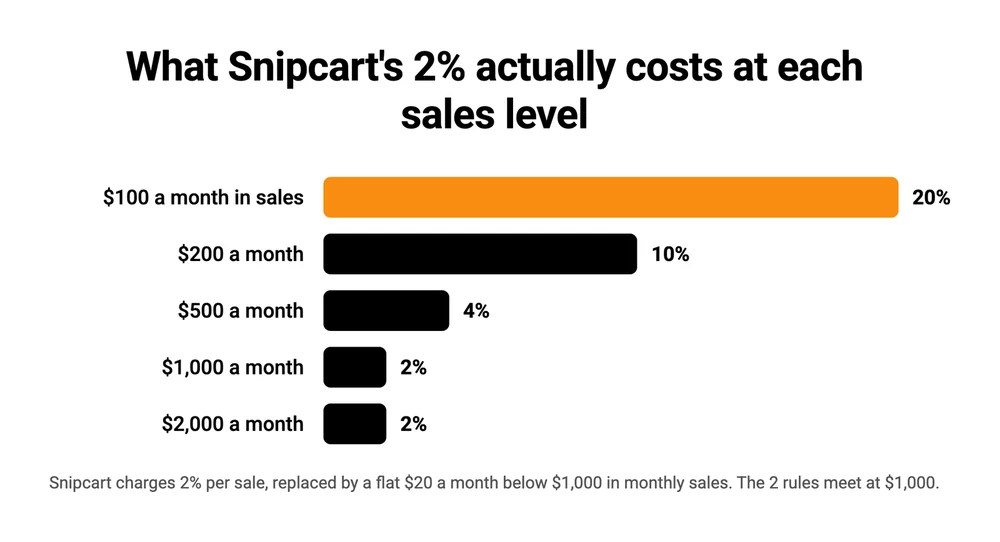
- Percentage pricing has a floor. Snipcart advertises 2% a sale, but under $1,000 a month it is a flat $20, which is 10% of a $200 month.
- Nobody on page 1 asks what happens when you leave. 1 tool ranking for this phrase is being switched off in January 2027.
The 3 kinds of tool hiding behind 1 phrase
Type this phrase into Google and you get a list of products that do not really compete with each other. That is the first thing to sort out, because it decides everything after it.
Picking the wrong one here is expensive and slow to undo. The Online Selling Mistakes Challenge runs through the 5 errors that cost solo sellers the most, free, over 5 days.
A hosted store is rented software. Shopify and BigCommerce host the site, patch the security, and hand you a shop. You pay monthly, you never touch a server, and you accept whatever the platform decides to build next.
A self-hosted platform is software you install. WooCommerce, OpenCart and PrestaShop are free to download, and the real bill is hosting, a payment plugin, and your own time when something breaks after an update.
A checkout you add to an existing site is the third kind, and it is what most solo sellers actually want. Snipcart, Ecwid, Payhip, Gumroad and CartMango all work this way: you keep the site you have, and the payment part is handled somewhere else. Ecwid straddles the line, since it will also build you a whole store if you want one.
CartMango is mine, which is worth knowing before you reach the prices below.
There is a distinction worth getting right before you install anything, and my guide on how to add a checkout to your site covers it: a true multi-item cart and a single buy button are different builds, and most solo sellers only need the second.
Whichever kind you land on, the software has to do the same 5 things. It has to take the payment without eating your margin, and it has to get the product to the buyer.
Then it has to help you make more from the people who already said yes, and catch the ones who stall at the payment screen. And it has to let you leave.
Every guide on the first page handles payment properly. Most handle abandoned carts. The other 3 jobs are where the real differences sit, and 2 of them are barely mentioned anywhere.
Taking the payment, and what each one keeps
Shopping cart software charges you in 1 of 2 ways, and mixing them up is how people end up on the wrong plan. A monthly or yearly fee is predictable and hurts most when you are small. A percentage of every sale is painless at the start and expensive once you are selling properly.
Prices below are the entry plan on the monthly basis, read at each vendor’s own pricing page, because that is the number a new seller pays in month one.
Shopify’s cheapest plan is $25 a month, Ecwid’s is $5, BigCommerce’s is $39, WooCommerce charges nothing for the plugin, Snipcart takes 2% of a sale with a $20 monthly floor, and CartMango is free until October 2026 and then $10 to $30 a year.
| Tool | Kind | Entry price | Cut per sale | The catch |
|---|---|---|---|---|
| Shopify | Hosted store | $25/mo ($19 billed yearly) | 0% on Shopify Payments, 2% on other gateways | App costs stack as you add features |
| BigCommerce | Hosted store | $39/mo ($29 billed yearly) | 0% platform fee | Plan auto-upgrades once you pass a sales cap |
| Ecwid | Checkout on your site | $5/mo | 0% | Starter is capped at 10 products |
| WooCommerce | Self-hosted | Free plugin | 0% | You pay hosting, plugins and your own maintenance |
| Snipcart | Checkout on your site | 2% per sale | 2% | Under $1,000 a month it becomes a flat $20 |
| CartMango | Checkout on your site | Free until October 2026, then $10 to $30 a year | 0% | Built for digital products, so no stock or postage tools |
CartMango is in that table on the same terms as the rest: a real price, a real cut, and the thing it does not do sitting next to the thing it does.
2 things in that table are worth slowing down on.
Snipcart’s floor is the one that surprises people. The advertised rate is 2% of each sale, which sounds cheap. Its own pricing page adds that for anyone under $1,000 in monthly sales, the 2% is replaced by a $20 monthly fee.
On a $200 month that is 10% of everything you made. On a $100 month it is 20%. At $500 it is 4%, and only at $1,000 a month does the flat $20 finally equal the advertised 2%. Past that line the 2% is the real rate, and at $2,000 a month you are paying $40, which is still 2%.
Google’s People Also Ask box for this phrase asks how much Snipcart costs. No editorial result on the first page answers it.
The prices in the guides above this post are worth checking yourself. TechRadar’s roundup, sitting second for this phrase under a title that says 2026, carries its own “Last updated December 12, 2024” stamp. Its price widget puts Shopify Basic at $348 a year and Grow at $948 a year. Shopify’s live annual rates are $19 and $49 a month, so $228 and $588 for the same 2 plans. Its third figure, Advanced at $3,588, is still exactly right.
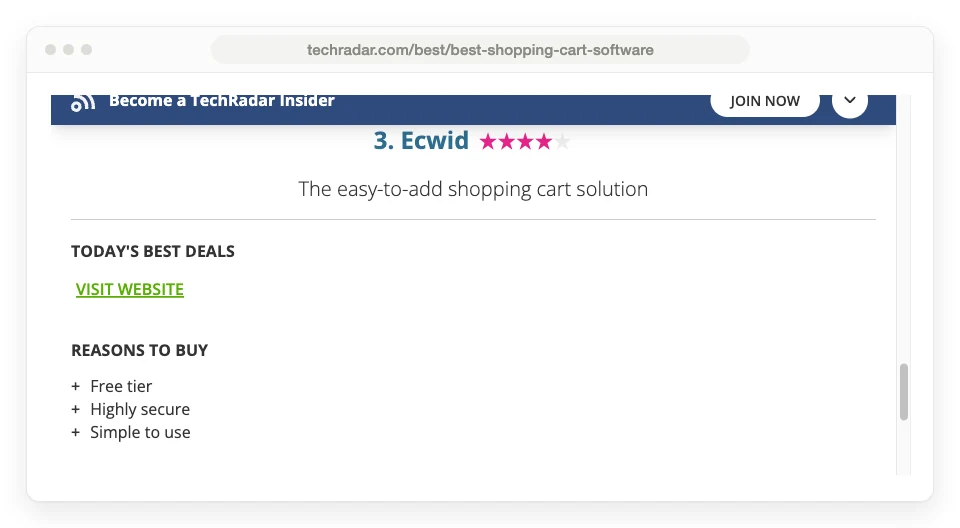
The same page leads its Ecwid entry with “Free tier” as the first reason to buy, and calls that free tier a highlight. Ecwid’s pricing page today has 4 plans, Starter, Venture, Business and Unlimited, and none of them is free. The cheapest is $5 a month. The page cannot even agree with itself about the vanished plan: its reasons-to-avoid list says the free tier was limited to 10 products, and the paragraph below says 5.
Freshness does not fix this on its own. The Guideflow roundup that Google’s own summary cites for this phrase went up in July 2026 and still lists Shopify at “From $39 a month”. Shopify is $25 monthly and $19 yearly. That same guide lists BigCommerce at “From $39 a month”, which is correct, and Ecwid at “From $5 a month”, also correct. Of the 3 prices I checked against the vendors’ own pages, it got 2 right and the biggest name wrong.
None of that means the guides are useless. Treat a price you read in a roundup as the thing to go and verify, and budget about 40 seconds per vendor to do it.
For a deeper read on the tools that take a cut of each sale rather than a flat fee, my breakdowns of what Gumroad really charges and how Payhip’s tiers compare both do the per-sale maths at real prices.
Getting what they bought into their hands
Digital delivery is the job the whole first page treats as an afterthought.
Wikipedia’s Comparison of shopping cart software ranks first for this phrase and compares 18 products across dozens of features. Physical shipping gets 3 sections of its own, each with a full table breaking support down carrier by carrier across Australia Post, Canada Post, DHL, FedEx, UPS and the US Postal Service. Digital downloads gets 1 column in the general features table, sitting between Ajax use and the eBay columns.
That ratio is the whole problem, on a single page. Plenty of these tools can deliver a file. What none of the guides does is tell you that delivery is a thing to go and check.
The 18 products Wikipedia compares are Apache OFBiz, BigCommerce, Drupal Commerce, KonaKart, Magento, Miva Merchant, nopCommerce, OpenCart, osCommerce, pimcore, PrestaShop, Shopify, Spree Commerce, SupaDupa, uCoz, VirtueMart, WooCommerce and Zen Cart. Not one of them was built around selling digital products. TechRadar names 4 tools and Google’s AI Overview names 4, and the same holds for every one of those.
A seller in the Shopify subreddit put it more plainly than any of the guides do. Asked whether Shopify was the right home for a digital-only store, a reply came back: “I found it weird for digital products. It’s entirely set up for physical products. Still works though.”
Still works though. That is the honest summary of using a physical-goods platform for files, and for some people it is a fine trade.
But delivering a digital product properly is a real job with its own list, and it looks nothing like a shipping label:
- The download link has to expire or be tied to the buyer. Otherwise it gets pasted into a group chat and you are giving the thing away.
- The buyer has to get it in seconds, not after a manual email. Digital buyers expect the file before they close the tab.
- Big files need somewhere to live. Most checkout tools cap storage, and video usually has to sit on YouTube, Vimeo or Loom regardless.
- Licence keys and course access are a separate problem again, and almost nothing handles them without an add-on.
Where the tools land on that list varies a lot. Snipcart’s own site names digital products as a use case, so it is genuinely covered there. WooCommerce handles downloadable products natively, though most sellers end up adding a plugin for protected delivery, which my guide to selling downloads through WooCommerce walks through with the real costs. Shopify needs an app, though its own Digital Products app is free and built by Shopify itself. The digital-first checkouts, Gumroad, Payhip, SendOwl and CartMango among them, do protected delivery as standard because it is the entire point of the product.
If this is the part you are stuck on, the delivery systems comparison covers the options on their own, separate from any cart.
Making each buyer worth more
2 features move revenue more than anything else on this list, and both are about the people already on your checkout page.
An order bump is a small extra offer sitting on the payment form itself, ticked or unticked before the buyer pays. An upsell comes after the payment has gone through, so the buyer does not re-enter their card. Neither needs more traffic, which is why they tend to be the cheapest revenue a small seller can add.
Availability is uneven and it is worth checking before you commit. Shopify and BigCommerce reach both through apps, which is another monthly line on the bill. WooCommerce needs an extension. Among the digital-first tools, Payhip does order bumps but no upsells or downsells at all, and Gumroad does upsells without true conditional downsells. On CartMango, order bumps are on every plan including the $10 one, while upsells and downsells need the $20 a year plan.
Catching the ones who stall at the payment screen
Some buyers reach the payment screen and stop. The Baymard Institute puts the average documented abandonment rate at 70.22%, averaged across 50 separate studies, and a reminder email is the cheapest way to get some of those buyers back.
Most hosted stores include recovery. Self-hosted platforms need a plugin for it. On CartMango, cart abandonment sits on the same $20 a year plan as the upsells, not the $10 entry one. If the emails themselves are what you are missing, I have templates you can copy.
Leaving, and taking your customers with you
Switching shopping cart software is the job no guide on the first page mentions. It is also the job that gets steadily more expensive the longer you leave it, because every month adds more products, more buyers and more subscriptions to move.
Look at what is sitting sixth in Google’s results for this exact phrase. ProductCart has been selling shopping cart software since 2001. Its own homepage now carries a red banner across the top:
Important Update: ProductCart Is Being Discontinued. End of Life: 1/11/2027. Read details HERE.
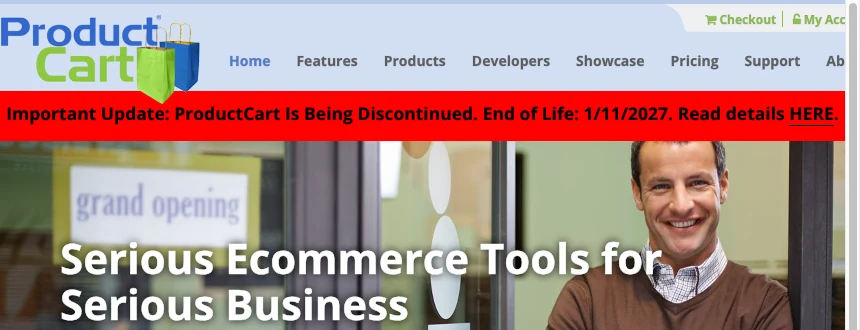
Its sunset FAQ fills in the rest. New licences are no longer sold, and version 5.5 is the final one.
Hosting for every ProductCart site ends on 11 January 2027, including for people who only use it to list stock and never take a payment. Support ends the same day, and the company is now selling paid migrations to Shopify instead.
Nothing about that is hidden. It is on the front page of the site, and it is still the sixth result Google gives you for shopping cart software.
So the question worth asking any tool before you commit is not what it does. It is what you keep when you go.
3 things are at stake. Your product pages and your design usually do not move, and rebuilding them is the visible cost. Your customer list normally exports, so that one is fine almost everywhere. Your recurring payments are the one that catches people out.
If you sell anything on a subscription, ask whether those subscriptions keep paying you after you cancel. The answer splits the field in half and it does not follow price. Easy Digital Downloads, ThriveCart, ClickFunnels, Kajabi and CartMango all let you keep them. Gumroad, Payhip, Sellfy, SendOwl, SureCart and Podia do not, and on 4 of those 6 it holds true even when the payments run through your own Stripe or PayPal account. A few platforms sit in between, keeping open-ended subscriptions alive while dropping fixed-term ones, so read the actual wording rather than assuming either way.
That is not a CartMango-only advantage and it would be dishonest to sell it as one. 4 other tools on that list do the same thing. It is simply a question almost nobody thinks to ask until the month they want to move.
Which shopping cart software covers which job
All 7 of these take a payment. Where they split is delivery and exit: 5 of the 7 deliver a digital file with no add-on, and only 1 of the 7 gives a straight yes on keeping your recurring payments after you cancel.
| Tool | Kind | Digital delivery | Bumps, upsells | Subs kept on exit |
|---|---|---|---|---|
| Shopify | Hosted store | Free app built by Shopify | Paid apps | Depends on the app you used |
| BigCommerce | Hosted store | Add-on app | Paid apps | Depends on the app you used |
| WooCommerce | Self-hosted | Native, plugin to protect the link | Paid extension | Depends on the plugin you used |
| Snipcart | Checkout on your site | Named use case on its own site | No upsells | Not stated on its pricing page |
| Gumroad | Checkout on your site | Native | Upsells, no true downsells | No |
| Payhip | Checkout on your site | Native | Order bumps, no upsells | No |
| CartMango | Checkout on your site | Native on every plan | Bumps on every plan, upsells from $20/yr | Yes |
CartMango’s own gap sits in the Kind column: it builds a sales page and takes the payment, but there is no browsable multi-product store, no stock control and no postage. The last column comes from a comparison table I keep updated across 13 checkout platforms, and the wider picture there is kinder to the field than that single row suggests. Easy Digital Downloads, ThriveCart, ClickFunnels and Kajabi all let you keep your subscriptions too. They just are not in this table, because none of them turned up on page 1 for this phrase.
The 2 hosted stores at the top are the right answer for anyone shipping physical goods. For someone selling files, they are a strange purchase: you pay for stock control, postage rates and a point-of-sale system you will never open, then pay again in apps for the parts you actually need. That trade can still be worth it at volume, since a flat $25 a month beats a 10% cut once you are past roughly $250 a month in sales.
For WordPress, my rundown of which cart plugins can actually take a payment goes deeper than this table can, and if you are already on WooCommerce and wondering whether to stay, the alternatives sorted by type covers the move.
Shopping cart software FAQ
What is the best shopping cart software?
There is no single best one, because the tools ranking for this phrase solve different problems. For shipping physical products, Shopify at $25 a month is the default for a reason. For adding a store to a site you already built, Ecwid starts at $5 a month. For selling files, courses or memberships, a digital-first checkout like Gumroad, Payhip or CartMango will cost less and deliver better than a store platform plus apps.
Can you give me some examples of shopping cart software?
Hosted stores: Shopify, BigCommerce. Self-hosted platforms: WooCommerce, OpenCart, PrestaShop, osCommerce, Zen Cart. Checkouts you add to an existing site: Snipcart, Ecwid, Gumroad, Payhip, SendOwl, CartMango. Wikipedia’s comparison article covers 18 of the store platforms in detail, though it barely touches the digital-first group.
How much does Snipcart cost?
Snipcart charges 2% of each transaction, plus whatever your payment gateway takes. Its pricing page adds a condition that matters at low volume: if your monthly sales are under $1,000, that 2% is replaced by a flat $20 a month. So the effective rate is 2% above $1,000 a month and rises sharply below it, reaching 10% on a $200 month.
Is there free shopping cart software?
Yes, with a catch in each case. WooCommerce, OpenCart and PrestaShop are free to download, and you then pay for hosting, a payment plugin and your own maintenance time. Payhip has a genuinely free plan that takes 5% of each sale instead. CartMango is free for everyone until October 2026, then $10 to $30 a year. Ecwid used to have a free plan and no longer does.
What is the best software for online shopping?
That phrase usually means something different. Shoppers searching it want apps for finding deals and tracking parcels, not software for running a store. If you landed here wanting to sell rather than buy, the answer is the one above: it depends whether you are shipping goods or delivering files.
What is the difference between a shopping cart and a payment gateway?
The cart is the shopfront and the order: it holds what the buyer picked, works out the total, and collects their details. The gateway is the part that moves the money, and Stripe and PayPal are the 2 most sellers use. Nearly every cart on this page connects to a gateway rather than replacing it, so you pay the card fee on top of whatever the cart charges.
Do I need shopping cart software if I only sell 1 product?
Probably not a full cart. A multi-item cart earns its place when buyers regularly order several things at once. For a single ebook, course or template, a checkout link or buy button converts better and takes minutes to set up, which is covered in more detail in the guide to selling without a website.
The bill you only see on the way out
Choose your shopping cart software on what you deliver first, then on price. A store platform that assumes a warehouse will keep charging you for a warehouse you do not have, in apps and in plans, for as long as you stay. And moving is when you find out what the software will let you take with you.
CartMango was built for the other side of that fork. Every CartMango plan protects the file you deliver, drops each buyer straight into your email tool, and keeps your subscriptions paying you even if you cancel. CartMango is free until October 2026, then $10 a year.
About the Author

👋 I’m Welly, founder of CartMango (the site you’re on), a checkout platform for digital product sellers. We’ve previously processed $179M+. I also run BirdSend (email marketing tool, 3.1B+ emails sent). On the side I show other non-techie digital sellers how I use AI workflows to automate 50%+ of my operations. Find me on LinkedIn.
Related Reading
- Online store for digital products: the 3 store types that bundle shopping cart software with hosting, and what each takes on a $10 sale
- How to protect digital downloads: 8 ways to stop your file being passed around
- How to sell online for free: net payout on a $30 sale across 7 platforms
- The best Gumroad alternative: for readers ready to compare checkouts directly