

WooCommerce fits physical catalogues, Easy Digital Downloads and FluentCart fit digital files, and a linked checkout like CartMango or Payhip fits a seller with only a few files. They split first on whether the plugin takes a payment alone or needs WooCommerce underneath it. Every one below was checked at its WordPress.org listing and its vendor’s own buy page.
I went looking for a WordPress shopping cart plugin the way anyone does. I read 4 of the guides that rank for it, from SeedProd, WP Rocket, Barn2 and Qode Interactive. I wrote down every plugin they named, then opened each one on WordPress.org to check what it actually does.
That is where the guides stop agreeing. The 4 of them name 15 plugins between them. Not 1 plugin appears on all 4 lists.
5 of the 15 cannot take a single payment until you install WooCommerce as well. 2 more keep your store on somebody else’s servers. And the prices in those guides are mostly the marketing rate rather than the number on the buy page.
Below is what survived that check: which plugins sell on their own, what a year of each really costs, and what the free versions quietly take.
Key Takeaways
- Not every plugin sold as a shopping cart can take a payment. 5 of the 15 named across 4 ranking guides need WooCommerce installed first.
- The advertised price is often not the year 1 price. WP EasyCart’s “$69/year” is its 5-year rate. 1 year is $89.
- SeedProd’s guide recommends SeedProd. It takes no payments, and the tier that touches a cart is $239.60, renewing at $599.
- 3 of these free versions take a cut of every sale. WP EasyCart 2%, Easy Digital Downloads 3% on Stripe, SureCart 2.9%.
- 1 recommended plugin has not been updated since December 2024. BigCommerce For WordPress has 200 active installs and a warning on its own listing.
The plugin is rarely where a small seller loses money.
The bigger leaks sit earlier, in what you sell and what you charge for it. If you are still at that stage, start with the profit leaks instead, which is a free 5-day email challenge and about 5 minutes a day.
What a WordPress shopping cart plugin has to do before it earns the name
A cart plugin has 4 jobs: show the product, hold what the buyer picked, take the money, and hand over the goods. A real shopping cart only does the second of those, which is roughly what several of these plugins do, and nobody has ever paid for their groceries with a trolley.
That distinction is the whole problem with this keyword. Here is every plugin the 4 guides name.
- SeedProd names 7: WooCommerce, SeedProd, BigCommerce, MemberPress, Easy Digital Downloads, Ecwid and WP EasyCart.
- WP Rocket names 4: WooCommerce, Easy Digital Downloads, Simple Shopping Cart and Ecwid.
- Barn2 names 8: WooCommerce, Easy Digital Downloads, SureCart, FluentCart, WP EasyCart, Ecwid, BigCommerce and Simple Shopping Cart.
- Qode Interactive names 7: WPC Fly Cart, WP EasyCart, CartFlows, Easy PayPal Shopping Cart, Simple Shopping Cart, Abandoned Cart Lite and Digital Goods for WooCommerce Checkout.
That is 15 different plugins. 5 of them appear on 3 of the 4 lists. Not 1 appears on all 4.
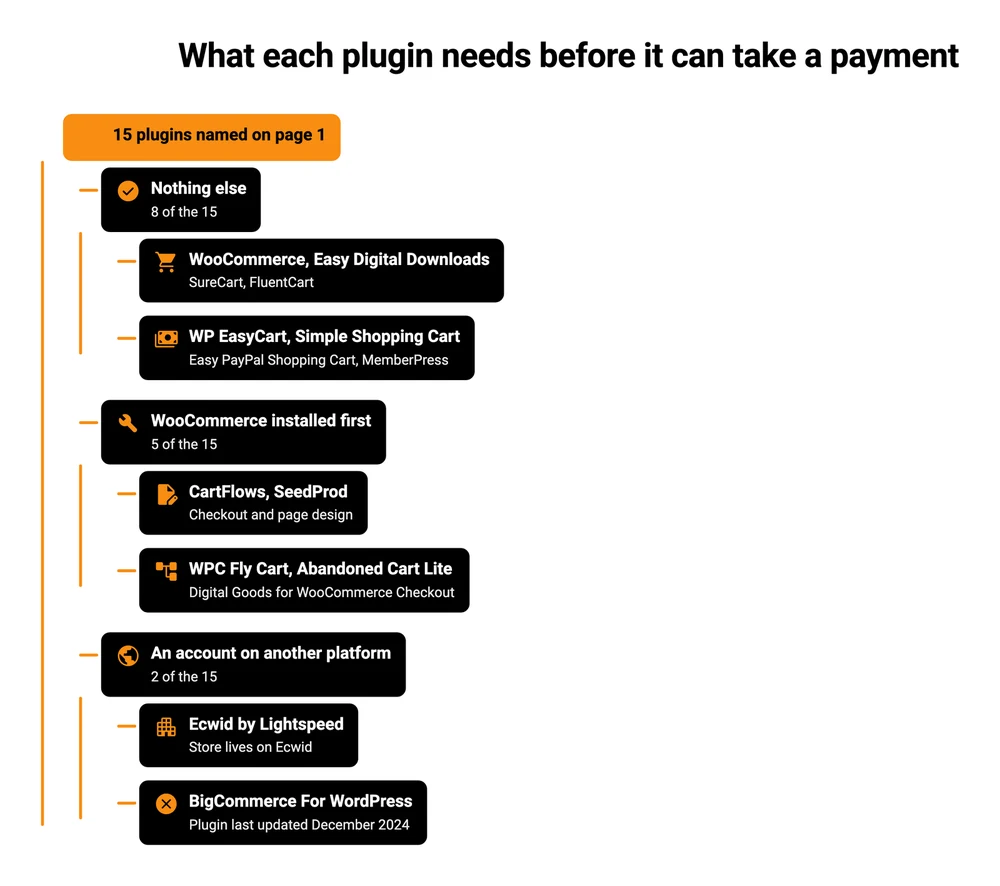
Every plugin named across the 4 guides ranking for this keyword, sorted by what it needs before it can take money. Checked at each plugin’s WordPress.org listing and at the vendor’s own docs.
WordPress.org publishes the answer for free. Since WordPress 6.5 a plugin can declare which other plugins it needs, and the directory shows that requirement on the listing page.
3 of these declare WooCommerce outright. A 4th, CartFlows, says it in its own FAQ: “CartFlows requires WordPress and WooCommerce to be installed on your site.” The 5th, SeedProd, is a page builder that never takes a payment itself.
CartFlows, SeedProd, WPC Fly Cart, Abandoned Cart Lite and Digital Goods for WooCommerce Checkout all need WooCommerce running before they can take a single payment. Ecwid and BigCommerce keep the store itself on their own servers rather than on your site.
| Plugin | Named by | What it actually does | What it needs first |
|---|---|---|---|
| SeedProd | SeedProd | Designs pages, including WooCommerce cart pages | WooCommerce, on the Elite plan only |
| CartFlows | Qode Interactive | Replaces the WooCommerce checkout with a funnel | WooCommerce |
| WPC Fly Cart | Qode Interactive | Adds a slide-out cart panel | WooCommerce |
| Abandoned Cart Lite | Qode Interactive | Emails people who did not finish | WooCommerce |
| Digital Goods for WooCommerce Checkout | Qode Interactive | Hides shipping fields on digital orders | WooCommerce |
| Ecwid by Lightspeed | SeedProd, WP Rocket, Barn2 | Embeds a store hosted by Ecwid | An Ecwid account |
| BigCommerce For WordPress | SeedProd, Barn2 | Embeds a store hosted by BigCommerce | A BigCommerce account |
None of this makes those plugins bad. CartFlows has 200,000 active installs and a 4.8 rating, and it does its job well.
It belongs in a shortlist for somebody who already runs WooCommerce and wants a better checkout. None of the 4 guides draws that line for you.
The plugins that take money on their own, and what a year of each costs
8 of the 15 plugins named across those 4 guides sell without help. 7 of them are in the table below, and the 8th is MemberPress, covered a few paragraphs down. Each price was read at the vendor’s own buy page rather than its marketing page, because on 2 of them those are different numbers.
WooCommerce, Simple Shopping Cart and Easy PayPal Shopping Cart are free to install and take nothing per sale, FluentCart’s cheapest licence is $199 for a year, Easy Digital Downloads starts at $99.50 while still adding 3% on Stripe, and WP EasyCart’s free version takes 2% of every sale.
| Plugin | Active installs | Free version | Cut on the free version | Cheapest paid licence, 1 year |
|---|---|---|---|---|
| WooCommerce | 7,000,000 | Full plugin | 0% | Free, extensions cost extra |
| SureCart | 80,000 | Launch plan | 2.9% per sale | $199 for 1 store |
| Easy Digital Downloads | 40,000 | Lite version | 3% on Stripe | $99.50, and the 3% stays until $199.50 |
| Simple Shopping Cart | 10,000 | Full plugin | 0% | Free |
| FluentCart | 8,000 | Free core | 0% | $199 for 1 site |
| WP EasyCart | 3,000 | Free edition | 2% per sale | $89 for 1 site |
| Easy PayPal Shopping Cart | 1,000 | Full plugin | 0% | Free, with a paid Pro version |
Install counts are worth a second look here. WP EasyCart shows up on 3 of the 4 lists, and 3 separate pages about it rank for this term at once: its WordPress.org listing, its own pricing page and a Stripe partner directory entry.
It has 3,000 active installs. WooCommerce has 7,000,000.
Plenty of good software has 3,000 users, so treat that as information rather than a verdict on the plugin. What it tells you is that Google ranks pages, not products. If you assumed a plugin near the top must be widely used, check the number yourself on the listing page.
MemberPress sells on its own too, and SeedProd’s guide includes it. It is a membership plugin rather than a cart, so it belongs in a different comparison. The full MemberPress pricing breakdown covers what it charges and where the transaction fee sits.
The advertised price and the year 1 price are 2 different numbers
WP EasyCart’s pricing page shows Professional at “$69/year” and Premium at “$89/year”. Both carry an asterisk. The footnote says pricing “is based on lowest price with a 5 year license length”.
Click through to the buy page and pick a licence length. Professional is $89 for 1 year, and only falls to $69 a year if you pay for 5 years at once. Premium is $129 for 1 year against the advertised $89.
The year 1 price is $20 higher than advertised on Professional and $40 higher on Premium.
Those are small amounts on their own. What makes them worth naming is where the number travels: a roundup copies the marketing figure, Google copies the roundup, and you budget from a price nobody actually sells. SeedProd’s guide lists WP EasyCart at “premium plans start at $69/year”. Barn2’s comparison table gives up entirely and writes “Paid tiers” in its price column.
SeedProd’s own entry is the sharper version of the same thing. Its guide recommends SeedProd and WooCommerce as “the best WordPress shopping cart solutions for most stores”, and prices SeedProd at “starts at $39.50/year”.
SeedProd takes no payments. Its own verdict says as much: “Run it alongside WooCommerce and you design the product, cart, and checkout pages yourself, no developer needed.”
The plugin designs the pages. WooCommerce does the selling.
The $39.50 Basic plan has no WooCommerce support at all. SeedProd’s own guide concedes it in a note under that entry: “SeedProd’s WooCommerce blocks are included in the Elite plan.”
Elite is $239.60 for a first year against a normal price of $599, and a footnote on the pricing page settles which of those you keep paying: “Special introductory pricing, all renewals are at full price.”
So the tier that can build a cart page runs $239.60, then $599 a year, under a headline of $39.50. It still needs WooCommerce underneath it, which the pricing row never says.
Easy Digital Downloads runs the same intro-then-full-price pattern, and so do most WordPress plugin licences. What the year 1 and year 2 cost of every WordPress ecommerce plugin looks like is worth reading before you commit to any of them.
Is there a free WordPress shopping cart plugin?
Yes, and there are 2 kinds of free here. Free that stays free, and free that takes a percentage instead.
WooCommerce core, Simple Shopping Cart and Easy PayPal Shopping Cart take 0% and stay at 0%. You pay your payment processor and nobody else. Stripe’s published US rate is 2.9% plus 30 cents per successful card charge, and that is the same whichever of these you install.
The other 3 charge you per sale in place of a licence fee.
- WP EasyCart’s free edition adds 2%. Its own Professional page lists what the paid licence buys you: “30+ payment gateways and drop the 2% transaction fees in our free version.” Its pricing page also lists “No Downloads or Subscriptions” against that free edition, which rules it out for anyone selling files.
- Easy Digital Downloads adds 3% on Stripe. Its documentation is specific about who escapes it: “You will not incur an additional 3% application fee from your Stripe transactions if you purchase a license to an EDD Extended (or higher) Pass.” The $99.50 Personal licence is not high enough. The 3% also applies to renewal orders on subscriptions.
- SureCart’s free Launch plan takes 2.9%. Its Pro plan removes it at $199 a year.
On a $30 file that is 60 cents to WP EasyCart, 90 cents to Easy Digital Downloads and 87 cents to SureCart, on top of what Stripe takes. Sell 200 copies in a year and Easy Digital Downloads’ free version has cost you $180, which is more than the $99.50 licence and nearly the $199.50 one that actually removes the fee.
Worth saying: none of these percentages is hidden. All 3 are on the vendor’s own site. They just are not in the roundups.
1 of the 4 guides gets a free plan wrong in the other direction. WP Rocket’s list, updated in July 2026, tells readers “A free plan is available for a limited number of products” and puts the paid entry at “a premium plan starting from €21 per month”.
Ecwid’s pricing page has 4 plans and no free tier at all. Its cheapest is Starter at $5 a month.
What 2 people who installed these ran into
2 WordPress site owners who installed these tools ran into the same trade from opposite ends: WooCommerce cost more than the free label suggests, and the lighter alternative was missing things they needed. Prices are easy to check from a pricing page. What a plugin feels like 6 months in is not.
On r/Wordpress, a French pastry shop owner with a small catalogue and no delivery asked whether to use WooCommerce or pay for something else. The thread is worth reading in full, and 2 replies do most of the work.
Comfortable-Web9455 argued for WooCommerce and then put a number on the real bill: “In the end you will probably end up paying around $200 to $300 per year in additional components to woocommerce with an average transaction rate of around 1.5%. It’s an extremely cheap price for the market Io opens up and worth it.” That is somebody who has done it saying the free core is free and the working store is not. Their framing is worth keeping too: treat it like opening another branch, with accounting, staffing and maintenance attached.
The counterweight came from DashBC, replying to a suggestion of FluentCart: “It might be okay for a small, limited site, but is missing a ton of common features, like product seo, tidy category and brand URLs, back in stock notifications, gift cards, inventory management, etc, etc.. So far seems like they’re hyper focused on digital subscriptions, physical sales features are lacking heavily. Set up a client on it (his idea), and we’re switching to Woo, and client is only selling a few dozen items without shipping.”
Read those 2 together and you get the honest trade. WooCommerce costs more than $0 once the store is running, and it covers far more ground than the light tools do.
The lighter tools cost less and have gaps, and on FluentCart those gaps sit on the physical-goods side, which matters far less if you sell files. That is the full WooCommerce alternatives picture in 2 comments.
The recommended plugin that WordPress itself warns you about
SeedProd’s guide ranks BigCommerce third and grades it “A-“, filed under stores that need room to grow. That grade is about BigCommerce the platform, which is a real, funded, actively developed company.
The WordPress plugin is a different object. Here is its listing.
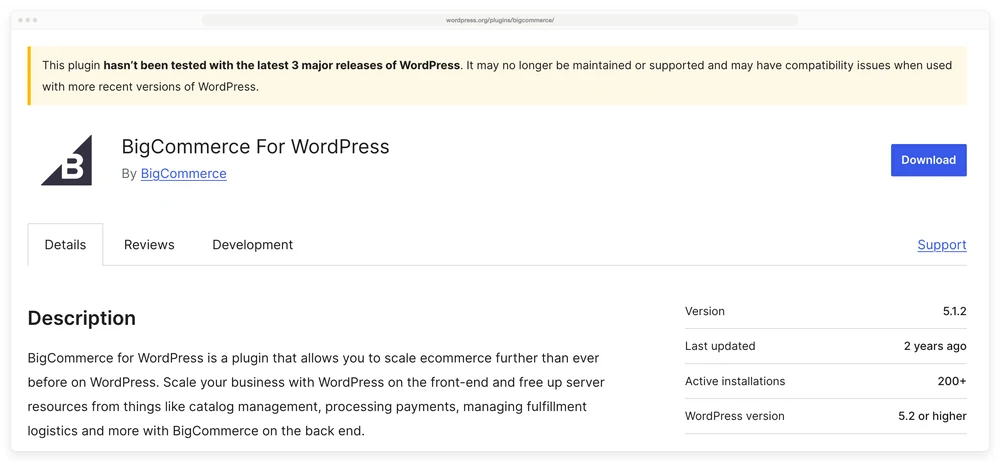
The BigCommerce For WordPress listing. Read the yellow bar, then the Last updated and Active installations rows on the right.
WordPress.org shows the warning automatically when a plugin has not been tested against the last 3 major releases: “This plugin hasn’t been tested with the latest 3 major releases of WordPress. It may no longer be maintained or supported and may have compatibility issues when used with more recent versions of WordPress.” Version 5.1.2, last updated December 2024, 200+ active installations, tested up to WordPress 6.7.7.
200 installs is the number that tells the story. Ecwid, the other hosted option on these lists, has 20,000, and WooCommerce has 7,000,000.
A connector plugin with 200 users and no update in the better part of 2 years is not a maintained connection between 2 platforms.
You can run this check on any plugin in about 15 seconds, and it costs nothing. Open the plugin’s page on WordPress.org, look for a yellow warning bar, then read Last updated and Active installations in the right-hand column. If the warning is there, close the tab.
Which one to install, by what you sell
The right pick falls out of what you are selling, not out of which guide you read.
Physical products, more than a handful. WooCommerce. It is free, it has 7,000,000 installs, and almost any WordPress developer you hire will already know it. The cost arrives later, in extensions and maintenance, which is a real trade-off and is covered in the 4 kinds of WooCommerce alternative.
Digital files as a real business. Easy Digital Downloads, FluentCart or SureCart. All 3 were built for downloads rather than adapted for them, so licence keys, file limits and subscription billing are native. Selling digital downloads through WooCommerce works too, and the setup differences are worth reading before you pick.
A few products on a site that is mostly content. Simple Shopping Cart. It is free, it has 10,000 installs, and it adds buy buttons to posts and pages without turning your blog into a shop. This is the case WooCommerce is genuinely too big for.
Courses or a membership. Neither a cart plugin nor a store plugin is the right starting point. The best WordPress LMS plugin comparison covers the course side.
Already on WooCommerce and unhappy with the checkout. A new cart is the wrong fix here. What you want is a checkout plugin, which is a different shortlist entirely, covered in choosing a WooCommerce checkout plugin.
Installing whichever one you pick is the easy part: Plugins, Add New Plugin, search the name, Install, Activate, then run its setup wizard. If you are not on WordPress at all, the 4 ways to add a shopping cart to a website covers the other routes.
There is also a route that skips the plugin. Your WordPress site keeps the pages and the traffic, and the buy button points at a checkout hosted somewhere else. Nothing to install, nothing to update, and no plugin that can break when WordPress ships a major release.
Selling 3 digital files from a WordPress site costs nothing per sale on WooCommerce core or Simple Shopping Cart, 2.9% on SureCart’s free plan, $99.50 a year plus 3% on Stripe with Easy Digital Downloads Personal, and nothing at all on a linked checkout until CartMango’s beta ends in October 2026.
| Route | What you install | Year 1 | Cut per sale |
|---|---|---|---|
| WooCommerce core | 1 plugin | $0 | 0% |
| Simple Shopping Cart | 1 plugin | $0 | 0% |
| SureCart Launch | 1 plugin | $0 | 2.9% |
| Easy Digital Downloads Personal | 1 plugin | $99.50 | 3% on Stripe |
| WP EasyCart free | 1 plugin | $0 | 2%, and it cannot sell downloads |
| CartMango | Nothing, you link out | $0 until October 2026, then from $10 | 0% |
That last row is my own product, CartMango, so weigh it with the suspicion you would give any vendor writing about itself.
The limits are worth stating plainly. CartMango is not a WordPress plugin, and there is no embedded checkout yet, so the buyer leaves your page to pay. CartMango has no course hosting and no community yet either, and both are planned for October 2026 on its $30 a year plan.
What CartMango does today is take the payment, deliver the file, and pay the money into your own Stripe or PayPal account with no percentage in between.
WordPress shopping cart plugin FAQ
What is the best shopping cart plugin for WordPress?
For physical products, WooCommerce, on install base alone. For digital files, Easy Digital Downloads, FluentCart or SureCart, because they were built for downloads. For a handful of products on a content site, Simple Shopping Cart. There is no single best pick, and any guide that gives you one without asking what you sell has skipped the only question that matters.
Does WordPress have a shopping cart?
No. WordPress core has no cart, no products and no checkout. It is a publishing system, so selling always means adding a plugin or linking out to a checkout hosted elsewhere. That is why the plugin choice exists at all.
Is there a free WordPress shopping cart plugin?
Several. WooCommerce, Simple Shopping Cart and Easy PayPal Shopping Cart are free and take nothing per sale. SureCart, Easy Digital Downloads and WP EasyCart also have free versions, and those take 2.9%, 3% and 2% of every sale instead of a licence fee.
What are the disadvantages of WooCommerce?
Weight and cost drift. WooCommerce is a full store engine, so a site selling 3 PDFs carries product, inventory, shipping and tax machinery it never uses.
The free core is also rarely the whole bill: subscriptions, memberships and abandoned-cart recovery are paid extensions. How much a WordPress ecommerce plugin really costs has the extension prices.
Do I need WooCommerce to use a shopping cart plugin?
Only for some of them. WooCommerce, Easy Digital Downloads, SureCart, FluentCart, WP EasyCart and Simple Shopping Cart all work on their own. CartFlows, SeedProd, WPC Fly Cart, Abandoned Cart Lite and Digital Goods for WooCommerce Checkout all need WooCommerce installed first, and the WordPress.org listing tells you which is which.
Is WordPress outdated in 2026?
Not for selling. WooCommerce alone runs on 7,000,000 active installs. What goes stale is individual plugins rather than WordPress itself, and the BigCommerce connector above is the example, which is why the Last updated date on a listing is worth 15 seconds of your time.
The option that is not a plugin at all
Every WordPress shopping cart plugin on this page is something you install, update and eventually renew. That is a fair deal when the store is the business. It is a lot of upkeep when the store is 3 files and a buy button.
For that second case, CartMango sits outside WordPress entirely. You keep your pages where they are and point the buy button at a CartMango checkout, so there is no plugin in your admin to maintain. CartMango takes 0% of your sales, pays out to your own Stripe or PayPal account, and is free until October 2026, then from $10 a year.
About the Author

👋 I’m Welly, founder of CartMango (the site you’re on), a checkout platform for digital product sellers. We’ve previously processed $179M+. I also run BirdSend (email marketing tool, 3.1B+ emails sent). On the side I show other non-techie digital sellers how I use AI workflows to automate 50%+ of my operations. Find me on LinkedIn.
Related Reading
- WordPress ecommerce plugin costs: year 1 against year 2, and the cut 4 of the 5 take
- Selling digital downloads through WooCommerce: the native setup and the 3 file delivery methods
- WooCommerce alternatives: the 4 kinds, and what a move actually costs
- Add a shopping cart to a website: the 4 methods for when a WordPress shopping cart plugin is not the right fit
- Online store for digital products: 3 store types priced on a $10 sale