

WooCommerce digital downloads work in the free core plugin, with no add-on needed. Add a simple product, tick Virtual and Downloadable, upload your file, and WooCommerce emails the buyer a protected download link once payment clears, with an optional download cap and expiry date. The plugin costs nothing, but hosting and paid extensions do.
I went looking for what a WooCommerce digital download store costs to run. Barn2’s guide on page 1, written by Maria Ansari, runs past 4,000 words and gives 7 plugins a section each.
It does not contain a single dollar sign. Not one, anywhere in the article.
That is the pattern across the whole first page. Everybody explains which checkbox to tick. Nobody says what turns up on the card afterwards.
So I priced it. Every figure below came off the vendor’s own page while I was writing, and 2 of them sit a long way above the number the same vendor puts in its headline.
You will get the setup steps, the delivery setting most sellers get wrong, the real yearly bill, and an honest read on when WooCommerce is the wrong tool for what you sell.
Key Takeaways
- The plugin is free and it already does the job. Tick Virtual and Downloadable, upload your file, publish. No add-on needed for a plain file sale.
- Hosting is where the money goes. Bluehost, one of WooCommerce’s own recommended hosts, lists its ecommerce plan at $15.99 a month on a 12-month term, then renews at $23.99 a month.
- The wrong delivery setting hands your file to anyone with the link. Redirect only skips the login check, and it is the only method a plain Google Drive link works with.
- Recurring payments cost $279 a year extra. WooCommerce Subscriptions is a separate paid extension. Memberships is $199 a year, course hosting is $179.
- WooCommerce caps nothing. No product limit, no file-size limit beyond your own server. Hosted checkouts usually cap both, CartMango’s own entry plan included, so this is a real reason to stay on WooCommerce.
Before the setup steps: if you are early enough that you are still choosing where to sell, the free 5-day Online Selling Mistakes Challenge walks through the 5 mistakes that cost solo sellers the most money. It takes about 4 minutes a day.
How to sell a digital download in WooCommerce
WooCommerce handles digital files in the core plugin. There is nothing to install beyond WooCommerce itself.
- In WP Admin, open Products > Add New. Products is its own top-level menu in the sidebar, not a submenu under WooCommerce. Leave the product as a simple product.
- Tick Virtual and Downloadable in the Product data panel.
- Under Downloadable files, click Add File, give it a name, then upload the file or paste its full URL.
- Set a Download limit to cap how many times each buyer can pull the file. Leave it blank for unlimited.
- Set a Download expiry in days if you want the link to stop working. Leave it blank for no expiry.
- Publish.
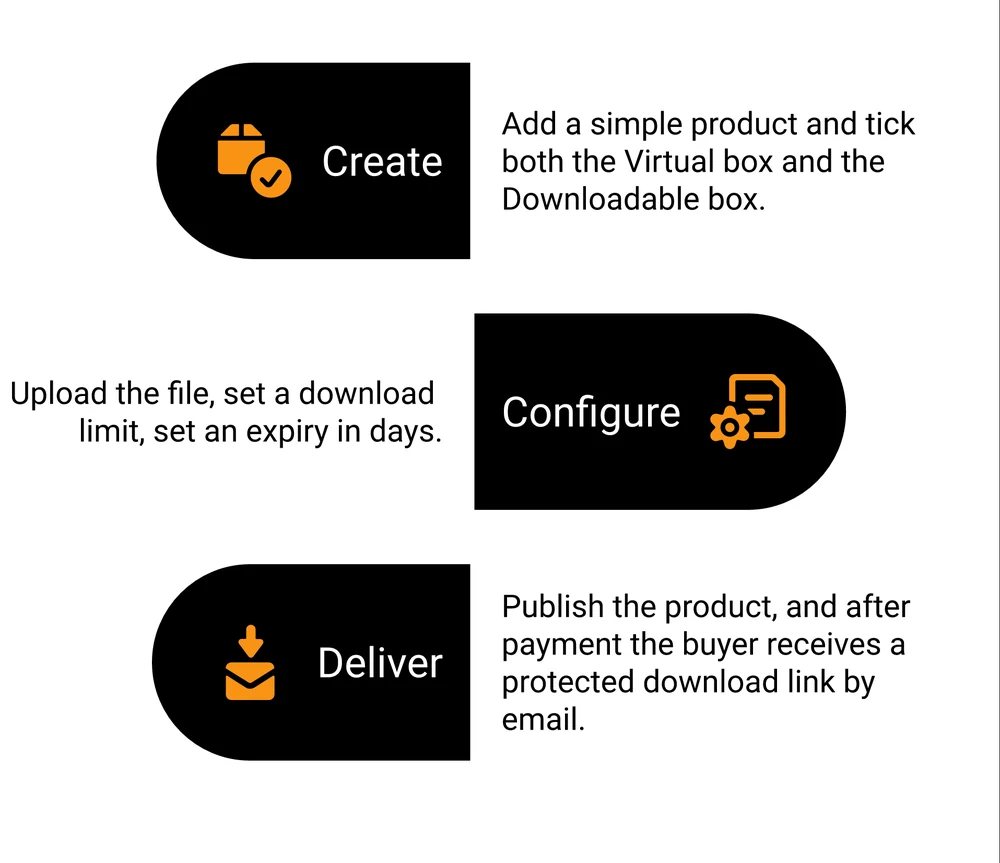
Once payment clears, the buyer gets an email with a download link. If they have an account on your site, the file also appears under My Account > Downloads.
That is the whole native flow, and it is worth knowing what else comes with it before you go shopping for plugins. WooCommerce says it “tracks and logs downloads of digital products with unique IDs”, viewable in the Downloads report inside WooCommerce Analytics. Download counts, limits, expiry dates and a delivery log, all in the free plugin.
New to the file side of this rather than the store side? Here is a walkthrough on creating digital downloads that sell.
Tick Virtual as well, or the order just sits there
Downloadable and Virtual are 2 different boxes and they do 2 different jobs. Downloadable attaches the file. Virtual tells WooCommerce nothing has to ship.
Tick only Downloadable and WooCommerce keeps the shipping fields and the shipping calculator on your checkout, because as far as it knows a box is going out. It also parks the order in Processing.
WooCommerce puts the rule plainly: orders containing only products that are both virtual and downloadable “will skip the Processing order status and move directly to the Completed order status.”
Miss the Virtual box and every order waits for you to mark it Complete by hand. Your buyer sits there. You get the email asking where their file is.
Do not pick the file out of the Media Library
There are 2 ways to attach a file and only 1 of them is safe.
Upload from the Edit Product screen and WooCommerce drops the file into a woocommerce_uploads folder that is not publicly reachable. Pick the same file out of the WordPress Media Library and it sits in the public uploads folder instead, where the direct URL works for anyone who has it. WooCommerce’s own guidance is to upload from the product screen “rather than selecting them from the media library” for exactly this reason.
The 3 file delivery methods, and the one that leaks your files
Under WooCommerce > Settings > Products > Downloadable products there is a dropdown called File download method. It arrives already set, so it is easy to walk past. That dropdown decides whether a stranger holding your link can take the file.
Force downloads and X-Accel-Redirect both hide the real file URL, and each one needs something from your server: Force downloads needs allow_url_fopen switched on, X-Accel-Redirect needs a server module installed. Redirect only needs nothing, works with Google Drive, and lets anybody with the URL download the file.
| Method | Delivery | Needs | Google Drive | Risk |
|---|---|---|---|---|
| Force downloads | PHP streams the file, so the real URL is never exposed | allow_url_fopen set to On | No | Large files on a weak server can time out mid-download |
| X-Accel-Redirect or X-Sendfile | The web server delivers the file directly | The X-Accel-Redirect or X-Sendfile module | No | Fails if your host does not have the module |
| Redirect only | The browser is sent straight to the file URL | Nothing | Yes, the only one that does | Anyone with the URL gets the file, logged in or not |
Redirect only is labelled “insecure” in the WooCommerce settings screen, and the documentation spells out what that means: “Anyone with the URL can access the file, even if they are not logged in. This means customers who purchase the product can share the link with others who have not.”
So the safe methods depend on your host, and the method that never fails is the one that gives your product away. Check with your host which of the first 2 you can actually use before you price anything.
Why your download link leaks even when the settings look right
Pick Force downloads and you would assume the file is locked. WooCommerce is more careful than that. It says it adds an .htaccess file to protect the uploads folder, then adds that this “does not guarantee protection in all server configurations.”
Read that second half again. An .htaccess file only takes effect if your web server is set up to read one. Plenty of managed hosts define Apache configuration at the server level and ignore per-folder .htaccess rules, which means WooCommerce writes the protection, the setting reads as On, and nothing is actually protecting anything.
You can watch this happen in the r/woocommerce thread that ranks on page 1 for this exact search. The seller had Force downloads enabled, the approved download directory ticked green, and file permissions confirmed correct.
Their report: “anyone with the url of my digital product can download it by pasting the url into their browser.” They asked what else they needed to do. Nobody in the thread had an answer, and it was archived unsolved.
3 things reduce the damage while you sort out the server side. Keep Append a unique string to filename switched on, which is the default and makes a URL much harder to guess. Set a Download limit so a leaked link dies after a few uses, and a Download expiry so it dies on a date.
None of the 3 is a lock. There is a wider set of options in this guide to protecting digital downloads.
Selling files you keep in Google Drive
Google Drive catches out sellers who already keep their whole product library there.
WooCommerce only needs a URL to deliver a file, so Drive looks like it should work. It does, with a condition the documentation states outright: some cloud providers, Google Drive named among them, “only work when you select Redirect only (insecure) as the file download method.”
Read that against the table above. Choosing Drive as your storage chooses the insecure delivery method for you. There is no native Force downloads path for a Drive-hosted file.
Sellers keep running into this. In another r/woocommerce thread, someone selling Drive-hosted products asks how to “avoid sharing public links to prevent unauthorized access or leaks”.
The replies are 2 paid third-party plugins, a suggestion to use Gumroad instead, and someone asking why they are using Drive at all. Nobody offers a native answer, because there is not one.
The paid route works. WP File Download from JoomUnited is $49 as a one-off, or $69 for the version carrying the cloud addon you need, and it does a real 2-way sync with Drive, Dropbox and OneDrive rather than a public redirect. JoomUnited states there is no recurring payment and no auto-renewal, so that is a purchase rather than a subscription.
The cheaper route is to move the files onto your own server and use Force downloads.
Either way, a plain Drive link and a protected download do not go together. More options here on digital delivery systems.
What WooCommerce digital downloads actually cost to run
The plugin is free. Here is the rest of the bill.
Hosting. WooCommerce runs on your server, so a server is your problem. Its own hosting page recommends 7 companies and prints a price for none of them.
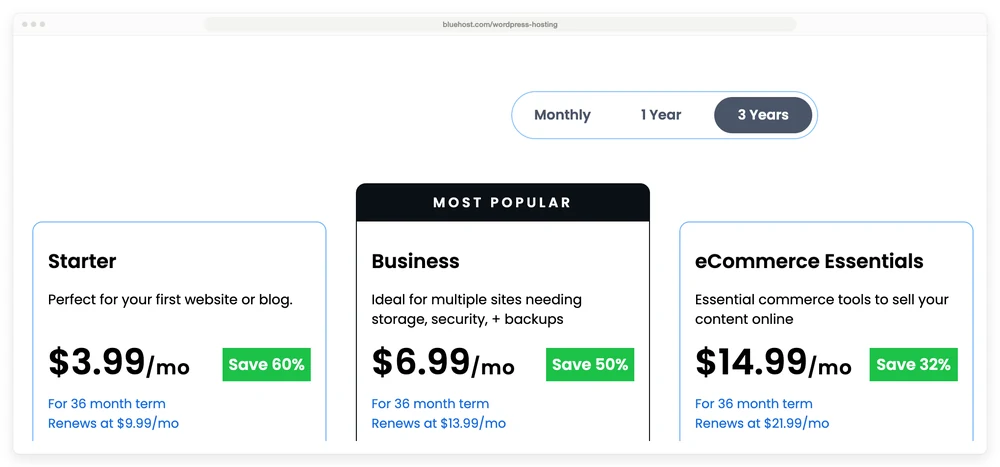
Bluehost is 1 of the 7. Its WordPress hosting page lists eCommerce Essentials at $15.99 a month on a 12-month term, and that renews at $23.99 a month. Pay 36 months up front and it drops to $14.99 a month, which renews at $21.99 a month.
The Business plan is $7.99 renewing at $15.99. Sitting directly above those numbers, the same page says “No hidden fees.”
Payment processing. This one is a wash and it is worth saying so. WooPayments charges 2.90% + $0.30 on a US card, plus 1.50% more if the card is foreign and 1.00% for currency conversion. Stripe’s published US rate is 2.9% + $0.30 for domestic cards.
Every route in this post pays roughly that, so processing is not a reason to pick WooCommerce or to avoid it. If PayPal is in your mix, the full PayPal fee breakdown covers the parts that do differ.
Extensions. This is where the guides go quiet, and where the money is.
WooCommerce core sells a file, caps the downloads and protects the link for nothing. Selling that same file on a payment plan costs $279 a year, putting it behind a membership costs $199, and turning it into a course costs $179. Prices read live off the WooCommerce marketplace.
| What you want | In the free plugin | Extension needed | Yearly price |
|---|---|---|---|
| Sell a file and deliver it after payment | Yes | none | $0 |
| Cap downloads and expire the link | Yes | none | $0 |
| Log who downloaded what | Yes | none | $0 |
| Sell on a payment plan or subscription | No | WooCommerce Subscriptions | $279 |
| Put files behind a membership | No | WooCommerce Memberships | $199 |
| Host a course with quizzes | No | Sensei Pro | $179 |
| Recover abandoned carts | No | AutomateWoo | $159 |
The top 3 rows matter as much as the bottom 4, because a rival plugin will tell you otherwise. Download Monitor, which sells a competing WordPress plugin, states that WooCommerce “doesn’t offer out-of-the-box functionalities like tracking the number of file downloads or creating ‘Members only’ or ‘Subscribers only’ downloads that require users to be logged in to download the files.”
The tracking half of that is flatly wrong. WooCommerce logs every download with a unique ID and reports it in Analytics, in the free plugin.
The login half is fairer. Downloads require login is a checkbox in the same settings screen as the delivery method, and it does restrict files to logged-in customers, with the catch that guest checkout has to be off for it to work.
What that toggle will not do is split buyers into tiers. It is all or nothing, and sorting customers into access levels is the job of the $199 a year Memberships extension in the table above.
What are the disadvantages of WooCommerce for digital downloads?
WooCommerce has 4 real disadvantages for a digital seller, and not one of them is a missing feature.
Your host decides how secure you are. Both safe delivery methods depend on server configuration you may not control. That is the single biggest risk in this whole setup and it is invisible from the WordPress dashboard.
The bill scales with what you sell. A plain file is free. Payment plans, memberships and courses are $179 to $279 a year each, on top of hosting.
The checkout was built for boxes. Ticking Virtual removes the shipping fields. The billing address block stays. You can measure how much this bothers digital sellers by what exists to fix it: a free plugin on WordPress.org whose entire job is stripping those fields out of a digital checkout, with 3,000+ installs, whose own description says “If you are selling downloadable digital products then you might not need customer’s billing and shipping address.”
Adding a file later does not reach past buyers. Add a bonus template to a product 6 months after launch and your existing customers get nothing. WooCommerce is explicit: “Adding a new download does not affect past orders. Only new purchasers gain permission to download it.”
Editing an existing file row does update old links. Adding a new row does not. That distinction catches people mid-launch.
Now the other side, because that list is not the whole picture. WooCommerce sets no cap on products and no maximum file size beyond whatever your server allows. Hosted checkouts usually do cap those, mine included: CartMango’s $10 plan stops at 10 products and 2 GB of storage.
It runs on 7+ million sites as a plugin sitting on hardware you rent, so nobody can change your terms or switch it off. And it sells digital and physical in the same cart, which is precisely why Downloadable and Virtual are separate boxes: a printed workbook with a PDF companion is 1 order.
WooCommerce, Easy Digital Downloads, or a hosted checkout
2 of the closest alternatives are also WordPress plugins, which means they carry the same hosting bill.
Sell a $25 file 100 times and Stripe takes about $102.50 whichever route you pick. The platform cut lands on top of that: Gumroad’s 10% + $0.50 adds $300, Payhip’s free plan adds $125, SureCart’s free Launch plan adds $72.50, and WooCommerce, Easy Digital Downloads and CartMango add nothing. The column that decides it is the last one, because the 3 WordPress routes all need a site and the hosted ones do not.
| Route | Software cost | Cut per sale | Needs a site |
|---|---|---|---|
| WooCommerce core | Free plugin, plus hosting from $7.99 a month on a 12-month term, $15.99 at renewal | none | Yes |
| Easy Digital Downloads, free version | Free plugin, same hosting bill | none | Yes |
| Easy Digital Downloads Pro | $99.50 first year, $199 a year after, plus hosting | none | Yes |
| SureCart, Launch plan | Free plugin, same hosting bill | 2.9% | Yes |
| Gumroad | nothing up front | 10% + $0.50 | No |
| Payhip, free plan | nothing up front | 5% | No |
| CartMango | Free until October 2026, then from $10 a year | none | No |
I will be upfront: CartMango is mine. It is a checkout, not a WordPress plugin, so it will not run your site, gate your posts or sell a printed workbook alongside the PDF.
CartMango sells files, protects the download link and takes subscriptions on every plan including the $10 one, which is the gap WooCommerce fills with a $279 a year extension. CartMango’s affiliate management, courses and community are not live yet. All 3 land on its $30 a year plan, affiliate in September 2026 and the other 2 in October 2026.
If you want a plugin rather than a hosted checkout, the honest comparisons are here: Easy Digital Downloads alternative and SureCart alternative.
When WooCommerce is the wrong tool
A few years ago I had a sales call for a done-for-you service I was selling. The prospect was already paying for my email tool, so he trusted me and the close would have been easy.
He also did not have the problem I fixed. His emails were already landing where they should. I told him that and ended the call early.
Writing about it afterwards, I admitted I had been “VERY tempted to take his money.”
I sell a checkout, so treat this as the same call.
If you already run a WordPress site, sell more than files, or want the thing you built to stay yours, WooCommerce is a good answer and the free plugin genuinely does the job. Ignore the plugin roundups until something actually breaks.
If the file is the whole business, look hard at what you are buying. You are running an entire website so that a PDF can change hands: hosting, updates, backups, a security plugin, and whatever time disappears when something breaks after an update.
None of that has anything to do with selling the file. There are ways to sell digital products without a website that skip all of it.
FAQ
Does Shopify allow digital downloads?
Yes. Shopify’s own Digital Products app is free and adds file delivery, access limits and post-purchase download links to any Shopify store. The catch mirrors WooCommerce’s, in reverse: Shopify is built around shipping physical goods, so you pay a monthly store subscription to use a bolted-on digital feature.
Can I sell a digital download without the full WooCommerce cart?
Yes, and it is a fair question if you sell 1 or 2 files. You can add a checkout to your site with a hosted buy button from a tool like CartMango, Gumroad or Payhip and skip WooCommerce entirely, or keep WooCommerce and use a plugin to strip the checkout down. A whole store to sell 2 PDFs is a lot of machinery.
Why is my WooCommerce order stuck in Processing?
Almost always the Virtual box. WooCommerce only auto-completes an order when every product in it is both virtual and downloadable. Tick Downloadable on its own and the order waits in Processing for you to mark it Complete, and the buyer does not get their file until you do.
Do I need a plugin to sell digital downloads on WooCommerce?
No. WooCommerce digital downloads work in the free core plugin, including protected delivery, download limits, expiry dates and download logging. You need a paid extension only for subscriptions, memberships, courses or abandoned-cart recovery, which start at $159 a year.
Can I give a bonus file to people who already bought?
Not by adding a new file row. WooCommerce grants new download rows to new purchasers only. Editing an existing row updates past buyers’ links, so the workaround is to replace the file in the row you already have, or bundle everything into 1 zip from the start.
Paying for a shop when you need a checkout
Everything above assumes a site is worth running. WooCommerce digital downloads are free, capable and well documented, and if you already have the site the maths is easy.
If you do not have one, that hosting bill buys you a shop you only need as a payment step. CartMango was built for that reader: a checkout that sells and protects the file, takes one-off payments and subscriptions on the same plan, and costs $10 a year, less than 1 month of the Bluehost tier built for stores.
If your WooCommerce digital downloads are the entire shop rather than 1 shelf in it, that swap is worth pricing.
About the Author

👋 I’m Welly, founder of CartMango (the site you’re on), a checkout platform for digital product sellers. We’ve previously processed $179M+. I also run BirdSend (email marketing tool, 3.1B+ emails sent). On the side I show other non-techie digital sellers how I use AI workflows to automate 50%+ of my operations. Find me on LinkedIn.
Related Reading
- Online store for digital products: the 3 store types and what each costs on a $10 sale
- How to sell WordPress themes: marketplace cuts against your own site, with the licensing rules
- Easy Digital Downloads vs SureCart: for readers picking between the 2 WordPress plugins
- Digital product pricing: how to set a price before you worry about fees