

An upsell page is a dedicated page shown right after a customer buys, before the final order confirmation, offering a single upgrade or add-on they can accept in one click without re-entering their payment details. Digital sellers use it to raise average order value, since the extra product costs almost nothing to deliver.
You spend real money and effort getting someone to buy. Then, the second they pay, most sellers send them straight to a plain thank-you page and that buyer is gone.
The moment right after the sale is one of the warmest a customer will ever be. They just trusted you with their card. An upsell page catches that moment and offers one more thing while their wallet is still open.
Here is the part that bugs me. Most guides on this topic use examples from Spotify or big stores selling extended warranties. None of it speaks to someone selling a $27 course or a pack of Notion templates.
So this guide is for you, the solo digital seller. You will learn what an upsell page is, how it differs from an order bump, what goes on a good one, worked digital examples, and when skipping it is smarter.
Key Takeaways
- An upsell page appears after the purchase, before the confirmation screen. It offers one upgrade the buyer accepts with a single click, no card re-entry.
- It is not the same as an order bump. A bump sits on the checkout as a small checkbox. The page comes after payment with a bigger offer.
- Digital products are close to the perfect upsell. Near-zero delivery cost means almost the whole extra sale is profit.
- One relevant offer beats a wall of options. The best ones show a single upgrade, clear pricing, and an easy way to say no.
- Sometimes no upsell wins. An irrelevant or pushy offer can sour a fresh customer, so the offer has to genuinely fit.
What Is an Upsell Page?
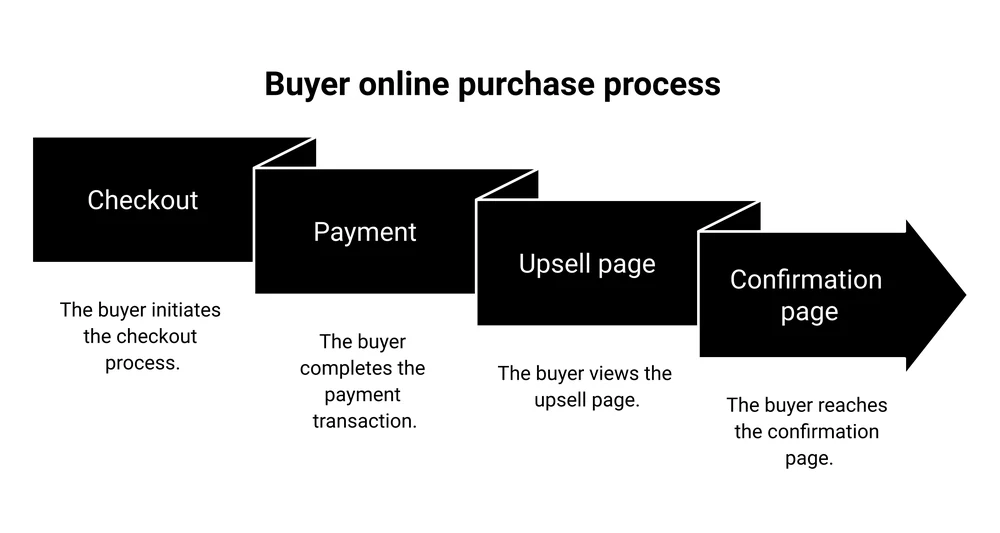
An upsell page is a standalone page a buyer sees right after they pay, but before they land on the final thank-you or confirmation screen. It offers one upgraded or complementary product. Because the payment already went through, they can add it with a single click, no need to type their card in again.
Sources online muddle this a bit. Some describe the upsell as happening “during checkout.” That thing on the checkout page is an order bump, which is a different tool.
A real one only appears after the money has changed hands.
Your buyer hits the checkout and pays for your $27 course. Then they see an upsell page offering your $97 coaching cohort at a one-time discount.
They click yes or no, then land on the confirmation page. That is the whole sequence.
Still working out where your sales quietly leak? The free 5-day Online Selling Mistakes Challenge walks you through the most common ones and how to plug them.
For a digital seller, that offer might be a bigger course, a template bundle, or a call with you. The mechanics stay the same no matter what you sell. The offer has to feel like the obvious next step, not a random pitch.
Upsell Page vs Order Bump vs Cross-Sell vs Downsell
These four get mixed up constantly. They are related, but each fires at a different moment and does a different job.
Here is the clean version, with an illustrative digital example for each. If you want to go deeper on the bump, here is how an order bump works.
| Tactic | When it shows | What it offers | Digital example |
|---|---|---|---|
| Upsell page | After payment, before the confirmation page | 1 bigger or upgraded product, 1 click to add | A $27 course buyer sees a $97 advanced course |
| Order bump | On the checkout, before paying | A small add-on ticked with a checkbox | A checkout adds a $12 template pack |
| Cross-sell | Any time, often the thank-you page or an email | A related but different product | A planner buyer is offered a matching journal |
| Downsell | Right after someone declines the upsell | A cheaper or smaller version | The $97 course drops to a $37 mini version |
The short way to remember it: the order bump is a nudge before they pay. The upsell page is a bigger swing after. Miss with it and a downsell is your backup. Cross-sells can pop up anywhere, from the thank-you page to an email.
Most digital sellers get the best return from the bump and the post-purchase upsell working together. The bump lifts the small orders, the post-purchase offer catches the buyers ready to spend more.
Why Upsell Pages Work So Well for Digital Products
For any seller, 2 numbers matter: average order value, or how much each buyer spends, and customer lifetime value, or how much they spend with you over time. A good post-purchase offer pushes both up without you finding a single extra customer.
The reason it works is timing. A buyer who just paid has already done the hard part, pulling out their card. Showing a relevant next offer at that exact second converts far better than chasing them later.
It is why recommendation engines are such a big deal for retail. McKinsey found that 35 percent of what people buy on Amazon comes from product recommendations.
The upside is real but modest per order. Across more than 40,000 online stores, one-click post-purchase upsells converted about 4.7 percent of the time, according to 2023 data from upsell app ReConvert.
The same report found average order value rose 5.6 percent. That is physical-goods data, so treat it as a floor.
Digital products tilt the math further in your favor. A physical upsell has to be packed and shipped. Your extra course, template, or ebook costs you almost nothing to deliver, so nearly the whole upsell is profit.
One seller in r/digitalproductselling made about $790k from a single digital product in 18 months. They put “have post-purchase upsells” near the top of their lessons. Their logic: the higher your average order value, the more you can afford to spend winning each customer.
What Goes on an Upsell Page
A good upsell page is short and does one job. Cram in too much and the buyer freezes, then clicks away. These are the parts that carry their weight.
- A reassuring headline. Confirm the first order went through so the new page does not read like an error. Something like “Wait, your order is confirmed. Add this before you go.”
- One offer, not a menu. Show a single upgrade. 2 or 3 choices split attention and kill the quick one-click decision.
- A quick benefit summary. 2 or 3 lines on what this add-on does for them. Lead with the outcome.
- A visual. A cover mockup or short preview makes a digital file feel real and worth the money.
- Simple pricing with an anchor. Show the regular price crossed out next to the one-time offer. A real discount rewards them for buying now.
- One clear button. A single yes action, worded around the benefit, not “submit.”
- An easy way to decline. A plain “No thanks, I’ll pass” link. Hiding it earns you a refund and a grumpy customer.
A little urgency helps, as long as it is honest. “This offer is only on this page” is true because the one-click deal genuinely disappears once they move on. Do not fake a countdown timer that resets.
Upsell Page Ideas for Digital Products
The trick is picking an upsell that feels like the natural next step from what they just bought, priced somewhere between a fraction and a couple times the first purchase. Here are worked examples you can adapt. These are illustrations, not real store data.
| Core product | Upsell offer | Why it fits |
|---|---|---|
| $27 online course | $97 group coaching cohort | Buyers who want faster results will pay for access to you |
| $19 Notion template | $59 full template bundle | They already like your style, the set saves them hours |
| $15 ebook | $29 ebook with audio and worksheets | Same idea, a format some readers just prefer |
| $12 printable | $39 printable mega-pack | One planner buyer usually wants the whole collection |
| $47 preset pack | $20/month editing membership | Turns a one-off sale into recurring income |
Notice the pattern. Most of these sell more of what the buyer already wanted, or the same thing in a better format. That last row is worth a special mention: turning a single sale into a recurring subscription is one of the most valuable upsells a digital seller can run.
If you are still building the front-end product these upsells hang off, our guide on how to sell online courses covers the core offer first.
How to Create an Upsell Page, Step by Step
You do not need to code anything. Here is the practical order of work.
- Pick a relevant upsell. Choose the obvious next step from the first purchase. A good rule: price it so it feels like an easy add, not a second big decision.
- Choose a checkout tool that does true one-click upsells. This is the part beginners miss. Basic payment links and most marketplaces cannot show a post-purchase upsell page at all. Dedicated checkout platforms like ThriveCart, SamCart, and CartMango are built for it. Bigger all-in-one funnel suites can do it too, though they cost more and bundle a lot you may not need. If you are weighing checkout tools, this ThriveCart vs SamCart breakdown helps.
- Write the offer. Use the page parts from the section above: reassuring headline, one offer, benefit lines, a visual, anchored pricing, one button, an easy decline.
- Set the one-time price. Make it a genuine deal they only get here. If you are unsure what to charge, our guide to pricing digital products has a simple method.
- Add the decline path. A clear “no thanks” link that sends them straight to the confirmation page. Consider a downsell here, a cheaper version for the people who passed.
- Test one thing at a time. Change the offer or the price, then watch 3 numbers: how many take it, how much your average order rises, and whether refunds tick up. Keep what works.
When Not to Use an Upsell Page
An upsell page is not free money. Done badly, it costs you trust with a customer you just paid to acquire. Skip it, or rethink it, in these cases.
- The offer does not fit. A random product bolted on after checkout feels like a cash grab. If you have nothing genuinely relevant, show a clean thank-you page instead.
- You stack too many. Chaining 3 upsells in a row wears people out and spikes refund requests. One strong offer beats making them run a gauntlet.
- You lean on heavy discounts every time. Train buyers to expect a fire-sale price after every purchase and you teach them to wait for it.
- The decline link is hidden. Trapping people into buying is a dark pattern, the kind of design trick the FTC called out in a 2022 report. It brings chargebacks and bad reviews. Always make “no thanks” obvious.
There is also a timing trap. Offering the upgrade before someone finishes paying, on the checkout itself, can distract them and cost you the original sale. That is why the bigger offer belongs after the purchase, and only the small, low-friction add-on belongs on the checkout as a bump.
Upsell Page FAQ
What is an upsell page?
An upsell page is a page shown to a customer right after they buy, before the final confirmation screen. It offers one upgrade or add-on they can accept in a single click without entering their payment details again. Sellers use it to raise average order value from buyers who are already in a buying mood.
What is the difference between an upsell page and a sales page?
A sales page sells your main product to someone who has not bought yet, so it is long and works to convince a cold visitor. An upsell page comes after the purchase and offers a quick add-on to someone who already paid, so it is short and low-friction. If you need the first one, here is how to create a sales page.
What is an example of an upsell?
A buyer pays $27 for your beginner course, then sees an upsell page offering your $97 advanced course at a one-time discount. They click once to add it. For a template seller, it might be a $19 template that upsells into a $59 full bundle.
What is upsell in a website?
On a website, an upsell is any offer that nudges a buyer toward a more valuable version or a useful add-on. It can appear on the checkout as an order bump, or on a dedicated upsell page after the sale. The goal is a higher order value while genuinely helping the customer get more.
Adding an upsell page is one of the things CartMango is built to do. It runs one-click upsells, downsells, and order bumps, so you make more from every buyer without finding new traffic.
It is free until October 2026, then starts at $10 a year.
About the Author

👋 I’m Welly, founder of CartMango (the site you’re on), a checkout platform for digital product sellers. We’ve previously processed $179M+. I also run BirdSend (email marketing tool, 3.1B+ emails sent). On the side I show other non-techie digital sellers how I use AI workflows to automate 50%+ of my operations. Find me on LinkedIn.
Related Reading
- Order bump, what it is and how to add one: the checkout-page sibling of the upsell page
- How to create a sales page: build the page that sells your main offer first
- How to price digital products: set the right price for your upsell offer
- ThriveCart vs SamCart: compare 2 checkout tools that do one-click upsells