

An order bump is a small, related add-on offered right on the checkout page, usually as a checkbox a buyer ticks before they pay. It raises the average order value without extra traffic. Because the shopper is already buying, adding it takes 1 click and no second payment step.
Most digital sellers chase more traffic. Cheaper ads, more posts, another funnel. The easiest money is usually somewhere else: the checkout page you already send buyers to. A well-placed order bump lifts what each buyer spends, and it costs nothing to test. I have watched sellers with steady sales run a checkout with no bump at all, quietly missing extra revenue on almost every order. It is one of the most overlooked levers in digital selling. Ahead: what an order bump is, how it differs from an upsell, real examples for digital products, the price range that works, and how to build one buyers actually tick. Straight to the parts that change the number.
Key Takeaways
- An order bump is a checkbox add-on on the checkout page. The buyer adds it in 1 click before paying, with no new payment step.
- It is not the same as an upsell. An order bump shows during checkout. A one-click upsell shows after the payment goes through.
- Price it low, usually 10% to 30% of the main product. The bump should feel like an easy yes, not a second decision.
- Relevance is everything. The add-on has to pair naturally with what they are already buying, or it gets ignored.
- 1 bump per checkout. Stacking 3 offers kills the impulse and drags down conversions.
- Digital products are perfect for bumps. No shipping, near-zero cost to deliver, so almost every bump sale is profit.
What is an order bump?
An order bump is an optional offer that sits on the checkout page, next to the main product a buyer is about to purchase. It is usually a single checkbox with a short line of copy and a price. Tick it, and the item gets added to the order before payment. That is the whole mechanic.
The order bump meaning comes down to timing and friction. It appears at the exact moment someone has already decided to buy, when their card details are in and their guard is down, so adding a low-cost extra takes 1 tick rather than a whole new purchase. Think of the candy bar by the grocery register. Small, cheap, relevant to the trip you are already making.
Want to spot the other places you are losing sales? The free 5-day Online Selling Mistakes Challenge walks through the top 5 profit leaks solo sellers miss, checkout included.
That timing is why bumps work so well. There is no second page, no re-entered card, no fresh decision to leave and come back. Extra steps and friction at checkout are a leading cause of abandoned carts, according to Baymard Institute research, so an offer that adds zero steps is unusually safe. The buyer is already in motion, and you hand them one easy way to spend a little more.
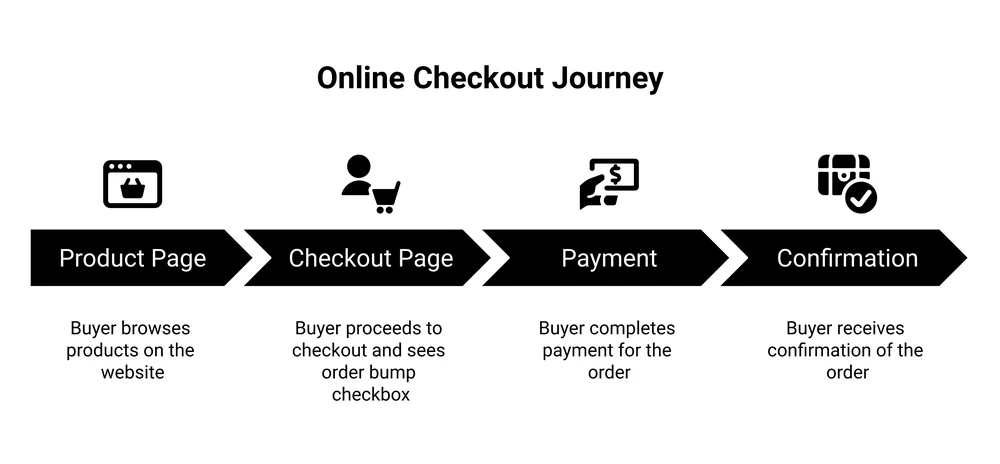
For digital sellers, this is close to free money. A physical store pays to stock and ship the extra item. Your bonus template pack or bonus video costs nothing to deliver a second time. Once the offer is built, every extra tick is almost pure margin.
Order bump vs upsell vs cross-sell vs downsell
People mix these up constantly, and “order bump vs upsell” is one of the most common questions on the topic. They are different tools that fire at different moments. Here is the clean version.
| Tactic | When it appears | How the buyer acts | Typical price |
|---|---|---|---|
| Order bump | On the checkout page, before paying | Ticks a checkbox | 10% to 30% of main offer |
| One-click upsell | Right after payment, before the receipt | Accepts with 1 click, no card re-entry | Often equal to or above the main offer |
| Cross-sell | On the product page or in the cart | Adds a related item manually | Varies |
| Downsell | After they decline an offer | Accepts a cheaper alternative | Lower than the declined offer |
The key split is order bump vs upsell. A bump happens during checkout, so it feels like part of the same purchase. A one-click upsell happens after the payment clears, as a separate follow-on offer. Both are powerful. The bump is the simplest to set up and the safest, because it never interrupts a sale that is already going through.
Cross-sells and downsells are useful too, but they solve different problems. A cross-sell nudges a related item earlier in the journey. A downsell rescues a buyer who said no to something pricier. The checkbox at checkout is the one that steadily lifts nearly every order.
Why order bumps work
The math is simple. If 100 buyers spend $30 each, you make $3,000. Add a $12 add-on that 1 in 4 buyers takes, and you just earned an extra $300 with zero additional visitors. Same traffic, same ad spend, more revenue per buyer. That sums up average order value, and a checkout bump is the lowest-effort way to raise it.
The psychology is straightforward too. The buyer has already committed. Saying yes to a small, relevant extra is easy once the bigger decision is behind them. Researchers call this commitment and consistency: once we act, we tend to keep acting in line with that choice. A cheap, useful add-on rides that momentum.
Low price does much of the work. When the offer costs a fraction of the main product, the buyer barely weighs it. There is no long deliberation, only a quick “sure, why not,” which is exactly the impulse purchase you are designing for.
Order bump examples for digital sellers
The best bumps feel obvious in hindsight. They remove friction or add a fast win to whatever the buyer just chose. Here are real patterns that work for digital products, whether you sell a course, a preset pack, or an ebook you wrote yourself.
| Main product | Order bump | Why it works |
|---|---|---|
| Online course | Companion workbook or templates | Helps them act on the course faster |
| Ebook | Editable template or checklist pack | Saves hours of doing it from scratch |
| Lightroom presets | Install walkthrough video or bonus pack | Removes the setup friction they fear |
| Notion template | Commercial-use license or setup call | Unlocks a bigger use for the same file |
| Monthly membership | Annual upgrade at a discount | Locks in a year, lifts retention |
Notice the pattern. Each bump extends the main purchase rather than distracting from it. Someone buying a course wants to finish it, so a workbook that speeds that up is an easy yes. Someone buying presets is often a little worried about installing them correctly, so a short walkthrough video removes that fear before it becomes a refund. The bump answers a question the buyer already has.
The annual-upgrade bump is worth calling out. If you sell a monthly plan, offering an annual option at checkout is one of the cleanest retention wins there is. You collect more upfront and keep the customer longer.
How to create an order bump that converts
You do not need a clever offer. You need a relevant one, priced right, described in a sentence. Follow these and most bumps land.
- Keep it relevant. The add-on has to pair with the main product. A random, unrelated bonus gets ignored because it does not connect to the purchase.
- Price it low. Aim for 10% to 30% of the main offer. The bump should feel like a rounding error next to what they are already spending. If you are still working out what the main product should cost, start with how to price digital products.
- Use 1 bump, not 3. Stacking offers reintroduces the exact decision fatigue you are trying to avoid. Pick your single best add-on.
- Write short, plain copy. 1 or 2 sentences. Say what it is and the single reason to grab it. No paragraph.
- Make it visual. A small image or icon next to the checkbox pulls the eye and lifts ticks.
- Test one thing at a time. Try a different bump or a different price, watch the take rate, keep the winner. Small changes compound.
That last point matters. The first bump you write is rarely the best one. Keep adjusting it as you go. Your first version is rarely your best one.
Common order bump mistakes to avoid
- Pricing it too high. A bump at the same price as the main product becomes a second big decision, and buyers freeze.
- Picking an unrelated add-on. If it does not connect to the purchase, the checkbox just adds clutter and doubt.
- Cramming in long copy. A wall of text at checkout slows the buyer down and can cost you the whole sale.
- Stacking multiple bumps. More offers feel like more selling. The checkout is not the place for a menu.
- Never testing. A bump left untouched for a year is almost never the best version. Check the take rate and adjust.
Where to add an order bump
Order bumps are a checkout feature, so you need a checkout or cart tool that supports them. That is part of the wider question of how to add a checkout to your site in the first place. If you sell digital products, most dedicated checkout platforms include them. SamCart and ThriveCart both offer order bumps. WordPress sellers can add them with plugins like SureCart. CartMango, the platform I run, also includes order bumps.
Whatever you pick, the feature to look for is a checkbox bump on the checkout page itself, not just a post-purchase upsell. That checkout-page placement is what makes the order bump the low-friction win it is. If a tool only does after-payment offers, you are missing the easiest lift.
Already comparing checkout tools? This roundup of SamCart alternatives breaks down the options for digital sellers, order bumps included.
FAQ
What does order bump mean?
An order bump is an optional add-on offer shown on the checkout page, usually as a checkbox. The buyer ticks it to add a low-cost, related item to their order in 1 click, before they pay. It is a simple way to raise the average order value.
What is the difference between an order bump and an upsell?
Timing. An order bump appears during checkout, before payment, as a checkbox next to the main product. A one-click upsell appears after the payment goes through, as a separate follow-on offer. Order bumps are simpler to set up and never interrupt a sale in progress.
How much should I price an order bump?
A common guideline is 10% to 30% of the main product’s price. The bump should feel small and easy next to what the buyer is already spending, so it triggers an impulse yes rather than a fresh decision.
Do order bumps slow down the checkout?
No, when done right. A good bump is one checkbox with a short line of copy and a small image. It adds a second of attention, not a new page or a new payment step. The mistake that slows checkout is long copy or stacking several offers.
How many order bumps should I use?
One per checkout. A single relevant bump keeps the decision easy. Stacking multiple offers brings back the decision fatigue that order bumps are meant to avoid, and usually lowers both your take rate and your main conversion.
Ready to add an order bump?
If you want order bumps without piecing together plugins, that is what I built CartMango for. Add a bump, an upsell, or a downsell to your checkout, and earn more from the buyers you already have without paying for more traffic. It is free during the beta, then starts at $10 a year.
About the Author

👋 I’m Welly, founder of CartMango (the site you’re on), a checkout platform for digital product sellers. We’ve previously processed $179M+. I also run BirdSend (email marketing tool, 3.1B+ emails sent). On the side I show other non-techie digital sellers how I use AI workflows to automate 50%+ of my operations. Find me on LinkedIn.
Related Reading
- How to add a shopping cart to a website: the 4 ways to put a checkout on your site
- How to price digital products: set the main price before you price the bump
- Abandoned cart email templates: win back the buyers who do not finish checkout
- SamCart alternatives: compare checkout tools for digital sellers, order bumps included