

Payhip pricing has 3 plans, all with the same features. Free is $0 a month plus 5% per sale, Plus is $29 a month plus 2%, and Pro is $99 a month with 0%. Card processing (about 2.9% plus $0.30) applies on top of every plan, and payouts are immediate.
The 5% on Payhip’s free plan reads like a rounding error. Then you sell a $10 product and keep $8.91, not $9.50.
I run a checkout platform, so I read pricing pages for a living. The gap I pay attention to is the one between the headline fee and what actually reaches your bank account.
On Payhip that gap has 2 parts. The payment processor takes its cut before Payhip’s fee is even counted, and the fixed $0.30 per sale quietly eats into cheap products.
None of that makes Payhip a bad deal. Its free plan is genuinely cheaper than Gumroad’s. The word “free” just carries more weight in the marketing than it does in your payout.
This post walks the real cost: every plan, what you keep per sale, when upgrading pays off, the downsides worth knowing, and how it compares to the alternatives.
Key Takeaways
- 3 tiers, same features. Free ($0 + 5%), Plus ($29 + 2%) and Pro ($99 + 0%). A higher monthly fee only buys you a lower per-sale cut.
- The 5% grows to 8% to 11%. Card processing of 2.9% + $0.30 stacks on top, on every plan, and the flat $0.30 hits cheap products hardest.
- Upgrading is a volume bet. Plus beats Free once you clear about $967 a month in sales. Pro beats Plus past about $3,500 a month.
- Payouts are immediate. Payhip sends each sale to your PayPal or Stripe right away, with no minimum balance and no holding period.
- Payhip is not a Merchant of Record. It handles EU and UK VAT, but not sales tax everywhere the way some platforms do.
How much does Payhip charge?
Payhip has no setup cost and no contract. You can list products and sell on the free plan without paying a monthly fee at all. What you pay is a percentage of each sale, and that percentage drops as you move up the paid tiers.
Here is the whole published structure, read from Payhip’s own pricing page.
| Plan | Monthly cost | Payhip fee per sale | Best for |
|---|---|---|---|
| Free Forever | $0 | 5% | Testing products, under ~$967 a month |
| Plus | $29 | 2% | Growing sellers, ~$967 to $3,500 a month |
| Pro | $99 | 0% | Established sellers, $3,500 a month and up |
The unusual part is that every plan includes identical features. Unlimited products, unlimited revenue, digital downloads, courses, memberships, an affiliate program, EU and UK VAT handling: all of it is on the free plan. The paid tiers do not add tools, only a smaller cut on each sale.
That makes the choice a pure math problem, which is the good news. But the “5%” on the free plan undersells the real cost of a sale.
Free resource: the platform fee is rarely the biggest leak in a solo seller’s numbers. The free 5-day Online Selling Mistakes Challenge walks through the 5 that cost creators the most, and how to close each one.
Payhip fees: what actually comes out of each sale
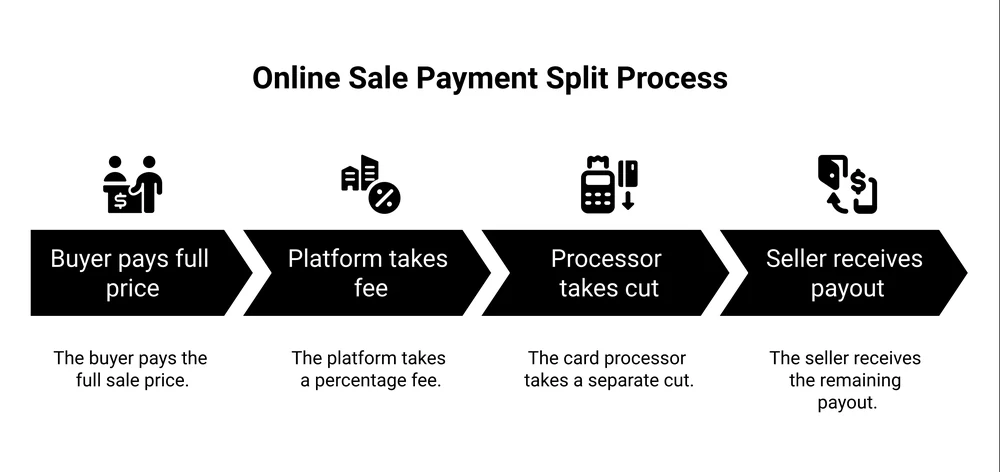
Payhip’s fee is not the only fee. Its own pricing page answers the question directly: “Do I need to pay PayPal/Stripe fees? Yes, PayPal and Stripe will still charge at their standard rates. This applies for all plans.”
So a sale on the free plan carries 2 separate charges. Payhip’s 5%, and card processing of roughly 2.9% plus $0.30, the standard US rate you can check on Stripe’s pricing page. Together that is about 7.9% plus a flat $0.30 on every free-plan sale.
The flat $0.30 is the part that stings. It lands on every sale no matter the price, so a cheap product loses a much bigger share than an expensive one. Here is what you keep at a few price points on the free plan.
| Sale price | Payhip 5% | Card processing | Total fees | You keep | Effective rate |
|---|---|---|---|---|---|
| $10 | $0.50 | $0.59 | $1.09 | $8.91 | 10.9% |
| $25 | $1.25 | $1.03 | $2.28 | $22.72 | 9.1% |
| $50 | $2.50 | $1.75 | $4.25 | $45.75 | 8.5% |
| $100 | $5.00 | $3.20 | $8.20 | $91.80 | 8.2% |
| $250 | $12.50 | $7.55 | $20.05 | $229.95 | 8.0% |
Fees calculated using Payhip’s published 5% free-plan rate plus standard US card processing.
A $10 product hands over almost 11 percent. A $250 product hands over 8. The advertised “5%” is real, but it is never the whole cost, and it is furthest from the truth on the low-priced products a lot of new sellers start with.
If you are still setting prices, our guide to how to price digital products covers the method before the fee math.
When upgrading to Plus or Pro actually saves money
Here is a fact that makes the tier decision simple: card processing is the same on all 3 plans. It cancels out. So when you compare Free, Plus and Pro against each other, the only number that moves is Payhip’s own fee.
That turns the tier choice into a single question: how much do you sell in a month?
- Free costs 5% of your sales, and nothing else.
- Plus costs $29 plus 2% of your sales.
- Pro costs $99 flat, with no cut.
Plus starts beating Free once 3% of your sales clears the $29 subscription, which happens at about $967 a month. Pro starts beating Plus once the $70 gap between them is covered by the 2% Plus still charges, which happens at about $3,500 a month.
| Monthly sales | Free (5%) | Plus ($29 + 2%) | Pro ($99) | Cheapest |
|---|---|---|---|---|
| $500 | $25 | $39 | $99 | Free |
| $1,000 | $50 | $49 | $99 | Plus |
| $2,000 | $100 | $69 | $99 | Plus |
| $3,000 | $150 | $89 | $99 | Plus |
| $5,000 | $250 | $129 | $99 | Pro |
A seller on r/selfpublish put the logic in plain terms. They host courses on Payhip and said the free plan “takes 5% of every transaction,” while “you can pay $99/month instead of a per-transaction fee,” which “works well if you know you’re going to get a lot of sales every month and exceed the subscription fee.”
That is the whole decision in a sentence. Do not pay for Plus or Pro on hope. Upgrade when your actual monthly sales cross the line.
When do you get paid?
Fees decide what you earn. Payouts decide when you see it, and this is where Payhip is genuinely good.
Payhip pays you immediately. Its pricing page says it deposits each sale “immediately after a transaction has been completed.”
There is no minimum balance to reach and no holding period. The money goes straight to your connected PayPal or Stripe account as sales happen.
That is a real gap versus some rivals. Gumroad, for one, holds every sale for 7 days and will not pay out until your balance clears its $100 minimum. On Payhip, a first-day $12 sale is money you can withdraw.
There is a catch worth knowing. Because Payhip pays through your own PayPal or Stripe, how fast you actually get the money comes down to PayPal or Stripe, not Payhip.
A seller comparing both platforms on r/digitalproductselling liked Payhip’s “lower transaction fees than Gumroad.” But they flagged that Payhip “requires you to have a PayPal account to receive payouts” in their region, and that moving money out of PayPal added another fee.
That second fee is PayPal’s, not Payhip’s, but it still comes out of your money. If your country supports Stripe on Payhip, connecting that instead usually avoids it. It is worth reading what PayPal charges before you pick.
The disadvantages of Payhip
Payhip is a solid platform, and an honest look means naming the downsides too.
- The free plan still costs 8 to 11 percent. “Free forever” means no subscription, not no fees. For a seller doing a handful of low-priced sales, that cut is real money.
- PayPal and Stripe only. Those are the only 2 ways to get paid. No Payoneer, no Wise, no direct bank options outside what those 2 support.
- No built-in email marketing. It captures your buyers, but you bring your own tool to actually email them. Selling and follow-up are 2 separate systems.
- A strict content policy. Payhip bans copyrighted and resold PLR material, and a Payhip staff member confirmed in that same r/selfpublish thread that violations “do lead to permanent account removal.” If you sell resold content, read the rules first.
- Tax is only half covered. Payhip collects and remits EU and UK VAT for you, but it is not a full Merchant of Record, so sales tax anywhere else is still yours to handle.
- You bring your own traffic. It has no real marketplace sending you buyers. As another seller in that same thread put it, “the platform is never the bottleneck, customer demand and your ability to reach buyers are.” Every visitor is one you found yourself.
Every one of these is a trade-off you accept for a checkout that costs nothing up front and stays simple to run.
Is Payhip better than Gumroad?
This is the comparison most people are really running, and on raw fees Payhip wins the free tier.
A $50 sale on Payhip’s free plan keeps you $45.75. The same sale on Gumroad’s direct rate of 10% plus $0.50, once its processing is added, keeps you $42.75. Payhip takes about 8.5 percent where Gumroad takes about 14.5 percent.
Gumroad answers back in other ways. It has a real discovery marketplace that can send you buyers, which Payhip does not. It bundles email tools Payhip leaves to you.
So the honest read is that Payhip is cheaper and cleaner for selling to an audience you already have, while Gumroad does more to help you find one. Our full Gumroad vs Payhip breakdown covers the feature side.
The wider question is what a checkout should cost at all. Here is how the fee models line up across a few options.
| Platform | Monthly cost | Cut per sale | Processing included | Entry plan cap |
|---|---|---|---|---|
| Payhip | $0 free, $29 Plus, $99 Pro | 5% / 2% / 0% by plan | No | None |
| Gumroad | $0 | 10% + $0.50 direct, 30% marketplace | No on direct | None |
| Sellfy | $29 (or $22 annual) | 0% | No | $10k sales a year |
| SendOwl | $39 (or $32.50 annual) | 0% | No | $10k sales a year |
| CartMango | Free until October 2026, then from $10/year | 0% | No | 10 products |
Prices read from each platform’s own pricing page. Every row still pays card processing of roughly 2.9% plus $0.30 on top of the rates shown, apart from Gumroad’s 30% marketplace rate, which already includes it.
To be straight about that last row: CartMango is my own platform, so weigh it with that in mind. It is also the only row that caps its entry plan by product count, at 10, where the others cap by sales volume or not at all.
The pattern is the trade every seller makes. Payhip charges a percentage, so it costs nothing until you sell and more as you grow. The flat-fee tools reverse that: you pay whether or not you sell, and keep almost everything once you do.
Run 100 sales of a $30 product, $3,000 in revenue, and Payhip’s cheapest option (Plus) leaves you about $2,794. A tool taking 0% of sales leaves you about $2,883, minus its plan cost.
For a wider list of options, see Payhip alternatives.
Is Payhip worth it?
For a lot of sellers, yes. If you are starting out, selling to your own audience, and want a clean storefront with no upfront cost, Payhip’s free plan is one of the cheaper honest ways to sell direct. You can be live today for nothing.
The point where sellers start looking around is control and cost at scale. The same r/selfpublish seller who ran that math named what held them back: “I don’t own the platform. What if it goes away some day?”
That is the real question under the fee math. Once you are selling steadily, a flat yearly or monthly price on your own checkout can keep more of each sale than any percentage does, and you can find ways to sell without leaning on a marketplace that keep you in control.
Payhip, Gumroad and a tool like CartMango all live in that direct-sales space. The right one depends on your volume and how much you want to own.
Payhip pricing FAQ
How much does Payhip charge?
Payhip has 3 plans: Free at $0 a month with a 5% fee per sale, Plus at $29 a month with 2%, and Pro at $99 a month with 0%. Payment processing from PayPal or Stripe, about 2.9% plus $0.30, applies on top of every plan.
How much does Payhip take per sale?
On the free plan, about 8 to 11 percent all in, not just the advertised 5, once card processing is added. On a $10 sale you keep around $8.91. On a $50 sale you keep around $45.75. The fixed $0.30 per transaction is why cheaper products lose a bigger share.
Is Payhip really free?
The Free Forever plan has no monthly cost, so “free” means no subscription. It still charges 5% per sale plus payment processing, so you do pay to sell. It is free to join and list, not free to earn.
Do I still pay PayPal or Stripe fees on Payhip?
Yes. Payhip’s own fee and the processor’s roughly 2.9% plus $0.30 both come out of every sale, on all 3 plans. Payhip states this directly on its pricing page.
Is Payhip better than Gumroad?
On the free tier, Payhip is cheaper: about 8.5% on a $50 sale versus Gumroad’s 14.5% once processing is counted. Gumroad offers a discovery marketplace and built-in email that Payhip does not. Payhip suits selling to an audience you already have. Gumroad does more to help you find one.
When does Payhip pay you?
Immediately. Payhip deposits each sale to your connected PayPal or Stripe as it happens, with no minimum balance and no holding period. Your withdrawal speed after that depends on PayPal or Stripe, not Payhip.
What this means for your pricing
Payhip pricing is 5% on the free plan, 2% on Plus at $29 a month, and 0% on Pro at $99 a month, with card processing stacked on top of all 3 and immediate payouts throughout. The real free-plan cost is closer to 8 to 11 percent, worst on cheap products.
Knowing the true number is what lets you price correctly and pick the right tier, instead of guessing off the headline 5. If your products sit under $10, run the effective-rate table against your own prices before you commit.
If running your own numbers made you wince, that is exactly why it is worth doing. CartMango is the checkout I built for solo digital sellers who would rather pay a flat yearly price than a percentage of every sale. It is free until October 2026, then starts at $10 a year, charged per year instead of per month, with no cut taken off the top of what you sell.
About the Author

👋 I’m Welly, founder of CartMango (the site you’re on), a checkout platform for digital product sellers. We’ve previously processed $179M+. I also run BirdSend (email marketing tool, 3.1B+ emails sent). On the side I show other non-techie digital sellers how I use AI workflows to automate 50%+ of my operations. Find me on LinkedIn.
Related Reading
- Gumroad vs Payhip: the closest head-to-head on fees and features
- Payhip alternatives: 7 checkout options compared on real cost
- How much does PayPal charge: the processing fee that stacks on every plan
- How to sell online for free: what selling actually costs across platforms