

WooCommerce alternatives fall into 4 groups: WordPress plugins like SureCart and Easy Digital Downloads if you stay put, hosted stores like Shopify if you leave, open-source builds like Medusa if you can code, and checkout-only tools like Payhip, Gumroad and CartMango for digital files. They separate on how much you still run. Every price came from the platform’s own page.
Search for a WooCommerce alternative and page 1 hands you a numbered list. Item 1 is a WordPress plugin you install on the site you already have. Item 5 is a hosted platform you rent by the month. Item 7 is open-source software you put on a server and maintain.
Those 3 things solve different problems, and 5 of the 6 guides ranking today never say so. ComeUp and Swell name no WordPress plugin at all, on a search whose subject is a WordPress plugin.
So the price comparison most people make is meaningless. A $199 yearly licence and a $25 monthly subscription are not competing offers.
This post sorts the options into groups first, prices them inside each group, and ends with the 4 questions that put you in one. Google’s own summary leaves out a 4th group, and for a lot of people it is the right answer.
Key Takeaways
- WooCommerce core takes 0% of your sales. The cut people want to escape is card processing, and every alternative pays that too.
- “Alternative” covers 4 different products on this search. Sorting yourself into 1 of them first is what makes the prices comparable.
- Google’s AI Overview quotes Shopify at $39 a month. Shopify’s own pricing page shows Basic at $25.
- SureCart’s free plan takes 2.9% of a sale and Squarespace takes 7% of a digital sale on its entry plan. Google’s summary mentions neither.
- Products and customers move off WooCommerce easily. Live subscriptions are where a move gets expensive, and some platforms cancel them when you leave.
Does WooCommerce actually take a cut of your sales?
WooCommerce takes 0%. The core plugin is free, open source, and it charges nothing per order. What costs money is hosting, a domain, and any paid extension you choose to add.
Platform fees are only 1 of the 5 leaks in the free 5-day Online Selling Mistakes Challenge. It covers the other 4 too.
This confusion is the top result for this search. A December 2023 thread in r/woocommerce opens with a developer whose client “doesn’t want to pay Woo and PayPal a big cut”. The highest-voted reply, from a user whose flair reads “Payments person”, answers it in 1 line:
Every other option is going to have a big cut (or an even bigger cut).
The reply then walks through why. Shopify charges you for the platform and Stripe charges you for the payment. Squarespace charges you for the platform and Stripe or PayPal charges you for the payment. The core Woo plugin is free, so the only unavoidable cost is hosting and a domain.
The person who asked came back later in the same thread with a correction: “Woo only take a cut if you use their own payment handling extension.” That extension is WooPayments, and the WooPayments fee schedule puts US cards at 2.90% + $0.30 with no monthly fee, plus 1.50% on international cards. That is the same rate Stripe publishes as its standard online card rate.
So that fee is the price of accepting a card, and it follows you to every platform in this post.
If your reason for leaving is the percentage, moving will not fix it. If your reason is maintenance, plugin conflicts or a database that has grown unmanageable, that is a real reason. The rest of this post is for you.
WooCommerce alternatives come in 4 kinds
WooCommerce alternatives split into 4 genuinely different products, and they differ by how much of the job you keep doing yourself.
- A WordPress plugin. You keep your site, your hosting, your theme and your update schedule. You swap the selling engine underneath. SureCart, Easy Digital Downloads, FluentCart and MemberPress live here.
- A hosted store. You leave WordPress. The platform runs the servers, the updates and the security, and you pay monthly rent for that. Shopify, BigCommerce, Squarespace, Wix and Ecwid live here.
- Open source you host yourself. You get the code for free and supply everything else, including a server and usually a developer. PrestaShop, Magento, Medusa, Saleor and Vendure live here.
- A checkout with no store. No catalogue, no browsing, no site to maintain. You get a payment page, a product page and file delivery. Payhip, Gumroad, SendOwl, Sellfy and CartMango live here.
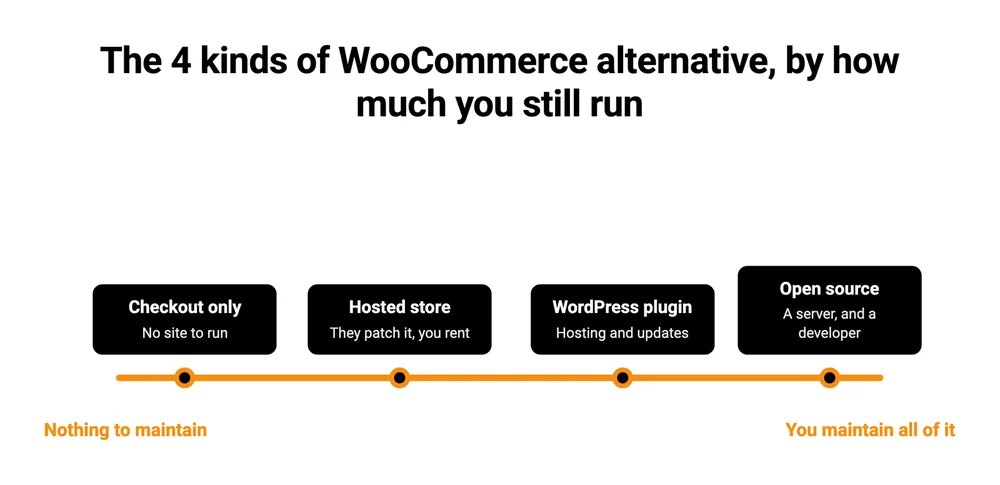
Google’s AI Overview for this search sorts its picks into the first 3 and leaves out the 4th entirely. Of the 6 articles ranking today, WPMarmite is the only one that labels its sections at all. Even that one files Gumroad under “hosted solutions” beside Shopify and Wix, which puts a checkout tool in the store-platform group.
Below, every option is priced on its own pricing page. Monthly plans are quoted on month-to-month billing, with the annual rate noted where it is lower. The cut shown is the platform’s own cut, which sits on top of card processing that everybody pays.
WooCommerce core costs $0 and takes 0% of a sale, so a cheaper licence is not what anything here is offering. Among the 3 hosted stores, Squarespace Basic has the lowest monthly rent at $14. It is also the only one of the 3 whose cut goes up because the product is digital.
| Option | Group | You still run | Entry price | Its own cut |
|---|---|---|---|---|
| WooCommerce | WordPress plugin | Hosting, updates, security | $0 | 0% |
| SureCart | WordPress plugin | Hosting, updates, security | $0 free plan, or $199 a year | 2.9% free plan, 0% on Pro |
| Easy Digital Downloads | WordPress plugin | Hosting, updates, security | $99.50 first year | 3% on Stripe below Extended, then 0% |
| Shopify | Hosted store | Nothing | $25/mo, $19 billed yearly | 0% own processor, 2% on another |
| BigCommerce | Hosted store | Nothing | $39/mo | 0% |
| Squarespace | Hosted store | Nothing | $14/mo, $10 billed yearly | 2% store, 7% digital on Basic |
| Payhip | Checkout only | Nothing | $0 | 5% |
| CartMango | Checkout only | Nothing | Free until October 2026, then $10 a year | 0% |
I run CartMango, which is the last row, so treat that one as disclosed rather than neutral. It is in the table because a checkout-only tool is a real answer for part of this audience and leaving it out would hide a group page 1 already hides.
Swap the plugin and stay on WordPress
Staying on WordPress is the smallest change on this list, because you keep the hosting and the domain you already pay for and change only the selling engine. What you are buying is a lighter plugin, not a lighter workload: updates, backups and security are still yours.
Easy Digital Downloads is built for files rather than physical goods. Personal is $99.50 for the first year on 1 site, Extended $199.50, Professional $299.50 and All Access $499.50. A footnote under the tiers reads “Special introductory pricing, all renewals are at full price”, so those renew at $199, $399, $599 and $999.
The pricing page does not mention the other cost. Easy Digital Downloads’ own Stripe documentation says a 3% application fee is added to Stripe transactions, renewals included, and that buying an Extended pass or higher is what removes it. PayPal transactions are not charged it. So the cheapest tier that takes nothing on a Stripe sale is Extended at $199.50, not Personal at $99.50. Our post on choosing a WordPress ecommerce plugin works out where that 3% flips Personal into the more expensive plan, at around $278 a month in Stripe sales.
SureCart is the one Google’s summary calls lightweight, and it has the free plan people go looking for. That free Launch plan takes 2.9% of every sale. Pro removes the fee at $199 a year for 1 store, or $699 once for lifetime access. On a store doing $1,000 a month, the free plan costs $29 in fees. The yearly licence works out at $16.58 a month, so free stops being the cheaper option somewhere around $570 a month in sales.
FluentCart is the newest of the group and it appears in Google’s related searches for this term while none of the 6 ranking guides includes it in their lists. Annual licences run $199 for 1 site, $499 for 5, $699 for 15 and $899 for 50. Its pricing page opens on a lifetime tab instead, showing $499 for 1 site discounted to $249. There is no per-sale cut on any tier.
WordPress.org puts WooCommerce at 7 million or more active installs. Its listings for the others report 80,000 for SureCart, 40,000 for Easy Digital Downloads and 8,000 for FluentCart. Smaller is not worse, and it does change what you can expect from documentation, third-party add-ons and the odds that somebody has already solved your problem in a forum.
Leave WordPress for a hosted store
A hosted store removes the maintenance completely, and you pay monthly rent for that. Nobody sends you a security patch, nothing breaks after an update, and the trade is that you cannot touch the code and you are on somebody else’s roadmap.
Google’s AI Overview picks this group first and names Shopify as the top overall answer.
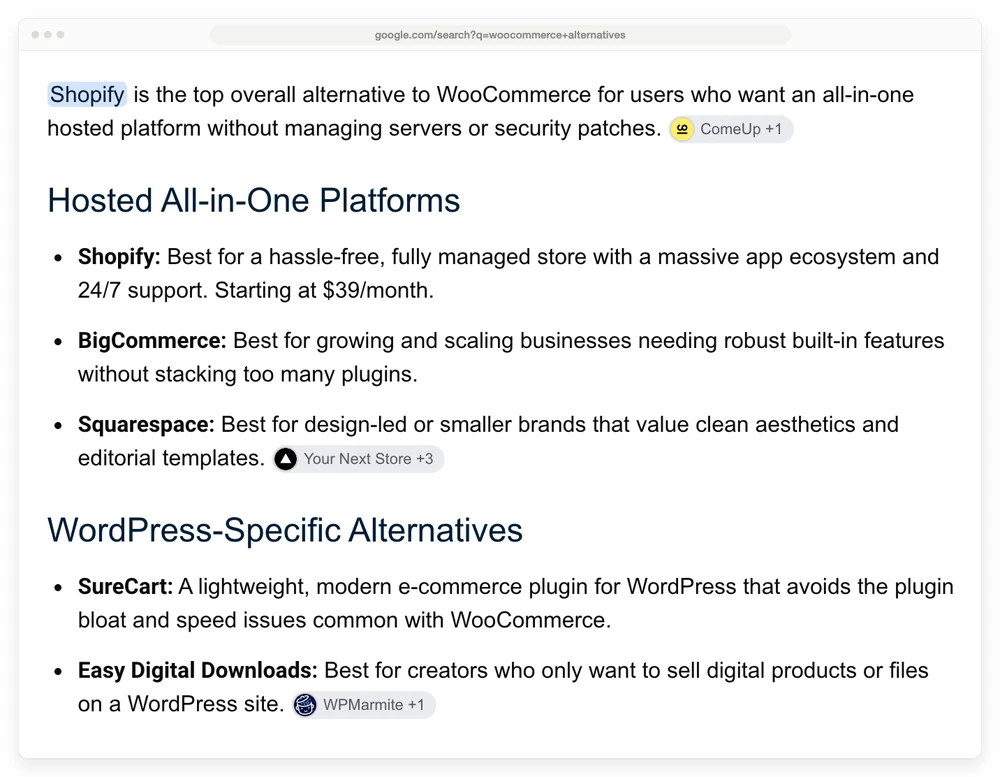
That summary quotes Shopify at “Starting at $39/month”. Shopify Basic is $25 a month on month-to-month billing, or $19 a month billed yearly. There is no $39 tier on the page and no cheaper Starter plan listed either. Grow is $65 monthly or $49 yearly, Advanced is $399 or $299, and Plus starts at $2,300 a month.
Shopify charges no platform percentage when you use Shopify Payments. Use a different gateway and it adds 2% on Basic, 1% on Grow and 0.6% on Advanced.
BigCommerce lists Core at $39 a month, Growth at $105 and Scale at $399, which drops to $299 billed annually. It takes no platform percentage, and its own page puts card processing from 2.89% + $0.29.
Squarespace has the lowest rent of the 3 and the highest cut on a digital sale. Basic is $14 a month, Core $20 and Advanced $32, dropping to $10, $14 and $23 billed yearly. The store fee is 2% on Basic and 0% above it. The fee on digital content and memberships is a separate line: 7% on Basic, 5% on Core and 0% on Advanced.
Run that against Shopify. Squarespace Basic is $11 a month cheaper, and 7% of digital sales cancels that out at about $157 a month. Sell more digital than that and the cheaper-looking plan costs more.
Neither the 7% nor SureCart’s 2.9% appears anywhere in the summary recommending both platforms.
Run it yourself with open source
Open source is free to download and expensive to run, because the code is the only part anybody gives you. PrestaShop and Magento are the traditional pair. Medusa, Saleor and Vendure are the newer headless option, which means the shop’s brain and its front end are separate programs you connect yourself.
A January 2026 thread in r/ecommerce shows what that means in practice. A seller wanting off WooCommerce got pointed at Medusa or Saleor by 3 different people. One of them discloses working at a rival platform. They still added that if API work is not appealing, containerising the existing WordPress install beats rebuilding on anything.
That is the honest read on this group. If you are not writing code, or paying somebody who does, this group is out. The $0 price tag covers the smallest part of the job.
Skip the store and keep only the checkout
A checkout-only tool sells the product without running a shop around it. There is no catalogue to browse, no inventory, no theme. You get a page for each product, a payment form and file delivery, and you send people straight to it from wherever your audience already is.
This is the group missing from Google’s summary, and it is the right one more often than page 1 suggests. Plenty of people running WooCommerce are selling 4 PDFs and a template pack. The store is doing nothing for them except generating maintenance.
Payhip is free with a 5% cut, $29 a month with 2%, or $99 a month with none. Its FAQ confirms Stripe and PayPal fees apply on top on every plan. Gumroad charges 10% + $0.50 on your own traffic and 30% when a buyer finds you through its marketplace. SendOwl and Sellfy sit here too, both on monthly subscriptions with revenue caps attached.
CartMango is my own, so read the numbers and discount the enthusiasm. It is free until October 2026 and then $10 a year on Silver, $20 on Gold and $30 on Platinum, with no cut of any sale on any tier.
Silver covers 10 products, 2 GB of file storage and 10 Mini Pages, which are hosted sales pages, so a seller with no website of their own can still take money. Order bumps are on every tier. Upsells, downsells and cart abandonment need Gold.
Here is what CartMango will not do. It sells digital products, so there is no shipping, no inventory and no physical goods. There is no browsable storefront, so nobody arrives and shops your catalogue, video needs external hosting like YouTube or Vimeo, and the product and storage caps above apply per tier.
If any of those is the reason you built a WooCommerce store, stay in the store groups above and pick Shopify or BigCommerce.
For a wider look at that decision, we compared the 3 store types on a $10 sale in our guide to running an online store for digital products.
What moving off WooCommerce actually costs
Of the 6 guides ranking for this search, Your Next Store is the only one that discusses migration, and it does it for developers moving to headless stacks. For everyone else the cost of the move is invisible until they are in it.
Products and customers are the easy half. WooCommerce exports products to CSV from its own tools and most platforms import that format, so a catalogue moves in an afternoon.
Past orders are harder and often not worth it. Order history rarely maps cleanly between 2 systems, and many sellers end up keeping the old site running in read-only mode for a year rather than moving 5 years of records.
URLs are the half people miss. Your product pages change address, so every link anyone has ever shared breaks unless you map old to new and redirect them. Skip that and you lose the search traffic that made the store worth keeping.
Live subscriptions are the expensive one, and this is where platforms differ most. Some cancel every recurring payment when you leave, even when the money was flowing through your own Stripe or PayPal account. That is revenue that stops, and no amount of planning moves it.
Of the 7 platforms below, Easy Digital Downloads and CartMango are the 2 that leave your recurring payments running when you go. The other platforms in this post are not on this list because I have no sourced answer for them, so ask before you assume.
| Platform | Group | What happens to live subscriptions if you leave |
|---|---|---|
| Easy Digital Downloads | WordPress plugin | You keep them |
| SureCart | WordPress plugin | Lost. It manages subscriptions on its own platform rather than directly on your Stripe or PayPal |
| Payhip | Checkout only | Lost, even when connected to your own Stripe or PayPal |
| Sellfy | Checkout only | Lost, even when connected to your own Stripe or PayPal |
| SendOwl | Checkout only | Lost, even when connected to your own Stripe or PayPal |
| Gumroad | Checkout only | Lost |
| CartMango | Checkout only | You keep them |
CartMango is mine, and it is in that last row because it bills through your own Stripe or PayPal account rather than its own.
Check this before you sign up anywhere, not before you leave. By the time you want to leave, the answer is already fixed.
How to pick your group in 4 questions
Answer these 4 and the group picks itself.
1. Do you sell physical products? Yes puts you in a hosted store or a WordPress plugin. Checkout-only tools do not do shipping or inventory, so that group is out.
2. Do people browse your catalogue, or do you send them to 1 product at a time? Browsing needs a store. Sending traffic to a single page does not, and that is most people selling a handful of digital files.
3. Do you want to keep running WordPress? If updates, backups and plugin conflicts are the reason you are here, a WordPress plugin does not solve it. You are swapping the engine, and everything around it is still yours to look after.
4. Will you write code, or pay somebody who does? No takes open source off the list, whatever its price says.
A word on the pull you will feel while answering these. I have bought 54 lifetime software deals on AppSumo over the years, and I still have not used 90% of them. I bought them the way people buy platforms, hoarding tools I thought I would need later, and later never arrived. These days I only buy something if I need it now or in the next 6 months.
The same reflex is what makes people pick the platform with the longest feature list. Pick the one that does what you sell today.
FAQ
Is there a free WooCommerce alternative?
Several. SureCart’s Launch plan and Payhip’s Free Forever plan both cost nothing up front and take a percentage instead, 2.9% and 5%. Easy Digital Downloads has a free version too, and it adds 3% to Stripe transactions until you buy an Extended pass. PrestaShop and Medusa are free to download and cost you a server and setup time. CartMango is free until October 2026 with no per-sale cut. And WooCommerce core is free as well, before you swap it for something else free.
Is Wix better than WooCommerce?
Wix is easier and less flexible. It runs the hosting, updates and security for you, and you pay monthly and stay inside what Wix supports. WooCommerce gives you the code, so it does whatever you can build, and every update, backup and conflict is yours to handle. Neither is better in general, and ease against control is the real question.
Is WordPress outdated in 2026?
No. WooCommerce alone runs on 7 million or more sites according to WordPress.org, and the plugin ships regular releases. What people usually mean by the question is that a WordPress store needs upkeep that a hosted platform does not, and that part is true.
Do I have to leave WordPress to stop paying transaction fees?
No, and leaving may add them. WooCommerce core charges no platform fee, so the only per-sale cost on a self-hosted store is card processing at roughly 2.9% + $0.30. Squarespace Basic adds 7% on digital sales and Payhip’s free plan adds 5%, both on top of that same processing.
Why are people moving away from WordPress?
Maintenance, mostly, rather than fees. The seller in the January 2026 r/ecommerce thread above named 2 specific things: plugin updates that break custom code, and what they called cleaning up database remnants of deleted items, which they described as unmanageable at scale. That is the reason a hosted store fixes and a different WordPress plugin does not.
What are the top 5 ecommerce platforms?
That is a broader question than this post answers, and deliberately so. Ranking platforms overall pulls in enterprise tools and physical-goods marketplaces that have nothing to do with replacing a WordPress plugin. Sorted by the groups above, the strongest picks are Shopify, BigCommerce and Squarespace for hosted stores, and SureCart and Easy Digital Downloads for staying on WordPress.
Which WooCommerce alternative is best for digital products only?
Easy Digital Downloads if you want to stay on WordPress, and a checkout-only tool like Payhip, Gumroad or CartMango if you would rather not run a site at all. Our guide to selling digital downloads through WooCommerce covers what the native setup does and does not handle first.
When the store is the part you do not need
Nearly all the WooCommerce alternatives in this post charge you for a store. Rent on Shopify, a licence on SureCart, a server on Medusa. That is money well spent when people browse your catalogue, compare products and buy something you ship.
It is money spent on nothing when you sell 6 digital files and every buyer arrives on 1 product page from an email or a link in your bio.
That is the case CartMango is built for. Free until October 2026, then from $10 a year, no cut of any sale, and your recurring payments keep running if you ever leave.
About the Author

👋 I’m Welly, founder of CartMango (the site you’re on), a checkout platform for digital product sellers. We’ve previously processed $179M+. I also run BirdSend (email marketing tool, 3.1B+ emails sent). On the side I show other non-techie digital sellers how I use AI workflows to automate 50%+ of my operations. Find me on LinkedIn.
Related Reading
- WooCommerce Digital Downloads: the native setup, the 3 file delivery methods & what the extensions really cost
- WooCommerce Checkout Plugin: for readers who want a better checkout rather than a different platform
- WordPress Ecommerce Plugin: what each plugin costs in year 2, once the introductory pricing ends
- Online Store for Digital Products: the 3 store types compared on a real $10 sale
- Easy Digital Downloads Alternative: for readers weighing EDD against the checkout-only WooCommerce alternatives