

Thinkific is the closest swap for Teachable at $40 a month, Podia the simplest all-in-one at $42, Skool the cheapest at $9 with a 10% cut, and Kajabi the most complete at $143. They differ most on what each one takes per sale. Every price here came off the vendor’s own page.
Every list of Teachable alternatives I opened had the same thing wrong with it. 8 of the 11 pages ranking for this search are published by one of the platforms being recommended, and 7 of those put themselves at the top of their own list.
Nothing about that is against the rules. It does change how you should read them.
So I did the slow version instead. I opened every pricing page, expanded the panels where the fees are tucked away, and wrote down what each platform charges right now. 1 number turned out to be missing from all 8 guides, and it is the number that decides whether Teachable’s headline 0% fee applies to you at all.
Below: what each option really costs, and which reader each one suits.
Key Takeaways
- Teachable’s Starter plan is $29 a month billed annually and takes 7.5% of every sale. Builder is $69 a month and Growth is $139.
- The 0% on Builder and Growth only applies through teachable:pay or the Monthly Payment Gateway. No guide ranking for this term mentions that condition.
- 8 of the 11 results on page 1 are published by a platform in its own list, and 7 of those 8 rank themselves first.
- Skool has the lowest monthly price and the biggest cut, at $9 a month plus 10% and 30 cents of every payment.
- Google’s AI Overview says Thinkific has zero transaction fees. Thinkific takes 5% on its entry plan through your own Stripe.
Before you switch anything, it is worth asking whether the platform is the problem at all. Most courses that do not sell have an audience problem rather than a hosting problem. Our free Online Selling Mistakes Challenge walks through the ones that cost the most.
The 6 Teachable alternatives at a glance
On the cheapest paid plan, Skool takes 10% of every sale, Teachable takes 7.5%, Thinkific and Podia take 5%, Circle takes 2%, and Kajabi takes nothing so long as you use Kajabi Payments and can find the $143 a month it costs to get in.
| Platform | Cheapest listed plan | Cut per sale | Cut ends when | Courses |
|---|---|---|---|---|
| Teachable | Starter, $29/mo billed annually | 7.5% | you move to Builder at $69/mo and use teachable:pay | 5 products, 100 students |
| Thinkific | Basic, $40/mo billed annually | 5% on your own Stripe | you switch to Thinkific Payments | Unlimited courses |
| Podia | Mover, $42/mo billed annually | 5% | you move to Shaker at $84/mo | 50 products |
| Skool | Hobby, $9/mo | 10% plus 30 cents | never, Pro at $99/mo still takes 2.9% | Unlimited courses |
| Circle | Professional, $89/mo billed annually | 2% plus Stripe’s cut | never, the floor is 0.5% on Circle Plus | Unlimited courses and members |
| Kajabi | Basic, $143/mo billed annually | 0% on Kajabi Payments, 2% on anything else | you use Kajabi Payments | 5 products |
The column says “cheapest listed” on purpose. Kajabi runs a cheaper tier that its pricing page does not display, which we dug into in our Kajabi pricing breakdown. For the wider category, our breakdown of what course platforms really charge prices 7 of them at the same volume.
All 6 host your course for you. If your course already lives somewhere and the only gap is taking payment, skip ahead to the checkout-only option further down.
Why people are leaving Teachable
2 things push sellers off Teachable, and neither is the software. The first is price, and the second is the caps on the cheap plan.
Teachable has restructured its plans more than once, and each round moved people onto something dearer.
A seller on r/Teachable described getting the email about the Basic plan going away: “I received the recent email about Teachable removing the Basic plan and pushing me into a plan that will renew in December for almost double the cost at over $800 annually. I might only sell 15 courses a year now, so I really don’t want to be just working for Teachable to get all my revenue from courses sold.” You can read the full thread on r/Teachable.
Teachable’s Builder plan billed annually works out at $828 a year. That is consistent with the figure in that post, though the seller does not say which plan they were moved onto.
On the caps: Teachable’s Starter plan allows 5 products, 100 active students and 1 admin user. 100 students sounds generous until you have run a course for 2 years.
There is a condition on that one, and it runs in your favour. Teachable’s pricing FAQ says the student caps disappear once you are selling properly: “Once you reach $10k USD/year in sales directly on the Teachable platform, these limits are removed.” So the cap bites hardest on the sellers earning least, and stops mattering for anyone doing real volume.
Worth flagging, since 3 of the guides ranking for this term get it wrong: Circle, BloggingX and Ruzuku all say the Starter plan allows 1 product. Teachable’s own pricing page says 5. Ruzuku also puts Builder at 5 products when the live page says 10.
Plan limits move. Check the vendor’s page rather than a roundup.
What Teachable actually costs in 2026
Teachable runs from $29 a month to $139, and Starter is the only plan with a cut of your sales, at 7.5%. Getting to a 0% plan costs $40 a month more.
| Plan | Billed monthly | Billed annually | Products | Active students | Cut per sale |
|---|---|---|---|---|---|
| Starter | $39 | $29/mo | 5 | 100 | 7.5% |
| Builder | $89 | $69/mo | 10 | 1,000 | 0% |
| Growth | $189 | $139/mo | 50 | 5,000 | 0% |
| Custom | Contact sales | Contact sales | Custom | Custom | 0% |
That $40 gap is worth doing the sums on. Moving from Starter to Builder pays for itself at about $533 a month in sales, because 7.5% of $533 is the same $40. Below that the cheap plan wins, and above it you are paying Teachable for the privilege of staying on it.
The condition attached to that 0%
The 0% in the table above carries an asterisk on Teachable’s site. Here is what the asterisk says, in Teachable’s own FAQ:
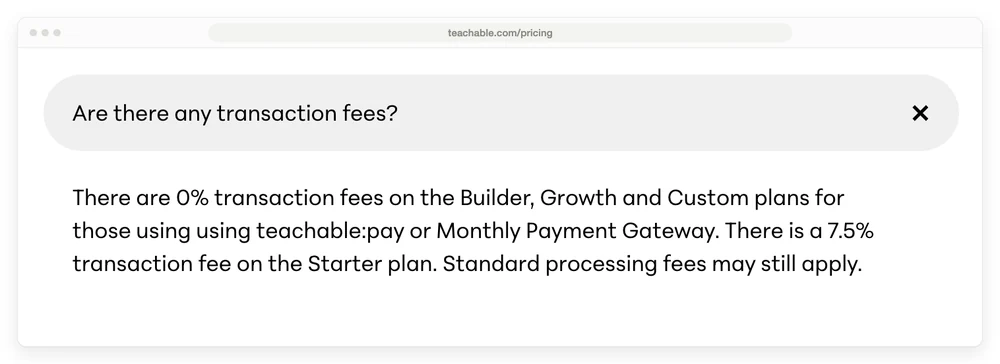
The wording is Teachable’s, doubled “using” and all: “There are 0% transaction fees on the Builder, Growth and Custom plans for those using using teachable:pay or Monthly Payment Gateway. There is a 7.5% transaction fee on the Starter plan. Standard processing fees may still apply.”
So 2 things decide whether you pay 0%: which plan you buy, and how you take the money. Pay through teachable:pay or the Monthly Payment Gateway and you get it. Bring your own provider and you pay the fee.
I checked all 8 guides ranking for this term for the words “teachable:pay” and “Monthly Payment Gateway”. Zero hits on every one of them. Several quote the 7.5% correctly and then present the 0% on Builder as unconditional.
There is a second layer under that. Teachable’s processing fees sit in a collapsed panel headed “Additional plan information”, which a reader has to click open:
- US credit and debit cards: 2.9% + 30 cents
- International cards: 3.9% + 30 cents
- US PayPal: 3.49% + 49 cents
- International PayPal: 4.99% + 49 cents
- Chargeback: $15
- BackOffice fee, optional: 2% to 2.8%
The US card rate matches Stripe’s published pricing of 2.9% + 30 cents, and the PayPal rate matches PayPal’s own fee schedule of 3.49% plus a fixed fee. Those are the going rates rather than a Teachable markup. The one to watch is the international card rate, since 3.9% is a full point above the US rate and most course sellers have overseas buyers.
Who wrote the other lists
8 of the 11 results on page 1 for this search are published by a platform that appears in its own list of alternatives. I went through every result and asked one question of each: does the company publishing this list also sell one of the products in it?
Circle, ProProfs, Teachery, Mighty Networks, ThriveCart, Esmerise, TrainerCentral and Ruzuku all publish a “Teachable alternatives” page recommending the platform they sell.
7 of those 8 put themselves in the top slot or name themselves the overall winner. Ruzuku is the exception and places itself 4th out of 7. Only 2 results on page 1 come from anyone with nothing to sell in the category: a Reddit thread and 1 affiliate blog.
Being upfront about it varies a lot, and that part is more interesting than “everyone is biased”:
- Esmerise says it plainly, in the opening paragraph. “We’re the team behind Esmerise, and over the years we’ve helped hundreds of creators migrate not only from Teachable, but also from the other platforms we’ll discuss here.”
- ProProfs puts it in the byline, which reads “Written by Michael Laithangbam, Author & Editor at ProProfs”.
- Circle never states it, and does publish its own fees. Its list says “Circle consolidates all of that, with transaction fees of 2% on Professional, 1% on Business, and 0.5% on Plus, in addition to Stripe’s standard processing fees”. Circle also gets Thinkific right where Google does not, marking it “0% (TCommerce)”.
- Teachery writes about itself in the voice of a reviewer. The page says “We’ve tested dozens of course platforms over the years, and Teachery consistently impresses us in three key areas”, then closes with “here’s our honest recommendation: If design matters to you and you want predictable costs, Teachery is hard to beat”.
- Mighty Networks, ThriveCart and Ruzuku make no ownership statement anywhere in the body. The domain name is the only signal.
None of this makes those pages worthless. Circle’s list is genuinely detailed and more accurate on Thinkific than Google is. Read them for the detail, and treat the ranking order in a platform’s own list as marketing.
Since I run a checkout tool myself, the same test applies to this page, and the bio at the bottom says so.
Google’s summary has the Thinkific fee wrong
Google’s AI Overview for this search states that Thinkific charges nothing per sale, and that is wrong by default.
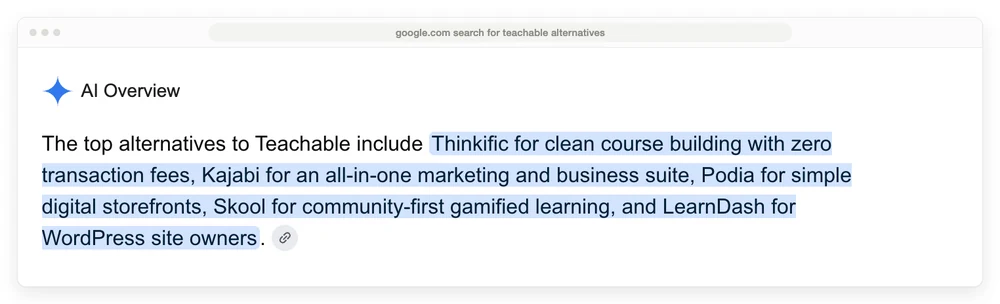
Read the first line. “Thinkific for clean course building with zero transaction fees.”
Thinkific does charge a percentage. Connect your own Stripe to the entry plan and it takes 5%. The rate drops to 2% on Start, 1% on Grow and 0.5% on Expand, and it goes to nothing only if you move to Thinkific Payments.
The number is not printed on Thinkific’s pricing page, which says only that it has “fees in select countries that can be avoided when using Thinkific payments”. We dug into where that number lives in our Teachable vs Thinkific comparison.
Thinkific is still a strong option. The fee just is not zero by default.
The 6 alternatives in detail
Every price below came off the platform’s own pricing page today. Where a page shows annual billing by default, that is what I have quoted, and I have said so.
Thinkific, the closest like-for-like swap
Basic is $40 a month billed annually, Start is $82 and Grow is $164. Unlimited courses on every plan, and 1 community on Basic.
Thinkific is the nearest thing to a straight replacement for Teachable, and the migration is the least painful of the 6. Watch the fee: 5% on Basic through your own Stripe, 0% through Thinkific Payments. Our head-to-head on Teachable vs Thinkific runs the crossover math.
Podia, the simple all-in-one
Podia’s Mover plan is $42 a month billed annually, which the page states as $504 for the year, and it carries a 5% fee. Shaker at $84 a month removes the fee and adds affiliate marketing, upsells and PayPal. Earthquaker is $150.
Podia’s own FAQ is clear about it: “On the Mover plan, we charge a 5% transaction fee. There are no Podia fees on the Shaker or Earthquaker plans.”
Courses, community, downloads, coaching, events, a website and email are on every plan. The email subscriber caps are the real limit, at 100 on Mover and 500 on Shaker. If you are weighing this one seriously, we have a longer piece on Podia alternatives.
Kajabi, the expensive one that does the most
Kajabi’s Basic plan is $143 a month billed annually, Growth is $199 and Pro is $399. The monthly-billed prices are $179, $249 and $499.
Kajabi’s pricing page is headed “No hidden fees. No revenue sharing.” Below that headline sits a row called “3rd Party Payment Provider Fees” charging 5%, 2%, 1% and 0.5%.
Those 4 numbers cover 4 tiers, and only 3 of them appear on the page. Use Kajabi Payments and you pay nothing extra, and bring your own provider and you do.
The 4th tier is cheaper than Basic and the pricing page does not display it, which we covered in our Kajabi pricing breakdown and our Kajabi alternatives roundup.
Kajabi wins on breadth. Email, funnels, landing pages, a website and a community all come in the box. You are paying $1,716 a year at the entry tier for that.
Skool, cheapest to start and dearest to sell on
Skool’s Hobby plan is $9 a month and Pro is $99. Unlimited members, courses, videos and live calls on both.
The fee is where it bites. Hobby takes 10% plus 30 cents of every payment, and Pro takes 2.9% plus 30 cents, rising to 3.9% above $900. Every community you run is billed as its own subscription.
Sell $2,000 a month on Hobby and the 10% costs you $200, which dwarfs the $9. Our Skool pricing deep-dive has the crossover point.
Skool suits a coach whose product is really the group. It is a weak fit if your course is the product and the community is a nice extra.
Circle, community with courses attached
Circle’s Professional plan is $89 a month billed annually and Business is $199. Circle Plus is quote-only.
Transaction fees are 2% on Professional, 1% on Business and 0.5% on Plus, each on top of Stripe. Those percentages sit in the feature comparison table rather than on the plan cards, so scroll past the pricing boxes to find them.
Circle has the better community product of the 2 community-first options here, and it now handles courses, drip content and cohorts. If community is the point, weigh it against Skool using our comparison of community platforms.
LearnDash, the WordPress route
LearnDash is a WordPress plugin, so you own the site and the student data, and you pay for hosting separately. There is no platform cut on your sales because there is no platform in the middle.
What I could not do this run is quote you a price. LearnDash’s site now redirects to a Liquid Web product page, and that page shows no price anywhere in it.
I searched the full rendered page for any dollar figure and found none, and the old /pricing/ path returns a 404. Treat any LearnDash price you read in a roundup as unverified until you see it on the vendor’s own page.
What a $100 sale leaves you
Same sale, same buyer, 7 routes, and the all-in cost ranges from $3.20 to $10.70. Card processing is included in every row here, at the standard US rate of 2.9% + 30 cents, so these figures are lower than the platform-cut-only numbers in our Teachable vs Thinkific piece. The Skool row works differently and is marked: Skool takes payment itself, so its 10% and 30 cents already include the processing the other rows pay separately.
| Route | Platform cut | Processing | Total fees | You keep |
|---|---|---|---|---|
| Teachable Starter | $7.50 | $3.20 | $10.70 | $89.30 |
| Skool Hobby | $10.30, all-in | included | $10.30 | $89.70 |
| Thinkific Basic, own Stripe | $5.00 | $3.20 | $8.20 | $91.80 |
| Podia Mover | $5.00 | $3.20 | $8.20 | $91.80 |
| Circle Professional | $2.00 | $3.20 | $5.20 | $94.80 |
| Thinkific Basic, Thinkific Payments | $0 | $3.20 | $3.20 | $96.80 |
| Kajabi Basic, Kajabi Payments | $0 | $3.20 | $3.20 | $96.80 |
Monthly plan costs are not in this table, which is why Kajabi looks cheap here and is not.
Is there a free alternative to Teachable?
Not a real one, if you want to sell.
Skool at $9 a month is the cheapest paid entry in this group, and it is not free. Systeme.io has a genuinely free tier, and Thinkific and Podia both run free trials rather than free plans. LearnDash has no ongoing platform fee, and you pay for WordPress hosting instead.
The pattern across every free option in this category is the same. You either pay a monthly fee, or you pay a percentage of what you sell. Free plans that let you charge money for a course are rare, and where they exist the percentage is doing the earning.
If you only need to take the payment
Some readers arrive at this search wanting a different platform. Others just want the money to come in, and the course already lives in Google Drive, a Notion page or a private YouTube playlist.
If that is you, none of the 6 above is the right tool. You would be buying a course-hosting product to solve a payments problem.
I should be upfront here: I run CartMango, which is a checkout tool for digital sellers, so treat this section the same way I asked you to treat the other 8 lists.
CartMango does not host courses. There is no student area, no lessons, no drip content and no community today.
Every platform above hosts courses and CartMango does not. Affiliate tools are another gap: Podia’s Shaker plan and Skool’s Pro plan both have them, and CartMango has none. CartMango is building the missing pieces, with affiliate management arriving September 2026 and the course area and community following in October 2026.
What CartMango does today is the checkout: the payment, the order bump, the upsell after the sale, and syncing the buyer into your email tool. CartMango is free until October 2026, then $10 to $30 a year with no cut of your sales.
Course hosting is what separates these 4 rows. Teachable Builder costs $828 a year and hosts the course, Thinkific Basic costs $480 and hosts it, Podia Shaker costs $1,008 and hosts it, and CartMango costs $10 to $30 a year and does not host it yet.
| Route | Cost per year | Cut per sale | Hosts the course |
|---|---|---|---|
| Teachable Builder | $828 | 0% with teachable:pay | Yes |
| Thinkific Basic | $480 | 0% with Thinkific Payments | Yes |
| Podia Shaker | $1,008 | 0% | Yes |
| CartMango | $0 until October 2026, then $10 to $30 | 0% | Not yet, planned for October 2026 |
I am the founder of CartMango, so read that last row with the same suspicion you would apply to Circle ranking Circle first.
The choice is a real one either way. If you want lessons, progress tracking and a student login, buy a course platform and pick from the 6 above. If you have somewhere to put the files already and the missing piece is a payment page, a checkout costs a fraction of that.
How to move your students off Teachable
Moving off Teachable takes 4 steps, and the reason most people never start is the one the same Reddit thread names: “transitioning the courses and students can be a real PIA.”
- Export your students. Teachable gives you a CSV with names, emails, sign-up dates and which courses they are enrolled in. Do this first, while your account is still active.
- Download your videos. Course platforms host your video, and getting it back out is slower than exporting a list. Budget real time here.
- Check who owns the recurring payments. If you sell a subscription or a payment plan, moving platforms can mean those plans stop and every customer has to re-subscribe. Ask the new platform this before you commit, not after.
- Run both in parallel for a month. Keep Teachable alive while the new platform takes new sales. Cancel only once nobody is still finishing a lesson on the old one.
Point 3 catches the most people. Several platforms in this list run subscriptions on their own systems rather than directly on your Stripe account, which means the billing relationship does not travel with you.
Which Teachable alternative should you pick
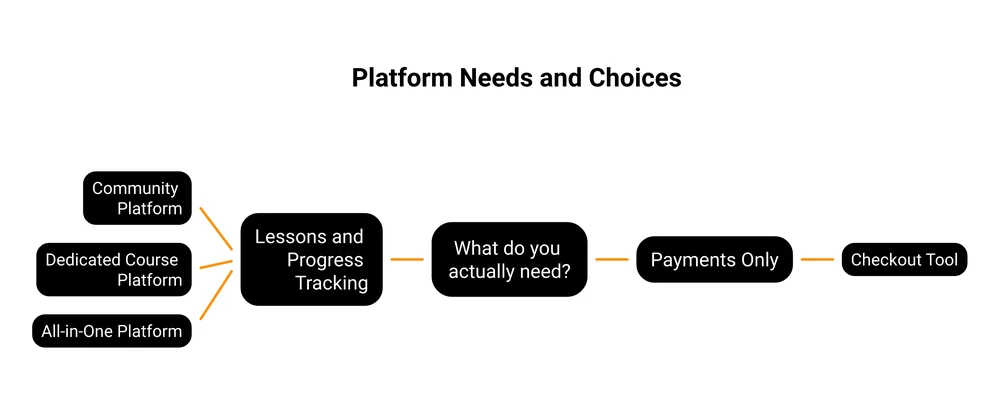
- You want the smallest change: Thinkific, at $40 a month, on Thinkific Payments so the 5% never applies.
- You want everything in 1 subscription: Kajabi at $143 a month, or Podia at $42 if the smaller feature set covers you.
- Your product is really the group: Skool at $9 a month while you are small, Circle at $89 once the 10% starts to hurt.
- You want to own the whole thing: LearnDash on your own WordPress site.
- You already have somewhere to put the course: a checkout on its own, such as CartMango at $10 to $30 a year, and skip the course platform entirely.
Whichever you pick, the platform is the easy part. Our guide to selling online courses covers the part that decides whether any of this pays for itself.
Read the fee on the vendor’s own pricing page before you sign up, and click open anything that is collapsed. That is where both Teachable and Circle keep the numbers that change the answer.
FAQ
Is there a free alternative to Teachable?
Not one that lets you sell without giving something up. Systeme.io has a free tier, and Thinkific and Podia offer free trials rather than free plans. Skool is the cheapest paid entry at $9 a month, with a 10% cut of each sale. LearnDash charges no platform fee, and you pay for WordPress hosting instead.
Is Skool better than Teachable?
For a coach whose product is a group, yes. Skool gives you unlimited members, courses and live calls for $9 a month, where Teachable’s Starter caps you at 100 students. For a course seller, Skool’s 10% cut on Hobby costs far more than Teachable’s 7.5% once you factor in that Teachable’s cut disappears on Builder.
Which is better, Udemy or Teachable?
Udemy and Teachable do different jobs. Udemy is a marketplace that brings you buyers and takes a revenue share, and it sets the price, which often means heavy discounting. Teachable is a platform you pay for, where you keep pricing control and bring your own audience. Pick Udemy for reach and Teachable if you already have people to sell to.
Which is better, Thinkific or Teachable?
Thinkific gives you unlimited courses on a $40 entry plan against Teachable’s 5 products at $29, and no platform cut if you use Thinkific Payments. Teachable is cheaper to start and its 7.5% Starter fee is printed openly. Our full Teachable vs Thinkific comparison has the break-even numbers.
Does Teachable charge a transaction fee on every plan?
No. Teachable charges 7.5% on Starter only. Builder, Growth and Custom are 0%, but only when you take payment through teachable:pay or the Monthly Payment Gateway. Standard card processing of 2.9% + 30 cents in the US applies on top of all of them.
Which Teachable alternative is cheapest?
Skool has the lowest monthly price of the Teachable alternatives here, at $9 a month, and the biggest cut at 10% plus 30 cents per sale. Thinkific Basic at $40 a month on Thinkific Payments is the cheapest route to paying nothing per sale. The cheap-plan-plus-a-cut option stops winning surprisingly early: on Teachable it flips at about $533 a month in sales.
The part you can stop paying
Every platform in this post takes something on the way through, and the version that does not comes with a condition attached. Teachable’s 0% needs teachable:pay. Thinkific’s needs Thinkific Payments. Kajabi’s needs Kajabi Payments.
That layer only exists because the platform is also hosting your course. If your course already has a home and the only missing piece is getting paid, you can drop the layer instead of shopping for a cheaper version of it. CartMango takes no cut of your sales at all.
About the Author

👋 I’m Welly, founder of CartMango (the site you’re on), a checkout platform for digital product sellers. We’ve previously processed $179M+. I also run BirdSend (email marketing tool, 3.1B+ emails sent). On the side I show other non-techie digital sellers how I use AI workflows to automate 50%+ of my operations. Find me on LinkedIn.
Related Reading
- Kajabi vs Teachable: the head-to-head, including the third-party payment fee 5 of 7 ranking pages miss
- Teachable vs Thinkific: where Thinkific keeps the 5% it does not print on its pricing page
- How to sell online courses: for when the platform is sorted and the selling is not
- Membership site platform costs: 8 platforms priced at 100 members, and who keeps your subscribers if you leave
- What course platforms really charge: 7 platforms priced at the same volume, worth a look if none of these Teachable alternatives fits