

A membership site platform does 2 jobs: it locks your content behind a login, and it bills your members on a repeating schedule. Kajabi, Podia, Circle, Mighty Networks and Skool host both halves. MemberPress adds them to a WordPress site, and Memberful adds them to a site on any platform. At 100 members the all-in cost runs from $1,580 to $3,470 a year.
I went through page 1 of Google for this term and added up what each platform would charge me on the same numbers.
The prices did not survive the check. Google’s own AI summary quotes a Kajabi plan at around $149 a month, and no Kajabi plan costs $149. Outseta’s guide lists MemberPress from $179 a year, which is close to a first-year price the company itself says goes back up when you renew.
And none of the 6 guides I read answered a question you only start asking once you have members. If you leave, do your members’ subscriptions come with you?
So this post prices 8 platforms at the same 100 members, shows where the advertised number and the real number split apart, and works out who is holding your members’ card details.
Key Takeaways
- MemberPress advertises $199.50 a year for its Launch plan, and its own footnote says every annual renewal is charged at the full price of $399.
- At 100 members paying $25 a month, the all-in yearly cost ranges from $1,580 to $3,470 across the 8 platforms priced here.
- Skool’s $9 a month Hobby plan lands at the top of that range, because its 10% and 30 cents per payment take $3,360 out of a $30,000 year.
- Podia’s help centre states plainly that cancelling your account cancels every recurring subscription you have and takes your site offline immediately.
- Skool is the merchant of record, so you cannot connect your own Stripe account and the payment relationship stays with Skool.
What a membership site platform actually does
A membership site platform locks your content and collects your money, and most tools do one of those noticeably better than the other.
The first job is the lock. Your videos, posts, downloads and lessons sit behind a login, and the platform decides who gets in based on whether that person is paying. That is the part people picture when they think about a membership.
The second job is quieter, and it is the one that decides your income. The platform has to charge every member on a repeating schedule, retry the cards that fail, and handle upgrades and cancellations. Then it has to keep doing all of that every month for as long as that person stays.
Worth a detour if you are still deciding what to put behind the paywall: the free 5-day Online Selling Mistakes Challenge walks through the pricing and offer errors that show up most often in solo digital businesses.
Tools that started as community apps, like Circle and Mighty Networks, are strong on the lock and treat billing as a bolt-on. Tools that started as WordPress plugins, like MemberPress, are strong on billing rules and leave the look of the thing to your theme.
Before you compare any of them, work out which of the 2 jobs you are actually short of. If you already have a website you like, you are buying billing and access control rather than a new home. If you are starting from nothing, you are buying both.
Club and nonprofit membership software is a separate category
Search for membership software and you will hit a second, unrelated category: tools for associations, clubs and nonprofits. Wild Apricot, Glue Up and MemberClicks live there, and they solve a different problem, which is managing a roster of members with dues, renewals, chapters, events and committees.
They are priced for organisations rather than creators. Glue Up runs from about $1,000 to $15,500 a year.
Everything below is about the creator version: content behind a paywall, paid for monthly by individuals who found you online. If you are running a golf club or a professional body, the tools above are the right shortlist and this is the wrong post.
The 4 kinds of membership site platform
Every creator tool on page 1 of Google falls into 1 of 4 types, and the type decides what you have to bring yourself.
Kajabi and Podia ask you to bring nothing, from $143 and $42 a month. Skool, Mighty Networks and Circle also host everything, from $9, $79 and $89. MemberPress needs a WordPress site you already run and costs $199.50 for the first year, while MemberSpace and Memberful bolt onto a site you built anywhere, from $39 and $49 a month.
| Type | Examples | You supply | Cheapest published rate |
|---|---|---|---|
| All-in-one | Kajabi, Podia | Nothing | Kajabi $143/mo, Podia $42/mo, both billed annually |
| Community-first | Circle, Mighty Networks, Skool | Nothing | Skool $9/mo, Mighty $79/mo, Circle $89/mo billed annually |
| WordPress plugin | MemberPress, Paid Memberships Pro | A WordPress site and hosting | MemberPress $199.50 first year |
| Bolt-on to your site | MemberSpace, Memberful | A site on any platform | MemberSpace $39/mo billed annually, Memberful $49/mo |
All-in-one tools give you courses, email, landing pages and a checkout in 1 subscription. You trade money and flexibility for having 1 login and 1 bill. If courses are the main thing you sell, the fees and the crossover points are laid out in this breakdown of what an LMS for online courses really takes.
Community-first tools put the feed, the chat and the member directory at the centre, then hang the paywall off it. They suit a membership where the value is other members rather than a content library. The real cost of the main ones is compared in this look at what community platforms really cost.
WordPress plugins give you the most control and the most homework. You own the site, you pick the theme, you handle updates, and you pay for hosting on top of the plugin.
Bolt-ons are the quiet option. You keep the Squarespace or Webflow site you already like, drop in a script, and the tool handles login and billing behind it.
The prices on page 1 do not match the pricing pages
Google’s AI summary for this search says Kajabi starts “around $149/month”. Kajabi’s live pricing page shows $179, $249 and $499 a month, or $143, $199 and $399 billed annually. No tier costs $149.
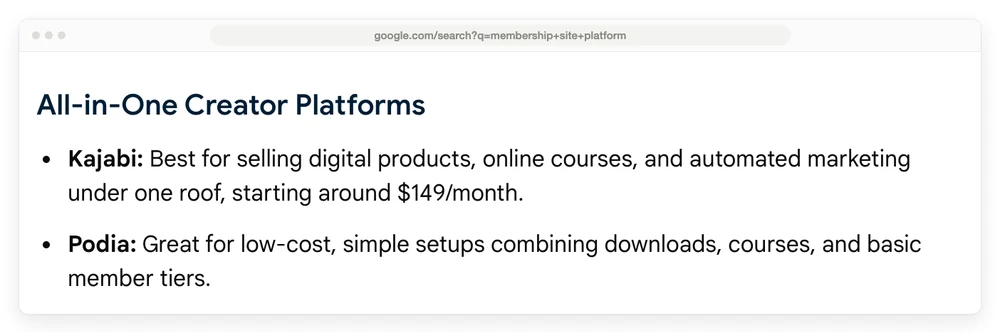
Google’s AI Overview for this search. Read the Kajabi line.
There is a fourth Kajabi tier called Kickstarter at $89 a month, and the pricing page does not draw it. The page’s own source still carries its signup link, so the plan is live and buyable while the comparison table you are reading skips it.
Every “cheapest Kajabi plan” answer written off that page inherits the gap. The full picture is in this Kajabi pricing deep-dive.
The written guides do no better. Outseta lists Kajabi at $119 to $319 a month and says it charges no additional fees, when Kajabi’s own pricing table shows a 0.5% to 2% fee for using your own payment processor.
Outseta also lists Mighty Networks from $41 a month when the page shows $79. Newzenler and Swarm publish no prices at all.
Every number in the next section came off the vendor’s own pricing page.
What 8 membership site platforms cost at 100 members
A membership site platform costs between $1,580 and $3,470 a year once you run 100 members paying $25 a month through it, which is $30,000 a year across 1,200 individual charges.
Prices below use annual billing wherever the platform offers it, because that is what these pricing pages show by default and it is the cheaper choice. Skool, Memberful and Mighty Networks are priced monthly, since that is the only rate they publish.
Card processing is the same for everyone connecting their own Stripe account. Stripe’s published pricing is 2.9% plus 30 cents per domestic card charge, which on this volume is $1,230 a year. Skool is the exception, because it charges 1 blended rate and no separate processing fee.
MemberPress Growth costs $1,579.50 in its first year and Memberful costs $3,288, on identical revenue of $30,000 and identical member numbers.
| Platform | Plan | Platform cut | Year 1 | Year 2 |
|---|---|---|---|---|
| MemberPress | Growth, $349.50 first year | 0% | $1,579.50 | $1,929 |
| Podia | Shaker, $84/mo billed annually | 0% | $2,238 | $2,238 |
| Skool | Pro, $99/mo | 2.9% + 30c blended | $2,418 | $2,418 |
| Mighty Networks | Launch, $79/mo | 2% | $2,778 | $2,778 |
| Circle | Professional, $89/mo billed annually | 2% | $2,898 | $2,898 |
| Kajabi | Basic, $143/mo billed annually | 0% on Kajabi Payments | $2,946 | $2,946 |
| MemberSpace | Starter, $39/mo billed annually | 5% | $3,198 | $3,198 |
| Memberful | Standard, $49/mo | 4.9% | $3,288 | $3,288 |
3 things fall out of that table that no roundup mentioned.
The cheapest headline price is the most expensive platform. Skool’s Hobby plan costs $9 a month, which is $108 a year, and every guide calls it the budget pick. Skool takes 10% plus 30 cents on every payment, so on 1,200 charges worth $30,000 that is $3,000 plus $360.
Add the plan and the total is $3,468, which is more than any row in the table. Skool’s full fee schedule, including a rate its pricing page leaves off, is in this Skool pricing breakdown.
MemberSpace’s 2 plans cross over at $24,000 a year. Starter is $39 a month with a 5% cut, Growth is $99 a month with a 2% cut, and at $24,000 of member payments they cost exactly the same. Below that Starter wins, above it Growth does. At the $30,000 used here, Growth would save $180 a year.
Only 1 row moves between year 1 and year 2. Everything hosted charges the same next year. MemberPress goes up, and the reason deserves its own section.
The price on the pricing page is often a first-year price
MemberPress lists 3 plans at $199.50, $349.50 and $499.50 a year. Above each price sits a struck-through number: $399, $699 and $999.
Under the pricing grid, in small text, MemberPress writes: “Special introductory pricing, all annual renewals are at full price.”
So the $199.50 Launch plan is a first-year price. Year 2 is $399, and the $349.50 Growth plan renews at $699. That is a 100% increase, disclosed, on their own page, in a footnote.
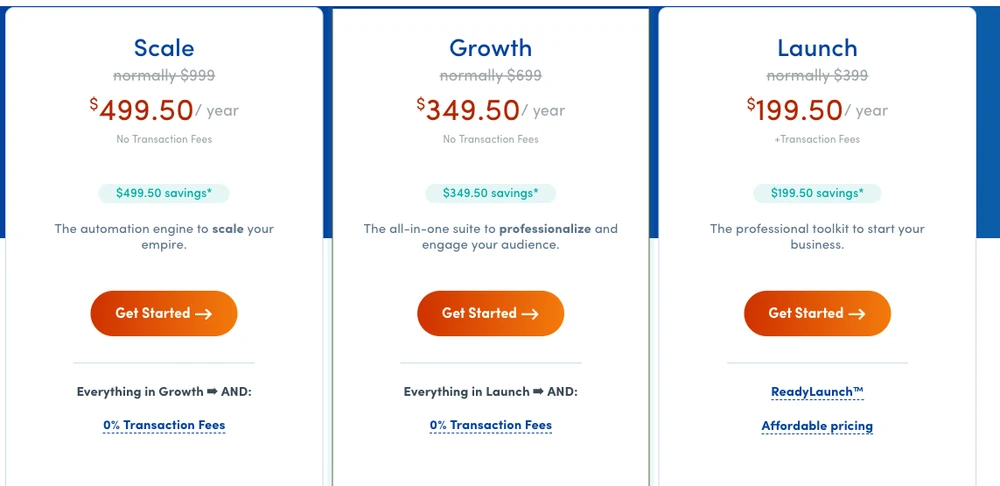
MemberPress’s own pricing grid. The struck-through numbers are what you pay from year 2 onward.
Somebody spotted this and asked about it in public. In the r/Wordpress thread that ranks on page 1 for this very search, a user called runningwithwolvs wrote:
Does nemberpress renew at the full price. 179 a year for basic seems ok but “full price” is $359 so wondering if they ever do charge the full amount in renewal?
Those were the numbers on the page when that was posted in 2024. Both have risen since, and the structure has not changed.
Nobody in the thread answered. I checked all 25 comments, and that question has no replies.
None of the guides ranking above or below it answered either. The answer was sitting in MemberPress’s own footnote the whole time, and the answer is yes.
MemberSpace runs a version of the same thing. Its Starter plan shows $24 a month with a “38% off” badge against a $39 price, so the $39 is the number to plan around.
This matters more on a membership than on almost anything else you buy, because a membership is a thing you run for years. Recurly’s benchmark data, drawn from its own network of subscription businesses, puts median annual churn at 3.60% and calls 2% to 4% the range where well-run subscription businesses sit. Members who stay that long mean a platform bill you keep paying that long too.
Before you sign up anywhere, check whether the plan price you are looking at is a promotional rate. Look for a struck-through number, an asterisk, or the words “introductory” and “renewal” near the price.
A percentage is a permanent cost, and a membership is where it hurts
A percentage fee on a membership repeats every month for as long as the member stays, which makes it behave nothing like the same percentage on a one-off sale.
Sell a $50 ebook once and a 5% platform cut costs you $2.50. That is the whole story.
Sell a $25 a month membership and a 5% cut costs you $1.25 in month 1, then again in month 2, then every month that member stays. A single member who sticks around for 3 years hands the platform $45 out of your $900.
Multiply that by 100 members and the percentage starts to outweigh the plan fee. On the table above, the platform’s cut is bigger than the plan fee on 3 of the 8 rows: Skool Pro, MemberSpace and Memberful. On Skool’s Hobby plan the plan costs $108 and the fees cost $3,360, which is 31 times the price you signed up for.
Recurring billing genuinely does cost the platform more to run, so part of the percentage is real. Stripe charges 0.7% of billing volume for Stripe Billing, its subscription engine, on top of ordinary card processing. That cost gets passed on somewhere.
The part worth watching is a percentage sitting on a plan that already looks expensive. Kajabi charges no cut if you use Kajabi Payments, then 2% on Basic, 1% on Growth and 0.5% on Pro if you connect your own processor instead.
Picking your own Stripe on Basic moves the yearly total from $2,946 to $3,546. Cheaper routes to the same job are in these Kajabi alternatives.
Who holds your members’ card details
The charge sits in whichever Stripe account the platform used to create it, and the platform decides what happens to it when you go. Podia’s help centre spells that out in 1 line. Its article on cancelling your account says that when your subscription is cancelled, “all recurring subscriptions and payment plans will be canceled”, that future payments “will stop”, that they “cannot be reinstated”, and that your site “will go offline immediately, and customers will no longer be able to access the content they purchased.”
Read that again with a membership business in mind. Cancelling Podia wipes out every paying member you have, and locks the ones who already bought out of the thing they bought.
The reason is worth understanding, because it applies well beyond Podia. When a member enters their card, a repeating charge gets created against it in some Stripe account.
Podia’s own documentation explains that those subscriptions are “tied to the specific Stripe account that was connected to your Podia account at the time they were created”, and that they “can’t be migrated between Stripe accounts”. The account holding that charge, and the software allowed to manage it, decide whether you can ever leave.
Skool removes the choice. Its payments documentation says every charge runs on Skool’s merchant account rather than yours, and that Skool is the merchant of record, so you cannot connect your own Stripe account at all.
Mighty Networks goes the other way and says you get paid directly through your own Stripe. It also warns hosts never to edit their plans inside Stripe, because doing so “can cause serious issues, including loss of subscribed members and deletion of Plans”, and disconnecting Stripe is not self-serve at all: you have to message their team.
Of the 8 platforms priced above, only Podia states plainly what happens to your members’ subscriptions when you leave, and what it states is that they end.
| Platform | Whose account holds the charge | What it publishes about leaving |
|---|---|---|
| Podia | Yours | Cancelling cancels every subscription, site goes offline immediately |
| Skool | Skool’s, as merchant of record | You cannot connect your own Stripe at all |
| Kajabi | Kajabi’s on Kajabi Payments, yours on a connected processor | Not published |
| Mighty Networks | Yours, paid directly through Stripe | Not published, and disconnecting needs a support request |
| Circle | Yours | Not published |
| MemberPress | Yours, on your own Stripe or PayPal | Not published |
| Memberful | Yours, on your own Stripe | Not published |
| MemberSpace | Yours, on your own Stripe | Not published |
| CartMango | Yours | Subscriptions keep billing if you leave |
“Not published” means what it says, so those companies do not answer it where a buyer would look and I am not going to guess on their behalf. Connecting your own Stripe is necessary for keeping your members without being enough on its own, which is exactly what Podia demonstrates.
So ask any platform you are close to choosing a direct question before you sign up: if I cancel today, do my existing members keep getting charged, and do they keep their access?
I should be upfront about the last row, because I run CartMango. CartMango is a checkout platform. It protects the files your buyers download, so a shared link is no use to anyone who has not paid, and it runs the recurring billing behind a subscription.
What CartMango does not have yet is a course library or a community for members to log into, and both are scheduled to launch in October 2026.
What CartMango does do is keep your recurring payments running if you cancel, which is the specific thing this section is about. If you are weighing recurring income models more broadly, the options are laid out in this list of recurring revenue businesses.
What to check besides the price
Cost and portability are the 2 things the ranking guides handle worst, which is why they take up most of this post. The rest of the decision comes down to 4 checks you can run yourself in an afternoon.
The free trial, and how long it runs. Podia gives 30 days. Circle and Mighty Networks give 14, and Mighty Networks asks for no card. MemberSpace gives 7 with no card.
Memberful charges nothing until you go live and take your first payment, and MemberPress offers a 14-day money-back guarantee rather than a trial. A trial that ends before you have built anything tells you nothing, so start it the week you plan to build.
Getting your existing members in. Moving out is hard, and moving in is its own job. Ask whether the platform imports members with their active subscriptions or only as a list of email addresses, because the second one means asking every member to re-enter a card.
Email subscriber caps, if the platform includes email. Podia’s plans cap you at 100, 500 and 1,000 email subscribers as you move up the tiers, which is low enough to matter on the plan most people start on. Check the cap before you count the email tool as a saving.
How much of the look you control. WordPress plugins give you everything, community-first platforms give you a logo and some colours, and bolt-ons inherit whatever your site already looks like.
I have deliberately not written a pros-and-cons paragraph for each of the 8 platforms. Every guide on page 1 already does that, they mostly agree with each other, and none of them price the thing properly, which is where the effort went here instead.
What people running these actually say
3 patterns show up in the r/Wordpress thread, and they are worth more than a review site because nobody in it earns a commission.
MemberPress dominates the recommendations. 8 separate commenters name it unprompted, including one who reports using it on 2 client sites and another who writes that it “works great with Stripe.”
Paid Memberships Pro has the loyal minority. 1 commenter reports using it “for about 5 years now on 4 sites” and calls it expensive and endlessly extendable in the same breath.
And the WordPress route carries WordPress problems. A commenter reports that Paid Memberships Pro version 3.3.2 stopped their Elementor 3.25.10 pages from loading, and that deactivating the plugin fixed it. That class of conflict is the real cost of the cheapest option on the table, and it never shows up in a pricing comparison.
Something else stands out in that thread. Across 25 comments, transaction fees and renewal pricing come up once between them, in the unanswered question above. People warn each other about plugin conflicts and hosting, then hand over a card without asking what the platform takes.
How to pick, by what you are selling
Start from what your members are paying for, because that decides which of the 2 jobs you need done well.
A content library or a course. You need the lock more than the feed. Podia Shaker at $2,238 a year all-in is the cheapest hosted route in the table, and MemberPress Growth is cheaper again if you already run WordPress. The wider question of packaging and selling it is covered in this guide to selling online courses, and if you are earlier than that, start with what an online course is.
A community. You need the feed, the chat and the member directory, so Circle, Mighty Networks and Skool are the real shortlist. Price them at your own member count, because 2% and 10% diverge fast.
A site you already have and like. Bolt on MemberSpace or Memberful rather than rebuilding. Run the MemberSpace plan math at your own revenue, since the 2 plans cross over at $24,000 a year.
Recurring income you intend to keep for years. Ask about subscription portability before you ask about anything else. A platform you cannot leave is a platform that can raise its price knowing you will pay it.
Whichever way you lean, 4 questions are worth asking in a support chat before you hand over a card. They take a few minutes and none of them are answered on a pricing page:
- Is this price promotional, and what does it renew at?
- If I cancel, do my existing members keep getting charged, and do they keep access?
- Does your percentage sit on top of card processing, or does it include it?
- What is the fee on a payment above $900, and on a card issued outside my country?
FAQ
What is the best membership site platform?
There is no single winner, because the cheapest option changes with your member count. At 100 members paying $25 a month, MemberPress Growth is cheapest at $1,579.50 in year 1, Podia Shaker is the cheapest fully hosted option at $2,238, and Memberful is the dearest in the table at $3,288. Price your own numbers rather than trusting a ranking.
Is there a free membership site platform?
Patreon and Skool’s Hobby plan come closest, and both replace the monthly fee with a 10% cut of your revenue. That is cheaper than a paid plan while you are small and more expensive once you pass roughly $15,000 a year. A self-hosted WordPress site with a free membership plugin is the only genuinely free route, and it costs you setup time and hosting instead.
How much does a membership site platform cost?
Between $9 and $179 a month for the plan, plus a platform cut of 0% to 10%, plus card processing of about 2.9% and 30 cents per charge. On $30,000 a year of member payments the all-in total lands between $1,580 and $3,470 depending on which combination you pick.
Do I keep my members if I switch platforms?
Your member list, yes. Their active subscriptions, often not.
Podia states that cancelling your account cancels every recurring subscription and takes your site offline immediately. Skool is the merchant of record, so the billing relationship was never yours. Most of the others do not publish an answer, so ask them directly before you sign up.
Do I need a website to run a membership site?
No. Kajabi, Podia, Circle, Mighty Networks and Skool host everything, including the sales page. You only need your own website if you choose a WordPress plugin like MemberPress, or a bolt-on like MemberSpace that layers onto a site you built somewhere else.
What is the difference between a membership site and an online course?
A course has an ending and a membership keeps going. A course sells 1 body of material for 1 payment, while a membership site platform charges on a repeat schedule and owes the member something new each month. Plenty of creators sell both, which is why the all-in-one tools bundle course hosting and membership access together.
Before you hand over your members
Of everything above, the part that is hardest to undo is where your members’ payments live. A platform that ends those subscriptions when you leave is holding the only asset a membership business really has.
That is the problem CartMango was built around. Leave CartMango and every subscription you created keeps billing, and the money keeps arriving in your own Stripe or PayPal account.
CartMango runs the checkout, the protected file delivery and the recurring billing rather than the course library, so it sits alongside whatever you use to host your material. It is free until October 2026, then $10 a year.
About the Author

👋 I’m Welly, founder of CartMango (the site you’re on), a checkout platform for digital product sellers. We’ve previously processed $179M+. I also run BirdSend (email marketing tool, 3.1B+ emails sent). On the side I show other non-techie digital sellers how I use AI workflows to automate 50%+ of my operations. Find me on LinkedIn.
Related Reading
- Community platform for creators: the real cost of Skool, Circle, Mighty Networks, Heartbeat, Patreon and Discord
- LMS for online courses: real fees for 7 course platforms and the crossover point on every entry plan
- Skool pricing: Hobby vs Pro, and the fees the pricing page leaves off
- Kajabi alternatives: 8 options priced all-in, including the hidden $89 tier
- Best recurring revenue businesses: 20 models that bill on a repeat schedule