

Skool charges $9 a month for Hobby or $99 a month for Pro, billed separately for each community you run, after a 14-day free trial. Both plans take a cut of every payment: 10% plus 30 cents on Hobby, 2.9% plus 30 cents on Pro, rising to 3.9% on transactions above $900.
Skool pricing looks like the simplest question you could ask about a community platform. 2 plans, 2 numbers, done.
Then you open the help docs and find a third number. And a fourth.
I have been selling things online for a long time and this pattern still catches me. A platform advertises a clean monthly price, and the money that actually leaves your account gets decided somewhere else, in a support article the pricing page never links to.
Skool does this in 3 places. The per-transaction cut is bigger than the headline number suggests, and there is a higher rate that switches on for expensive products.
Then there is a 30% commission on certain members that most reviews of this platform never mention at all.
Below is every number, where Skool states it, and what you are left with after each one.
Key Takeaways
- 2 plans, billed per community. Hobby is $9 a month, Pro is $99 a month, and every community you run is a separate subscription.
- The advertised fee is not the full fee. Skool’s pricing page leaves out the 30 cents per transaction and the higher rate on sales above $900.
- Growth Boost takes 30%. Skool charges a 30% commission on members it sends you, and 2 of its own help docs disagree about whether that is switched on by default.
- Pro starts paying for itself at about $1,268 a month in member payments. Below that, the $9 Hobby plan costs less overall even with its 10% cut.
- You cannot connect your own Stripe account. Skool is the merchant of record, so it owns the payment relationship and pays you out once a week.
Skool pricing in 2026: 2 plans, 2 very different fee structures
Skool sells 2 plans. Both come with a 14-day free trial, and both are recurring subscriptions after that.
Hobby is $9 a month. You get unlimited members, unlimited courses, unlimited videos and unlimited live calls. What you do not get is a custom URL or affiliate tools, and every payment your members make carries a 10% transaction fee.
Pro is $99 a month. Same unlimited everything, plus the custom URL and affiliates, and the transaction fee drops to 2.9%.
Before you pay for any platform by the month, it is worth knowing which leaks are costing you the most. The free 5-day Online Selling Mistakes Challenge walks through the 5 that come up most often with solo sellers.
Switch the pricing page to yearly billing and the numbers become $7.50 a month for Hobby and $82 a month for Pro, with “2 months free” printed above the toggle.
That last part deserves a second look. 2 months free on a $99 plan means paying for 10 months, which is $990 a year, or $82.50 a month. The page rounds that down to $82. It is a small thing, and it is the kind of small thing worth confirming on the checkout screen before you commit to a year.
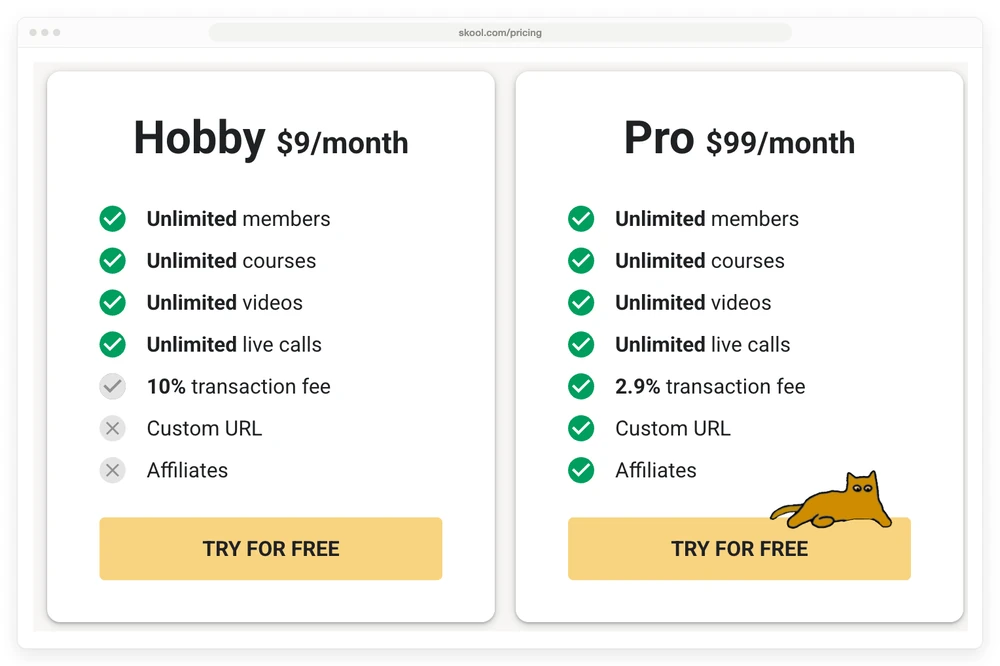
Look at the Hobby column in that screenshot. The tick next to “10% transaction fee” is grey rather than green, and Custom URL and Affiliates both carry a cross. Skool is being upfront that Hobby is the stripped-back option. The 10% is doing most of the work there.
Every plan is priced per community, not per account
This is the first cost that surprises people, and it is easy to miss because the pricing page never spells it out.
Skool’s billing sits on the group, not on your account. Its cancellation doc, titled “How to cancel my Skool group subscription or free trial?”, walks you into the settings of “the respective group”. Its payments FAQ answers what happens “if you have multiple communities” by explaining that all of their payouts land in the same bank account.
Run 2 paid communities and you are paying 2 subscriptions. 3 communities on Pro is $297 a month, not $99.
The transaction fee Skool’s pricing page does not show you
The pricing page says “10% transaction fee” and “2.9% transaction fee”. Skool’s own payments help doc says something more detailed.
Here is what that doc states, word for word, under a heading that reads “Skool charges”:
- Pro plan: 2.9% + 30c per transaction for transactions up to $899 USD
- Pro plan: 3.9% + 30c per transaction for transactions above $900 USD
- Hobby plan: 10% + 30c per transaction for all transactions
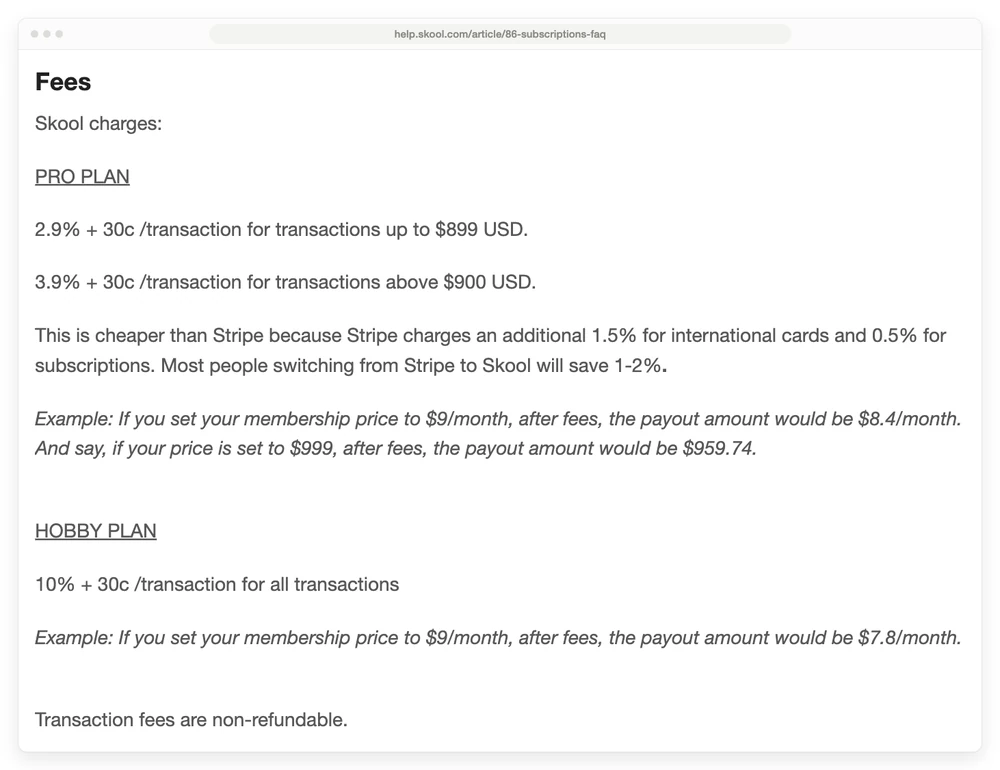
2 things are missing from the pricing page. The 30 cents per transaction, which barely registers on a $99 sale and matters a lot on a $9 one. And the 3.9% rate, which is a full percentage point higher and applies to anything priced at $900 or more.
If you sell a $997 cohort or a $1,500 mastermind seat, the 2.9% you read on the pricing page is not the rate you will pay.
Skool is not hiding these numbers. They sit in Skool’s payments help doc that anyone can read, and Skool even works the math for you in 2 examples.
They are simply not on the page where you decide whether to sign up. Of the 5 written guides ranking on page 1 of Google for this term, 2 mention the 3.9% rate and 3 do not.
Skool’s claim that this beats Stripe
The same help doc makes a comparison worth repeating, because it is a fair point and it cuts in Skool’s favour:
“This is cheaper than Stripe because Stripe charges an additional 1.5% for international cards and 0.5% for subscriptions. Most people switching from Stripe to Skool will save 1-2%.”
Both of those Stripe numbers are real. Stripe’s published pricing lists 2.9% + 30c for domestic cards, then adds 1.5% for international cards, 1% where a currency conversion is needed, and Stripe Billing starts at 0.5% on top.
So Skool’s 2.9% + 30c really is flat, whoever your member banks with. For a membership selling worldwide, that is a genuine advantage and it belongs in the comparison.
It is worth understanding how Skool can do that, because it tells you exactly who the saving is for.
How Skool can quote 1 rate for every card
The 1.5% comes from the card networks. It exists because your member’s bank sits in another country, which costs more to settle, and no platform can change where somebody’s card was issued.
So Skool is not making that fee disappear. Somebody still pays it, and it is not you.
Here is what Skool has actually published. Its payments doc says every charge runs on Skool’s merchant account rather than yours, and that Skool is the merchant of record. So the card volume of every community on the platform lands in 1 account instead of thousands of separate ones. Separately, Stripe’s pricing page says it offers custom rates to businesses with large payment volume.
What Skool pays Stripe is not public, and I am not going to guess at it. The part that affects you is the part Skool does publish: whatever card your member turns up with, you are quoted 2.9%, and the difference between a cheap domestic card and an expensive international one stops being your problem.
Worth saying plainly, because it is easy to read this section as a criticism: being the merchant of record also means Skool takes on the chargeback risk and the sales-tax filing that would otherwise be yours. A single blended rate is a normal way to price that, not a trick.
Which means the saving depends entirely on your buyers
Skool says most people switching will save 1% to 2%. That is true for some sellers and worth nothing to others, and the deciding factor is where your members bank.
| Your members | Running your own Stripe | On Skool Pro | Who wins |
|---|---|---|---|
| Mostly overseas | 2.9% + 1.5% = 4.4% + 30c | 2.9% + 30c | Skool, by about 1.5% |
| Mixed | somewhere in between | 2.9% + 30c | Usually Skool |
| All domestic | 2.9% + 30c | 2.9% + 30c | Nobody, the rates are identical |
Read the bottom row twice if you sell mainly to 1 country. At that point Skool’s transaction fee is not saving you anything at all, and you are still paying $99 a month for the plan and handing the payment relationship to somebody else.
There is 1 more limit on the word “flat”. The 2.9% is the same for every card, but only up to $899. Price anything at $900 or more and the rate becomes 3.9%.
Growth Boost: the 30% commission, and a toggle worth checking
Here the arithmetic changes. 4 of the 5 written guides on page 1 of Google do not mention Growth Boost at all, and the 5th describes a 30% commission under a different name, without saying whether it is switched on for you.
Skool runs a promotion feature called Growth Boost. Your community gets pushed to the top of Skool’s Discovery search results, and Skool runs paid ads for it off-site at its own cost. If a member joins through that promotion, Skool takes a 30% commission.
Members you bring in yourself cost you nothing extra. That part is clean, and Skool says so plainly.
2 details make this bigger than it first sounds.
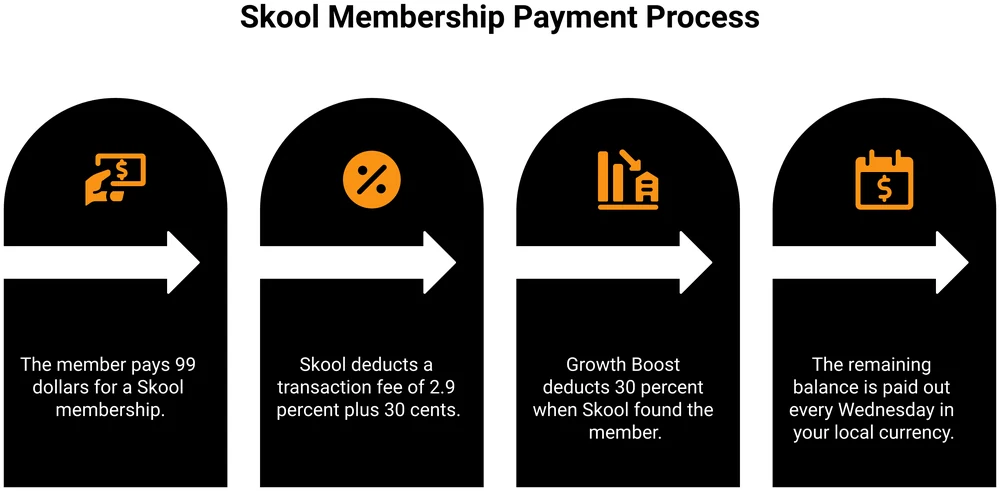
The first is that the cut is not a one-off. Skool’s payments FAQ says the Growth Boost commission “applies to recurring charges, as long as the member’s subscription is active”. Skool spells out that it deducts the commission “and fees”, so a member who joins through Discovery on a $99 a month community leaves you about $66 a month, for as long as they stay.
The second is the default, and here Skool’s own documentation contradicts itself.
| Skool doc | What it says about the default | What that implies |
|---|---|---|
| Payments FAQ | “Growth Boost is default ON. It can be toggled OFF at any time from SETTINGS > Discovery.” | Already running unless you turn it off |
| Discovery FAQ | “Upon toggling ON, the group will be shown to your ideal member in Discovery results and off-site ads.” | Something you opt into |
The payments doc says it is already on. The discovery doc describes it as something you switch on. The payments doc is the more recent of the 2 and states the default outright.
I am not going to tell you which one is right, because Skool’s own help centre does not agree with itself. What I will say is that a 30% recurring commission is worth 20 seconds of your time: open Settings, then Discovery, and look at the toggle yourself.
1 more line from the Discovery docs is worth knowing while you are in there. Skool lists “payments off-platform” as a ranking penalty in Discovery. Take payments somewhere else and your visibility inside Skool’s own search goes down.
What you actually keep on each plan
Numbers beat adjectives. Here is what lands in your account on each plan at 4 common price points, using Skool’s stated fees.
| Price you charge | Hobby fee | You keep on Hobby | Pro fee | You keep on Pro |
|---|---|---|---|---|
| $9 a month | $1.20 | $7.80 | $0.56 | $8.44 |
| $49 a month | $5.20 | $43.80 | $1.72 | $47.28 |
| $99 a month | $10.20 | $88.80 | $3.17 | $95.83 |
| $999 one-off | $100.20 | $898.80 | $39.26 | $959.74 |
The $999 row is the one to sit with. On Pro that sale crosses the $900 line, so it is charged at 3.9% rather than 2.9%, which costs you an extra $10 against the rate printed on the pricing page.
3 of these figures come from Skool’s own worked examples rather than mine. Its help doc says a $9 membership pays out $7.80 on Hobby and $8.40 on Pro, and that a $999 price pays out $959.74.
Two of those land exactly on my rows. The third is 4 cents out: Skool prints $8.40 where its own stated formula gives $8.44.
Skool appears to round that example down to 1 decimal place. A tiny thing, and a fitting one for a post about numbers that are harder to pin down than they look.
Remember that none of this includes the plan itself. On Hobby you are $9 a month down before your first member pays you anything. On Pro, $99.
Hobby or Pro: where the switch pays off
The trade is simple once you strip it back. Pro costs $90 a month more than Hobby, and saves you 7.1% of every payment you take, since 10% drops to 2.9%. The 30 cents is identical on both plans, so it cancels out.
Divide $90 by 7.1% and you get $1,268. That is the monthly volume where the 2 plans cost you the same.
- Under about $1,268 a month in member payments, Hobby is cheaper, even with the 10% cut.
- Over that, Pro is cheaper, and the gap widens fast as you grow.
Put it in members rather than dollars and it gets more useful. On a $49 a month membership, the crossover lands at about 26 paying members.
At 25 members Hobby costs you $139 a month all in, against $142 on Pro. At 26 members Pro edges ahead.
So if you are launching something new, start on Hobby. It stays the cheaper plan until you have roughly 2 dozen paying members, and it lets you find that out for $9 a month instead of $99.
Setting that membership price is its own problem, and it is the one most people rush. The same thinking in our guide to how to price digital products applies to a community: the number you pick changes which plan you should be on, not the other way round.
Which brings me to the part I got wrong myself, years ago.
I built an online training course, spent hundreds of hours on it, and launched it to fewer than 5 buyers. I almost quit the whole online thing over it.
I had built the whole thing before checking that anyone wanted it. Any platform would have given me the same result.
What I do now is validate with payment first. Asking “would you buy this” gets a yes from almost everyone, because saying yes is free. Putting up a page that says “you can buy it here” gets you the truth. A person reaching for their card is the only answer that means anything.
That is why the Hobby plan matters more than its position at the bottom of the pricing page suggests. $9 a month is cheap enough to test whether people will pay to be in your community before you commit $1,188 a year to hosting it. If you are still costing out the thing itself, we broke that down in what it costs to create an online course.
What Skool costs across a full year
Monthly numbers hide the size of the commitment. Here is the same decision annualised, at 3 realistic stages, with the plan fee and the transaction fees added together.
| Your stage | Monthly member payments | Best plan | Total cost for the year |
|---|---|---|---|
| Just launched, 5 members at $49 | $245 | Hobby | $108 plan + $312 fees = $420 |
| Growing, 25 members at $49 | $1,225 | Hobby | $108 plan + $1,560 fees = $1,668 |
| Established, 60 members at $49 | $2,940 | Pro | $1,188 plan + $1,239 fees = $2,427 |
The middle row is the uncomfortable one. At $1,225 a month coming in, Skool’s cut is $1,560 a year, which is more than the Pro plan costs outright, and you are still on the $9 plan because switching would cost you more.
That is the 10% doing its work. The deal is still fair at that size. It is just a far bigger number than “$9 a month” prepares you for.
6 costs that never appear on the Skool pricing page
The plan fee and the transaction fee are the 2 numbers everyone quotes. These 6 are the ones that decide how the platform actually feels to run.
1. You cannot use your own Stripe account. Skool’s payments FAQ is blunt: “This is NOT a regular Stripe account.” All payment processing happens on Skool’s merchant account. Skool creates a new Stripe Express connection purely to push money to your bank. Your existing Stripe account, with its history and its customer records, stays out of it.
2. Skool is the merchant of record. Per its payments FAQ, Skool adds EU VAT on top of your price, collects it, and files it. In its own words, sales tax is “Skool’s responsibility, not yours”. For a solo seller with EU members that removes a genuine headache, and it is one of the stronger reasons to pick Skool. It also means Skool, not you, is the legal seller.
3. Payouts are weekly, and the first one can take 14 days. Money lands every Wednesday. The first payout runs through verification checks and may take up to 14 days to reach your bank. Payouts arrive in your local currency, and Skool does not support USD deposits outside the US.
4. There are no refunds. At all. Skool’s payment terms say no refunds are given for full or partial billing periods, or for not using the platform. Transaction fees are separately marked non-refundable. Its own summary reads: “You can cancel anytime, but Skool doesn’t issue refunds.”
5. Cancelling archives your community. You keep access until the end of the billing period, then the group is archived and the content becomes read-only. Nothing new can be added. Your members’ subscriptions live on Skool’s merchant account, not yours, so leaving is not a matter of pointing them somewhere else.
6. Existing members keep their old price forever. Skool calls this grandfathering, and it works exactly as it sounds. Raise your community from $99 to $150 and every current member stays at $99. Run it free first and then start charging, and everyone who joined during the free period stays at zero, permanently.
That last one is a real planning decision, not a footnote. In an r/Entrepreneur thread about a Skool community pulling in $186k a year, 1 commenter running their own group for new YouTubers put it plainly: if a community started out free, anyone who joined then is still paying nothing. They described going free first to build a base, then charging for access afterwards.
That works. Just go in knowing the free members are free for good.
How Skool pricing compares if all you need is to get paid
Skool is a community platform with courses attached. If that is what you want, the honest answer is that Skool does it and does it well, and the comparison below is not going to talk you out of it.
But a lot of people land on Skool because they need somewhere to charge money, and the community part is a bonus they may or may not use. If that is you, the platform bill is worth looking at next to the alternatives.
| Platform | Plan | Platform cost | Its own stated cut per sale | Community + courses today |
|---|---|---|---|---|
| Skool | Hobby | $9 a month, $7.50 on yearly | 10% + 30c | Yes |
| Skool | Pro | $99 a month, $82 on yearly | 2.9% + 30c, 3.9% over $900 | Yes |
| Circle | Professional | $89 a month on annual billing | 2% | Yes |
| Mighty Networks | Launch | $79 a month on annual billing, $950 a year | 2% | Yes |
| CartMango | Base | Free until October 2026, then from $10 a year | 0% | Not yet |
I should be upfront that CartMango is mine, so read that last row with that in mind. It is a checkout platform for digital sellers, not a community platform, and on community and course hosting the other 4 rows beat it outright today, with the features to match arriving in October 2026.
2 notes so the table is read on the right basis, and the second one is the reason a fee table like this is so easy to get wrong.
The percentages are not measured the same way. Skool’s covers card processing, because Skool is the merchant of record and runs the charge on its own account. CartMango’s 0% is the platform’s own cut, so your Stripe or PayPal fees sit on top of it.
Circle and Mighty Networks both list their percentage as a platform transaction fee, separate from payment processing. Before you rank any of these by percentage, confirm with each one whether card processing sits on top.
Both of those 2% figures are hidden behind an expander. Circle’s pricing page shows plan prices and a vague “lower transaction fees” bullet on its most expensive tier. Mighty Networks shows 3 plan cards. Neither states a fee until you open the “compare plan features” table further down, where Circle lists 2%, 1% and 0.5% across its 3 tiers and Mighty Networks lists exactly the same 3 numbers across its own.
I nearly published this post saying that neither of them discloses a transaction fee at all, because the collapsed page really does read that way. Which is the same trap Skool’s own pricing page sets, in a different costume.
A paid community is one of the recurring revenue businesses worth building, and it is not the only way to charge people every month. A paid newsletter charges for the same relationship with far less platform overhead, and if a course rather than a community is what you are really selling, how to sell online courses covers the routes that do not need a monthly community fee at all.
If you want the wider set of options in this category, our Stan Store alternatives breakdown sorts them by what you actually need, and Gumroad’s pricing is the closest comparison for a per-sale fee with no monthly plan.
Is Skool worth the money?
The answer turns on which number is your constraint, so here is how I would split it.
Skool earns the $99 if the community is the product. The gamification, the leaderboards and the genuinely busy free groups are the reason people stay, and no spreadsheet in this post captures that. Add the merchant of record handling and the flat international rate, and for a membership with buyers across many countries Skool’s per-sale cut is competitive.
Skool is expensive if you are selling 1 product to a small list. At 10 members on a $49 membership you are handing over $99 a month plus 2.9% for a set of features you are not using yet. Start on Hobby. Move to Pro when the math above says to.
Look elsewhere if you need to own the payment relationship. No own Stripe account, subscriptions running on somebody else’s merchant account, an archived group when you stop paying, and a Discovery ranking penalty for taking payments off-platform. Those 4 point the same direction.
If keeping your recurring revenue portable matters to you, that is worth weighing before you migrate a list across.
Skool is a good platform with a firm opinion about how it runs: excellent at community, and in charge of the money at every step.
FAQ
How much is a Skool membership?
For a community owner, Skool costs $9 a month on the Hobby plan or $99 a month on Pro, after a 14-day free trial. On yearly billing the pricing page shows $7.50 and $82 a month. For a member joining someone else’s community, the price is whatever that owner sets, from free upwards.
How much does Skool take from creators?
On Pro, 2.9% plus 30 cents per transaction under $900, and 3.9% plus 30 cents above it. On Hobby, 10% plus 30 cents on everything. On top of that, Skool takes a 30% commission on any member who joins through its Growth Boost promotion, for as long as that member’s subscription stays active.
Does Skool have a free plan?
No. There is a 14-day free trial on both plans, and no permanent free tier for community owners. Joining someone else’s Skool community can be free, since owners set their own prices, but running one costs at least $9 a month.
Is Skool pricing per group or per account?
Per group. Skool’s billing and cancellation docs are written around a single group’s subscription, and running 2 paid communities means paying 2 subscriptions. Payouts from all your communities do go to 1 bank account.
Is Skool worth it to make money?
It works if the community itself is what people are paying for, and if your volume justifies the plan. Below roughly $1,268 a month in member payments the $9 Hobby plan costs you less overall, so there is little reason to pay for Pro before then. Before you compare the plans, ask whether anyone has paid you yet for what you plan to put inside. That answer decides more than the plan does.
About the Author

👋 I’m Welly, founder of CartMango (the site you’re on), a checkout platform for digital product sellers. We’ve previously processed $179M+. I also run BirdSend (email marketing tool, 3.1B+ emails sent). On the side I show other non-techie digital sellers how I use AI workflows to automate 50%+ of my operations. Find me on LinkedIn.
Related Reading
- How to sell online courses: the routes that do not need a monthly community fee
- Gumroad pricing: the closest per-sale comparison, with no monthly plan to cover
- Stan Store alternatives: the wider all-in-one field, sorted by what you actually need
- Best recurring revenue businesses: where a paid community fits among the other models
- Paid newsletter: charging for the same relationship with far less platform overhead