

An LMS for online courses is really 2 different products sold under 1 name. Moodle, Canvas and TalentLMS host and track training for schools and companies. Teachable, Thinkific, Kajabi, Podia, LearnWorlds and Payhip bundle course hosting with a storefront and a checkout, which is the half you need if you are selling to the public.
Search that phrase and Google hands you software built for HR departments. The first page is Moodle, Canvas, Zoho and a stack of roundups written for someone with a training budget and a headcount. All of it is accurate for a manager rolling out compliance training to 40 staff, and useless to someone who wants to charge $99 for a course they filmed at their kitchen table.
The 2 groups need opposite things. A training LMS is priced per seat and never has to take a payment. A selling LMS has to run a checkout, and that is where the money quietly goes missing.
This post covers what a course platform actually charges once you start selling, where each one keeps that number, what the free options really cost, and how to work out which plan fits your sales instead of your hopes.
Key Takeaways
- Google’s own AI Overview asks whether you want to sell a course or train staff, then page 1 answers only the training half.
- Every course platform’s cheapest plan carries a second price: a cut of each sale, charged on top of card processing.
- Those cuts flip earlier than most sellers expect. On Teachable, the plan above the cheapest one gets cheaper at $6,400 a year in sales.
- Free LMS software like Moodle is genuinely free, and it cannot take a payment on its own, so budget for hosting and a checkout.
- Work out your own crossover point from real sales before you pick a plan, because the sticker price is the smaller half of the bill.
Google’s own answer splits this question in half
Google’s AI Overview for this search names 4 platforms, then asks the reader a question instead of answering one. After listing TalentLMS, Moodle, Canvas and LearnWorlds, it says: “Are you looking to build and sell an online course, or do you need an LMS for internal employee/student training?”
That is Google admitting the phrase covers 2 jobs. Its own organic results then serve one of them.
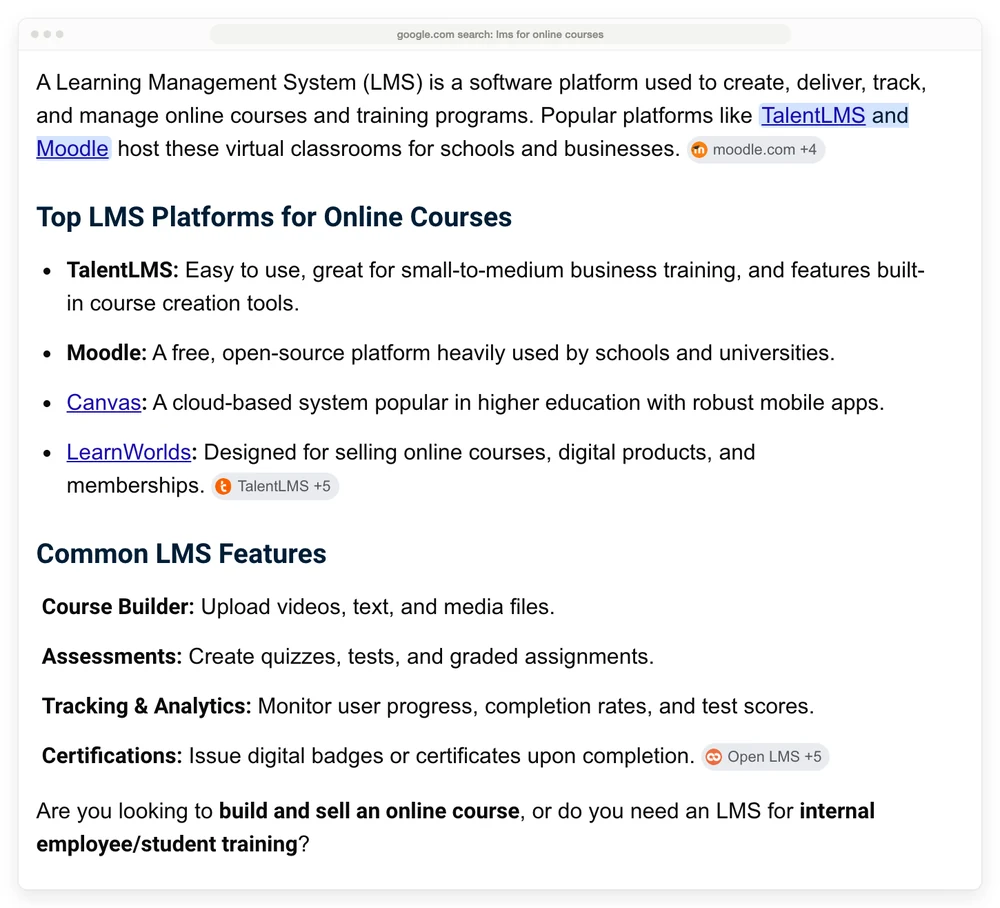
Google names 3 training platforms, 1 selling platform, and then asks which kind of person you are.
If the selling half is the half you are on, the free 5-day Online Selling Mistakes Challenge covers the 5 mistakes that cost solo sellers the most money, most of which happen before you ever pick a platform.
I opened every page-1 result and searched each one for the words a seller cares about. Not one of them tells you what a course platform will take out of a sale.
Moodle’s product page is the number 1 result, at about 1,500 words. Search it for price, pricing, payment, Stripe or checkout and you get zero hits on any of the 5.
The biggest roundup on the page is 360Learning’s “16 Best Learning Management System Examples”, close to 6,000 words, with the word Pricing in its title. It carries 16 lines beginning “Pricing:”, and 10 of them say the price is available on request or by quote. Its Thinkific entry quotes a monthly figure and never mentions that Thinkific takes 5% on that plan when you use your own Stripe.
ProProfs Training Maker’s “10 Best Free LMS Platforms” runs past 5,000 words and recommends 10 platforms. It does answer whether you can sell on a free LMS, in a collapsed question near the bottom, and the answer is 2 sentences long. The only fee it names anywhere is a 20% royalty charged by a platform that is not one of its 10 picks.
Those pages are answering the training question properly, and doing it well. If you are the person Google’s own AI Overview described as wanting to build and sell a course, page 1 has not answered you yet.
What an LMS has to do differently when you are the one getting paid
A selling LMS has to do 2 jobs that a training LMS never touches: take money from a stranger, and keep taking it without you watching. A school already knows who its students are and never invoices them through the software. You do not know who your buyer is until they pay.
A training LMS gives you lessons, quizzes, progress tracking, certificates and reporting. It assumes an admin enrols people. Pricing is per seat or per active user, which is why Moodle’s own community registry counts more than 146,000 sites and 57 million courses, nearly all of them run by institutions.
A selling LMS gives you all of that plus a storefront, a checkout, coupons, order bumps and a payout. Pricing is a monthly plan, and then, on most of them, a percentage of every sale.
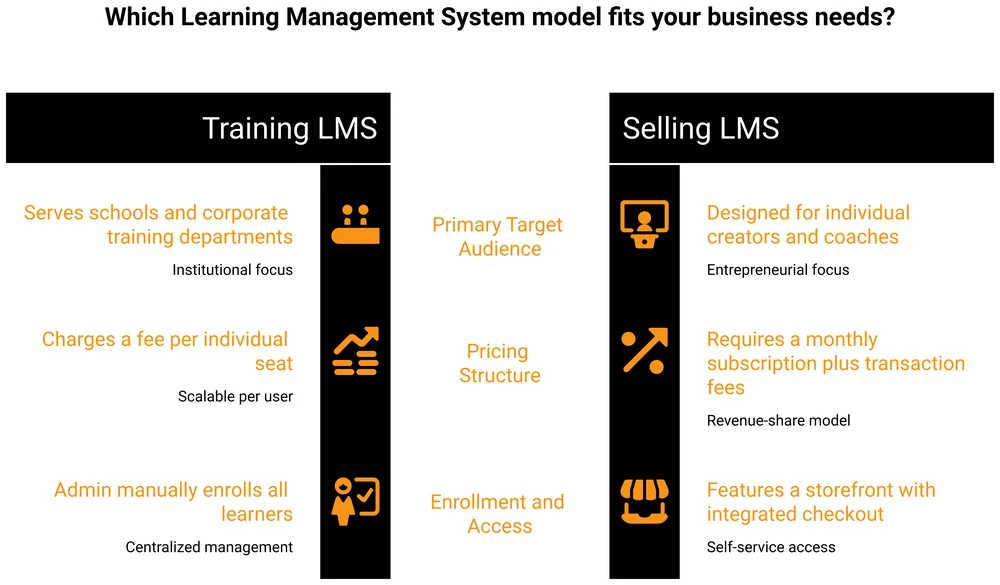
That percentage sits on top of card processing, which is a separate cost you also pay. Stripe charges 2.9% plus 30 cents per successful transaction on domestic cards, and every platform below either uses that rate or something close to it.
So on a $100 course you are looking at 2 numbers stacked: the platform’s cut, then roughly $3.20 of card processing under it.
The cheapest plan on every course platform has a second price
Teachable’s cheap plan stops paying for itself at $6,400 a year in sales, Podia’s at $10,080, Payhip’s at $11,600 and Thinkific’s at $16,800, and on LearnWorlds it happens at 132 sales whatever you charge for them. Only Kajabi has no crossover, because its entry plan takes no cut in the first place.
| Platform | Entry plan | Cut per sale | Next tier up | Crossover at |
|---|---|---|---|---|
| Teachable | Starter, $29/mo | 7.5% | Builder, $69/mo (0%) | $6,400 a year |
| Podia | Mover, $42/mo | 5% | Shaker, $84/mo (0%) | $10,080 a year |
| Payhip | Free, $0 | 5% | Plus, $29/mo (2%) | $11,600 a year |
| LearnWorlds | Starter, $24/mo | $5 per enrolment | Pro Trainer, $79/mo (0%) | 132 sales a year |
| Thinkific | Basic, $40/mo | 5% on your own Stripe | Start, $82/mo (2%) | $16,800 a year |
| Kajabi | Basic, $143/mo | none on Kajabi Payments | Growth, $199/mo | never |
All prices are billed annually, and card processing is left out because it costs roughly the same on every row and stacks on top of all of them. Note that 2 of the upgrades still take a cut, just a smaller one: Payhip Plus keeps 2% and so does Thinkific Start.
LearnWorlds works differently to the rest because its fee is a flat $5 per paid enrolment rather than a percentage, so its crossover lands at a number of sales rather than a revenue figure.
Teachable’s crossover is the one worth staring at. $6,400 a year is about $533 a month, or 64 sales of a $100 course. Our Kajabi alternatives breakdown found the same $533 figure running the arithmetic monthly, and reached the same conclusion about Skool and Podia.
Kajabi is the exception here. Its Basic plan costs nearly 5 times what Teachable’s Starter does, at $143 a month against $29, and it takes no cut at all if you use Kajabi Payments.
You are paying the fee up front instead of per sale. That is a better deal at high volume and a worse one at low volume.
What this looks like on a real year
Take a $100 course selling 300 times, so $30,000 in sales. Card processing costs $960 across all of these and is left out so the platform costs compare cleanly.
Teachable Starter runs $348 in plan fees plus $2,250 in cuts, so $2,598. Builder runs $828 and takes nothing. The cheap plan costs $1,770 more over the year.
Podia Mover comes to $2,004 against $1,008 on Shaker. LearnWorlds Starter comes to $1,788 against $948 on Pro Trainer. Payhip’s free plan comes to $1,500 against $948 on Plus.
The pattern holds at $15,000 and at $60,000 too, on 4 of the 5. The only entry plan that survives at $15,000 is Thinkific’s, and only by $54.
I would not call this a trap. Any pricing that mixes a flat fee with a percentage has a crossover somewhere, by design. The crossovers just sit far lower than the plan names imply, and no platform tells you where yours is.
Where each platform keeps that number
Thinkific keeps its cut off the pricing page entirely. The pricing page lists Basic at $40 a month, Start at $82 and Grow at $164, with no platform fee stated anywhere on it.
The fee lives in a support article instead, and it reads 5.0% on Basic, 2.0% on Start, 1.0% on Grow and 0.5% on Expand. It applies only if you take payments through your own Stripe or PayPal rather than Thinkific’s own processor, and it is charged on your first $1M of sales each year.
Kajabi puts the number on the pricing page and puts a contradiction above it. The page headline reads “No hidden fees. No revenue sharing.”
Further down that same page, a row titled “3rd Party Payment Provider Fees” charges 2% on Basic, 1% on Growth and 0.5% on Pro. A seller who reads the headline and plugs in the Stripe account they already have finds the cut in their payouts. Our Kajabi pricing deep-dive covers the hidden Kickstarter tier that carries 5%.
Teachable is upfront about the 7.5%, and the detail underneath it costs more than people expect. Its help centre says the fee is charged on “total transaction value (product price including taxes)”. If you sell a $100 course to a buyer in a VAT country and collect $120, the 7.5% is calculated on $120.
Teachable also buries 2 useful facts in accordions on its own pages. Its help centre says new schools may face a 100% reserve with a 14-day hold, so your first fortnight of sales can sit unpaid while the refund window runs.
The other one works in your favour, and it is worth knowing before the student caps scare you off a plan. Teachable’s pricing FAQ says the active and imported student caps are removed once you pass $10,000 a year in sales on the platform: “We want to reward your school’s growth, not restrict it.”
LearnWorlds is the strangest of the group, and it is the platform Google’s AI Overview singles out as designed for selling online courses. Its Starter plan costs $24 a month and charges $5 for every paid enrolment.
On a $99 course that is 5% and unremarkable. On a $29 tripwire it is 17%, which is worse than any percentage on this page.
Podia is the plainest of the lot. Its FAQ states the 5% on Mover directly and tells you Stripe’s 2.9% plus 30 cents applies on top.
Free LMS options for online courses, and what free actually costs
Free LMS software is real, and every option splits into 2 kinds: software you host yourself, and a paid platform’s free tier that takes a cut instead of a fee.
Moodle is the genuine open-source one. The software costs nothing, you can download it, and its community registry counts more than 146,000 live sites.
What Moodle does not include is a server, a domain, updates, backups or a checkout. You supply all 5, and they are where the money and the evenings go.
Moodle also has no native way to charge a stranger for a course. You add a payment plugin, connect a processor and maintain that yourself. For a solo seller with 1 course, that is a weekend of setup to save a monthly fee that a simpler tool would have charged.
LearnDash is the middle path if you already run WordPress. It costs $259 a year for Essentials, $399 for Pro and $599 for Elite, takes no cut of your sales at all, and includes Stripe and PayPal integrations. You supply the hosting and you own the whole thing.
Payhip’s free plan is the other kind of free. It costs nothing a month, gates no features, and takes 5% of each sale. At $11,600 a year in sales its $29 Plus plan overtakes it, which is the same crossover arithmetic as everything above.
Google Classroom, Canvas and Open edX also turn up on free-LMS lists. All 3 are built for education and none of them exists to sell a course to a stranger. If your students are paying you, they are the wrong shelf.
Do you need an LMS at all to sell a course
Plenty of course sellers do not need an LMS, and the test is whether your course has any structure a student can fail to follow. An LMS earns its price when you need lessons released in order, quizzes marked, certificates issued, or progress tracked across a cohort.
If your course is 12 videos and a workbook that people watch in any order, you are paying a platform for tracking nobody uses.
The lighter route is to host the content somewhere simple and take payment through your own checkout. Our guide to video hosting platforms for courses covers the delivery half, and it costs a fraction of a course platform’s monthly plan.
You lose the student dashboard, the progress bar and the built-in certificate, and you are stitching 2 tools together instead of 1.
For a first course sold to a list you already have, that is usually a fair swap. For a catalogue of 8 courses with cohorts, it rarely is.
CartMango handles the payment half of that split, alongside Payhip and Gumroad. To be straight with you, I built CartMango, so treat this as disclosure rather than a recommendation.
CartMango is free until October 2026 and then starts at $10 a year with no cut of your sales, and CartMango is a checkout rather than an LMS. CartMango’s own LMS is in development and targeted for October 2026, so if you need lessons and student progress this month, pick Thinkific or Teachable and run the checkout wherever you like.
How to pick, using your own numbers
Pick the plan that matches the sales you already have, not the sales you are hoping for. The cheapest plan feels like the careful choice, which is why the crossover keeps catching people out.
I am not immune to this. Over the years I bought 54 lifetime software deals on AppSumo, across social media tools, AI tools, bots, customer support, landing pages, SEO and ads.
I still have not used about 90% of them. The reasoning at the time was that I would probably need them later, and later never came.
What fixed it was a rule instead of a feeling: I only buy something now if it is relevant to me now or within the next 6 months. That same rule works on a course platform. Pick the tier your current sales justify, and diarise a check when your revenue changes.
The arithmetic takes about 2 minutes.
Multiply your realistic yearly sales by the entry plan’s percentage, then add the entry plan’s yearly cost. Compare that total against the yearly cost of the plan above it. Whichever is smaller is your plan.
3 more things worth checking before you commit, because they bite after you have already migrated.
Check the caps, not just the price. Teachable’s Starter plan allows 5 products and 100 active students, and Podia’s Mover plan caps you at 100 email subscribers. Both of those limits arrive well before the fee stops mattering.
Check who processes the payment. On Thinkific and Kajabi the cut depends entirely on whether you use their processor or your own, and the cheaper-looking choice is usually theirs.
Check what happens on a refund. In an r/elearning thread, a creator posted the reply they got from Teachable support about a change from November 6, 2025: Teachable would “no longer refund transaction fees because these fees cover the operational costs already incurred at the time of the sale”.
Another creator in that thread called it “another hit to small course creators who already operate on tight margins”. I could not find the policy stated on Teachable’s own help pages, so treat it as a creator’s report rather than published policy, and ask support before you rely on either answer.
If you are still deciding what to build before you worry about where to put it, our guides on what an online course is and how to sell online courses cover the parts that decide whether the platform ever matters.
LMS for online courses: frequently asked questions
Is LMS good for online courses?
An LMS is good for online courses when the course has structure that needs enforcing: lessons in order, quizzes to mark, certificates to issue, or progress to track. For a single self-paced course of videos and a workbook, an LMS adds cost without adding much. The test is whether a student could fail to follow your course, not whether the software looks capable.
What are the top 5 LMS platforms?
The top 5 LMS platforms split by which job you are hiring for. For selling courses to the public, Teachable, Thinkific, Kajabi, Podia and LearnWorlds are the 5 most established.
For training staff or students, Moodle, Canvas, TalentLMS, Open edX and Google Classroom are the ones that dominate. Very few lists tell you which half they are ranking.
Do online courses use LMS?
Most paid online courses run on some kind of LMS, though not always a dedicated one. A creator selling 1 course often uses a course platform that bundles an LMS with a checkout, while universities and companies use a standalone LMS with no payment layer at all.
A course delivered as a video link and a PDF uses no LMS whatsoever and still sells fine.
What are some free LMS platforms for online courses?
Moodle, Open edX, Canvas and Google Classroom are free to use, and all 4 are built for education rather than selling. Payhip runs a free plan that does sell, taking 5% of each sale instead of a monthly fee. Free self-hosted software still costs you hosting, setup and maintenance, and none of the education ones can take a payment without extra work.
Can I use WordPress as an LMS for online courses?
Yes. LearnDash is the most established WordPress LMS plugin, at $259 a year for Essentials with no cut of your sales and Stripe and PayPal built in.
You supply the hosting, the updates and the backups. It works out cheaper than a hosted platform once your sales are steady, and it is more work on the days something breaks.
How much does an LMS for online courses cost?
Entry plans on the main selling platforms run from $0 to $143 a month, and the monthly price is the smaller half of the bill. Add the platform’s cut of each sale, which runs 5% to 7.5% on most entry plans, then card processing of about 2.9% plus 30 cents underneath that. At $30,000 a year in sales, everything included, that lands between roughly $2,500 and $3,600 depending on which platform you picked.
The number to work out before you pick anything
Work out your crossover point first, then pick the platform. It is 1 multiplication, it takes 2 minutes, and it is the only number on this page that is about your business rather than somebody’s pricing table.
Everything else follows from it. If you are under your crossover, the entry plan is genuinely the cheap one and you should take it. If you are over it, the plan that looks expensive is the one saving you money, and you have probably been paying the difference for a while.
Nearly every guide to an LMS for online courses ranks the software and stops there. That works for an HR team buying seats, because nobody is buying anything from them and there is no crossover point to find. It leaves the person who is actually selling to work out the expensive half alone.
If you have already worked out that you are paying a course platform mostly so it can take payments, that half is worth pricing on its own. CartMango is free until October 2026 and starts at $10 a year after that, with no cut of your sales.
About the Author

👋 I’m Welly, founder of CartMango (the site you’re on), a checkout platform for digital product sellers. We’ve previously processed $179M+. I also run BirdSend (email marketing tool, 3.1B+ emails sent). On the side I show other non-techie digital sellers how I use AI workflows to automate 50%+ of my operations. Find me on LinkedIn.
Related Reading
- How to sell online courses: the selling half, before any LMS for online courses matters
- Kajabi pricing deep-dive: all 4 tiers including the one Kajabi hides
- What community platforms really cost: for readers adding a community alongside the course
- Cost of creating an online course: what you spend before you ever pay a platform