

Teachable starts at $29 a month billed annually and takes 7.5% of every sale on that plan. Thinkific starts at $40 and takes nothing, as long as you use Thinkific Payments. Both platforms only reach 0% on their own processor. Here are the live prices, the published fees and what a $100 sale really pays out.
Every Teachable vs Thinkific comparison on page 1 of Google tells you roughly the same story. Teachable charges 7.5%, Thinkific charges nothing, pick Thinkific.
I read both companies’ own documents. That is not what they say.
Thinkific does take a percentage of your sales. On the entry plan it is 5%.
The number is nowhere on the pricing page. It sits in a support article that the pricing page links to as the single word “here”, and Thinkific never calls it a transaction fee.
Teachable’s 0% carries the same catch, folded into a collapsed FAQ box on its own pricing page.
Below you get the real numbers for both platforms, on both payment routes, plus the exact sales figure where each cheap plan stops being the cheap one.
Key Takeaways
- Both platforms hit 0% only on their own payment processor. Connect your own Stripe to Thinkific’s entry plan and it takes 5% of every sale.
- Teachable’s entry plan takes 7.5% whichever way you get paid. That is $7.50 gone from every $100 course sale, before card processing.
- Thinkific’s fee is not printed on its pricing page. It lives in a support article under the name “third-party payment gateway fee”, which is why so many comparisons miss it.
- Teachable’s cheap plan stops paying for itself at $533 a month in sales. Thinkific’s does at $1,400 a month, and only if you use your own Stripe.
- Google’s AI Overview gets this wrong. It states Thinkific charges 0% on its paid plans. Thinkific’s own fee table says 5.0%, 2.0%, 1.0% and 0.5%.
Teachable vs Thinkific pricing in 2026
Teachable is cheaper to start on and Thinkific is cheaper to grow on, and the gap between them is smaller than the headline prices suggest. Teachable’s entry plan runs $29 a month billed annually against Thinkific’s $40, a difference of $11. That $11 buys you unlimited courses and room for 10,000 students instead of 100.
Both companies push the annual price on the pricing page and charge more if you pay monthly.
| Compare | Teachable | Thinkific |
|---|---|---|
| Entry plan | Starter, $29/mo billed annually ($39 monthly) | Basic, $40/mo billed annually ($54 monthly) |
| Middle plan | Builder, $69/mo billed annually ($89 monthly) | Start, $82/mo billed annually ($109 monthly) |
| Upper plan | Growth, $139/mo billed annually ($189 monthly) | Grow, $164/mo billed annually ($219 monthly) |
| Top plan | Custom, contact sales | Plus, contact sales |
| Products on entry plan | 5 | Unlimited courses |
| Active students on entry plan | 100 | 10,000 |
| Platform cut on entry plan | 7.5% | 0% or 5%, depending on your processor |
The last 3 rows are where the real difference lives, and only one of them shows up in most comparisons.
Before you pick a plan: the free 5-day Online Selling Mistakes Challenge walks through the 5 mistakes that quietly cost solo sellers the most money. Paying a percentage you did not know about is one of them.
Does Thinkific charge transaction fees?
Thinkific charges 5.0% of every sale on its Basic plan when you take payment through your own Stripe account. The rate falls to 2.0% on Start, 1.0% on Grow and 0.5% on Expand. It drops to nothing if you switch to Thinkific Payments, which is Thinkific’s own processor.
That is Thinkific’s own published table, not an outside estimate.
Google does not agree. Search the platform names and the AI Overview answers with this:
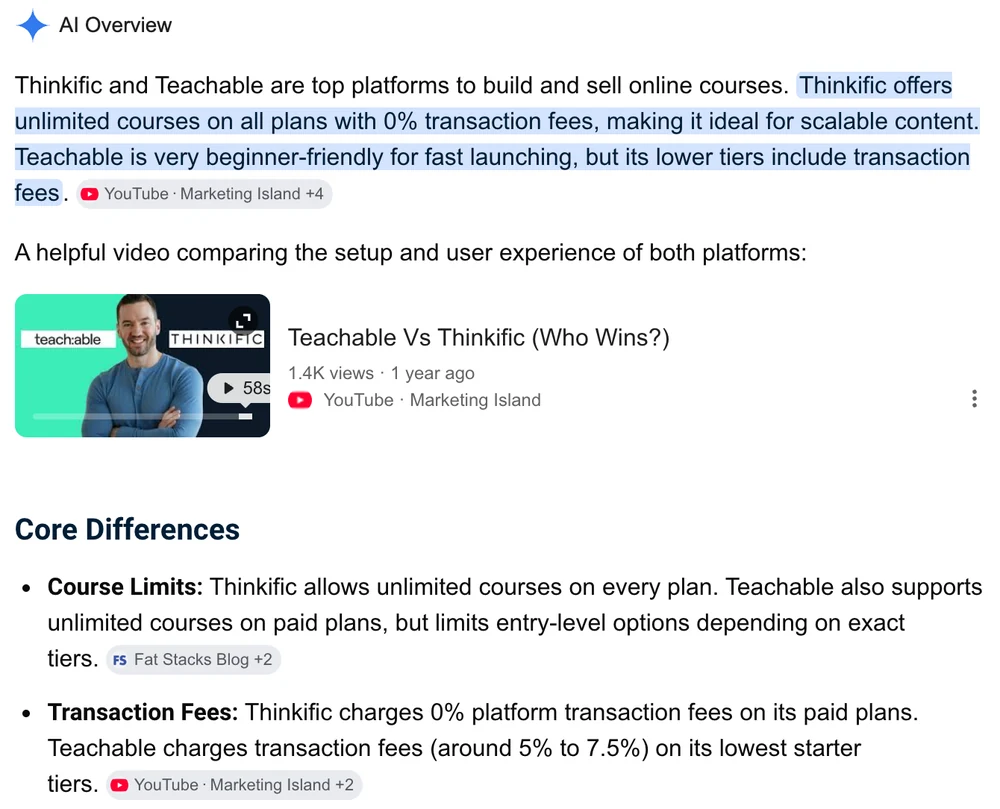
It says “Thinkific offers unlimited courses on all plans with 0% transaction fees”, then repeats it in the bullet list underneath: “Thinkific charges 0% platform transaction fees on its paid plans.”
Here is what Thinkific publishes:
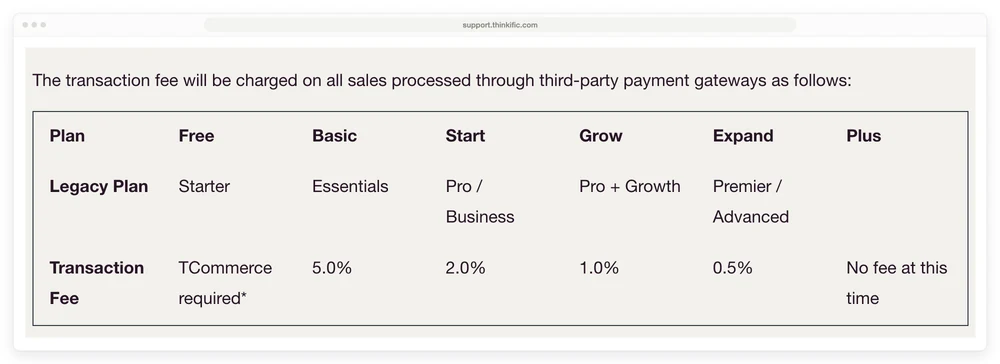
The heading above that table on Thinkific’s own site reads “How Much Is the Fee?” and the sentence above it reads “The transaction fee will be charged on all sales processed through third-party payment gateways as follows”.
So Thinkific uses the words “transaction fee” for the thing Google says Thinkific does not charge.
3 details make this easy to miss, and all 3 are Thinkific’s doing.
The fee has a different name on the pricing page. There it is a “third-party payment gateway fee”, tucked inside a collapsed FAQ. Search the visible text of Thinkific’s pricing page for “transaction fee” and you get zero hits, because every mention of that phrase sits in markup a reader never sees.
The percentages are on a different page entirely. The pricing page does not print 5%, 2% or 1% anywhere. It links out with the word “here”.
And it only bites if you use Stripe. Move to Thinkific Payments and the fee genuinely disappears, which is the whole point of it. Thinkific puts it plainly in the same article: “Migrate to TCommerce to avoid the fee”.
2 more things Thinkific publishes that almost nobody repeats. The fee applies to your first $1M of sales in a calendar year, then it is waived. And it went live in the United States, Canada and the UK on July 3, 2024, with the EU following on November 6, 2024.
A page ranking for this keyword tells you the opposite. Ruzuku’s comparison says Thinkific “charges no transaction fee in primary markets like the US, whichever payment processor you use”, then adds that “a few countries have a regional fee you can sidestep with Thinkific Payments”.
The United States does not sidestep this fee. It is among the first 3 countries the fee ever applied to.
Teachable’s 0% carries the same asterisk
Teachable’s 0% transaction fee on the Builder, Growth and Custom plans applies only when you get paid through teachable:pay or the Monthly Payment Gateway. That condition is not on the plan cards. It is inside a collapsed FAQ box near the bottom of the pricing page, and the plan cards mark it with a small asterisk that leads nowhere obvious.
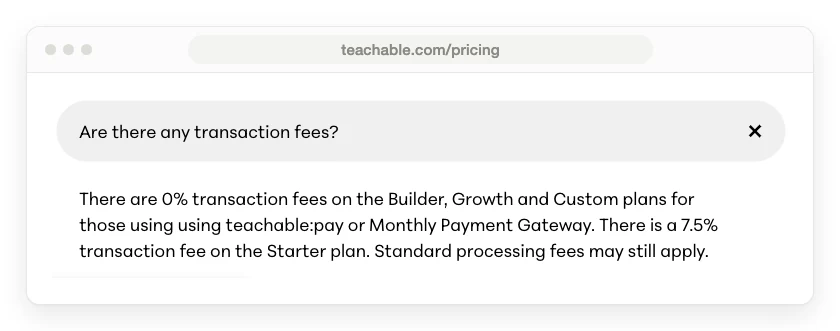
Read the 2 platforms side by side and the structure is identical. Use our processor, pay no platform cut. Use your own, pay one.
The difference is which half each company hides.
Thinkific publishes the exact percentages and hides that a fee exists at all on the page where you choose a plan. Teachable does the opposite: it prints 7.5% right on the Starter card, in public, and then hides the condition attached to the 0%.
Neither is lying. Both are counting on you reading the loud number and skipping the quiet one.
Teachable’s Starter plan is the exception to all of this. The 7.5% applies there whichever way you take payment, so there is no processor trick that removes it.
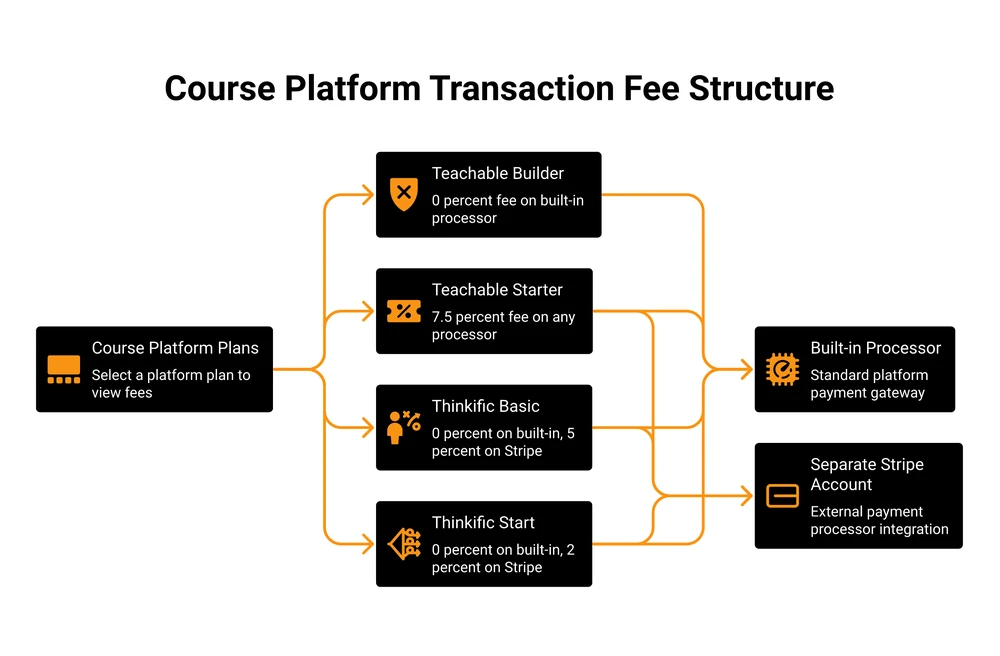
What a $100 course sale pays out on each
On a $100 sale, Teachable Starter keeps $7.50 and Thinkific Basic keeps $5.00 if you are on your own Stripe, while Teachable Builder and Thinkific Basic on Thinkific Payments both keep nothing. Card processing of about 2.9% plus 30 cents comes out of every row on top, so it is left out below to keep the platform’s own cut visible.
| Route | Plan cost | Cut on $100 | You keep |
|---|---|---|---|
| Teachable Starter | $29/mo | $7.50 | $92.50 |
| Teachable Builder | $69/mo | $0 | $100 |
| Thinkific Basic, own Stripe | $40/mo | $5.00 | $95.00 |
| Thinkific Basic, Thinkific Payments | $40/mo | $0 | $100 |
| Thinkific Start, own Stripe | $82/mo | $2.00 | $98.00 |
That table flatters everyone, because a per-sale percentage means nothing until you know how many sales you make. Run the same 5 routes at $1,000 a month in course sales and the ranking changes completely.
At $1,000 a month in sales, Thinkific Basic on Thinkific Payments costs $40 all in, Teachable Starter costs $104, and the identical Thinkific Basic plan jumps to $90 the moment you connect your own Stripe.
| Route | Plan | Platform cut | Monthly total |
|---|---|---|---|
| Thinkific Basic, Thinkific Payments | $40 | $0 | $40 |
| Thinkific Basic, own Stripe | $40 | $50 | $90 |
| Teachable Starter | $29 | $75 | $104 |
| Thinkific Start, own Stripe | $82 | $20 | $102 |
| Teachable Builder | $69 | $0 | $69 |
The cheapest row and the second most expensive row are the same Thinkific plan. The only thing separating them is which processor you clicked during setup.
Card processing is the piece both platforms leave to you, and the rates are worth knowing before you price a course. Stripe charges 2.9% plus 30 cents on domestic cards in the US, and Thinkific’s own help pages put Thinkific Payments at exactly the same 2.9% plus 30 cents for sellers based in the US or Canada.
Teachable publishes a fuller schedule. It matches Stripe on US cards, then rises to 3.9% plus 30 cents on international cards, 3.49% plus 49 cents on US PayPal and 4.99% plus 49 cents on international PayPal, with a $15 chargeback fee on top.
Worth saying plainly, because it is the one place neither platform marks anything up: Teachable’s 3.49% on US PayPal is PayPal’s own published rate for PayPal Checkout, passed straight through. The processing rates are not where either company makes its money on you.
If most of your buyers are outside the US, that 3.9% international card rate will cost you more than either platform’s plan fee.
When the cheap plan stops being the cheap one
Teachable’s Starter plan stops paying for itself at $533 a month in sales, Thinkific’s Basic plan on your own Stripe stops at $1,400 a month, and Thinkific’s Basic plan on Thinkific Payments never stops, because there is no percentage to escape.
| Route | Cheap plan | Its cut | Next plan up | Crossover point |
|---|---|---|---|---|
| Teachable | Starter, $29/mo | 7.5% | Builder, $69/mo (0%) | $533/mo, or $6,400 a year |
| Thinkific, own Stripe | Basic, $40/mo | 5% | Start, $82/mo (2%) | $1,400/mo, or $16,800 a year |
| Thinkific, Thinkific Payments | Basic, $40/mo | 0% | Start, $82/mo (0%) | Never, upgrade only for features |
The arithmetic is simple enough to redo with your own numbers. Teachable’s Builder plan costs $40 a month more than Starter, and 7.5% of $533 is $40, so that is the point where the fee costs more than the upgrade. Thinkific’s Start plan costs $42 a month more than Basic and cuts the fee by 3 percentage points, and 3% of $1,400 is $42.
$533 a month is fewer than 6 sales of a $97 course. Plenty of people cross it in their first good month and keep paying 7.5% for a year because nobody told them the line was there.
What are the disadvantages of Thinkific?
Thinkific’s main disadvantage is that its cheapest plan costs $11 a month more than Teachable’s, and the features most course sellers reach for sit on the next tier up. Completion certificates, assignments, quizzes, live cohorts, memberships and payment plans all start on the Start plan at $82 a month billed annually rather than on Basic at $40.
Payment plans are the one that catches people out. If you sell a course above $200, splitting it into instalments usually lifts how many people buy. On Thinkific that means the $82 plan.
The second disadvantage is the fee structure this whole post is about, and it is worse than a number. It is a decision you make once, during setup, that you will probably never revisit. Pick Stripe out of habit on the Basic plan and you have quietly signed up for 5% forever.
The 5% is not even the full cost of that choice. Thinkific’s help pages say the TCommerce selling tools “are only available when using Thinkific Payments as your primary payment processor”, so going with Stripe also switches off the order bumps, the Buy Now Pay Later option and the sales tax handling that sit on top of it.
There is a 3rd, and it is the smaller one: Thinkific’s branded mobile app is a $199 a month add-on. Thinkific Mobile itself is included from the Start plan.
Removing Thinkific’s own branding from your site needs the Grow plan at $164 a month billed annually.
Where Teachable wins
Teachable wins on price at the very start and on getting a first product live quickly. $29 a month billed annually is the lowest entry price of the 2, and the Starter plan already includes upsells, cart recovery, global tax handling and the iOS and Android student apps.
It also pays out faster. Teachable pays daily on teachable:pay, against monthly on the Monthly Payment Gateway. For a seller watching cash flow in the first year, daily payouts are worth more than a percentage point.
The affiliate program arrives on Builder at $69 a month, which is cheaper than most standalone affiliate tools.
And Teachable’s student caps are less scary than they look. Its own pricing FAQ says the active and imported student limits are removed once you pass $10,000 a year in sales on the platform: “We want to reward your school’s growth, not restrict it.” So the 100-student cap on Starter lifts itself the moment the business starts working.
Product caps are a different story and they do not lift. Starter allows 5 products, Builder 10 and Growth 50. If you sell lots of small things rather than a few big ones, that ceiling arrives long before the fee does.
Is Teachable no longer free?
Teachable no longer has a free plan. Its pricing page offers a 7-day free trial and a 30-day money-back guarantee, and the cheapest paid way in is Starter at $29 a month billed annually or $39 monthly. The free plan that older comparisons still describe, the one with a 10% fee plus $1 per enrolment, is gone.
Thinkific’s pricing page no longer shows a free plan either. It lists Basic, Start, Grow and Plus, with a free trial as the way to look around.
There is a footnote worth knowing if you find an old free Thinkific account. Thinkific’s fee article says that from July 3, 2024 in the US, Canada and the UK, and November 6, 2024 in the EU, “Thinkific Payments is the default and required payment processor to creators on Free plans”, and that access to Stripe, PayPal and other third-party processors “is revoked”.
That is the strongest version of the pattern in this whole post. On the free tier, the choice of processor was not made expensive. It was removed.
If a free tier is what you actually need, our roundup of LMS options for online courses prices 7 platforms including the ones that still have one.
Can you really make money on either one?
Yes, and the platform is the smallest part of it. At $1,000 a month in course sales, the difference between the best and worst route in the table above is $64 a month. The difference between selling 10 courses a month and selling none is $1,000, and no platform feature moves that number.
That is the honest framing both companies avoid. Teachable and Thinkific are both perfectly capable of hosting a course that nobody buys.
Course sellers who post about their numbers tend to talk about support and pricing changes rather than features. In an r/elearning thread started in 2024 by a seller migrating more than 50,000 students, a creator wrote that Teachable “has all the features I need but they keep doubling the price”, and later said they moved that brand to Thinkific “just to get it done”. Another in the same thread wrote “Avoid teachable, their support is terrible”, describing a 24-hour wait while locked out of their own school.
The most useful line in that thread came from the seller who started it. Asked what “no fees” meant, they wrote: “Meaning transaction fees should be zero. I know that there are gateway fees behind the scenes that still apply and extra fees such as teachable Backoffice. But I want to keep them low.”
Someone with 50,000 students still had to spell out which fees they meant. That is a fair signal about how clearly either platform explains this.
If you want the demand side rather than the platform side, our guide to selling online courses covers where the buyers come from, and what it costs to create an online course covers the budget before you ever pay a platform.
Is Thinkific better than Teachable? Who should pick which
Thinkific is the better pick for most people who plan to sell more than a handful of products, and Teachable is the better pick if you want the lowest possible monthly bill for 1 course and you will use teachable:pay.
Pick Teachable Starter if you have exactly 1 or 2 courses, fewer than 100 active students and you are testing whether anyone wants what you made. $29 a month is the cheapest real way in. Watch the $533 a month line.
Pick Teachable Builder the moment you cross $533 a month in sales. At that point 7.5% costs more than the upgrade and you get the affiliate program with it.
Pick Thinkific Basic on Thinkific Payments if you want the lowest all-in cost at low volume and you are happy on their processor. $40 a month with no cut beats every Teachable row until you need certificates or payment plans.
Pick Thinkific Start if you sell above $200, need instalments, run live sessions or issue certificates. $82 a month billed annually is the real entry price for a serious course business on Thinkific.
Pick neither if what you actually needed was a checkout. Both of these are course platforms first, so if your product is a PDF, a template pack or a set of downloads, you are paying for lesson players and student progress tracking you will never switch on.
Our comparison of Kajabi’s pricing and our Kajabi alternatives breakdown both price that trade-off in more detail.
That last group is where my own product sits, so here is the disclosure and the honest limit in the same breath. CartMango is a checkout platform for solo digital sellers: order bumps, upsells and downsells, buyers syncing into your email tool, no cut of your sales, free until October 2026 and $10 to $30 a year after that.
CartMango does not host courses today. CartMango’s affiliate management launches in September 2026, and CartMango’s course hosting and community features follow in October 2026.
So if you need lesson players, student progress and certificates this month, pick Teachable or Thinkific. That is a real requirement and I am not going to argue you out of it.
Teachable vs Thinkific: frequently asked questions
Can I use my own Stripe account on either platform?
Yes on both, and it costs you on both. On Thinkific, connecting your own Stripe triggers the third-party payment gateway fee: 5% on Basic, 2% on Start, 1% on Grow. On Teachable, the published 0% on Builder and above applies to teachable:pay and the Monthly Payment Gateway, and Teachable’s pricing page does not state a rate for any other route.
Which is cheaper, Teachable or Thinkific?
Teachable is cheaper on the sticker price at $29 a month billed annually against $40. Thinkific is cheaper in practice for anyone selling more than about $150 a month, because Teachable’s Starter plan takes 7.5% and Thinkific Basic on Thinkific Payments takes nothing. Above $533 a month you should be on Teachable Builder anyway, which is more expensive than Thinkific Basic.
Do both platforms give students completion certificates?
Both do, on paid tiers rather than at entry level. Thinkific’s plan cards put completion certificates on Start at $82 a month billed annually, and Teachable’s put course certificates on Growth at $139, so Thinkific reaches them for $57 a month less. Check the live plan cards before you commit, because Teachable’s own structured data still lists certificates on cheaper plans than its cards show.
Does Thinkific limit how many courses I can sell?
No. Thinkific lists unlimited published courses on every plan, starting with Basic at $40 a month billed annually. Its student cap sits at 10,000 on Basic, Start and Grow alike, which is 100 times Teachable’s 100-student Starter cap. Teachable caps products at 5 on Starter, 10 on Builder and 50 on Growth, and those product caps do not lift with revenue the way its student caps do.
Can I move from Teachable to Thinkific later?
Yes, and the cost is your time rather than a fee. Both platforms accept content and student imports, and Teachable counts imported students against a separate cap: 5 on Starter, 50 on Builder, 1,000 on Growth. Move before you have a large back catalogue, because the work scales with the number of lessons rather than the number of students.
The number to work out before you pick
Work out your monthly sales figure first, then read the Teachable vs Thinkific tables above with that one number in your hand. Everything else in this comparison depends on it.
Under $533 a month, Teachable Starter is the cheapest way to be selling this week. Over it, you are choosing between Teachable Builder at $69 and Thinkific Basic at $40, and Thinkific wins that on price unless you need something Teachable has and Thinkific gates.
The one rule that survives whichever you pick: check which processor you are on before you take your first payment, not after. That single setting is worth more than any feature either company advertises, and it is the one both of them explain in the quietest place on the page.
If the checkout is the only part of this you needed, that is the piece CartMango does. CartMango runs order bumps, upsells and downsells so each buyer is worth more without more traffic, and it takes no cut of what you sell. CartMango is free until October 2026, then $10 to $30 a year.
About the Author

👋 I’m Welly, founder of CartMango (the site you’re on), a checkout platform for digital product sellers. We’ve previously processed $179M+. I also run BirdSend (email marketing tool, 3.1B+ emails sent). On the side I show other non-techie digital sellers how I use AI workflows to automate 50%+ of my operations. Find me on LinkedIn.
Related Reading
- LMS options for online courses, priced: real fees for 7 course platforms, with the same crossover math applied beyond Teachable vs Thinkific
- Kajabi pricing, broken down tier by tier: for readers weighing the all-in-one option against these 2
- What it costs to create an online course: the budget before you pay any platform
- How to launch a course without the stress: the 30-day plan for after you have picked a platform