

The main community platforms for creators are Skool, Circle, Mighty Networks, Heartbeat, Patreon and Discord. Most charge a monthly fee plus a percentage of every membership payment. Patreon and Discord charge no monthly fee and take a bigger percentage instead. This comparison prices all 6 against the same membership, 100 members paying $25 a month.
I went looking for what these platforms cost and kept finding the same 4 numbers: $9, $40, $49 and $89. Google’s own AI summary repeats them at the top of the results page. Every one of those is a monthly fee.
The monthly fee is the smaller half of what you pay.
The other half is a cut of every payment your members make. Skool’s cheapest plan takes 10% with card processing included. Heartbeat takes 5% and leaves you to pay card processing on top. Discord takes 16% all in, and 40% if your member happens to subscribe from an iPhone.
Add that second number in and the order changes. The plan with the lowest monthly fee on this list ends up costing more per month than the plan with the highest one.
Below you get all 7 options priced at the same membership size, which platform suits which kind of community, and the one number to check before you hand anyone your card.
Key Takeaways
- There are 2 numbers and only 1 gets advertised. A monthly fee and a cut of each membership payment. Patreon and Discord skip the monthly fee and take a bigger cut.
- At 100 members paying $25 a month, Skool’s $9 plan costs $289. Its $99 plan costs $201.50 for the same members.
- Discord takes 16% of a paid server subscription on desktop, rising to 40% when the member pays through the iOS App Store.
- Google’s AI summary lists 4 monthly prices and no transaction fees. 2 of those 4 are wrong at source, and a third is an annual price standing in for the monthly one.
- Hosting the community somewhere free and taking payment through your own checkout costs $102.50 at that same size, all of it card processing.
The 2 numbers every community platform charges
Pick any community platform and you are agreeing to 2 separate charges.
The first is rent. You pay it monthly whether you make a sale or not. This is the number on the pricing page, the number in the ads, and the number every comparison article leads with.
The second is a cut. Every time a member pays you, the platform keeps a percentage. This one scales with your success, which means it is small while you are testing and large once the thing works. That is worth knowing before you build a membership, because it applies to most recurring revenue businesses run on somebody else’s platform.
Here is what that looks like in practice. A creator with 100 members at $25 a month is collecting $2,500. On Skool’s $9 Hobby plan, the monthly fee is $9 and the cut on those payments is $280, once you count the 30 cents Skool takes on each one. The advertised $9 is the small change in that bill.
Google’s AI summary of this exact search is a good example of the problem. The version below names 4 platforms, gives a monthly price for each, and mentions no transaction fee at all. It rewrites itself on every load, and across 3 loads the platforms and prices moved around while the missing fee never appeared.
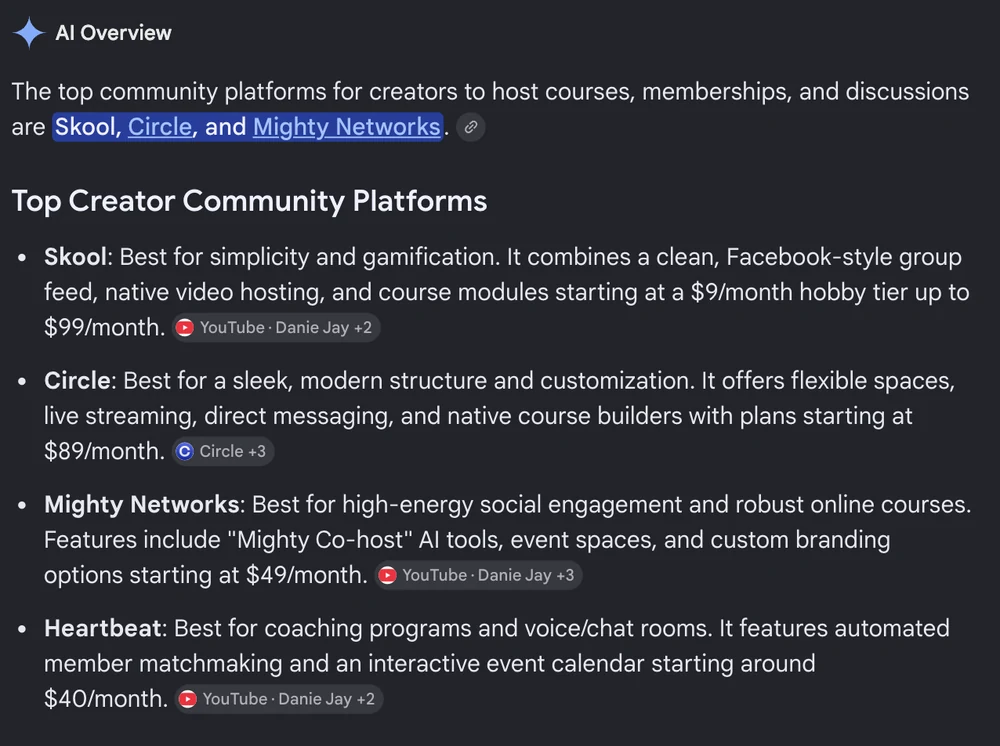
2 of those 4 prices do not match the platforms’ own pricing pages. Mighty Networks is listed at $49 a month when its pricing page shows $79. Heartbeat is listed at around $40 when its own page shows $49. The third, Circle’s $89, is a real Circle price, but it is the annual-billing figure standing in for the monthly one. Google’s own help pages put it plainly: AI responses may include mistakes.
If you are picking a platform this week, the free 5-day Online Selling Mistakes Challenge covers the profit leaks that show up after you launch, which is usually where this bites.
One more thing about the 2 numbers before the comparison. They are not measured the same way across platforms, and that trips up most tables you will read.
Skool is the merchant of record, so its percentage is all-in and nothing else gets added.
Discord is the same, publishing its own 6% processing rate alongside its 10% platform fee. Circle, Mighty Networks, Heartbeat and Patreon go the other way and charge their percentage on top of your Stripe bill, so you pay theirs and Stripe’s. Heartbeat states this plainly in a footnote on its pricing page, which is more than the others do.
Stripe’s published rate for domestic cards is 2.9% plus 30 cents per transaction, with another 1.5% for international cards and 1% when a currency conversion is needed. That international surcharge is the reason Skool can claim its all-in rate works out cheaper for some sellers.
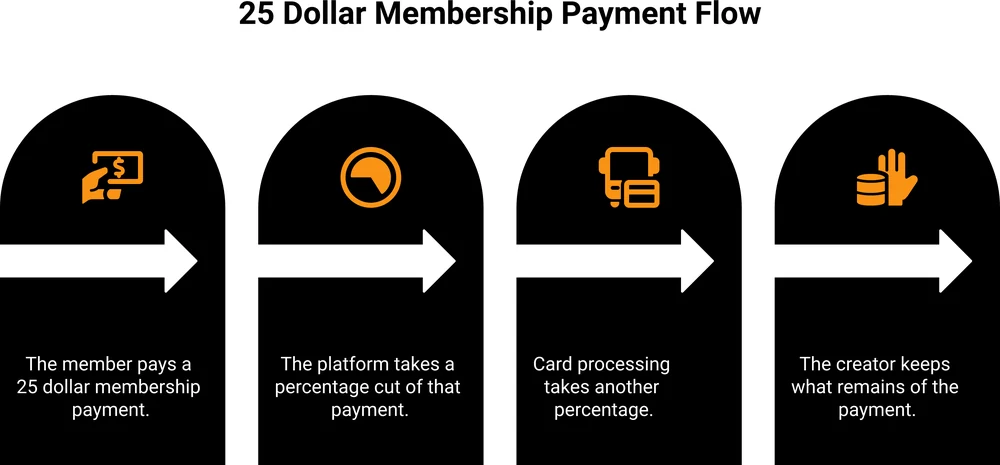
What the 7 main options cost at 100 members paying $25 a month
Same membership, same size, every fee added. The totals below include card processing for every row, because you cannot avoid it anywhere and leaving it out of some rows and not others is what makes most comparison tables misleading.
| Platform | Monthly fee | Its cut | Total per month | You keep |
|---|---|---|---|---|
| Skool (Pro) | $99 | 2.9% + 30c, all-in | $201.50 | $2,298.50 |
| Circle (Professional) | $99 | 2% plus Stripe | $251.50 | $2,248.50 |
| Mighty Networks (Launch) | $79 | 2% plus Stripe | $231.50 | $2,268.50 |
| Heartbeat (Build) | $49 | 5% plus Stripe | $276.50 | $2,223.50 |
| Patreon | $0 | 10% plus processing | $352.50 | $2,147.50 |
| Discord (server subscriptions) | $0 | 10% plus 6% processing | $400.00 | $2,100.00 |
| CartMango checkout, community hosted free | $0 until October 2026, then from $10 a year | 0% plus Stripe | $102.50 | $2,397.50 |
I should be upfront: CartMango is my platform, and it is on that list as a checkout rather than as a community platform. It has no community feature today.
That row means running the community somewhere free, like a Discord server or a Facebook group, and taking the money through your own checkout instead of the platform’s. Community, courses and affiliate management are all in development at CartMango, with community targeted for October 2026 on the $30 Platinum plan.
Two notes on that table so you can check my working. Patreon’s total assumes standard card processing, because Patreon’s pricing page says the 10% comes “plus payment processing, currency conversion, and payout fees” without naming a rate, so that row is the one estimate here. And CartMango’s $0 is a beta price that ends in October 2026, after which that row gains about 83 cents a month. Nobody in the table escapes card processing, including my own row.
2 things in that table are worth sitting with.
The cheapest monthly fee belongs to Heartbeat at $49, and Heartbeat’s total is $276.50. The most expensive monthly fee belongs to Skool Pro and Circle at $99, and Skool Pro’s total is $201.50. The $49 plan costs $75 a month more than the $99 plan.
And the 2 platforms that charge nothing monthly, Patreon and Discord, are the 2 most expensive on the list. Free rent, expensive cut.
The same platforms at 3 community sizes
100 members is a single point on a curve. Here is what 8 plans cost at $25 a month per member across 3 sizes, so you can find the row that matches where you actually are.
| Platform | 20 members | 100 members | 400 members |
|---|---|---|---|
| Skool (Hobby, $9) | $65.00 | $289.00 | $1,129.00 |
| Skool (Pro, $99) | $119.50 | $201.50 | $509.00 |
| Circle (Professional, $99) | $129.50 | $251.50 | $709.00 |
| Mighty Networks (Launch, $79) | $109.50 | $231.50 | $689.00 |
| Heartbeat (Build $49, then Grow $149) | $94.50 | $276.50 | $809.00 |
| Patreon ($0) | $70.50 | $352.50 | $1,410.00 |
| Discord subscriptions ($0) | $80.00 | $400.00 | $1,600.00 |
| Own checkout, free community | $20.50 | $102.50 | $410.00 |
The order is different in all 3 columns, and that is the whole point.
At 20 members Skool’s Hobby plan is the cheapest paid option at $65 and Heartbeat’s $49 plan beats Skool Pro by $25. At 100 members Heartbeat costs $75 more than Skool Pro. By 400 members Skool’s own $9 plan has become $620 a month more expensive than its $99 one.
The Heartbeat row changes plan partway across that table, and it is worth saying why. Its $49 Build plan stops at 350 members, so a 400-member community has to move up to Grow at $149 a month, where the cut drops from 5% to 2.5%. That is $809, or $300 more than Skool Pro at the same size. Member caps like that are the other thing worth checking on a pricing page, because the plan you compared may not be the plan you end up on.
Discord goes from the middle of the pack at 20 members to the most expensive option at every size above that. At 400 members it costs $1,600 a month against $410 for the same members paying through your own checkout, a difference of $14,280 a year.
Whatever you pick, the sensible move is to check the math again once you double.
Skool’s $9 plan costs more than its $99 plan
This one deserves its own section because Skool’s pricing page shows both plans side by side and a lot of people pick the $9 one.
Skool has 2 plans. Hobby is $9 a month with a 10% transaction fee. Pro is $99 a month with a 2.9% fee. Skool’s help centre adds a detail the pricing page leaves out: both plans also take 30 cents per transaction, and the Pro rate rises to 3.9% on any single transaction above $900.
At 100 members paying $25, Hobby costs $289 a month and Pro costs $201.50. The $9 plan is $87.50 a month more expensive. Over a year that is $1,050.
The crossover sits at $1,267.61 of membership revenue a month. Below that, Hobby is genuinely cheaper. Above it, every extra dollar you earn costs you 7.1 cents more on Hobby than on Pro.
So the $9 plan is a good deal for a small paid group and gets worse every time you sell one more membership. If you are testing an idea with 20 members, take it. If the thing works, the plan that looked expensive is the one that leaves you more money.
Nothing about this is hidden. Both numbers are printed on Skool’s pricing page. They are just printed as “10% transaction fee” and “2.9% transaction fee” underneath “$9/month” and “$99/month”, and almost nobody multiplies them out.
There is a third Skool number that only applies if you switch it on. Turning on Growth Boost puts your group in front of people browsing Skool’s Discovery listings, and Skool then takes 30% of any member it sends you. Its help centre is clear that you pay nothing on members you bring in yourself, so it does not touch the totals above. Check it before you flip that toggle.
Discord takes the biggest cut on this list
Discord is free to run and that is why so many creators start there. Charging for it is where the cost appears.
Discord’s own Monetization Terms set out the fee schedule for Server Subscriptions. On desktop and browser, Discord takes a 10% platform fee plus 6% payment processing. That is 16% of every membership payment, which at $2,500 a month is $400.
Through the iOS App Store it gets worse. Apple takes 30% of the purchase, or 15% on retained auto-renewing subscriptions, and Discord still takes its 10% on top. A member who signs up on their iPhone can cost you 40% of what they pay in the first year, then 25% once the subscription is renewing. The same member subscribing from a laptop costs you 16%.
You do not control which one they use.
Apple’s Small Business Program drops its rate to 15% for developers under $1 million in yearly proceeds, but that applies to Discord as the developer, not to you.
There is a second cost that has nothing to do with percentages. Discord’s terms say eligible payouts arrive within 45 days after the end of the calendar month. A payment collected on 2 January can sit with Discord until mid-March. For a solo creator running on membership income, that gap matters more than a couple of percentage points.
This is why a lot of paid Discord servers skip Server Subscriptions entirely. The creator sells access through their own checkout, then a bot grants the member their role. The community stays free to run and the money never touches Discord’s fee schedule.
Which platform fits which kind of community
Cost is one input. What you are actually building is the other, and these platforms are genuinely different products. A paid community is one of several content creator business models, and the right tool depends on which one you are running.
Skool
Skool is a single feed, a course area and a leaderboard. There are no spaces to configure and very little to set up wrong, which is the point.
It suits a coach or creator who wants one room where everybody talks and a course sitting next to it, which makes it a common first home for people selling online courses. The gamification is real: members chase points and it does hold attention. What you give up is customization, because there is almost none.
Circle
Circle is the opposite trade. Separate spaces, live streams, direct messages, a website builder, courses, and a look you can make your own. Reach for it if you are running several things at once, or if your brand has to look like yours rather than like the platform’s. It is the most polished of the group and it asks the most setup work in return.
Mighty Networks
Mighty Networks leans hardest into engagement and mobile. Native apps, events, and a set of AI tools it calls Mighty Co-host. It suits community-first businesses where people show up daily, especially cohorts and challenges. Its pricing page shows Launch at $79 a month and Scale at $179, with transaction fees of 2%, 1% and 0.5% across the 3 tiers, each charged on top of your card processing.
Heartbeat
Heartbeat is built around chat and voice rather than a forum. Audio rooms, member matchmaking, an events calendar. It suits coaching businesses and anything where people talk in real time. Its Build plan caps at 350 members, so it is a starter plan in member terms and not only in price.
Patreon
Patreon is a fan-support product that happens to have community features. Tiers, one-off payments, DMs, chats, an exportable email list. Podcasters, musicians and video creators land here, because their audience is paying to support the work rather than to get a specific outcome, the same audience relationship behind most ways to monetize a newsletter. The 10% cut buys you something real: Patreon handles chargebacks, fraud, tax collection and payouts, and you never set up Stripe.
Discord
Discord is an excellent free chat product and a poor billing product. Run the community there and charge somewhere else.
Facebook groups
Facebook groups cost nothing, reach people who are already logged in, and give you no member list, no payments and no control. Plenty of paid communities still start here and move once they are earning.
That move is usually about management rather than money. A creator on r/PartneredYoutube asking this exact question said they had used both Discord and Facebook Groups and found both “cluttered and hard to manage”. The replies were mostly single platform names, several of them plugging tools nobody has heard of, which is a fair picture of how this decision usually gets made.
A short warning on the “own checkout” path, since it is the one I sell into. It removes the platform’s cut. It does not give you a community.
You still need somewhere for people to talk, and you still have to run it. Nobody is browsing a directory and finding you either, though that last part is equally true on every option in this list.
There is a second trade the fee table hides, and it runs against me. Skool is the merchant of record, so it handles sales tax and VAT for you, and Patreon absorbs chargebacks, fraud and tax collection too. Run your own checkout and all of that becomes your job. That work has a real cost, and for plenty of sellers it is worth more than the $100 to $300 a month the fee table saves.
Why every guide names a different winner
Look at who publishes the results for this search.
A big share of the first page is published by companies that sell a community platform. Circle’s own homepage ranks on it.
GroupApp’s roundup ranks GroupApp first. Podia’s roundup ranks Podia first. Mighty Networks’ roundup ranks Mighty Networks first, and its 9 picks include neither Skool nor Heartbeat, the 2 platforms it gets compared against most.
None of that is dishonest exactly. A company writing about its own category will rate its own product well. It does mean the ranking you are reading is a marketing asset, and the omissions tell you as much as the picks do.
The independent guides have a different problem, which is that these numbers move. Venture Harbour’s comparison, one of the few on page 1 with no platform to sell, was updated in April 2026. It lists Heartbeat’s plans as Starter at $49 with a 3% fee and Growth at $129 with 2%. Heartbeat’s live pricing page now shows Build at $49 with 5%, and Grow at $149 with 2.5%. Same entry price, different plan names, and a 5% fee where the guide still says 3%.
That is a good guide going stale in about 4 months, which tells you how fast this category reprices.
The practical version: whatever you read, including this, open the platform’s own pricing page before you pay. The fee is usually one line under the price, and on Circle’s page it is not in the plan card at all, it is in the full comparison table further down.
How to choose a community platform for creators
4 questions, in order.
What is your monthly membership revenue going to be? Not your dream number, your realistic 6-month number. Under about $1,200 a month, the cheap-monthly plans win on cost. Above it, the percentage decides everything and a higher monthly fee usually wins. That $1,200 line is calculated from Skool’s 2 plans, so treat it as a rule of thumb rather than a number that holds exactly on every platform.
Does your community need to be a product or a place? A course with a discussion area attached wants Skool or Circle. A room where people talk all day wants Heartbeat or Discord. Building the wrong one is more expensive than picking the wrong price tier.
Who is paying, and why? People paying for an outcome will follow you to a platform they have never heard of. People paying to support you are already on Patreon and may not move. The same split decides how a paid newsletter gets priced.
Can you separate the community from the checkout? This is the question almost nobody asks. Hosting the conversation on a free tool and taking payment through your own checkout costs $102.50 at 100 members against $201.50 to $400 on the all-in-one options. You trade polish and convenience for roughly $100 to $300 a month.
There is no single right answer there. A $99-a-month platform that gets your members to actually show up is worth more than $99 of saved fees. The mistake is picking by the advertised price without knowing the real one.
If your shortlist has drifted toward the bigger all-in-one suites, the cost gap widens again, and a SamCart vs Kajabi comparison shows what that tier charges. If it has drifted the other way, toward link-in-bio tools, picking a Stan Store alternative covers the same decision at the lighter end.
FAQ
What is the best platform to create a community?
There is no single best one. Skool wins on simplicity and gamification, Circle on customization and features, Mighty Networks on mobile and engagement, Heartbeat on live chat and voice. On cost alone at 100 members paying $25 a month, Skool’s Pro plan is the cheapest all-in-one at $201.50 a month.
What are the best free community platforms?
Discord and Facebook groups, and both are genuinely free to run. Discord gives you better tools and no member data you can export easily. Facebook groups give you people who are already there and almost no control. Charging on either one means either accepting Discord’s fee schedule or using your own checkout.
Do community platforms take a cut of my membership revenue?
Nearly all of them do, and the rate usually drops as the plan gets more expensive. Read the rates carefully, because they are not all quoted on the same basis.
Skool takes 10% on its $9 plan and 2.9% on its $99 plan, and both of those include card processing. Discord takes 10% and publishes its own 6% processing next to it, so 16% all in.
The rest quote a rate that sits on top of your card processing. Circle takes 2% on Professional and 1% on Business. Mighty Networks takes 2%, 1% or 0.5% by tier. Heartbeat takes 5%, 2.5% or 1.25%. Patreon takes a flat 10%. Add roughly 2.9% plus 30 cents to each of those to get what you actually pay.
Is Skool’s $9 plan worth it?
Below about $1,268 a month in membership revenue, yes. Above that, the 10% transaction fee costs more than the $90 you save on the monthly fee. At 100 members paying $25, the $9 plan costs $87.50 a month more than the $99 plan.
Can I run a paid community without paying a platform fee?
Yes, by separating the 2 jobs. Host the community on a free tool and sell access through your own checkout, then grant access manually or with a bot. You still pay card processing, roughly 2.9% plus 30 cents, and you take on the setup work the all-in-one platforms do for you.
How much does Circle actually cost?
Circle’s Professional plan is $99 a month billed monthly, or $89 a month billed annually, plus a 2% transaction fee on top of Stripe. Business is $219 monthly or $199 annually with a 1% fee. Circle’s pricing page shows only the $89 and $199 figures, with a footnote saying prices are based on annual billing, so the monthly rate is the one number you have to go looking for. Most comparison articles quote the $89 as though it were the monthly price.
The number to work out before you pick
Picking a community platform for creators comes down to reading 2 numbers, and only one of them is on the pricing page in large type.
Work out your realistic monthly membership revenue, multiply it by the transaction fee, then add the monthly cost. Do that for the 2 or 3 platforms on your shortlist and the decision usually makes itself. It took me an afternoon of reading pricing pages and help centre articles to build the tables above, and several of the numbers I started with, taken straight from the top of Google, did not survive the check.
Run your own numbers before you pick one. On this list, at 400 members, the distance between the cheapest option and the most expensive is $1,190 a month.
If you go the separate-checkout route, CartMango is the checkout half of it. It takes the payments, and whichever community platform for creators you land on runs the conversation. You keep 100% of what your members pay, there is no cut on top of card processing, and every buyer syncs into your email tool so you can actually reach them again. It is free until October 2026, then starts at $10 a year.
About the Author

👋 I’m Welly, founder of CartMango (the site you’re on), a checkout platform for digital product sellers. We’ve previously processed $179M+. I also run BirdSend (email marketing tool, 3.1B+ emails sent). On the side I show other non-techie digital sellers how I use AI workflows to automate 50%+ of my operations. Find me on LinkedIn.
Related Reading
- How to start a newsletter: the audience half, before you charge anyone for access
- How to price digital products: for setting the membership price the fees come out of
- Launching a course: the 30-day version, for communities built around a course
- Best Gumroad alternative: for readers ready to compare checkouts properly