

$19 a year buys Carrd’s most popular Pro plan, Pro Standard: 10 one-page sites, your own domain and signup forms, which suits a simple page well. Taking card payments in a form on the page needs Pro Plus at $49 a year, and Carrd has no blog or multi-product store.
This Carrd review draws on Carrd’s plan and help pages, all 61 Trustpilot reviews and 9 r/Carrd threads. The free plan builds 3 sites with a Carrd badge, and the $9 Pro Lite removes the badge but adds no domain or forms. On Trustpilot, Carrd scores 3.1, split between fans of the price and 1-star reviewers whose top complaint is a site taken down.
Carrd’s upgrade page says Pro starts “from just $19 / year” and lists payment-enabled forms among the Pro features. The help page for those same forms says something else: “Requires Pro Plus or higher.” That’s the $49 plan.
None of the written Carrd reviews I read on Google’s first page mention that requirement. A top-ranked review says the $9 plan includes a custom domain, which Carrd’s own plan page doesn’t list. Another says you can’t sell directly on Carrd.
I sell a checkout for a living, so the money side of a Carrd page is what I checked hardest: which plan each kind of page needs, what unhappy reviewers report, and how to sell on the free plan.
Key Takeaways
- Pro Standard fits most pages. $19 a year buys 10 sites, your own domain, signup forms and payment widgets, which are other services’ buy buttons.
- Payment forms need Pro Plus. Carrd’s help page says its Stripe payment form “Requires Pro Plus or higher”, the $49-a-year plan.
- Selling needs no Pro plan. A Carrd button can link to Gumroad (10% + $0.50 a sale) or CartMango, which I run (0% a sale, free right now, from $10 a year once paid plans start in November).
- Carrd builds 1 page per site. There’s no shopping cart or blog, and nothing in Carrd’s docs sends a buyer a file after they pay.
- Trustpilot reviews are split. 34 of 61 give 5 stars, 20 give 1 star, and takedowns are the top 1-star complaint.
What Carrd is, and what each plan adds
Carrd is a builder for one-page websites, started as a side project by a developer who goes by AJ, and it sells 3 yearly Pro plans on top of a free Basic plan. A single page can still hold several parts, because Carrd’s “sections” switch between named parts so a site acts like it has a few pages, while it all stays 1 web address.
If a product is about to go on that page, the Online Selling Mistakes Challenge walks through 5 mistakes that cost small sellers sales, free, over 5 days.
Carrd’s plans cost $0, $9, $19 and $49 a year, and only the $49 Pro Plus takes Stripe payments in a form.
| Plan | Price a year | Sites | Own domain | Forms | Taking money |
|---|---|---|---|---|---|
| Basic | Free | 3 | No | No | A button linking out |
| Pro Lite | $9 | 3 | No | No | A button linking out |
| Pro Standard | $19 | 10 | Yes | Contact and signup | Adds payment widgets |
| Pro Plus | $49 | 25 | Yes | Adds custom forms | Adds Stripe payment forms |
A payment widget is another service’s buy button dropped into your page, like a Stripe, PayPal or Gumroad button. A payment form is Carrd’s own form taking the money through Stripe. Those rows come from Carrd’s own plan descriptions, and Carrd itself says Pro Lite suits people who don’t use custom domains, forms or widgets.
Pro Lite gives you an unbranded address on Carrd’s short domain (like .crd.co), not your own .com. More sites cost more: Pro Standard runs from $19 for 10 sites to $599 for 1,000, and Pro Plus from $49 for 25 sites to $999 for 1,000. Every paid plan bills yearly with no monthly option, and auto-renew is optional, so you can pay each year by hand.
A 7-day Pro trial needs no card, and it includes Advanced Forms, the Pro Plus feature behind payment forms. Carrd’s Pro troubleshooting page covers what happens next: buy a plan that lacks a feature you used in the trial, and you lose it until you switch plans and pay the prorated difference. Payment forms are 1 such feature, since the trial includes them and Pro Standard doesn’t.
What decides which Carrd plan you need
3 questions decide your Carrd plan: does the page need your own domain, does it need a form, and does it have to take money? A yes on the domain or a signup form means Pro Standard, a Stripe payment form on the page means Pro Plus, and selling through a link to a checkout works on any plan.
An r/Carrd thread on whether Carrd is still worth it shows who uses it. Someone runs live music gigs from a Carrd site, a designer keeps a portfolio there, and another reply sums up the appeal: “Which site builder platform has a $19 per YEAR subscription?”
If a Carrd address and badge are fine for now
The free Basic plan suits a portfolio, an event page or a link-in-bio page with no form. It gives you 3 sites on a Carrd address with a small “Made with Carrd” badge, at $0. Pro Lite at $9 a year removes the badge and adds the unbranded short address, premium templates, video uploads and no limit on elements per site, with still no forms, widgets or custom domain.
A Trustpilot reviewer on the free plan wrote: “There are of course limits to the free version but for my use I have all I need.”
If the page is mainly a list of links for your social bio, a link-in-bio tool is built for that job. LinksMango, made by the team behind CartMango, has a free page with unlimited links and product cards whose Buy buttons go to your own checkout. Our Linktree vs Stan Store breakdown covers the 5 jobs a link-in-bio page has to do.
The catch at this level: nothing on the page can collect an email. Forms start at Pro Standard.
If the page needs your own domain and an email signup
Pro Standard at $19 a year is the plan for a landing page on your own .com that collects emails. Carrd’s own plan page calls it “by far the most popular Pro plan”, and it adds custom domains, contact and signup forms, payment widgets from services like Stripe and PayPal, your own code embeds and site analytics.
Signup forms send names and emails straight to 20 email tools, Kit, Mailchimp, MailerLite, beehiiv and ActiveCampaign among them. The welcome email and everything after it come from your email tool, the same split our lead capture page guide walks through. You buy the domain separately from a registrar, so budget for that on top of the $19.
A freelance designer in the top r/Carrd thread on Google’s first page uses Squarespace for full sites and Carrd for any one-page job, a landing page or a sales page. Their reason: “There’s no reason to pay a monthly fee to Squarespace when you don’t have to.” The page still needs words that sell, and our landing page copywriting template gives you a fill-in structure.
Pro Standard still can’t take a payment inside a Carrd form, which needs the next plan up or a different route.
If you want to sell 1 product from a Carrd page
A Carrd page can take money in 3 ways: a plain button linking to a hosted checkout, a payment widget, or a Carrd payment form. The plain button isn’t on Carrd’s list of Pro-only features.
Only a button to a hosted checkout sells from a free Carrd page: widgets need $19 a year and Stripe forms need $49.
| Route | Carrd plan | Platform fee | File delivery |
|---|---|---|---|
| Stripe payment form | Pro Plus, $49 a year | None from Carrd, Stripe charges card fees | None in Carrd’s docs |
| Stripe, PayPal or Gumroad widget | Pro Standard, $19 a year | Set by that service | Gumroad sends files, Stripe and PayPal don’t |
| Link button to Gumroad | Any plan, free included | 10% + $0.50 a sale | Gumroad sends the file |
| Link button to CartMango | Any plan, free included | 0% a sale plus Stripe or PayPal card fees, free right now, from $10 a year once paid plans start in November | Protected download links |
That last row is my own product, CartMango. Its Mini Pages editor also hosts a simple sales page that links straight to its checkout, so a seller with 1 product could skip Carrd. Carrd gives you more design options than a Mini Page, so keep Carrd if you want them and point its button at a checkout.
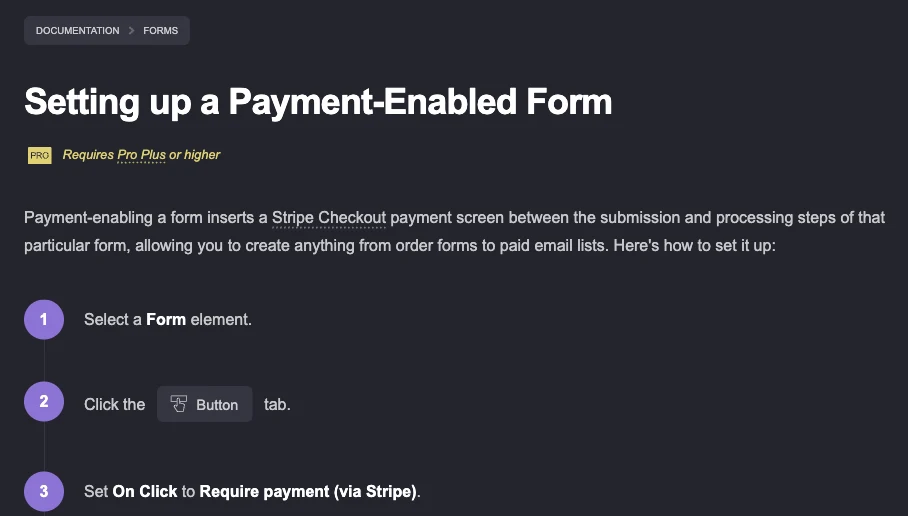
Carrd’s help page for payment-enabled forms. Read the yellow line under the title.
How Carrd’s Stripe payment form works
Per Carrd’s payment form docs, you set a form’s button to “Require payment (via Stripe)”, enter a Stripe price ID or a custom price, and paste your Stripe API keys into Carrd. The buyer then sees a Stripe Checkout screen, and the form only goes through after they pay.
Every step in those docs uses Stripe, with no PayPal option. The form does nothing about delivery either: after payment it does its normal job, like emailing you or sending the details to Zapier, Make, n8n or Airtable, so you have to send the file yourself.
A custom form can let the buyer pick the amount, but it’s still 1 charge per submission. When someone in r/Carrd asked how to take a reservation fee plus an optional gift as 2 separate amounts, a reply in the Stripe amount thread explained that “Carrd only supports one payment amount per payment-enabled form.”
For 1 file or 1 course, the link-button route is the simpler setup, since the checkout and the delivery happen in a tool built for both. Our list of platforms that need no website covers 12 of them, and the Google Sites ecommerce post explains why a plain button beats pasting checkout code into a page builder.
If you need a shop, a blog or several real pages
Carrd is the wrong tool for a store with several products, a blog or a site Google should index page by page. Every Carrd site is 1 page with sections, with no shopping cart and no blog engine.
An indie skincare seller found that out in a Carrd shipping thread. Linking each product to its own checkout meant a buyer of 3 items would check out 3 times.
An r/Carrd user marked as a helpful contributor replied: “Carrd is more for marketing landing pages. It’s not really best fit for complex ecommerce stores.” The seller leaned toward an all-in-one store instead.
For that kind of site, pick a multi-page builder with a store and a blog built in, like Wix. Wix’s US prices are $17 a month for its Light plan and $29 a month for Core, the first Wix plan that accepts payments, both billed yearly, and Wix notes that prices vary by location. On the same yearly basis, Carrd Pro Standard works out to about $1.58 a month.
Commenters in r/Carrd also point to cart add-ons like Ecwid or Shoprocket that embed into a Carrd page, which needs Pro Standard for the embed. The skincare seller’s own math, “$29/mo here, $19/mo there”, is what pushed them toward 1 tool. Our guides to Squarespace digital products and adding a website cart compare those routes with real fees.
Where Carrd goes wrong: 23 low-star reviews sorted
Carrd’s worst reviews mostly describe sites taken down without warning, work lost in the builder and plans that turned out to need an upgrade. Carrd has 61 reviews on its Trustpilot page and a TrustScore of 3.1, with 34 at 5 stars, 2 at 4 stars, 2 at 3 stars, 3 at 2 stars and 20 at 1 star.
A plain average of those stars is 3.44, higher than the TrustScore, because Trustpilot doesn’t use a plain average. The page is unclaimed, Trustpilot says Carrd has no history of asking customers for reviews, and its data marks all 61 reviews as organic. Reviews have turned more negative lately: of the 15 posted since January 2026, 8 give 1 or 2 stars.
6 of the 23 reviews at 1 or 2 stars say a site or account was taken down, more than any other complaint.
| Complaint | Reviews | What a reviewer said |
|---|---|---|
| Site or account taken down | 6 | “all three websites and my account has been totally deleted no warning” |
| Hit a plan wall or no refund | 4 | “most templates are unusable unless you upgrade to a higher-tier plan” |
| Editor problems | 4 | “You cannot set the font size to be e.g. 16px” |
| Lost unsaved work | 3 | “a window popped up asking me to reload… AND EVERYTHING WAS GONE” |
| Locked out of the account | 2 | “Access Denied. Please try again” over and over |
| Other (SSL, support, billing, trust) | 4 | “they cant fix the SSL issue for two weeks” |
A UK business owner ran paid ads all day before a customer told them their advertised Carrd site couldn’t be found. All 3 of their sites and the account were gone with no email or warning, and Carrd’s terms of use let it “suspend or delete a Site” at its sole discretion.
Lost work comes up too. 3 low-star reviewers lost hours of building, 2 of them after a page refresh, and both of those say there was no auto-save. A 4-star reviewer describes losing hours when the builder refused to save a design.
Billing has 2 rules to know. If an auto-renewal fails and no card is saved, Carrd’s terms say your account drops to the free Basic plan “after a short grace period” and your sites “lose access to any Pro features”, which would switch off a payment form or custom domain.
Refunds are at Carrd’s discretion. The terms say Carrd is not required to give a refund for any reason, though a 5-star reviewer was offered a refund when they left.
Many of the 5-star reviews praise how easy Carrd is, its price and its support. Reviewers mention fast, personal replies. One had an SSL problem “fixed at 6 AM my time”, and a long-time user has had referral credits cover a whole year’s plan.
The Carrd review verdict, page by page
The right Carrd plan costs $0 to $49 a year, and selling 1 product through a button to a checkout needs no paid plan.
| Your page | Pick | Cost | The catch |
|---|---|---|---|
| Portfolio, event or link page | Basic or Pro Lite | $0 or $9 a year | No forms, no own domain |
| Own domain plus email signup | Pro Standard | $19 a year plus the domain | Your email tool does the sending |
| 1 product for sale | Any plan, button to Gumroad or CartMango | $0, or $19 a year with your own domain, plus the checkout’s fee | Delivery happens at the checkout |
| A Stripe form on the page | Pro Plus | $49 a year | You deliver the file yourself |
| Store, blog or several pages | Wix or another multi-page builder | From $17 a month for Wix Light, $29 for Core to take payments | Billed a year upfront |
FAQ
Is Carrd really free?
Carrd’s free Basic plan builds up to 3 one-page sites with no time limit. They sit on a Carrd address with a small Carrd badge, and they can’t use forms, widgets or your own domain. Paid plans start at $9 a year, and a 7-day Pro trial needs no card.
Is Carrd trustworthy?
Carrd is a reasonable pick for a page as long as you keep a backup, because reviewers report sites taken down without warning. It grew from AJ’s side project into Carrd Inc., and its public changelog adds templates and fixes regularly. Payments on a Carrd form go through your own Stripe account. Keep your page text and images outside Carrd, and never send paid ads to a page you aren’t checking.
Which is better, Carrd or Wix?
Carrd is better for a single page you want live today for $0 to $19 a year. Wix fits a multi-page site, a blog or a store with a cart, from $17 a month for Light, or $29 a month for Core, the first Wix plan that takes payments, both billed yearly. A heavy Wix user in an r/Carrd thread found Carrd “clunky and difficult to use”, so expect a learning curve if you come from Wix.
What are the limitations of Carrd?
Every Carrd site is 1 page, with sections standing in for extra pages, and there’s no blog, no shopping cart, and nothing in Carrd’s docs that delivers a file after payment. Forms need Pro Standard at $19 a year, Stripe payment forms need Pro Plus at $49, and billing is yearly only. Several Trustpilot reviewers also lost unsaved work in the builder, so save often.
Can you sell digital products on Carrd?
Yes, in 3 ways. Any plan can link a button to a hosted checkout like Gumroad or CartMango, Pro Standard adds payment widgets, and Pro Plus adds Stripe payment forms. Carrd’s docs describe no way to send the buyer the file, so a checkout that delivers files is the simplest fit.
A Carrd page with a real checkout behind it
The part after the click, taking the money, sending the file and following up with the buyer, is simpler with a checkout that also delivers the file. Reddit users like Carrd for one-page jobs and call it a poor fit for a store, which is where this Carrd review lands for sellers.
Protected downloads, order bumps and a checkout that adds every buyer to your email tool are what CartMango puts behind a Carrd button, with 0% taken per sale. CartMango is free right now, with paid plans from $10 a year starting in November. Keep your Carrd page as it is, and point its button there.
About the Author

👋 I’m Welly, founder of CartMango (the site you’re on), a checkout platform for digital product sellers. We’ve previously processed $179M+. I also run BirdSend (email marketing tool, 3.1B+ emails sent). On the side I show other non-techie digital sellers how I use AI workflows to automate 50%+ of my operations. Find me on LinkedIn.
Related Reading
- How to create a sales page: the 7 blocks every sales page needs
- Leadpages review: another page builder, rated by its users
- ThriveCart vs Leadpages: a page builder against a checkout
- Stan Store alternative: pick by what you sell