

This Leadpages review finds a landing page builder that costs less than Unbounce for split testing but has lost the trust of many recent reviewers. Plans start at $29 a month, tests start at $99, and 25 of the 31 Trustpilot reviews from the past 12 months give 1 star.
Leadpages rebuilt the product from the ground up in 2026, and all 9 Trustpilot reviews posted in October give 1 star and blame the new version. It still fits a marketer paying for ad traffic who will run tests every month. A seller with 1 or 2 pages can pay far less for the same job.
Most of the Leadpages reviews on page 1 of Google describe plans that no longer exist. 6 of the 7 written reviews I read quote a Standard plan, at $25 to $49 a month, that Leadpages has dropped.
None of those 7 mentions refunds or renewals either, and billing is the main complaint in 28 of the 51 recent 1- and 2-star reviews.
So this review goes to the sources instead: Leadpages’ own pricing page, terms and help docs, plus 450 Trustpilot ratings.
You’ll see what each plan costs in US dollars, what the October reviews say, and how Leadpages handles the 5 jobs you need from a page tool, including the one those reviews skip.
Key Takeaways
- The plans changed. Billed monthly, Pro costs $29, Grow $99 and Optimize $199. The Standard plan many reviews quote is gone.
- Split testing costs less than Unbounce. Grow is $79 a month on yearly billing, $33 less than Unbounce’s testing plan, with no visitor cap.
- Trustpilot reads 1.9 out of 5. 319 of 450 ratings give 5 stars, yet 25 of the last 31 give 1 star.
- October’s reviews all give 1 star. All 9 blame the new version, while Leadpages’ FAQ says “Nothing changes unless you want it to.”
- Selling 1 product costs less elsewhere. Carrd costs $19 a year, and CartMango, which I run, is free right now, from $10 a year once paid plans start in November.
Leadpages pricing: what each plan costs now
Leadpages is a landing page builder that now shows 4 plans on its pricing page, from $29 to $199 a month. Its FAQ adds Scale at $399 plus custom-priced Enterprise. Pro and Business publish pages, and Grow and up add testing.
Not sure a page tool is your real problem? The Online Selling Mistakes Challenge is a free email course on 5 common selling mistakes, worth reading before you spend $99 a month on testing.
Pro is the cheapest way in at $29 a month, and A/B testing starts on Grow at $99, more than 3 times that price.
| Plan | Monthly | Billed yearly | Pages | Domains | A/B tests |
|---|---|---|---|---|---|
| Pro | $29 | $276 a year | 25 | 1 | No |
| Business | $49 | $468 a year | 50 | 2 | No |
| Grow | $99 | $948 a year | Unlimited | 4 | Yes |
| Optimize | $199 | $1,908 a year | Unlimited | 6 | Yes, plus AI traffic routing |
| Scale | $399 | $3,828 a year | Unlimited | 10 | Yes, plus full auto-testing |
Those are US prices. Leadpages reads your location and shows a different list by country. The Internet Archive’s US copy holds the yearly figures above, and Leadpages’ own FAQ lists the monthly ones. Check the page from your own country before you budget.
socialmarketingwriting.com’s review, updated in September 2026, still says “For most people, the Standard plan ($37/month) will be sufficient.” Google’s summary for this search carries the same stale Standard and Pro lines.
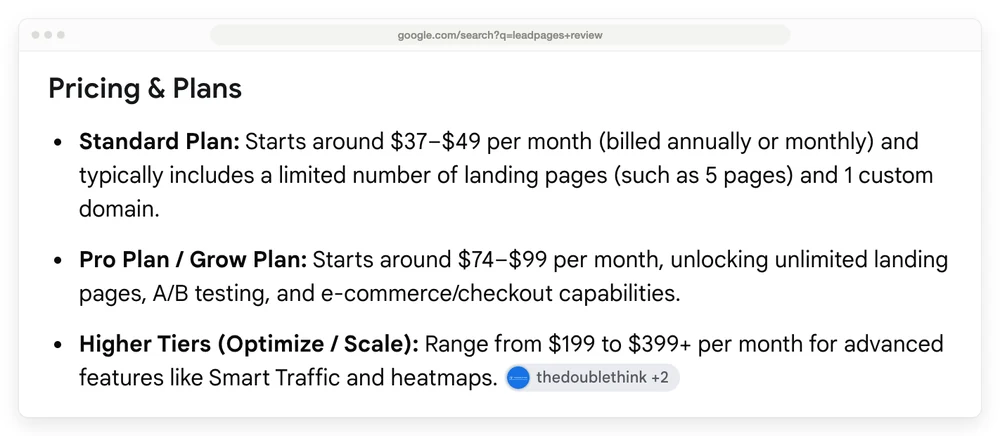
Leadpages has also dropped the $10 Starter plan from its pricing page, so older guides that list it are out of date.
Leadpages reviews on Trustpilot: why 319 5-star ratings sit under a 1.9
Leadpages scores 1.9 out of 5 on Trustpilot while 319 of its 450 ratings give 5 stars, and the reason is mostly timing. Trustpilot’s own help page says “Newer, recent reviews hold more weight in the TrustScore than older ones”, and the recent ones are mostly 1 star.
5-star reviews fell from 25 in 2022 to 3 so far in 2026, 1-star reviews rose from 5 to 25, and Leadpages went from answering nearly every review to answering none.
| Year | Reviews | 5-star | 1-star | Leadpages replied to |
|---|---|---|---|---|
| 2022 | 31 | 25 | 5 | 29 |
| 2023 | 36 | 26 | 6 | 36 |
| 2024 | 33 | 24 | 8 | 33 |
| 2025 | 40 | 13 | 23 | 39 |
| 2026 so far | 30 | 3 | 25 | 0 |
Since mid-February 2026, all 26 new reviews give 1 or 2 stars. Trustpilot’s company activity page shows the same thing over 12 months, and adds a line saying Leadpages “Hasn’t replied to negative reviews for the past 12 months.”
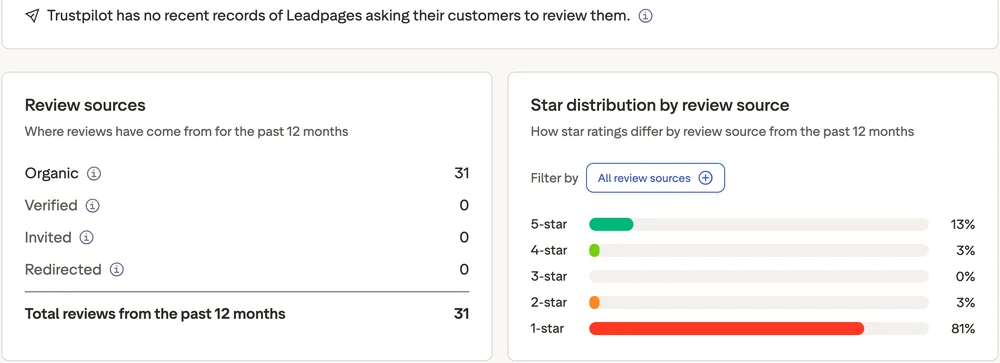
Trustpilot’s page data tags 40 of the 103 reviews since January 2024 as coming through a basic review link, the kind a business can hand out, and all 40 give 4 or 5 stars. The other 63 came in on their own, and 59 of those give 1 or 2 stars. So the recent 5-star pile leans on reviews that arrived by link.
Where reviewers are happy, support is the usual reason: 147 of the 238 4- and 5-star reviews I read mention support, help or the team.
Then I sorted all 51 1- and 2-star reviews since January 2025 by main complaint. 28 are about billing, renewals, trial charges, cancelling or refunds. 11 are about the new version. 4 are about price rises on existing plans, and 8 are about support or bugs.
31 reviews in a year is a small, angry sample against the 400,000-plus businesses Leadpages says use it. G2 shows 4.3 from 232 reviews and Capterra shows 4.5 from 302. But the 25 reviews Capterra shows first are all dated August 2025 or earlier, so that score says little about the rebuilt product.
Getting a page live without a designer
Leadpages has long been easy to start with, and ease of use is the praise that lasts across review sites. “I’m NOT a techie and Leadpages allows me to create landing pages in less than 5 minutes,” a Capterra reviewer wrote in August 2025.
The builder behind that praise was already drawing complaints. In February 2026, Leadpages published a post that opens “We read every cancellation review. All 200 of them from the past year.” It listed the patterns: mobile editing that didn’t work properly, forms that were too basic, rigid positioning. Then it said “Here’s the part we don’t love admitting: they were right.”
So it rebuilt the editor, first as a beta called Page Studio, then added an AI agent called Piper in September 2026. You describe the page, Piper offers 3 directions, and you edit from there. Leadpages’ CEO calls that “starting from an 80% draft”, which is a fair way to set expectations.
October went badly for people with years of pages. A German customer opened the editor the day before a launch and wrote “I cannot edit my pages anymore because all section names got replaced by generic technical names (div, div, div).” A UK customer said a small edit took about an hour instead of 5 minutes, and then the page was held for manual review.
2 real strengths remain. There’s no traffic cap on any plan, where Unbounce’s $22 Starter plan covers 500 visitors. And you get a custom domain and SSL (the padlock in the browser) from Pro up.
On page speed, Leadpages says pages “typically load in under 2 seconds”. I found no independent test of a live page in any review I read. The speed complaints I did find were about the editor.
Moving each new lead into your email tool
Every Leadpages plan includes forms, but your plan decides how many tools those forms can feed and how long your sign-ups stay stored. Pro, Business and Grow each allow 5 active connections to other tools, and Optimize allows 10.
Pro keeps form submissions for 30 days, so anything that never reached your email tool can vanish. Business and up keep submissions while you stay subscribed. The pricing table also says Pro has no lead CSV export, while the forms page says CSV export is “Included on every plan”.
Leadpages also gives 3 different counts for what it connects to: 19 on its forms page, 50+ on its main FAQ and 200+ on its pricing page. So look up your own email tool by name.
This was one of the jobs that broke for some users in October. “Every one of my forms is broken, so my leads aren’t arriving in my email platform,” a UK reviewer wrote. Another said contacts still reached Mailchimp but with broken fields, which stopped their automations.
A Leadpages help doc on its older builder says “the lead magnet feature is considered legacy, and may not be available in all accounts.” The safer setup is to let your email tool send the file, using a simple lead magnet email sequence.
Charging for it and handing over the file
Leadpages can take payment on the page and adds no fee of its own, but its docs leave most of what happens after the sale to other tools. You pay the processor’s normal rate, which Leadpages puts at 2.9% + 30 cents for a US Stripe charge.
Its help doc for the new version lists Stripe, PayPal, Shopify, Lemon Squeezy and Gumroad as gateways. Its product page lists one-time sales, subscriptions, payment plans and upsell pages after checkout. That’s a decent list for a page tool, and 3 things stay unclear, so ask support before you buy.
- Which plans include it. The help doc says checkout needs “a paid plan with e-commerce enabled”, and the pricing table has no checkout row.
- How the file reaches the buyer. The product page suggests a “Stripe thank-you page redirect for instant access links or download delivery”. The docs don’t say whether that link is protected or expires.
- Coupons and multiple products. The older builder’s help doc says 1 product per checkout, no coupon box, and refunds go through Stripe. The new doc doesn’t say whether that changed.
The worst report here came from a US course seller in October, who said the payment connections broke in the move and “now customers can get access to my courses etc simply by providing their email address and not paying for anything.” That’s 1 reviewer, and it may not happen to you. It’s also a good reason to run a real test purchase after any update.
If your page mostly exists to sell 1 product, you may not need a page builder at all. I run CartMango, a checkout that competes with Leadpages for this job. CartMango hosts a simple sales page built in Mini Pages with a button to the checkout, delivers files through protected links and takes no per-sale fee.
CartMango is a much smaller tool than Leadpages. Its feature list has no pop-ups or A/B tests, and Mini Pages are built for sales pages only. The no-website selling guide shows that route step by step. If you want a full checkout next to Leadpages instead, the ThriveCart vs Leadpages comparison prices running both.
Finding out which version of a page wins
Leadpages’ A/B testing, or split testing, starts on Grow at $99 a month, or $79 on yearly billing, and this is where it beats a well-known rival. Unbounce’s plan cards first list testing on Experiment at $149 a month, or $112 on yearly billing, with a 30,000-visitor limit. Leadpages has no visitor limit and costs $33 a month less on the same yearly billing.
Smart Traffic, which sends each visitor to the version most likely to work, and heatmaps start on Optimize at $199. If you only want to try testing, Systeme.io’s free plan includes 1 A/B test.
Unbounce still has its fans. In an r/PPC thread, a long-time Unbounce user who had just started Leadpages for a client wrote “Unbounce is far superior. It gives us a lot more control.” The same person added that “with a lot more control comes more complexity.”
Before you pay for testing, do the sums on your own traffic. Leadpages’ FAQ says a test usually needs 100 to 1,000 conversions to give a clear answer. Say your page collects 20 sign-ups a week. That’s 5 weeks at the very best and 50 weeks at the slow end, for 1 test. At that size, a better landing page copy template will teach you more than a test you can’t finish.
The job reviews skip: staying live and leaving clean
Staying stable while the company changes the product, then letting you leave without a surprise charge, is Leadpages’ weakest job on the reviews I read. 28 of the 51 1- and 2-star reviews since January 2025 are about the leaving half, and none of the 7 written reviews covers it.
What October did to existing pages
Leadpages tells existing customers what to expect on its pricing page: “Nothing changes unless you want it to. Your pages keep working. You choose old or new experience any time. Your current price stays the same.”
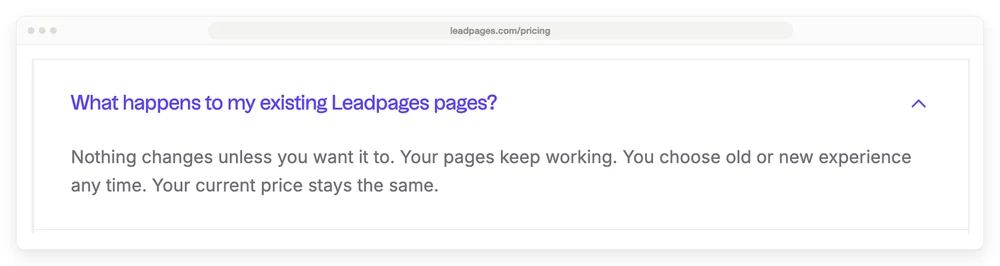
9 Trustpilot reviews from October 2026 say otherwise, and that’s the most 1-star reviews in any month of the profile’s history. 5 of the 9 say the move came with no warning.
- The move. “Overnight and without warning I was moved over to their new system, which is not ready for use,” wrote a UK customer, who says support called it a phased rollout.
- Ad tracking. A 6-year US customer said the switch “was sending 0 conversions to the ad platform” while sales were still coming in, which hurt a working campaign.
- Search. A UK reviewer said the switch “indexed all pages that had been previously marked as no-index”, so hidden pages became findable on Google.
- Price. A reviewer said the subscription “more-or-less doubled in price to nearly £1,000 a year”. Another said a 50-domain plan now means paying $240 per domain.
These are reviewers’ own accounts, and I can’t confirm each one. I also found no Leadpages post announcing a date for the move. Leadpages’ terms promise advance notice of a fee rise, and its FAQ promises your price stays the same, so anyone seeing a higher bill has a fair question to put to support.
If you’re on Leadpages today, run these 4 checks now.
- Send a test lead through every live form and confirm it lands in your email tool with all its fields.
- Make a real purchase on every page that sells, and confirm the buyer can’t get in without paying.
- Check your ad tracking against your real sign-ups for the past week.
- Export your leads while you can. Lead CSV export starts on Business, and Pro keeps sign-ups for 30 days.
Trial charges, renewals and refunds
The Leadpages trial lasts 7 days and needs a card, and the pricing page says “On day 7 it becomes your paid plan unless you cancel.” That wording changed in October 2026. The Internet Archive’s copy from October 5 said “You choose a plan or your account pauses. No surprise charges.”
If you picked yearly billing, day 7 would mean a full year’s bill, which is $948 on Grow. Reviewers describe the same trap: 1 says they were charged $888 for a year after building 1 page on the trial, and another reports £720 for a yearly Pro plan after a sign-up they thought had failed.
The refund rules depend on which page you read. Leadpages’ main FAQ says “we don’t offer refunds on subscription payments” after the trial. Its terms offer a 7-day money-back guarantee for new accounts, starting when the paid term starts, with renewals excluded. Those same terms still describe a 14-day trial. So if you miss the trial, contact Leadpages inside 7 days of the first charge.
Renewals are automatic, and they’re the other big complaint. “I was charged $488 to auto-renew a Leadpages account I hadn’t logged into in two years,” a reviewer wrote in May 2026. Put the renewal date in your calendar the day you sign up.
The FAQ says you can cancel from your account settings. A May 2026 reviewer said “the actual cancel button is missing”, and an older Capterra reviewer said support couldn’t find their account when they asked to cancel. Take a screenshot when you do it, and check that auto-renew really shows as off.
Leadpages’ help doc says your account drops to a Free plan with a 5-page limit at the end of the billing period. Pages over that limit and custom domains are switched off, though not deleted. So any page on your own domain goes dark that day, and it’s worth rebuilding elsewhere first.
Give that move real time, and pay for help if it saves you days. When I moved a Google Workspace account to a new one in 2022, I spent half a day just moving files, and even a paid migration tool couldn’t copy my forms. I told my email list at the time: “I’d rather pay money because money can be gotten back. But not time.”
Who should pay for Leadpages, and what each tool covers
Pay for Leadpages Grow if you spend money on ads every month and will run a test on every campaign. That’s the customer the rebuilt product is made for, and $79 a month on yearly billing is a fair price for testing with no visitor cap. I’d still wait until new Trustpilot reviews stop reporting broken forms and tracking before moving live campaigns onto it.
Skip Leadpages if you have 1 or 2 pages and send your own audience to them. Pro costs $276 a year and has no testing, while Carrd and Systeme.io do that job for less. If those pages sell 1 product, CartMango is a third option.
Leadpages pros and cons
- Works: quick page building, no visitor cap, no per-sale fee, and cheaper split testing than Unbounce.
- Check first: which plan includes checkout, how files reach buyers, and how many connections your stack needs.
- Watch out: yearly charges after the trial, automatic renewals, and reports of broken forms and payments since the October move.
Leadpages Grow costs $33 a month less than Unbounce’s testing plan with no visitor cap, while Systeme.io and Carrd cost far less for a seller who doesn’t need split tests, and CartMango costs far less for a seller with 1 product. Prices below are on yearly billing, shown per month.
| Tool | Price | Pages | Leads | A/B tests | Payment |
|---|---|---|---|---|---|
| Leadpages Pro | $23/mo | 25 pages | 5 connections, 30-day history | No | Needs e-commerce on your plan, plans not named |
| Leadpages Grow | $79/mo | Unlimited | 5 connections | Yes | Needs e-commerce on your plan, plans not named |
| Unbounce Experiment | $112/mo | Unlimited, 30,000 visitors | Lead forms | Yes | Stripe, PayPal or Shopify scripts from its docs |
| Systeme.io Free | $0 | 3 funnels, 1 domain | Built-in email, 2,000 contacts | 1 test | Stripe, PayPal, stops at $10,000 in total sales |
| Carrd Pro Standard | About $1.58/mo ($19 a year) | 10 one-page sites | Forms sent to your email tool | No | Stripe or PayPal embeds |
| CartMango Silver | About $0.83/mo ($10 a year) once paid plans start | 10 Mini Pages, sales pages only | Buyers only, synced to your email tool | No | Stripe, PayPal, no per-sale fee |
CartMango is mine, so its row lists what it leaves out. If you want an all-in-one instead, the Systeme.io review and the ClickFunnels review cover the bigger bundles.
FAQ
Is Leadpages worth it?
Leadpages is worth it if you pay for ad traffic every month and will run tests. Grow at $79 a month on yearly billing is cheaper than Unbounce’s testing plan and has no visitor cap. For 1 or 2 pages sent to your own audience it’s hard to justify, and the October reviews are a reason to wait.
Does Leadpages have a free plan?
Not one you can sign up for from its pricing page. Leadpages offers a 7-day trial that needs a card. Its help doc does mention a Free plan with a 5-page limit, but that’s where a cancelled account lands, with extra pages and custom domains switched off.
What is the average cost of a landing page?
Tool prices in this post run from free plans and $19 a year for Carrd up to $399 a month for Leadpages Scale, and I found no reliable average. Hiring someone to design and write the page is a separate cost, and quotes vary too much for a single figure to mean much.
Is Unbounce a legitimate company?
Yes. Unbounce is an established paid landing page tool with a public price list and a 14-day free trial, and its about page says it bought Insightly in July 2024. Plans start at $22 a month on yearly billing, with A/B testing on Experiment at $112.
Is it better to have a landing page or website?
For 1 offer and 1 action, a landing page usually does the job, because nothing pulls the visitor away. For many products, or a brand people browse, a website makes more sense. Many sellers need neither at the start, and a hosted sales page is enough to take a first sale.
Can ChatGPT build a landing page?
Yes, it can write the copy and the code. You still need somewhere to host the page, a form that feeds your email tool and a way to take payment. Leadpages sells that layer, and every plan on its pricing page includes a connector that publishes pages from Claude or ChatGPT.
Selling 1 product without a $99 page tool
A $99 page tool earns its keep when you buy traffic and test all the time. For a seller with 1 product, this Leadpages review points elsewhere: Pro costs $276 a year and can’t run a test.
If your page sells 1 ebook, template or other downloadable file, CartMango covers that smaller job with a hosted Mini Page, a checkout and protected file delivery, and it takes no cut of your sales. CartMango is free right now, and paid plans start in November 2026 from $10 a year.
About the Author

👋 I’m Welly, founder of CartMango (the site you’re on), a checkout platform for digital product sellers. We’ve previously processed $179M+. I also run BirdSend (email marketing tool, 3.1B+ emails sent). On the side I show other non-techie digital sellers how I use AI workflows to automate 50%+ of my operations. Find me on LinkedIn.
Related Reading
- Leadpages alternatives: cheaper picks by the job you pay for
- ThriveCart vs Leadpages: checkout, page builder, or both
- Systeme.io review: the free plan’s $10,000 sales limit
- Kartra review: when an all-in-one bundle pays off
- Sell digital products without a website: the hosted-page route, step by step