

Google Sites has no shopping cart, checkout or payment feature, so every Google Sites ecommerce setup borrows one from another company. The most reliable version is a plain Google Sites button that opens a hosted checkout from PayPal, Stripe, Square, Jotform, Payhip, Gumroad or CartMango in a new tab.
Pasting a whole store into the page is riskier. Google runs embedded code in a locked frame that cannot take over the page, and Ecwid’s own Google Sites page warns its embedded cart can lose what a shopper added. Stripe and Square links charge no monthly fee, just 2.9% + 30¢ and 3.3% + 30¢ per US card sale.
In August, a seller asked in a thread on r/ecommerce whether a Google Site could replace Etsy. They were already selling from a Google Site that linked to Etsy, and summed it up in 3 words: “it sucks really”.
The replies pushed Shopify, WordPress and Wix. A reply said Google Sites has “No proper cart, shipping/tax handling, inventory, none of it”. True, and it stops just short of the useful part: what you can bolt on, and what breaks when you do.
So I checked it myself. I read the code Google wraps around an embed box, clicked a PayPal button on a live Google Site, and priced 13 add-ons at their own sites.
Below, 4 cuts take those 13 down to 7, and a table shows which of the 7 fits what you sell.
Key Takeaways
- Google Sites has no checkout of its own. Every Google Sites store borrows one, through a linked button or code pasted into an embed box.
- Pasted code runs inside a locked frame. It cannot take over the page, and Ecwid calls embedding its store “not yet the best way”.
- A plain button to a checkout works best. PayPal, Stripe, Square and Jotform each start at $0 a month and open in a new tab.
- File sellers need delivery built in. CartMango, Payhip and Gumroad send protected downloads and leave you $19.12, $18.12 and $16.62 of $20.
- 2 popular picks fail on price. Shopify’s $5 Starter plan is closed to new stores, and Ecwid’s $5 plan cannot sell files.
Google Sites ecommerce means bolting on 1 of these 13 tools
Selling from Google Sites means picking 1 of 13 outside tools, because Google gives you buttons and an Embed box but no cart, product list or payment step. Google’s help page on embedding covers web addresses, Google files and “HTML, CSS, or JavaScript code”. Carts and payments never come up.
Whichever tool wins, the price and the words around your buy button still do a lot of the selling. For those, the Online Selling Mistakes Challenge is a free 5-day email course on the top 5 selling mistakes solo creators make.
Here is the full field: the tools that page 1 and the Google Sites Community name, plus the low-tech and link-out options they skip.
- A Google Form order form, with the payment chased by hand afterwards
- PayPal buttons, pasted into the page as code
- Stripe Payment Links, put behind a Google Sites button
- Square Payment Links, the same way
- A Jotform order form with Stripe, PayPal or Square built into it
- An Ecwid store pasted into the page
- An Ecwid store on its own storefront, which Ecwid calls Instant Site, linked from your menu
- A Shopify Buy Button
- Snipcart, a cart script you add to your own page
- Gumroad
- Payhip
- Lemon Squeezy
- CartMango, the checkout I run, held to exactly the same cuts as the other 12
If you have read our guide to adding a website cart, most of these will look familiar. What changes on Google Sites is the embed box, and that is where most of the cutting happens.
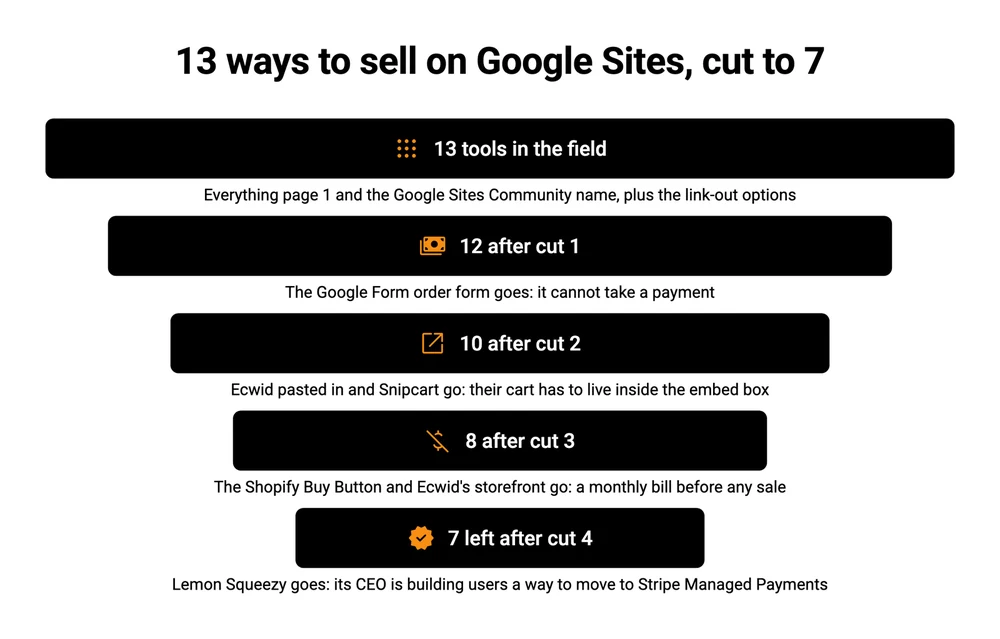
Cut 1: an order form that never takes the money
A Google Form can collect an order but cannot collect a payment, so it goes first. Google’s list of question types runs from short answer to date and time, with no payment question anywhere in it.
That leaves you sending bank details or an invoice after each order, then checking who paid.
For a bake sale or a club kit order, that is fine.
For a stranger on the internet who has to leave, open a banking app and come back, a lot of them simply do not come back.
That leaves 12.
Cut 2: a cart pasted inside Google’s embed box
Any tool that needs its shopping cart to live inside the page fails here, because Google Sites runs pasted code in a locked frame. I read the page code of a live Google Site that sells with pasted code, a local park group selling its history book through 2 PayPal buttons.
Your code sits 3 frames deep there, inside a frame Google serves from gstatic.com. That frame carries a sandbox list, which is the browser’s rulebook for what the code inside may do:
allow-scripts allow-popups allow-forms allow-same-origin
allow-popups-to-escape-sandbox allow-downloads allow-storage-access-by-user-activation
The permission missing from that list is allow-top-navigation, the one that would let code inside the box take over the whole browser tab. So the box can open a new tab, and it can never become the page.
For 1 button, that is fine. For a whole store living inside the box, it is a problem, and Ecwid says so itself. Its page for Google Sites users files embedding the store as code under “not yet the best way”:
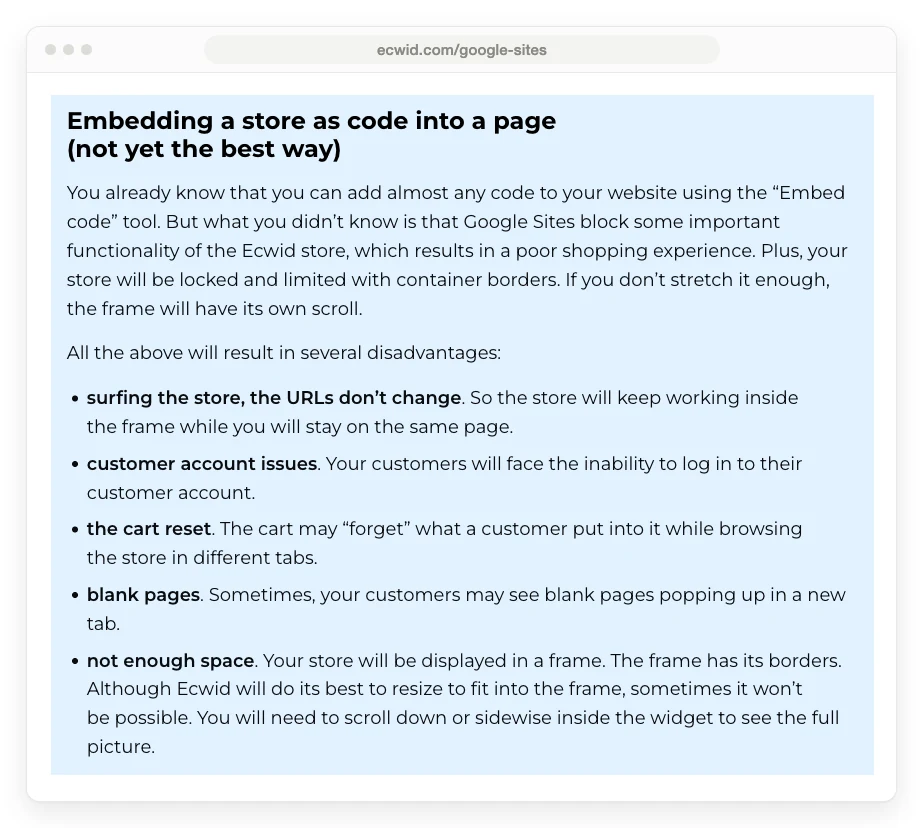
The list is blunt. The page address never changes as a shopper browses, so no product gets its own link. Customers cannot log in to their account. Under “the cart reset”, the cart can lose what someone added while browsing in different tabs. Blank pages can pop up in a new tab, and under “not enough space”, the store may not fit its frame.
Ecwid’s advice is to link to its separate storefront instead, which is option 7 on the list above.
The summary Google shows at the top of this exact search says the opposite. Its AI Overview describes Ecwid as a tool that “lets you embed a fully functional shopping cart and product gallery directly onto a Google Site page”. Ecwid, the company that makes the cart, does not agree.
Snipcart goes out on the same cut. It is built to run from your own page’s code, so on Google Sites the cart, the buttons and the checkout window would all sit inside that same box.
The Shopify Buy Button survives this one, narrowly. Shopify’s help center lists a “Direct to checkout” setting that skips the cart entirely, and by default “the checkout opens in a new window”, which is exactly what the sandbox allows.
That leaves 10.
Cut 3: a monthly bill on a website that costs nothing
Google Sites is free with a Google account, so any tool that bills you every month before your first sale fails this cut. That takes out 2 more.
The Shopify Buy Button. Shopify’s $5 Starter plan would have been the obvious pairing, but Shopify’s help center now says “The Starter plan isn’t available to new stores.” So the Buy Button starts on Basic, at $25 a month, or $19 a month on yearly billing. 12 months at $19 is $228 before a single sale, which only makes sense if you already run a Shopify store, and our guide to selling files through Shopify covers that case.
Ecwid’s own storefront. Ecwid’s cheapest plan, Starter, costs $5 a month for up to 10 products. The digital goods row on Ecwid’s pricing table shows a cross under Starter, so a file seller needs Venture, at $29 a month on yearly billing or $35 month to month.
2 of the guides ranking for this search still quote an older Ecwid. Kirksville Web Design’s guide says you can “Start a free Ecwid account with up to 10 online products”. HostAdvice’s guide says the starter plan “only lets you list up to five products” for $5.
Ecwid’s pricing page has no free plan, and Starter now allows 10.
3 survivors come with a catch you should know before you pick them. Jotform’s free plan allows 10 paid orders a month, and the next plan up, Bronze, costs $34 a month on yearly billing. Payhip’s free plan has no monthly fee but takes 5% of every sale.
CartMango is free until October 2026 and then costs $10 a year, billed yearly rather than monthly. If you count any upfront fee as a fail, cross it off too. $10 a year is the price of 2 months on Ecwid’s cheapest plan.
That leaves 8.
Cut 4: a platform whose CEO is building your way off it
Lemon Squeezy fails on a fact from its own blog. It charges 5% + 50¢ per sale with no monthly fee, it handles sales tax as merchant of record, and Google’s AI Overview names it as a best choice for digital downloads.
In January 2026, its CEO JR Farr posted an update admitting to “slower support responses and less frequent product updates” while the team builds Stripe Managed Payments, Stripe’s own merchant of record product. The same post says: “Our goal is to provide Lemon Squeezy users an easy way to migrate to Stripe Managed Payments.”
Starting a new shop there means planning your second move before your first sale.
That leaves 7.
The 7 that pass, and which one fits what you sell
7 tools pass all 4 cuts: PayPal buttons, Stripe Payment Links, Square Payment Links, Jotform, Payhip, Gumroad and CartMango. What you sell decides between them, more than price does. On a $20 US card sale, CartMango, Jotform and a Stripe Payment Link each leave you $19.12, Square leaves $19.04, PayPal $18.81, Payhip’s free plan $18.12 and Gumroad $16.62.
| Tool | Best for | To start | You keep of $20 | The catch |
|---|---|---|---|---|
| PayPal buttons | A few physical items | $0 a month | $18.81 | The cart opens on PayPal, in a new tab |
| Stripe Payment Links | Services, fees, 1 product | $0 a month | $19.12 | Ends at a thank-you message or a redirect, so no file delivery |
| Square Payment Links | Physical goods, local pickup | $0 a month | $19.04 | 3.3% + 30¢ is Square’s rate for new customers |
| Jotform | Order forms, bookings, event fees | $0 on the free plan | $19.12 via Stripe | 10 paid orders a month, then $34 a month billed yearly |
| Payhip | Digital files | $0 a month | $18.12 | 5% of every sale on the free plan |
| Gumroad | Digital files, sales tax handled | $0 a month | $16.62 | 10% + $0.50 per sale, card fees on top |
| CartMango | Digital files | Free until October 2026, then $10 a year | $19.12 | Checkout opens on its own page, not embedded |
Every figure uses the tool’s own published rate plus card processing: Stripe’s 2.9% + 30¢ for Payhip, Jotform and CartMango, and the 2.9% + $0.30 Gumroad’s help center lists for its own sales. Since CartMango is my own platform, check its row the way you would check any vendor’s: 0% per-sale cut, with Stripe or PayPal paid directly by you.
Selling files. Pick CartMango, Payhip or Gumroad. All 3 send the buyer a protected download, which matters the day a link gets shared around (our guide on protecting digital downloads covers why). Gumroad costs the most per sale, but since January 2025 it has acted as merchant of record, so it collects and pays sales tax for you. If that job matters to you, the extra $2.50 on a $20 sale over CartMango buys it. Our list of Gumroad alternatives compares it with the rest.
Selling physical goods. PayPal buttons and Square Payment Links both cost nothing to set up. PayPal’s Add to Cart button lets a shopper pick 2 or 3 items before paying, while Square is the better fit if you already take card payments in person. PayPal’s rate is the higher of the 2: PayPal’s US fee page lists 3.49% + $0.49 for PayPal Checkout, while Square’s payment links page lists 3.3% + 30¢. Our breakdown of what PayPal charges shows where the extra goes.
Taking fees, deposits or bookings. A Stripe Payment Link behind a Google Sites button is the cleanest setup. Jotform earns its place when you need answers from the buyer too, like a class date, a size or a team name, because the payment sits inside the form.
Why a plain button beats pasted checkout code
For a checkout, a Google Sites button that links out does the same job as pasted checkout code, with less to break, because both end in a new tab. I did not expect that when I started.
On that live park group site, I clicked the PayPal Add to Cart button. The page stayed where it was, and PayPal’s cart opened in a separate tab. Then I checked what a native Google Sites button does with an outside address. It carries target="_blank", the instruction to open a new tab. So both routes land the buyer in the same place.
The pasted version just adds a fixed-height frame, 3 layers deep, that can end up with its own scroll bar, which is Ecwid’s “not enough space” point. The button version is a normal part of the page, sized like the rest of it. Anything inside the embed box also sits in a frame served from gstatic.com rather than on your page. Kirksville Web Design, a studio that builds Google Sites, warns that embedded code is “not providing indexable, Google Crawl Bot crawlable content to your site”. So write the description, the price and what the buyer gets as ordinary Google Sites text right above the button.
The button itself takes a minute. Add a Button from the Insert panel, give it a label like “Buy the guide, $20”, and paste your checkout link. If you still want pasted code, Google’s path is Insert, then Embed, then Embed code, and its help page says any JavaScript has to sit inside script tags.
Since the buyer ends up on that new tab, it becomes your real sales page. A bare payment link shows a short form with a price. A hosted product page, the kind Payhip, Gumroad and CartMango’s Mini Pages build, shows the product, the pitch and the checkout in 1 place, much like the page in our guide to creating a sales page.
The part none of this fixes is traffic. The seller from that Reddit thread was leaving Etsy partly because Etsy was not sending them buyers anymore. Google Sites has no marketplace either, so every visitor is one you bring in yourself, through search, social posts or email.
FAQ
Can you use Google Sites to sell things?
Yes, with an outside tool. Google Sites has no cart or payment step, so you add a button that links to a hosted checkout from PayPal, Stripe, Square, Jotform, Payhip, Gumroad or CartMango. 73 people clicked “I have the same question” on a Google Sites Community thread asking exactly this, and the answers there point to the same outside tools.
Does Google Sites charge fees to sell?
No. Google Sites is free with a Google account and takes nothing from a sale, because it never touches the payment. The fees come from the tool you add: from 2.9% + 30¢ per US card sale on Stripe’s standard pricing, up to 10% + $0.50 plus card fees on Gumroad.
Can I sell digital downloads on Google Sites?
Yes, if the tool you add delivers the file. CartMango, Payhip and Gumroad all send a protected download link after payment. A Stripe Payment Link only ends at a thank-you message or a redirect, per Stripe’s own docs, so the delivery step stays with you. Our guide to selling without a website covers the same choice from the other side.
Can I make money with Google Sites?
Yes, but the money comes from what you sell, not from Google Sites. Google takes no cut and pays you nothing, so your income is your sales minus the fees of the tool you add, which run from $0.88 to $3.38 on a $20 card sale among the 7 tools above. Google Sites also has no marketplace, so the size of that income depends on the visitors you bring in yourself.
Are Google Sites good for a small business?
For a small shop with a handful of products, yes. A free site plus a checkout link covers most of what a new seller needs. It gets tight once you have dozens of products, because each product is a button you add and update by hand, and nothing keeps your stock count in sync with the site.
What are the disadvantages of Google Sites for selling?
3 of them matter. There is no built-in checkout, so every sale opens a new tab on another company’s page. Pasted store code runs inside a locked frame, which Ecwid itself warns can break its cart. And Google Sites brings you no shoppers, so every visitor comes from your own marketing, much like any store built outside a marketplace.
Give the new tab something to sell
Google Sites ecommerce always ends the same way: the buyer clicks your button and lands on a new tab. On a $20 file, the 2 questions left are how much of that sale stays yours and whether the download stays protected once they pay.
CartMango’s Mini Pages builds the product page that button points to, the checkout sits behind it, the download is protected, and CartMango takes no per-sale cut. It is free until October 2026, then $10 a year.
About the Author

👋 I’m Welly, founder of CartMango (the site you’re on), a checkout platform for digital product sellers. We’ve previously processed $179M+. I also run BirdSend (email marketing tool, 3.1B+ emails sent). On the side I show other non-techie digital sellers how I use AI workflows to automate 50%+ of my operations. Find me on LinkedIn.
Related Reading
- Online store for digital products: the 3 store types and what each keeps of a $10 sale
- Shopping cart software: the 3 kinds of cart and the 5 jobs each has to do
- How to sell online for free: net payout on a $30 sale across 7 platforms
- Gumroad alternatives: for file sellers weighing Gumroad’s cut against the rest