

A lead capture page is a single web page that trades something useful, a checklist, a template, a discount, for a visitor’s email address. It carries 1 offer, 1 form and no navigation menu. Free email tools host one at no cost. Paid page builders start near $10 a month.
I read all 7 pages ranking on Google’s first page for this exact phrase before writing this one. Not one of them tells you what a lead capture page costs.
They show you Intercom’s page, ADP’s page, Samsara’s page. Real companies with marketing teams and a CRM behind them. The top result opens by asking whether you own marketing at your company.
If you are 1 person selling a template or a course, that advice was written for somebody else. You don’t need a heat map. You need to know whether you can put a page live this afternoon without paying anybody, and where that stops working.
So below: the 5 parts of the page, the real cost of every route I could check today, the half that every guide skips, and the legal rule that kicks in the moment you email that list.
Key Takeaways
- Not one page ranking for this term states a price. Unbounce writes the top result and its cheapest plan caps you at 500 visitors a month.
- The free route genuinely works. Kit’s free plan hosts unlimited landing pages, takes a custom domain and emails the file, up to 10,000 subscribers.
- Free usually stops at delivery, not at capture. beehiiv’s free plan collects the email fine, but the automation that sends the file starts at $43 a month.
- A lead capture page has exactly 1 job. 1 offer, 1 form, no navigation menu, nothing else on the page competing for that click.
- US law counts your follow-up email as a commercial email. It needs your valid physical postal address and a working unsubscribe link in every send.
What a Lead Capture Page Is (and the 5 Other Names for It)
A lead capture page is a landing page whose only goal is collecting a contact detail, almost always an email address, in exchange for something the visitor wants.
The naming is a mess, and that’s worth clearing up first, because you will hit all of these while researching. Wikipedia’s landing page entry lists “lead capture page”, “single property page”, “static page”, “squeeze page” and “destination page” as names for the same thing. Marketers also say opt-in page, and email tools tend to just say landing page.
They all describe 1 page, 1 offer, 1 form.
Google’s own AI Overview for this term lands in the same place, and it’s a fair summary of what every ranking guide agrees on:
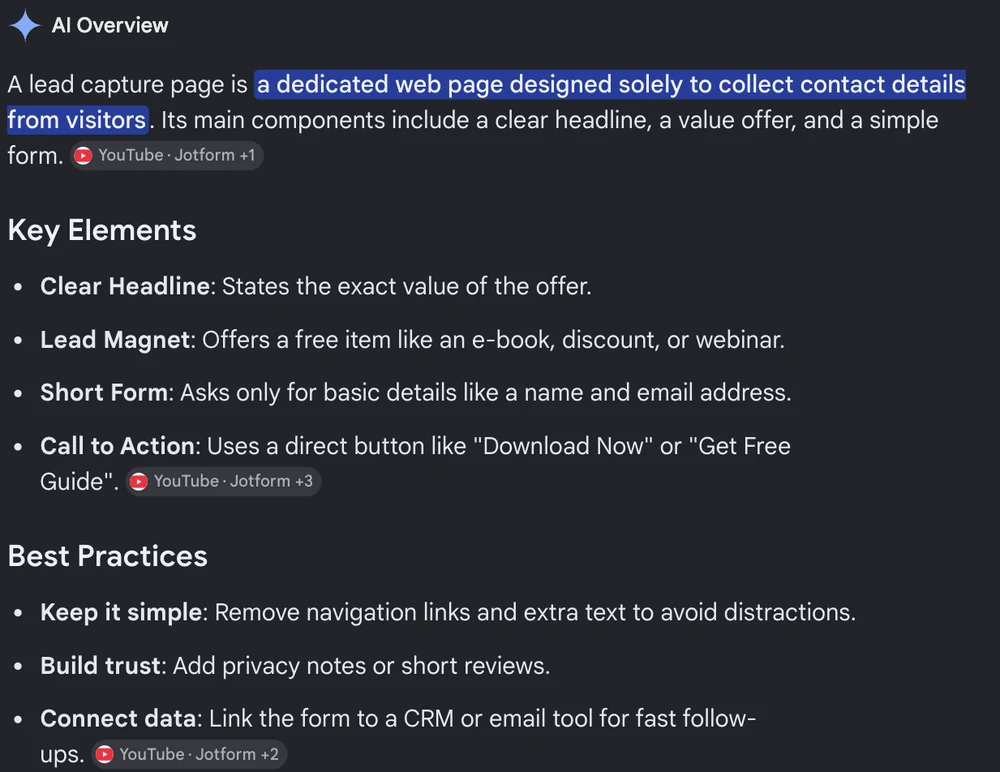
Google’s AI Overview for “lead capture page”. Every ranking page teaches those same 4 key elements.
Free 5-day challenge: the Online Selling Mistakes Challenge walks through the 5 mistakes that quietly cost solo sellers the most money. It also happens to be a live lead capture page, so you can watch one working before you build yours.
Where it differs from the pages you already know:
- Your homepage wants to send visitors 12 places. A lead capture page wants to send them nowhere.
- A sales page asks for money. A lead capture page asks for an email address, which costs the reader about 4 seconds and no risk. That gap is why the 2 pages look so different in length and tone.
- A product page explains a thing you sell. A lead capture page explains a thing you give away.
- A click-through page warms someone up and then hands them onward to a checkout or a booking form. It collects nothing itself, so the 2 get confused constantly.
Landing pages have a weirdly specific origin, by the way. Wikipedia traces them to Microsoft’s IT departments in late 2003, built as a response to poor online sales of Office. The whole category exists because a big software company was disappointed with its own web sales.
The 5 Parts of a Lead Capture Page
Strip away the design and every page that works has the same 5 pieces.
1. A headline that names the thing. Name the object the reader gets, in their words, at the size they will receive it. A headline like “The 27-Point Pre-Launch Checklist” works because a reader can picture the object. “Grow your business with our free resource” fails because it names a category. If headlines are the part you find hardest, the compelling headline guide has 12 quick fixes.
2. The offer itself. The checklist, the template, the mini course, the discount code. This is the whole trade, and it deserves more thought than the page design does.
3. A short form. Email address, and a first name if you plan to use it. Every extra box is a reason to leave.
One small thing here that most guides get backwards. Plenty of pages put the label inside the box, so the field shows a grey “Your email” that vanishes the moment you type. Nielsen Norman Group’s research on placeholder text in form fields found that this hurts more than it helps.
Eyetracking shows people’s eyes are drawn to empty fields, so a box that already looks filled gets skipped altogether. The grey is also too low-contrast for some readers, and several screen readers never announce it.
Put the label above the box. Leave the box empty.
4. One button. Just the 1. “Send me the checklist” beats “Submit”, because it repeats what the reader is about to receive.
5. A reason to trust you. A line of proof, a subscriber count, a short testimonial, or a single sentence saying what you will and will not do with the address. Small, but it is the difference between a stranger typing an email and closing the tab.
Everything else, the hero image, the social icons, the navigation menu, the footer links, is optional at best and a leak at worst. If you want the copy for each block spelled out, the landing page copywriting template gives you the prompts section by section.
What All 5 Parts Look Like Together
Here is 1 page written out end to end. It’s an illustration rather than a screenshot of somebody’s live page, because live pages get rewritten and this one will still read the same next year.
Headline: The 27-Point Pre-Launch Checklist
Subhead: For solo sellers about to put a digital product live for the first time.
The 3 bullets:
- Every setting to check before you take the first payment
- The 4 things that most often break on launch day
- A test-purchase script you can run in 10 minutes
The form: 1 box, labelled Email address, with the label sitting above the box.
The button: Send me the checklist
The trust line: 1 email with the checklist, then a short weekly note. Unsubscribe whenever. I will not sell your address.
That’s the whole page. Roughly 60 words of copy, 1 input box, 1 button.
Notice what is missing. There’s no menu, no About link, no footer stuffed with social icons, and no second offer competing with the first one. A reader who lands there has 2 options, and 1 of them is leaving.
What a Lead Capture Page Actually Costs
Here is the part page 1 of Google skips.
I checked all 7 ranking pages. Not one states a price. The 2 companies whose builders you would end up buying, Unbounce and Leadpages, wrote the top organic result and the paid ad sitting above it, and neither article names a number.
So I opened their pricing pages, plus the free routes those articles never mention. Every figure below was checked at the source.
| Tool | Free plan | Hosts page free | Sends file free | Cheapest paid |
|---|---|---|---|---|
| Kit | Up to 10,000 subscribers | Yes, unlimited pages | Yes, built into the page | $33/mo, or $390 a year |
| beehiiv | Up to 2,500 subscribers | Yes | No, needs the paid plan | $43/mo, or $517 a year |
| MailerLite | Up to 250 subscribers | Yes, 1 page | Yes, on 3 automations | $10.80/mo, or $129.60 a year |
| Carrd | Yes, 3 sites | Page only | No, sends no email at all | $19 a year, the $9 tier has no forms |
| Unbounce | None, 14-day trial | No | No, sends no email at all | $22/mo paid yearly |
| Leadpages | None, 7-day trial | No | No, sends no email at all | $10/mo |
| BirdSend | None, 7-day trial | No free plan | No free plan | $7.50/mo, or $90 a year |
I’ll be upfront about that last row. BirdSend is my other business, so read it as disclosure rather than a recommendation. Its 2 real limitations go first.
It has no free plan at all, only a 7-day trial. That is the whole reason it cannot compete with Kit for somebody starting from nothing.
And its lead capture page is a form type called a Welcome Screen, not a page builder. You get a headline, some text and a form, with no drag-and-drop and none of the layout control Unbounce or Leadpages sell. BirdSend’s own comparison pages call it a simplistic landing page and say outright that there is no dedicated landing page creator.
What it does have is the cheapest paid entry in the table, by a distance. $90 a year covers up to 1,000 contacts, against Kit’s $390 a year at that same list size.
One thing to read before you compare those paid columns. The 3 email tools price by list size, so the figures above are what each charges at a small list: Kit and beehiiv quoted at 1,000 subscribers, MailerLite at 500. Those are price points, not ceilings. Your bill climbs as the list grows.
Carrd, Unbounce and Leadpages charge by pages and traffic instead, so list size never moves their price.
A few more things that table hides.
Unbounce’s cheapest plan caps you at 500 visitors a month. That figure counts total page views, including everyone who lands and leaves without signing up. Its Starter tier is $22 a month paid yearly, $29 month to month, and gives you 5 pages and traffic volume up to 500.
The next tier up, Build, is $74 a month paid yearly and lifts that ceiling to 20,000. A creator who posts a link to their own audience can burn through 500 views in a day.
Leadpages starts at $10 a month, but that’s the publishing-only product. Their $10 Starter is HTML Pub, which builds and hosts pages. The product actually called Leadpages, with A/B testing and lead enrichment, starts at $99 a month. Both want a credit card for the 7-day trial.
Carrd’s $9 plan cannot collect an email. Forms do not appear until Pro Standard at $19 a year. Carrd is a page builder and nothing else, so it hands your form submissions to an email tool and you still need that tool. The saving is real, the setup is 2 accounts.
MailerLite’s free plan is 250 subscribers. That is the tightest free ceiling of the 3 email tools here, so check it against your current list before you commit. You also get 1 landing page and 2,500 emails a month on it.
Kit’s free plan is the outlier. Unlimited landing pages, a custom domain, unlimited traffic and automatic lead magnet delivery, free up to 10,000 subscribers. Kit’s own help doc opens by saying a landing page is a standalone opt-in and you do not need a website or a blog to use one. What you give up on free: Kit branding stays on the page, and you get 1 basic automation and 1 email sequence, so it holds exactly 1 freebie funnel and no more.
The Half Every Guide Skips: Actually Delivering the Thing
Collecting the email is the easy half. Getting the promised file into the reader’s inbox, automatically, at 2am, is where free plans quietly stop.
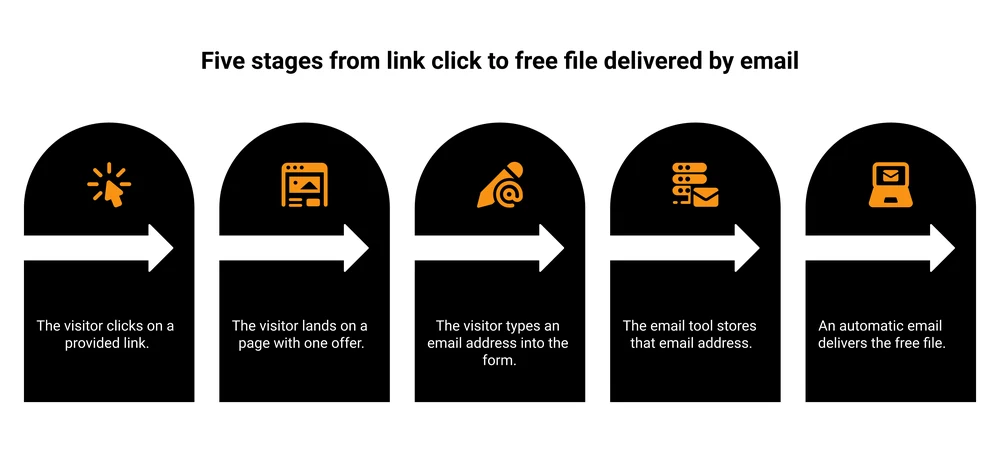
The full journey. Most guides stop explaining at stage 3.
There is a decision that comes before picking a tool: whether the download sits on the page they land on, or only arrives by email. Here is my own setup, and the 4 reasons I went the second way:
This is the biggest gap I found across those 7 pages. Only one of them, SamCart’s own product documentation, even discusses the delivery email.
That doc is honest about 3 catches. The automatic email can land in the recipient’s Other, Promotions or Spam folders. It can’t be switched off or edited. It only sends in English.
The rest of page 1 stops at “connect the form to your CRM” and leaves.
Where each free plan actually stands:
- Kit delivers on free. The landing page has an Incentive setting, and the confirmation email it sends can carry the lead magnet you promised. It is a setting on the page rather than a separate automation, so the free plan’s 1-automation limit does not block it.
- beehiiv does not. The free Launch plan gives you the website, custom domains, subscribe forms and unlimited sends, but Email Automations and Digital Products both start on Scale at $43 a month. You will collect addresses and then email the file by hand.
- MailerLite delivers on free, inside its 3-automation limit.
- Carrd never sends email. It passes the submission to Kit, MailerLite, Mailchimp, beehiiv and others, and that tool does the sending.
Whichever you pick, test it with your own address before you send traffic anywhere. Then write the emails that follow, because the delivery email is only the first one. The lead magnet email sequence guide covers what comes after it.
Worth knowing now rather than later: the same plumbing that delivers a free file is what moves a paying customer further down the line. Checkout platforms like CartMango plug into Kit, ActiveCampaign, beehiiv and BirdSend, so when you do sell something, the buyer lands back on the same list without a CSV export in the middle.
What to Offer (the checklist versus ebook fight has no winner)
Most guides will tell you short beats long. The evidence is messier than that, and I would rather show you the mess.
In a thread on r/Emailmarketing, the person who started it reported that short PDF checklists beat everything else they had tried by roughly 5 to 10 times, against longer ebooks. A few comments down, someone else in the same thread said their 60-page email marketing guide worked well, promoted through social, email and paid LinkedIn ads.
Both are real people reporting real results, and they contradict each other. The thing doing the work in each case is the audience and the traffic source. Page count is downstream of both.
The practical read: match the size of the promise to the size of the moment. Someone who just watched a 60-second video wants something they can finish in 5 minutes. Someone who read a long guide and clicked at the bottom has already invested, and will happily take the 60-pager.
Decent starting offers for a solo seller:
- A checklist that removes a decision, rather than one that adds homework
- A single template with your own example already filled in
- A 5-day email course, which doubles as proof you can write
- A swipe file of the exact things you use
If you want a longer list to pick from, the lead magnets guide has plenty, and most of them work well outside coaching too.
Building One With No Website at All
You don’t need a website. That sentence is doing a lot of work, so let me be concrete about it.
Kit, MailerLite and beehiiv each host the page for you and give you a free address like yourname.kit.com/checklist. You can point your own domain at it later if you buy one. Nothing gets installed, and there’s no server to think about.
That’s the whole reason a lead capture page is usually the first web page a solo seller ever publishes. It’s 1 page, it has 1 job, and the tool that stores the emails also hosts it. If you are weighing this up more broadly, the guide to selling without a website covers the rest of the setup.
A real site starts to matter later, when you want a blog pulling in search traffic, or several offers living side by side. That’s a problem worth having. My own rule of thumb: don’t go looking for it before your first 100 subscribers.
How to Build One in About 20 Minutes
The guide currently ranking first for this term turns it into a 15-step walkthrough. It is 7 steps, and most of them take under a minute.
1. Make the thing first. Write the checklist, export the template, record the 5 emails. Building the page before the offer exists is how a page sits half-finished for weeks. Save it as a PDF or a link.
2. Open a free account with Kit, MailerLite or beehiiv. Kit if you want the most room on free, MailerLite if you like the editor, beehiiv if you are heading toward a newsletter and know you will pay later.
3. Pick a landing page template, not a website template. They sit in different menus. The landing page one already has the form on it and no navigation bar, which saves you deleting things.
4. Write 4 lines of copy. The headline names the object. The subhead says who it is for. Three bullets say what changes after they read it. The button repeats the offer.
5. Upload the file and switch on the delivery email. In Kit this lives under the page’s Incentive setting. In MailerLite it is an automation triggered by the form. Write 2 sentences and attach the file or the link.
6. Send yourself through it. Use a personal address, not the one attached to the account. Fill in the form the way a stranger would, wait, and check the inbox. Then check the spam folder, because that is where it will land if it lands anywhere odd.
7. Publish and put the link somewhere real. Your social bio, the end of a video, your email signature, the last line of a post. A lead capture page with no traffic pointed at it is just a page.
The part people skip is step 6. It costs 4 minutes and it’s the only step that proves the other 6 worked.
Once It Is Live: Match the Message, Then Test 1 Thing
Two habits separate a page that quietly improves from a page that sits at whatever number it started on.
Match the message. Whatever you wrote in the post, video or bio that sends people here has to reappear on the page, in the same words. Somebody who clicked “the 27-point pre-launch checklist” should see that exact phrase in the headline.
Change the wording between the link and the page and a chunk of visitors decide they clicked the wrong thing, then leave. This is the cheapest fix on the whole list and it costs nothing but attention.
Test 1 thing at a time. Change the headline, leave everything else alone, and give it enough visitors to mean something. Note what this costs: Unbounce puts split testing on its third tier up, $112 a month paid yearly, and Leadpages builds its paid plans around it. On a free plan you’re comparing this month against last month by hand.
Which is fine, because split testing needs traffic before it tells you anything real. At a few dozen visitors a week you’ll be reading noise and calling it a result.
Get the message match right first. Point traffic at the page second. Worry about testing when the numbers are big enough to argue with.
Before You Send a Single Email
Nobody on page 1 mentions this, and it applies from your very first send.
The follow-up email you send to that list counts as a commercial email under US law. The FTC’s CAN-SPAM compliance guide sets out what every commercial message needs:
- Accurate From, To and Reply-To details
- A subject line that matches what is inside
- A clear disclosure that the message is an ad
- Your valid physical postal address
- A plain way to opt out, actioned within 10 business days
The penalty is the part that gets people’s attention. Each separate email that breaks the rules carries a fine of up to $53,088, per the FTC’s own guide.
For a solo seller this is mostly painless. Any real email tool inserts the unsubscribe link and the address block for you. What it means in practice is that you need a mailing address you are willing to publish, and a post office box or a registered private mailbox both count.
Readers in the EU and the UK sit under different rules again, and consent is treated more strictly there. Look those up before you send to an international list, because I am not going to summarise somebody else’s law from memory.
Double opt-in, where the subscriber clicks a confirmation link before joining, costs you some sign-ups. It also means the addresses on your list are real, which protects the only thing on that list that matters.
Why This Page Matters More Than Your Follower Count
You don’t have to take my word for how fragile a following is. There are numbers on it now.
Appeals Centre Europe is an independent body that hears disputes from social media users in the EU. It reviewed more than 4,600 cases of people who said Facebook, Instagram or Threads had banned them wrongly. Account bans were the single biggest complaint it received in the year to March 2026.
Meta handed over the evidence behind its decision in fewer than 100 of those cases.
The BBC reported that finding in May 2026. It had itself been contacted by more than 500 people the year before, all saying their account was gone, with no way to appeal and nobody at Meta to talk to. Some described what it did to their businesses.
And here’s the part I keep coming back to. Meta frequently reversed the ban once the BBC asked about a specific case.
So the working route back to your own audience ran through a national broadcaster taking an interest in you personally. That is the fragility, stated plainly.
The list is the only audience you actually own. It’s the point I’ve repeated more than any other in my own emails.
Followers sit on somebody else’s platform. That platform decides who sees you, it can change its mind without telling you, and it owes you nothing on the way out.
A lead capture page is the cheapest way to move people off that arrangement. Every email address on your list is a person you can reach without asking an algorithm for permission first.
There’s a money side to this as well. When you launch something, the list is who you launch to. Every name on it is somebody you already paid for once, in time or in ad spend, and never have to pay for again.
If the page is going to feed a regular email rather than a one-off freebie, the guide to starting a newsletter covers what to send once people are on it.
Mistakes That Quietly Kill a Lead Capture Page
None of these are dramatic. That’s exactly why they survive.
| Mistake | What it costs | Fix |
|---|---|---|
| Navigation menu left on | Readers wander off before the form | Delete the header and footer links |
| Vague offer (“free guide”) | Nobody can picture what they get | Name the object and its size |
| 6 form fields | Every box loses people | Ask for email, add a first name only if you use it |
| Button says “Submit” | Reads like paperwork | Repeat the offer: “Send me the checklist” |
| No delivery test | Broken funnels run for weeks unnoticed | Sign up with your own address before sharing |
The last row is the one I would bet money on. A lead capture page that collects addresses and never sends the file looks perfectly healthy from the outside.
Your dashboard fills up with subscribers. Nothing tells you the promise got broken, except the readers who quietly unsubscribe.
Test it the day you build it, and again any time you change the offer.
FAQ
What is a lead capture page?
A lead capture page is a single web page built to collect a visitor’s contact details, usually an email address, in exchange for something free. It carries 1 offer, 1 form and 1 button, with no navigation menu. It’s the same thing people mean by squeeze page or opt-in page.
What is a lead generation page?
The same page, described from the business side. Lead generation is the activity of finding potential customers, and a lead capture page is the web page that does the capturing. Some marketers use lead generation page more loosely, covering any page with a form on it, including a contact page.
Which tool is best for a lead capture page?
For a solo seller with no website, Kit’s free plan does the most: unlimited landing pages, a custom domain, unlimited traffic and automatic file delivery up to 10,000 subscribers. MailerLite is a close free alternative below 250 subscribers. Dedicated builders like Unbounce and Leadpages are built for teams running paid ads, and the pricing reflects that. If you have already decided to pay and want the cheapest email tool that can also host a plain opt-in page, my own BirdSend is $90 a year for 1,000 contacts, with the Welcome Screen caveat above.
Do I need a website to build one?
No. Kit, MailerLite and beehiiv all host the page for you and give you a free web address on their domain. You can attach a domain you own later. This is the normal starting point for a solo seller.
What conversion rate should I expect?
Traffic source moves this number far more than page design does. Visitors who already know you convert noticeably better than cold traffic from ads, so a benchmark taken from somebody else’s ad campaign tells you very little. Measure your own page for 2 weeks and treat that number as the line to beat.
All of the above assumes you have somewhere to put the email addresses once they arrive.
If you want mine, BirdSend is the email tool I built for creators, 3.1 billion emails sent so far. It holds the list, sends the delivery email, and its Welcome Screen gives you the simple version of the page this whole post is about.
No free plan, and the page is plain rather than fancy, both of which I said above. $90 a year for up to 1,000 contacts, with a 7-day trial.
Then, at some point, you are going to sell something to that list.
That second part is the job CartMango does. It takes the payment, then drops every buyer straight back into whichever email tool you picked, Kit, ActiveCampaign, beehiiv or BirdSend, so the person who bought once is still on the list you sell to next time. No CSV exports between a checkout and an email tool.
Free until October 2026. After that, plans start at $10 a year.
About the Author

👋 I’m Welly, founder of CartMango (the site you’re on), a checkout platform for digital product sellers. We’ve previously processed $179M+. I also run BirdSend (email marketing tool, 3.1B+ emails sent). On the side I show other non-techie digital sellers how I use AI workflows to automate 50%+ of my operations. Find me on LinkedIn.
Related Reading
- How to create a sales page: the page you send people to once you are ready to charge
- Lead magnet email sequence: the emails that follow the file you just delivered
- How to promote digital products: where the traffic for that page comes from
- How to start a newsletter: turning a list into something people look forward to
- Selling digital products without a website: the rest of the no-site setup