

Linktree now sells paid products only on Pro or Premium. Pro costs $14.99 a month plus 9% of each sale, and Premium $34.99 with no cut. Stan Store Creator costs a flat $29 a month with 0% taken, so it is cheaper than Linktree Pro once you sell more than about $156 a month.
In the Linktree vs Stan Store math on monthly billing, Linktree Pro costs less below that line, and Premium loses to Stan at every volume. The catch: Linktree’s Pro card says “Sell and earn with 0% fees” while the fee table on the same page says 9%, so budget on 9% until Linktree settles it.
Search this question and Google hands you 7 pages. 5 of them belong to companies selling a rival to one of the 2, and the top-ranking article among them is Stan Store’s own blog.
That does not make them wrong. It does mean the numbers get quoted loosely. Ecomm.design runs a table saying Linktree cannot sell digital products and cannot host courses, both of which Linktree documents on its own site.
So I read both companies’ own pricing pages and help centres instead. Below are the 5 jobs a bio-link store has to do, who wins each, and the 2 costs the comparisons skip.
Key Takeaways
- Linktree sells paid products only on Pro and Premium now. Pro is $14.99 a month plus 9% a sale, and Premium is $34.99 at 0%.
- Stan Store keeps 0% on both plans and has no free tier. That is $29 a month before your first sale, or $99 with the selling tools.
- Stan Creator beats Linktree Pro above about $156 a month in sales, and beats Linktree Premium at every volume, including zero.
- Linktree’s pricing page gives 3 answers on fees. Its FAQ mentions a 25 cent payout charge, the Pro card says 0% and the fee table says 9%.
- Neither platform lets you use a custom domain, and both normally open a Stripe account for you rather than using the one you have.
- Selling is country-gated on both. Linktree lists 35 countries, Stan lists 37, and Stan falls back to PayPal outside them.
Job 1: being the link people actually tap
Linktree wins this outright. It is the only thing Linktree was built to do, and the free plan gives you unlimited links, a themed page at linktr.ee/yourname, and a name Linktree says 70 million people trust.
Stan Store gives you a creator storefront that holds link buttons too. Stan is built to sell, and the buttons come along.
Platform fees are rarely the biggest leak in a small store, and they are the easiest thing to obsess over. Pricing too low, a checkout that loses people at the last step and a product nobody was asking for all cost more, and the Online Selling Mistakes Challenge covers them over 5 days by email, at no cost.
Linktree is now testing ads on some free pages: a visitor who taps one of your links may see a short ad before reaching where you sent them. Its help centre says ads never appear on paid plans, and the test runs on select free Linktrees in eligible countries.
Familiarity does real work when you are asking someone to tap a link in a bio. A creator on r/socialmedia asked for alternatives after a price rise, from $125 to $200 a year, and the money was not what was stopping her. She wrote that she was wondering whether “people see Linktree as a trusted link and they might be less likely to click on another link in bio tool.” A 60% rise, and the sticking point was still the domain.
Linktree leans on exactly that. Its own FAQ calls the linktr.ee domain “safe, recognizable, and built for social, giving your audience confidence to click.”
Taking the vendor’s advert off your own page
Both companies put their own branding on the page you send followers to, and both charge you to remove it. The prices are not close.
On Linktree, hiding the Linktree logo comes with the Pro plan at $14.99 a month. On Stan Store, the “Try 14 Days Free” referral banner sits at the bottom of your store on the $29 Creator plan, and Stan’s help centre is plain about the fix: to remove the Stan branding from the bottom of your store, you need to be on the Creator Pro plan. That is $99 a month.
So on Stan’s entry plan, the page where people buy from you carries an advert for Stan.
The address is rented either way
Neither platform will let you point a custom domain at your store. Linktree’s help centre says it does not offer the option to use a custom domain to replace the linktr.ee URL, and adds that it does not provide developer tools for domain forwarding either. Stan’s help centre says your store URL will always remain stan.store/yourusername, and that you will not be able to update it to anything else.
I have been on the wrong side of that before. Years back I tried to build an audience on Twitter and failed at it, badly enough that I gave up and started over on LinkedIn from about 500 dormant followers. 6 weeks of daily posting and commenting later I was at 1,000.
None of the first effort came with me. An address you do not own works fine right up until it stops.
That is the same reason a lot of sellers end up running a link page for traffic and a separate checkout they control. Our breakdown of an online store for digital products prices the 3 ways to do that second half on a single $10 sale.
Job 2: charging for something without sending people off the page
Both can take the payment on the page, so a follower never leaves, but on Linktree only from the Pro plan up. What each keeps for that is where they split.
Stan Store keeps 0% on both plans. Its homepage says “0% Transaction Fees, Always,” and that part is accurate. What you pay is the subscription: $29 a month for Creator or $99 for Creator Pro, dropping to $300 and $948 if you pay a year upfront.
Linktree runs the opposite model, and the cheap end of it is gone. Its help centre now says selling digital products “needs a Pro or Premium plan”, and repeats it in 3 separate articles. The fee table on the pricing page still lists 12% on Free and 9% on Starter, but those are plans that can no longer sell a paid product.
On the 2 plans that can, the table says Pro keeps 9% of each sale and Premium keeps nothing. Stripe’s standard US rate of 2.9% plus $0.30 sits on top of both, and climbs another 1.5% on an international card.
The plan Linktree marks “Recommended” is Pro, and its card now lists “Sell and earn with 0% fees”, while the fee table a few scrolls down says 9% for the same plan. Linktree’s help centre does not settle it either: its fee article says the fee “depends on your plan” and links back to that table. Until Linktree fixes one of them, plan your numbers on 9%.
Here is what 9% does to a $34.99 course on Linktree Pro.
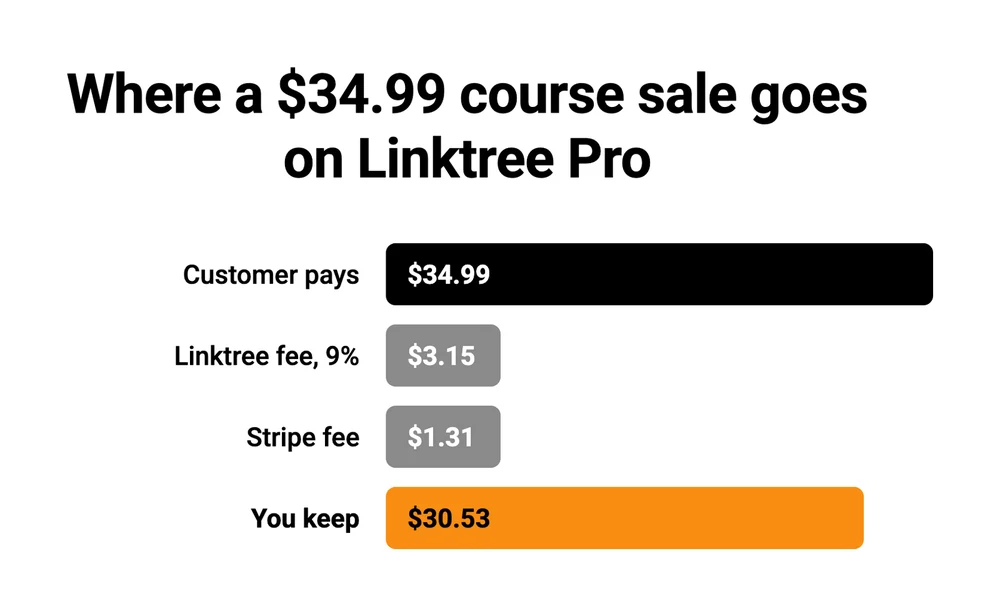
On Pro, Linktree takes $3.15, Stripe takes $1.31, and you keep $30.53. On Premium, Linktree takes nothing and you keep $33.68. Sell the same course through Stan Store and you keep $33.68 too, because Stan takes nothing and Stripe still takes its $1.31.
The number Linktree’s FAQ gives you
Linktree’s pricing page carries an FAQ, and one of the questions on it is “Does Linktree charge transaction fees?” The answer opens “Yes, and we’re proud of how competitive they are,” then says: “we currently only charge USD$0.25 per payout and constantly looking for ways to pass on more profit to our creators.” It closes with “While many platforms take a significant cut, we’re committed to market-leading transparency and flexibility.”
That 25 cents is real, and Linktree’s help centre puts it on partner earnings: Linktree Shops, sponsored links and affiliate offers. It says nothing about what happens when you sell your own ebook. The percentage that covers that sits in the fee table further down the same page.
So the same pricing page answers the fee question 3 ways: 25 cents in the FAQ, which does not cover your own products, 0% on the Pro card and 9% in the table. It is the page a buyer reads before signing up.
What each one costs at your sales volume
At $1,000 a month in sales, Linktree Pro costs $104.99 and Linktree Premium $34.99, while Stan Store’s Creator plan costs $29 whatever you sell. Every figure below is monthly billing at the 9% in Linktree’s fee table, and Stripe’s 2.9% plus $0.30 is left out because it is identical on every row.
| Monthly sales | Linktree Pro | Linktree Premium | Stan Creator |
|---|---|---|---|
| $0 | $14.99 | $34.99 | $29 |
| $100 | $23.99 | $34.99 | $29 |
| $250 | $37.49 | $34.99 | $29 |
| $500 | $59.99 | $34.99 | $29 |
| $1,000 | $104.99 | $34.99 | $29 |
| $2,000 | $194.99 | $34.99 | $29 |
Stan’s $29 overtakes Linktree Pro at about $156 a month in sales. For a seller on Pro, that crossover arrives early. 3 sales of a $47 product leave you under it. The 4th puts you over.
If the Pro card turns out to be right and Pro really charges 0%, the picture flips: $14.99 flat beats Stan’s $29 at every volume.
And Linktree Premium is more expensive than Stan Creator on every row, including the $0 one. If you were going to pay Linktree to escape the fee, Stan costs $5.99 less a month, and its plan includes a community, which Linktree does not offer.
Job 3: handing over the file, the course or the call
Stan Store still wins this, by less than it used to, and the reason is what sits on its cheap plan.
The $29 Creator plan includes an unlimited course builder with course analytics, community features, a booking calendar, recurring subscriptions, lead magnets and digital downloads. Courses and a community at $29 a month is genuinely unusual. Kajabi’s entry plan is $89 a month and Podia’s is $49, and Podia takes 5% of each sale on top at that tier. Our Stan Store pricing breakdown has Stan’s full plan-by-plan cost.
Linktree does sell digital products and it does host courses, whatever page 1 says, on the Pro plan and up. What almost nobody mentions is who builds the courses. Linktree’s help centre says it plainly: “The course builder is powered by Kajabi and works right inside your Linktree Admin.” You can price a product anywhere from $1 to $10,000, the buyer pays through Stripe, and the download is instant.
This is where the ranking pages come apart. Ecomm.design’s table marks Linktree “No” on digital product sales, “No” on course hosting, “No” on instant delivery, and lists its payment gateway as “PayPal/Square”. Linktree runs on Stripe.
The same table then puts Stan’s course hosting on the $99 plan, and Stan’s own help centre lists an unlimited course builder on the $29 one. A reader trusting that page would pay $70 a month more for something they already had.
Bookings used to be the gap, and Linktree has closed it. It now has a Bookings link that takes free or paid sessions through your Google Calendar, with Google Meet for the call. Stan puts a calendar on its $29 plan too.
Job 4: selling to the same buyer twice
Both platforms collect an email address. Only one of them lets you make more from the buyer while they are still at the checkout, and it charges $99 a month for the privilege.
Linktree collects email and SMS details on your page, and connects to a mailing list on the Pro plan. That is the whole story. There are no order bumps, no post-purchase upsells and no funnels, so a Linktree sale is worth what the buyer clicked on and nothing more.
Stan has all of it, and none of it is on the $29 plan. Discount codes, limited-quantity offers, order bumps, upsells, funnels covering up to 20 products, affiliate management, email broadcasts and flows, pixel tracking: every one of those is a Creator Pro feature. Moving up costs $70 more a month, or $648 more a year on annual billing.
Whether that is worth it is arithmetic rather than a feature list. Priced yearly, Creator Pro has to add $648 of sales before it breaks even.
If bumps and upsells lift your revenue by 10%, that means $6,480 a year in sales. Below that you are renting tools that cost more than they return.
Pricing the product properly moves that line faster than any upgrade does, which our guide on how to price digital products walks through.
Job 5: getting the money out, which is the job nobody compares
Every guide on page 1 compares the fee. Not one of them checks what happens to the money after the sale, and this is where both platforms do something most sellers would want to know about.
Neither platform lets you use the Stripe account you already have. Linktree’s help centre: “When you connect Stripe to Linktree, a new Stripe account is created for your Linktree store.” Stan’s help centre is blunter, saying you will be prompted to set up a Stripe Custom account managed by Stan, and that you will not be able to connect an existing Stripe account.
Stan does run a narrow experiment on this. Connecting an existing Stripe account is open to a slice of new creators who signed up after May 2025 and go through onboarding on a mobile browser. Stan warns that if you use it, the income tab inside Stan may not show accurate earnings.
Payout speed runs the opposite way to the fee. Linktree says sales go straight to your Stripe account, and land in your bank on whatever Stripe schedule you set, daily, weekly or monthly. Stan holds a sale in an “Available Soon” balance while Stripe settles it, which Stan puts at 2 to 7 business days, then you click Cash Out manually with a $10 minimum, then wait another 24 to 48 hours. The realistic wait is 3 to 9 days.
So the platform taking 9% of a sale pays you faster than the one taking nothing.
And you may not be allowed to sell at all. Linktree lists 35 countries where paid digital products work. Stan lists 37 for its Stripe Custom accounts, and unlike Linktree it has a fallback: sellers outside the list are pointed at PayPal instead, which Stan’s help centre says covers more than 200 countries.
You can check your own against PayPal’s country list. Both platform lists are broadly the United States, Canada, the EU and EEA, the UK, Australia, New Zealand, Japan, Singapore, Hong Kong and the UAE. Most of Asia, Africa and Latin America is on neither.
And leaving is not clean on the Stan side. Stan’s help centre warns that deleting a recurring membership, community or course product does not cancel your customers’ memberships. You have to cancel each one by hand, or they keep getting charged for something you have taken down.
From December 2025, Linktree moved US and Canadian plans to tax-exclusive pricing. A $14.99 plan is now $14.99 plus your state’s sales tax.
This is the job where a plain checkout tool beats both. CartMango, which I run, and Payhip both connect to the Stripe or PayPal account you already have, and the sale lands in it. CartMango’s own wording is “Funds go directly to your Stripe/PayPal accounts instantly. We’re not interested in holding your money.” Gumroad does not work that way, and holds your money on its own payout schedule.
None of those 3 gives you a link-in-bio page on its own, so swapping to one trades a job away, not a free upgrade.
Linktree vs Stan Store, job by job
Stan Store covers the most of the 5 jobs in 1 account, and it puts order bumps and upsells behind the $99 plan. Linktree does the bio link best and sells only from its $14.99 Pro plan up. CartMango has no bio link of its own.
| Job | Linktree | Stan Store | CartMango |
|---|---|---|---|
| The link in your bio | Yes, unlimited links on the free plan | Yes, a store page with link buttons | Not in CartMango itself. LinksMango, a free link page from the same team, has Buy buttons that can point at it |
| Charging for a sale | Pro and Premium only. 9% on Pro per the fee table, 0% on Premium | Yes. 0% on both plans | Yes. 0% on every plan |
| Files, courses, bookings | Files and Kajabi-powered courses from Pro, plus a Bookings link | Files, courses, community, bookings, memberships | Files with protected delivery. Courses and community not yet, planned for October 2026 |
| Selling to the same buyer again | Email and SMS capture, list integrations on Pro and Premium | Order bumps, upsells and email, all on the $99 plan | Order bumps on every plan, upsells and downsells from $20 a year |
| Getting paid out | A Stripe account Linktree opens, 35 countries | A Stripe Custom account Stan manages, 37 countries, PayPal elsewhere | Your own Stripe or PayPal, paid out instantly |
CartMango is my own platform, so treat that last column as an interested party: it is free right now and from $10 a year once paid plans start in November, with course hosting and community planned for October 2026 on the $30 a year plan.
Who should pick which
Pick Linktree if the bio link is the product. You are sending traffic to other places and not selling from the page, so the free plan costs you nothing apart from the ad test some free pages now carry. Selling starts at Pro, $14.99 a month plus 9% per the fee table.
Pick Stan Store if you sell most months. Past about $156 a month, the flat $29 is cheaper than Linktree Pro, and the same plan includes a community, which Linktree does not have. The tools that raise your average order are a separate $70 a month, so budget for Creator Pro or plan without them.
Pick a free link page plus your own checkout if you want the money in your own account. That keeps the traffic hub and puts each sale in your own Stripe account. The link page can be Linktree Free, or LinksMango, which my team runs: free with up to 10 product cards, or 20 if you keep a small “Made with LinksMango” line. A checkout such as CartMango sits behind it. It is 2 tools instead of 1, which is a real cost in setup time. Our Stan Store alternatives roundup sorts the checkout options by what you actually need.
FAQ
How much does Linktree cost per month?
Linktree’s paid plans run $7.99 for Starter, $14.99 for Pro and $34.99 for Premium a month, with a free plan underneath. Linktree prices its own website in the visitor’s local currency and does not publish a single global price list, so those figures come from its subscription listings on the US App Store. Talkspresso, one of the pages ranking for this comparison, quotes the same $8, $15 and $35.
What are the disadvantages of Linktree?
You cannot sell a paid product on the free or Starter plan any more, and Pro still takes 9% of each sale according to Linktree’s own fee table. Beyond price: ads on some free pages, no custom domain, no order bumps or upsells, a Stripe account Linktree opens rather than yours, and paid digital products limited to 35 countries.
What is better than Stan Store?
It depends which job you are replacing. For a pure link hub, Linktree’s free plan is cheaper and better known. For a deeper course and community setup, an all-in-one such as Podia at $49 a month or Kajabi at $89 is the honest comparison, though both cost more than Stan’s $29. For the checkout on its own, Payhip starts free and takes 5% a sale, and CartMango is free right now, from $10 a year once paid plans start in November, with no cut. Both pay into your own Stripe or PayPal.
What is better than Linktree?
For selling, almost anything with a real checkout, because $14.99 a month plus 9% of every sale, going by Linktree’s fee table, is a high price for the bio link itself. Stan Store is the usual answer and the one page 1 pushes hardest. Beacons is the other link-in-bio people name. If the links are all you need, Linktree Free is hard to beat.
Does Stan Store have a free plan?
No. Stan’s help centre says so, and adds that the free-looking accounts people spot are affiliate-only, without store features. New accounts get a 14-day trial.
Can I use my own domain with either?
No, on both. Linktree keeps you on linktr.ee/yourname and says it does not provide domain forwarding tools either. Stan keeps you on stan.store/yourusername permanently, and its help centre says there is no built-in way to embed your Stan store in your own site.
When the bio link is not the part you are paying for
Work back through the 5 jobs and the Linktree vs Stan Store choice gets smaller than it looked. Linktree Pro charges you for the month and the sale. Stan charges you for the month only. Both hold the Stripe account, both own the address, and both decide which countries are allowed to sell at all.
If the bio link is the thing you actually need, keep it. Linktree Free does that job for nothing and does it well. The part worth pricing on its own is the checkout sitting behind it, because that is where the 9% or the $29 is going.
If your Linktree vs Stan Store answer is to split the 2 jobs, both halves can be cheap. LinksMango gives you the free link page. CartMango runs the checkout behind each Buy button: free right now and from $10 a year once paid plans start in November, no cut of a sale on any plan, and paid into the Stripe or PayPal account you already have.
Then point each Buy button at a CartMango checkout, which takes no cut of the sale.
About the Author

👋 I’m Welly, founder of CartMango (the site you’re on), a checkout platform for digital product sellers. We’ve previously processed $179M+. I also run BirdSend (email marketing tool, 3.1B+ emails sent). On the side I show other non-techie digital sellers how I use AI workflows to automate 50%+ of my operations. Find me on LinkedIn.
Related Reading
- How to sell digital products on Instagram: where the traffic behind a bio link actually comes from
- How to create a sales page: the page a link button should be sending people to
- Stan Store pricing: both plans, the payout wait, and the Stripe account you never own
- Buy Me a Coffee alternatives: 7 creator tools priced on what each really takes