

Squarespace digital products come in 4 kinds: downloadable files, online courses, member sites and video pages. A download is set up as a product on a store page. The other 3 sit behind a paywall, unlocked by a pricing plan attached to the content itself.
Which of the 4 you pick sets your fee. Squarespace treats a download as commerce and takes 0% to 2%. It treats a course, member site or video page as a digital product and takes 0% to 7%, or 9% on older plans. Card processing is charged on top of both. On Basic and Core the gap between the 2 schedules is 5 points.
You already pay Squarespace every month, and depending on what you build, it takes a cut of every digital sale on top of that.
How big that second charge is depends on a choice you make in roughly 10 seconds, from a dropdown, the first time you add the product. Nobody warns you at the time.
2 sellers can put the identical file behind the identical price and pay Squarespace fees 5 points apart.
Below: the 4 jobs a Squarespace digital product has to do, the real fee on each plan, the limits that catch people out, and what a $30 sale leaves in your pocket.
Key Takeaways
- Squarespace runs 2 separate fee schedules, and which one hits you depends on whether you build a download or a course.
- A downloadable file is charged as commerce: 0% on Core and above, 2% on Basic, with card processing on top.
- A course, member site or video page is charged as a digital product: 7% on Basic, 5% on Core, 1% on Plus, 0% on Advanced.
- The download size limit is 300 MB, not the 20 MB Google’s summary claims, and only 1 file fits in each product.
- A buyer cannot put 2 downloads in 1 order, so a bundle has to be zipped into a single product.
- Moving from Basic to Core pays for itself at about $6,000 of yearly sales. The steps above that only pay back if you sell courses.
Picking the costlier of the 2 schedules by accident is the sort of leak that never reaches your analytics, because the money is gone before the number lands on your dashboard. Our Online Selling Mistakes Challenge covers 4 more leaks like this one, free, across 5 emails.
The 4 kinds of Squarespace digital products
Squarespace bundles 4 different products under 1 label. A download is a store product charged as commerce at 0% to 2%, while courses, member sites and video pages are paywalled content charged as digital products at 0% to 7%.
| Product type | What the buyer gets | How it reaches them | Fee schedule |
|---|---|---|---|
| Download | 1 file | Emailed link, expires in 24 hours | Commerce |
| Online course | Text and video lessons in chapters | Login on your site | Digital Products |
| Member site | Pages locked behind a paywall | Login on your site | Digital Products |
| Video page | A browsable video library | Login on your site | Digital Products |
Squarespace draws that line by billing, so 2 products made of the same material land on opposite sides of it.
A 40-page PDF workbook sold as a download sits on the commerce side. The same workbook, plus 3 videos, built as a course page sits on the digital products side, and costs you more per sale on every plan below Advanced even though the content and the price tag have not changed. Squarespace states this plainly in its own fees documentation, which lists commerce fees for “physical products, download products, service products, and donations” and then lists a second set for “courses, video pages, and member sites” that it calls “separate from commerce fees.”
It just never says it where a seller is likely to look. Of the 8 pages ranking for this search, only 1 names a fee at all, and that one is a support article about an add-on plan Squarespace has since closed. The other 7 name none, and that includes all 4 of Squarespace’s own marketing and blog pages.
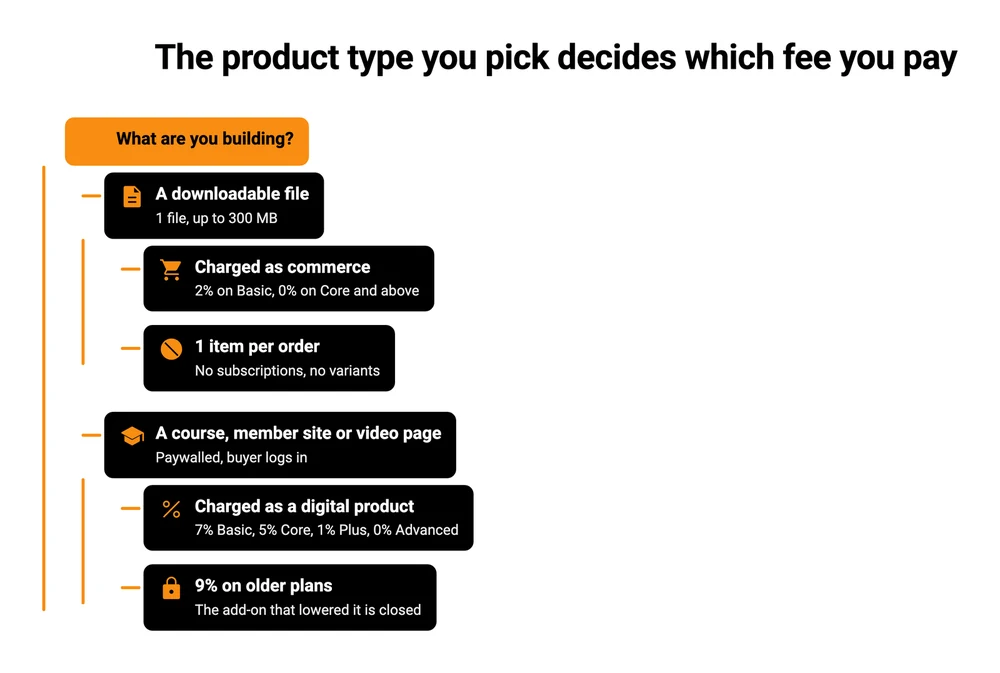
Job 1: choosing the product type, because it prices every sale after
Choosing the product type is the job that costs the most per sale and gets the least thought. You pick it from a dropdown, and that dropdown decides which of Squarespace’s 2 fee schedules follows the product for as long as it exists.
On the Basic plan the same $30 sale costs $1.77 as a download and $3.27 as a course, because Squarespace takes 2% on one and 7% on the other before card processing is added.
| Plan | Yearly price | Download fee | Course fee | You keep on a $30 course sale |
|---|---|---|---|---|
| Basic | $228 | 2% | 7% | $26.73 |
| Core | $348 | 0% | 5% | $27.33 |
| Plus | $588 | 0% | 1% | $28.59 |
| Advanced | $1,188 | 0% | 0% | $28.95 |
Those yearly prices are Squarespace’s own published annual totals, not 12 months of a rounded monthly figure. Paid yearly they work out at $19, $29, $49 and $99 a month, against $25, $39, $65 and $139 month to month. Older figures are still circulating: LitExtension’s Squarespace pricing guide currently lists Basic at $16 a month and Core at $23 on annual billing, where Squarespace’s own pricing data says $19 and $29.
The “You keep” column assumes Squarespace Payments on a US standard card, which is 2.9% plus $0.30 on Basic and Core, 2.7% plus $0.30 on Plus, and 2.5% plus $0.30 on Advanced. If you connect Stripe instead, Stripe’s published US rate is “2.9% + 30¢ per successful transaction for domestic cards”, which is identical to what Squarespace Payments charges on Basic and Core. So on those 2 plans the platform fee is the entire difference between the routes.
When moving up a plan actually pays
The step from Basic to Core costs $120 more a year and removes 2 points of fee, on downloads and courses alike. Divide $120 by 2% and you get $6,000. Under that, Basic is cheaper. Over it, Core is.
Every step above Core only pays back on courses, because downloads already sit at 0% from Core upward. For a course seller, Plus costs $240 more than Core and removes 4 points of fee plus 0.2 of a card point, so it starts paying at about $5,700 a year. Advanced costs $600 more than Plus for 1 point plus 0.2, which needs roughly $50,000 a year.
If you only sell downloads, Core is the last upgrade that changes your fee at all.
If you already price your products, how you set the price matters more than any of this. A 5-point fee on a $9 product is 45 cents.
The older plans, and the plan you can no longer buy
Sites on an older billing plan pay 9% on courses, member sites and video pages unless they hold a Digital Products add-on plan. That add-on had 3 tiers: Starter at 7%, Core at 3% and Pro at 0%. You cannot get one. Squarespace’s own help article says: “As of July 23, 2026, you can’t sign up for a Digital Products plan.” Existing subscribers keep theirs.
So the highest-ranking page that names a Squarespace digital-product fee describes an add-on nobody new can buy.
If you are on an old plan and selling courses, the only lever left inside Squarespace is your website plan.
Job 2: getting the file to the buyer intact
A download product on Squarespace holds 1 file, up to 300 MB. When somebody buys, Squarespace emails them a link, and that link works for 24 hours.
Ask Google the same question and you get a different number. Its AI Overview lists the steps to add a download and puts the ceiling at “up to 20 megabytes for standard downloads”.
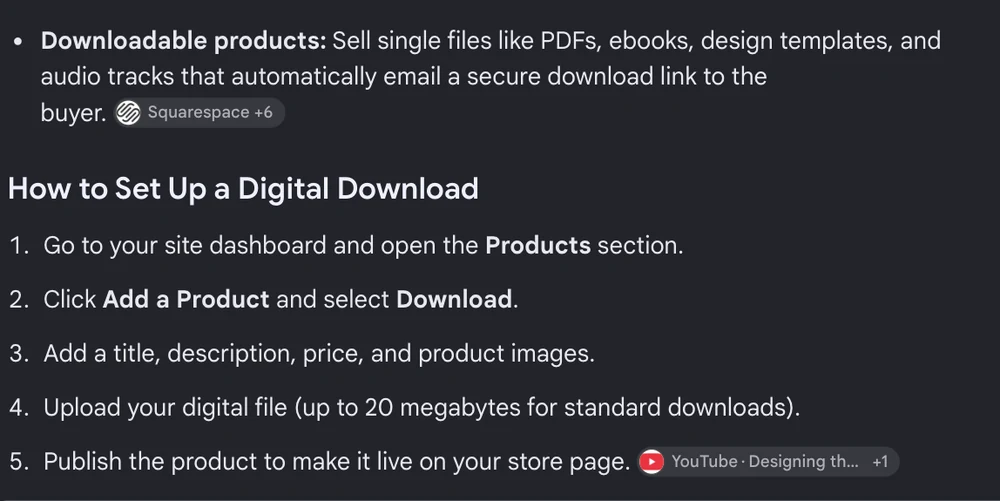
The AI Overview Google returns for this search. Read step 4.
Squarespace’s Download products guide says: “The file size limit for a download is 300 MB.” The summary is out by a factor of 15, in the direction that would talk a seller out of a perfectly normal ebook, audio file or video. Links really do expire after 24 hours, with a detail that makes that survivable: when a buyer clicks a dead link, Squarespace automatically emails them a fresh one.
The limits that catch people are the quieter ones.
1 file per product. Selling a 12-template pack means zipping all 12 into a single archive under 300 MB. Buyers get 1 thing to unzip, which is fine for designers and less fine for an audience on a phone.
You cannot re-download your own file. Once it is uploaded, there is no export. Squarespace’s own suggested workaround is to place a test order and use the buyer’s link. Keep your masters somewhere else.
Strip odd characters out of the filename. Squarespace’s guide warns that special characters, an em dash among them, can stop the file downloading for your customer. A silent failure that looks like a broken product.
No variants, no SKUs, no quantity. A download is 1 item at 1 price. If you want a personal licence and a commercial licence, that is 2 separate products.
Every one of those is workable. They are worth knowing before you build a product around a promise the tool cannot keep. If your file is the whole product, how you protect it is the next thing to sort out, because a 24-hour link only controls when the file arrives, and says nothing about where it travels afterwards.
Job 3: charging the same person again next month
Squarespace downloads cannot be sold as subscriptions at all, which its download documentation states outright.
So recurring money means a course, a member site or a video page. Those attach a pricing plan to the content, and a pricing plan can be free with an email signup, a one-off payment, an instalment run, or a genuine subscription. That is also the route carrying the higher fee. Recurring billing on gated content only exists on the schedule that runs to 7%, or 9% on an older plan.
There is 1 way out of that, and it is narrow. Squarespace does allow subscription billing on physical and service products, and both of those sit on the cheaper commerce schedule. Neither locks anything behind a login, so it works for a retainer or a recurring service and not for a content library.
I ran a web design service before I ever sold software, and I closed it because I wanted to sell a product instead of hours rather than redo the same work for each new customer.
A member site is the closest Squarespace gets to that on this list, and it sits on the higher of the 2 fee schedules.
Sellers already running Squarespace memberships have opinions about how well it holds up. In a thread on r/squarespace, a member-site operator reported losing members to failed recurring payments every month, noticeably more than on a Patreon they ran alongside it.
The same seller described copying new content by hand into every pricing tier, because tiered content is not shared between plans. Another wanted to email everyone who bought a specific product, and found the built-in email tool only segments by price band and order count.
That thread has been up a while, so treat it as a snapshot rather than a current spec. The reports are still the kind of detail that decides whether a membership is pleasant to run at 200 members.
Job 4: letting 1 buyer take 2 things in 1 order
“Customers can’t buy more than one download product at a time.” That line sits in Squarespace’s own download documentation, and it decides whether a growing catalogue works. It applies to the whole cart, not to shipping or stock. A buyer who wants your $19 template pack and your $12 icon set has to check out twice.
Checkout is where sales die. Baymard Institute’s running average across 50 studies puts documented cart abandonment at 70.22%. Sending somebody who has already decided to buy back through checkout a second time puts them in front of that number twice.
There are 2 ways around it inside Squarespace.
Zip the bundle into a single product and price it as a bundle. This works, and Squarespace’s own guide points at it as the answer. The cost is flexibility: you cannot let a buyer pick 3 of your 8 templates, and every new combination is a new product with a new zip file.
Or move the paid part of the transaction somewhere that has a real cart, and leave Squarespace to be the site people land on. That is the next section.
Both work. Past roughly 5 or 6 products the second one scales and the first one turns into zip-file admin, which is the same reasoning behind adding a checkout to a site you already own rather than rebuilding the site around a store.
Where an outside checkout fits on a Squarespace site
You do not have to sell through Squarespace to sell from Squarespace. A product page, a landing page or a blog post can send a buyer to a checkout hosted elsewhere, and the buyer comes back to your site afterwards.
On a $30 sale, after 2.9% plus $0.30 of card processing, a Squarespace download on the Core plan and a CartMango checkout both leave $28.83, while a Squarespace course and Payhip’s free plan both leave $27.33.
| Route | Platform cut | Delivers a file | Bills monthly | Hosts a course | Keep on $30 |
|---|---|---|---|---|---|
| Squarespace download, Core plan | 0% | Yes, 1 file up to 300 MB | No | No | $28.83 |
| Squarespace course or member site, Core plan | 5% | Yes, behind a login | Yes | Yes | $27.33 |
| Payhip, free plan | 5% | Yes | Yes | Yes | $27.33 |
| CartMango | 0% | Yes | Yes | Not yet, planned for October 2026 on the $30 a year plan | $28.83 |
Read the course column before the money column. 2 of these 4 routes host a course today, and the 2 that leave you the most per sale are the 2 that do not.
CartMango is my own platform, and I have left that tie standing rather than dressing it up. On a plain $30 download, Squarespace on the Core plan gives you exactly the same net per sale as a CartMango checkout does.
That tie is per sale only. Squarespace Core is $348 a year and CartMango is free until October 2026 and from $10 a year after, though a Squarespace seller is paying the $348 for the website regardless. CartMango does not host a course at all yet, so on that job Squarespace wins outright today. Where an outside checkout pulls ahead is on the 5% Squarespace takes on a course, and on orders carrying more than 1 item.
Payhip is worth naming because its free plan carries no monthly cost at all. It takes 5% per sale instead, and card processing is charged on top of that, the same way it is everywhere else. We broke the tiers down in full in our Payhip pricing write-up, and the Gumroad numbers tell a rougher story again, because the headline 10% is not the whole charge.
Which route suits you:
- Selling 1 or 2 downloads and already on Core or above? Squarespace is fine and you are paying nothing extra for it.
- Selling courses or memberships on Basic or Core? You are handing over 5 to 7 points that a move up a plan, or a move off-platform, would recover.
- Growing a catalogue where people buy several things at once? The 1-item-per-order rule is the thing that will start costing you, not the percentage.
- On an older plan with no Digital Products add-on? 9% is the steepest Squarespace cut anywhere in this article, and it is the easiest one to fix.
For a fuller map of the ways a file can reach a buyer, we compared the main digital delivery systems separately, and there is a walkthrough of making the download itself if the product is still on your hard drive. Not everybody needs a website under any of this, incidentally. Selling without a site at all is a real route, and a cheaper one if the Squarespace subscription is the only reason you are paying anything.
FAQ
Which Squarespace plan do I need to sell digital products?
Selling anything needs commerce, which Squarespace says is available on “the Basic, Core, Plus, Advanced or some Legacy plans.” Basic starts at $228 a year and charges 2% on a download or 7% on a course, never both on the same sale. Core drops the download fee to nothing and the course fee to 5%.
Can I sell a digital product on Square?
Square is a separate company with a similar name. Square Online does let you list a digital item, but its own help page describes the file as one “that you can manually send to the customer.” So the sale is automated and the delivery is not. Squarespace emails the download link on its own.
Is Canva or Squarespace better for digital products?
They do different jobs, so the comparison does not really land. Canva is where you design the PDF, the template or the workbook. Squarespace is where you host the page and take the payment. Plenty of sellers use both. Canva also runs a Creators programme where designers publish templates into Canva’s own library, which is a different route again from running your own store.
What is the downside of Squarespace for digital products?
4 things, in rough order of how much they cost you: the digital products fee runs to 7% on the entry plan and 9% on older ones, a download product holds only 1 file, a buyer cannot order 2 downloads at once, and downloads cannot be sold as subscriptions.
Can you make money from Squarespace?
Yes, and the arithmetic is worth doing before you start. At 100 sales a month of a $30 download on the Core plan you keep $2,883 of $3,000. Sell the identical thing as a course on the same plan and you keep $2,733. That $150 gap comes down to which product type you clicked.
Do Squarespace download links expire?
They expire 24 hours after purchase. If a buyer clicks a dead link, Squarespace sends a fresh one to the email address on the order automatically, and you can also resend it by hand from the Orders panel. The link stays live for its 24 hours even if you cancel the order.
Pick the fee before you pick the format
Everything above comes back to 1 decision made early and rarely revisited. The dropdown where you choose Download, Course, Member Site or Video Page sets your fee for every sale that follows it.
Worth 10 minutes before you build, rather than a rebuild once buyers are attached to the product.
Squarespace digital products work, at a fee that moves depending on which of the 4 you built.
If you would rather the number stopped moving, that is roughly why CartMango exists. CartMango’s platform cut is 0% whatever you sell through it, a one-off file or a subscription, so what you keep does not change when your product does. CartMango is free until October 2026, then from $10 a year, billed by the year rather than the month.
About the Author

👋 I’m Welly, founder of CartMango (the site you’re on), a checkout platform for digital product sellers. We’ve previously processed $179M+. I also run BirdSend (email marketing tool, 3.1B+ emails sent). On the side I show other non-techie digital sellers how I use AI workflows to automate 50%+ of my operations. Find me on LinkedIn.
Related Reading
- How to create a digital download: the file itself, before you worry about where it sells
- Digital delivery systems compared: 10 ways a paid file can reach a buyer
- How to add a shopping cart to a website: 4 methods, matched to what you sell
- Payhip pricing: full tier breakdown for readers weighing the outside-checkout route
- Selling digital products without a website: the cheaper path if Squarespace digital products are only costing you a site subscription