

The strongest WordPress LMS plugins are Tutor LMS for a first course on a budget, LearnDash for structured programs with quizzes and cohorts, and Masteriyo for anyone who wants Stripe without buying a licence first. They split on what it costs to take a payment. Every price below was read on the plugin’s own pricing page.
I went through the whole first page of Google for this search, opened every guide on it, then opened every plugin’s own pricing page next to them. The guides and the pricing pages do not tell the same story.
4 of those guides run a “starting price” column. Not one of them mentions that 2 of the plugins they recommend cost twice as much in your second year. The longest article on the entire first page, at over 11,000 words, does not contain a single price for any plugin it reviews.
So this post is the version I wanted to read. What each plugin charges, what it charges again next year, and which of the free ones can actually take a card.
Key Takeaways
- Only 1 of the 6 free versions here takes Stripe without a paid add-on, and 2 of them will not take an online payment at all.
- Masteriyo is the only plugin here whose free version takes Stripe and PayPal with no paid add-on. It is also the least installed one on the list.
- LifterLMS charges $199 in year 1 and $398 in year 2. Masteriyo charges $99, then $199.
- LearnDash has no free version, costs $259 a year, and is the only plugin here with Stripe and PayPal at its entry price.
- 5 of the 8 results on page 1 for this search are published by a company that sells a WordPress LMS plugin.
Before you spend anything on any of this, it is worth knowing which mistakes cost creators the most money. That is what the free 5-day Online Selling Mistakes Challenge walks through, and it takes about 5 minutes a day.
What a WordPress LMS plugin gives you, and what it leaves you to buy
A WordPress LMS plugin turns your existing WordPress site into a course site. It adds course, lesson and quiz content types, it tracks who has finished what, and it locks lessons behind a login so only enrolled students can open them.
That is the whole job. Everything else a course business needs sits outside the plugin, and the bills come separately.
4 costs sit outside the licence price. WordPress hosting is yours to buy, and video hosting is almost always separate too, because course video is heavy and shared hosting handles it badly. That is why so many video hosting platforms are aimed at course creators.
Stripe and PayPal still charge their own processing fee on every sale, currently 2.9% plus 30 cents on a standard US card. And on several of these plugins, the ability to charge anything at all is its own line item.
Page 1 skips that last cost, so this post starts there.
Only 1 of these free plugins will take a Stripe payment
Only 1 of the 6 free WordPress LMS plugins below will take a Stripe payment without you paying for the plugin first. Every one of those free versions will build a course, gate it behind a login and track student progress.
Charging for it is sold separately.
Sensei LMS is the clearest example, because Automattic wrote the distinction into its own pricing page. The free plan’s first bullet is “Publish unlimited free courses.” Selling is a bullet on Sensei Pro, at $15 a month billed as $179 a year.
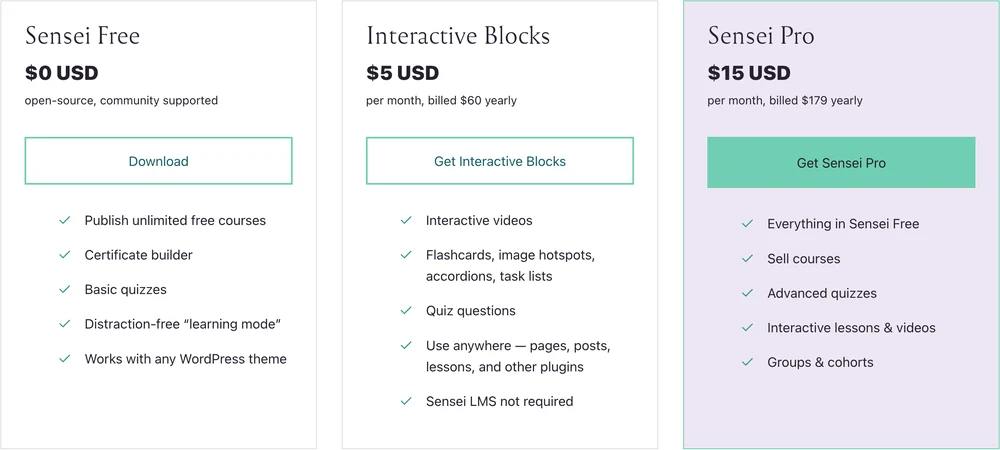
Sensei’s free plan and its paid plan, side by side. Read the first bullet under each price.
Of the 6 plugins here with a free version, 1 takes Stripe with no paid add-on, 2 take PayPal but make you buy Stripe, 2 will not take an online payment at all until you pay, and MasterStudy does not say either way on any of its own pages.
| Plugin | Free version | Card payments in the free version | Cheapest way to add them |
|---|---|---|---|
| Masteriyo | Yes | Yes. Stripe, PayPal, Razorpay and Mollie, built in | Already included |
| Tutor LMS | Yes | PayPal only. Stripe and 8 other gateways are Pro | $199 a year |
| LearnPress | Yes | PayPal, built into the free plugin. Stripe is a paid add-on | $39 for the Stripe add-on |
| LifterLMS | Yes | None. The free core plan lists no gateway | $199 a year |
| Sensei LMS | Yes | None. The free plan publishes free courses | $179 a year |
| MasterStudy | Yes | Not stated on its pricing page or its WordPress.org listing | $99 a year |
| LearnDash | No free version | Not applicable | $259 a year, Stripe and PayPal included |
Masteriyo is the odd one out, and it says so plainly on its WordPress.org listing: “The built-in order system, payment gateways, quizzes, and certificates are all free. No third-party plugins required.” That is a real difference, and it is the reason to look at a plugin most of the roundups barely mention.
A WordPress user hit this exact wall in r/Wordpress. Looking for a free plugin that could charge for a single course, they wrote: “I’ve looked at both lifterlms and sensei and they both require I sign up for a paid version in order to accept payments.”
A few replies later they added that most of the free plugins they had tried carried the same catch. The top reply pointed them at Masteriyo, for exactly the reason above.
Do you need WooCommerce as well?
WooCommerce is free, and several LMS plugins use it as their shopping cart rather than building one. That sounds like a way around the paywall, and usually it is not.
LearnPress makes the arithmetic visible. PayPal is built into its free plugin, and its own pricing page then lists “Global and Local Payment Gateways” as a $49 WooCommerce add-on, with a separate Stripe add-on at $39. So the free WooCommerce route still runs through a paid connector.
Adding WooCommerce also adds a second full plugin to maintain, with its own updates, its own settings and its own database tables. On a site that sells 3 courses, that is a lot of machinery for a checkout.
What these plugins cost in year 2
The cheapest paid WordPress LMS plugin costs $99 in year 1 and the dearest costs $299, and by year 2 that order has changed. Every price below is the plugin’s own current asking price, read on its own pricing page, and where a plugin advertises a first-year discount the year 2 figure is the one it prints next to it.
LifterLMS goes from $199 to $398 in year 2 and Masteriyo from $99 to $199, both under a footnote saying renewals are charged at full price, while LearnPress drops from $299 to $209.30. None of the 4 comparison guides on page 1 mentions any of it.
| Plugin | Cheapest paid plan | Year 1 | Year 2 | Sites |
|---|---|---|---|---|
| Masteriyo | Basic | $99 | $199 | 1 |
| MasterStudy | Single site | $99 | Not stated | 1 |
| Sensei LMS | Sensei Pro | $179 | $179 | 1 |
| Tutor LMS | Annual | $199 | $199 | 1 |
| LifterLMS | Earth Bundle | $199 | $398 | 1 |
| LearnDash | Essentials | $259 | $259 | 1 licence |
| LearnPress | Pro Bundle | $299 | $209.30 | 1 |
LifterLMS is the sharpest version. Its pricing page shows the Earth Bundle at $199 with “normally $398” struck through above it, a coupon code called FIRSTYEAR50 sitting in a bar across the bottom of the screen, and a footnote reading “All renewals are at full price.” Its own FAQ heading asks “Why do you offer the 1st year at 50% off?”
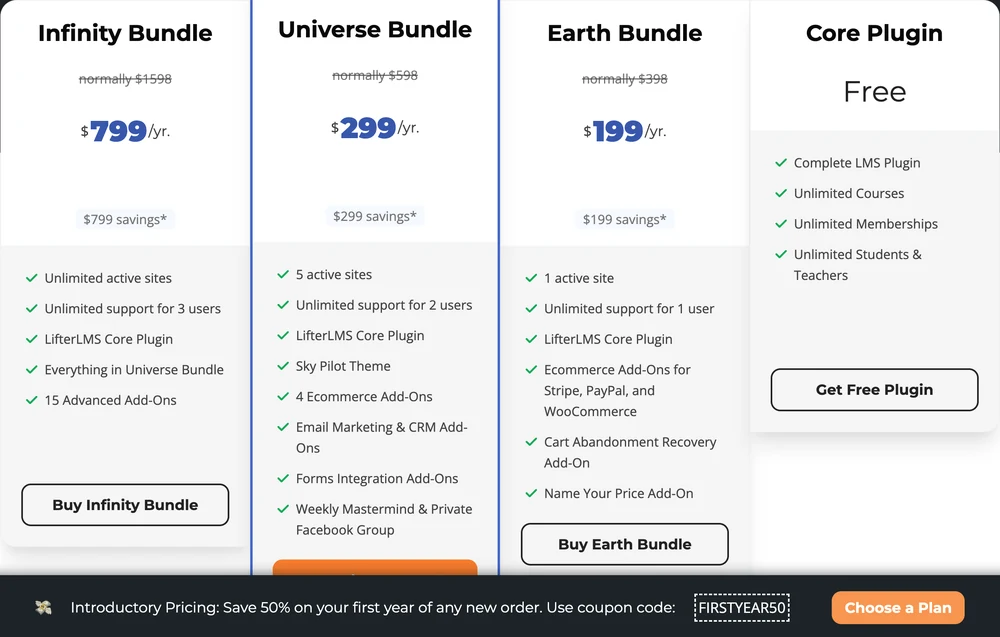
2 facts in a single screenshot. The free plan has no way to take a card, and the plan that does is half price for 12 months.
Masteriyo runs the identical mechanic with almost identical wording. Basic is $99 against a struck-through “Normally $199/year”, and the footnote reads: “Special introductory pricing on annual plans. All annual renewals at full price.”
LearnPress goes the other way, which is worth saying because it is unusual. Its Pro Bundle is $299 in year 1 and its own pricing card says it renews at $209.30.
The 2 that hold steady are the 2 with no discount to unwind. Sensei stays at $179 and Tutor LMS stays at $199, and LearnDash simply says “Renews annually, cancel any time” under its $259.
The price most guides quote for LearnDash is retired
LearnDash used to sell 1-site, 10-site and unlimited licences at $199, $399 and $799. It now sells Essentials, Pro and Elite at $259, $399 and $599, and learndash.com/pricing redirects to Liquid Web, which owns it.
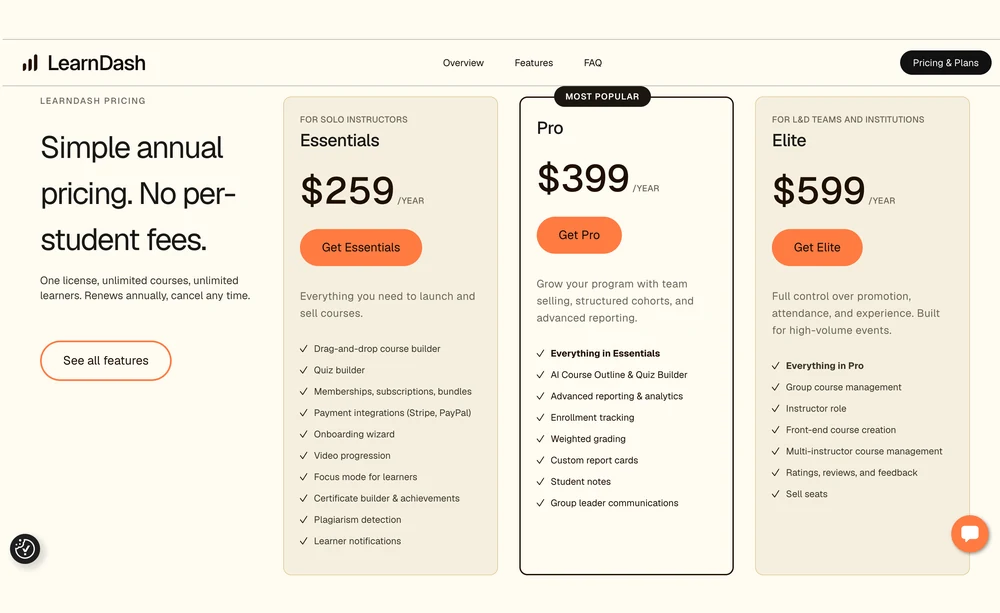
LearnDash’s current prices. The $199 entry tier that most guides still quote no longer exists.
The most recently updated third-party guide on page 1 still lists LearnDash at $199 a year. So does the 2023 guide sitting 2 places below it. We wrote up the full ladder in our LearnDash pricing breakdown, and the shortlist of what costs less in LearnDash alternatives.
Page 1 is written mostly by the companies selling the plugins
Search “wordpress lms plugin” and 8 organic results come back. 5 of them belong to a company that sells a WordPress LMS plugin: Masteriyo, Tutor LMS, LifterLMS, StylemixThemes for MasterStudy, and Liquid Web for LearnDash.
The 6th is ProProfs, which ranks its own training product first in its own roundup. That leaves 1 genuinely third-party read, from a hosting company, published in February 2023.
None of this is against the rules and it does not make the advice wrong. It does explain why the price columns look the way they do.
The clearest case is the fourth result, an 11,000-word LifterLMS article titled around testing 11 plugins. It gives every plugin a “Total Cost of Ownership” section and a summary table with a “Starting Price” column. Every cell in that column reads “Free core”, “Paid only”, “Part of MemberPress” or “Thrive Suite”.
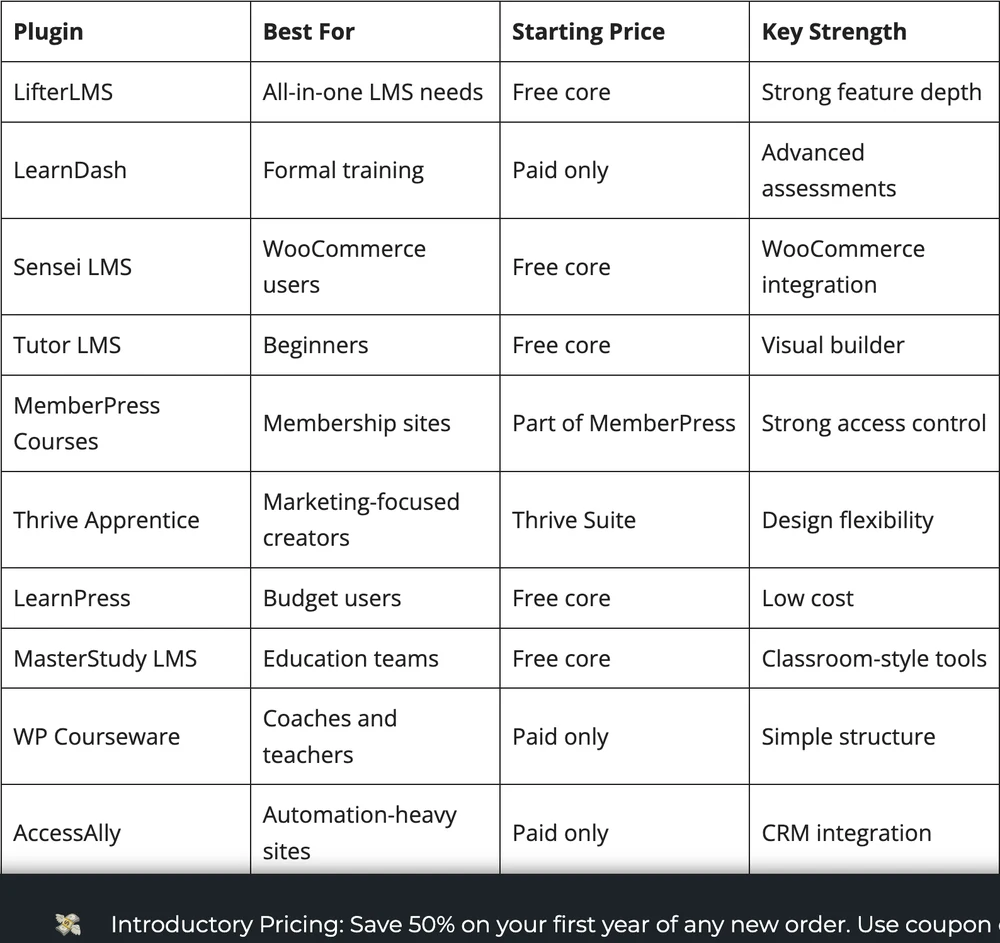
A price column with no prices. The bar underneath it is the first-year discount the article never mentions.
Counted properly, that page carries exactly 1 dollar figure across 11,000 words, and it is LifterLMS’s own $1 trial link in the site footer.
Which plugins people actually run
The WordPress.org plugin directory publishes an active install count for every plugin it lists, rounded down to the nearest band. Nobody self-reports that figure, which makes it the closest thing to an honest popularity number in this category.
Tutor LMS reports 100,000+ active installs and Masteriyo reports 5,000+, so the free plugin with the best payment story is also the least installed one on this list.
| Plugin | Active installs | WordPress.org rating |
|---|---|---|
| Tutor LMS | 100,000+ | 4.4 from 587 reviews |
| LearnPress | 70,000+ | 4.3 from 597 reviews |
| LifterLMS | 10,000+ | 4.8 from 391 reviews |
| MasterStudy | 10,000+ | 4.5 from 485 reviews |
| Sensei LMS | 10,000+ | 3.5 from 40 reviews |
| Masteriyo | 5,000+ | 4.8 from 179 reviews |
| LearnDash | Not in the directory | Sold only as a paid licence |
2 things fall out of that table. The most installed plugin is not the best rated, the least installed one is, and Sensei manages a low score on both, so neither number ranks these on its own.
LearnDash is invisible in that table, because a paid-only plugin never appears in the free directory. Worth remembering whenever you see a “most popular” list built from these numbers.
Will an LMS plugin slow your site down?
An LMS plugin is heavier than a normal WordPress plugin, and there is a structural reason for it. Course progress is per student per lesson, so a site with 200 students and 40 lessons is tracking 8,000 rows that all change while people are studying.
2 consequences follow. Page caching helps you less than it does on a blog, because a logged-in student needs a personalised page that a cache cannot serve. And the database grows with enrolment rather than with your content, so the site gets slower as the business works.
The practical version: a small course on decent shared hosting is fine, and by the time you have hundreds of active students you are buying managed WordPress hosting whether you planned to or not. Budget for it before you pick a plugin, not after.
When a course does not need an LMS plugin at all
An LMS earns its keep when the learning has structure. Quizzes that have to be passed, lessons that open in a set order, certificates at the end, a dashboard a student comes back to, cohorts you manage as a group. If you need those, buy the plugin.
Plenty of what gets sold as a course needs none of it. 6 videos and a workbook, delivered once, works as a straight download. Gating it behind a login, a student dashboard and a progress bar adds work for you and a password for the buyer.
For that kind of product, a checkout that delivers files does the job, and the options are things like Gumroad, Payhip, SendOwl and CartMango.
CartMango is the one I run, so treat that as disclosure rather than a recommendation. CartMango is not a WordPress plugin and CartMango does not host courses today, though course hosting is planned for October 2026 on its top plan. What CartMango does now is take the payment and deliver the files, with a hosted sales page if you have no site to put one on.
The wider comparison of hosted options that do host the course lives in our guide to picking an LMS for online courses and the best course platform breakdown. If access control matters more than the lessons themselves, the membership site platform costs piece covers that side.
How to pick, in 4 questions
Has anyone paid for this course yet? Answer this one first, because it changes the budget.
Years ago I built an online training course that fewer than 5 people bought, after slaving hundreds of hours into creating it. I almost quit my online journey because of that embarrassing failure. Now I sell the thing before I build it, and I would rather find out nobody wants a course from a few unanswered emails than from a $259 licence and an empty student list.
A course somebody has already paid for justifies $259 a year. A course nobody has seen yet justifies a free plugin and a PayPal button.
Do you actually need an LMS, or a checkout? Run the structure test above. If there are no quizzes, no set lesson order and no certificates, you are paying for machinery you will never switch on.
How will you take the money? This is the question that decides your real starting price. If you want Stripe on day one and zero spend, Masteriyo is the only free plugin here that does it. If PayPal alone is fine, Tutor LMS free will do. Everyone else charges you before they let you charge anyone.
What does 2 years of taking payments cost? Add the renewal to the first year, then count only what you must spend before you can charge a card at all.
Masteriyo is $0 across both years, and Tutor LMS and LearnPress are both $0 if PayPal alone will do. Add Stripe and LearnPress is $39 once, Tutor LMS is $398, Sensei is $358, LearnDash is $518 and LifterLMS is $597.
That is a $597 spread on the same job, and it is the sum the guides on page 1 leave you to do yourself.
FAQ
What is the best LMS plugin for WordPress?
LearnDash is the most complete at $259 a year, with Stripe and PayPal included. Tutor LMS gives the most away free and has more active installs than anything else here.
Masteriyo is the only one whose free version takes Stripe, and Sensei suits anyone already running WooCommerce. The features are close across all of them and the prices are far apart, so budget and payment method decide this more than feature lists do.
Is Tutor LMS a WordPress plugin?
Yes. Tutor LMS is a WordPress plugin, installed from the WordPress.org directory, with over 100,000 active installs. There is a free version and a paid version at $199 a year for 1 site, rising to $399 for 10 sites and $799 for unlimited. The free version accepts PayPal, and Stripe is part of the paid plan.
What is the difference between an LMS and an LCMS?
An LMS delivers and tracks learning: enrolments, progress, quiz scores, completion. An LCMS manages the content itself, letting teams author, version and reuse learning material across many courses. Most WordPress plugins are the first thing, built for a single person publishing courses instead of a team maintaining a content library.
Is there a genuinely free WordPress LMS plugin?
Masteriyo comes closest. Its free version builds and gates courses and takes payment through Stripe, PayPal, Razorpay and Mollie without a paid add-on. LearnPress, Tutor LMS, LifterLMS, Sensei and MasterStudy all ship free versions too, but each one either limits the payment gateways or leaves them out of the free tier entirely.
What does a WordPress LMS plugin cost in total?
The licence is the smallest part. Budget the plugin at $99 to $259 in year 1, then whatever it renews at, plus WordPress hosting, plus video hosting once the course is more than a few short clips, plus Stripe or PayPal processing on every sale. A small course site typically lands between $300 and $600 a year before a single lesson is filmed.
2 prices to check before you install anything
Whichever WordPress LMS plugin you land on, write down 2 numbers before you install it. What it renews at, and what it costs before it will take a card.
Both are printed on the vendor’s own pricing page. Both are missing from almost every guide that ranks above it.
The second number is the one that surprised me while checking these. 4 of the 6 free versions here will build and publish a course for nothing, then charge you before they will take a Stripe payment for it.
CartMango does that second half. CartMango’s cheapest plan includes Stripe and PayPal, takes no cut of your sales, and pays out straight into your own Stripe or PayPal account. CartMango is free until October 2026, then from $10 a year.
About the Author

👋 I’m Welly, founder of CartMango (the site you’re on), a checkout platform for digital product sellers. We’ve previously processed $179M+. I also run BirdSend (email marketing tool, 3.1B+ emails sent). On the side I show other non-techie digital sellers how I use AI workflows to automate 50%+ of my operations. Find me on LinkedIn.
Related Reading
- LMS for online courses: the hosted side of this decision, with the real fees for 7 platforms
- LearnDash pricing: the full tier ladder and why $199 keeps getting quoted
- LearnDash alternatives: 8 options priced on what you pay in year 2
- Membership site platform costs: for when access control matters more than the lessons
- How to sell online courses: what happens after the plugin is installed