

The main WooCommerce checkout plugin options are Checkout Field Editor for editing fields free, CheckoutWC and Fluid Checkout for replacing the checkout page, and CartFlows for order bumps and upsells. They separate on price, $49 to $149 a year, and on whether they support block checkout or only classic. Every price here was read on the vendor’s own page.
I built WordPress plugins for a living before I built checkouts. From 2011 to 2015 my product was Profits Theme, a WordPress landing page plugin, and the 2nd of its kind ever built. I started building carts while that plugin was still running, and I have been building them ever since.
So I have seen the plugin licence business from the selling side, which is part of why the buying side looks so odd. You search for a checkout plugin and page 1 hands you 3 buying guides. All 3 were written by companies that sell a plugin on their own list, and each ranks its own product at or near the top.
I opened every vendor’s pricing page, every plugin’s own directory listing, and all 3 of those guides. What follows is where they disagree.
Key Takeaways
- Check your checkout type before you buy. Block checkout is the default for stores set up after WooCommerce 8.3, and 2 of the biggest field editors still only support classic.
- Free covers most stores. Checkout Field Editor has 400,000 plus installs and a 4.9 rating, and costs nothing.
- The official Woo one-page extension costs $79 a year and holds a 2.3 out of 5 rating on WooCommerce’s own marketplace, with half its reviews at 1 star.
- All 3 buying guides on page 1 rank their own plugin, and 2 of them quote a price the plugin’s own vendor page contradicts.
- Selling files? You may need no plugin at all. Ticking Virtual removes the shipping fields and guest checkout is a core setting, so only order notes needs one.
- The top abandonment reason barely applies to you. 40% of shoppers quit over shipping, tax and fees, which mostly vanish when the product arrives by email.
Before you pay for anything, our free 5-day Online Selling Mistakes Challenge covers the profit leaks that cost solo sellers more than any plugin licence does.
The WooCommerce checkout plugins people actually install
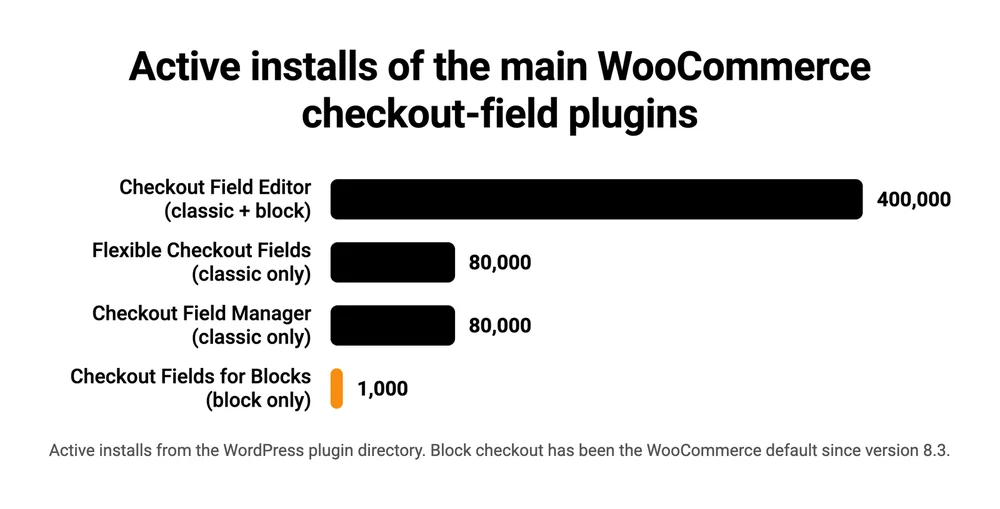
Free plugins hold every large install base here, and the only one with no free version is rated worst. Checkout Field Editor by ThemeHigh sits at 400,000 plus installs with a 4.9 rating, and Flexible Checkout Fields and Checkout Field Manager both sit at 80,000 plus. The paid-only WooCommerce One Page Checkout extension has 10,000 plus installs and a 2.3 rating. Every price below is the vendor’s annual rate.
| Plugin | Free | Installs | Rating | Paid from | Renews at |
|---|---|---|---|---|---|
| Checkout Field Editor (ThemeHigh) | Yes | 400,000+ | 4.9 | $49 a year | Not published |
| CartFlows | Yes | 200,000+ | 4.8 | $99 a year | $149 a year |
| Flexible Checkout Fields (WP Desk) | Yes | 80,000+ | 4.7 | Not on its product page | Not published |
| Checkout Field Manager (QuadLayers) | Yes | 80,000+ | 4.5 | $49 a year | Not published |
| Direct Checkout (QuadLayers) | Yes | 70,000+ | 4.8 | $49 a year | Not published |
| FunnelKit Funnel Builder | Yes | 30,000+ | 5.0 | $99.50 a year | $129 a year |
| Fluid Checkout | Yes (Lite) | 20,000+ | 4.9 | 99 EUR a year | Same price |
| CheckoutWC | Yes (Lite) | 2,000 | 4.7 | $149 a year | Not published |
| WooCommerce One Page Checkout | No | 10,000+ | 2.3 | $79 a year | Not published |
Installs and ratings come from each plugin’s WordPress directory listing and describe the free version, so CheckoutWC’s 2,000 and Fluid Checkout’s 20,000 plus are Lite users rather than paying customers. WooCommerce One Page Checkout has no free version at all, and its 10,000 plus installs and 2.3 rating come from its own marketplace listing. Prices in euros are the vendor’s own currency, and Fluid Checkout adds tax on top.
“Not published” in that last column means the vendor prints no renewal price on its pricing card. Only CartFlows prints one there. FunnelKit puts it in a footnote reading “Special introductory pricing, all renewals are at full price”, which turns its $99.50 into $129. The rest say the licence buys “1 year of updates and support” and leave the rest to you.
The $79 extension rated 2.3 out of 5
WooCommerce One Page Checkout is the only plugin in that table with no free version, and the only one rated under 4 stars. Its own product page on WooCommerce’s marketplace shows 2.3 out of 5 from 10 verified buyers, and the breakdown is worse than the average suggests: 50% of those reviews are 1 star.
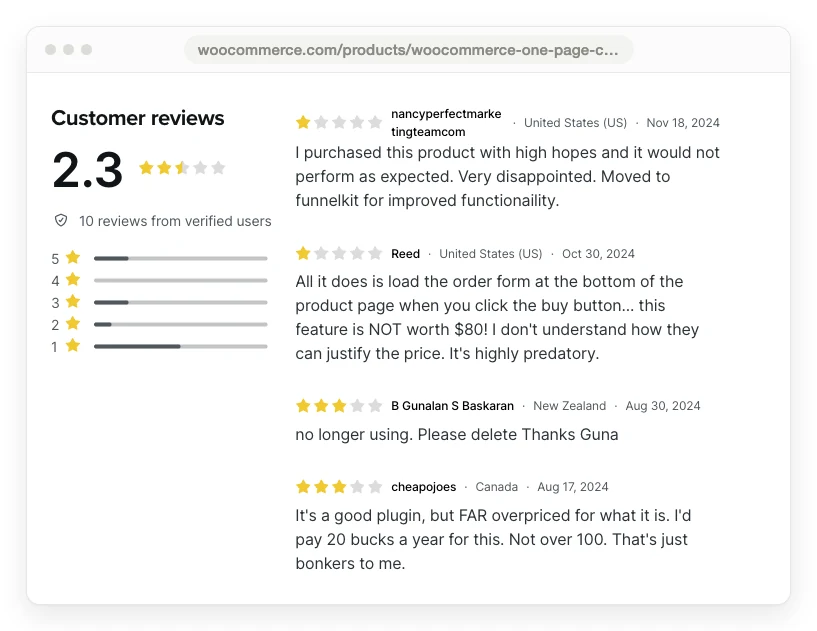
A verified buyer, Reed, wrote: “All it does is load the order form at the bottom of the product page when you click the buy button… this feature is NOT worth $80! I don’t understand how they can justify the price. It’s highly predatory.”
Another, cheapojoes, gave it 3 stars with “It’s a good plugin, but FAR overpriced for what it is. I’d pay 20 bucks a year for this. Not over 100.” The 2-year plan on that page is $126.40, which is the figure that comment is measuring against.
2 of the buying guides on page 1 recommend this plugin, and neither mentions the rating sitting on the same page as the price they quoted.
Classic or block checkout? Check this before you buy anything
Your WooCommerce store runs 1 of 2 completely different checkouts, and the plugin market has not caught up with the split. WooCommerce’s own documentation is precise about who is on which: “For WooCommerce stores started after the release of version 8.3 in November 2023, the Cart and Checkout blocks are the default experience.”
That sentence is about stores that were started after 8.3. An older store that simply updated WooCommerce kept its classic checkout, which is a page holding the shortcode [woocommerce_checkout].
How to tell in 30 seconds. Open Pages in your WordPress admin, edit the page called Checkout, and look at what is on it. A single Checkout block means block checkout, and the text [woocommerce_checkout] means classic.
If no page is called Checkout, the real answer lives under WooCommerce, then Settings, then Advanced, where WooCommerce’s own docs say you “set WooCommerce pages”.
What to install once you know
On classic checkout, every field editor in the table above works. Checkout Field Editor’s free version is the sensible default, and it costs nothing.
On block checkout, the list shrinks. Checkout Field Editor is still the default pick, WooCommerce’s own field API covers just 3 types of its own, and WP Desk needs its separate blocks plugin. Checkout Field Manager does not work at all, whatever its 80,000 installs suggest.
That last one is worth reading in the developer’s own words, from the plugin’s directory listing: “At the moment, the plugin is not compatible with the new WooCommerce Checkout Blocks introduced in version 8.3 and later.” Its suggested workaround is to put your checkout page back on the classic shortcode.
WP Desk took the other route. Its Flexible Checkout Fields plugin, also above 80,000 installs, states that it “works with the classic checkout form based on the shortcode”, and WP Desk ships a separate plugin, Checkout Fields for Blocks, for the newer one. That second plugin has 1,000 active installs.
80,000 against 1,000, from the same developer, for the same job.
A seller in r/woocommerce described how that feels from the inside: “Finally moved my store to the new block checkout and a bunch of my custom fields just stopped showing up. Turns out the old PHP hooks a lot of field plugins rely on don’t render in the block version, so half my setup quietly died.” A reply summed it up: “this is normal, the classic checkout is one thing, the block checkout is another; you have to change the stack as well.”
Even where a plugin supports both, it rarely supports them equally.
Checkout Field Editor gives 20 field types on classic checkout and 10 on block in its free version, and 24 against 13 in the paid one, while WooCommerce’s own field API offers 3.
| Route | On classic checkout | On block checkout |
|---|---|---|
| WooCommerce’s own field API | Uses the older PHP filter | 3 types: text, select, checkbox |
| Checkout Field Editor, free | 20 field types | 10 field types |
| Checkout Field Editor Pro, $49 a year | 24 field types | 13 field types |
| Flexible Checkout Fields, free | Supported, 80,000+ installs | Needs a second plugin, 1,000 installs |
| Checkout Field Manager, free | Supported, 80,000+ installs | Not supported |
WooCommerce is candid about the consequences elsewhere in its docs. When an extension declares itself incompatible, a warning and a 1-click switch back to the classic checkout appear in the editor sidebar, and if your payment gateway is the incompatible one, it “may not appear as a payment option on the checkout page.”
Is there a free WooCommerce checkout plugin?
Yes, and for most stores the free version is where I would start. 8 of the 9 plugins in the pricing table near the top of this post have a free version, and the only one without is the paid Woo extension. These 5 are the ones a solo digital seller is most likely to need, leaving out the funnel builders that a 3-product shop rarely has a use for.
- Checkout Field Editor by ThemeHigh, 400,000 plus installs, 4.9 from 1,056 ratings. Add, remove, reorder and rename checkout fields, with 20 field types on classic and 10 on block.
- Flexible Checkout Fields by WP Desk, 80,000 plus installs, 4.7 from 295 ratings. Same job, classic checkout only, with the separate blocks plugin mentioned above.
- Direct Checkout by QuadLayers, 70,000 plus installs, 4.8 from 408 ratings. Skips the cart page and sends buyers straight to checkout.
- Fluid Checkout Lite, 20,000 plus installs, 4.9 from 159 ratings. Rebuilds the checkout as a multi-step or single-step flow, and it replaces WooCommerce’s checkout block with its own.
- CheckoutWC Lite, 2,000 installs, 4.7 from 28 ratings. A cut-down version of the paid template system.
Read what the free tier withholds before you assume it is enough. QuadLayers is unusually direct about this, and its own pricing page lists what the free plan does not include: “Premium support, Quick purchase button, One-page checkout”.
So the free version of a plugin tagged for one page checkout does not do one page checkout.
How to customize the WooCommerce checkout page
WooCommerce gives you 3 routes to a customized checkout page. On block checkout you get all 3, and the first 2 need no third-party plugin. On classic checkout, route 3 is the realistic one.
Route 1, the WordPress block editor. A block checkout is built from blocks, so you edit it where you edit any template. WooCommerce’s own checkout page documentation gives the path for a block theme: Appearance, then Editor, then Templates, then WooCommerce, then “Page: Checkout”. On a classic theme it is under Pages instead.
From there you can, in Woo’s words, “rearrange or style any of the included blocks”, and the Checkout block’s own sidebar carries the built-in options. Free, no code, and it covers what a lot of stores want.
Route 2, WooCommerce’s own field API. For fields the editor does not offer, WooCommerce ships a supported way to register your own without a third-party plugin. It is block-only, and you still write PHP, which is what stops this being the answer for everyone. The additional checkout fields documentation states the limit plainly: “The following field types are supported: select, text, checkbox. There are plans to expand this list, but for now these are the types available.”
3 field types covers a VAT number, a delivery note or a how-did-you-hear-about-us dropdown. It does not cover file uploads, date pickers or conditional logic.
Route 3, a plugin. Checkout Field Editor and Flexible Checkout Fields both give you a drag-and-drop screen under WooCommerce in your admin menu, many more field types, and conditional rules that show a field only when another answer matches. This is the route to buy when routes 1 and 2 run out, and on classic checkout it is where you start.
A step further up, CheckoutWC, Fluid Checkout, CartFlows and FunnelKit replace the checkout page rather than editing it, and their paid tiers are where order bumps and post-purchase upsells live. That is a bigger commitment: a second layout to maintain every time WooCommerce updates.
A warning for digital sellers before you add anything. Another reply in that r/woocommerce thread, from someone who says they ran a store for almost a decade, makes the point: most custom fields are at checkout “because someone said ‘let’s collect X’ without asking WHEN X is needed”. Anything you can collect after payment usually should be.
How to get one page checkout in WooCommerce
One page checkout means the buyer picks the product and pays without a separate cart page and a separate checkout page. On a store selling 1 or 2 digital files, that removes a step which was never doing anything.
There are 3 ways to get it, and 1 near-miss worth knowing about.
The official extension. WooCommerce One Page Checkout costs $79 for a 1-year plan, or $126.40 for 2 years. It works by shortcode, which ties it to the classic checkout, and it is the 2.3-star product from earlier in this post.
A direct-checkout plugin. Direct Checkout by QuadLayers sends buyers from the product page straight to checkout. Its Personal licence is $49 a year for 1 site, and one-page checkout is a paid feature rather than a free one.
A full replacement. CheckoutWC’s Basic plan at $149 a year lists one-page checkout among its features, and Fluid Checkout PRO at 99 EUR a year lets you pick single-step or multi-step.
The near-miss. YITH One-Click Checkout also ranks on page 1 for this search, and its one-click button is built “for customers who are already registered on your e-commerce store”. A first-time buyer arriving from a newsletter never gets that button, because the single click needs saved billing data and a stranger has none.
Guests are not shut out entirely. YITH’s own features list offers an option to “enable the plugin features for guest users”, which sends them past the cart to the normal checkout form. That is a shortcut, and it is not the 1-click purchase the name promises.
Why the plugin roundups disagree with the plugins
The guides on page 1 disagree with the vendors they write about, in 3 repeatable ways.
The guide sells one of the plugins. FunnelKit’s roundup puts FunnelKit Funnel Builder at number 1 of 7. SeedProd’s puts SeedProd at number 2 of 10, behind WooCommerce itself. CartFlows’ puts CartFlows at number 1 of 19 and its own cart abandonment plugin at number 3. None of that is hidden, and none of it is disclosed either, apart from SeedProd’s affiliate note.
The prices drift. SeedProd lists Direct Checkout as “Free, Pro from $20/year”. QuadLayers’ own pricing page shows $49 a year, with no $20 tier on either the annual or the lifetime toggle. CartFlows prices itself at $199 a year in its own roundup, while its own pricing page sells Starter at $99 a year.
The compatibility claim contradicts the plugin. FunnelKit’s number 2 pick links to Checkout Field Manager on the WordPress plugin directory and credits it with 4 field types on block checkout. That same directory page carries the developer’s own answer saying the plugin is not compatible with Checkout Blocks at all.
Install counts drift too. ThemeHigh’s own site advertises 600,000 plus active installations for Checkout Field Editor. The WordPress plugin directory, which counts them, says 400,000 plus.
The habit that fixes all 3 is boring and it works. Open the vendor’s pricing page, flip the monthly and annual toggle, and read the plugin’s own directory listing for the block compatibility answer before you buy.
The checkout problem a plugin cannot fix if you sell digital products
Shoppers abandon carts mostly over shipping and tax, which is a problem a digital seller does not have. Every guide on page 1 is written for a store shipping boxes, and that shows up in what they tell you to fix.
Baymard Institute’s cart abandonment research puts the reasons in order. 40% of abandoners blame extra costs being too high, naming shipping, tax and fees. 20% blame slow delivery. Both are close to irrelevant when the product is a file that arrives by email.
The reasons that do apply to you sit further down. 19% did not trust the site with their card details, 18% objected to being asked to create an account, and 17% found the checkout too long or complicated.
That last one has a number attached. Baymard’s benchmark database finds “the average US checkout flow contains 23.48 form elements displayed to users by default”, against an ideal it puts at 12 to 14.
A digital order needs a name, an email and a card. The rest of that form is mostly there to get a parcel to a house.
So the useful move for a digital seller is subtraction, and 2 of the 3 cuts need no plugin at all.
- The shipping address goes on its own. Tick Virtual on the product and WooCommerce stops asking, because WooCommerce’s product documentation defines virtual products as “intangible items like services or memberships that don’t require shipping”.
- The account requirement is a core setting. WooCommerce’s settings documentation puts it under WooCommerce, then Settings, then Accounts and Privacy, where “you can enable or disable guest checkout”.
- Order notes is the one a field editor earns. Both free editors above remove it in a couple of clicks.
What no checkout plugin does is recover the buyers who leave anyway. That is a follow-up job, and abandoned cart email templates are a cheaper first step than another licence. It also will not protect the file after the sale, which is a separate setup covered in protecting digital downloads.
WooCommerce checkout plugin FAQ
What is the best payment gateway for WooCommerce?
For a solo digital seller, Stripe and PayPal cover almost every case, and most stores run both. The catch worth knowing is compatibility rather than fees: WooCommerce warns that a gateway which does not support the block checkout “may not appear as a payment option on the checkout page”. Our PayPal fee breakdown covers the rates.
Do I need a checkout plugin if I only sell digital downloads?
Usually not. WooCommerce core already sells a file, delivers it after payment, caps downloads and protects the link, as covered in our guide to WooCommerce digital downloads. A plugin earns its licence when you need fields the core checkout does not have, or a layout your theme cannot give you.
Does the free version work with block checkout?
It depends which plugin. Checkout Field Editor’s free tier supports block checkout with 10 field types. Flexible Checkout Fields needs a separate blocks plugin from the same developer. Checkout Field Manager states it is not compatible with blocks at all. Check the plugin’s own directory listing rather than a roundup.
What happens if I stop paying for a checkout plugin?
Only 1 of these vendors says. Fluid Checkout spells it out on its own pricing page: if the subscription is cancelled or a payment fails, “the plugins will continue to work including the PRO features, but you won’t have access to updates and support”. The rest sell “1 year of updates and support” and stop there, so assume nothing about what year 2 looks like until you ask them.
Can I switch back to the classic checkout?
Yes. WooCommerce keeps a 1-click revert and surfaces it automatically when an incompatible extension is active. Its cart and checkout documentation covers both directions.
Selling 3 PDFs without maintaining a store
Picking a WooCommerce checkout plugin is a compatibility problem because WooCommerce is a shop, and a shop carries a theme, a checkout template and a plugin stack that all have to agree with each other. That is a fair price when you have a real catalogue.
If what you sell is 3 PDFs and a template pack, you are maintaining a store to run a payment step. I’ll be upfront that CartMango is my platform, built for exactly that reader: a hosted checkout that delivers the file, takes one-off payments and subscriptions on the same plan, and takes nothing beyond your payment processor’s cut, with payouts going straight to your Stripe or PayPal account.
CartMango is free until October 2026 and starts at $10 a year after that, which is less than the cheapest paid WooCommerce checkout plugin licence in the table above. Order bumps are on every CartMango plan, and there is no theme to break and no shortcode to check.
CartMango does not host courses or a community today, and both arrive on the $30 a year plan in October 2026. If your WooCommerce store is a genuine shop, keep it. If the shop exists to take a payment, that swap is worth pricing.
About the Author

👋 I’m Welly, founder of CartMango (the site you’re on), a checkout platform for digital product sellers. We’ve previously processed $179M+. I also run BirdSend (email marketing tool, 3.1B+ emails sent). On the side I show other non-techie digital sellers how I use AI workflows to automate 50%+ of my operations. Find me on LinkedIn.
Related Reading
- WooCommerce digital downloads: the native setup and the 3 file delivery methods, before any WooCommerce checkout plugin gets involved
- How to add a shopping cart to a website: 4 methods matched to what you sell, with the fee math
- Order bumps: what they are, how they differ from upsells, and examples for digital sellers
- SureCart alternative: for readers weighing the lighter WordPress ecommerce plugins
- Easy Digital Downloads alternative: the other WordPress route for selling files