

A MemberPress plan costs $399, $699 or $999 a year for Launch, Growth or Scale, halved to $199.50, $349.50 and $499.50 for your first year only. Launch also takes 4.9% of every successful payment, on top of what Stripe charges. Every MemberPress pricing tier covers 1 website.
Years ago I ran a company that built WordPress plugins. We sold licences, people renewed or they did not, and that was the whole business.
So I read plugin pricing pages differently from most people. On MemberPress’s page my eye went straight to a line of small grey text under the cheapest plan reading “+Transaction Fees”, with no number attached to it.
A plugin that takes a cut of your sales works differently from a plugin that charges you a licence fee. You hand over a slice of revenue every month, on software running on your own server and your own hosting bill.
This post covers what each MemberPress plan costs in year 1 and at renewal, what the 4.9% removes from a payment, the revenue level where the cheaper plan stops being cheaper, and why 2 of the guides ranking above this one quote plans MemberPress stopped selling.
Key Takeaways
- The advertised prices are year 1 only. Launch renews at $399, Growth at $699 and Scale at $999, double what the pricing page shows.
- Launch charges 4.9% per payment. Add Stripe’s 2.9% plus 30 cents and a $29 membership payment costs you $2.56.
- The 4.9% is not on the plan card. The number sits inside a closed accordion at the bottom of the pricing page.
- Growth beats Launch above roughly $3,061 a year in payments in year 1, and roughly $6,122 a year once both renew at full price.
- Every plan covers 1 site, including the $499.50 one. Extra sites are $69 a year each.
- 2 of the 4 third-party guides on page 1 quote plan names MemberPress no longer sells, and 1 lists “no transaction fees” as a benefit.
Before the numbers, a quick aside. If you are pricing a membership because the money side of your business feels leaky, the free 5-day Online Selling Mistakes Challenge walks through the 5 mistakes that quietly cost solo sellers the most. It is built from what we saw processing $179M+ in creator sales.
How much does MemberPress cost?
MemberPress costs $199.50, $349.50 or $499.50 for the first year across its 3 annual plans, and every one of them renews at double that. Launch is the only plan with a transaction fee on top.
| Plan | Year 1 | Renewal | MemberPress fee | Payment methods |
|---|---|---|---|---|
| Launch | $199.50 | $399 | 4.9% per payment | Stripe only |
| Growth | $349.50 | $699 | 0% | Stripe, PayPal, Square, manual |
| Scale | $499.50 | $999 | 0% | Adds Authorize.net |
The struck-through numbers above each price on MemberPress’s own pricing page are the real ones. Its footnote says every annual renewal is charged at the full price, and its own blog is blunter still: the Launch plan costs $399 per year plus a 4.9% transaction fee, with a 50% welcome offer knocking the first year down to $199.50.
So the honest way to read the pricing page is to look at the crossed-out number, not the red one. That is what you pay from year 2 for as long as you keep the site.
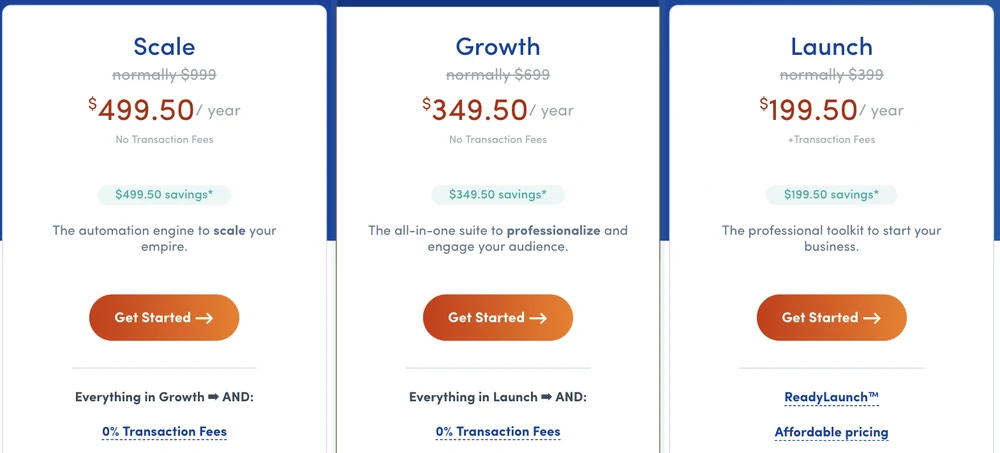
MemberPress’s 3 plan cards. Under Launch’s price, “+Transaction Fees”. Under the other 2, “No Transaction Fees”. None of the 3 shows a percentage.
What each plan unlocks
The fee is only part of what separates the tiers. Launch gives you unlimited members, unlimited courses and lessons, content protection, coupons and a drag and drop curriculum builder, which is a real membership site and enough to start selling online courses from your own domain.
What Launch does not give you is a second payment method. PayPal, Square and manual payments all start at Growth, and so does content dripping, so a drip-fed course on the cheapest plan is off the table.
Order bumps, Zapier and Authorize.net are Scale only. Scale is also where the Easy Affiliate platform gets bundled in, which MemberPress prices separately at $499 a year.
The 4.9% MemberPress takes on its cheapest plan
MemberPress states the number in a single place: an accordion at the foot of the pricing page, under “Common Questions”. Opened, it reads that the Launch plan includes a 4.9% transaction fee per successful payment, and that standard payment processor fees still apply on top.
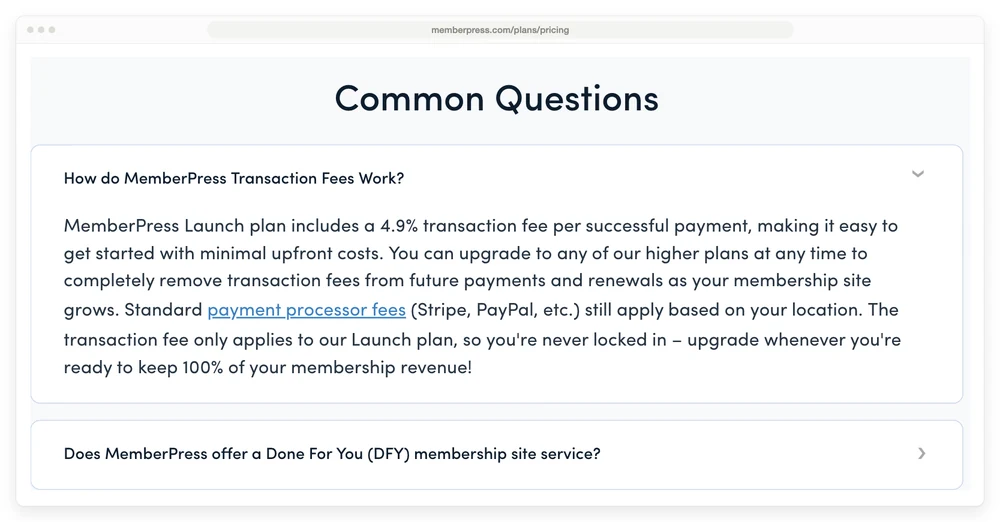
You have to scroll past the plans, the guarantee and the testimonials, then click this row open, to find the percentage.
That “on top” matters more than the 4.9% does on its own. Stripe’s standard United States rate for a domestic card is 2.9% plus 30 cents per successful transaction, and MemberPress does not replace it. Launch stacks its own cut on top of the processor you were already paying.
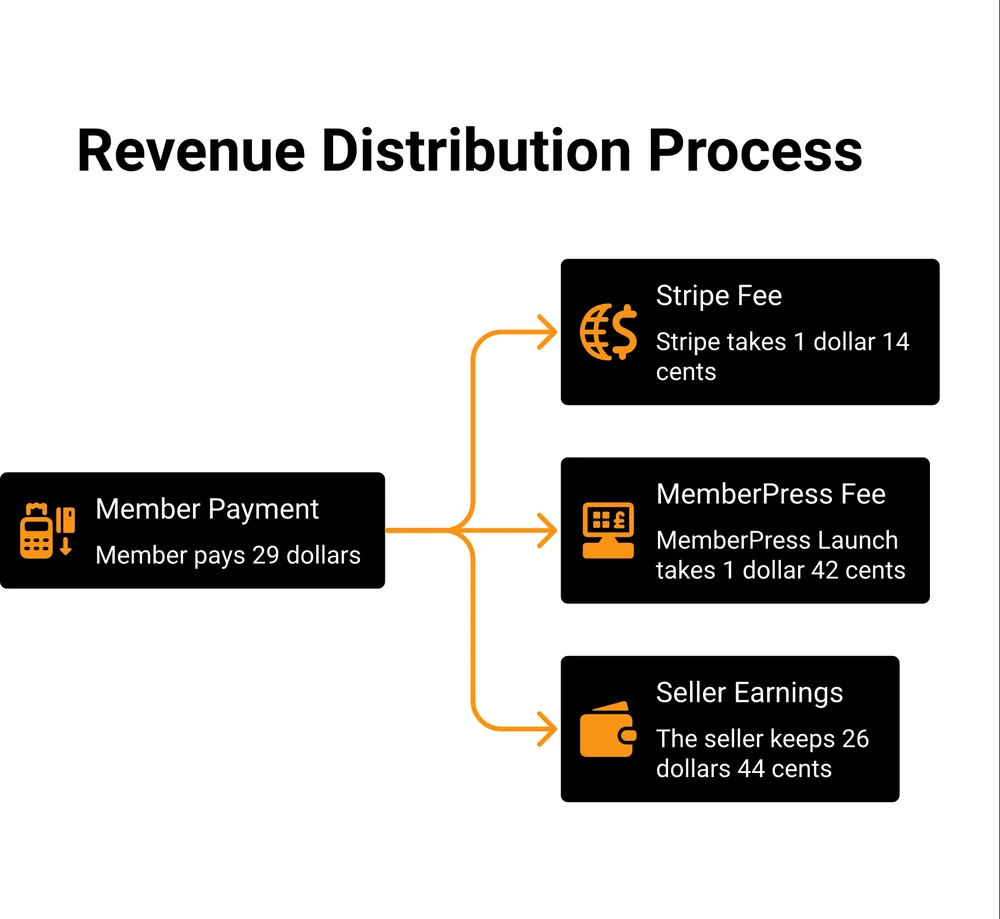
A single $29 payment on the Launch plan, split 3 ways.
On a $29 monthly membership, MemberPress takes $1.42 and Stripe takes $1.14, so $2.56 of a $29 payment goes to somebody else and you keep $26.44.
| Member pays | MemberPress 4.9% | Stripe 2.9% + 30c | You keep |
|---|---|---|---|
| $9 | $0.44 | $0.56 | $8.00 |
| $19 | $0.93 | $0.85 | $17.22 |
| $29 | $1.42 | $1.14 | $26.44 |
| $49 | $2.40 | $1.72 | $44.88 |
| $99 | $4.85 | $3.17 | $90.98 |
Small payments take the worst of it, because Stripe’s flat 30 cents is a bigger share of $9 than of $99. A $9 tier loses 11.1% of every payment before you have delivered anything.
And it repeats. A membership charge comes round every month, so the 4.9% comes out of every one of them for as long as that member stays.
1 member at $29 a month pays you $348 over a year, of which MemberPress takes $17.05. Get to 12 members at that price and the fee alone has cost you more than the $199.50 plan did.
Where Growth gets cheaper than Launch
Growth overtakes Launch at about $3,061 a year in member payments, which is roughly $255 a month. Growth costs $150 more up front and charges nothing per payment, so above that revenue the dearer plan is the cheaper one.
The crossover moves once both plans renew at full price. The gap between them widens from $150 to $300, so you need about $6,122 a year, or roughly $510 a month, before Growth wins. Scale is further out again, overtaking Launch at about $6,122 a year in year 1 and about $12,245 after renewal.
Those are low numbers. 9 members paying $29 a month gets you past the year 1 crossover, and a membership site with 9 members is barely started. So for most sites that are selling at all, Launch is the more expensive plan wearing a smaller price tag.
There is a wrinkle worth knowing before you plan around this. Upgrading removes the fee from future payments, in MemberPress’s words, so it is not retroactive. The cut you paid while you were on Launch stays paid.
Every plan covers 1 website, including the $499.50 one
Every MemberPress plan comes with a single site licence, and the price you pay makes no difference to that. MemberPress’s own documentation says the Launch, Growth and Scale plans “all come with one available license (site) activation”, and that you use up an activation for every website you put the plugin on.
Scale at $499.50 buys more features than Launch at $199.50, all of them on that same 1 site. Additional sites are sold separately at $69 a year each, up to 15 extras.
2 more things worth knowing sit in that same documentation, and most roundups skip both:
- WordPress Multisite is not officially supported. MemberPress says some customers have got it working, which is not the same as it being supported.
- You have 21 days to activate the licence key. Miss the window and the plugin backend deactivates.
If you build client sites, that changes the maths completely. 5 client sites on Growth means $349.50 plus 4 extra activations at $69, so $625.50 in year 1. The plan half of that doubles to $699 when it renews.
Set that against the hosted tools in our membership site platform cost breakdown before you commit either way.
Why some MemberPress pricing guides list plans it no longer sells
2 of the 4 third-party pages ranking on page 1 for this term describe plan names MemberPress does not sell any more. That is awkward for anyone comparison shopping, because both read as current.
OptinMonster’s review lists 3 licence levels: Basic at $179.50 a year, Plus at $299.50 and Pro at $399.50. WPAstra’s review lists 4: Basic at $359 for 1 site, Plus at $599 for 2, Pro at $799 for 3 and Elite at $999 for 5. Those are 2 different retired structures, and neither matches Launch, Growth and Scale.
Neither review mentions a transaction fee anywhere. WPAstra goes further and lists “No transaction fees or monthly fee” as one of the things it likes about MemberPress.
That was true of the plan structure it describes. A new buyer landing on Launch today gets charged 4.9% of every successful payment.
The other 2 pages do carry today’s prices. Capterra’s entry is a short directory listing that shows the current 3 plans and says nothing about the fee or the renewal. GroupApp’s review does cover the fee, and GroupApp sells a competing product, so read it as a rival’s pitch rather than a neutral write-up.
You can see the same lag from buyers. In an r/Wordpress thread, someone looking to move off MemberPress says they run a subscription tool and that MemberPress “is expensive at $359/year”. That is the old Basic price, and it is not a plan you can buy today.
I am not picking on those sites, and I will be quoting stale numbers myself eventually. The practical takeaway is smaller and more useful: open the vendor’s own pricing page in a second tab before you compare anything, because a review that was accurate when it was written stays online looking accurate long after the pricing changed.
Is MemberPress free, and is there a trial?
No, and no. MemberPress has no free version and no free trial. What it has is a 14-day money-back guarantee, which is a refund window rather than a trial, so you pay first and ask for it back if the plugin is wrong for you.
1 thing trips people up here. A free WordPress.org plugin called Members, with 300,000+ active installations, lists Blair Williams as its author, and Blair Williams is MemberPress’s co-founder and CEO.
Members handles user roles and content restriction, and it does not take payments. So it is a free plugin from the same person rather than a free version of MemberPress, and it will not run a paid membership on its own.
Paid Memberships Pro is free to install, and 2% if you use its Stripe setup
Paid Memberships Pro is the alternative people name most, and Google surfaces the comparison as a question searchers ask. In the r/Wordpress thread above, 4 separate commenters point to it, though 1 of them is flagged as a developer, so read that count with the usual pinch of salt.
The entry point is what differs for a pricing decision. Paid Memberships Pro publishes a free, open-source tier with no site limit, then charges $499 a year for Standard and $999 for Max. So its cheapest route in is $0, while its cheapest paid tier costs more than MemberPress Growth.
The free tier has its own catch, and it works the same way as the one this post is about. Paid Memberships Pro documents “an additional 2% application fee per transaction for Stripe connected sites without an active license key”, and says that fee does not apply to sites using their own Stripe API keys. So free means 2% on the easy setup and 0% on the more technical one.
Other tools real users named in that thread, as a starting list: Thrive Apprentice, Easy Digital Downloads, WooCommerce Memberships with Subscriptions, ProfilePress and Restrict Content Pro. SureCart is worth a look too if what you actually want is a WordPress checkout rather than a member area.
If you are weighing hosted platforms against a plugin, our breakdown of what a membership site platform really costs prices 8 of them at 100 members, and the LMS for online courses comparison does the same for course tools.
FAQ
How much does MemberPress cost?
$199.50, $349.50 or $499.50 a year for Launch, Growth or Scale in year 1, renewing at $399, $699 and $999. Launch adds a 4.9% fee on every payment, and payment processor fees are separate on every plan. Every plan covers 1 site, with extra sites at $69 a year.
What is the difference between a membership and a subscription in MemberPress?
A membership is the access level you sell, meaning the rules about what a buyer can see. A subscription is the recurring payment that keeps them in it. You can attach a one-off payment to a membership instead, so every subscription belongs to a membership but not every membership is sold as a subscription.
Does the 4.9% fee apply to every plan?
No. MemberPress states the transaction fee applies to Launch only, and that Growth and Scale are 0%. Upgrading removes it from future payments rather than refunding what you already paid.
Can I use 1 MemberPress licence on more than 1 site?
No. All 3 plans include a single site activation, and you can buy up to 15 additional activations at $69 a year each, giving 16 sites in total. WordPress Multisite is not officially supported.
Is MemberPress cheaper than a hosted membership platform?
Usually on the plan fee, because you are supplying the hosting, the domain and the maintenance yourself. Compare the all-in figure instead of the sticker price. Launch’s 4.9% grows with your revenue while a plugin licence does not, which is why a hosted tool like Kajabi can work out closer than the headline numbers suggest.
If your membership is really just a subscription
Everything above assumes you need what MemberPress is for: locking WordPress content behind a login, with access rules, drip schedules and course structure attached. If that is your site, a membership plugin is the right tool and the only real question is which tier.
A fair number of people searching for membership pricing never gate a page at all, though. They sell a recurring thing and deliver it by email or by a link. For them the plugin is a lot of machinery around 1 job, which is billing people every month and not losing them.
I should say plainly that I run CartMango. It is in the table below for that narrower billing job only, and it is a worse answer than MemberPress on almost everything else here.
CartMango does not protect WordPress content, so it cannot gate a members area on your site. Course hosting and community are still being built and arrive on the $30 a year plan in October 2026, with affiliate management in September 2026. If you need any of those today, MemberPress Scale or a hosted platform is the honest answer.
On the narrow question of taking a recurring payment, MemberPress Launch takes 4.9% for as long as you stay on it, MemberPress Growth takes 0% for $349.50, Paid Memberships Pro takes 2% on its free tier unless you wire up your own Stripe keys, and CartMango takes 0%. On the wider question of gating a real members area, only the first 3 rows do it at all.
| Tool | Year 1 | Renewal | Cut per payment | Gates WordPress content |
|---|---|---|---|---|
| MemberPress Launch | $199.50 | $399/year | 4.9% | Yes |
| MemberPress Growth | $349.50 | $699/year | 0% | Yes |
| Paid Memberships Pro | $0 free tier | $0 | 2%, or 0% with your own Stripe keys | Yes |
| CartMango | Free during beta | $10 to $30/year | 0% | No |
CartMango is mine, so treat that last row the way you would treat any vendor writing about itself. Check the numbers, ignore the framing.
Whatever you pick, ask 1 question before you hand over a card: if I cancel, do my existing members keep getting charged?
No pricing page I read for this post answers it, MemberPress pricing included. Put it to any tool you are close to choosing, mine included, and get an answer before you move a member list across.
About the Author

👋 I’m Welly, founder of CartMango (the site you’re on), a checkout platform for digital product sellers. We’ve previously processed $179M+. I also run BirdSend (email marketing tool, 3.1B+ emails sent). On the side I show other non-techie digital sellers how I use AI workflows to automate 50%+ of my operations. Find me on LinkedIn.
Related Reading
- What a membership site platform really costs: 8 platforms priced at 100 members, and who keeps your subscribers if you leave
- LMS for online courses: real fees for 7 course platforms and the crossover point on every entry plan
- Easy Digital Downloads alternatives: for readers who want a WordPress checkout rather than a member area
- How to sell online courses: what actually moves the needle once the platform is chosen