

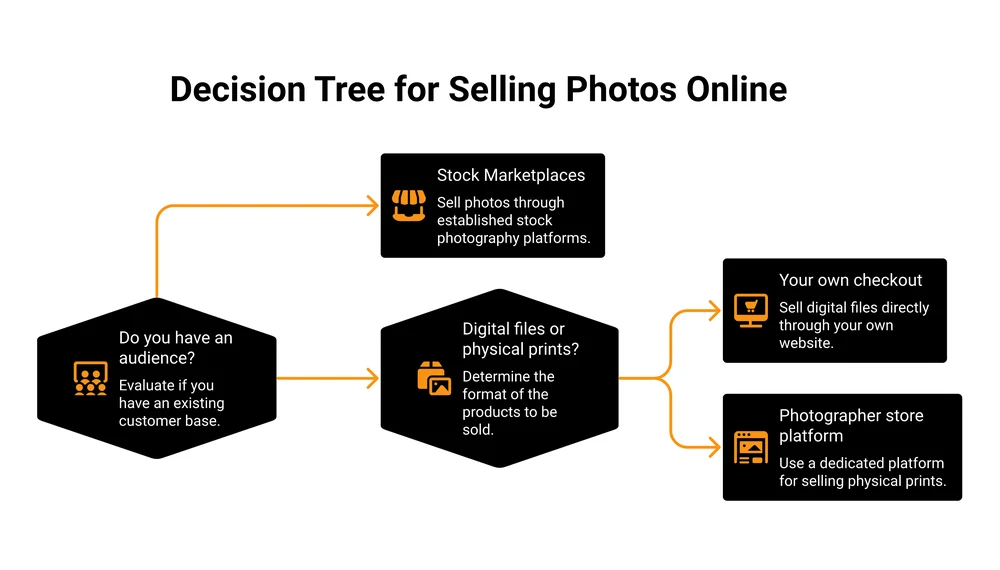
Photographers sell photos online 4 ways: stock marketplaces like Adobe Stock and Shutterstock, print-on-demand wall art, photographer store platforms like SmugMug and Pixieset, or their own checkout through a tool like CartMango, Payhip or Gumroad. The routes split on a single question: who brings the buyer. Every rate below was read at each platform’s own page.
Search for where to sell your photos and you get 15 websites with a percentage next to each one. Adobe Stock pays 33%. Shutterstock pays up to 40%. Alamy pays up to 50%.
Then you upload, you wait, and your first sale lands as 10 cents.
None of those percentages were a lie. A percentage on its own tells you nothing, because your payout depends on the price it gets applied to. Almost nobody prints that price.
This guide does the arithmetic the roundups skip.
You will see what each big marketplace pays for a single licensed photo, taken from their own published pages. You will see why your rate can go backwards on a schedule you do not control. And you will see how many downloads it takes to match one direct sale, so you can pick a route on numbers instead of a list of names.
Key Takeaways
- There are 4 ways to sell photos online: stock marketplaces, print-on-demand, photographer store platforms, and your own checkout.
- Stock marketplaces bring the buyers. You pay for that with cents per download, and the rates drop if you slow down.
- Adobe Stock’s own royalty page works its 33% out to 99 cents per licensed photo. Shutterstock’s floor is 10 cents.
- A single direct sale is worth 15 to 950 stock downloads. But nobody browses your store, so you bring every visitor yourself.
- Prints and digital files are different businesses. Prints mean shipping, returns and a print lab. Files just download.
The 4 ways to sell photos online (and who each one is for)
Every platform you have read about fits into 1 of 4 routes. The routes are not really competing with each other, because they answer different questions.
The question that separates them is who brings the buyer.
On a stock marketplace, the platform brings millions of buyers and hands you a slice of a price it sets. On your own store, you set the price and keep nearly all of it, and finding the buyer is entirely your problem. Everything else is detail.
Before you pick, it helps to know the mistakes that quietly cost solo sellers money on any of these routes. That is what the free 5-day Online Selling Mistakes Challenge covers.
| Route | What you sell | Who sets the price | Who finds the buyer | What it costs you | Best for |
|---|---|---|---|---|---|
| Stock marketplaces | Licences to use your photo | The platform | The platform | 50% to 85% of every sale | Big back catalogues, no audience |
| Print-on-demand | Framed prints, canvas, merch | You set a markup | The platform, mostly | A cut of each print | Wall-art work, zero setup |
| Photographer store platforms | Prints and client galleries | You | You | $96 to $282 a year | Working photographers with clients |
| Your own checkout | Digital files you deliver | You | You | Under $15 a year, or a per-sale cut | Sellers who already have an audience |
Most people reading this are choosing between routes 1 and 4, so the rest of this guide spends most of its time there.
What those royalty percentages actually pay
Here is the part the roundups leave out, and it is the single most useful thing to know before you sell photos online anywhere.
This end of stock photography has a name: microstock. High volume, low price per download, and a royalty rate that is a share of whatever the customer paid.
Stock customers almost never buy 1 photo. They buy a monthly subscription that includes a bundle of downloads, so the price per photo is the subscription price divided by the bundle size.
That number is small, and your percentage of a small number is smaller.
Adobe does the arithmetic for you on its own royalty page. Its example: a plan costing $29.99 a month for 10 photo licences works out to $0.99 per licensed photo.
That is the same 33% Google’s AI summary describes as a high payout royalty. Both statements are true at once.
Shutterstock is blunter. Its contributor help centre has an article titled “Why am I still seeing $0.10 earnings at higher levels?”
The answer, in Shutterstock’s own words, is that $0.10 is the minimum payout per download, regardless of level, and that all contributors, at all levels, receive some $0.10 earnings. It explains why: on a large subscription pack the customer can pay as little as 20 to 30 cents per download, so a contributor’s percentage of that lands under a dime and gets rounded up to one.
iStock goes lower still. Its rate card, effective 1 July 2026, sets a minimum price per file of $0.10 for non-exclusive photos and pays non-exclusive photographers a flat 15%. That works out to 1.5 cents on a minimum-priced download.
So the honest version of the headline numbers looks like this:
- 33% at Adobe Stock is about 99 cents on a typical subscription licence.
- Up to 40% at Shutterstock still has a 10 cent floor that never goes away.
- 15% at iStock, on a minimum-priced file, is a cent and a half.
None of this means stock is a scam. Volume is the entire point of the model, and a contributor with a large catalogue getting licensed every day is running a real business on those cents. It does mean 33%, 40% and 50% are not measuring the same thing, so ranking them against each other tells you very little.
What each stock marketplace really pays
I read the rate structure at each platform’s own contributor page. 2 things surface immediately, and neither one shows up in the roundups that rank for people searching how to sell photos online.
The first is that the top rate is almost never your rate.
The second is that your rate can go backwards. Shutterstock and Alamy both move contributors down a tier, and iStock resets every contributor’s download count to zero on 1 January.
| Marketplace | Published rate | What that resolves to in practice |
|---|---|---|
| Adobe Stock | 33% on photos | About $0.99 per licensed photo on Adobe’s own worked example. On its biggest subscription plans a floor of $0.33 to $0.38 applies, set by your lifetime licence count |
| Shutterstock | 15% to 40%, across 6 levels | $0.10 minimum per download at every level. Levels reset to level 1 each 1 January |
| Alamy | 20% Silver, 40% Gold, 50% Platinum | Gold is the default when you sign up. Earn under $250 in a Revenue Year and you drop to 20% |
| iStock (Getty) | 15% to 45% | Non-exclusive photos are a flat 15% that downloads never raise. The top 45% exclusive rate needs 681,083 downloads in a single year, because the count resets each January |
The roster does not stop at those 4. 500px, Dreamstime, EyeEm and Foap all take stock uploads, Stocksy runs a curated co-op, Pond5 leans toward video, and Fine Art America and Society6 sell print-on-demand wall art rather than licences. I have not priced those here, because rates move often enough that the only number worth trusting is the one on the platform’s own contributor page on the day you sign up.
A few of the big 4 deserve unpacking.
Shutterstock resets everyone every year. Its help pages state that levels for all contributors reset to level 1 on January 1st of each year. Climb to 40% by December and you start the next January back at 15%.
Alamy demotes you for a slow year. Alamy’s contributor help says all contributors are automatically put into Gold tier when they sign up, which pays 40%. Make under $250 in gross sales in a Revenue Year and you move into Silver at 20%. Platinum at 50% needs both $25,000 of sales and Alamy exclusivity.
iStock’s ladder is steeper than it looks. Its rate card effective 1 July 2026 shows the exclusive photo ladder as 25% by default, then 30% at 1,050 downloads, 35% at 11,235, 40% at 45,675, and 45% at 681,083. Read that alongside the reset: the same rate card says every contributor’s download total returns to zero on 1 January, so those targets are what you have to hit inside a single year. Non-exclusive photographers, which the rate card says is what contributors typically sign as, sit at a flat 15% no matter how many downloads they get.
Sell stock photos, or sell from your own store?
This is the real decision, and it has an answer you can calculate.
Say you sell a $15 pack of your photos direct to a buyer. Standard card processing of 2.9% plus 30 cents takes about 74 cents, so roughly $14.26 reaches you.
Now count how many marketplace downloads pay the same $14.26:
- About 15 downloads at Adobe Stock’s 99 cent example rate.
- About 143 downloads at Shutterstock’s 10 cent minimum.
- About 950 downloads at iStock’s non-exclusive floor.
So selling direct is worth somewhere between 15 and 950 stock downloads, depending on which marketplace you are comparing against.
And the marketplaces still win for plenty of photographers, because those downloads happen while you sleep and your direct sale does not. Adobe has millions of buyers already searching. Your store has whoever you personally send to it, which on day one is nobody.
That gap is not theoretical. I built a course years ago that fewer than 5 people bought.
The course was fine. I had nobody to sell it to, and no amount of margin fixes that. A photographer who leaves a marketplace for their own store inherits exactly that problem on day one.
The r/AskPhotography thread that ranks on page 1 for this search puts the same tension in a beginner’s words. The original poster asked for sites that “don’t require you to do a ton of marketing to have a chance of making any sales.”
One reply lays out the cost of the marketplace answer: “you need to upload constantly and it has to be curated so people will actually buy the photos and you have to earn a minimum amount to have a payout”. The top-voted answer in that thread is bleaker still: “AI is replacing the stock photo market.”
So the split runs roughly like this. Stock suits you if you have a large back catalogue, no audience, and no appetite for marketing. Your own store suits you if you already have people who follow your work, even a few hundred of them, because a few hundred of the right people beats a few thousand anonymous downloads.
There is a middle option most guides never mention: do both. Nothing stops you licensing non-exclusively on Adobe or Shutterstock while selling your best work direct.
Exclusivity is the only thing that closes that door, and it is optional on both. At iStock it buys you a higher rate. At Alamy it is the gate to the 50% Platinum tier.
The one thing your own store gives you that no marketplace does is the buyer’s email address. Adobe knows who bought your photo. You do not.
Selling prints, wall art and client galleries
This is a genuinely different business from selling files, and blending the two is where most roundups get confusing.
Print platforms handle physical fulfilment. A print lab makes the thing, packs it and ships it, and handles the return when it arrives bent. That service is what the monthly fee buys.
If you shoot weddings or portraits, these tools also do client galleries and proofing, which is a job no checkout tool does.
Here is what the 3 that rank on page 1 charge, read from their own pricing pages.
| Platform | Cheapest plan that sells | Commission on sales | Also does |
|---|---|---|---|
| Pixieset | Free ($0), or Basic at $8/month billed annually | 15% on the free plan, 0% from Basic up | Client galleries, print fulfilment, 3 GB free storage |
| Picfair | Picfair Plus, $9.99/month billed annually | Its plans page says you set your own prices for prints and downloads | Hosted photography store, up to 10,000 images |
| SmugMug | Portfolio, $23.50/month billed annually | None, and the plan grid lists card processing fees as none | Unlimited storage, print lab fulfilment, websites |
2 corrections worth knowing, because the pages ranking above this one get them wrong.
One popular roundup lists SmugMug at “$28/month” with a 15% commission. Another lists it at $9.99 a month with a 75% to 85% commission. Neither matches SmugMug’s live pricing page, which has no $9.99 plan at all and whose cheapest selling tier is Portfolio at $23.50 a month billed annually.
Watch the promo pricing too. Picfair’s plans page was running a 60% off code when I read it, showing $4.00 a month. The list price is $9.99 billed annually and $11.99 billed monthly, and the list price is what you pay from year 2.
Selling photos direct as digital files
If you go the direct route, what you sell is files from your own storefront. No shipping, no print lab, no returns.
The photographers who do well here rarely sell single images. They sell packages:
- A themed pack, say 40 moody coastal shots, delivered as a single zip.
- Textures, overlays and skies that other photographers composite into their own work.
- Mockup photos that designers drop their artwork into.
- Lightroom presets built from your own editing style.
- A direct commercial licence sold to a local business that wants photos of its own town.
The mechanics matter more than people expect. Buyers want the file instantly, so you need automatic delivery rather than an email you send by hand. High-resolution photo packs are large, so file size limits bite quickly.
You want a watermarked preview so buyers see quality without getting the goods for free. And a plain licence PDF inside the zip, stating what the buyer may and may not do, prevents most of the awkward conversations later.
If any of that is new, our guide to digital delivery systems walks through the options, and how to create a digital download covers packaging the file itself.
Pricing a file is different from pricing a print. There is no unit cost to recover, so the price reflects what the work is worth to that buyer. Our digital product pricing guide goes deeper, but the short version is that photographers usually underprice packs and overprice singles.
What it costs to run your own checkout, on a $15 sale. All rows show the platform’s cut only, since card processing is roughly the same wherever you sell.
| Platform | Ongoing cost | Platform cut | A $15 sale leaves you | Digital delivery |
|---|---|---|---|---|
| Gumroad | None | 10% + $0.50 per sale | $13.00 | Included |
| Payhip, free plan | None | 5% per sale | $14.25 | Included |
| Payhip, Plus plan | $29/month | 2% per sale | $14.70 | Included |
| CartMango | Free until October 2026, then from $10/year | 0% | $15.00 | Included |
Card processing still comes off every row, including the last one, so a real $15 sale nets about $14.26 on any of them. This catches people out on Gumroad in particular: its 10% is a platform fee, and Stripe or PayPal charges sit on top of it, so the true cost of a Gumroad sale is higher than the headline suggests.
Fees read from each platform’s published pricing. Note the units in that ongoing cost column: Payhip Plus is $29 a month, CartMango’s base plan is $10 a year, and CartMango’s base tier caps at 10 products.
I should be upfront that CartMango is my own platform, built for solo sellers who want to keep the whole sale. If you want a deeper look at the alternatives, we have written up Gumroad’s pricing and Payhip’s pricing in detail. You can also sell photo files on Etsy, which brings its own traffic in exchange for its own fees, or read our wider guide to selling online for free and selling digital art.
What kind of photos actually sell
Buyer demand and photographer taste are 2 different things, and the gap between them is where most catalogues die.
Stock buyers are usually a marketer, a designer or an editor filling a specific hole. They search for a concept, not for beauty. The categories that consistently move are people doing recognisable things, workplaces and business scenes, food, travel and location shots, lifestyle moments, nature, animals and sport.
The generic end of all those categories is exactly what AI image tools now produce for free, which is the shift behind that Reddit thread.
What has not been automated is anything that had to be there. A real named place on a dated day. Real people with signed releases. Local businesses, local streets, local events. Specific beats pretty now.
Discovery runs on your keywords. On a marketplace, the photo nobody can find earns nothing regardless of quality, which makes keywording part of the job itself. Budget time for it.
On your own store the same rule applies with different plumbing. Nobody browses your site, so your photos get found through your Instagram, your newsletter, a search result or a client who already knows you. That is the marketing cost of route 4, and it is real.
Licences, model releases and the legal part
Whichever way you sell photos online, these rules are the same, and this is the part that gets people in trouble. It is also the thinnest part of the competition. 2 of the longest guides ranking for this search run past 4,000 words each without using the phrase model release once.
You keep the copyright. Selling a photo on a stock site sells a licence to use it, not the photo itself. You can license the same image somewhere else, as long as you did not sign an exclusive agreement.
Royalty-free means the buyer pays once and can then reuse the image without paying you again per use. The name confuses people: it describes how the buyer pays, and the buyer still pays. Rights-managed licences are limited by use, time or region, and usually cost the buyer more.
Standard versus extended. A standard licence covers ordinary use. An extended licence covers resale items, like putting your photo on a mug that gets sold. Extended pays you more, so it is worth knowing which of your images are likely to end up on something that gets sold.
Editorial versus commercial. Editorial covers news and comment. Commercial covers advertising and promotion, and it is the one that needs releases.
Model and property releases. If a recognisable person appears in a photo sold for commercial use, you need a signed model release from that person. Recognisable private property, and some landmarks, need a property release from the owner. Marketplaces reject photos without them, and photographers selling direct carry the risk themselves.
Selling photos of yourself. The same rule applies, and you sign your own release. Strip the EXIF metadata before uploading, since it can carry the GPS coordinates of where the photo was taken.
Piracy is the other half of this. A watermarked preview plus secure download links covers most of it. Our guide to protecting digital downloads covers the rest.
How to start selling photos online this week
Skip the 200-photo upload. Start with a batch small enough that you finish it.
- Pick 20 photos, not 200. Choose the ones a buyer would need, not your favourites.
- Export them properly. Full resolution, sRGB colour, JPEG for marketplaces. Keep the originals.
- Keyword 1 photo properly and time it. Subject, action, location, mood, concept. Multiply by 20 and you will know whether you want the marketplace route at all.
- Pick 1 route, not 4. Splitting a 20-photo catalogue across 4 platforms gets you nothing on any of them.
- Set a price you would defend. For a pack of 20, somewhere between $12 and $30 is a normal starting point.
- Put the buy link where your people already are. Your bio, your newsletter, the caption of a photo that did well.
Then leave it alone for 60 days. Photo sales are slow enough that a fortnight tells you nothing.
FAQ
What is the best site to sell your photos?
There is no single best site, because the sites do different jobs.
Adobe Stock and Shutterstock are best if you have a big catalogue and no audience. Pixieset and SmugMug are best if you shoot clients and sell prints. Your own checkout is best if you already have people who follow your work.
How much money can you make by selling photos online?
On stock marketplaces, plan on cents per download. Adobe’s published example is 99 cents a licence and Shutterstock’s floor is 10 cents, so income comes from catalogue size rather than from any single photo. A single direct sale is worth roughly 15 to 950 stock downloads, but only from the buyers you personally bring.
Where can I sell my photos for the most money?
Per sale, your own store, because you keep close to the full price instead of 15% to 50% of a subscription slice. Per month with no marketing effort, a large stock marketplace, because it already has the buyers. Which one is right for you comes down to whether you already have an audience.
How can I sell photos of myself online for money?
Sign a model release for yourself, since commercial use needs one even when the subject is you. Strip the EXIF metadata before uploading, because it can include GPS coordinates. Then choose a platform that accepts portraits: the big stock marketplaces do, and selling direct through your own checkout has no approval process at all.
Which way should you sell photos online?
If you have thousands of images and no audience, upload to Adobe Stock and Alamy, keep it non-exclusive, and treat it as a slow-building catalogue rather than an income.
If you shoot clients, a photographer store platform earns its monthly fee on galleries and print fulfilment alone.
If you already have people who follow your work, selling files direct is worth 15 to 950 stock downloads per sale, and unlike any marketplace route it hands you the buyer’s email address.
Whichever route you pick, decide it on the payout you can calculate, not on the percentage in the headline.
If you take the direct route, traffic is the hard part, so the sensible move is earning more from each buyer you already have. That is what CartMango is built for.
Add an order bump at checkout, offer the extended licence as a 1-click upsell right after the sale, and every buyer drops into your email tool so you can sell them the next pack. It is free until October 2026, then $10 a year.
About the Author

👋 I’m Welly, founder of CartMango (the site you’re on), a checkout platform for digital product sellers. We’ve previously processed $179M+. I also run BirdSend (email marketing tool, 3.1B+ emails sent). On the side I show other non-techie digital sellers how I use AI workflows to automate 50%+ of my operations. Find me on LinkedIn.
Related Reading
- How to sell digital products without a website: the no-site path, if your photos live on Instagram rather than a portfolio
- How to start a digital product side hustle: honest income numbers and real fees across the common routes
- 15 competitors of Etsy: marketplaces worth a look if you want someone else bringing the buyers
- How to add a shopping cart to a website: for photographers who already have a portfolio site and want to sell from it