

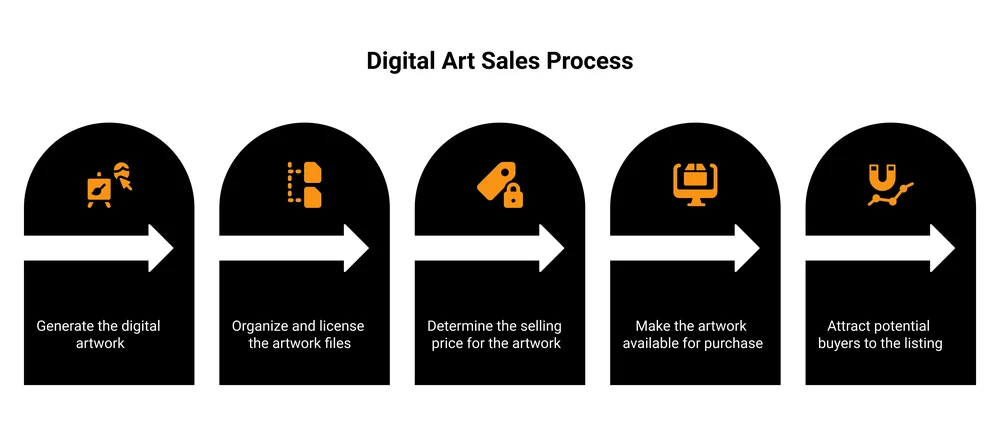
To sell digital art, decide what you will sell (downloadable illustrations, brushes, presets, printable wall art, fonts), then pick where to sell it: an online marketplace like Etsy, a print-on-demand service, or your own checkout. Prepare and license your files, set a price, then drive traffic to the listing. Most new sellers earn modestly at first and grow from there.
Turning your art into actual income is the part nobody hands you a map for. You can draw. The hard question is how to get paid for it without giving away half of every sale or shouting into a feed where nobody buys.
Most guides skip past the part that decides everything. Where you sell sets how much you keep. A marketplace brings some browsers but takes a cut and owns the buyer. Print-on-demand handles physical prints but eats your margin on every order. Your own checkout keeps the margin and the customer, but you bring the traffic.
This post walks through what kinds of digital art sell, the three places to sell it with the real fee math, how to prepare and price your files, and how to actually get people to your listing. I sell digital products myself, so I will be straight about the trade-offs.
Key Takeaways
- What sells: downloadable art like printable wall art, brushes, presets, fonts, clip art, and design assets move faster than one-off original pieces.
- Three places to sell: online marketplaces (reach, but a cut per sale), print-on-demand (physical prints, thin margin), and your own checkout (best margin, you bring traffic).
- The fee math matters more than the price tag. A 10% marketplace cut on every sale, forever, adds up faster than artists expect.
- Files and licensing are the boring part that protects you. Export the right formats and state clearly what buyers can and cannot do with your art.
- Traffic is the real job. Once a store exists, marketing your work is 80% of the work. The art was the easy part.
What selling digital art actually means online
“Digital art” covers a few different businesses, and they do not pay the same. Before we get into them, one quick thing: most new sellers lose money to the same handful of mistakes. The free 5-day Online Selling Mistakes Challenge walks through the top five, built from years of watching solo creators leave money on the table.
Art sold as a digital download. The buyer pays, gets a file, done. Printable wall art, Procreate and Photoshop brushes, Lightroom presets, clip art packs, fonts, social media templates, design elements. Near-zero cost per sale once it is made. This is the highest-margin path, and it is the focus of this guide.
Art sold as a physical product through print-on-demand. You upload a design, a service like Printful or Printify prints it on a mug, poster, or shirt and ships it when someone orders. You never touch inventory, but the print and shipping cost eats most of the price.
Commissions and NFTs. Commissions are custom one-off work, billed per project. NFTs are a separate, speculative market with its own platforms and a much smaller buyer pool than it had a few years ago. Both are real, neither is the focus here.
If you can sell the same file a thousand times without making it again, you are selling a digital download. That is the model with the best economics for an artist, so it is the one worth getting right.
What kinds of digital art sell best
Original fine-art pieces sold once are the hardest way to do this. The art that sells over and over is useful, repeatable, and easy for a buyer to imagine using.
What moves well as a download:
- Printable wall art. Buyers download, print at home or at a shop, and frame it. Sets and themed collections outsell single prints.
- Brushes and presets. Procreate brush packs, Photoshop brushes, Lightroom presets, and LUTs. Other creators buy these to speed up their own work.
- Clip art and illustration packs. Bundles of PNGs or vectors that small businesses and crafters drop into their own designs.
- Fonts and lettering. A single good font can sell for years. See selling fonts for the licensing side.
- Design assets and templates. Social media templates, Canva templates, icons, patterns, and backgrounds.
- Niche extras. Twitch emotes, stream overlays, sticker sheets, coloring pages, and planner inserts each have small, loyal buyer pools.
Brushes are a clear example. Max Ulichney, a professional animator, built MaxPacks into a well-known line of Procreate brush sets that he sells as downloads. Procreate has featured his work. It is proof that a specific, useful art asset can become a real product, not just a portfolio piece.
The pattern: solve a problem for a specific buyer. “A pack of 30 boho line-art illustrations for small skincare brands” sells better than “my art.” The more specific the use case, the easier the sale.
Where to sell digital art: marketplaces vs print-on-demand vs your own checkout
This is the decision that sets your income ceiling. There are three real options, and the difference between them is who brings the buyers and how much of each sale you keep.
This short video covers the same marketplace-versus-own-checkout trade-off, including why the per-sale cut hurts more over time:
| Where you sell | How it works | Who brings buyers | Cut per sale | Owns the customer |
|---|---|---|---|---|
| Online marketplace (Etsy, Creative Market) | List on a shared store | The marketplace, partly | Listing fee + about 6.5% + processing | The marketplace |
| Print-on-demand (Printful, Printify) | They print and ship physical | You | Product base cost, often 40 to 60% of the price | You |
| Own checkout (Gumroad) | Your own hosted checkout link | You | 10% + $0.50, plus 2.9% + $0.30 processing | You |
| Own checkout (Payhip) | Your own hosted checkout link | You | 5% per sale on the free plan, plus processing | You |
| Own checkout (CartMango) | Your own hosted checkout link | You | Free during beta, then from $10/year, no per-sale cut | You |
Fees as of 2026-06-25, from each platform’s pricing page. Marketplaces and print-on-demand have a real place. A marketplace like Etsy puts your work in front of people already shopping, which is worth a lot when you have no audience yet. Print-on-demand is the only sane way to sell physical prints without a garage full of inventory.
But notice the column that matters over time: the cut per sale. A 6.5% marketplace fee or a 10% platform fee is not a one-time cost. It is a tax on every sale for as long as you sell there. Sell $2,000 a month on a 10% platform and that is $200 a month, every month, gone.
On your own checkout you still pay standard payment processing. Stripe charges about 2.9% plus $0.30 per sale, and that applies wherever you sell. The difference is the platform cut stacked on top, which is the part an own checkout cuts down.
I will be upfront: CartMango is my own checkout platform, built for keeping more of each sale instead of paying a cut forever. The honest takeaway is not “use mine.” It is that the own-checkout path is the one the marketplace-funded guides bury, and for digital downloads it usually keeps you the most money once you have any traffic of your own.
Many artists run both: a marketplace to get discovered, their own checkout to sell without a website to repeat buyers and email subscribers where they keep the full margin.
How to prepare and license your files
The unglamorous step that saves you refund requests and stolen work.
Export the right formats. Match the format to the use:
- Printable wall art: high-resolution PDF or PNG, 300 DPI, in standard frame sizes (such as 8×10, 11×14, A4).
- Brushes and presets: the native format (.brushset for Procreate, .abr for Photoshop, .xmp or .dng for Lightroom).
- Clip art and design assets: PNG with transparent background, plus SVG for anything that needs to scale.
- Fonts: .otf and .ttf, zipped together.
Bundle multiple files into a single ZIP so the buyer gets one clean download. For the full walkthrough, see creating digital downloads that buyers actually open without emailing you.
State the license clearly. A license is just the rules for what a buyer may do with your art. Spell out the difference:
- Personal use: the buyer uses it themselves and cannot resell it.
- Commercial use: the buyer can use it in products they sell, usually for a higher price.
Put the terms on the product page and inside the download. Vague licensing is where most disputes start.
How to price your digital art
Price on the value to the buyer, not the hours you spent. A buyer does not care that a brush pack took you a weekend. They care that it saves them an afternoon.
A few rules that hold up:
- Bundle. Three presets for $18 outsells one preset for $6, and your effort barely changes.
- Anchor with tiers. A $12 single pack next to a $29 “everything” bundle makes the bundle look like the smart buy.
- Account for the cut. On a platform that takes 10%, a $10 product nets you $9 before processing. To clear the same amount on a marketplace, you have to price higher, which can cost you sales. This is where keeping more per sale quietly compounds.
For a full method, see how to price digital products. The short version: start a little higher than feels comfortable, then adjust based on what actually sells.
How to get traffic and market your art
Here is the part that separates the stores that make money from the ones that do not. Once your listing exists, marketing it is most of the job.
Where artists actually find buyers:
- Instagram, TikTok, and Pinterest. Visual platforms are made for this. Show the art, show your process, link to the listing. Pinterest in particular sends buyers to digital art for years after a pin goes up.
- An email list. The one audience you own outright. A buyer who joins your list can be sold to again with no platform between you. This is the long game that pays.
- SEO. Listings and blog posts that match what buyers search (“printable nursery wall art,” “minimalist Procreate brushes”) pull in steady, free traffic.
The trade-off worth saying out loud: on a marketplace, the platform sends you some browsers, but you are renting that audience and competing with everyone else on the same page. On your own store you bring the traffic, but every visitor is yours. If social media is not your thing, there are other ways to market that do not need a feed at all.
How to protect your digital art from theft
Digital files get copied. You cannot stop it completely, but you can make casual theft annoying enough that most people just buy.
- Watermark your previews. Show the art on the product page with a visible watermark. The clean file only comes after purchase.
- Use limited, expiring download links. A link that works for a set number of downloads or a set window stops a buyer from posting the file publicly forever.
- State your license terms. Clear terms will not stop a determined thief, but they give you grounds if you need them.
A good checkout handles the delivery side for you, with secure links instead of a raw file on a public URL. For the full playbook, see protecting digital downloads.
Is selling digital art profitable, and other common questions
Is selling digital art profitable?
Yes, but margin and traffic decide it, not the art alone. Digital downloads have near-zero cost per sale, so once a product is made, almost every dollar after fees is profit. The catch is traffic. A beautiful product no one sees earns nothing. Most start small and grow as their audience and catalog grow. Working artists feel this shift firsthand: on Reddit, one artist asked how to profit from digital art beyond commissions, which is exactly the move from trading hours to selling products this guide is about.
The ceiling can be real, though. Kayla Warner of Amma Rose Designs published that her shop took in $93,534 in revenue across 2020 selling printable and digital planners. It is one seller’s self-reported number, not an audited one, but it is specific and it is hers. The sellers who reach that level treat it as a small business, not a side art project.
What is the 80/20 rule for artists?
It usually means one of two things, and people use both. The first is a time split: spend most of your time creating and a focused slice on marketing and the business side. The second is the classic Pareto principle applied to art, that a small share of your products and buyers drives most of your sales. Whichever version you mean, the lesson lands the same. The art is only part of the job. Selling it is the rest.
What kind of digital art sells best?
Useful, repeatable art that solves a problem: printable wall art, brushes and presets, fonts, clip art, and templates. Buyers purchase these to decorate a space or speed up their own work, so demand is steady. One-off original pieces are the slowest path.
Do I need an LLC to sell digital art?
In the United States, you generally do not need an LLC to start selling. Most people begin as a sole proprietor and register a business structure later, often for liability or tax reasons as income grows. Rules vary by state and country, so confirm with a local accountant or attorney. This is general information, not legal advice.
If you sell digital art as downloads, this is what I built CartMango for: your own checkout that helps you keep more of each sale instead of handing a cut to a marketplace forever. It is free while we are in beta, then starts at $10 a year, with no per-sale cut on top of standard processing.
About the Author

👋 I’m Welly, founder of CartMango (the site you’re on), a checkout platform for digital product sellers. We’ve previously processed $179M+. I also run BirdSend (email marketing tool, 3.1B+ emails sent). On the side I show other non-techie digital sellers how I use AI workflows to automate 50%+ of my operations. Find me on LinkedIn.
Related Reading
- How to sell Lightroom presets: a near-sibling: presets are digital art, with the fee math worked out
- How to sell Canva templates: another download-style product, license rules and where to sell
- Creating digital downloads: the file-prep and delivery walkthrough
- Best Gumroad alternative: for readers comparing their own-checkout options