

Podia pricing runs from $49 to $179 a month, or $42 to $150 a month if you pay for the year, across its Mover, Shaker and Earthquaker plans. Only Mover charges a transaction fee, at 5%. There is no free plan any more, just a 30-day trial, and every plan caps how many email subscribers you can hold.
Podia will not let you move down to a cheaper plan while you are over its limits. Its help centre says you may need to delete products or remove videos first.
That rule is nowhere on the pricing page. It is also the kind of thing that turns a $49 decision into a $99 one a few months later.
Podia builds caps into every tier: products, videos, community spaces, and how many people you are allowed to email. You can buy your way past exactly 1 of them.
I read all 4 guides on page 1 for this search. Not one of them explains how those caps work, and 2 of them still quote prices Podia has replaced.
So here is what the 3 plans cost, what the 5% on the cheapest one adds up to once sales start, what your email list costs on top, and the rules that decide when you have to move up.
Key Takeaways
- Podia costs $49, $99 or $179 a month, dropping to $42, $84 or $150 a month when you pay annually.
- Only the cheapest plan, Mover, charges a Podia transaction fee. It is 5% of every sale.
- At $1,000 a month in sales, Mover and Shaker cost exactly the same. Past that, Mover gets more expensive.
- Every plan caps email subscribers at 100, 500 or 1,000. Going over costs extra, on a scale hidden behind a dropdown.
- Email subscribers are the only limit Podia will sell you more of. Products, videos, community spaces and assistant seats all force a full plan upgrade.
- Podia killed its free plan in late 2024, though Google’s own AI answer still tells searchers it exists.
Podia pricing: the 3 plans
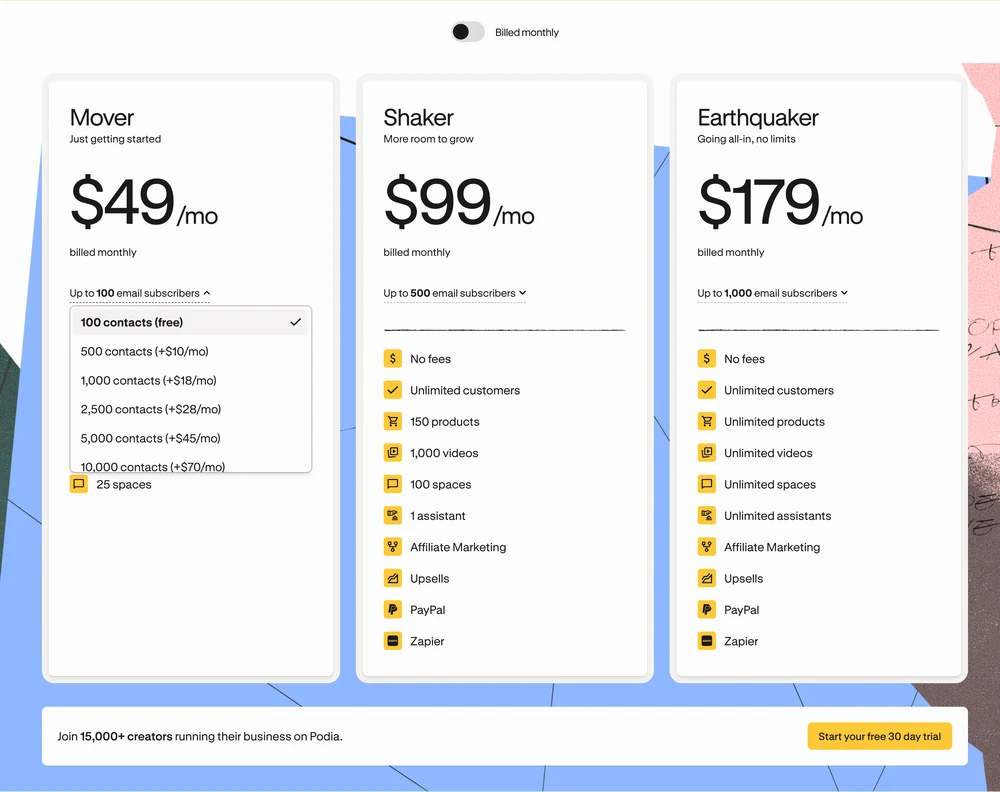
Mover costs $49 a month, Shaker $99 and Earthquaker $179. Pay for a year up front and those fall to $42, $84 and $150 a month, which is $504, $1,008 and $1,800 a year.
| Plan | Monthly | Yearly, per month | Yearly total | Podia fee | Email subscribers |
|---|---|---|---|---|---|
| Mover | $49 | $42 | $504 | 5% | 100 |
| Shaker | $99 | $84 | $1,008 | 0% | 500 |
| Earthquaker | $179 | $150 | $1,800 | 0% | 1,000 |
Podia’s help centre says annual billing saves 15%. Measured against the real numbers it is 14% on Mover, 15% on Shaker and 16% on Earthquaker, so 15% is a fair description rather than an exact one.
The plans also differ on things that have nothing to do with price. Mover gives you 50 products, 500 videos and 25 community spaces, and it leaves out PayPal, affiliate marketing, upsells and Zapier.
Shaker adds all 4 of those, plus 1 assistant seat, 150 products and 1,000 videos. Earthquaker removes the product, video, space and assistant caps entirely.
New to selling digital products and not sure which costs matter yet? The free 5-day Online Selling Mistakes Challenge walks through the profit leaks that catch most first-time sellers, including the ones hiding in platform fees.
Does Podia have a free plan?
No. Podia retired its free plan in late 2024. What you get instead is a 30-day trial with no credit card required, and at the end of it you pick a paid plan or your site stops being available.
Page 1 gets this wrong more than anything else about Podia, and Google is part of the problem. Open the People Also Ask panel on a search for Podia pricing, expand “Is Podia good for beginners?”, and Google’s own AI answer lists this as a reason to choose it:
Free Plan Available: You can start building and testing your ideas with Podia’s Free Plan before paying a monthly fee.
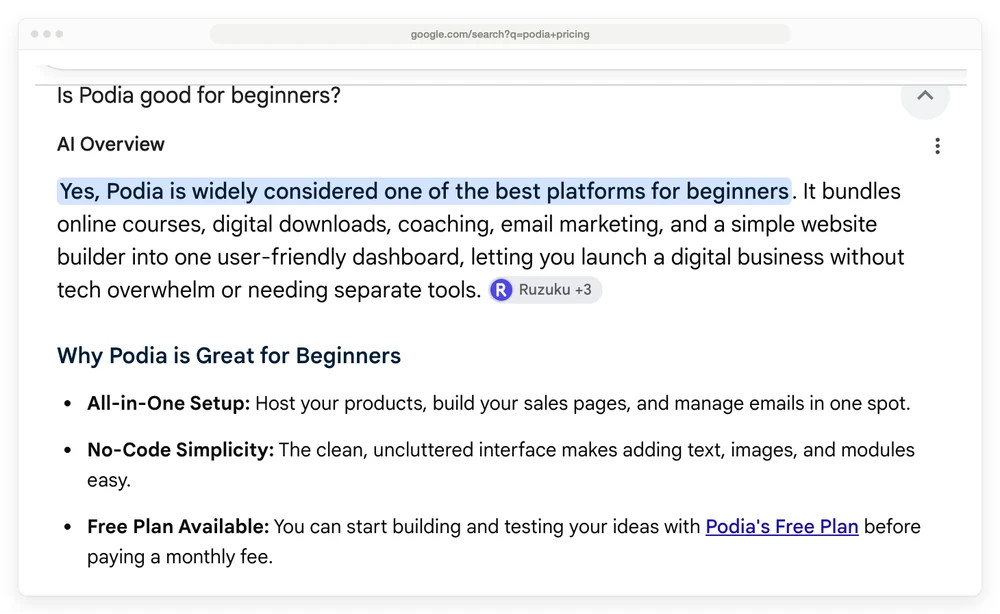
That plan has been gone for well over a year. Google lists Ruzuku among its sources for the answer, and Ruzuku’s Podia review is one of several pages still running a price card Podia has replaced.
A creator who was on the free plan when it ended described it in an r/edtech thread about the shutdown: “Super bummed because I didn’t even have time to let my community know. My site basically disappeared. Podia emails were going to a ‘promotions’ folder I didn’t know existed, so I missed the news.”
What Mover’s 5% fee actually costs
Podia’s 5% applies to Mover alone. Shaker and Earthquaker take nothing. On top of whichever plan you pick, your payment processor takes its own cut, and that one never goes away.
Podia’s pricing page puts the processor cut at 2.9% plus 30 cents for “Stripe or PayPal”. That matches Stripe’s published US rate. It understates PayPal, whose own merchant fees page puts PayPal Checkout at 3.49% plus 49 cents in the US.
On a $100 sale that is $3.20 through Stripe and $3.98 through PayPal. PayPal is only available on Shaker and Earthquaker anyway, so Mover sellers are on Stripe by default.
Here is what the 3 plans cost at 4 revenue levels, assuming $50 products, Stripe as the processor and month-to-month billing.
At $1,000 a month in sales, Mover and Shaker both cost exactly $134. Below that Mover is cheaper, above it Mover’s 5% keeps climbing while Shaker’s price stays where it is. Pay annually instead and that crossover arrives earlier, at $840 a month, because the gap between the 2 plans narrows to $42.
| Monthly sales | Products sold | Mover | Shaker | Earthquaker |
|---|---|---|---|---|
| $500 | 10 | $91.50 | $116.50 | $196.50 |
| $1,000 | 20 | $134 | $134 | $214 |
| $3,000 | 60 | $304 | $204 | $284 |
| $5,000 | 100 | $474 | $274 | $354 |
Podia does its own version of this arithmetic, and it is worth seeing. On Podia’s comparison page against Kajabi, the company works an example at $500 a month in sales and prices its own entry plan like this:
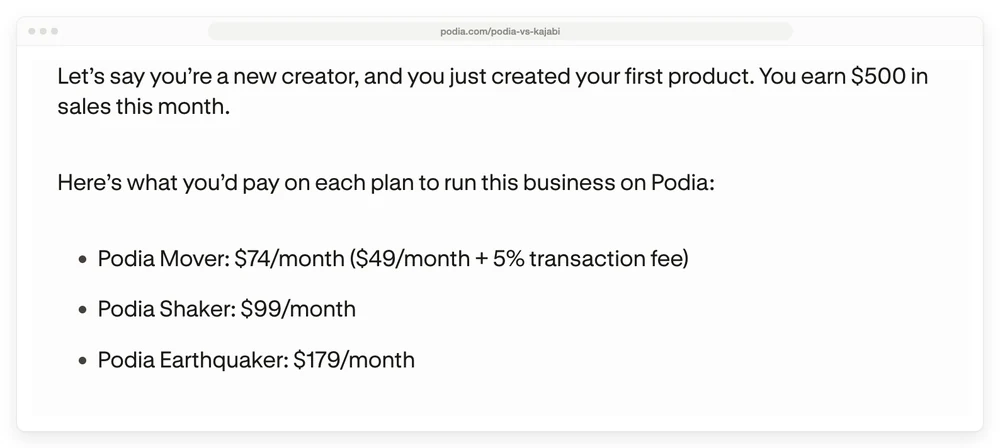
That is Podia putting Mover at $74 a month once the fee is counted. The figure is a worked example rather than a sticker price, so treat it as one. It is still the clearest signal available that Podia knows the 5% is the real story on its cheapest plan, and none of the 4 guides on page 1 mentions it.
What your email list adds to the bill
Every Podia plan includes email marketing, and every plan caps how many subscribers you can email. Mover stops at 100, Shaker at 500 and Earthquaker at 1,000.
Go past your cap and you pay a monthly add-on. The pricing page does not show what that costs when it loads. You have to click the “Up to 100 email subscribers” line on a plan card, which opens a dropdown of 13 price rungs running from 100 contacts free all the way to 500,000 contacts.
Podia’s email add-on costs the same on all 3 plans. Going from your allowance to 5,000 contacts adds $45 a month whether you are on Mover, Shaker or Earthquaker. Only the free allowance changes.
| Contacts | Extra, billed monthly | Extra, billed yearly | Mover total, monthly |
|---|---|---|---|
| 500 | $10 | $8 | $59 |
| 1,000 | $18 | $14 | $67 |
| 2,500 | $28 | $22 | $77 |
| 5,000 | $45 | $36 | $94 |
| 10,000 | $70 | $56 | $119 |
| 25,000 | $135 | $108 | $184 |
| 50,000 | $250 | $200 | $299 |
The ladder keeps going past this table. 100,000 contacts adds $400 a month, and 500,000 adds $1,250.
This is worth knowing before you compare Podia against anything else, because 100 subscribers is a very low ceiling. A creator who has been collecting emails for a few months is already over it.
The plan that fixes it is not automatically the next plan up, either. Mover plus the 500-contact add-on is $59 a month. Shaker, which includes 500 contacts, is $99.
It also means the plan Podia describes as “Going all-in, no limits” has a limit. Earthquaker removes the caps on products, videos, community spaces and assistants, and still meters your email list at 1,000 subscribers.
One more thing, because it explains a contradiction you will run into if you read around. 2 of the guides ranking for this topic publish partial versions of this ladder and disagree with each other, 1 saying 1,000 contacts on Shaker adds $14 and the other saying $18. Both are right. The first is quoting annual billing and the second is quoting monthly.
Email subscribers are the only limit you can buy more of
Podia will sell you more email subscribers and nothing else. Every other cap moves only when you change plan, and the pricing page never says so.
Podia’s help centre article on plan limits is direct about it: “We don’t currently offer à la carte upgrades for individual limits or features. Limits can only be increased by upgrading to a different Podia plan.”
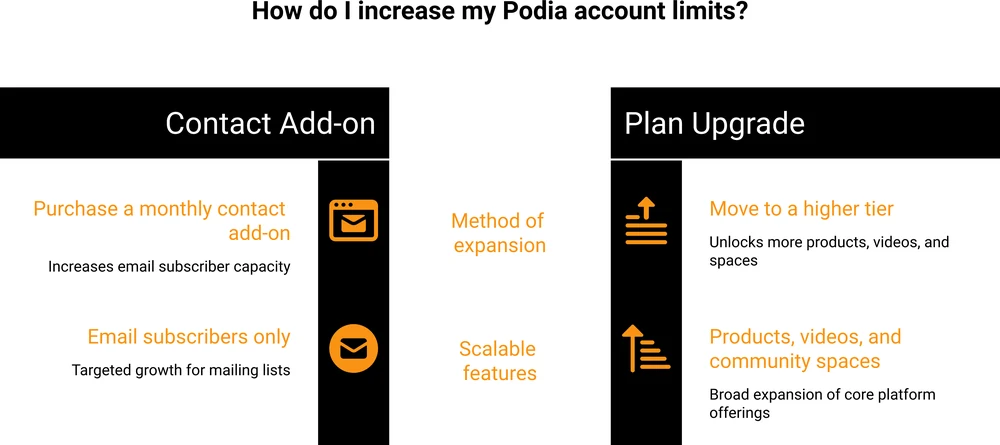
So subscribers are the one exception. Need a 51st product on Mover? There is no add-on for that.
You move to Shaker at double the price, and you collect 100 more videos and 75 more community spaces you may never touch. The same goes for video count, community spaces and assistant seats.
3 more rules sit in that article, and each one costs money or time in a way the pricing page never hints at.
Downgrading can mean deleting your own work. Podia will not let you move to a cheaper plan while you are over its limits. Its words: “you may need to delete products, remove videos, or reduce other usage-based items.” So trying Earthquaker for a few months is not freely reversible if you fill it up.
Dropping your subscriber tier switches off your email. Lower the tier below your actual list size and the downgrade goes through, but “email sending will be disabled until you’re back within the selected subscriber limit or upgrade to a higher tier.” Your list is still there. You just cannot mail it.
The trial can lock you out of the cheap plan. If your account is over a plan’s limits when the trial ends, Podia says “you won’t be able to select that plan.” Podia’s free migration moves up to 50 products onto Mover, and Mover caps at 50 products. Migrate a catalogue of 55 and Mover is off the table, whatever the pricing page says it costs.
None of this makes Podia a bad platform. It does mean you should pick a plan for where you expect to be in a year, because the caps are what force the next upgrade.
The same trap shows up across this category. We priced 8 membership platforms at 100 members and found the renewal terms, not the headline price, decided what most sellers actually paid.
Which Podia plan fits which seller
Mover suits you if you are selling under roughly $1,000 a month, have fewer than 50 products and a list under 100 people. Below that revenue line the 5% costs less than the $50 a month you would save. Accept that you get no PayPal, no upsells and no affiliate program on this tier. If the affiliate side is what you would miss, here is what standalone affiliate software costs.
Shaker is where the math above points once you are selling consistently. It kills the 5%, adds PayPal, upsells, Zapier and affiliates, and pays for itself the moment you clear $1,000 a month in sales. Starting here saves you a migration later.
Earthquaker earns its price on caps. Nothing about it is cheaper than Shaker at any revenue level, since neither charges a transaction fee. You move up when 150 products, 1,000 videos or 100 community spaces stop being enough.
If none of that fits because you only ever wanted the checkout, that is worth naming too. Plenty of people land on an all-in-one to take payments, then pay every month for course hosting and a community platform they never switch on.
How Podia compares on price
All 4 of these platforms host courses, so the comparison that matters is the entry price plus whatever each one takes per sale. Broadly, those 2 numbers pull against each other here: the cheaper the plan, the bigger the cut.
Teachable’s Starter is the cheapest course platform in this table at $29 a month, then Thinkific’s Basic at $40 and Podia’s Mover at $42, with Kajabi’s Basic at $143. Teachable and Podia take a cut of every sale on those entry plans too, at 7.5% and 5%, and Kajabi takes 2% if you bring your own processor.
| Platform | Cheapest plan, yearly | Per year | Cut of each sale | Hosts the course |
|---|---|---|---|---|
| Teachable Starter | $29/mo | $348 | 7.5% | Yes |
| Thinkific Basic | $40/mo | $475 | Not stated on its pricing page | Yes |
| Podia Mover | $42/mo | $504 | 5% | Yes |
| Kajabi Basic | $143/mo | $1,716 | 2% on outside processors, 0% on Kajabi Payments or PayPal | Yes |
| CartMango | Free until Oct 2026, then from $10/year | $10 to $30 | 0% | Not yet, planned for October 2026 on the $30 plan |
I should be upfront that CartMango is mine, so read that last row with that in mind. CartMango handles the checkout, and it does not host your course yet. An affiliate system is planned for September 2026, with course hosting and a community feature following in October 2026. All 3 land on the $30 a year Platinum plan, not the $10 Silver one.
So compare that $30 against the course platforms above, not the $10. The $10 tier is the checkout on its own.
Today, if you need somewhere to put course videos and run a community, every other row on that table does that and CartMango does not yet.
What the row is there to show is the gap in what you pay to take the money. Podia’s Mover charges 5% of every sale on top of $504 a year.
CartMango takes 0% and is free until October 2026, then $10 a year.
For a fuller list of what people move to and why, we ran the numbers on 9 Podia alternatives, on what Kajabi really costs and on what Teachable really costs.
FAQ
How much does Podia cost per month?
$49 for Mover, $99 for Shaker and $179 for Earthquaker, billed monthly. Paying yearly brings those to $42, $84 and $150 a month, billed as $504, $1,008 and $1,800 up front. Mover also charges 5% of every sale, and your payment processor charges its own fee on all 3 plans.
Does Podia charge transaction fees?
Yes, on the Mover plan only, at 5% per sale. Shaker and Earthquaker charge 0%. Separately, Stripe takes 2.9% plus 30 cents and PayPal Checkout takes 3.49% plus 49 cents on every plan, because those are the processor’s fees rather than Podia’s.
What is better than Podia?
Podia bundles 4 things, so the answer turns on which of them you actually use. If it is the course hosting, Teachable and Thinkific do the same job for less on their entry plans. If it is mainly the community, dedicated tools like Skool are built for it. If all you need is the checkout, a cart platform like CartMango costs a fraction of any of them.
Is Podia good for beginners?
For someone selling a first course to a small list, yes, and the 30-day trial with no card is a genuinely low-risk way to find out. The thing to check before committing is the email cap of 100 subscribers on Mover, since that is the limit most beginners hit first.
Which is better, Podia or Thinkific?
Thinkific’s Basic plan is $40 a month billed annually against Podia’s $42, so price is close to a tie at entry. Thinkific leans harder into the learning side, with quizzes, assignments and cohorts. Podia bundles a website builder, community and email marketing in a way that suits sellers more than teachers.
Can I get a refund from Podia?
Within 72 hours of your most recent payment, yes. Podia does not do partial refunds on annual plans, so a year paid up front in month 2 is not something you can claw back. Refunds take 5 to 10 business days.
The part you can stop paying for
Every number in this Podia pricing breakdown is the cost of a bundle. You are paying for course hosting, a website builder, a community and email marketing, on a plan sized by whichever of those you use most, and the cheapest tier bills you 5% of every sale on top.
Plenty of sellers genuinely need all of it. Plenty of others work out that they were paying $504 a year plus 5% for what was, in practice, a checkout.
If that sounds like you, CartMango does the checkout part: order bumps, upsells and downsells to lift what each buyer spends, with every sale syncing into your email tool. CartMango is free until October 2026, then $10 to $30 a year depending on the plan, and it takes 0% of what you sell. Order bumps are on every tier, upsells and downsells from the $20 one.
About the Author

👋 I’m Welly, founder of CartMango (the site you’re on), a checkout platform for digital product sellers. We’ve previously processed $179M+. I also run BirdSend (email marketing tool, 3.1B+ emails sent). On the side I show other non-techie digital sellers how I use AI workflows to automate 50%+ of my operations. Find me on LinkedIn.
Related Reading
- 9 Podia alternatives, priced live: where sellers go when Podia pricing stops fitting, sorted by which part of it you use
- What Kajabi really costs: the $89 tier missing from its pricing page, and the fee on outside processors
- What Teachable really costs: the 4th plan that never appears on its pricing page
- What course platforms charge: real fees for 7 platforms, and the point where each one overtakes the others