

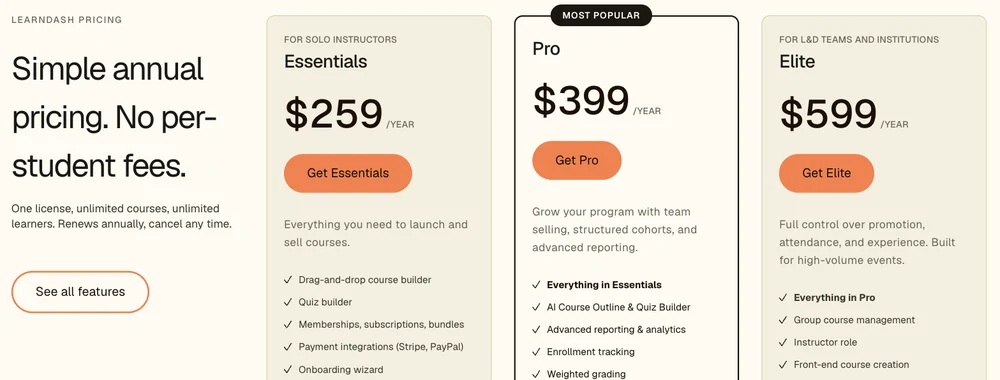
LearnDash costs $259 a year as a WordPress plugin you host yourself, and Thinkific costs $475 a year billed yearly, or $54 a month billed monthly, as a hosted platform. In the LearnDash vs Thinkific choice, LearnDash suits sellers who already run WordPress. Thinkific suits sellers who want no server to look after.
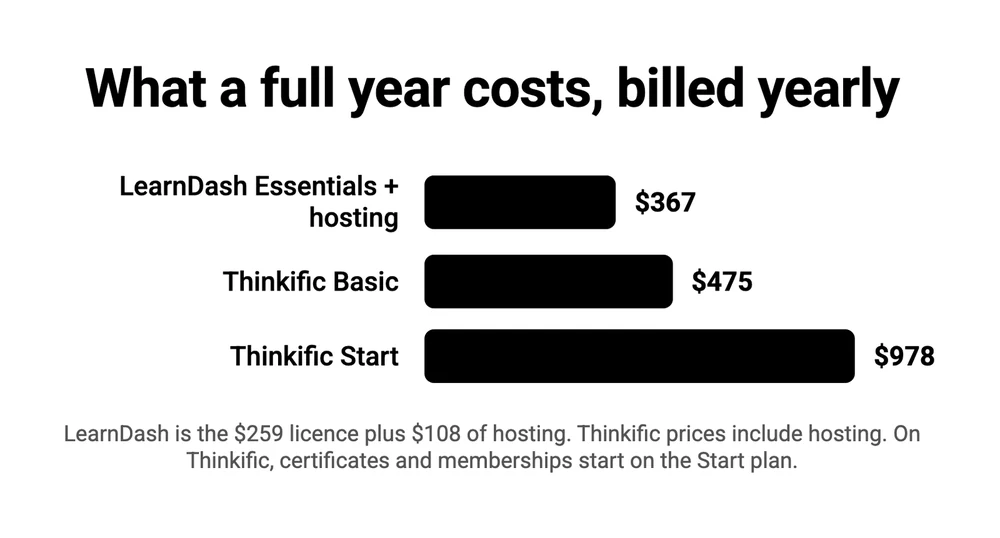
Hosting adds about $108 a year to LearnDash, bringing it to roughly $367 against $475 for Thinkific Basic. LearnDash takes no cut of sales. Thinkific takes 5% on Basic when you take payments through your own Stripe account instead of Thinkific Payments. Completion certificates and memberships need Thinkific Start at $978 a year. Thinkific has no free plan, only a 30-day trial.
All 7 written guides on page 1 of Google for this search come from a company that sells a course or training product. 2 of the 7 are the vendors themselves, Thinkific and the company that owns LearnDash.
The prices do not line up either. Most of those pages print a LearnDash price that LearnDash no longer lists. 2 of them say neither product takes a cut of your sales, which is only half right.
So I read both pricing pages, LearnDash’s terms and Thinkific’s help center. You will learn 3 things: what a full year of each costs on the same basis, which one fits your situation, and what happens to your course the day you stop paying.
Key Takeaways
- LearnDash costs $259 a year and Thinkific costs $475. LearnDash needs hosting from about $108 a year on top, which makes it $367.
- Thinkific takes 5% of each sale on Basic if you use your own Stripe account. Thinkific Payments avoids it, at 2.9% for card processing.
- Certificates and memberships cost more on Thinkific. Both start on its Start plan at $978 a year. LearnDash includes both at $259.
- Only 1 of the 7 guides on page 1 quotes LearnDash’s current price. 4 print a retired price, Thinkific’s own page included.
- Stop paying Thinkific and you lose the admin dashboard. With LearnDash, updates end and the terms restrict use, but the lessons stay in your database.
Whichever platform you pick, it cannot fix an offer that does not sell. If you want to check yours first, the Online Selling Mistakes Challenge is a free email course that covers the top 5 selling mistakes in 5 days.
LearnDash vs Thinkific: what a full year of each costs
LearnDash Essentials costs $259 a year plus hosting, and Thinkific Basic costs $475 a year billed yearly or $648 paid month by month.
LearnDash only bills by the year, so every figure here is a full year.
On yearly billing, LearnDash runs from $259 to $599 before hosting, and Thinkific runs from $475 to $1,968 with hosting included.
| Plan | Paid yearly | Paid monthly | Outside-gateway cut | Hosting |
|---|---|---|---|---|
| LearnDash Essentials | $259 | No monthly option | None | Separate, from about $108 a year |
| LearnDash Pro | $399 | No monthly option | None | Separate |
| LearnDash Elite | $599 | No monthly option | None | Separate |
| Thinkific Basic | $475 | $648 over 12 months | 5% | Included |
| Thinkific Start | $978 | $1,308 over 12 months | 2% | Included |
| Thinkific Grow | $1,968 | $2,628 over 12 months | 1% | Included |
The Thinkific yearly totals come from its own pricing page.
It prints $40, $82 and $164 a month billed annually, and a saving of $173, $330 and $660 against the monthly price. 12 months at $54 is $648, and $648 less $173 is $475, so the $40 is a rounded figure.
LearnDash’s $259 buys the plugin and nothing to run it on. LearnDash’s pricing page says “One license, unlimited courses, unlimited learners. Renews annually, cancel any time,” and the hosting is your own bill.
How much is that bill? Liquid Web, the company that owns LearnDash, sells managed WordPress hosting for 1 site at $9 a month, which is $108 over a year. Add it and LearnDash Essentials lands at $367 against Thinkific Basic’s $475.
2 things can move those numbers.
LearnDash’s terms and conditions say a plan renews at “the then-current” rate and that the company “may increase Fees for the Services upon renewal”. So $259 is this year’s price and no promise about next year’s. The rest of the detail, including what each of the 3 plans adds, is in my LearnDash pricing breakdown.
Thinkific moved too. It raised Basic, Start and Grow in 2026, which I covered in the Kajabi vs Thinkific comparison.
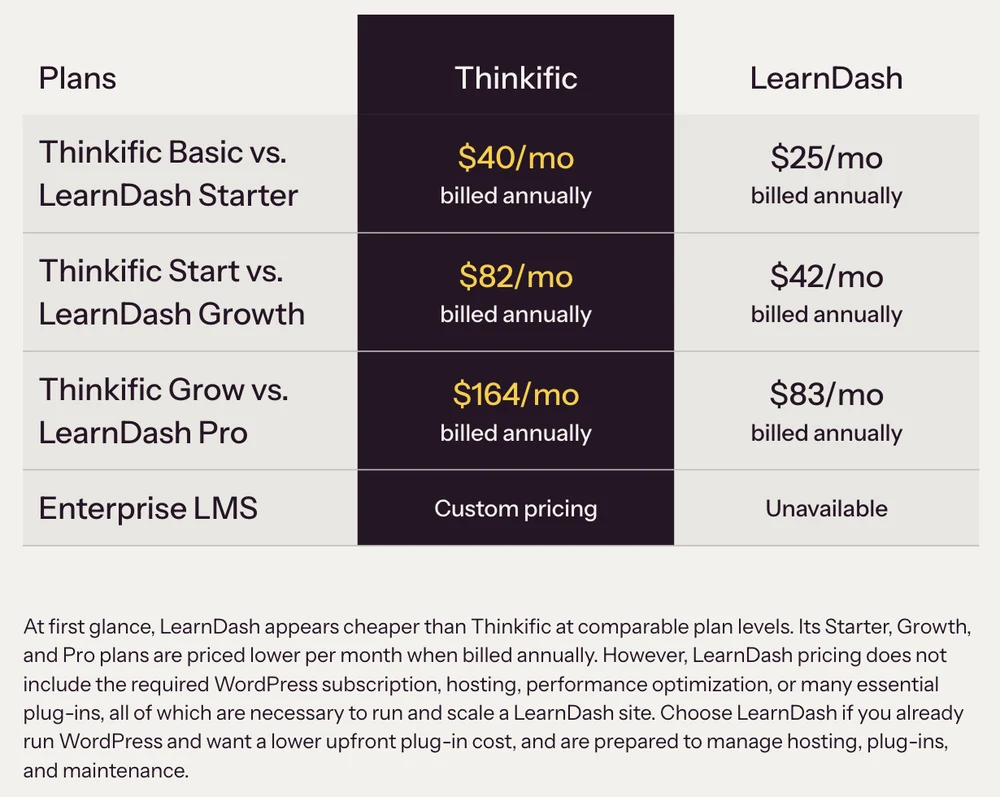
Thinkific’s own comparison prices LearnDash plans that LearnDash no longer lists
Thinkific’s comparison page, the top result for this search, prices LearnDash at $25, $42 and $83 a month billed annually, on plans called Starter, Growth and Pro, and LearnDash’s pricing page lists none of them.
LearnDash lists 3 plans today: Essentials, Pro and Elite, at $259, $399 and $599 a year. It has no Starter and no Growth. Its Pro costs $399 a year, which is about $33 a month before hosting.
Those names and numbers were real once. LearnDash’s pricing page from February 2025, as saved by the Internet Archive, lists Starter, Growth and Pro under a product called LearnDash Cloud, billed at $299, $499 and $999 a year. Divide those by 12 and you get Thinkific’s column to within a dollar.
LearnDash Cloud was the hosted version. The same archived page lists what it included: “Website hosting”, “WordPress CMS” and “LearnDash LMS”.
LearnDash later renamed the hosted plans. Archived copies of the same page from October 2025 and May 2026 show them under new names, from $29 a month billed annually. LearnDash’s owner has since rebuilt the product line, and today the old Cloud addresses redirect to the plugin page. Existing Cloud customers keep their accounts, per that announcement.
So look again at the sentence under Thinkific’s table. It says LearnDash pricing “does not include the required WordPress subscription, hosting” and more besides. That is a fair point about the plugin. It is wrong for the 3 plans named in the table, because those were the hosted plans.
Thinkific’s page gives 2 more LearnDash prices further down.
Its feature table says “$29 a month”, which matches the old hosted entry plan. Its mobile app section mentions an “annual LearnDash LMS subscription of $199 (minimum)”, which was the old 1-site license. Each of those figures was a real LearnDash price at some point, and $259 is not among them.
Thinkific has company. Of the 7 guides ranking on page 1, only EzyCourse quotes LearnDash at $259, while Masteriyo, SchoolMaker and BenchPrep still print the retired $199 license, and Liquid Web and uTeach give no LearnDash price at all.
| Guide | Who publishes it | LearnDash price | Thinkific price |
|---|---|---|---|
| Thinkific | Thinkific | $25, $42, $83 a month, billed yearly | $40, $82, $164 a month, billed yearly |
| Masteriyo | A rival WordPress course plugin | $199, $399, $799 a year | A free plan, then $49 a month |
| Liquid Web | The owner of LearnDash | None given | $99 and $109 a month, on retired plan names |
| uTeach | A rival course platform | None given | None given |
| SchoolMaker | A rival course platform | $199, $399, $799 a year | $49, $99, $199 a month |
| BenchPrep | A rival training platform | $199 a year | $49 a month |
| EzyCourse | A rival course platform | $259, $399, $599 a year | $54, $109, $219 a month |
SchoolMaker and BenchPrep also say neither product charges a transaction fee. That is true of LearnDash. For Thinkific it holds only while you use Thinkific Payments, which I come back to below.
The second column shows a second pattern. All 7 guides come from a company that sells a course or training product.
I sell software too, so read me with the same doubt. I run CartMango, a checkout for digital products. CartMango is not in these tables because it does not host courses.
If you already run a WordPress site
If your site already runs on WordPress, LearnDash is the cheaper and tidier pick, because you pay the hosting bill anyway and the course lives on the same domain as everything else.
Plenty of sites qualify. W3Techs counts WordPress on 40.2% of all websites.
For you the cost is the license alone, $259 a year for Essentials. LearnDash’s plan list for Essentials includes the course builder, a quiz builder, a certificate builder, memberships and subscriptions, and Stripe and PayPal payments.
What you give up is the selling side. LearnDash’s plan lists name no order bump, no upsell and no abandoned-cart email, and Thinkific Basic includes order bumps, coupon codes and abandoned-cart emails. LearnDash’s FAQ points to WooCommerce for “additional flexibility” in selling, which is 1 more plugin to run.
I have sold software both ways. I ran a company that built WordPress plugins, including Profits Theme (2011 to 2015), and later left it for hosted software.
With a plugin, the code runs on a server the customer rents, so an update that breaks something is the customer’s to fix. With hosted software that job stays with the vendor. LearnDash is the first kind and Thinkific is the second.
LearnDash has no free version. If you want to test the idea before you pay, several WordPress course plugins install for free, and I priced 7 of them in the WordPress LMS plugin comparison.
If you have never run a website and do not want to start
If you have no site and no wish to manage one, Thinkific Basic is the safer pick at $475 a year, because hosting, updates and security are Thinkific’s job.
Basic includes unlimited courses, 1 community, up to 5 digital products, a checkout with order bumps and coupon codes, abandoned-cart emails and your own domain.
You can test all of it on a 30-day trial. Thinkific no longer offers a free plan to new sign-ups, which I traced in the Thinkific free plan post.
LearnDash’s site answers “Do I need technical experience to use LearnDash?” with “No”, and adds that “Advanced options are available for developers and agencies”. 1 seller’s account reads differently.
Writing in an r/elearning thread, a course seller who had picked LearnDash 2 months earlier described the result: “it’s been a chaos. LearnDash and WP have many capabilities, but they are very very buggy. Login, Registration, Password Reset, all of them don’t function well.” They were choosing between Thinkific, Teachable and LearnWorlds as a replacement.
1 reply in that thread gave this advice: “If you’re just getting started with your business I would keep it simple and use one of the 3rd party apps. Once you start making decent money and if you need more features and flexibility, that’s the time to move to WordPress.”
That is 1 seller, and the same reply suspected they were on LearnDash’s hosted plan and blamed aggressive caching. It shows that a WordPress course site has more parts to get wrong. It does not show that LearnDash breaks for everyone.
What you give up with Thinkific is a clean brand, because Thinkific’s name stays on your site until the Grow plan at $1,968 a year.
If students need a certificate, or you charge members every month
If your course ends in a certificate, or you charge members every month, LearnDash costs far less, because Thinkific puts both features on its Start plan at $978 a year.
Thinkific’s pricing page lists “Completion certificates” and “Memberships and subscriptions” under Start, along with payment plans, bundles and upsells. Basic has none of them. Paid month by month, Start is $109, or $1,308 over a year. LearnDash Essentials lists a certificate builder and “Memberships, subscriptions, bundles” at $259. Add $108 of hosting and the gap to Thinkific Start is $611 a year.
Start is more than those 2 features, though. It also adds upsells and payment plans, which LearnDash’s Essentials list does not name.
Quizzes are a smaller difference. Thinkific Basic includes quizzes, and graded assignments arrive on Start. LearnDash’s page says you can “Create quizzes with 8 question types”.
LearnDash gives you the certificate builder. You still design the certificate, set the rule that awards it and test that it fires.
If you take payments through your own Stripe account
If you want sales to land in a Stripe account you already own, Thinkific charges 5% of every sale on Basic, 2% on Start and 1% on Grow, and LearnDash charges nothing. Thinkific calls this the third-party payment gateway fee. The FAQ on its pricing page says the fee exists, and the percentages sit in a help center article. Say you sell $10,000 of courses in a year. 5% of that is $500, which is more than the Basic plan costs when billed yearly.
You avoid it by using Thinkific Payments, Thinkific’s own processor, which its pricing page describes as “in line with other processors like Stripe and Paypal at 2.9%”. The help article adds 2 limits. The fee is not charged in countries where Thinkific Payments is unavailable, and it stops after your first $1M of sales in a calendar year.
PayPal is less clear.
The help article says the fee applies to Stripe today and to outside processors such as PayPal “in the future”, while the FAQ on Thinkific’s pricing page already names both. Check your own account before you assume PayPal is exempt.
LearnDash has no equivalent. Stripe and PayPal are built in, the pricing page says “No per-student fees”, and you pay the processor’s own rate with nothing added.
SchoolMaker and BenchPrep miss this fee when they say neither product charges a transaction fee. Thinkific is not unusual in charging one, and I compared what 6 course platforms keep per sale.
What happens when you stop paying either one
Stop paying Thinkific and you are locked out of your own admin area. Stop paying LearnDash and the lessons stay in your own database, but updates and support end and the terms restrict further use.
Thinkific’s cancellation article spells it out. Once the billing cycle ends you “will no longer be able to access, edit, or interact with any areas of Thinkific”, and the list that follows includes your Admin Dashboard, your learning products and your “order, transaction, and user tables”.
The article is less tidy about students. 1 passage says enrolled students “will continue to have access and will continue to get charged”. Another says students on active subscriptions “will continue to get charged but will lose access to their product at their next billing cycle”. Both agree on the charging, so cancel your students’ subscriptions before you cancel your own.
LearnDash works differently because the course is part of your own website.
The lessons are stored in your WordPress database, on hosting you control. LearnDash’s terms promise updates and support for the term of your order, and they license the plugin under the GPL, the same open license WordPress uses.
The terms also say “You may not use any Services or materials after the expiration or termination of your Order”. A GPL license and that sentence seem to conflict, and I am not a lawyer. If you plan to let a license lapse and keep the site running, ask LearnDash in writing first.
Deactivate the plugin and your lessons vanish from the site, because WordPress no longer knows how to display them. I walked through the fix in the LearnDash alternatives post.
When neither of them fits
Neither LearnDash nor Thinkific is the right tool if what you sell is a file, or if 1 of them is close but too expensive.
Do you sell an ebook, a template pack or a recorded workshop? Then you need a checkout and a download link, and a course platform is more than the job asks for. CartMango, Gumroad and Payhip each sell and deliver a file.
CartMango does not host courses today. That feature is planned for October 2026 on CartMango’s $30 a year plan.
If you want a hosted platform and Thinkific’s price or fee puts you off, I priced 6 Thinkific alternatives and ran Teachable vs Thinkific on the same basis as this post.
If you want to stay on WordPress and $259 feels steep, the LearnDash alternatives post linked above prices 8 options on their year 2 renewal.
LearnDash or Thinkific, by situation
LearnDash wins 3 of these 5 situations at $259 to $367 a year, and Thinkific Basic wins 1 at $475, when you want no website to manage.
| Your situation | Pick | Yearly cost | The catch |
|---|---|---|---|
| You already run a WordPress site | LearnDash Essentials | $259 | Order bumps, upsells and abandoned-cart emails are not in the plan list |
| You have no site and want none | Thinkific Basic | $475, or $648 paid monthly | Thinkific branding stays until Grow at $1,968 |
| Students need a certificate, or members pay monthly | LearnDash Essentials | $367 with hosting | You build and test it yourself. Thinkific needs Start at $978 |
| You want sales in your own Stripe | LearnDash Essentials | $367 with hosting | Thinkific adds 5% on Basic |
| You sell a file, not a course | A checkout | Varies by tool | Neither product is built for it |
FAQ
What are the disadvantages of Thinkific?
Thinkific’s main disadvantages are the price step between plans and the fee on outside payment gateways. Completion certificates, memberships and payment plans start on Start at $978 a year, against $475 for Basic. Use your own Stripe account and Thinkific adds 5% on Basic. Its branding stays on your site until the Grow plan, and if you cancel you lose access to the admin dashboard.
Is LearnDash a good LMS?
LearnDash is a good LMS if you are comfortable running a WordPress site. At $259 a year it includes a course builder, quizzes with 8 question types, certificates, memberships and Stripe and PayPal payments, with no cut of sales. It is a poor fit if you do not want to manage hosting, updates and plugin conflicts yourself.
Is LearnDash cheaper than Thinkific?
Yes, over a full year. LearnDash Essentials is $259 a year plus hosting from about $108, so roughly $367. Thinkific Basic is $475 billed yearly or $648 paid monthly. The gap grows to $611 if you need certificates or memberships, because those need Thinkific Start at $978. LearnDash only bills yearly, so you cannot pay it month by month.
Does Thinkific have a free plan?
No, not for new sign-ups. Thinkific’s pricing page answers this itself: it has no free plan, only a 30-day free trial. Some comparison pages still list a free Thinkific tier, including 1 on page 1 of Google for this search. After the trial, the cheapest plan is Basic at $54 a month or $475 for a year.
What are some good alternatives to LearnDash?
On WordPress, Tutor LMS, Sensei and LearnPress are the usual alternatives, and each has a free version you can install before paying. Off WordPress, the hosted options include Thinkific, Teachable, Podia and LearnWorlds. The LearnDash alternatives post linked above prices 8 options on their year 2 renewal.
Which learning platform is the best?
No single platform is best, because the answer changes with what you already own. LearnDash wins if you run WordPress and want no cut of sales. Thinkific wins if you want the hosting handled for you. For the wider field, I checked the real fees on 7 platforms in the LMS for online courses post.
The small products that sit beside the course
Whichever side of LearnDash vs Thinkific you land on, the platform only sells the course. If you also sell smaller things around it, such as a workbook, a template pack or the recording of a live workshop, they do not need a $475 platform or a WordPress plugin.
CartMango runs the checkout, delivers the file and adds no cut of its own on top of Stripe’s or PayPal’s fees. CartMango does not host lessons today, so the course itself still belongs on LearnDash or Thinkific.
About the Author

👋 I’m Welly, founder of CartMango (the site you’re on), a checkout platform for digital product sellers. We’ve previously processed $179M+. I also run BirdSend (email marketing tool, 3.1B+ emails sent). On the side I show other non-techie digital sellers how I use AI workflows to automate 50%+ of my operations. Find me on LinkedIn.
Related Reading
- LearnDash pricing: what each of the 3 plans includes, and the hosting bill on top
- Thinkific alternatives: 6 hosted platforms priced after Thinkific’s 2026 rise
- Best WordPress LMS plugin: 7 plugins priced on the year 2 renewal
- Kajabi vs Thinkific: for readers weighing an all-in-one platform
- Best course platform: 6 platforms and the cut each one takes per sale