

Tutor LMS at $199 a year, Sensei Pro at $179 and LearnPress at $0 are the LearnDash alternatives that cost less than its $259 on WordPress. Thinkific at $475 and Teachable at $348 are the routes off WordPress, both taking a cut per sale. Every figure here is the year 2 price, because several of these double on renewal.
I read all 8 pages ranking for this term, then opened every pricing page they cite. 2 problems showed up, and they cancel in the wrong direction.
Half of these guides price LearnDash at a number it stopped charging. The same guides price the replacement at a first-year discount that quietly doubles when it renews.
So the comparison a reader gets is LearnDash’s old bill against everybody else’s coupon. Nobody is lying. Everybody is a year out of date, on both sides at once.
Below is every alternative priced twice, once for year 1 and once for year 2, plus the thing that decides how hard the move actually is: what happens to your courses the moment you switch the plugin off.
Key Takeaways
- LearnDash costs $259 a year, not $199. 2 of the 8 ranking guides still use the retired price as their comparison baseline.
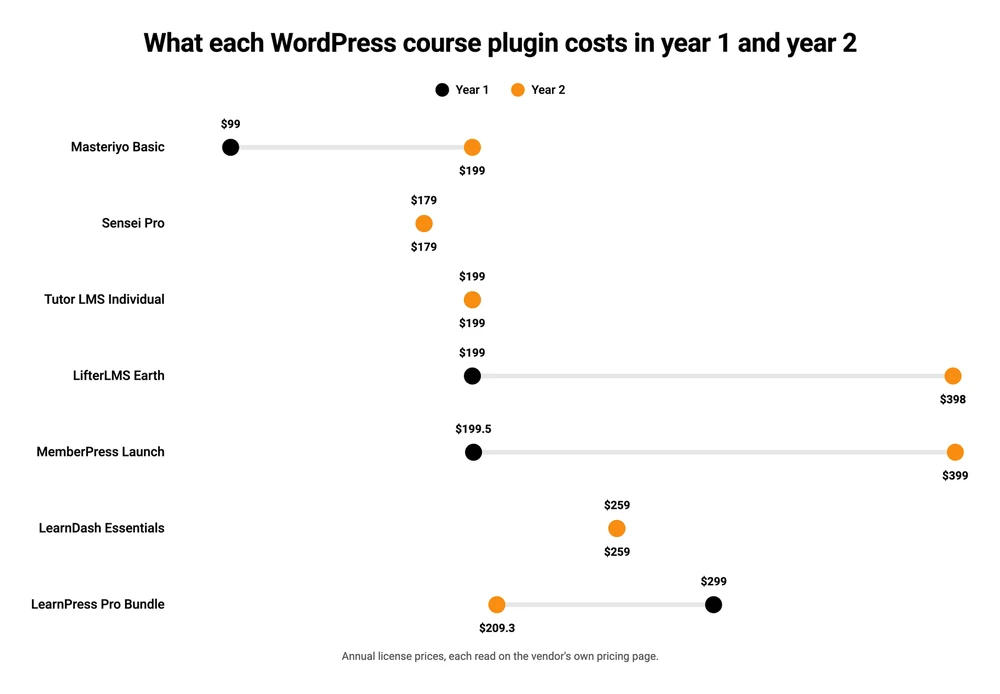
- 3 of the cheap-looking WordPress plugins double on renewal. LifterLMS goes $199 to $398, Masteriyo $99 to $199, MemberPress $199.50 to $399.
- Tutor LMS charges $199, $399 and $799 for 1, 10 and unlimited sites. That is the exact ladder LearnDash retired.
- Your courses are stored as LearnDash’s own post types. Switch the plugin off and the content stops being visible.
- LearnPress is the only genuinely free option with a lifetime license. Sensei’s free tier publishes courses but cannot sell them.
Before the tables, a quick aside. Picking the wrong plugin costs you a few hundred dollars. The leaks that actually sink a small course business sit somewhere else entirely, and the free 5-day Online Selling Mistakes Challenge walks through the 5 that cost solo sellers the most.
LearnDash alternatives, priced on what you pay in year 2
Every figure here was read on the vendor’s own pricing page. Where a page offered a monthly and a yearly rate, the yearly rate is the one quoted, and the annual totals come from the vendor’s own published number rather than a monthly figure multiplied by 12.
In year 2, Sensei Pro at $179, Tutor LMS and Masteriyo at $199 each, and LearnPress at $209.30 all cost less than LearnDash’s $259. LifterLMS at $398 and MemberPress at $399 cost more, and both of those start the first year cheaper than LearnDash does.
| Tool | Where it runs | Year 1 | Year 2 on | Cut per sale |
|---|---|---|---|---|
| LearnDash Essentials | WordPress | $259 | $259 | None |
| Sensei Pro | WordPress | $179 | $179 | None |
| Tutor LMS Individual | WordPress | $199 | $199 | None |
| LearnPress Pro Bundle | WordPress | $299 | $209.30 | None |
| LifterLMS Earth | WordPress | $199 | $398 | None |
| Masteriyo Basic | WordPress | $99 | $199 | None |
| MemberPress Launch | WordPress | $199.50 | $399 | 4.9% |
| Teachable Starter | Hosted | $348 | $348 | 7.5% |
| Thinkific Basic | Hosted | $475 | $475 | 5% on your own Stripe |
| CartMango Silver | Hosted | Free until October 2026 | $10 | None |
CartMango is my own platform, so read that last row knowing who wrote it. It is a checkout rather than a course platform: CartMango takes the money and delivers the file, and it does not host lessons, quizzes or a gradebook today. Course hosting is in development, targeting October 2026, and it is on the $30 a year plan rather than the $10 one. On this table CartMango belongs in the same conversation as the rest only if what you are selling is closer to a download than a curriculum, which is the case more often than the LMS industry likes to admit.
The $199 nobody charges any more
LearnDash has not sold a $199 plan since the product was repackaged, and its own pricing page now shows 3 numbers: $259, $399 and $599.
The old ladder was priced by how many sites you installed on. 1 site was $199, 10 sites were $399, and unlimited sites were $799, with reporting and memberships bought separately on top. LearnDash’s current pricing page lists Essentials at $259 a year, Pro at $399 and Elite at $599, with memberships now included in all 3. We went through the whole change in our breakdown of LearnDash pricing.
2 of the 8 pages ranking for this term still use the old number, and both use it to make their own product look better by comparison.
Masteriyo’s guide states it twice: “LearnDash is a paid plugin, with an upfront cost of $199 per year. Add-ons are priced separately, often in the $49 to $99 range.” That page is dated April 2026, months after the repackage that folded the add-ons in. Its own comparison table repeats the figure as “starts around $199/year”.
Ruzuku’s roundup goes further and builds a cost argument on top of it. “WordPress maintenance is the real cost. The $199/year LearnDash license is just the entry fee. You also need WordPress hosting, an SSL certificate, a compatible theme, and essential add-ons (ProPanel for reporting at $49/year, Stripe integration, etc.).”
2 things in that sentence are out of date, not 1. ProPanel is not a $49 add-on any more, it is what you get when you move from Essentials to the $399 Pro plan. So the article understates the license by $60 and overstates the add-ons at the same time.
The other pages have the opposite problem. They never state a LearnDash price at all. LifterLMS’s page holds the number 1 organic slot for this search, and the only dollar figure anywhere on it is its own $1 trial. LearnPress publishes a guide titled “10+ Best Free and Paid LearnDash Alternatives and Competitors” that runs past 1,800 words with no dollar sign on it anywhere.
The same guides price the replacement at its coupon
The alternatives these guides recommend are quoted at an introductory rate that ends after 12 months.
Ruzuku does both sides in the same article. It prices LearnDash at the retired $199, then lists LifterLMS’s all-access bundle at “$299/yr”. LifterLMS’s own pricing page carries a banner reading “Introductory Pricing: Save 50% on your first year of any new order”, and under that same $299 bundle it says “normally $598”. The small print is not hidden either: “All renewals are at full price.”
Masteriyo does the same thing to itself. Its Basic plan shows $99 a year with “Normally $199/year” printed directly above it, and the footnote reads “Special introductory pricing on annual plans. All annual renewals at full price.”
MemberPress runs the identical structure, $199.50 in year 1 and $399 after, which we covered in the MemberPress alternatives roundup.
So test the pattern rather than assuming it. Of the 7 licensed products here, 3 double at renewal, 1 gets cheaper, and 3 are flat. LearnDash is one of the flat ones. Its terms do reserve the right to raise the price at renewal, which is normal for annual software, but there is no first-year discount to fall off.
Read the numbers on a 2-year basis and the ranking changes. LifterLMS costs $597 across 2 years against LearnDash’s $518. The plugin sold as the cheaper option is $79 more expensive by month 24.
Which of these do people actually run
Tutor LMS has 100,000 or more active installations, LearnPress 70,000, LifterLMS and Sensei 10,000 each, and Masteriyo 5,000. Those counts come from the WordPress plugin directory, which reports them for every free plugin.
| Plugin | Author | Active installations | Ratings |
|---|---|---|---|
| Tutor LMS | Themeum | 100,000+ | 587 |
| LearnPress | ThimPress | 70,000+ | 597 |
| LifterLMS | LifterLMS | 10,000+ | 391 |
| Sensei LMS | Automattic | 10,000+ | 40 |
| MasterStudy LMS | Stylemix | 10,000+ | 485 |
| Masteriyo | masteriyo | 5,000+ | 179 |
Compare that with how the same tools are ranked on Google. The AI summary at the top of this search names Masteriyo first among the WordPress options, and Masteriyo has the smallest install base of the 5. Tutor LMS, running on 20 times as many sites, comes second. LifterLMS holds the top organic result with 10,000.
There is no conspiracy in that. Masteriyo publishes the page Google cites, and so does LifterLMS, and so does LearnPress. 5 of the 8 results are a vendor recommending its own product, which is a fair thing for a company to do and a poor basis for a shortlist.
MasterStudy is the one plugin in that table this post does not price, because it never came up in the guides ranking for this term. LearnDash does not appear in the directory at all, because it is sold only as a paid license. Its own page claims 100,000 active WordPress installs, which would put it level with Tutor LMS.
Staying on WordPress: what you keep
Swapping the plugin and keeping WordPress is the cheaper move, and it is cheaper in a way the price tags do not show.
Your payment account stays yours. LearnDash’s Stripe documentation has you paste your own live keys into the WordPress settings, so the customers, the card details and the recurring charges all sit in a Stripe account you own. Every WordPress plugin here works the same way. Move between them and your subscribers keep paying without noticing.
Tutor LMS at $199 a year is the closest like-for-like swap, with a free core that never expires. Its ladder is $199, $399 and $799 for 1, 10 and unlimited sites, which is the exact ladder LearnDash retired. A lifetime license runs $499 for 1 site, so it pays for itself against LearnDash inside 2 years.
LearnPress is the strongest free option and the odd one out on renewals. The free tier is a lifetime license for 1 site with 8 add-ons included. The Pro Bundle is $299 and renews at $209.30, which buys another 12 months of updates rather than the license itself.
Sensei LMS is built by Automattic, the company behind WordPress.com. Sensei Pro is $179 a year, the cheapest paid plugin on this page. Read its free tier carefully though: “Sell courses” is listed as a Pro feature, so the free version publishes free courses and cannot take money.
LifterLMS has the most complete free core, with unlimited courses, memberships and students. The paid Earth bundle is where the ecommerce add-ons live, at $199 for the first year and $398 after.
Masteriyo is the newest of the 5 and the smallest by installs. Its $99 Basic tier includes AI course creation and native Stripe and PayPal checkout, and renews at $199.
MemberPress is a membership plugin with courses attached rather than an LMS with membership bolted on. Launch is $199.50, renews at $399, and takes 4.9% of every payment, which no other plugin here does. Full numbers are in our MemberPress pricing breakdown.
Leaving WordPress: what you hand over
Moving to a hosted platform removes the server work and adds a percentage.
Teachable Starter is $348 a year and keeps 7.5% of every sale. Thinkific Basic is $475 and keeps 5% if you connect your own Stripe, dropping to nothing if you use Thinkific’s own processor. Both bundle the hosting, the updates and the security patches into that price, which is the actual thing you are buying.
The 7.5% is easy to underrate. On $10,000 of course sales it is $750 a year, on top of the $348. Our comparison of what each course platform takes runs the crossover points for 7 of them.
There is a limit on Teachable’s entry plan that matters more than the fee if you already have students. Starter allows 100 active students and 5 imported students. If you are moving a LearnDash site with an existing enrolment list, 5 is not a rounding error, it is a wall. Builder at $828 raises it to 50 imported, and Growth at $1,668 to 1,000.
Kajabi, LearnWorlds and Podia are the other 3 names that come up on this search. We priced all of them against each other in the best course platform comparison, and covered the swaps in more depth in the Thinkific alternatives and Teachable alternatives roundups.
What happens to your courses when you remove LearnDash
Your LearnDash lessons stop being visible the moment the plugin is deactivated.
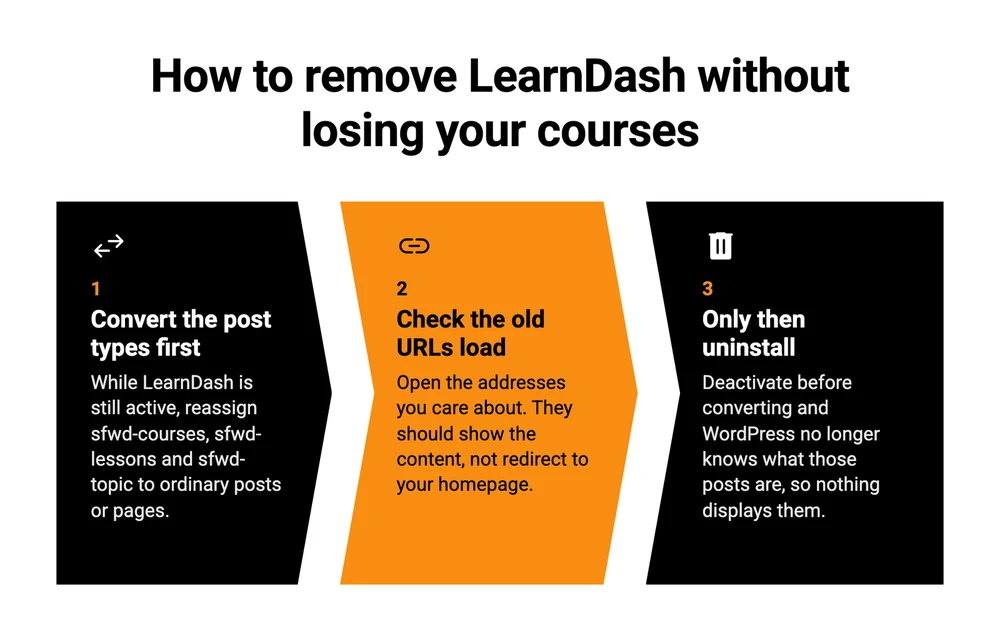
LearnDash does not store courses as ordinary WordPress pages. It registers its own content types, and its developer documentation names all 4 of them in a single line: “Remember each of the LD post types (sfwd-courses, sfwd-lessons, sfwd-topic and sfwd-quiz) can each be associated with the WP Category and Post Tag taxonomies.”
A content type belongs to whatever registered it. Turn LearnDash off and WordPress no longer knows what an sfwd-courses post is, so the rows sit in your database with nothing able to display them. I did not find it mentioned in any of the guides ranking for this term.
A WordPress user hit exactly this and posted about it. Writing in r/Wordpress, they explained: “I de-activated the Learndash plug in but then I couldn’t find any of the content and if I went directly to a url of a topic it redirected to my homepage.” They wanted to keep the same URLs and had roughly 100 pages of it. Copying each one by hand and adding a redirect was, in their words, fine for a few posts.
The reply that solved it applies to every move like this: convert the content types first with a plugin like Post Type Switcher, confirm the URLs still resolve, and only then uninstall.
A few years back I moved my Google Workspace account to a new one and spent half a day on it.
I paid for a migration tool rather than dragging folders by hand. The tool still could not copy forms, still choked when a folder held too many files, and quietly turned every Doc and Sheet into a .docx and .xlsx on the way over. So after copying I had to go back and check what had actually arrived. My rule since then: I would rather pay money, because money can be gotten back and time cannot.
Applied here, that means budget for a checking pass rather than a copying pass. Themeum publishes a free Tutor LMS Migration Tool with 1,000 or more active installations, and it names the job outright: “Already on LearnDash, LearnPress, or LifterLMS? This tool handles the full migration pipeline for all three.” Going to a hosted platform is the harder direction, because there is no shared database and the student records have to be rebuilt on the other side.
Is there a genuinely free LearnDash alternative
Yes, and LearnPress is the closest thing to one. Its free tier is a lifetime license for a single site with 8 add-ons, and it never renews.
LearnDash has no free version at any level, which is why it is absent from the WordPress plugin directory. Tutor LMS, Masteriyo, LearnPress, LifterLMS and Sensei are all in there and all install at no cost.
The free tiers still leave 3 costs in place. Taking payment is the first: Sensei’s free tier cannot sell a course, and LifterLMS keeps its ecommerce add-ons on the paid bundle. Hosting is the second, because no WordPress plugin removes the server bill, and a course site is heavier than a blog since a logged-in student bypasses the page cache. Support is the third, and on a free plugin it means a public forum.
For a first course, starting free is the sensible order of operations. Build it, find out whether anyone buys, and let the paid license be a decision rather than a guess.
What people who switched actually say
LearnDash users on Reddit complain about 2 things: how it looks before you style it, and what it does not do natively.
The person who asked had already bought both licenses. Posting in r/Wordpress after what they described as more than 4 months of research, they wrote: “I bought both TutorLMS and LearnDash licences to test and both have huge drawback.” Their finding was that Tutor LMS could not do the one thing they needed, because “once a user buys a ‘Bundle’, you cannot update/add courses to that bundle.” LearnDash handles that through Groups, but they found it “doesn’t have Zoom integration, filters, categories, adding courses to favourites.”
The interface comes up more than the price does. In another r/Wordpress thread, the person asking said LearnDash “was quite good but dont convince me since the UX/UI (gutenberg) is not the best and it dont implement Zoom natively.”
A reply in that thread is worth quoting and then correcting, because it is the most upvoted objection to LearnDash you will see repeated: “learndash is crap. it doesnt even have a default front end design, you need woocommerce for payment (they literally recommend it on their official documentation)… if we need woocommerce anyway, then WHY do we need learndash the first place?”
The payment half of that is out of date. LearnDash sells courses through Stripe and PayPal natively, on the entry plan, and its own Stripe documentation walks you through pasting your keys into the LearnDash settings screen with no WooCommerce anywhere in the process. The front-end design complaint stands. The WooCommerce one does not, and it is a good example of how long a fixed complaint keeps circulating.
FAQ
What are the top 5 LMS systems?
By installed base on WordPress, the top 5 are Tutor LMS at 100,000 or more sites, LearnPress at 70,000, and LifterLMS, Sensei and MasterStudy at 10,000 each. LearnDash is not counted there because it is not in the free directory, though it claims 100,000 installs of its own. Off WordPress, the names that dominate are Thinkific, Teachable, Kajabi and LearnWorlds.
Is there a free version of LearnDash?
No. LearnDash is sold only as a paid annual license, starting at $259 a year for Essentials, and it does not appear in the WordPress plugin directory. Every other major WordPress LMS on this page has a free version you can install and test first. There is a 30-day refund window rather than a free tier.
What is the easiest LMS to use?
For a first course on WordPress, Tutor LMS and Masteriyo are the 2 most often described as the simplest, both built around a front-end course builder. Off WordPress, Teachable and Thinkific remove the setup entirely, since there is no server, theme or plugin conflict to manage. Easiest and cheapest are rarely the same answer.
What is the best free LMS?
LearnPress, on the strength of its free tier being a lifetime license for 1 site with 8 add-ons included rather than a trial. Tutor LMS and LifterLMS have free cores that are more generous on features, though LifterLMS keeps payments behind the paid bundle. Whichever you pick, hosting remains a separate bill.
If your course is 4 videos and a workbook
An LMS earns its price when you need progress tracking, quizzes, drip content and a gradebook. My guess is that plenty of people paying $259 a year for that use a fraction of it.
If what you actually sell is a set of videos and a PDF, the job is taking the money and delivering the files, and the course-platform machinery is overhead you are maintaining for no one. CartMango does that half. The $10 a year plan covers checkout, order bumps, protected file delivery and subscription selling, with the buyer synced into your email tool afterwards. Upsells and downsells sit on the $20 plan. CartMango is free until October 2026, takes no cut of your sales, includes free migration, and if you ever leave, every subscription you set up keeps running and keeps paying you.
To be straight about the limits, since this is a page about LearnDash alternatives and CartMango is not one today. CartMango does not host lessons, it does not track who finished what, and it has no quizzes. Course hosting and community are in development, targeting October 2026, and they will land on the $30 a year plan. Until then, if you need a real LMS, pick one of the LearnDash alternatives in the tables above and ignore this section.
About the Author

👋 I’m Welly, founder of CartMango (the site you’re on), a checkout platform for digital product sellers. We’ve previously processed $179M+. I also run BirdSend (email marketing tool, 3.1B+ emails sent). On the side I show other non-techie digital sellers how I use AI workflows to automate 50%+ of my operations. Find me on LinkedIn.
Related Reading
- LearnDash Pricing: the $259 entry price and what the license leaves off your bill
- MemberPress Alternatives: 8 membership plugins priced on the year 2 renewal
- LMS for Online Courses: what 7 course platforms take per sale, and the crossover on every entry plan
- The Best Course Platform: 6 priced live, and the 0% that needs the platform’s own processor
- How Much It Costs to Create an Online Course: the bill on top of the software