

The best course platform is Teachable for a first paid course at $29 a month, Thinkific for unlimited courses on the entry plan, Podia for a big catalogue, LearnWorlds for high-ticket programmes and Kajabi for marketing on 1 bill. The cut each takes per sale is what separates them. Every price here was read at the source.
The sticker price on a course platform is the part you can plan for. The cut it takes out of every sale is the part that decides whether the cheap plan is actually cheap, and every entry plan below keeps a slice of each sale.
That slice is hard to find on purpose. Thinkific keeps it off its pricing page entirely, and Kajabi puts it a few screens below a headline that says the opposite.
Email Vendor Selection, the roundup ranking first for this search, states flatly that one of them charges nothing, which is not what that platform’s own help centre says.
Below are the current prices, all on the same billing basis, what each platform keeps per sale, and the cost that only turns up when you try to leave.
Key Takeaways
- Every entry plan takes a cut. Teachable Starter keeps 7.5%, Podia Mover 5%, Thinkific Basic 5% and LearnWorlds Starter $5 a sale.
- Every 0% has a condition. On Thinkific and Kajabi you switch to the platform’s own card processor. On Teachable and Podia you buy a higher tier.
- Udemy keeps 63% of any sale its marketplace drives. Bring your own buyer and you keep 97%.
- Email Vendor Selection, the page ranking first for this search, says Thinkific charges no transaction fee. Thinkific’s help centre publishes 5% on its cheapest paid plan.
- The cost nobody quotes is the cost of leaving. Teachable sellers reported bills going from $119 to $309 a month with 30 days notice.
“Best course platform” is 2 questions wearing 1 phrase
The phrase best course platform returns 2 different worlds on 1 page.
The top 10 results include Coursera, edX and Udemy, which are places to go and take a course. They also include Teachable and a roundup of tools for building one. Google’s own AI summary picks a side and answers only the second version.
If you want to take a course, the short answer is Coursera and edX for university-backed certificates, Udemy for cheap one-off skills, and Khan Academy if free is the main thing. That is a different article and you can stop reading here.
The rest of this is for the other half. You have something to teach, and you want to know where to put it and what that will cost you.
Before the numbers: the mistakes that cost course sellers most happen before a platform is picked. The free 5-day Online Selling Mistakes Challenge walks through the 5 that come up most often.
What each course platform costs, and what it keeps
Teachable is the cheapest way in at $29 a month billed yearly and keeps the biggest slice of every sale at 7.5%, while Kajabi is the most expensive at $143 a month billed yearly and keeps nothing on its entry plan if you use Kajabi’s own processor.
| Platform | Cheapest paid plan | Its cut per sale | Plan with no cut |
|---|---|---|---|
| Teachable | $29/mo billed yearly | 7.5% | Builder, $69/mo |
| LearnWorlds | $24/mo billed yearly | $5 per paid enrolment | Pro Trainer, $79/mo |
| Thinkific | $40/mo billed yearly | 5% on your own Stripe or PayPal | same plan, on Thinkific Payments |
| Podia | $42/mo billed yearly | 5% | Shaker, $84/mo |
| Kajabi | $143/mo billed yearly | 2% on an outside processor | same plan, on Kajabi Payments |
| Udemy | free to host | 63% on a marketplace sale | no paid plan exists |
Every price is the per-month rate when you pay for a year up front, because that is the number each platform puts on its own pricing card. Pay monthly instead and Teachable Starter is $39, Thinkific Basic is $54, Podia Mover is $49 and Kajabi Basic is $179.
Card processing sits on top of all of this. Stripe’s standard rate is 2.9% plus 30 cents, and none of the cuts above include it.
2 of the caps matter more than the headline price. Teachable Starter gives you 5 products and 100 active students. Podia Mover gives you 50 products but only 100 email subscribers, which is a strange thing to run out of first.
Every 0% on this page has a condition attached
The condition behind a 0% transaction fee is either the platform’s own card processor or a higher tier, and which one it is changes what the 0% costs you.
Read the marketing on any of these platforms and you will find a promise of no transaction fees. Read the help centre and you find the same sentence with an extra clause on the end.
Thinkific publishes nothing about a transaction fee on its pricing page. Its cheapest plan is $40 a month billed yearly. That is a rounded figure: the real annual price is $475, which Thinkific gets to by taking $173 off 12 months at its $54 monthly rate. Connect the Stripe account you already have and Thinkific takes another 5% of every sale.
That rate drops to 2% on the $82 plan and 1% on the $164 plan, and it applies to your first $1M of sales each calendar year.
Switch to Thinkific Payments and it goes to zero on the plan you are already paying for, which makes Thinkific the cheapest 0% on this page if you are willing to move processors.
The fee is not on the pricing page. It sits in a support article, and the pricing page’s own FAQ points at it in a sentence most people will never open: when you use third-party processors like Stripe or Paypal on Thinkific, an additional third-party payment gateway fee applies and it varies per plan type.
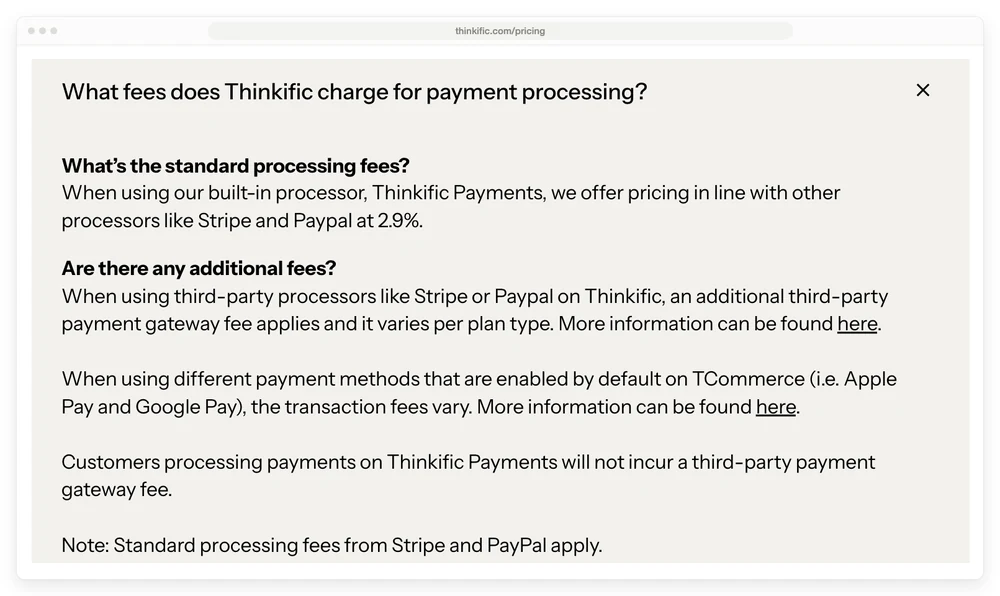
Google’s AI summary for this exact phrase tells you Thinkific offers “zero transaction fees on paid plans”. Email Vendor Selection says “there are zero transaction fees” and quotes Thinkific at $99 a month with a free plan.
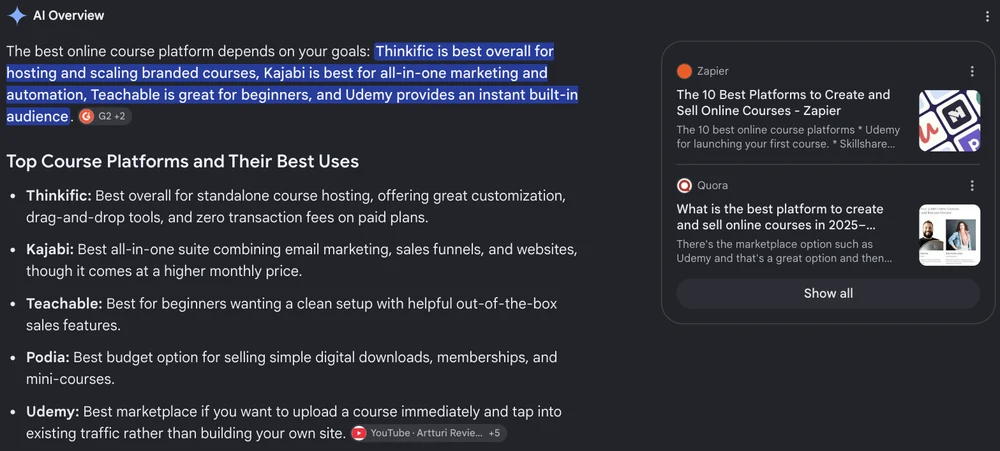
Both are wrong for anyone using their own Stripe or PayPal, and Email Vendor Selection’s prices are wrong too. Thinkific’s live tiers are $54, $109 and $219 a month, and the free plan the page mentions left the pricing page in May 2024.
iSpring, the other roundup on page 1, quotes $36, $74 and $149, which is under the real price on all 3 tiers.
Kajabi puts “No hidden fees. No revenue sharing.” at the top of its pricing page. Scroll to the bottom of that same page and a row headed “3rd Party Payment Provider Fees” charges 2% on Basic, 1% on Growth and 0.5% on Pro.
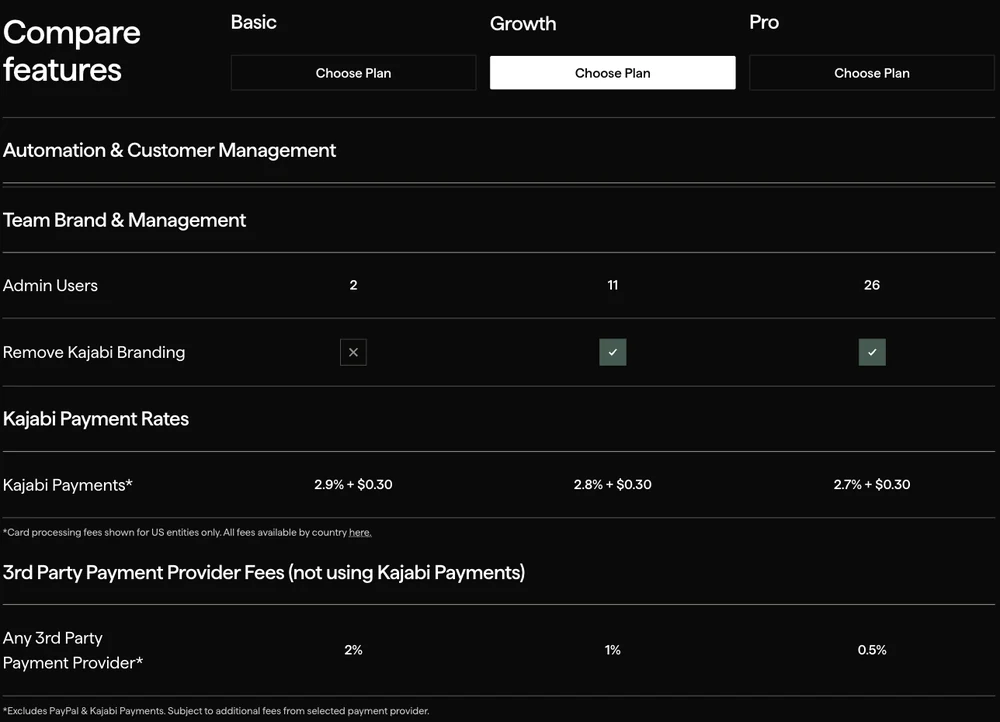
A seller who reads the headline and plugs in the Stripe account they already have finds the difference in their payouts. The Kajabi pricing deep-dive has the rest of the surcharge schedule.
Teachable is upfront that Starter carries 7.5%. The 0% on the plans above it carries a condition of its own, spelled out in its pricing FAQ: there are 0% transaction fees on the Builder, Growth and Custom plans for those using teachable:pay or Monthly Payment Gateway. No processor gets Starter to 0%, so the only route out is the $69 plan.
Our Teachable pricing breakdown covers the tier that does not appear on the pricing page at all.
Podia is the plainest of the group. Mover at $42 a month takes 5%, Shaker at $84 takes nothing, and Podia says so on the card. There is no processor switch here, just a tier.
So on Teachable and Podia the question becomes at what point the cut costs more than the upgrade that removes it. We ran that arithmetic for 7 platforms in the LMS fee comparison: Teachable’s cheap plan stops paying for itself at $6,400 a year in sales, Podia’s at $10,080 and Thinkific’s at $16,800. That last figure is the Basic to Start tier upgrade, so it only matters if you want to stay on your own Stripe.
LearnWorlds charges $5 a sale, which is a very different number at $29 than at $500
LearnWorlds works differently from the rest because its entry fee is flat rather than a percentage.
Starter costs $24 a month billed yearly and takes $5 for every paid enrolment. On a $29 mini-course that is 17% of the sale.
On a $100 course it is 5%. On a $500 cohort programme it is 1%.
So the same fee is the worst on this page or the best on it, depending only on what you charge. Sellers with cheap, high-volume products should look hardest at this one, and sellers with a single expensive programme can mostly ignore it. The LearnWorlds pricing breakdown has the learner caps that bite before the fee does.
Udemy hands you an audience and keeps 63% of the sale
Udemy costs nothing to host on and takes 63% of any sale its own marketplace brings you, which is the price of the built-in audience Google’s AI summary describes.
From Udemy’s own instructor revenue share page: instructors receive 97% of the revenue when the student buys through the instructor’s own coupon or referral link, and 37% when no coupon or referral link was used. So a sale that Udemy’s marketplace or its ads brought you leaves you $37 of every $100, and Udemy keeps $63.
There is a second layer under that. Those percentages apply to the Net Amount, which Udemy defines as what the student paid less any applicable taxes or fees, including the 30% fee Apple or Google charge on iOS and Android sales. A $100 marketplace sale inside the iOS app is $70 before the split, so 37% of it is $25.90.
None of this is hidden. It is a straight trade.
Udemy does the marketing you would otherwise do yourself, and keeps 63% of the sales it finds for you. Bring your own buyer to a Udemy listing and you keep 97%, which is roughly what a 0% platform leaves you once its card processing comes off, so the 2 are closer than they look.
The catch is the one every marketplace has. You do not get the student list, so the second course is as hard to sell as the first.
The bill that arrives before your first sale
Every platform above charges you monthly whether you sell anything or not, and none of them brings you a single buyer.
A creator who has been selling courses on these platforms since 2010 put it plainly on Quora: they will not lift a finger to market your courses, and you pay them every month for the software even if you sell nothing. That is how they make their money, and there is nothing dishonest about it. It is just not what the pricing page emphasises.
I have been on the other side of that promise. Before I could afford courses I learned from free articles and YouTube videos, and when I finally had some money saved I bought a course that promised “how to go from 0 to 10k in a month, even if you’re a complete beginner”. My words at the time, looking back on it: I was too naive and dumb to fall for a scheme like this.
What I worked out later is that with no skills and no audience, $1,000 a month is out of reach, let alone $10,000. None of the pricing pages above says so, but the most capable platform on this page will not bring you a single buyer either.
Pick the plan that fits the sales you have, not the business you are picturing, and read how to sell online courses before you read another pricing page. If you have not built the thing yet, what it costs to create an online course is the more useful number.
What it costs to leave
The cost of switching platforms is the number no pricing page shows, and it only exists once you have built on one.
In May 2025, Teachable announced new plans and gave sellers 30 days before the change. The thread on r/elearning is a useful thing to read before you commit to anyone. A creator on a legacy plan described going from $119 a month to $309.
Another said theirs went from $179 to $399. A third had a 50-class plan cut to 25 while the price went up.
What kept most of them on Teachable was the migration itself. One had more than 30,000 students, plus funnels, automations and student records that would all have to be rebuilt somewhere else. That is the real lock, and it gets stronger every month you use the platform.
Thinkific did a quieter version of the same thing when it retired its free plan in May 2024 and replaced it with a trial.
So when you compare, add a column the pricing pages leave out. If this platform doubled its price next year, how much work is it to move? The answer is shorter if your videos live somewhere you control and your buyers land in your own email tool.
When you do not need a course platform at all
Plenty of things sold as courses are a set of videos and a PDF. No quizzes, no drip schedule, no completion certificates, nobody checking who finished lesson 4.
If that describes yours, a checkout will do the job, and the difference in what you keep is large enough to matter.
On a $100 sale, Teachable Starter costs $348 a year and takes $7.50, Gumroad costs nothing a year and takes $10.50, and CartMango costs nothing until October 2026 and takes $0.
| Route | Yearly cost | Its cut on a $100 sale | Hosts the lessons |
|---|---|---|---|
| Teachable Starter | $348 | $7.50 | Yes |
| Thinkific Basic, own Stripe | $475 | $5.00 | Yes |
| Gumroad | $0 | $10.50 | No |
| Payhip free plan | $0 | $5.00 | No |
| CartMango | $0 until October 2026, then from $10 | $0 | Not yet, planned for October 2026 |
I should be upfront that CartMango is mine. CartMango is a checkout, so it takes payments, delivers the files and drops the buyer into your email tool, and CartMango does not host lessons or track student progress today.
CartMango’s learning management system is in development and planned for October 2026, on the $30 a year plan.
If you need lessons, quizzes and progress tracking this month, pick Thinkific or Teachable and run the checkout wherever suits you.
Card processing is on top of every row in that table. Gumroad’s own help centre states its 10% plus 50 cents excludes card processing at 2.9% plus 30 cents, and Payhip says the same about its 5% fee.
How to pick
Work down this list and stop at the first line that describes you.
- You want to take a course, not build one. Coursera or edX for certificates, Udemy for cheap one-off skills.
- You have no audience and want traffic more than margin. Udemy. It costs nothing to host and 63% of what it sells for you.
- You are selling videos and a PDF, no lessons or quizzes. A checkout such as Gumroad, Payhip or CartMango, and check what cut each takes, because they range from 0% to over 10%.
- You need real lessons, quizzes and progress tracking, and you are early. Teachable Starter or LearnWorlds Starter, and watch the cut.
- You are selling more than $10,000 a year. Move up a tier, or move to the platform’s own processor. The cut on the entry plan now costs more than the upgrade.
- You want email, funnels, a website and courses on 1 bill. Kajabi, and budget $1,716 a year before you sell anything.
FAQ
What is the best platform to create a course?
For most solo creators starting out, Teachable Starter at $29 a month billed yearly or LearnWorlds Starter at $24 is the cheapest real way in, and both take a cut of each sale. Thinkific Basic at $40 removes the cut entirely if you use Thinkific Payments. Kajabi is the strongest all-in-one and costs the most.
Is there a course platform that is genuinely free?
Udemy is free to host on, and it takes 63% of any sale its marketplace brings you. Thinkific retired its free plan in May 2024.
Teachable, Podia and LearnWorlds run trials rather than free tiers. Payhip has a free forever plan at 5% a sale, though it is a checkout rather than a course platform.
Is there a better platform than Coursera?
For taking courses, edX offers similar university-backed certificates and Udemy is cheaper for one-off practical skills. For teaching, Coursera is not really a competitor, because it partners with universities rather than accepting individual creators the way Udemy does.
Who is Udemy’s biggest competitor?
On the learner side, Coursera and Skillshare. For an instructor, the real alternative is hosting the course yourself on Teachable, Thinkific or Podia, where you keep the student list. You still pay a monthly fee, and on all 3 of those entry plans you pay a cut of each sale as well, so it is a swap rather than an escape.
Which platforms give students a completion certificate?
Thinkific includes completion certificates from its $82 plan and Teachable from its $139 plan. LearnWorlds includes them on Pro Trainer at $79. If certificates matter to your buyers, check which tier carries them before you compare headline prices, because on 2 of these platforms it is a whole-tier upgrade.
What stays yours when the plan changes
Choosing the best course platform is partly a bet on a company that can raise your price, cut your limits or retire the plan you built on, and the r/elearning thread above is what that looks like from the inside.
2 things survive all of that. Your buyer list, and any recurring payments you have set up. Both of those sit with whatever tool takes the money.
CartMango is free until October 2026 and then starts at $10 a year, with no cut of your sales. If you ever leave CartMango, every subscription you created keeps running and keeps paying you.
For a course that needs no lessons or quizzes, taking the money is the whole job, and CartMango does it for less per year than the cheapest plan on this page costs in a single month.
About the Author

👋 I’m Welly, founder of CartMango (the site you’re on), a checkout platform for digital product sellers. We’ve previously processed $179M+. I also run BirdSend (email marketing tool, 3.1B+ emails sent). On the side I show other non-techie digital sellers how I use AI workflows to automate 50%+ of my operations. Find me on LinkedIn.
Related Reading
- LMS fee comparison for 7 course platforms: the deeper fee math behind picking the best course platform, including the sales figure at which each entry plan costs more than the upgrade above it
- Teachable pricing breakdown: all 4 plans, including the tier that is not on the pricing page
- Kajabi pricing deep-dive: the surcharge schedule and the tier Kajabi no longer draws
- How to sell online courses: for the part no platform does for you