

Ko-fi fits creators paid in tips and memberships, and Gumroad fits sellers who want sales tax handled. Ko-fi takes 5% of a shop sale or membership, and 0% of a one-off tip once you switch off its default Standard mode. Gumroad takes 10% plus $0.50 a sale and handles sales tax as merchant of record.
Every Gumroad vs Ko-fi figure adds the 2.9% + 30¢ card fee, which neither cut includes. On a $20 sale, Gumroad leaves $16.62 and Ko-fi $18.12. Ko-fi Gold ($12 a month) removes the 5%. For selling files to followers, CartMango (free right now, from $10 a year once paid plans start in November, 0% a sale plus Stripe’s card fee) leaves $19.12 before its plan.
You have people who like your work. Some want to tip you, some want to buy the file, and a few would pay every month.
Gumroad and Ko-fi both start free, then charge for each of those differently. A $5 tip, a $20 sale and a $10 member each cost a different amount, the card fee sits on top, and only Gumroad handles your sales tax.
So what does a $5 tip actually leave you? Below are the real fees on a $5, $20 and $50 sale, the 2 page-1 comparisons that get them wrong, then 5 situations with the pick, the cost and the catch.
Key Takeaways
- Ko-fi takes less per sale. Ko-fi takes 5% of shop sales and memberships, while Gumroad takes 10% plus $0.50 on every direct sale.
- Tips cost 0% only after a switch. New Ko-fi pages start in Standard mode, which takes 5% of every one-off tip until you turn it off.
- Card fees sit on top of both. Gumroad’s help page says its 10% + $0.50 leaves out card processing of 2.9% + $0.30.
- Gumroad does your sales tax. Gumroad has been the merchant of record since January 2025, while Ko-fi leaves tax and VAT to you.
- CartMango takes 0% a sale. CartMango, the checkout I run, sells files and memberships, free now and from $10 a year once paid plans start.
What Gumroad and Ko-fi each take from a $5, $20 and $50 sale
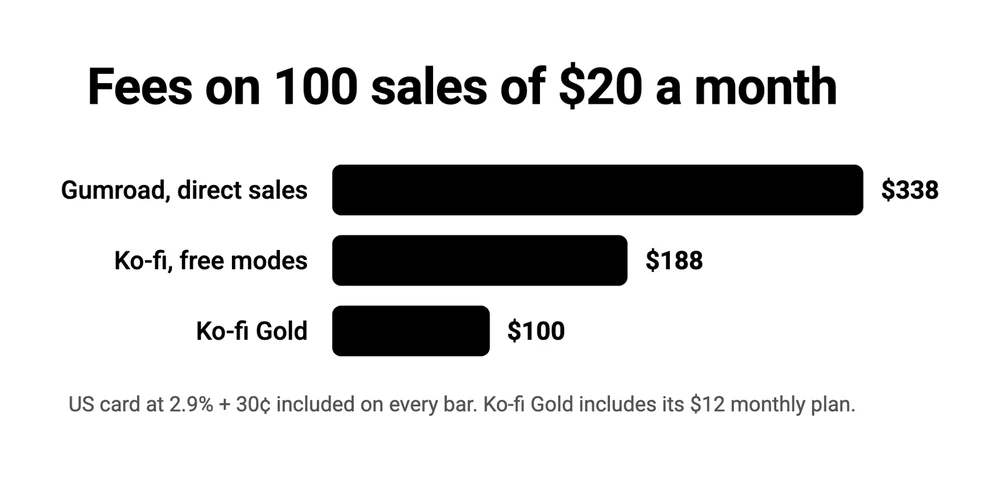
Gumroad takes $3.38 of a $20 card sale and Ko-fi takes $1.88, once the 2.9% + 30¢ card fee is added to each platform’s own cut.
Setting up your first paid page on either one? The Online Selling Mistakes Challenge is a free email course on the 5 mistakes solo creators make most once they start charging, with a fix for each.
On a US card sale, Gumroad’s direct fee runs from 29% of a $5 sale to 14.5% of a $50 sale, Ko-fi’s shop fee from 14% to 8.5%, and Ko-fi Gold and CartMango from 9% to 3.5%.
| Setup | Plan cost | Keep on $5 | Keep on $20 | Keep on $50 |
|---|---|---|---|---|
| Gumroad, direct sale | $0 | $3.55 | $16.62 | $42.75 |
| Gumroad, Discover sale | $0 | $3.50 | $14.00 | $35.00 |
| Ko-fi shop sale or membership | $0 | $4.30 | $18.12 | $45.75 |
| Ko-fi tip, Standard mode (the default) | $0 | $4.30 | $18.12 | $45.75 |
| Ko-fi tip, Free mode | $0 | $4.55 | $19.12 | $48.25 |
| Ko-fi Gold, any payment | $12 a month | $4.55 | $19.12 | $48.25 |
| CartMango | Free now, then about $0.83 to $2.50 a month, billed yearly | $4.55 | $19.12 | $48.25 |
I run CartMango, so weigh its row with that in mind. CartMango bills yearly only, at $10 to $30 a year, so its plan is shown per month, and Ko-fi Gold bills monthly only. CartMango’s 0% only pays for its $10 plan once yearly sales pass $200, since $10 is 5% of $200.
Both platforms pass the card fee on to you. Gumroad’s fee article says its 10% + $0.50 “does not include” credit card processing at 2.9% + $0.30, or PayPal’s fees. Ko-fi sends each payment straight into your own PayPal or Stripe account, and Stripe’s pricing page lists 2.9% + 30¢ for a domestic card, plus 1.5% for an international one. PayPal charges its own rates, which Ko-fi puts at “usually around 3% + $0.30”. The only row with processing built in is a Gumroad Discover sale, at a flat 30%.
2 comparisons on page 1 for this search get that card fee wrong. Pocketsflow’s guide says Gumroad’s “payment processing is bundled into that 10%” and never mentions the $0.50. Its worked example, 100 sales of $20 in a month, puts Gumroad at $200 and Ko-fi’s free plan at about $218, and concludes that Ko-fi’s free plan is not cheaper for shop sales. With the fees Gumroad publishes, those same 100 sales cost $338 on Gumroad, $188 on Ko-fi and $100 on Ko-fi Gold.
Powered Online errs the other way. Its fee table assumes a 0.9% + $0.30 card rate, leaves out Gumroad’s $0.50, and says “Ko-fi adds nothing on sales”, when Ko-fi’s own fee table lists 5% on shop sales in both of its modes. Our Gumroad pricing breakdown has more on how Gumroad’s fees stack.
Gumroad vs Ko-fi: a store against a support page
Gumroad is built as a store and Ko-fi as a support page. A Ko-fi page centers on a support button, a feed of posts, goals, memberships and commissions, with a shop alongside. On a Gumroad page people arrive to buy a product, and a tip is an optional extra at checkout.
4 other things differ:
- Tax. Gumroad collects and pays the sales tax and VAT it owes on your sales. Ko-fi leaves tax to you.
- Discovery. Gumroad runs a marketplace called Discover. Ko-fi has no creator search.
- Tips. Ko-fi charges 0% on one-off tips in Free mode. Gumroad takes its normal fee from a tip.
- Payouts. Ko-fi pays you the moment someone pays. Gumroad holds card sales first.
Ko-fi’s help center says funds are “transferred immediately and directly into your own account”, meaning your own Stripe or PayPal balance, with no payout schedule and no minimum. Moving that money on to your bank follows Stripe’s or PayPal’s own timing.
On Gumroad’s standard weekly, monthly or quarterly payouts, you need “a minimum balance of $100 USD to receive a payout”, and each sale waits at least 7 days. US sellers can take an instant payout of any settled amount from $1, for a 3% fee, after a first payout and 60 days of processing with Gumroad. PayPal sales go straight to a connected PayPal account. Powered Online puts Gumroad’s minimum “around $10”, and our Gumroad review found 46 of 68 recent seller reviews on Trustpilot describe a suspended account, a held payout or the $100 minimum.
If supporters pay you because they like your work
Ko-fi in Free mode is the pick when most of your money arrives as tips. A one-off tip costs nothing on Ko-fi beyond the card fee, so a $5 tip leaves you $4.55. If tips are most of what you earn, I’d start there and add a shop item later.
The catch is the default. Ko-fi’s fee article says new creators now start with every feature switched on, which means Standard mode, and Standard takes 5% of one-off tips and goals too. To get the 0%, go to Settings, then Payment, and turn “Get all of Ko-fi” off. On a $5 tip, that switch is the difference between $4.30 and $4.55, or $25 across 100 tips.
The AI Overview at the top of this search labels Ko-fi’s “0% on tips/donations” as the Free plan, but never says new pages start in Standard. Pocketsflow and Delivvo leave the setting out too.
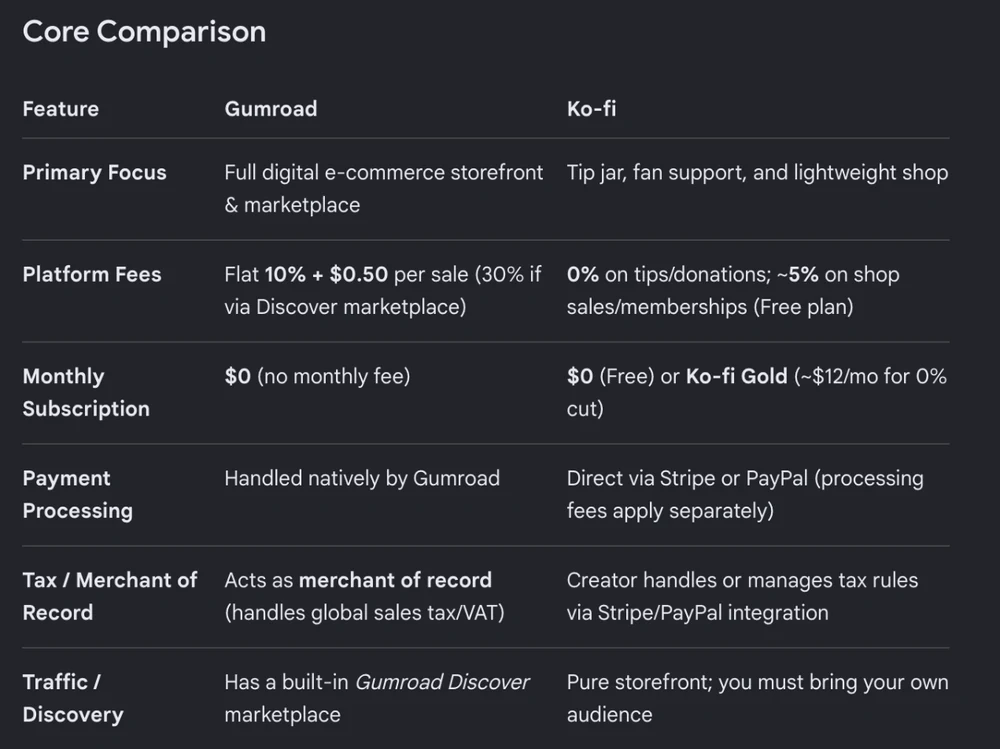
Free mode also switches off some features. Ko-fi’s fee table lists supporter-only posts, scheduled posts, custom page colours and extra Shop storage as Standard-only perks. Ko-fi Gold includes supporter-only content and scheduled posts without the 5%.
Gumroad has tips too, but only as an extra on top of a purchase. Its tipping article says tipping is on by default at checkout and that “You receive 100% of tips, minus standard Gumroad and Stripe/PayPal fees”. So a Gumroad tip pays the same 10% + $0.50 as the product it rides along with, and nobody can tip you without buying something.
A single artist’s experience shows how small tips can stay. In a 2019 Tapas forum thread, the artist, almost 5 years into webcomics, ranked their income as Patreon first, Gumroad pin sales second and Ko-fi third, and said of Ko-fi: “I don’t get too many one-time donations”. If your supporters also buy, give them something to buy. Ko-fi Shop items and membership tiers cost 5% in both modes.
Our Ko-fi fees breakdown lists every rate, and the Buy Me a Coffee alternatives guide prices the other tip pages.
If you want buyers who have never heard of you
Gumroad is the only one of the 2 with a marketplace that can put your product in front of strangers. Gumroad Discover recommends products to people browsing Gumroad, and it takes 30% of each sale it brings you, card processing included, so a $20 sale through Discover leaves you $14. You have to qualify first. Gumroad’s Discover article lists 3 account conditions: your payout settings filled in, a balance of at least $100 from genuine sales, and a pass through its risk review, which “can take on average 3 weeks” after you cross $100. Products listed there are also opted into Gumroad’s affiliate program automatically.
Ko-fi has nothing like it. Its help center says “It isn’t possible to search for creators directly on Ko-fi”, so every visitor comes from a link you shared. Gumroad does not publish how many sales Discover sends a typical seller, so treat it as a bonus rather than the plan. The same Tapas artist made that point in 2019: “I’m pretty sure most of the sales made on Gumroad are driven from other sites, like creators’ social media.”
If sales tax paperwork is the job you want gone
Gumroad is the pick if you never want to work out, collect or pay sales tax yourself. Its pricing page says Gumroad has been a merchant of record since January 1, 2025, and handles “sales tax collection and remittance worldwide”. You turn nothing on. Gumroad collects the tax at checkout and pays it.
Ko-fi leaves the tax to you. Its tax article says Ko-fi “is not the merchant of record on any transaction”, and that “It is the creator’s responsibility to calculate and remit the appropriate sales tax or VAT due on their sales.” Ko-fi gives you a setting to add a tax rate at checkout, and the filing is yours.
Do you sell to buyers in other countries? Whether you owe tax turns on where you live and where your buyers are, so check with a tax advisor. If you do owe VAT on sales into the EU, the EU’s own rate table shows standard rates from 17% in Luxembourg to 27% in Hungary, and each rate needs collecting and reporting. CartMango is the same as Ko-fi here: you stay the seller, so the tax stays yours.
Gumroad charges for that service in its fee. On a $20 shop sale it costs $1.50 more than Ko-fi, the gap between 10% + $0.50 and 5%. Big sellers get a discount: once your paid sales in a calendar month reach $20,000, new direct sales that month drop to 5% + $0.50.
If members pay you every month
Ko-fi costs less for monthly memberships than Gumroad, and Ko-fi Gold costs less again once memberships and shop sales pass $240 a month. On a $10 monthly member, Gumroad leaves you $7.91, Ko-fi’s free modes $8.91 and Ko-fi Gold $9.41. A catch for memberships: Free mode switches off supporter-only posts, so a members-only feed needs Standard or Gold.
Ko-fi Gold costs $12 a month for new creators, monthly only, and it removes the 5% from every payment type. Ko-fi’s Gold article says existing Gold members keep the price they already pay, and mentions creators “only paying $8”, which is likely why Pocketsflow lists Gold at “roughly $8” and Powered Online at “$8/month”. Anyone joining now pays $12. $12 is 5% of $240, so below $240 a month the 5% costs you less than Gold. 2 traps sit in Ko-fi’s fee article. If Standard mode is on when you subscribe to Gold, “you’ll need to opt out separately to remove the service fee”. And for members who joined through Stripe before your upgrade, “You’ll keep paying the 5% platform fee”.
Gumroad memberships work, at 10% + $0.50 a payment, and they stay tied to Gumroad: if you leave, those recurring payments end. Unlike Gumroad’s, CartMango subscriptions keep paying you if you ever leave CartMango. Our guide to selling subscriptions online prices a $10 member across more tools, and our Patreon vs Ko-fi comparison covers the main membership-only option.
If your followers already buy and you want no cut
CartMango, the checkout I run, takes 0% of each sale, so a $20 sale leaves you $19.12 after the card fee. CartMango fits sellers whose buyers already follow them and who mostly sell files or memberships.
CartMango is free right now, and once paid plans start in November it costs $10, $20 or $30 a year. CartMango’s $10 Silver plan covers 10 products and 2 GB of file storage, with one-time and subscription selling, coupons, pay-what-you-want pricing and order bumps. CartMango’s upsells and cart abandonment start on the $20 plan. CartMango has real gaps next to these 2. CartMango has no tip jar, no fan feed and no marketplace. If your fans mostly tip, Ko-fi fits better. If you need strangers to find you, or want tax handled, Gumroad does that.
Gumroad, Ko-fi or CartMango, matched to how you earn
Match the platform to how most of your money arrives: Ko-fi for tips and members, Gumroad for strangers and tax, CartMango for no-cut sales to people who already follow you.
For a $20 payment, the right pick costs anywhere from $0.88 (a Ko-fi tip in Free mode, or a CartMango sale) to $6.00 (a Gumroad Discover sale).
| How you earn | Pick | Cost on $20 | The catch |
|---|---|---|---|
| Mostly tips | Ko-fi, Free mode | $0.88 | No supporter-only posts, tax is yours |
| Strangers finding you | Gumroad Discover | $6.00 | $100 in sales and a review first |
| No sales tax to handle | Gumroad, direct sale | $3.38 | $100 payout minimum, 7-day hold |
| Monthly members | Ko-fi, Gold above $240 a month | $1.88, or $0.88 plus $12 a month on Gold | 5% stays on older Stripe members |
| Sales to followers, no cut | CartMango | $0.88, plus $10 to $30 a year | No tip jar, tax stays yours |
Nothing stops you running 2 of these, such as Ko-fi for tips and a checkout for your files.
FAQ
Why are people leaving Gumroad?
Seller complaints mostly concern payouts and suspended accounts. When we sorted 118 recent Trustpilot reviews for our Gumroad review, 46 of the 68 written by sellers described a suspended account, a held payout or the $100 payout minimum. Fees push sellers away too: 10% + $0.50 plus card processing takes 29% of a $5 sale.
What’s better than Gumroad?
For tips, Ko-fi, at 0% in Free mode. For selling files, Payhip’s free plan takes 5% a sale, and our Payhip vs Ko-fi comparison covers its tax handling. CartMango takes 0% a sale, free right now and from $10 a year once paid plans start. Our Gumroad alternatives guide compares more options.
Do people actually make money on Gumroad?
Some sellers do, but Gumroad publishes no figure for a typical seller. The 2019 Tapas artist above ranked Gumroad pin sales second, behind Patreon. On the cost side, 100 sales of a $20 product leave you $1,662 after Gumroad’s fee and card processing, paid out once your balance passes the $100 minimum on standard payouts.
Is Gumroad worth it in 2026?
Gumroad is worth it if you want sales tax handled worldwide and a store running in minutes, and you accept a higher fee for that. It is a poor fit for cheap products: a $5 sale leaves you $3.55, against $4.30 on Ko-fi. Above $20,000 a month in sales, Gumroad’s direct fee drops to 5% + $0.50.
Does Ko-fi take a fee on tips?
One-off tips cost 5% only in Standard mode, and every new Ko-fi page starts in it. Free mode takes 0% on one-off tips and goals, while monthly tips, memberships, commissions and shop sales cost 5% in both modes. Turn Standard off under Settings, then Payment.
Can I use Gumroad and Ko-fi together?
Yes. You can keep a Ko-fi page for tips and memberships and sell files from Gumroad, linking each from the other. You then pay 5% on Ko-fi sales, 10% + $0.50 on Gumroad sales, run 2 dashboards, and only the Gumroad side has its sales tax handled for you.
Paying 0% on sales to fans who already follow you
If your money is mostly tips, Ko-fi in Free mode is the cheaper home. If sales tax is the job you want gone, Gumroad earns its 10% + $0.50. Most of the Gumroad vs Ko-fi question is about which of those 2 problems you need solved.
If you mainly sell files or memberships to people who already follow you, CartMango takes 0% of each sale, with only the card fee on top. CartMango is free right now, then from $10 a year once paid plans start in November.
About the Author

👋 I’m Welly, founder of CartMango (the site you’re on), a checkout platform for digital product sellers. We’ve previously processed $179M+. I also run BirdSend (email marketing tool, 3.1B+ emails sent). On the side I show other non-techie digital sellers how I use AI workflows to automate 50%+ of my operations. Find me on LinkedIn.
Related Reading
- Ko-fi fees in 2026: every Ko-fi rate, the Standard toggle and the $240 Gold break-even
- Gumroad vs Patreon: what Gumroad’s extra $0.50 does to a small sale
- Payhip vs Ko-fi: the same 5% on both free plans, and who handles the tax
- Gumroad review: payouts, holds and what sellers report on Trustpilot