

Ko-fi is built for tips and fan memberships, and Payhip is built for selling files and courses. Both take 5% of a shop sale on their free plans, so the choice turns on what else you need. Payhip collects and pays digital VAT and sales tax for you, and Ko-fi does not.
Payhip vs Ko-fi prices, from each tool’s pricing page: Ko-fi Gold removes its 5% for $12 a month, worth it above $240 a month in sales. Payhip charges $29 a month for a 2% fee, or $99 for 0%. CartMango (free right now, from $10 a year once paid plans start in November, 0% a sale) is a third route for files and memberships.
You make things people like, and now you need a single place to take their money. Ko-fi and Payhip both let you start free, and both pay you straight into PayPal or Stripe.
The differences show up later: a 5% cut on tips you never chose, a tax bill you file yourself, or a paid plan that costs more than it saves. Some guides on this search also quote Ko-fi prices that have since changed.
Below are all 7 ways to take money on Payhip, Ko-fi and a third checkout. Each cut has a number behind it, and 3 setups are left at the end, each matched to the way you earn.
Key Takeaways
- Same 5% on the free plans. Ko-fi takes 5% of shop sales, memberships and commissions, and Payhip’s free plan takes 5% of every sale.
- Tips are where Ko-fi wins. One-off tips cost 0% once you switch off Ko-fi’s Standard mode, which every new account starts with.
- Ko-fi Gold costs $12 a month. Some guides still say $6. Gold removes the 5% and only beats the free plan above $240 a month.
- Payhip does the tax for you. On every plan it collects and pays digital VAT and sales tax in the EU, UK, US and Canada. Ko-fi leaves that to you.
- CartMango takes 0% a sale. CartMango, the checkout I run, sells files and memberships, free right now and from $10 a year once paid plans start.
Start here: 7 setups across Ko-fi, Payhip and CartMango
Payhip, Ko-fi and CartMango give you 7 ways to take money between them: 3 on Ko-fi, 3 on Payhip and 1 on CartMango. Each row below is a setup you could switch on today, priced from each tool’s own pricing page.
Still deciding what to put in your shop before you choose where? The Online Selling Mistakes Challenge is a free 5-day email course on the mistakes solo creators make most, and how to fix each one.
On their free setups, Ko-fi and Payhip both take 5% of a shop sale, Ko-fi Gold and Payhip Pro take 0% for $12 and $99 a month, only Ko-fi has a tip jar, and only Payhip collects your sales tax.
| Setup | Monthly cost | Shop sale | One-off tip | Sales tax |
|---|---|---|---|---|
| Ko-fi Free mode | $0 | 5% | 0% | You handle it |
| Ko-fi Standard (the default) | $0 | 5% | 5% | You handle it |
| Ko-fi Gold | $12 | 0% | 0% if Standard is off | You handle it |
| Payhip Free Forever | $0 | 5% | No tip jar | Payhip handles digital sales |
| Payhip Plus | $29 | 2% | No tip jar | Payhip handles digital sales |
| Payhip Pro | $99 | 0% | No tip jar | Payhip handles digital sales |
| CartMango | Free now, then about $0.83 to $2.50, billed yearly | 0% | No tip jar | You handle it |
I run CartMango, so weigh its row with that in mind. CartMango bills yearly only, while Payhip and Ko-fi Gold bill monthly only, so CartMango’s $10 to $30 a year is shown as a monthly figure.
Card fees sit on top of every row. Stripe charges 2.9% + 30¢ on a US card, per Stripe’s pricing page, and PayPal Checkout charges 3.49% plus a fixed fee, per PayPal’s US fee table. Ko-fi and Payhip both send each payment straight into your own PayPal or Stripe account, so you pay those fees directly.
Getly writes that Ko-fi “takes 0% commission on all plans”, and Powered Online’s fee table puts Ko-fi’s free plan at 0% on sales. Ko-fi’s own fee table says 5%, so on a $10 sale both free plans leave you $8.91 after Stripe’s card fee, not the $9.41 Getly works out for Ko-fi.
The cuts below assume a shop selling under about $240 a month. Above that line, Ko-fi Gold comes back in, and above about $967, Payhip Plus does too. Each cut says where its line sits.
Cut 1: Payhip Plus and Pro, below $967 a month in sales
Payhip Plus only saves you money above about $967 a month in sales, and Payhip Pro only beats the free plan above $1,980.
Plus costs $29 a month and swaps the 5% fee for 2%, so it saves 3% of your sales. 3% of $967 is $29, so below that line the free plan costs you less. Pro costs $99 and removes the fee entirely, but Plus stays cheaper than Pro until $3,500 a month.
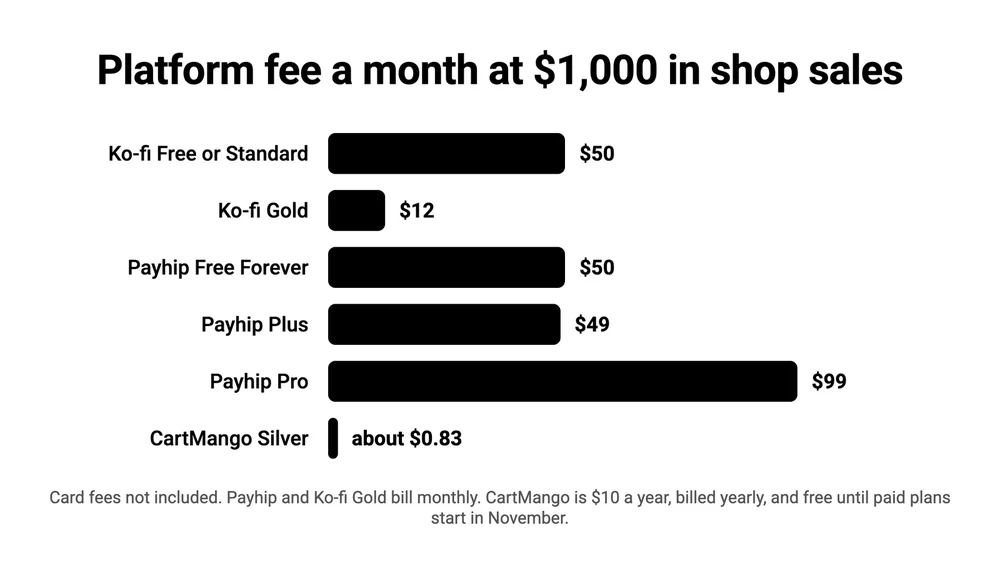
At $1,000 a month in shop sales, Ko-fi Gold costs $12, Payhip Plus $49 and Payhip Pro $99, while Ko-fi’s free modes and Payhip’s free plan each cost $50.
| Setup | At $200 a month | At $1,000 a month | At $3,000 a month |
|---|---|---|---|
| Ko-fi Free or Standard | $10 | $50 | $150 |
| Ko-fi Gold | $12 | $12 | $12 |
| Payhip Free Forever | $10 | $50 | $150 |
| Payhip Plus | $33 | $49 | $89 |
| Payhip Pro | $99 | $99 | $99 |
| CartMango Silver, billed yearly | about $0.83 | about $0.83 | about $0.83 |
These are platform fees only, and card fees are left out because they are the same on every row. CartMango’s figure is its $10 a year Silver plan spread over 12 months, and CartMango is free right now, until paid plans start in November. If you sell between about $967 and $3,500 a month, keep Payhip Plus and read it wherever Payhip Free Forever appears below.
That leaves 5: Ko-fi Free mode, Ko-fi Standard, Ko-fi Gold, Payhip Free Forever and CartMango.
Cut 2: one of Ko-fi’s 2 free modes, depending on tips
Ko-fi’s Free mode and its Standard mode charge the same 5% on shop sales, memberships, commissions and monthly tips. The only money difference is one-off tips and goals, which cost 0% in Free mode and 5% in Standard.
Standard is what Ko-fi used to call Contributor status, and Ko-fi’s help center says “Everyone who joins Ko-fi now starts with Contributor status”. So a new page takes 5% of tips until you go to Settings, then Payment, and switch it off.
Do people tip you? Then keep Free mode. On a $5 tip paid through Stripe with a US card, Free mode leaves you $4.55 and Standard leaves you $4.30. Across 100 tips a month, that is $25 back in your pocket.
If you only sell files, keep Standard on. It costs nothing extra, because a shop sale is 5% either way, and it raises your Ko-fi Shop storage from 25 GB to 200 GB and the largest file from 2 GB to 5 GB. Supporter-only posts and scheduled posts come with it.
You only need 1 of the 2 modes. That leaves 4.
Cut 3: Ko-fi Gold, below $240 a month in sales
Ko-fi Gold costs $12 a month and removes a 5% fee, so it only pays for itself once your shop sales, memberships, commissions and monthly tips pass $240 a month.
That $12 is the current price for new creators. Of the 5 sources on this search’s first results page that price Gold, 4 list an older figure: Google’s AI Overview and Getly say $6 a month, and Pocketsflow and Powered Online say about $8. Only PayRequest has $12.
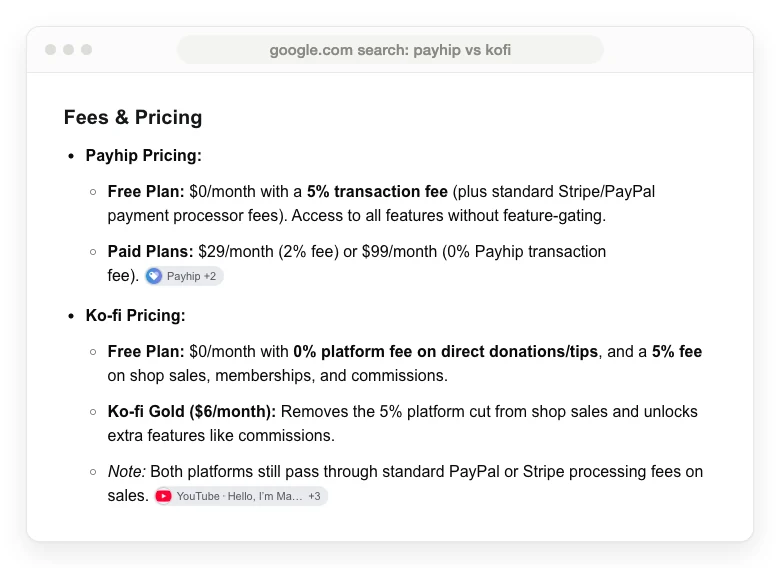
Those older prices were real once. Ko-fi’s help article on Gold says some creators earned thousands a month “but only paying $8”, and anyone who already had Gold keeps the price they signed up at. New creators pay $12, monthly only, since Ko-fi no longer sells an annual plan.
Below $240 a month, the 5% costs less than Gold. At $1,000 a month, the 5% is $50 against Gold’s $12, so Gold wins easily. Ko-fi gets you to 0% for $12, while Payhip asks $99 for the same 0%.
2 traps sit in Ko-fi’s fee article. If Standard is on when you subscribe, Gold does not switch it off: Ko-fi says “you’ll need to opt out separately to remove the service fee”. And for members who joined through Stripe before you upgraded, Ko-fi says “You’ll keep paying the 5% platform fee”.
If your Ko-fi sales already pass $240 a month, keep Ko-fi Gold and read it wherever Ko-fi appears below. For a smaller shop, that leaves 3: one of Ko-fi’s free modes, Payhip Free Forever and CartMango.
Which survivor fits you: Ko-fi, Payhip Free Forever or CartMango
Ko-fi fits creators paid mostly in tips, Payhip fits sellers who want their sales tax handled, and CartMango fits sellers who want no cut taken from each sale.
Ko-fi charges 0% on one-off tips in Free mode and 5% on shop sales, Payhip charges 5% a sale with tax handled on every plan, and CartMango charges 0% a sale for about $0.83 to $2.50 a month, billed yearly, once paid plans start.
| Survivor | Why it survived | What it costs | What it still does not do |
|---|---|---|---|
| Ko-fi, Free or Standard | 0% tips, or extra storage at no cost | $0 plus 5% of shop sales and memberships | Collect or pay your sales tax |
| Payhip Free Forever | Beats Payhip’s paid plans under about $967 a month | $0 plus 5% of every sale | Run a tip jar, or keep subscriptions if you leave |
| CartMango | No cut on any sale | Free now, then about $0.83 to $2.50 a month, billed yearly | Run a tip page, or collect your sales tax |
Above $240 a month in Ko-fi sales, Ko-fi Gold takes Ko-fi’s row. Above about $967 a month, Payhip Plus takes Payhip Free Forever’s.
Ko-fi, when tips and fan memberships pay you
Ko-fi is the better home when supporters pay you because they like your work: one-off tips, monthly tips, memberships with tiers, and commissions. Its page is built around a support button, a feed of posts and goals, so a fan lands somewhere that feels like your space rather than a store.
If your supporters also buy from you, put a price on the things you make. In a February 2023 email to my own list, I gave 5 reasons to sell without apologizing, and one of them was “We’re NOT philanthropists.” A Ko-fi Shop item or a membership tier makes that ask politely. A tip button waits for someone to feel generous.
Ko-fi will not bring you those supporters. Its help center says “It isn’t possible to search for creators directly on Ko-fi”, so every visitor arrives through a link you shared. And while Ko-fi adds a sales tax or VAT rate at checkout if you set one, you register, file and pay that tax yourself.
Payhip, when you sell files or courses to buyers abroad
Payhip is the better home when most of your money comes from selling things: ebooks, templates, presets, courses, coaching or memberships. Every Payhip plan has the same features, including a store builder with themes, and only the fee changes. Payhip pays each sale straight into your PayPal or Stripe account. Payhip also runs a marketplace, but as our Payhip vs Etsy comparison found, most buyers still have to come from you.
Payhip has no tip jar. Its help center says Stripe does not allow tips “without offering something in return”, so the closest Payhip gets is pay-what-you-want pricing on a product, where buyers can pay more than your minimum. It also has no one-click upsell after checkout. Payhip subscriptions only run through Stripe, and recurring payments stop if you ever leave Payhip.
Store closures are the other risk. Our Payhip review found that 48 of the 68 one-star Trustpilot reviews written in English describe a closed, deleted or locked store. Most of Payhip’s replies to those reviews cite copyright or resold content.
CartMango, when you want no cut on files and memberships
CartMango is a checkout for selling files, memberships and courses, and it takes 0% of each sale. CartMango is free right now, and once paid plans start in November, it costs $10, $20 or $30 a year. CartMango’s $10 plan covers 10 products with order bumps, coupons and pay-what-you-want pricing. Upsells and cart abandonment start on CartMango’s $20 plan, and courses sit on the $30 plan, with lesson videos linked from YouTube or Vimeo.
CartMango subscriptions keep paying you if you ever leave CartMango. Our guide to selling subscriptions online runs the numbers on a $10-a-month member. CartMango’s Mini Pages gives you a hosted sales page, so you need no website of your own, though Payhip and Ko-fi host your page too.
CartMango has gaps too: no tip page, no fan feed and no discovery, and its community feature is not live yet. Like Ko-fi, CartMango keeps you as the seller, so sales tax stays your job. If your fans mainly tip, Ko-fi fits better, and if you want tax handled for you, Payhip does.
Courses, memberships and who finds your page
All 3 sell digital downloads and memberships, but only Payhip and CartMango sell courses, only Ko-fi has a tip jar, and only Payhip runs a marketplace where new buyers can find you.
| Feature | Ko-fi | Payhip | CartMango |
|---|---|---|---|
| Digital downloads | Yes | Yes | Yes |
| Online courses | No course tool | Yes | Yes, on the $30 plan |
| Memberships | Yes | Yes, Stripe only | Yes |
| Tips | Yes | Pay what you want on a product | Pay what you want on a product |
| Buyers who find you there | None, no creator search | A marketplace, but most buyers come from you | None |
Ko-fi’s own feature list covers tips, memberships, a shop, commissions, stream alerts, Discord roles, goals and posts, with no course or lesson tool. Payhip sells courses and coaching on every plan. Whichever you pick, plan on bringing your own buyers through your posts, links and email list.
Instant payouts, and the name on your buyer’s receipt
Ko-fi and Payhip both pay you immediately. Ko-fi’s Shop help article says “payments are immediate”, and Payhip’s pricing page says it deposits your sales “immediately after a transaction has been completed”. Neither holds your money, because each payment lands in your own PayPal or Stripe account.
That direct setup affects privacy, because your PayPal or Stripe account details can show on the buyer’s receipt. A seller in an r/Affiliatemarketing thread who sells on Payhip under pen names put it plainly: “A PayPal business account will show the business name and address, which is your real name on the receipt. With Stripe they only show your business name, business website and customer support phone number.”
If you sell under a pen name on either tool, check what your payment account shows before your first sale.
Sales tax splits Payhip and Ko-fi more than the 5% does
Payhip collects and pays your digital sales tax and VAT, and Ko-fi does not.
Payhip’s pricing page says it “automatically collects, reports and remits” digital EU and UK VAT and US and Canadian sales tax “on your behalf”. In the US it acts as a marketplace facilitator and in Canada as a digital platform operator, so the law treats Payhip as the one who owes that tax. That holds on every Payhip plan, free or paid.
Getly’s comparison says neither platform is a merchant of record and tax is yours on both, which is wrong for Payhip. Payhip’s own Ko-fi comparison page undersells it too, mentioning only UK and EU VAT.
Ko-fi is clear about its own role. Its help article on tax says Ko-fi “isn’t the merchant of record” and “doesn’t collect or remit sales tax or VAT on a creator’s behalf”. Ko-fi gives you a setting to enter a tax rate for each place you sell to, and the tax lands in your account with the sale. Reporting and paying it is on you.
So the same 5% shop fee buys different things. On Payhip it comes with someone else handling the tax. On Ko-fi it does not. Whether you owe that tax depends on where you live and where your buyers are, and Ko-fi itself tells creators to check with a tax advisor.
Payhip vs Ko-fi FAQ
What are the disadvantages of Payhip?
Payhip’s free plan takes 5% of every sale, and its paid plans only pay off above about $967 a month. It has no tip jar and no one-click upsell after checkout, its subscriptions need Stripe, and recurring payments stop if you leave. Payhip can also close a store over copyright or resold content, the most common complaint in its 1-star reviews.
Does Ko-fi pay immediately?
Yes. Ko-fi never holds your money. Each tip, membership payment and shop sale goes straight into your own PayPal or Stripe account the moment the buyer pays, so Ko-fi adds no payout schedule or minimum of its own. PayPal or Stripe still take their normal card fee from each payment.
Does Ko-fi allow NSFW creators?
Ko-fi allows some adult-themed work if you add its NSFW tag, such as non-sexual nudity in art, education or lifestyle content. Its help article says the tag “does not provide an option for pornography or sexually explicit nudity”, so those are banned either way. Payhip also lists pornography among its banned products, and says breaking those rules risks an account deleted without prior notice.
Is Gumroad better than Ko-fi?
On fees, no. Gumroad takes 10% plus $0.50 of each direct sale against Ko-fi’s 5%, so Ko-fi costs less on every sale. Gumroad is better if you want no tax work: it is the merchant of record and handles sales tax worldwide. Its Discover marketplace takes 30% of the sales it brings you. Our Gumroad vs Patreon comparison shows what Gumroad’s extra $0.50 does to a $5 sale.
Does Ko-fi take 5% of tips?
Only if Standard mode is on, and new accounts start with it on. In Free mode, one-off tips and goals cost 0%, while monthly tips, memberships, commissions and shop sales cost 5% in both modes. Our Ko-fi fees breakdown lists every rate and the Gold break-even.
Can I use Payhip and Ko-fi together?
Yes. You can keep a Ko-fi page for tips and memberships and sell files from a Payhip store, linking each from the other. You then pay 5% on each side’s sales, run 2 dashboards, and only the Payhip side gets its sales tax handled for you.
Keeping the 5% on sales to your own followers
If your income is mostly tips, Ko-fi is the pick, and if you want your sales tax handled, Payhip is. Whichever side of Payhip vs Ko-fi you land on, a shop sale on the free plan costs you 5%.
If you mostly sell files or memberships to people who already follow you and would rather keep that 5%, CartMango takes 0% of every sale. CartMango is free right now, then from $10 a year once paid plans start in November, and if you ever leave, your subscriptions keep paying you.
About the Author

👋 I’m Welly, founder of CartMango (the site you’re on), a checkout platform for digital product sellers. We’ve previously processed $179M+. I also run BirdSend (email marketing tool, 3.1B+ emails sent). On the side I show other non-techie digital sellers how I use AI workflows to automate 50%+ of my operations. Find me on LinkedIn.
Related Reading
- Ko-fi fees in 2026: every Ko-fi rate, the Standard toggle and the $240 Gold break-even
- Payhip vs Etsy: what Payhip’s marketplace sends you against Etsy’s search
- Payhip vs Kajabi: Payhip’s fees next to a full course platform
- How to sell subscriptions online: live fees on a $10-a-month member and what happens when you switch tools