

Ko-fi fees split by what the payment is for: 0% on one-time tips, and 5% on shop sales, memberships and commissions. New accounts start with Contributor status switched on, which puts the same 5% on tips too. Ko-fi Gold removes the service fee for $12 a month, and Stripe or PayPal charge on top of all of it.
A creator posted their last 3 Ko-fi payments on Reddit because the numbers made no sense. A €14 shop sale had lost 10.70%. A €10 shop sale had lost 11.89%. They were on the free plan, reading a fee page that promised 0% to 5%, and losing more than double that.
Nothing had gone wrong. They were looking at 1 number and paying 3 of them.
Ko-fi’s fees are not complicated, but they are scattered across a pricing page, 4 help articles and a toggle buried in account settings, so hardly anyone assembles the whole picture. This post puts every number in one place: what Ko-fi charges on each type of payment, the setting that is quietly taking 5% of your tips, when the $12 plan pays for itself, and why the fee doing the most damage is not Ko-fi’s at all.
Key Takeaways
- Ko-fi charges 0% on one-time tips only if Contributor status is off. New accounts have it switched on.
- Monthly tips, memberships, shop sales and commissions cost 5% on Ko-fi Free and on Contributor alike.
- Ko-fi Gold is $12 a month for new creators, billed monthly only. Annual plans are no longer sold.
- Subscribing to Ko-fi Gold does not remove the 5% by itself. Contributor has to be switched off separately.
- The flat processor fee is what hurts small payments. PayPal takes 19.67% of a $3 payment before Ko-fi takes anything.
Not sure where your margin is going? The free 5-day Online Selling Mistakes Challenge walks through the 5 profit leaks that catch solo sellers most often.
What Ko-fi charges on each type of payment
Ko-fi sets its service fee by what the payment is for, not by which plan you are on. One-off tips and crowdfunding goals are the only payment types that reach 0% without paying for Gold, and the other 4 cost 5% whichever free option you pick.
| Payment type | Ko-fi Free | Contributor on | Ko-fi Gold |
|---|---|---|---|
| One-off tips | 0% | 5% | 0% |
| Crowdfunding goals | 0% | 5% | 0% |
| Monthly tips | 5% | 5% | 0% |
| Membership tiers | 5% | 5% | 0% |
| Commission sales | 5% | 5% | 0% |
| Shop sales | 5% | 5% | 0% |
Those figures come from the full breakdown table in Ko-fi’s own help article on fees. 2 things in it catch people out.
The first is monthly tips. Most guides treat “tips” as a single thing and print 0%. Ko-fi’s own table separates a one-off tip from a recurring monthly one, and the recurring version is 5% on both free options. If a supporter moves from buying you a coffee now and then to sending $5 every month, your fee on that money goes from nothing to 5%.
The second is that the free column is not the column most new accounts sit in. That is the next section.
Payment processing sits on top of every row above. None of these percentages are what you keep.
The 5% on tips you did not choose
Ko-fi has a setting called Contributor status. Turning it on gives Ko-fi 5% of your tip income, and in return you get page customisation, supporter-only posts, scheduled posts, a shorter page name and more shop storage.
It is switched on when you sign up. Ko-fi says so plainly in its help article on Contributor status: “Everyone who joins Ko-fi now starts with Contributor status”. The same sentence goes on to say you can opt out at any time.
So the headline everybody repeats, 0% on tips, describes a setting you have to go and turn off. Ko-fi’s fee article says the same thing from the other side: new creators start with everything switched on and are “always free to opt out and keep tips completely fee-free.”
You will also meet it under 3 different names across Ko-fi’s own pages. The pricing page calls it Standard, the help centre calls it Contributor status, and the toggle in your settings is labelled “Get all of Ko-fi.”
Same 5% either way.
Switching it off takes 2 clicks, under Settings then Payment. What you give up is the perk list, and one of those perks is not cosmetic.
Free accounts get 25 GB of asset storage and a 2 GB limit per item. Contributors get 200 GB and 5 GB per item. Ko-fi publishes both numbers in the FAQ at the bottom of its Ko-fi Shop help article.
If you sell large video files or big asset packs, 8 times the storage is a real trade for 5% of your tips. If you sell 3 PDFs, it is not.
Is 5% of tips a bad deal?
A 5% cut of tips is fair value for a service with no monthly cost, and plenty of creators are happy to pay it. The problem is that it is a default rather than a decision. Nobody resents paying for something they chose.
Ko-fi Gold costs $12 a month, and half the web says otherwise
Ko-fi Gold is the paid plan that removes the service fee. For a new creator it costs $12 a month, and Ko-fi will only sell it monthly. Its help article on Ko-fi Gold is direct about both: “Ko-fi Gold is now available for $12/month for new users” and “New creators can still sign up for Gold, but only on a monthly plan (annual plans are no longer available).”
Almost nothing else you read will tell you that.
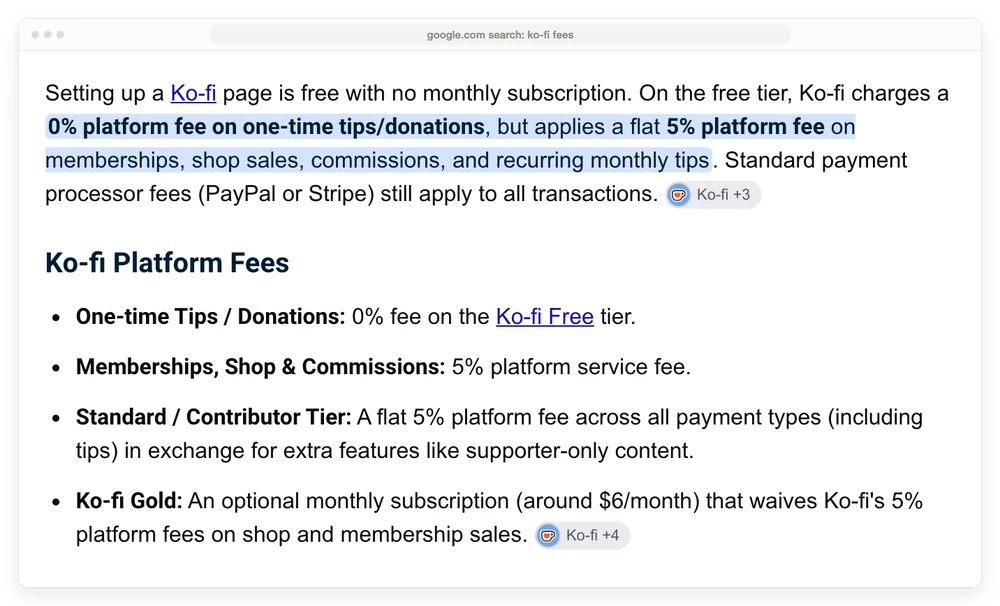
Google’s AI answer for this exact question puts Ko-fi Gold at “around $6/month”.
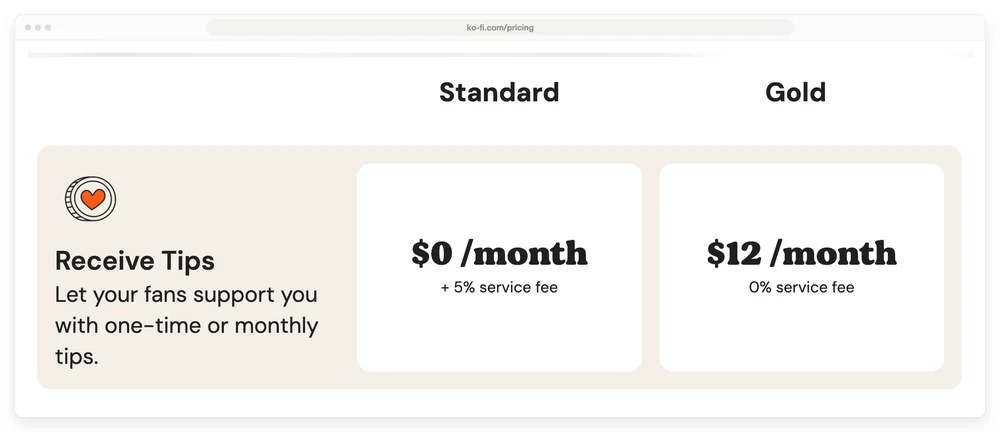
Ko-fi pricing shows 2 columns on its own page, which was the top organic result on that same search: Standard at $0 a month plus a 5% service fee, and Gold at $12 a month with no service fee.
The ranking guides carry the same wrong figure. PunchSalad puts the plan at “a flat fee of $6 a month”, then does the break-even sum off that price and tells readers Gold is worth it above $120 a month. At the real price the break-even is $240 a month, so that advice is out by half.
Talkspresso states Ko-fi Gold as “$6 per month (or $54 per year)”, which is wrong twice, because the annual plan does not exist for new sign-ups. Talks.co states that Ko-fi Gold is “No longer offered” at all.
None of those pages is lying. They were written when they were true.
Ko-fi’s own explanation of why it changed the plan mentions creators earning thousands a month while “only paying $8”, so there have been at least 3 Gold prices in circulation. Older creators keep the price they signed up at, so a $6 or $8 Ko-fi Gold subscription is a real thing sitting in plenty of accounts. It is just not a price you can buy today.
The same drift has hit the comparisons. That PunchSalad review also quotes “Patreon’s 5%-12% fees”, a tiered structure Patreon has since replaced with a single flat rate.
If you are budgeting for Ko-fi Gold, budget $144 a year, not $72.
Paying for Ko-fi Gold does not switch the 5% off
Contributor status and Ko-fi Gold are separate switches, and subscribing to Gold does not turn Contributor off. Ko-fi buries this in a note at the bottom of its fee article: “Ko-fi Gold creators can still turn on Get all of Ko-fi. If you already have this switched on when you subscribe to Gold, you’ll need to opt out separately to remove the service fee.”
Read that next to the section above and the trap is obvious. New accounts have Contributor on by default. So a creator who signs up this year, decides the 5% is eating too much, and pays $12 a month to remove it, keeps paying the 5% until they also go into Settings and switch Contributor off.
That is $144 a year for nothing, on top of the fee you were trying to escape.
If you pay for Ko-fi Gold, go and check that toggle. It takes 30 seconds and it is the highest-value thing in this post.
When Ko-fi Gold starts paying for itself
Ko-fi Gold breaks even at $240 a month of fee-bearing income, because it costs $12 a month and removes a 5% fee, and 5% of $240 is $12.
Fee-bearing income means shop sales, memberships, commissions and monthly tips. One-off tips with Contributor off are already 0%, so they do not count toward the total.
Below $240 a month the 5% costs less than Ko-fi Gold, above it Ko-fi Gold costs less, and at $1,000 a month the 5% is $50 against Gold’s $12.
| Monthly fee-bearing income | 5% costs you | Ko-fi Gold costs | Cheaper option |
|---|---|---|---|
| $100 | $5.00 | $12 | stay on the free 5% |
| $200 | $10.00 | $12 | stay on the free 5% |
| $240 | $12.00 | $12 | no difference |
| $500 | $25.00 | $12 | Ko-fi Gold |
| $1,000 | $50.00 | $12 | Ko-fi Gold |
Under $240 a month, Ko-fi Gold costs you money. Over it, the saving grows with every sale, which is the opposite of how most creator platforms price.
I got a reminder of how that decision feels in a completely unrelated part of my life. We had a Coway water filter system put in at home, an outdoor filter for the taps and a reverse osmosis unit for drinking water.
Where I live I buy drinking water every month anyway, and the subscription came to about what I was already spending on bottles. So the filtration for washing and bathing arrived on top of a bill I was paying regardless.
I was not sold anything. I did arithmetic, and it came out as a no-brainer.
Ko-fi Gold is the same kind of decision. Compare $12 against the 5% already leaving your account, rather than against zero. Below $240 a month the 5% is the smaller number, and no feature list changes that.
Stripe and PayPal take more than Ko-fi does
Ko-fi never touches your money. Payments go straight into your own Stripe or PayPal account, and those companies take their cut before Ko-fi’s percentage is in the picture at all. Ko-fi’s fee article describes processor fees as “usually around 3% + $0.30”, which is close for Stripe and low for PayPal.
Read at the source, the US rates are:
- Stripe: 2.9% plus $0.30 per successful transaction on domestic cards.
- PayPal: 3.49% plus a fixed fee for a PayPal Checkout payment, and the US-dollar fixed fee is 0.49.
The percentages look similar. The flat fee is what does the damage, because it does not shrink with the payment, and Ko-fi’s whole model is small payments.
A $3 sale loses 24.67% to Ko-fi and PayPal together and leaves you $2.26, while a $50 sale loses 9.48% and leaves you $45.26, because that flat fee stays the same size whatever the payment is.
| Sale price | Ko-fi 5% | PayPal Checkout | You keep | Total cut |
|---|---|---|---|---|
| $3 | $0.15 | $0.59 | $2.26 | 24.67% |
| $5 | $0.25 | $0.66 | $4.09 | 18.20% |
| $10 | $0.50 | $0.84 | $8.66 | 13.40% |
| $25 | $1.25 | $1.36 | $22.39 | 10.44% |
| $50 | $2.50 | $2.24 | $45.26 | 9.48% |
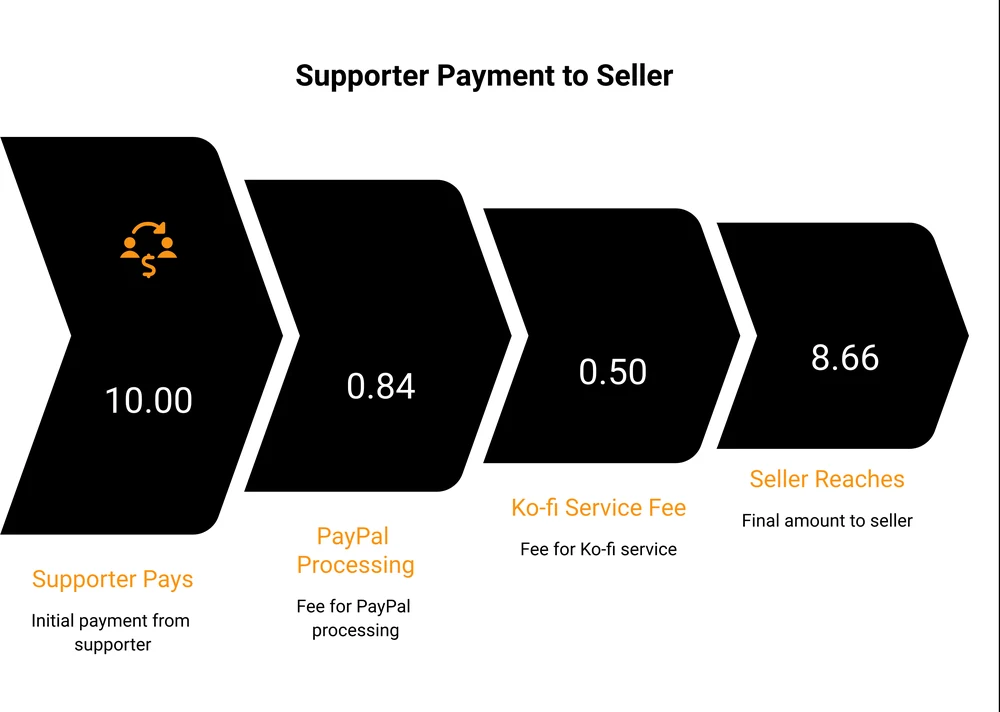
On a $3 sale, PayPal takes almost 4 times what Ko-fi takes. Arguing about the 5% while running every payment through PayPal means arguing about the smaller number.
This is exactly what the creator on Reddit had run into. Their €18 one-time donation cost 5.30%, because Ko-fi took nothing and PayPal took its cut. Their €10 shop sale cost 11.89%, because Ko-fi’s 5% landed on top of the same flat fee, on a smaller amount.
Same platform, same creator, more than double the rate, and both numbers were correct. Their figures are in euros, so the exact rates differ from the US table above, but the pattern is identical.
The whole thread and the replies they got are worth reading on their own, for how much the community disagrees about how Contributor works.
2 things change that arithmetic, and neither costs $12 a month.
The first is connecting Stripe instead of PayPal. At $3 the total cut drops from 24.67% to 18%. At $10 it drops from 13.4% to 10.9%. That is a single connection in your settings.
The second is raising the smallest thing you sell. A $3 item loses about a quarter of its price to fees, while a $10 item loses about an eighth.
Bundling 4 small files into a $12 product is worth more than any plan change on this page. Our guide to pricing digital products works through how to set that number.
If most of your supporters pay through PayPal, the full breakdown of what PayPal charges covers every rate by transaction type and the international surcharges that stack on top.
What Ko-fi does not charge you for
Ko-fi deserves credit on the charges it does not make, because a fee post can make any platform sound like a mugging.
Ko-fi’s pricing page commits to this in writing: “You only pay the service fees (no more than 5%) plus standard payment processor fees, and that’s it. No buyer fees, payout fees, marketing fees or any other surprises.”
That holds up on the things that annoy sellers elsewhere:
- No payout fee and no minimum balance. Money lands in your own Stripe or PayPal account as the payment clears, because Ko-fi never holds it.
- No currency-conversion fee of its own. Ko-fi’s fee article notes that only payments in a different currency get converted, and that the small percentage for doing it comes from PayPal or Stripe. Setting your Ko-fi currency to the one you are paid in most often keeps that to a minimum.
- No monthly cost at all if you do not want one. Both free options really are free.
- No cut of your buyers. Your supporter pays the price on the page.
Refunds are where it gets less tidy, and Ko-fi is only half clear about it. Its refund help article says you issue refunds yourself, that Ko-fi will not do it for you, that they are full amount only rather than partial, and that they must go out within 180 days. On the cost, its answer is that “PayPal/Stripe keeps the transaction fee from the original payment.” So a refunded $10 sale still costs you the processor’s 84 cents, with nothing kept at the end of it.
What Ko-fi does not say anywhere is whether its own 5% comes back on a refund. I could not find that answered on any of its help pages, so treat it as unknown rather than assuming either way.
How Ko-fi fees compare to Patreon and Buy Me a Coffee
Patreon takes $1.00 of a $10 sale, Ko-fi and Buy Me a Coffee each take $0.50, and Ko-fi Gold takes nothing beyond the processor’s cut.
| Platform | Platform fee | Monthly plan | Extra layers | Fee on a $10 sale |
|---|---|---|---|---|
| Ko-fi Free | 0% tips, 5% on the rest | none | none | $0.50 |
| Ko-fi Gold | 0% | $12 | none | $0.00 |
| Buy Me a Coffee | 5% on everything | none | 0.5% payout, 1% international, 0.5% subscriptions | $0.50 |
| Patreon | 10% | none | currency conversion, payout fees | $1.00 |
Every figure above is the platform’s cut alone. Stripe or PayPal still take theirs on each row.
Buy Me a Coffee has no fee-free option at all. Its help centre sets out the whole stack: a flat 5% platform fee, Stripe’s 2.9% plus $0.30, a further 0.5% for payout processing, plus 1% on international transactions and 0.5% on subscription payments. On an international subscription that is more layers than Ko-fi charges in total.
Patreon’s pricing page lists a single 10% rate, plus “payment processing, currency conversion, and payout fees, and applicable taxes”. That is double Ko-fi, and it buys 2 things Ko-fi does not do.
The first is a discovery surface where supporters find creators. The second is Patreon absorbing chargebacks, disputes and fraud rather than passing them to you, which its page states directly. If you sell to strangers rather than to an audience you already have, both are worth something real.
For a fuller picture of what the membership and community platforms cost, we priced them side by side.
Where a tip jar stops fitting
Ko-fi is built around support. Someone likes what you make, they send you something, and a shop sits alongside that. The pricing follows the same idea: cheap when the amounts are small and occasional, and a flat 5% forever once they are not.
That model stops fitting when selling becomes the main thing rather than a side effect. The first tell is volume. At $1,000 a month in shop sales the 5% is $50 a month, and at that size Ko-fi Gold at $12 is a genuinely good deal.
The second tell is what you need the software to do. A tip jar does not raise the value of a sale.
There is no offer added at checkout, nothing after the purchase, and no way to reach somebody who left mid-payment. Those are checkout-platform features, a different category of tool with its own pricing.
Gumroad’s 10% plus $0.50 costs $1.50 on a $10 sale, Ko-fi and Payhip’s free plan each take $0.50, and Ko-fi Gold and CartMango take none of it.
| Route | Platform fee | On a $10 sale | Fixed cost |
|---|---|---|---|
| Ko-fi Free or Contributor | 5% | $0.50 | none |
| Ko-fi Gold | 0% | $0.00 | $12 a month |
| Gumroad | 10% plus $0.50 | $1.50 | none |
| Payhip free plan | 5% | $0.50 | none |
| CartMango | none | $0.00 | free until October 2026, then from $10 a year |
The fee column counts only what each platform keeps. Your processor bills you separately on all 5 routes.
I should be upfront that CartMango is my platform, which is why it is in that table rather than left out of it. It sits in the checkout category described above, so it does nothing for someone who mainly receives support, and Ko-fi’s 25 GB of free storage beats the 2 GB on CartMango’s entry plan.
What CartMango does is remove the per-sale percentage. CartMango charges no per-transaction fee on any plan, and after the beta ends in October 2026 the entry plan is $10 a year. Course hosting and community features are not live yet and arrive on the $30 a year plan in October 2026.
If you sell rarely, Ko-fi’s 5% costs you less than any yearly fee. Once you are selling steadily the arithmetic flips, and it is worth running rather than assuming.
Ko-fi fees FAQ
How do you avoid the 3% PayPal fee on Ko-fi?
You cannot remove it, and the workarounds are worse than the fee. PayPal charges 3.49% plus a 49-cent fixed fee on a US PayPal Checkout payment, and that money goes to PayPal, not to Ko-fi. Connecting Stripe instead brings it to 2.9% plus $0.30 on US cards, which is the only legitimate saving available. Asking supporters to send friends-and-family payments breaks PayPal’s rules and risks the account being limited.
Is it better to use Ko-fi or PayPal on its own?
A plain PayPal link costs the same processing and skips Ko-fi’s 5%, so on raw fees PayPal alone wins. What you give up is the page, the shop, membership tiers, file delivery and a record of who bought what. If you only need a donate button, PayPal is cheaper. If the thing has to be delivered, the 5% is buying you delivery.
What is better on fees, Patreon or Ko-fi?
Ko-fi. Patreon takes 10% of creator earnings plus processing, currency conversion and payout fees. Ko-fi takes 5% on memberships and shop sales, and nothing on one-time tips with Contributor off. Patreon’s higher cut pays for discovery and for Patreon carrying chargeback and fraud risk instead of you.
Is Ko-fi good for selling digital products?
For low volume, yes. Storage is generous, delivery is handled, and 5% with no monthly cost is cheap when you sell a little. It gets expensive as you scale, because 5% of $1,000 a month is $50 a month, at which point Ko-fi Gold at $12 or a dedicated checkout tool both cost less.
Does Ko-fi hold your money before paying you?
No. Payments go directly into your connected Stripe or PayPal account when the supporter pays. There is no payout threshold, no payout fee and no waiting period from Ko-fi, which is one of the clearest advantages it has over marketplace-style platforms.
When the tip jar becomes a shop
Ko-fi fees come down to a single question about your own numbers: is the money arriving as support, or as sales?
If it is support, Ko-fi is close to the cheapest option there is, and the only job is switching Contributor off so your tips stay at 0%. If it is sales, you are paying a percentage on every one of them forever, and past a few hundred dollars a month that percentage is often the biggest cost a solo digital seller can actually do something about.
That second case is what CartMango was built for. CartMango charges no per-transaction fee on any plan, adds order bumps so each buyer spends more, and sends payouts straight to your own Stripe or PayPal. Free until October 2026, then $10 a year. Set that against Ko-fi fees at $240 a month of sales, where the 5% alone costs $12 in a single month.
About the Author

👋 I’m Welly, founder of CartMango (the site you’re on), a checkout platform for digital product sellers. We’ve previously processed $179M+. I also run BirdSend (email marketing tool, 3.1B+ emails sent). On the side I show other non-techie digital sellers how I use AI workflows to automate 50%+ of my operations. Find me on LinkedIn.
Related Reading
- How much does PayPal charge: every PayPal rate by transaction type, and the ones that stack internationally
- How to price digital products: setting a price that survives a flat processor fee
- What community platforms really cost: membership platforms priced side by side, Patreon included
- How to sell online for free: what each free route really nets you on a single sale
- Gumroad pricing: how the 10% and the processing fee stack on a direct sale