

In the Gumroad vs Patreon choice, use Patreon to charge fans monthly for new posts and Gumroad to sell finished files once. On a card sale both take 10% plus a 2.9% and $0.30 US processing fee, and Gumroad adds a flat $0.50, so a direct Gumroad sale costs $0.50 more.
These figures come from the platforms’ own fee pages, for a Patreon page published after August 4, 2025 and Gumroad sellers under $20,000 a month. Patreon’s shop sells one-off files from $3, and Gumroad runs memberships. CartMango, which I run, bills members and sells files at 0% per sale, free right now and from $10 a year once paid plans start in November.
Search “gumroad vs patreon” and 4 of the 6 comparison pages on Google’s first page still quote Patreon plans that a new creator cannot join.
Both platforms also keep your monthly fans on their own billing. Delete a Gumroad membership product and every member’s subscription ends, and Patreon pledges stay on Patreon’s checkout. Moving fans later means asking each one to enter a card again.
Below are the fees each platform publishes today, what each keeps from a $5, $10, $25 and $100 sale, which one fits how your fans pay, and what happens to those fans if you ever move.
Key Takeaways
- Gumroad costs $0.50 more per direct card sale. Both take 10% plus 2.9% and $0.30 in payment processing, and Gumroad adds a flat $0.50.
- The gap matters most on small prices. Gumroad fees take $1.45 of a $5 sale and Patreon fees take $0.95, against $13.70 and $13.20 on $100.
- Patreon’s legacy 5%, 8% and 11% plans are closed to new pages. Anyone publishing a Patreon page after August 4, 2025 pays the standard 10%.
- Both now sell one-off products and memberships. The Patreon shop takes prices from $3 to $5,000, and Gumroad memberships bill monthly, quarterly, every 6 months or yearly.
- Neither platform lets paying members follow you out. Both export fan emails, but fans must subscribe again elsewhere. CartMango (free right now, from $10 a year once paid plans start in November) bills through your own Stripe or PayPal.
Gumroad vs Patreon fees on a $5, $10, $25 and $100 sale
Gumroad fees run $0.50 higher than Patreon fees on every direct card sale, as long as your Gumroad sales stay under $20,000 a month. Both charge 10% plus 2.9% and $0.30 in payment processing, and Gumroad adds a flat $0.50 per sale.
A flat $0.50 takes its biggest share from your cheapest items, since it is the same on a $3 sale as on a $300 one. If you want to catch pricing mistakes like that before launch day, the Online Selling Mistakes Challenge walks through 5 common ones and how to fix them, 1 email a day for 5 days.
Gumroad’s and Patreon’s figures both come from their own help pages. Gumroad’s fee page says its 10% plus $0.50 “does not include” card processing of 2.9% plus $0.30. Patreon’s creator fees overview lists the same 2.9% plus $0.30 for a US-dollar payout, on top of its 10%.
On a $5 card sale, Patreon leaves you $4.05, Gumroad leaves $3.55, a Gumroad Discover sale leaves $3.50 and CartMango leaves $4.55. The gap between Patreon and Gumroad stays at $0.50, so it shrinks from 10% of a $5 sale to half a percent of a $100 one.
| Sale | Patreon keeps | Gumroad keeps | Gumroad Discover keeps | CartMango keeps |
|---|---|---|---|---|
| $5 | $4.05 | $3.55 | $3.50 | $4.55 |
| $10 | $8.41 | $7.91 | $7.00 | $9.41 |
| $25 | $21.47 | $20.97 | $17.50 | $23.97 |
| $100 | $86.80 | $86.30 | $70.00 | $96.80 |
Every column uses a US card at 2.9% plus $0.30, except Discover, which is a flat 30% with processing included. CartMango is the checkout I built, so weigh its row with that in mind. It charges a yearly plan fee instead of a cut, $10 to $30 once paid plans start in November, and against Patreon’s 10% the $10 plan pays for itself after $100 of sales in a year.
Counting card processing, Gumroad’s fees come to 29%, 20.9%, 16.1% and 13.7% of the sale at those 4 prices, and Patreon’s to 19%, 15.9%, 14.1% and 13.2%.
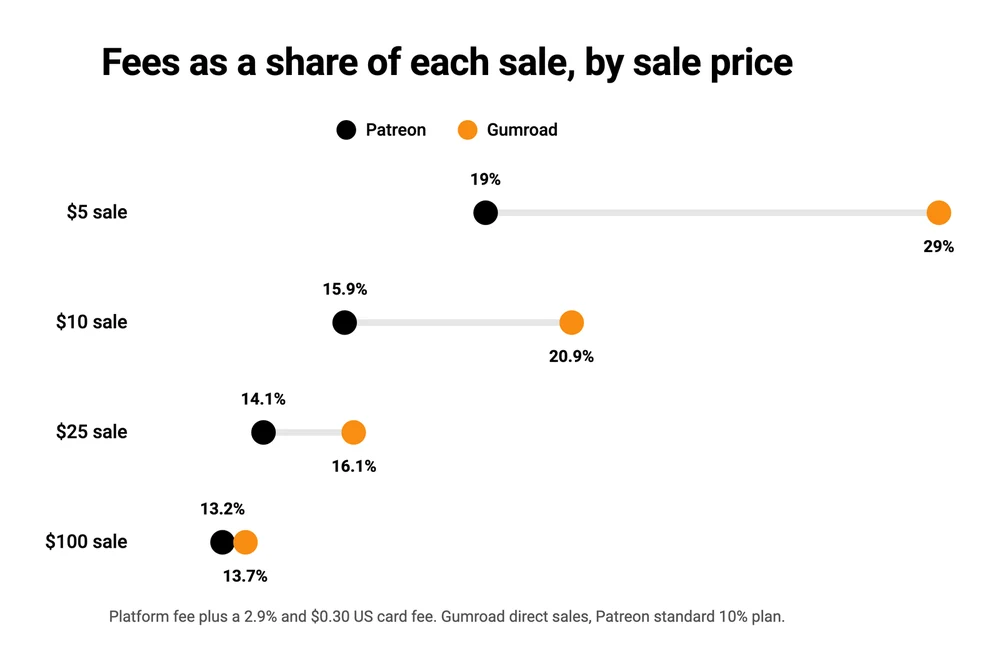
A few smaller costs sit outside the table. Patreon adds 2.5% when a fan pays in a different currency from your payout, and a US direct deposit costs $0.25 per payout. Gumroad’s 10% falls to 5% on new direct sales once your paid sales reach $20,000 in a calendar month, while the $0.50 stays, and the count resets on the 1st. Every line of both is in our Patreon fees breakdown and our Gumroad pricing guide.
Why you keep reading 8% and 12% for Patreon
4 of the 6 comparison pages ranking on Google’s first page quote Patreon plans that no longer take new creators. 3 still list an 8% or 12% plan, and 1 says Patreon “takes 12% of every sale”. Google’s own AI Overview puts Patreon at “typically ~5% to 12%”.
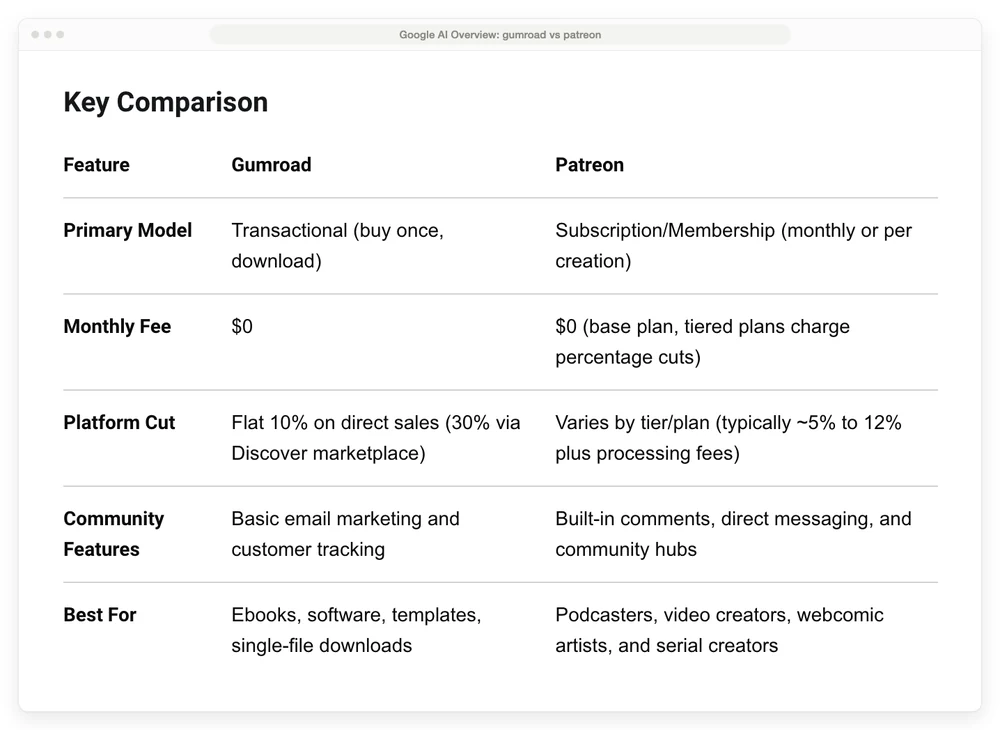
The AI Overview Google shows for “gumroad vs patreon”. Read the Platform Cut row, then “per creation” in the Primary Model row.
Patreon’s fee page lists 3 legacy plans today: Founders at 5%, Pro at 8% and Pro + Merch at 11%. All 3 are closed to new creators, and anyone who publishes a page after August 4, 2025 is on “our standard 10% pricing plan”. A legacy creator who unpublishes and republishes moves onto it too.
Lite and Premium are older plan names that no longer appear on Patreon’s table. The 12% still sits in Patreon’s own help text on one-off sales, “between 5% and 12% … depending on your platform plan”, on the same page as a table whose top rate is 11%.
The “per creation” line is out of date as well. Patreon’s help page on iOS in-app purchases says the November 1, 2026 deadline to move to subscription billing has passed. Pages still billing per creation get switched, with billing paused until the creator sets monthly prices.
What Gumroad and Patreon each do beyond the fee
Patreon gives fans a feed with livestreams, chats and DMs, Gumroad adds a Discover marketplace at 30% a sale, and CartMango sends each payment straight to your own Stripe or PayPal.
| Job | Gumroad | Patreon | CartMango |
|---|---|---|---|
| One-off products | Yes, free or pay-what-you-want allowed | Shop, priced $3 to $5,000 | Yes, plus a hosted Mini Page |
| Memberships | Tiers, free trial of 7 days or 1 month | Tiers, monthly or yearly | Yes, on every plan |
| Fan feed | Posts and files on a member page | Feed, video hosting, livestreams | No |
| Community | Plain-text chat per product | Chats, comments and DMs | Not yet |
| Sales tax | Collected for you as the legal seller | Most of it collected for you | You stay the seller and handle it |
| Getting paid | $100 minimum, 7-day hold on weekly payouts | $0.25 per US direct deposit | Straight to your Stripe or PayPal |
Gumroad and Patreon both take sales tax off your hands, Gumroad as the legal seller and Patreon for most of it. Gumroad has been the merchant of record on your sales since January 1, 2025, and Patreon’s pricing page says it takes care of “most applicable tax collections and remittance”. CartMango does not file tax for you, since your own Stripe or PayPal account takes the money and you stay the seller.
If your fans pay $3 to $10 a month
Patreon is the better pick for a podcaster, comic artist or illustrator with a few hundred fans on small monthly tiers. It was built for that job, and it costs less per payment.
Patreon’s 10% includes a hosted creator page, monthly and annual memberships, chats, polls and comments, and video hosting of up to 100 hours a month once you have paying fans. Gumroad memberships give each tier a content page with files and posts, plus a plain-text chat per product. By Gumroad’s own help page, that chat takes plain text only, cannot be searched and sends no instant notifications.
Does $0.50 matter on a $5 tier? It is 10% of the price, and Gumroad charges it on every renewal too. Its fee article applies 10% plus $0.50 per transaction and lists no separate rate for memberships, so a $5 member costs $1.45 a month on Gumroad against $0.95 on Patreon. With 100 members on a $5 tier, that is $600 a year more on Gumroad for the same fans.
What you give up on Patreon is control over the iPhone price. Apple takes 30% of each new iOS in-app purchase in the Patreon app, falling to 15% after a member stays a full year. By default Patreon raises the in-app price by about 43% so you still earn the same, which turns a $10 tier into $14.29 for that fan.
You can switch that off and absorb the fee yourself. Fans in the US can also pay on Patreon’s mobile website, which skips Apple’s cut. Our Patreon review covers what else Patreon does well and badly.
If you sell files that cost under $15
The Patreon shop is the better pick for files priced $3 to $15 when your buyers already follow you there, because it keeps $0.50 more of every card sale. On a $10 file it leaves you $8.41, against $7.91 on Gumroad.
Patreon lets you sell a post, a product or a collection “for purchase only”, so the buyer does not need to be a member. Its floor is $3, though, so a free file or a $1 pay-what-you-want download belongs on Gumroad, which allows both.
Gumroad is the pick when you want buyers you did not bring. Its Discover marketplace shows your products to people browsing Gumroad, at 30% a sale. Entry needs a $100 balance from real sales and a risk review that Gumroad says takes “on average 3 weeks”. Products on Discover are also opted into Gumroad’s affiliate program automatically, so another creator can earn a cut unless you switch it off.
Gumroad also holds card money before paying it out. On its standard weekly schedule, card sales wait for a $100 minimum balance and a 7-day hold. Our Gumroad review sorted 118 recent Trustpilot reviews, and 46 of the 68 written by sellers described a held payout, a suspension or that $100 minimum.
CartMango fits the seller whose buyers already know them and who only needs the sale. It keeps $9.41 of that $10 file before its $10 to $30 yearly plan, pays straight into your Stripe or PayPal, and hosts the sales page for you through Mini Pages, as Gumroad and Patreon host theirs. It has no marketplace, so every buyer is one you bring, and video files need outside hosting such as YouTube or Vimeo. Our Gumroad alternatives guide lists more file-selling platforms.
If you already sell on Gumroad and want a monthly tier
Gumroad is the better home for a monthly tier that is more product, like a template drop or a sample pack. Patreon is the better home for a tier that is access to you, like behind-the-scenes posts, early drafts or a chat.
A creator on r/patreon ran both for exactly this. “In the past I used both sites at once to entice more patronage,” they wrote in a February 2025 thread. Patreon held the latest 2 months of work, older months moved to Gumroad as packs at a higher price, and patrons who stayed got a free code. When they later lost the Gumroad account, a reply pointed out that Patreon had started letting creators sell posts individually.
A Gumroad tier can bill monthly, quarterly, every 6 months or yearly, offer a free trial of 7 days or 1 month, and hold its own files and posts. On a $10 monthly tier, Gumroad takes $2.09 per charge and Patreon takes $1.59. Running both costs you simplicity: 2 dashboards, 2 payout schedules and 2 places a fan has to log in.
If you are thinking of leaving Patreon
A checkout that bills through your own payment account is the pick for a creator whose fans pay on Patreon but who wants out, because moving to Gumroad keeps the same problem. The latest push came from Apple. TechCrunch reported that Apple set a November 1, 2026 deadline for Patreon to move every creator onto subscription billing, a change that hit the 4% of creators still on older billing models.
In a January 2026 r/patreon thread, the top reply called it “a less accessible payment model that puts more stress on everyone’s finances”.
Gumroad memberships run on Gumroad’s own billing for new sellers, and its help page says deleting a membership product cancels every member’s subscription. So the fans stay tied to the platform there too.
Neither platform lets you carry the billing out. Patreon’s audience export and Gumroad’s sales CSV both give you fan emails, and each fan still has to enter a card again wherever you go next.
CartMango runs subscriptions through your own Stripe or PayPal, so if you leave CartMango later, existing subscriptions keep paying you. It takes 0% per payment and costs $10 to $30 a year from November. On $500 a month of membership income, Patreon’s 10% comes to $600 a year, so the switch saves about $570 to $590 after the plan.
The cost of leaving is everything Patreon does beyond billing. CartMango has no fan feed, no member posts and no video hosting, and its community feature is not live yet. The posts would need another home, such as a Substack or Ghost newsletter or a community tool like Circle. Our community platform guide prices those community tools, and our Patreon alternatives list shows what each option leaves you from $1,000 a month.
Gumroad vs Patreon by situation
Patreon costs less than Gumroad on small monthly tiers, Gumroad can bring marketplace buyers at 30% a sale, and CartMango takes no per-sale cut, so its $0.59 on $10 is card processing only, plus a yearly plan.
| Situation | Pick | Cost on $10 | The catch |
|---|---|---|---|
| Fans pay $3 to $10 a month | Patreon | $1.59 | Apple’s 30% inside the iPhone app |
| Files under $15 | Patreon shop, Gumroad for free files and Discover, or CartMango for buyers you bring | $1.59, $2.09 direct or $0.59 plus plan | Patreon’s floor is $3, Gumroad’s payouts wait for $100 |
| Gumroad store plus a monthly tier | Gumroad for product tiers, Patreon for access tiers | $2.09 or $1.59 | 2 dashboards, 2 payouts |
| Leaving Patreon | CartMango | $0.59 plus $10 to $30 a year | No feed, no member posts |
FAQ
Why is everyone leaving Patreon?
Not everyone is, though 2 changes have pushed some creators to look around. Apple has taken 30% of new memberships bought in the Patreon iPhone app since Patreon began rolling out Apple’s billing in November 2024, and Apple set November 1, 2026 as the deadline to move every creator onto subscription billing. TechCrunch reported that only 4% of creators were still on the older billing models that deadline affected.
Do people actually make money from Gumroad?
Some do. Gumroad’s homepage shows a running total of what its sellers earned the previous week, and it is a 7-figure number. Gumroad does not publish what a typical seller makes, and Discover only opens after $100 of your own sales, so the money tracks the audience you bring.
Is there a better option than Patreon?
For tips, Ko-fi can cost less, at 0% to 5% depending on plan and settings, as our Patreon vs Ko-fi comparison shows. For finished files, Gumroad charges 10% plus $0.50 a sale. CartMango (free right now, from $10 a year once paid plans start in November, 0% per sale) suits creators who only need billing and want subscriptions in their own payment account.
Can you use Gumroad and Patreon at the same time?
Yes. A creator on r/patreon kept the newest work on Patreon for members and sold older months on Gumroad as packs at a higher price, with a free code for patrons. You pay each platform’s fee only on what sells there.
Which one handles sales tax?
Gumroad collects sales tax on your sales as the legal seller, and Patreon collects most of it for you. Gumroad has been the merchant of record since January 1, 2025, so it collects and pays the sales tax, VAT and GST it owes on your sales. Patreon says it takes care of most applicable tax collection and remittance.
Where your members’ cards end up
Patreon wins on small monthly tiers and on everything fans do between payments. Gumroad wins on free and pay-what-you-want downloads and on a marketplace that can bring buyers you never met. Whichever side of Gumroad vs Patreon you pick, your paying fans stay on that platform’s billing.
So who should hold the billing? With CartMango, you do. CartMango runs subscriptions and file sales through your own Stripe or PayPal account at 0% per sale.
About the Author

👋 I’m Welly, founder of CartMango (the site you’re on), a checkout platform for digital product sellers. We’ve previously processed $179M+. I also run BirdSend (email marketing tool, 3.1B+ emails sent). On the side I show other non-techie digital sellers how I use AI workflows to automate 50%+ of my operations. Find me on LinkedIn.
Related Reading
- Patreon fees in 2026: every Patreon fee, the legacy plans, and what a real pledge leaves you
- Gumroad pricing: why the 10% plus $0.50 is not the whole cost
- Patreon vs Ko-fi: Patreon’s flat 10% against Ko-fi’s 0% to 5%
- Patreon alternatives: what you keep from $1,000 a month on each platform
- Gumroad review: what 118 recent Trustpilot reviews say about payouts and suspensions