

You sell subscriptions online by doing 5 jobs: decide what renews each month, set a price and billing interval, pick a tool that charges cards on repeat and delivers access, handle failed cards and cancellations, and keep your subscribers billable if you ever switch tools.
Every renewal pays the fee again, so the tool decides what you keep. On a $10-a-month subscriber paying 12 times by US card, fees total $25.08 on Gumroad, $19.08 on Patreon and $13.08 on Payhip’s free plan. Stripe Billing alone or CartMango come to about $7.92, and CartMango is free right now, from $10 a year once paid plans start in November.
A subscription gets tested after launch day. A card expires. Someone wants out. A cheaper tool shows up and you want to move your paying members over without losing any of them.
Each of those moments has a price, and the price repeats. The fixed part of a fee, like a card’s 30 cents, gets taken 12 times a year from every subscriber, for as long as they stay.
Below are the 5 jobs a subscription needs done, in the order you meet them. You get real fees for a $10-a-month subscriber at 6 tools, read from each tool’s own pages, plus which tools keep billing your subscribers if you leave.
Key Takeaways
- Fees come back every renewal. On the same $120, fees reach $25.08 on Gumroad and $13.08 on Payhip’s free plan, against $7.92 on CartMango or Stripe alone.
- Yearly billing cuts card fees. A $100 yearly plan pays Stripe’s 30-cent fixed fee once, while a $10 monthly plan pays it 12 times a year.
- Stripe charges extra for subscriptions. Stripe’s subscription guide names no fee percentage, but its pricing page adds 0.7% of billing volume to card fees.
- Failed cards cost you subscribers. In Recurly’s 2026 benchmarks, failed payments made up 1.59 of the 4.14-point median yearly churn in digital media.
- Check who owns the subscription before your first sale. Gumroad, Payhip and Podia stop the billing if you leave, while ThriveCart, Kajabi and CartMango keep it running.
What solo creators sell on subscription
A subscription works when something new shows up every billing cycle. Without that, people download what they paid for and cancel. Worried you will build it, launch it and still get no sales? The Online Selling Mistakes Challenge covers the 5 selling mistakes solo creators make most, 1 a day for 5 days, free.
For a solo creator, the thing that renews is usually 1 of these:
- A library that grows every month. Templates, presets, stock photos, lessons, sewing patterns. Members pay to keep access and to get the new batch.
- A monthly drop. 10 new Canva templates, a fresh planner, a new set of brushes, delivered on the same day each month.
- A paid newsletter or private podcast. The writing or the episodes are the product.
- Group coaching or office hours. A call on a fixed schedule, plus recordings for the people who miss it.
- A private community. Often bundled with 1 of the above.
Physical subscription boxes are a different job, with shipping and stock to manage. Shopify sellers add a subscription app such as Recharge for that. Software has its own needs, like license keys. This guide is for the first group: creators selling access to things they make. If you are still picking an idea, this list of recurring revenue businesses gives you more ideas, and fan-funded creators can compare the Patreon alternatives first.
Job 1: Decide what renews, and whether you can keep it up
The renewal has to buy something. Selling a fixed bundle on a monthly plan looks like a subscription, but there is nothing new in month 2, so people grab the files and leave. Ask 2 questions before you set anything up. What does a subscriber get in month 3 that they did not have in month 2? Can you make that every month for a year, on a bad week, with no help?
If the honest answer to the second question is “maybe”, cut the promise down. A monthly drop of 5 templates you can actually make beats a weekly drop of 10 you abandon in March. Write down months 1 to 3 before you launch. If you cannot fill 3 months on paper, you cannot fill 12 in real life.
A renewal that delivers something real also keeps you out of subscription-trap territory, where people stay only because leaving is hard. More on that in Job 4 and the FAQ.
Job 2: Set the price, and let yearly billing cut your fees
Price from 2 numbers: what the subscription saves or earns the buyer, and what it costs you to keep producing. Say you run a $9 template club: it competes with free Canva templates. A $29 club that saves a busy Etsy seller 5 hours a month competes with their time instead. If you need a method, the guide to pricing digital products walks through one.
Then pick monthly, yearly or both. The interval changes your fees more than most sellers expect, because card processors charge a fixed amount on every payment.
Here is the math on Stripe Billing, with the 2.9% + $0.30 card fee and the 0.7% subscription fee:
- $10 a month: 12 payments, $7.92 in fees on $120. That is 6.6% of what you collect.
- $100 a year: 1 payment, $3.90 in fees on $100. That is 3.9%.
The 30 cents alone costs $3.60 a year on the monthly plan and $0.30 on the yearly one. On Gumroad, where the fixed part is $0.50 plus the card’s $0.30, a monthly subscriber pays $9.60 a year in fixed fees before any percentage is counted. Yearly billing also means 1 renewal a year instead of 12, so fewer chances for a card to fail, though each failed one is a bigger payment to chase.
So offer both. Charge $10 a month, or $100 for the year, and the subscriber gets 2 months free while you get the cash up front and lower fees. Some people will always want monthly, because it feels easier to quit, and that is fine.
A free trial is optional. If you run one, collect the card at signup, show the first charge date on the checkout page, and email a reminder 2 or 3 days before it hits.
Job 3: Pick the tool that takes its cut 12 times a year
The tool you choose takes its cut on every renewal. A percentage costs you the same share either way, but the fixed part of each fee lands on every payment, so a small monthly price pays a higher effective rate.
On a $10-a-month subscriber who pays 12 times by US card, fees take $25.08 on Gumroad, $19.92 on Substack, $19.08 on Patreon, $13.08 on Payhip’s free plan and $7.92 on Stripe Billing alone or CartMango.
| Route | Platform cut | Plan price | Fees on $120 | You keep |
|---|---|---|---|---|
| Gumroad | 10% + $0.50 | None | $25.08 | $94.92 |
| Substack | 10% | None | $19.92 | $100.08 |
| Patreon (new pages) | 10% | None | $19.08 | $100.92 |
| Payhip free plan | 5% | None | $13.08 | $106.92 |
| Stripe Billing on its own | 0% | None | $7.92 | $112.08 |
| CartMango | 0% | Free right now, from $10 a year once paid plans start in November | $7.92 | $112.08 |
Every row includes US card fees of 2.9% + $0.30 per payment. Paying through PayPal costs a different amount. Substack, Stripe Billing and the CartMango row also include Stripe’s 0.7% subscription fee. Stripe’s 0.7% applies only to subscriptions run through Stripe Billing, and the other platforms’ own fee pages do not list it, so those rows leave it out. CartMango adds no fee of its own and you pay Stripe or PayPal directly, so I counted the 0.7% on its row to stay on the safe side. Patreon’s 10% applies to creator pages published after August 4, 2025, and it also takes $0.25 each time you pay out to a US bank.
CartMango’s $10 plan is a flat yearly cost per account, not per subscriber. With 1 subscriber you keep $102.08, below Payhip’s free plan. From 2 subscribers on, the $5.16 a year it saves per subscriber against Payhip’s free plan covers the plan. If Patreon would only be your billing tool, the $10 plan pays for itself from the first subscriber.
I run CartMango, so weigh its row knowing that. It gives buyers access the moment they pay and removes it when a subscription is canceled or refunded. It has no fan feed, no reader network and no built-in community.
Patreon’s 10% buys you a membership page plus an app your fans can pay through. Substack’s 10% buys you a newsletter tool with its own reading app. If you need either, the cut can be worth paying. If you already have an audience and just need to bill them, you are paying 10% every month for a crowd you brought yourself.
Stripe Billing adds 0.7% to card fees
Stripe’s own guide to selling subscriptions ranks on page 1 for this search and is long and detailed. It never names a fee percentage. Stripe’s pricing page does: Stripe Billing, the part of Stripe that runs subscriptions, charges 0.7% of billing volume on top of the card fee.
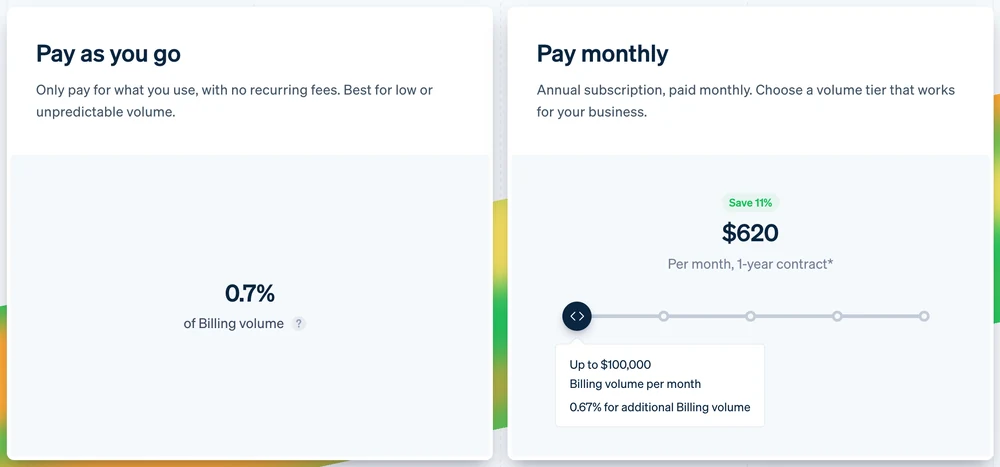
Stripe Billing’s pricing page. The left card is the one a solo creator pays: 0.7% of every subscription payment, on top of the 2.9% + $0.30 card fee. The right card starts at $620 a month and is built for much bigger businesses.
On a $10 payment that is 7 cents. Small, but Substack lists it as its own “Stripe Billing” line in its fee table. Whatever tool you pick, ask whether that 0.7% is already inside its price or comes on top. Stripe Billing on its own also delivers nothing: it charges the card, and you connect the files or members area yourself.
What the tool has to do besides charge
Taking the money is half the job. The tool also has to:
- Open access the moment someone pays, by sending the file, adding them to a members area, or tagging them in your email list.
- Close access when they cancel or stop paying, on the right date, without you checking a spreadsheet.
- Send receipts and renewal reminders, so nobody is surprised by a charge.
- Give subscribers a customer portal to update their card or cancel, so they do not have to email you.
- Collect sales tax or VAT where you owe it. Gumroad collects and pays sales tax for you as the merchant of record, and Payhip collects EU and UK VAT plus US and Canadian sales tax on your behalf. With your own Stripe, or a checkout like CartMango where you stay the seller of record, tax is yours to set up.
If you are comparing tools on exactly these points, the guide to recurring billing software cuts 21 options down to 6. For course and community memberships, the breakdown of membership site platforms prices 8 of them at 100 members.
Job 4: Rescue failed cards, and let people leave cleanly
Subscribers leave in 2 ways. Some decide to cancel. Others never decide anything: their card expires, their bank blocks the renewal, and the payment fails.
Recurly, a subscription billing company, tracks both across its customers. In its 2026 benchmarks, the median annual churn rate for digital media and entertainment was 4.14%, according to Recurly’s churn rate benchmarks. Failed payments caused 1.59 points of that, rather than people choosing to go. That is roughly 38% of the total. Recurly’s own description of this group: it “reflects nothing about their intent to stay.”
Many of those payments can be saved. By Stripe’s own figure on its Billing page, businesses using Stripe recover 55% of failed payments on average. Stripe credits Smart Retries, a card account updater and cancellation surveys, and its dunning tools add email alerts. Dunning is the name for this whole routine, and your tool should run at least these parts on its own:
- Automatic retries. The tool tries the card again over the next few days, at different times.
- A “your payment failed” email with a 1-click link to update the card.
- A “your card is about to expire” email sent before the renewal date, not after it fails.
Ask before you sign up: does the tool retry failed payments on its own, and does it email the subscriber? If the answer is “you can set that up with Zapier”, plan on building and fixing it yourself.
Then make leaving easy. Put a cancel link in the customer portal and in every receipt. Let people switch from monthly to yearly, or pause for a month, from the same page. I would rather lose a subscriber in 2 clicks than keep an angry one for 1 more month.
Job 5: Keep your subscribers billable if you switch tools
Moving subscribers to a new tool is the job none of the 4 long guides on page 1 for this search covers (Stripe, The Good, Squarespace and SureCart). It also gets harder with every subscriber you add.
A Shopify seller in a r/ecommerce thread about where to run a subscription business put it plainly. They have used Recharge for “nearly 8 years”, say its “customer service sucks”, and would switch to a rival app “but it’s a pain to migrate all customers over.” Recharge runs physical boxes, but digital sellers hit the same wall on any tool that owns the billing.
The reason is where the subscription lives. Some tools create the subscription inside their own system and charge the card on their own schedule. Close your account and the schedule goes with it, so every subscriber stops paying until they sign up again somewhere new. Other tools leave the subscription running in the payment account you connected, so it keeps billing after you leave.
Of these 8 tools, 3 keep billing your subscribers after you leave (ThriveCart, Kajabi and CartMango), 3 stop all of it (Gumroad, Payhip and Podia), and SendOwl and SamCart stop part of it.
| Tool | After you leave | Detail |
|---|---|---|
| Gumroad | Billing stops | Recurring payments are lost |
| Payhip | Billing stops | Lost even with your own Stripe or PayPal connected |
| Podia | Billing stops | Lost even with your own Stripe or PayPal connected |
| SendOwl | Stripe billing stops | Closing the account cancels Stripe subscriptions and ends access |
| SamCart | Partly stops | Stripe fixed-term plans and all PayPal plans are lost |
| ThriveCart | Keeps billing | You keep recurring payments |
| Kajabi | Keeps billing | You keep recurring payments |
| CartMango | Keeps billing | You keep recurring payments |
The SendOwl row comes from our SendOwl review, which read SendOwl’s own help pages, and the rest from the comparison table we keep at CartMango. Connecting your own Stripe account is not enough on its own. Payhip and Podia both let you connect your own Stripe or PayPal, and the subscriptions still end when you close the account. SendOwl works the same way on Stripe: closing the seller account cancels every Stripe subscription you sold.
Patreon and Substack are not in that table, so the same advice applies to them. Before your first subscriber pays, email the tool’s support and ask 1 question: “If I close my account, do the subscriptions I created keep charging through my own Stripe or PayPal account?” Get the answer in writing. Moving 10 subscribers by hand is annoying. Moving 500 means asking 500 people to type their card in again, and some of them never will.
FAQ
Can you make money from subscriptions?
Yes, because each buyer pays again. 50 subscribers at $10 a month is $500 a month before fees, every month they stay. The catch is churn: some leave each month, so you need new subscribers just to stay level. Cut the fees per renewal, rescue failed cards, and that $500 holds up much better over a year.
What is a subscription trap?
A subscription trap is a plan that is easy to start and hard to stop: a renewal the buyer did not notice, a trial that turns into a charge with no warning, or a cancel option hidden away. Avoid all 3. Show the renewal date at checkout, remind people before a trial ends, and put a cancel link in every receipt.
What are the best websites to sell subscriptions?
Pick by what you sell: Payhip or Gumroad for downloads and member content, CartMango for billing subscribers and delivering their files, Patreon for fan memberships with a feed, Substack for a paid newsletter, SureCart or WooCommerce Subscriptions on a WordPress site, and Recharge for physical boxes on Shopify. Then compare the fee per renewal and what happens to your subscribers if you leave.
Can I sell subscriptions without a website?
Yes. Payhip and Gumroad host a store page for you, and CartMango’s Mini Pages host a simple sales page that links straight to the checkout. You share the link anywhere: your Instagram bio, your email list, a YouTube description. The guide to selling without a website covers the full setup.
Before you sell subscriptions online, pick where they live
When you sell subscriptions online, most of the jobs above can be fixed later. You can add a yearly plan or switch on failed-payment emails in an afternoon. Where the subscriptions live is a choice that gets harder to change with every person who signs up.
If you want yours somewhere you can walk away from, CartMango bills monthly, yearly or custom intervals with a 0% cut on each renewal. Close your CartMango account and the subscriptions you created keep billing, so the recurring revenue keeps coming to you. It is free right now, from $10 a year once paid plans start in November.
About the Author

👋 I’m Welly, founder of CartMango (the site you’re on), a checkout platform for digital product sellers. We’ve previously processed $179M+. I also run BirdSend (email marketing tool, 3.1B+ emails sent). On the side I show other non-techie digital sellers how I use AI workflows to automate 50%+ of my operations. Find me on LinkedIn.
Related Reading
- Recurring Billing Software: 21 Options Cut Down to 6: which tool to bill subscriptions with, every price read at the vendor
- Membership Site Platform: 8 Compared at 100 Members: for memberships with courses or a community attached
- Gumroad vs Stripe: what each one charges on a $20 sale, and what the gap buys
- Patreon Fees: 10% Advertised, 19% Real on a $5 Pledge: the full fee stack if you bill fans on Patreon