

SureCart fits a WordPress site selling digital files, subscriptions or courses, where its free plan covers the whole job for 2.9% of each sale. WooCommerce fits physical stock, shipping and unusual add-ons. SureCart vs WooCommerce splits on what you pay for: SureCart bills the sale, WooCommerce bills the feature.
Every price below was read at the vendor’s own page. SureCart Pro drops the 2.9% for $199 a year, so the free plan costs more above roughly $6,862 of annual sales. WooCommerce core is free and takes nothing per sale, then charges $279 a year for Subscriptions and $159 a year for AutomateWoo.
If you have already read a few SureCart vs WooCommerce comparisons, you are probably working from a number SureCart stopped charging.
I read the 6 pages ranking for this that are not the vendor or a forum thread. 5 of them print a price for SureCart’s free plan. All 5 say 1.9%. SureCart’s own pricing page says 2.9%.
One of the 5 was refreshed in July 2026 and still prints it.
A full point sounds small until you set it against a licence fee. This post prices both plugins from what the vendors charge right now, then walks the 5 situations that decide it. In 1 of them the answer is neither.
Key Takeaways
- SureCart’s free plan takes 2.9% of every sale. 5 of the 6 comparisons ranking for this keyword still print the retired 1.9% rate.
- SureCart Pro removes that fee for $199 a year. Pro wins above roughly $6,862 in annual sales, about $572 a month.
- WooCommerce core takes nothing per sale. Subscriptions costs $279 a year and AutomateWoo $159, and SureCart includes both free.
- Your payment processor can decide it before any feature does. SureCart documents 5, WooCommerce lists 49 official payment extensions.
- WPML has no compatibility page for SureCart. It lists WooCommerce as fully compatible, tested August 2026.
What SureCart vs WooCommerce comes down to
WooCommerce keeps your shop inside your own WordPress database. SureCart keeps the storefront on your site and runs the rest on its own servers, which its documentation calls a headless setup: “SureCart is a headless eCommerce platform where the storefront is hosted on your WordPress website while the heavy lifting is handled by SureCart servers.”
That single difference is where most of these comparisons start, and where most of them stop. On its own it does not tell you which one to install.
A wrong price is one thing a comparison post can cost you. The Online Selling Mistakes Challenge covers 5 more, over 5 days by email, free.
The size gap tells you more than the architecture does. The plugin directory puts WooCommerce at 7+ million active installations and SureCart at 80,000+. That is roughly 87 times more sites running WooCommerce.
The gap says little about quality. SureCart holds 4.8 stars across 282 reviews, WooCommerce 4.5 across 4,823.
What it does predict is compatibility. Your theme, your page builder and your host were almost all tested against WooCommerce first. If something breaks at 11pm, somebody has probably already written about it.
The 2 points these comparisons spend longest on are speed and support. Neither one settles the choice.
Moving the cart off your server does take load off it, which is the reason SureCart is built that way. Support splits on who you can ask: SureCart is a company you hold an account with, while the free WooCommerce plugin comes with documentation, community forums and whoever built your site.
Neither of those is the thing you will regret. The first thing that does is a number.
The SureCart price on page 1 is one the company stopped charging
All 5 comparisons that quote a price put SureCart’s free plan at 1.9%, and 4 of them put Pro at $179 to $249 a year. SureCart’s own page says 2.9% and $199.
| Page | What it says SureCart’s free plan costs | What it says Pro costs |
|---|---|---|
| DIY Dream Site | 1.9% transaction fee | $179 to $249 a year, lifetime $499 to $1,499 |
| LiteExtension | “a small transaction fee (1.9%)” | $179 to $249 a year, lifetime $499 to $1,499 |
| EcommerceGold | 1.9% | $179, renews at $199, lifetime $599 |
| YITH | “a 1.9% fee for each transaction” | Grow $39 a month, Scale $69 a month, lifetime $1,599 |
| HeroThemes | 1.9% | “According to recent data, $179/year” |
| WPCrafter | states no price at all | states no price at all |
| SureCart’s own pricing page | 2.9% | $199 a year, or $699 once |
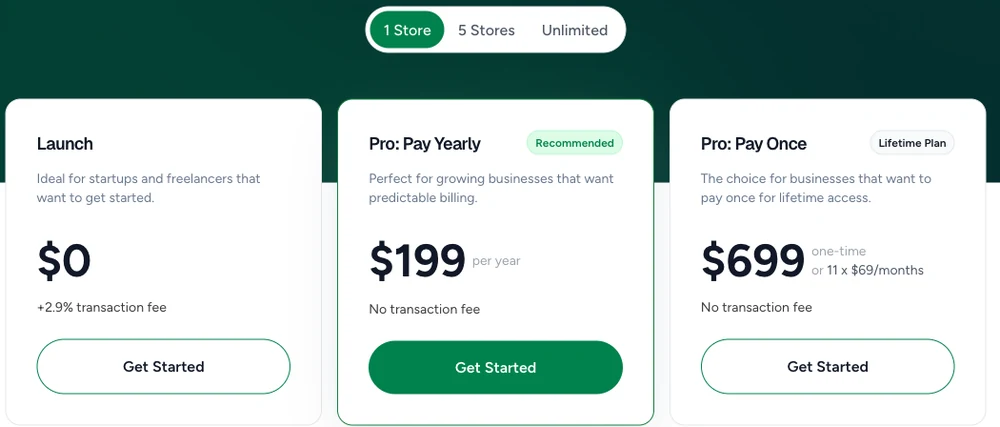
Going from 1.9% to 2.9% raises what SureCart takes by 52.6%. On a store selling $12,000 a year that is $348 instead of $228, so the reader who planned around the old number is short by $120 in year one.
The lifetime licence moved further than the fee did. The 2 pages quoting a lifetime range both start it at $499, EcommerceGold says $599, and SureCart charges $699. That is $200 more, on the plan people buy so they can stop thinking about price at all.
And the freshness signals are backwards. HeroThemes updated its post in July 2026 and introduces the dead figure with the words “According to recent data”. YITH is describing a Grow and Scale monthly structure SureCart does not sell at all any more, then concludes from it that “it’s clear that SureCart is more expensive than WooCommerce”.
Now look at who writes them. SureCart’s own site ranks for the keyword, and YITH sells more than 100 competing WooCommerce extensions.
LiteExtension sells the migration service you buy if you switch. HeroThemes sells WordPress themes and support plugins. WPCrafter’s page carries an affiliate disclosure, and DIY Dream Site’s is written by a SureCart customer who bought the lifetime licence.
None of that makes them wrong. All of it is a reason to check the numbers yourself.
What WooCommerce costs once it does the same jobs
WooCommerce core is free, open source, and takes 0% of your sales.
That part is true, and it is the whole reason 7 million sites run it.
The cost arrives when you need something core does not do.
For a digital seller the 2 extensions that come up first are recurring billing and abandoned-cart recovery, and WooCommerce charges $279 and $159 a year for them while SureCart includes both on the free plan and takes 2.9% of each sale instead.
| Job | WooCommerce | SureCart |
|---|---|---|
| Recurring subscriptions | Subscriptions, $279 a year | Included on every plan, free one too |
| Abandoned cart recovery | AutomateWoo, $159 a year | Included on every plan, free one too |
| Order bumps and one-click upsells | Paid extensions | Included on every plan |
| Automatic sales tax and EU VAT | Configuration or a paid extension | Included, via TaxJar |
| Per-sale platform cut | None, ever | 2.9% on free, none on Pro |
SureCart’s own pricing page is unusually blunt about this: “From Free to Pro Unlimited, you get everything you need to sell online, no feature restrictions.” Its tax documentation says the same about TaxJar calculations: “you don’t have to pay anything extra for this helpful feature. It’s included in your plan!”
So the 2 extensions above cost $438 a year on WooCommerce. SureCart’s free plan reaches $438 in fees at $15,103 of annual sales.
A store selling under that gets both jobs done for less on the free plan, and a bigger one gets them for less on the licences.
SureCart Pro at $199 costs less than the 2 licences together, whatever you sell.
2 cautions before you build a budget on any of this. Nobody needs every extension. A store selling one-off downloads with no subscriptions and no cart emails pays WooCommerce nothing at all, and core handles downloadable products without a single add-on. Our own walkthrough of selling digital downloads through WooCommerce does the whole setup in the free plugin.
And treat SureCart’s own arithmetic carefully. Its WordPress.org listing claims that matching SureCart’s features “would cost you $2,849 per year, per store, in WooCommerce add-ons”, and DIY Dream Site repeats that figure as though it were a finding.
SureCart shows no working for it. The same listing sources it to “reasons told to us by SureCart merchants that switched from WooCommerce”, which is a survey of its own customers rather than a price audit. The renewal-cost angle is real, and we priced it properly across 5 WordPress ecommerce plugins at year 1 and year 2 rates.
If your store is still under about $572 a month
Take the free plan and pay the 2.9%.
SureCart Pro costs $199 a year and removes the 2.9%, so the 2 plans cost the same at $6,862 of sales a year, which is $571.84 a month: below that the free plan is cheaper, above it Pro is.
| Yearly sales | SureCart free, at 2.9% | SureCart Pro | Cheaper |
|---|---|---|---|
| $2,000 | $58 | $199 | Free |
| $5,000 | $145 | $199 | Free |
| $6,862 | $199 | $199 | Level |
| $12,000 | $348 | $199 | Pro |
| $30,000 | $870 | $199 | Pro |
Credit where it is due: FluentCart’s comparison, which Google’s summary cites but which does not rank on page 1, published this break-even before we did.
The table leaves out 2 things. The 2.9% sits on top of what Stripe or PayPal charges, not instead of it, which HeroThemes gets right even while quoting the wrong rate. And the $699 lifetime licence needs 3.5 years of Pro to pay for itself, so it only makes sense if you are confident the store outlives that.
The same crossover runs through WordPress Stripe plugins, several of which take their own cut on top.
If Stripe will not open an account in your country
Take WooCommerce, unless your country is covered by one of SureCart’s 5 processors.
SureCart documents Stripe, PayPal, Mollie, Paystack and Razorpay. WooCommerce’s official payments category lists 49 extensions and offers a filter labelled “Select a country to discover local payment methods”.
Apply the same who-benefits test here as to the blogs. The top reply telling a seller SureCart “is still the best option” carries Reddit’s own flair, “Brainstorm Force employee“. Brainstorm Force owns SureCart. The processor list in that comment is accurate as far as it goes. It is still an employee answering a stranger.
This is not theoretical. A seller in an r/Wordpress thread described leaving after paying for a year:
I stopped using SureCart after one year of premium pro plan with them.
His reason was a missing gateway in his country. In his words SureCart had said Razorpay was “under development since they released beta first varient which i used few yers ago”, and he upgraded to the paid version anyway.
It never arrived while he was paying. He kept WooCommerce running alongside it, in his words “more reliable since It stays in my server”, and WooCommerce carries Razorpay as a free official extension.
That gap has since closed for Indian merchants, and only for them. SureCart now documents a Razorpay connection, and its own doc sets out where it stops.
The hard limit is currency: “Currently, Razorpay requires Indian Rupee (INR). If another currency is used, Razorpay will not appear as a payment option at checkout.” Availability also “depends on the customer’s billing country”. So Razorpay answers the Stripe problem for anyone billing in INR, which in practice means India.
Then come the smaller catches, 3 of them. Razorpay blocks live payments unless your Business Website URL is verified and matches the site hosting the checkout, “even if the processor is connected successfully in SureCart”. The connection only works if you are already signed in to Razorpay in the same browser, which SureCart says is “currently under investigation by the Razorpay team”. And subscriptions need Recurring enabled on your Razorpay account separately.
So SureCart fixed that particular complaint. The risk it points at has not moved.
5 processors is a short list, and if yours is not on it there is no extension to install. The cost of choosing WooCommerce here is the hosting and maintenance you already pay, plus a gateway extension that is usually free, against SureCart’s $0 or $199.
On WooCommerce the question is usually which of the 49 to pick, which is a different problem. Whose account holds your money differs across the main WordPress options.
If your shop has to work in a second language
Take WooCommerce. This one is not close, and not 1 of the 6 comparisons mentions it.
WPML is the standard translation plugin for WordPress. Its compatibility page for WooCommerce is live and says WooCommerce “is fully compatible with WPML”, last tested in August 2026. The equivalent page for SureCart returns a 404, because there is not one.
2 sellers raised it in separate r/Wordpress threads. One put it bluntly: “you don’t even support multilingualism! (Not even via an external plugin such as WPML)”.
He pre-empted the usual workaround in the same comment: “Loco Translate can only translate one language; it cannot make a website multilingual.” A second seller, in a later thread, was still “waiting for the day SureCart implements multiple languages for the shop”.
Price it before you commit. WPML sells 3 tiers, and a shop needs the middle one, Multilingual CMS at 99 euros a year. The 39-euro Multilingual Blog tier lists E-Commerce support as “Not included”. WPML also says its separate Multilingual and Multicurrency add-on “needs to be installed for full translation and multicurrency capabilities”, so budget the 99 euros a year and the setup time, not just the licence.
If your products only ever need to read in 1 language, ignore this section entirely. If they do not, it decides the whole comparison on its own, whatever the pricing says.
If the person adding products every week is not you
Take SureCart, and accept the trade that comes with it.
This is the one thing the 87x install gap does not help with.
A client, a partner or a virtual assistant who logs in once a week to add a product does not benefit from WooCommerce’s extension library. They meet its admin instead, and that is the whole of their experience of the plugin.
On the ease question, the threads agree. “Use SureCart if you don’t have any web dev knowledge”, says a commenter, while another calls WooCommerce “not the easiest for the average person to manage”. The fullest version splits it down the middle: “If you’re an advanced user, go for WooCommerce. If you want things easy, go for SureCart.” The review scores point the same way, 4.8 against 4.5.
That is agreement on ease, and not on the overall answer. The same threads lean heavily to WooCommerce once ownership and flexibility come up.
It costs $0 on the free plan or $199 a year on Pro, and what you trade is the install-base advantage: fewer tested integrations, a smaller pool of people who have hit your problem before, and a checkout you cannot rebuild as freely. If the WooCommerce admin is the only real complaint, that is worth fixing before you migrate a whole store: we compared checkout plugins built for Woo that do exactly that.
If you are charging for a service and shipping nothing
Take neither.
Most of these comparisons land on a winner, which is easier to do when you have something to sell. The most useful answer came from a seller who described his case plainly: the site “wont be selling any physical or digital products. It will only be taking one-time payments for services”. 3 separate people told him not to install an ecommerce plugin at all, and to use a payment form instead.
They are right. A full shop plugin brings product types, inventory, shipping zones, order statuses and a cart you will never use. If all you need is a page that takes a payment, the shorter routes are a form plugin such as Fluent Forms, a Stripe payment link, or a hosted checkout like Payhip, Gumroad or CartMango, which is mine, that lives outside WordPress entirely.
They price differently from a shop plugin too, and not all the same way. Payhip takes 5% on its free plan and Gumroad 10% plus $0.50, so on those 2 the cut is the thing to check against your order value. CartMango is free until October 2026 and starts at $10 a year after that, with no percentage on top.
CartMango is mine, so discount it accordingly. It belongs on the list for the same narrow reason as the others: it takes the payment and sends the file without you running a store. It is not a WordPress plugin and it will not replace WooCommerce for anyone who needs stock, shipping or a product catalogue on their own site, which is why it is not in the tables above.
If you are somewhere between the 2 and do want files delivered from your own site, the honest field is wider than these 2 names. We sorted the WooCommerce alternatives into 4 groups by how much of the setup you keep running.
What to settle before you install either one
Both directions have an exit cost, and neither vendor advertises it.
Leaving WooCommerce means moving products, orders and customers out of your own database, which is tedious but entirely yours to do. Leaving SureCart works differently, because the data you are moving lives on SureCart’s servers. Subscriptions are the sharp edge: SureCart manages them on its own platform rather than directly in your Stripe or PayPal account, so recurring payments do not simply carry on if you go.
Before CartMango I built and ran a checkout called Zaxaa, so I have been the company in the middle, running other people’s recurring billing.
Your billing on the day you want to leave is the thing to check, and it is cheaper to check before you connect a payment processor than after.
A developer in the February 2024 thread put the same worry plainly: with WooCommerce “you own your site”, while with SureCart “it appears you are just renting a website on a proprietary system”. He was careful about it, adding that a company folding “can happen with any business”. That hypothetical has not happened, and SureCart is still shipping. His ownership point is the part that survives.
One more note on sourcing, because Google’s AI summary leans on that same 2024 thread as community consensus. Its own participants did not read it that way.
“The comments on this post seem a lot like AI generated shill”, wrote one. “Whoa what’s going on with the bots on this post”, wrote another. The original poster agreed: “There are definitely more bots than humans here.” It is archived, so none of it can be corrected now. Every quote above links back to the thread it came from, so you can read the surrounding argument rather than my selection of it.
Sales under about $572 a month point to SureCart’s free plan and anything above $6,862 a year to Pro, while a second language, a missing payment gateway or a service with nothing to ship overrides the pricing entirely.
| Your situation | Pick | What it costs | The catch |
|---|---|---|---|
| Under about $572 a month in sales | SureCart, free Launch plan | 2.9% per sale | Costs more than Pro once you pass $6,862 a year |
| Selling subscriptions at real volume | SureCart Pro | $199 a year, or $699 once | Subscriptions live on SureCart, not your Stripe |
| Stripe will not open in your country | WooCommerce | Free core, gateway usually free | You run updates, security and hosting |
| Shop needs a second language | WooCommerce plus WPML | Core free, WPML CMS 99 euros a year | No SureCart equivalent exists |
| Someone else adds the products | SureCart | Free, or $199 a year | Fewer tested integrations than WooCommerce |
| Taking payments for a service | Neither | A form plugin or hosted checkout | No product catalogue, which is the point |
FAQ
Is SureCart actually free?
The Launch plan costs nothing and carries every feature, including subscriptions, order bumps and tax calculation. It charges 2.9% of each sale on top of your payment processor’s fee. That is cheaper than the $199 Pro plan until you are selling about $6,862 a year, and more expensive after.
Can I run SureCart and WooCommerce on the same site?
Yes, both can be active on 1 WordPress install, and people do it while migrating. Running both permanently means 2 sets of products, 2 order histories and 2 checkouts your customers can reach, so it is a transition state rather than a setup.
Is the $699 SureCart lifetime licence worth it?
It replaces $199 a year, so it pays for itself after 3.5 years. That is a long bet on a plugin whose data sits on the vendor’s servers. If the store is established and you have already run SureCart for a year, the maths is reasonable. For a store that does not exist yet, the yearly plan keeps your options open.
Which is better, WordPress or WooCommerce?
They are not competitors. WordPress is the website, and WooCommerce is the shop that bolts onto it. Every WooCommerce store is a WordPress site. The real question is which selling plugin you add on top, which is what this comparison is about.
What is the best alternative to WooCommerce?
It depends which part you want to stop running. SureCart and Easy Digital Downloads replace the plugin while keeping your site. Shopify replaces the whole thing. Hosted checkouts such as Payhip or Gumroad replace the store entirely for digital files. We grouped the options 4 ways with live prices for each.
Which big companies use WooCommerce?
WooCommerce publishes customer stories rather than a public list, and most large stores do not advertise their stack. The more useful number is the 7+ million active installations on the WordPress.org directory, which is why hosts and themes test against it first.
What is the best cart plugin for WooCommerce?
Reach for one only when a specific step is losing you sales. Checkout field editors trim the form, side-cart plugins keep shoppers on the page, and AutomateWoo at $159 a year chases the ones who leave. We priced the WooCommerce checkout plugins against what each actually fixes.
So which should I install?
SureCart vs WooCommerce resolves on your situation rather than on an overall winner. Take SureCart if you sell digital files or subscriptions, want the features without licences, and your payment processor is on its list of 5. Take WooCommerce if you ship physical goods, need a second language, or need a gateway only its 49 payment extensions cover.
If the answer turned out to be neither
Work out which of the 5 situations above is yours, then price that one route at today’s numbers rather than the ones a comparison post quoted. On this keyword that single step changes the answer, because the figure most guides hand you is a full percentage point light.
And if the honest answer for you turned out to be the last situation, where the store is the part you do not need, a hosted checkout skips the plugin question entirely. CartMango takes the payment, delivers the file and keeps the subscription paying you if you ever leave, on your own Stripe or PayPal account.
About the Author

👋 I’m Welly, founder of CartMango (the site you’re on), a checkout platform for digital product sellers. We’ve previously processed $179M+. I also run BirdSend (email marketing tool, 3.1B+ emails sent). On the side I show other non-techie digital sellers how I use AI workflows to automate 50%+ of my operations. Find me on LinkedIn.
Related Reading
- WordPress shopping cart plugins: which of the plugins named on page 1 can actually take a payment on their own
- Online store for digital products: the 3 store types and what each takes from a $10 sale
- WooCommerce digital downloads: setting up file delivery in the free core plugin, with no add-ons
- WooCommerce alternatives: where to look if SureCart vs WooCommerce turned out to be the wrong question for your store