

The main WordPress Stripe plugin options are the official WooCommerce Stripe Payment Gateway for an existing store, Accept Stripe Payments for a single buy button, and WP Simple Pay or WPForms for payment forms. They differ most on what they take per sale. Every fee below was read at the plugin maker’s own pages.
WP Full Pay’s free version takes 5% of every sale. Stripe takes 2.9% plus 30 cents. Install that plugin and the thing sitting between you and your money costs more than the payment processor does.
It is the last plugin you would expect to be the expensive one. It is free, it has 9,000 active installs, and it turns up on most lists of good free Stripe plugins.
So I priced all of them. Not the licence, which every roundup already covers, but the percentage that comes out of each sale before you ever see it.
4 of these plugins take nothing beyond Stripe’s own rate. 6 take between 2.9% and 5% on top of it. Only 1 of those 6 prints the number next to the price.
Key Takeaways
- Stripe charges 2.9% plus 30 cents on a domestic card. Any percentage above that belongs to the plugin.
- 6 popular Stripe plugins add their own cut: 2.9%, 3%, 4.9% or 5%. WP Full Pay’s free version takes more than Stripe does.
- Only 1 of those 6, SureCart, prints the number next to the price. On 3 others it sits inside a panel you have to open.
- A page-1 guide calls its own 3% “the transaction fee that Stripe charges”. Stripe publishes no 3% payment rate.
- The official WooCommerce Stripe gateway has 700,000 installs and the lowest rating here, 3.1 stars, with 39% of reviews at 1 star.
- Below roughly $1,600 a year in sales, paying the percentage beats buying a licence on 3 of these plugins.
The 2 kinds of WordPress Stripe plugin
Before any of the money matters, work out which of these you are shopping for. The same phrase is used for 2 completely separate jobs.
A payment gateway adds Stripe as a payment option to a store plugin you already run. The official WooCommerce Stripe Payment Gateway is the obvious one, written by Stripe and WooCommerce together. Payment Plugins for Stripe is the main free alternative. Both need WooCommerce underneath them, so neither does anything on its own.
Most sellers meet the percentage after they have already made the sales. Our free 5-day Online Selling Mistakes Challenge applies the same after-the-fact logic to the other 4 places money quietly goes missing.
A payment form or button plugin does the whole job by itself. You drop a shortcode or a block on a page, a card field appears, and the money lands in your Stripe account. There is no cart, no store, no product catalogue. WP Simple Pay, WPForms, Accept Stripe Payments, WP Stripe Checkout and WP Full Pay all sit here.
If you are selling 3 things and you do not want to run a shop, the second kind is what you want. If you already run WooCommerce, install the gateway and stop reading roundups.
There is a third group that shows up in these lists: store plugins like Easy Digital Downloads and SureCart, which include Stripe as 1 feature of a much bigger tool. I priced those separately in the WordPress ecommerce plugin comparison, so they get 1 row each here and no more.
What each WordPress Stripe plugin takes on top of Stripe
On a $50 sale, the official WooCommerce gateway and Accept Stripe Payments leave you $48.25, WP Simple Pay Lite and WPForms Lite leave you $46.75, and WP Full Pay’s free version leaves you $45.75. The gap is small on 1 sale and it is $250 across 100 of them.
| Plugin | Free version | Its own cut | Fee on a $50 sale | You keep |
|---|---|---|---|---|
| WooCommerce Stripe Gateway | Yes | None published | $1.75 | $48.25 |
| Accept Stripe Payments | Yes | None published | $1.75 | $48.25 |
| WP Stripe Checkout | Yes | None published | $1.75 | $48.25 |
| Payment Plugins for Stripe | Yes | None published | $1.75 | $48.25 |
| SureCart Launch | Yes | 2.9% | $3.20 | $46.80 |
| WP Simple Pay Lite | Yes | 3% | $3.25 | $46.75 |
| WPForms Lite | Yes | 3% | $3.25 | $46.75 |
| Easy Digital Downloads free | Yes | 3% | $3.25 | $46.75 |
| MemberPress Launch | No, $199.50 a year | 4.9% | $4.20 | $45.80 |
| WP Full Pay free | Yes | 5% | $4.25 | $45.75 |
| CartMango, a hosted checkout | Free until October 2026 | None | $1.75 | $48.25 |
Every fee column adds Stripe’s own 2.9% plus 30 cents, which nothing on this list replaces. Stripe’s published rate is 2.9% plus 30 cents on a domestic card, with 1.5% more on an international one.
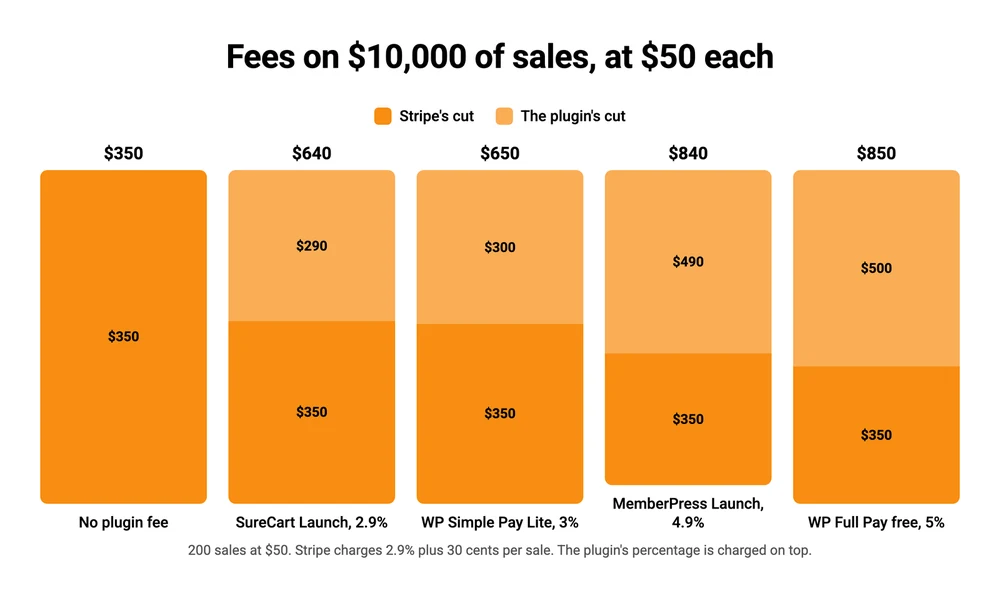
The same fees across a year of selling. At 200 sales of $50, WP Full Pay’s free version takes $500 while Stripe takes $350.
I am the founder of CartMango, so treat the last row with the scepticism it deserves. It is in the table because it is the one row that answers the question the table asks, and leaving it out would be its own kind of dishonest. To be clear about it up front: CartMango is a hosted checkout you link to from a WordPress page rather than a plugin you install. That limitation is covered further down.
3 of these numbers are worth saying out loud.
WP Full Pay’s free version takes 5%. That is more than Stripe charges to process the payment. Its WordPress.org listing states it plainly: a 5% application fee per transaction.
MemberPress Launch charges 4.9% on a plan you already paid for. Launch is $199.50 a year at the introductory rate and $399 at renewal, and the fee does not go away until you move up to Growth.
SureCart is the odd one out, because its own 2 sources disagree. Its pricing page and its docs both say the free Launch plan adds 2.9%. Its WordPress.org listing still says 1.9%. Trust the pricing page, which is the one they keep current.
4 of the 6 do publish the figure on their own pricing page, just not where you would look for it. So this is a findability problem rather than a hidden one.
Only SureCart prints it next to the price, under the $0 on its plan card. WPForms puts it inside the feature comparison you reach by clicking “See all features”. WP Full Pay and MemberPress both park it in a questions panel at the foot of the page.
WP Simple Pay and Easy Digital Downloads do not put the number on their pricing pages at all. For Easy Digital Downloads the only signal is that its cheapest tier omits the “No Platform Fees” line the dearer ones carry.
The 3% that page 1 calls a Stripe fee
WPForms publishes one of the roundups on page 1 of this search, covering the 7 best Stripe payment plugins. It says this about its own plugin:
if you upgrade to WPForms Pro, you can even remove the 3% transaction fee that Stripe charges for payments
Stripe’s published rate is 2.9% plus 30 cents on a domestic card, and the whole schedule sits on a single page. There is no 3% payment rate on it, at any volume or on any product.
The 3% is WPForms’. Its own documentation says so, and says it clearly:
Stripe’s processing fee starts at 2.9% + 30 cents per successful card charge, as outlined on Stripe’s pricing page. If your WPForms license is inactive, an additional 3% processing fee is applied by WPForms to each transaction.
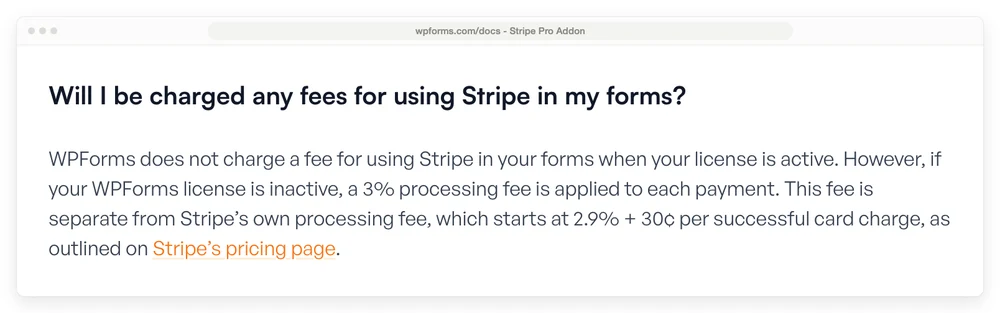
WPForms’ own documentation, which states the 3% is applied by WPForms and is separate from Stripe’s fee.
The same article gets the identical mechanic right when it is describing somebody else. About WP Simple Pay it says the free version “adds a 3% fee on top of Stripe’s own rate”, which is exactly correct. 2 descriptions of the same thing, 100 lines apart, and only the one about a rival names the right company.
I do not think anyone did that on purpose. It reads like a sentence that got shortened once too often. It matters anyway, because a reader who believes it will treat the 3% as unavoidable, when it is the one part of the bill they can remove.
The point where a licence beats the percentage
A percentage and a licence cross over at a specific number, and it is lower than most sellers expect.
Take WP Simple Pay. Its Personal licence is $49.50 for the first year and $99 after that, and any paid licence removes the 3%. Divide the licence by 0.03 and you get the yearly sales figure where they cost the same.
| Plugin | Cheapest licence that clears the fee | First-year break-even | Renewal break-even |
|---|---|---|---|
| WPForms Basic | $39.60, then $99 | $1,320 in yearly sales | $3,300 |
| WP Simple Pay Personal | $49.50, then $99 | $1,650 | $3,300 |
| WP Full Pay Basic | $79.50, then $159 | $1,590 | $3,180 |
| SureCart Pro | $199 a year | $6,862 | $6,862 |
| Easy Digital Downloads Extended | $199.50, then $399 | $6,650 | $13,300 |
Those crossover points split into 2 groups, so read your own row rather than the range. The 3 form plugins cluster tightly: WPForms, WP Simple Pay and WP Full Pay all pay for themselves somewhere between $1,320 and $3,300 of yearly sales. The 2 store plugins sit far higher, at $6,650 and above, so a seller doing $5,000 a year is genuinely better off on SureCart’s free plan, or on the free Stripe support built into Easy Digital Downloads, than buying either licence.
2 of those rows have a catch. Easy Digital Downloads keeps its 3% running through the $99.50 Personal plan and drops it only at the $199.50 Extended pass, so its cheapest licence is not the one that helps. MemberPress is missing from the table because no MemberPress licence at the Launch price clears the fee at all. You need Growth, which is $150 more at the introductory rate, and that gap pays for itself at about $3,100 of yearly sales.
Similar names, very different plugins, and 1 that no longer exists
Install counts and star ratings point in opposite directions here, and it is worth knowing which one you are reading. The WooCommerce Stripe Payment Gateway is the most installed dedicated Stripe plugin on WordPress.org, at more than 700,000 active installs, and the lowest rated plugin in this whole comparison at 3.1 stars.
There are enough reviews behind that number to take it seriously. It has 236 ratings and 93 of them are 1 star, so 39% of everyone who rated it gave it the lowest score available.
Payment Plugins for Stripe WooCommerce sits at 100,000 installs and 4.8 stars from 301 ratings, it is free, and it publishes no cut of its own. Stripe runs a customer story about the company that ranks on page 1 of this search, and 2 separate commenters in the Reddit thread below recommend it by name. It is missing from the 7-plugin roundup WPForms publishes for this keyword.
| Plugin | Active installs | Rating | 1-star share |
|---|---|---|---|
| WooCommerce Stripe Gateway | 700,000+ | 3.1 | 39% |
| Payment Plugins for Stripe | 100,000+ | 4.8 | 5% |
| SureCart | 80,000+ | 4.8 | 4% |
| Easy Digital Downloads | 40,000+ | 4.7 | 6% |
| Accept Stripe Payments | 20,000+ | 4.1 | 17% |
| WP Full Pay free | 9,000+ | 4.2 | 12% |
| WP Simple Pay Lite | 8,000+ | 4.4 | 10% |
| WP Stripe Checkout | 1,000+ | 4.4 | 4% |
The 2 numbers measure different things and both are worth reading. 700,000 installs means the official gateway is maintained, compatible and not going anywhere.
A 39% 1-star share means the people it goes wrong for have a genuinely bad time. If you run WooCommerce you will install it anyway, because it is the official one. Just do not read the install number as a review.
The naming does not help. A r/woocommerce thread asking this exact question opens with a seller asking “there is no official WooCommerce plugin by Stripe but rather a number of third-party plugins?”, which is wrong, and it is wrong in a way that is easy to sympathise with. Further down, another commenter puts it plainly:
There’s so many Stripe gateway plugins with similar sounding names, it’s all very confusing! There should be a master list that differentiates all the gateway integrations.
That thread also shows why a recommendation needs checking against the live listing before you act on it. One of the plugins recommended in it, Stripe Payments For WooCommerce by Checkout Plugins, was cited there with 200,000 installs and 4.4 stars. WordPress.org closed that listing permanently on 23 July 2025 at the author’s request. It cannot be downloaded, and its install count now shows nothing at all.
A second warning in the same thread is worth repeating, from a seller who took over an existing store:
Just a heads up if you use the Stripe Express version, and happen to want to change accounts, it’s a HUGE process. You can’t uninstall the plugin and start again, it locks in your site.
Match the plugin to what you are selling
The fee only matters once you know which kind of plugin you need. 4 questions get you there.
Do you already run WooCommerce? Install the official WooCommerce Stripe Payment Gateway and stop. It is free, it adds no cut of its own, and anything else is a second tool doing the same job. Our guide to choosing a WooCommerce checkout plugin covers what to add on top.
Do you need a form, or a button? A form plugin collects information along with the money, which is what you want for a booking, a commission or a donation with a name attached. A button plugin sells 1 fixed thing.
For buttons, Accept Stripe Payments does the job for nothing extra and 20,000 sites run it.
For forms, WPForms and WP Simple Pay both take 3% on the free version and both drop it once you hold a licence, so the choice is really about the tool. WP Simple Pay does payments and nothing else. WPForms is a form builder that happens to take payments.
A caution on WPForms: its pricing page lists the payment features under the Pro tier while its documentation says any active licence clears the fee, so check that before you buy the cheap one. Skip WP Full Pay unless you are certain you will buy a licence, because its free version takes the biggest cut on this page.
All of them take one-time and recurring payments on the free version, so subscriptions are not the thing that separates them. Wallets are close too: the official gateway carries the longest list, with Apple Pay, Google Pay, Klarna and a set of regional methods, while the form plugins cover cards and the main wallets and put the rest behind a licence.
Are you selling files that need delivering? A form plugin’s job ends when the money arrives. Handing over a protected download is a store plugin’s job, and the honest options are Easy Digital Downloads, SureCart or WooCommerce.
I compared those on cost in the WordPress ecommerce plugin guide and on file delivery in selling digital downloads on WooCommerce. Selling a course instead? The WordPress LMS plugin comparison covers which of those will take a card at all.
How much will you sell this year? Under $1,600, take the free version and the percentage. Over $3,300, buy the licence. Between the 2, it barely matters, so pick on whether you like the plugin.
FAQ
Is there a free WordPress Stripe plugin?
Several, and 4 of them publish no cut of their own on top of Stripe’s rate: the official WooCommerce Stripe Payment Gateway, Payment Plugins for Stripe, Accept Stripe Payments and WP Stripe Checkout. The other free versions cost nothing to install and then take between 2.9% and 5% of each sale.
Which Stripe plugin does WordPress recommend?
WordPress.org does not recommend any plugin. What it publishes is active installs and ratings, which are different signals. The WooCommerce Stripe Payment Gateway leads on installs at 700,000 and trails on rating at 3.1 stars, so neither number alone tells you what to install.
Can I use Stripe on WordPress without WooCommerce?
Yes. A form or button plugin puts a Stripe card field on any page with a shortcode or a block, and no store plugin is involved. WP Simple Pay, WPForms, WP Full Pay, Accept Stripe Payments and WP Stripe Checkout all work this way. You can also skip the plugin entirely and link out to a hosted checkout.
How do I connect Stripe to WordPress?
Install your chosen plugin from Plugins then Add New, activate it, and open its settings. Most now use Stripe Connect, which is an authorise button rather than a copy and paste of API keys. Stripe requires your site to serve HTTPS, which nearly every host now includes.
Do these plugins replace Stripe’s fees?
No, and none of them claims to. Stripe’s rate of 2.9% plus 30 cents applies whatever sits in front of it. The plugin’s percentage, where it exists, is charged on top and goes to the plugin company.
What happens to the fee if my licence expires?
It comes back. WPForms applies its 3% whenever the licence is inactive, which covers a lapsed renewal and the free version alike. Easy Digital Downloads does the same, and its 3% applies to subscription renewals, not only first payments.
What is the difference between WooPayments and the Stripe gateway plugin?
WooPayments is WooCommerce’s own payment product, built on Stripe underneath but billed by WooCommerce. The WooCommerce Stripe Payment Gateway connects your store to a Stripe account you own and control. The Reddit thread above starts with a seller moving off WooPayments for exactly that reason.
What happens if the plugin I am using gets discontinued?
It keeps running on your site, and nobody is fixing it any more. Stripe Payments For WooCommerce by Checkout Plugins was closed permanently on 23 July 2025 at its author’s request, and it had a large install base at the time. No new downloads, no updates, and no security patches when Stripe next changes something. Check a plugin’s WordPress.org listing for a recent update date before you install it, not just a star rating.
A checkout that leaves your Stripe rate alone
Every number in this post answers a single question: how much of a $50 sale reaches your bank. A WordPress Stripe plugin licence is the flat part of that answer and a percentage is the part that grows. Once you are selling regularly, the percentage is the only half that keeps getting bigger.
CartMango is a checkout for digital product sellers, and its answer to that question is 0%. You connect your own Stripe or PayPal account, buyers pay you directly, and CartMango adds nothing on top of what Stripe charges.
It earns its keep by raising what each buyer spends rather than by taking a slice. Order bumps are on every plan, including the $10 one. Upsells, downsells and abandoned cart recovery sit on the $20 tier and above. Every feature is unlocked for everyone until the beta ends in October 2026, and CartMango is free until then.
The honest limits, because they matter on a WordPress post. CartMango is not a WordPress plugin, so you link to its checkout from your page rather than embedding it. Embeddable checkout is on the roadmap and is not live today. A learning management system and a community are planned for October 2026, and affiliate management for September 2026, so if you need any of those now, a WordPress Stripe plugin from this page will serve you better.
About the Author

👋 I’m Welly, founder of CartMango (the site you’re on), a checkout platform for digital product sellers. We’ve previously processed $179M+. I also run BirdSend (email marketing tool, 3.1B+ emails sent). On the side I show other non-techie digital sellers how I use AI workflows to automate 50%+ of my operations. Find me on LinkedIn.
Related Reading
- WordPress ecommerce plugin comparison: what the store plugins cost once the licence renews
- Choosing a WooCommerce checkout plugin: live prices and the block versus classic split
- Selling digital downloads on WooCommerce: file delivery, and the method that leaks your files
- How much does PayPal charge: the other processor rate, broken down by transaction type
- SureCart alternatives: for readers ready to compare store plugins properly