

Which WooCommerce upsell plugin you need depends on when the offer appears. UpsellWP’s free version handles an order bump at checkout, WPFunnels at $103.99 a year handles post-purchase offers, and CartFlows or FunnelKit replace the checkout outright, from $149.50 a year.
An order bump sits beside the pay button. A post-purchase one-click upsell appears after the card is charged and needs a gateway that can re-bill a saved card. Every price here was read at the vendor, where the entry plan at CartFlows and FunnelKit includes neither, so the upsell tier costs $299 a year at both after the first year.
5 tools dominate this search, and 2 of them sell an entry plan with the upsell switched off.
It sits right in the vendor’s own feature list, as a grey cross next to order bumps and next to one-click upsells, on the plan most people would reach for first.
I read all 5 pricing pages to work out which tier carries what, because the summary sitting above the search results does not say.
Below is what each one costs on the tier that does the job, which moment each offer can appear at, and the gateway rule that quietly decides whether a post-purchase upsell will work on your store at all.
Key Takeaways
- CartFlows Starter at $99 a year has a cross next to order bumps and one-click upsells. Pro, at $199, is the tier that has them.
- FunnelKit is built the same way. Basic at $99.50 has no upsells, Plus at $149.50 does, and both renew at full price.
- UpsellWP’s free version gives you order bumps at checkout, which is the single feature most people are shopping for.
- A true post-purchase one-click upsell needs a gateway that can charge a stored card. Free plugins here usually mean Stripe only.
- WooCommerce’s built-in “Up-sells” field is a product-page suggestion box, not a checkout offer, and you fill it in by hand per product.
What a WooCommerce upsell plugin does that WooCommerce cannot
WooCommerce already has a field labelled “Up-sells”. It is not the thing you are looking for.
WooCommerce’s own documentation defines it plainly: “Up-sells are products that you recommend instead of the currently viewed product.” Its docs add that “depending on your theme, up-sells display on the single product page below the product description,” and that “you define up-sells manually in the Linked Products tab of each product.”
Read that again. Instead of, on the product page, and set by hand 1 product at a time.
Not sure what else your store is quietly leaving on the table? Working out where the money leaks is the whole point of the Online Selling Mistakes Challenge, a free email course that sends 1 lesson a day for 5 days.
So the native feature shows a browser a different product before they have bought anything. Cross-sells work the same way, appearing on the cart page, also filled in by hand. Related products are automatic but you cannot choose them: WooCommerce generates those from shared tags and categories, and its docs say outright that “you cannot select related products manually in the merchant.”
None of that is an upsell in the sense people mean when they search for a plugin. Someone in r/woocommerce put the confusion neatly while answering a question about cart and post-purchase offers: “isn’t it done in native WC? I think it is but you have to do manually for each product.”
A plugin is buying you 3 things WooCommerce has no version of at all.
An order bump. A tick-box offer sitting on the checkout page next to the pay button. The customer adds it before paying, in the same transaction, so it lifts average order value without needing a second checkout. Our guide to the order bump walks through what belongs in one.
A post-purchase one-click upsell. An offer shown after the card has already been charged. The buyer accepts with a single tap and never re-enters card details, because the gateway re-uses the card it just took. The One Click Upsell Funnel plugin describes it in its own listing as “additional products that customers can buy with one click checkout, without re-entering their payment details.” That is the version that needs an upsell page behind it.
Automatic targeting. Rules like “show this offer when the cart is over $50” instead of assigning products to each other by hand.
The quoted price is usually for the plan with no upsells in it
CartFlows’ cheapest paid plan costs $99 in year 1 and cannot run an order bump or a one-click upsell. Its Pro plan, which can, is $199 in year 1 and $299 every year after that. Google’s AI Overview for this exact keyword recommends CartFlows “including order bumps, checkouts, and one-click upsells (from $99/year)”, and quotes FunnelKit at “from $99.50/year”. Neither of those 2 plans runs either feature, and the tier that does costs $299 a year at both once the first year ends. That is roughly 3x the number in the summary.
Here is CartFlows’ own pricing page.
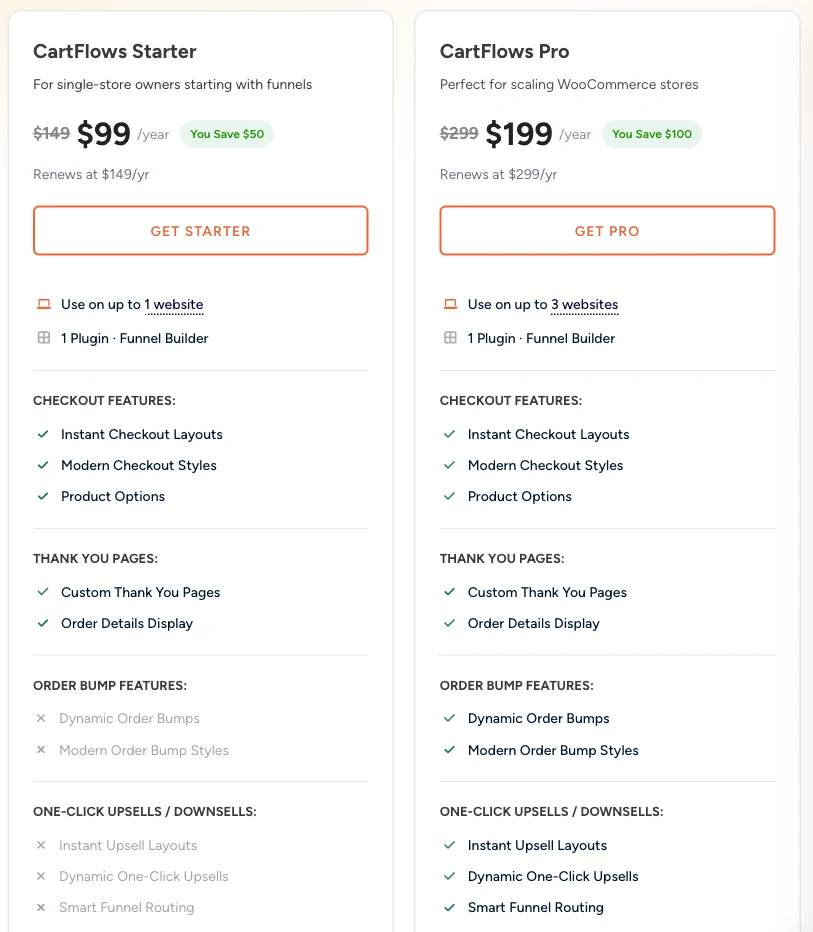
The odd part is that CartFlows itself is clearer about this than Google’s summary of it. CartFlows publishes its own “best WooCommerce upsell plugins” roundup, which ranks on page 1 for this term, and the comparison table in that article lists its one-click upsell and its order bump as “Plus ($189/yr)” while the same row’s “Price (from)” column says “from $99/yr”. The tier name and the figure in that article no longer match the live pricing page, which calls it Pro and charges $199, but the point survives the rename: the qualifier is right there in the vendor’s own table. It is the summary above the search results that drops it.
FunnelKit is built the same way. Its Basic plan at $99.50 lists in-cart extras and then says the rest is “Available in Plus Plan”. Order bumps and one-click upsells sit in Plus, at $149.50.
Both of those are first-year prices, and both vendors say so. CartFlows prints “Renews at $149/yr” and “Renews at $299/yr” directly under its 2 headline numbers. FunnelKit puts an asterisk on every plan and the footnote reads: “Special introductory pricing, all renewals are at full price.”
So the honest comparison is not the sticker. It is the tier that runs an upsell, priced on the year you are still paying for it.
Order bumps and one-click upsells together cost $299 a year at CartFlows and $299 at FunnelKit once the introductory year ends, against $103.99 at WPFunnels, $60 at UpsellWP, and nothing at all if an order bump on its own is what you need.
| Plugin | Cheapest tier that runs upsells | Year 1 | Renewal | Sites |
|---|---|---|---|---|
| UpsellWP (order bump only) | Free version | $0 | $0 | any |
| UpsellWP (post-purchase) | Starter | $60 | not published | 1 |
| WPFunnels | Starter | $103.99 | not published | 1 |
| FunnelKit | Plus | $149.50 | $299 | 2 |
| CartFlows | Pro | $199 | $299 | 3 |
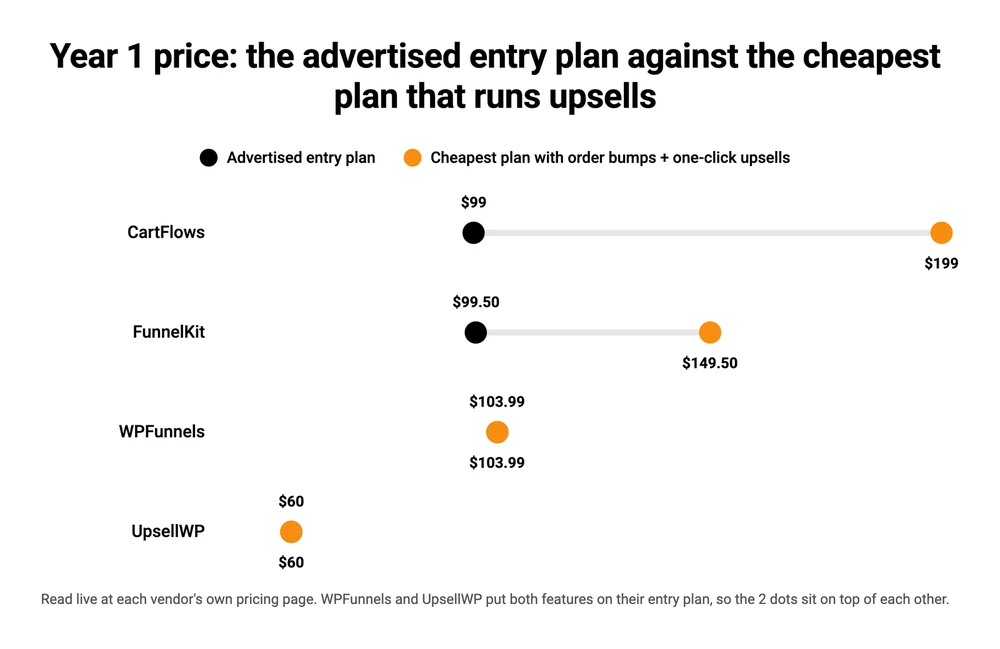
A note on the 2 blanks. UpsellWP and WPFunnels both show a struck-through higher number beside their price, and neither publishes what year 2 costs anywhere on its pricing page. CartFlows and FunnelKit both do, and they deserve credit for it. The number is unwelcome and they print it anyway. It is the same footnote we found on WooCommerce coupon plugins, where it turns $99.50 into $199 on renewal.
Since this whole section is about what an upsell feature costs, here is 1 comparison from outside the plugin market. CartMango is a product I run, which you should factor in: it puts order bumps on every plan and upsells and downsells on its $20 a year tier, and it is free while the beta runs until October 2026. That is a hosted checkout rather than a plugin, and I come back to when it genuinely fits near the end of this post.
If you only want 1 offer box at checkout
An order bump at checkout is the cheapest situation on this list, and the demand for it is visible right on the search results page: 2 of the 8 related searches Google lists under this keyword ask for a free one outright.
Most stores in this position want a tick box on the checkout page offering 1 related thing, and then to stop thinking about it. UpsellWP’s free version does that, with no funnel to build around it.
Its WordPress.org listing puts checkout order bumps, cart cross-sells, frequently bought together bundles and next-order coupons in the free tier, along with “smart targeting” rules based on cart contents or subtotal. It also claims full compatibility with the newer WooCommerce checkout blocks. Whether your store runs those or the older classic checkout decides which plugins can put anything on your checkout page at all, and our guide to picking a WooCommerce checkout plugin has a 30-second test for telling which one you have.
What it costs. Nothing. The plugin has 5,000 active installs and a 96 out of 100 rating across 142 reviews on WordPress.org.
What you give up. Post-purchase offers. UpsellWP’s free listing is explicit that post-purchase upsells, thank-you page offers, popups and A/B testing are paid features, and the Starter plan that unlocks them is $60 a year for 1 site. So the free version sells to someone who has not paid yet, never to someone who already has.
There is a version of this where you skip the all-in-one entirely and run a different small plugin at each spot. A store owner in that Reddit thread describes doing exactly that: “On product pages I use WPC Bought Together and on checkout pages I use super order bump.”
It works. It also means 2 plugins to keep updated instead of 1, which is a real cost on a WordPress site that nobody puts a number on.
If the offer has to land after the card is charged
You want the second offer to appear once the sale is already banked, so a no costs you nothing.
Post-purchase is the fussiest of the 3 to set up, and the deciding factor is not the plugin at all.
A true one-click upsell charges a second time without asking for card details again. That only works if your payment gateway can re-bill a card it has already stored.
Plenty can. Some cannot. And the free plugins are where this bites hardest.
The One Click Upsell Funnel plugin is the clearest example, partly because it says so itself. Its WordPress.org listing states: “One Click Upsell Free Version Supports Stripe Payment Method for creating Upsell Offers.” 1 gateway. If your store takes money through PayPal, Square, Mollie or Authorize.net, the free version cannot run a post-purchase offer on it, and the multi-gateway support sits in the paid version.
That plugin is worth a second look for a different reason. It sits at number 3 and number 5 on Google’s first page for this keyword, and Google’s AI Overview names it as one of the top options.
Its WordPress.org page says 1,000 active installations, last updated 5 months ago, and tested up to WordPress 6.9.7. For comparison, CartFlows, FunnelKit and WPFunnels are all tested to 7.1, UpsellWP to 7.0.4, and all 4 were updated within the last 5 weeks. None of that makes the plugin broken. It is just not what a first-page ranking and a mention in Google’s summary would lead you to expect, and nothing on the listing flags it.
The paid options are broader here. WPFunnels puts one-click upsells on its $103.99 Starter plan and prints “11+ Payment gateway support” beside the feature. FunnelKit’s own FAQ says one-click upsells are “supported by over 15 payment gateways” and names PayPal, Stripe, Mollie, Authorize.net, Braintree and SagePay.
What to pick. UpsellWP Starter at $60 a year is the cheapest paid route to post-purchase offers, and it is the obvious upgrade if you are already running its free version. Pay the extra $43.99 for WPFunnels Starter when you want a published gateway list to check yourself against before you commit.
What you give up. Check your gateway against the vendor’s own list before you pay. This is the 1 thing on this page a refund policy will not rescue you from, because it is not a bug and support cannot switch it on.
Worth knowing before you pay for any of this: a post-purchase offer only fires on a completed order, so a buyer who abandons the checkout never reaches one. Our guide to cart abandonment software covers the tools that chase them and what each one really costs.
If the checkout itself is the part you are willing to move, a hosted checkout takes the gateway question off the table. CartMango runs post-purchase offers on Stripe and PayPal directly, so the compatibility answer is yes or no rather than a table you have to cross-reference.
If you are replacing the checkout, not adding to it
Some stores do not want an offer bolted onto the existing checkout. They want a different checkout.
That is what CartFlows and FunnelKit sell. Both replace WooCommerce’s checkout page with their own, add a custom thank-you page, and hang order bumps and one-click upsells off that new flow. They are also the 2 biggest plugins on this page by some distance. CartFlows has 200,000 active installs on WordPress.org against FunnelKit’s 30,000, and UpsellWP and WPFunnels are next, level with each other at 5,000 apiece. FunnelKit carries a 100 out of 100 rating across 1,019 reviews, against CartFlows’ 96 out of 100 across 506.
What it costs. CartFlows Pro is $199 in year 1 and $299 after, covering 3 sites. FunnelKit Plus is $149.50 then $299, covering 2. FunnelKit’s higher tiers fold in its own email automation, which is the real reason to pay more there rather than site count.
What you give up. A lot more surface area. You are handing your checkout, your thank-you page and your offer logic to 1 plugin, and if you ever remove it you are rebuilding all 3.
That is a reasonable trade for a store with a catalogue and real volume. It is a strange trade for a store selling 6 things. The wider version of this question is in our guide to WooCommerce alternatives, which sorts the options by what they actually replace.
Worth saying plainly, since I am hardly neutral here either: 3 of the 9 results on page 1 for this keyword are published by the maker of a plugin in this post: funnelkit.com, cartflows.com and flycart.org, which makes UpsellWP. CartFlows is straightforward about it, and the disclosure in its own article is better than most: “We make CartFlows, and we’ve put it at number one. But we tested every other plugin on the same criteria, and we’ll tell you exactly where competitors do it better. We’re not paid for placement here.” Take the recommendations for what they are, then check the pricing page yourself.
If everything you sell is a file
Here the plugin question may be the wrong question.
A store selling ebooks, templates, presets or a course has no stock, no shipping and no variants. WooCommerce is there to take the money. Adding a $299 a year funnel plugin on top of a free store plugin, to sell 5 downloads, is a lot of machinery for the job. The alternative is a hosted checkout that already has the offer types built in. You keep your WordPress site. The checkout and the offers move off it.
CartMango is my own product, so read this as the founder talking rather than a neutral review.
What it costs. Order bumps come on every plan including the $10 a year one. Upsells and downsells, plus cart abandonment, are on the $20 a year Gold plan. Everything is free while the beta runs until October 2026, and there is no per-sale platform cut.
What you give up. Anything WooCommerce-shaped. No physical products, no shipping, and it is not a plugin you install, so it will not inherit your theme or your existing product catalogue.
The honest limit is that this only makes sense if the WooCommerce half was never carrying much weight. If you have 200 products and a shipping matrix, ignore this section entirely. Our guide to selling digital downloads through WooCommerce covers the stay-put version, and we price a full digital stack on its renewal rather than its first year.
Here is the whole decision in 1 place.
An order bump costs nothing on UpsellWP’s free version, the cheapest paid post-purchase offer is UpsellWP Starter at $60 a year, and the 2 full checkout replacements both settle at $299 a year once their introductory year ends.
| Your situation | What to pick | Cost | The catch |
|---|---|---|---|
| 1 offer box at checkout | UpsellWP free | $0 | No post-purchase offers |
| Offer after the card is charged | UpsellWP Starter | $60/yr | No published gateway list |
| Post-purchase, gateway in doubt | WPFunnels Starter | $103.99/yr | Renewal price not published |
| Replacing the whole checkout | FunnelKit Plus or CartFlows Pro | $299/yr on renewal | Hard to remove later |
| Selling files, not products | CartMango | $20/yr, free until October 2026 | Leaves WooCommerce behind |
Last row is mine, so weigh it against the other 4 rather than taking my word: CartMango only wins the bottom row, and only for sellers whose catalogue is files.
Where this goes wrong
The most expensive mistake here is buying the funnel before you have proof anyone wants the offer.
Many years ago I built an online training course and almost nobody bought it. Fewer than 5 people. I had put hundreds of hours into it before ever asking whether anyone wanted the thing, and I nearly quit over it. What changed afterwards was the order of operations. I now find out whether people will pay before I build, because somebody saying “sounds good” and somebody handing over money are not the same event.
An upsell offer is exactly the same kind of bet. You do not know whether your buyers will take a second product until you put 1 in front of them. So the cheap move is to run an order bump on UpsellWP’s free version for a month, watch the take rate, and only then decide whether $299 a year of funnel software is worth it.
The second mistake is quieter. Every price quoted above is a year 1 price, Google’s own summary included, and 2 of the 4 paid vendors here do not publish a renewal figure anywhere on their pricing page. Budget on the renewal or do not budget.
The third is picking on gateway assumptions. “Works with all WooCommerce gateways” describes the checkout, not the post-purchase charge. Those are different capabilities and the marketing copy rarely separates them.
FAQ
What is the best free WooCommerce upsell plugin?
UpsellWP’s free version covers checkout order bumps, cart cross-sells and frequently bought together bundles, and it has 5,000 active installs and a 96 out of 100 rating on WordPress.org. For free post-purchase offers, One Click Upsell Funnel is the option, but its free version works with Stripe only.
Does WooCommerce have upsells built in?
It has a field called “Up-sells”, which is not the same thing. WooCommerce’s documentation describes up-sells as products “you recommend instead of the currently viewed product”, shown on the product page and set by hand per product. There is no built-in order bump and no post-purchase offer.
What is the difference between an order bump and a one-click upsell?
An order bump is a tick-box offer on the checkout page, accepted before the customer pays, in the same transaction. A one-click upsell appears after payment and charges the card a second time without asking for details again. The second needs a gateway that supports stored cards.
Do I need a specific payment gateway for one-click upsells?
Yes, for post-purchase offers. The gateway has to be able to re-bill a stored card. FunnelKit says over 15 gateways work, WPFunnels advertises 11 or more, and the free One Click Upsell Funnel plugin supports Stripe only. Check the vendor’s list against your gateway before buying.
How much does a WooCommerce upsell plugin cost?
On the tier that actually runs order bumps and one-click upsells: $0 for an order bump on UpsellWP’s free version, $60 a year for UpsellWP Starter, $103.99 for WPFunnels Starter, $149.50 then $299 for FunnelKit Plus, and $199 then $299 for CartFlows Pro.
Can I use more than 1 upsell plugin at once?
Yes, and some store owners do, running 1 plugin on product pages and another at checkout. The trade is 2 plugins to keep updated and a small chance of conflict at the checkout, which is where both want to write.
Pick the moment before you pick the plugin
Every WooCommerce upsell plugin on this page answers the same question differently: where does the offer appear. Answer that first and the shortlist writes itself, because order bumps are cheap and often free, post-purchase offers are a gateway question, and a full checkout replacement is a $299 a year commitment you should make on evidence rather than on a page-1 listicle.
If the answer turns out to be that WooCommerce was only ever there to take the money, you may not need a WooCommerce upsell plugin at all. CartMango is a hosted checkout built for people selling digital products, where order bumps ship on every plan and upsells and downsells come on the $20 a year tier, with no per-sale cut and no licence to renew.
About the Author

👋 I’m Welly, founder of CartMango (the site you’re on), a checkout platform for digital product sellers. We’ve previously processed $179M+. I also run BirdSend (email marketing tool, 3.1B+ emails sent). On the side I show other non-techie digital sellers how I use AI workflows to automate 50%+ of my operations. Find me on LinkedIn.
Related Reading
- Order bump: what belongs in a checkout offer and what kills the take rate
- Upsell page: how a post-purchase offer page is built and when not to show one
- WooCommerce checkout plugin: the 30-second test for whether your store runs classic or block checkout
- WooCommerce coupon plugin: the same renewal trap, priced across 7 coupon plugins
- Cart abandonment software: for the buyers who never reach the offer at all