

A WooCommerce coupon plugin earns its price on 4 jobs: auto-apply, BOGO, tiered pricing and coupon abuse. Advanced Coupons covers cart conditions, WebToffee Smart Coupons does auto-apply and BOGO free, Discount Rules handles bulk pricing, and Power Coupons is built for auto-apply. They separate on which of those jobs they charge for.
Each price below comes from the vendor’s own pricing page, and 1 site runs $59 to $129 in year 1. Those are first-year rates: Advanced Coupons renews at $199 and Power Coupons at $149. WooCommerce core already creates coupons free, with spend limits, expiry dates and per-customer caps, though it cannot apply a discount for the shopper.
Nobody shops for a coupon plugin on a quiet Tuesday.
You go looking the week a sale is coming and you realise WooCommerce will not apply the code by itself. Or a month after a launch, when 1 code meant for 30 newsletter subscribers turns up on a deals forum.
Page 1 of Google will not help much with that. All 8 results on it are published by a company that sells one of these plugins, or by WooCommerce itself.
Below is the same field, priced at the vendor and sorted by the jobs a discount setup has to do. The last of those jobs is the one that can break a live checkout.
Key Takeaways
- WooCommerce core already creates coupons free, with minimum spend, expiry dates, product exclusions and per-customer usage limits included.
- Auto-apply is what people buy a plugin for. WooCommerce’s own docs say core cannot do it.
- Auto-apply is free in WebToffee Smart Coupons and Power Coupons, and paid in Advanced Coupons and Discount Rules.
- The advertised price is the first-year price. Advanced Coupons is $99.50 then $199, and its own footnote says all renewals are at full price.
- Check whether your store runs classic or block checkout before you buy. Advanced Coupons alone has shipped 28 changelog entries about the checkout blocks.
What WooCommerce already does before you install anything
WooCommerce ships with a coupon system, and it is more capable than most buying guides admit. You will find it under Marketing, then Coupons.
Core gives you 3 discount types: percentage discount, fixed cart discount, and fixed product discount. Each coupon takes an expiry date and a free shipping toggle.
The restriction settings are where it gets useful:
- Minimum spend and maximum spend
- Individual use only, so a coupon cannot be stacked with another
- Exclude sale items
- Limit to, or exclude, named products or categories
- Restrict to named email addresses, with wildcards
- Usage limit per coupon, limit usage to X items, and usage limit per user
Not sure which discount is quietly costing you margin rather than winning you sales? Pricing is one of the 5 leaks in the Online Selling Mistakes Challenge, a free email course that sends 1 a day.
For a solo seller running a seasonal sale or a launch discount, that list covers the job, with no plugin to install and nothing to renew.
Core will not apply a coupon for the shopper, and WooCommerce says so in its own coupon documentation: “There is no functionality in WooCommerce core to automatically apply coupon codes for customers, so you need to send them via email, social media, or other marketing methods.”
The whole plugin market is built on that gap.
Getting the discount applied without the buyer typing anything
A code the shopper has to remember, find and type is a code a lot of shoppers never use. They abandon at the cart, or they open a new tab to hunt for a working code and never come back.
Auto-apply fixes that. The discount lands when the cart meets a condition you set, and nobody types anything.
This is the feature these vendors lead with, and they split sharply on whether they charge for it.
WebToffee Smart Coupons gives it away. Its free plugin lists auto-apply among its own headline features: apply discount codes automatically when coupon conditions match.
Power Coupons gives it away too. Auto-apply is the free plugin’s entire pitch, described on its directory listing as discounts that apply automatically when conditions are met, with no codes needed.
Advanced Coupons charges for it. Its own Premium Getting Started Guide lists under premium features: “Auto Apply Coupons – automatically apply a coupon to the cart when a customer becomes eligible.” The free version gives you BOGO, cart conditions, store credit and URL coupons, but the automatic part sits behind the licence.
The same guide also states that premium “is the premium add-on plugin for the free Advanced Coupons for WooCommerce plugin. It requires the free plugin to be installed and activated for it to work.” You are running 2 plugins, not 1.
Discount Rules charges for it as well. Its free version does percentage discounts, storewide sales, quantity breaks and order-total discounts. Auto-apply sits in the Pro paragraph.
So the feature people buy a coupon plugin for is free in WebToffee Smart Coupons and Power Coupons, and paid in Advanced Coupons and Discount Rules. No guide on page 1 puts it that plainly.
Making a discount grow the order instead of just shrinking the price
A flat 20% off costs you 20% of every sale you were going to make anyway. The discounts worth installing a plugin for are the ones that change what the shopper puts in the basket.
There are 4 kinds that do that, and which plugin you need depends on which kind you want.
Buy 1 get 1, or BOGO. Add a second item free or half price. Free in Advanced Coupons and in WebToffee Smart Coupons, Pro-only in Discount Rules, Pro-only in Power Coupons.
Spend X get Y. Cross a cart total and the shopper gets a free product or free shipping. This is cart-condition territory. Advanced Coupons built its reputation here, and its free version includes cart conditions, though the premium tier adds conditions on cart weight, coupons already applied and more.
Quantity breaks and tiered pricing. Buy 3, pay less per unit. This is Discount Rules’ home ground, and it is free there, including a bulk discount table shown on the product page so shoppers can see the next tier.
Store credit and gift cards. Money back into the customer’s account rather than off this order, which brings them back. Advanced Coupons includes store credit free. StoreApps Smart Coupons is built around gift cards and credit, and that plugin has no free version.
If you want one of these, pick the plugin that gives you that kind free rather than the one with the longest feature list.
All of that assumes someone is waiting for the code. Years ago I ran done-for-you email work, and a client paid in full and then went quiet on me for 3 weeks. He surfaced again 2 days before Black Friday wanting help with the launch. The emails I wrote for him brought in $26,201 across the 6 days of that sale.
The discount in that launch was an ordinary percentage off. Check you have a list to send a code to before you buy a Pro tier to unlock every discount type.
The coupon types that only exist in plugins
Some discounts have no equivalent in core at all. If you need one of these, the licence is not optional.
URL coupons. A link that applies the discount the moment it is clicked, so an email subscriber never sees a code field. Advanced Coupons includes this free. It is the single easiest way to lift redemption on an email campaign, because the shopper does nothing.
Scheduled lifecycle coupons. A code that fires on a customer’s birthday, on the anniversary of their first order, or after 90 days of silence. Coupons Pro is built almost entirely around this, with birthday, anniversary and re-engagement modules, at $79 a year.
Referral coupons. A customer shares a code, the friend gets a discount, the customer gets credit. This sits closer to affiliate tracking than to discounting, and if that is the job you are solving, our guide to affiliate tracking software compares the tools built for it properly.
Coupons on the product page. Showing an available code on the listing rather than waiting for the cart. Coupons Pro does this, and it is the reason it ranks where it does.
Printable and PDF coupons. Niche, and mostly relevant if you also sell in person.
If none of them is quite your case, check whether a filter will do the job for free.
A store owner in r/woocommerce asked for 1 coupon that applies a different fixed discount to each product in the cart. The first reply pointed at WebToffee Smart Coupons, the second at Advanced Coupons Pro. A third posted a working woocommerce_coupon_get_discount_amount filter that does the same thing in about 15 lines, at no cost.
That route will not suit everyone. It is still worth 10 minutes with a developer before a $199 renewal.
Keeping the code away from people who would have paid full price
Every discount has a leak.
The code meant for 30 subscribers reaches a deals site. A one-per-customer offer gets used 4 times from 4 email addresses. A sale price stacks on top of a coupon and an order ships at a loss.
Core gives you 4 guards for free. Individual use only stops stacking. Exclude sale items stops double discounting. Usage limit per user caps repeat redemption, and email restrictions tie a code to named addresses.
Core has no way to generate a large batch of unique single-use codes, so every subscriber gets their own and a leaked code burns exactly 1 redemption. That one is paid almost everywhere. Advanced Coupons calls it Virtual Coupons and puts it in premium. WebToffee includes bulk generation in its paid plugin. StoreApps sells a unique code generator with import and export.
Cart conditions do the rest of the work. A rule that says the coupon only fires above a $40 subtotal, only on full-price items, and only for logged-in customers, is worth more than any single feature on a comparison table.
A caution on the free tiers. Discount Rules has 1,369 ratings on WordPress.org and 1,299 of them are 5 stars, so the plugin is well liked. Of its 34 one-star reviews, 10 are titled about the free version rather than about bugs, with titles like “Most features blocked unless you buy Pro Version”, “Even the most BASIC functions are PRO” and “Misleading description of free vs pro features”. Install the free version and test your exact discount before you plan a sale around it.
Paying for the same plugin again next year
Advanced Coupons costs $99.50 for the first year on 1 site, then $199 every year after that. The vendors publish the second number. The buying guides quote the first.
Advanced Coupons advertises its single-site Growth plan at $99.50 a year. The price card shows $199.00 struck through above it and a badge reading 50% off, with an asterisk.
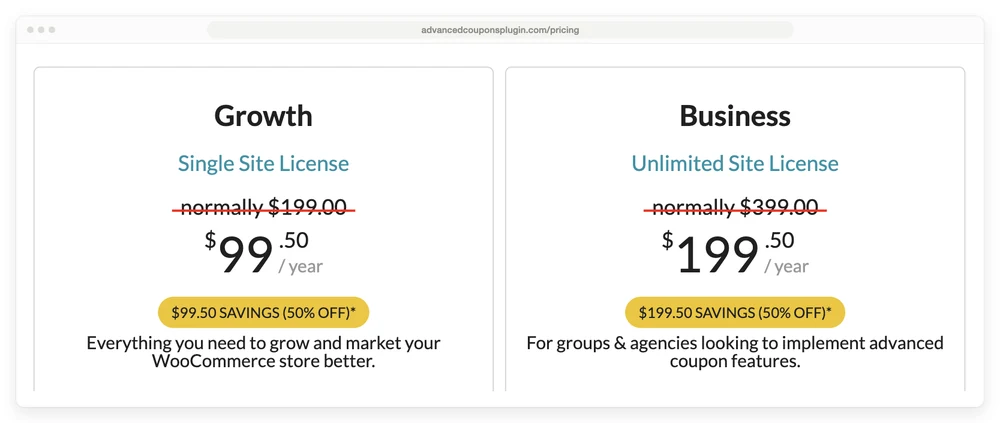
The asterisk resolves at the bottom of the same page: “Special introductory pricing, all renewals are at full price.” Their FAQ closes the door properly: “Sorry, we don’t offer discounts on renewals.”
Advanced Coupons on 1 site is therefore $99.50 in year 1 and $199.00 every year after. The Business tier is $199.50 then $399.00. The All Access Bundle is $249.00 then $498.00.
FunnelKit runs the identical play, down to the wording. Its Basic plan is $99.50 in year 1 against a normal price of $129, and the footnote on its pricing page is the same sentence, word for word: “Special introductory pricing, all renewals are at full price.”
Power Coupons does it differently and deserves credit for it. Its price card says $99 a year and then, on the card itself, “Renews at $149/yr”. You do not have to find a footnote.
Line the whole field up and PW Coupons Plus is $59 in year 1 and still $59 in year 5, while Advanced Coupons goes from $99.50 to $199, the widest gap on this table.
| Plugin | Year 1 | Every year after | Sites |
|---|---|---|---|
| PW Coupons Plus | $59 | $59 | 1 |
| Coupons Pro | $79 | $79 | 1 |
| Discount Rules Pro | $85 | $85 | 1 |
| WebToffee Smart Coupons | $89 | $89 | 1 |
| Power Coupons Pro | $99 | $149 | 3 |
| Advanced Coupons Growth | $99.50 | $199 | 1 |
| StoreApps Smart Coupons | $129 | $129 | 1 |
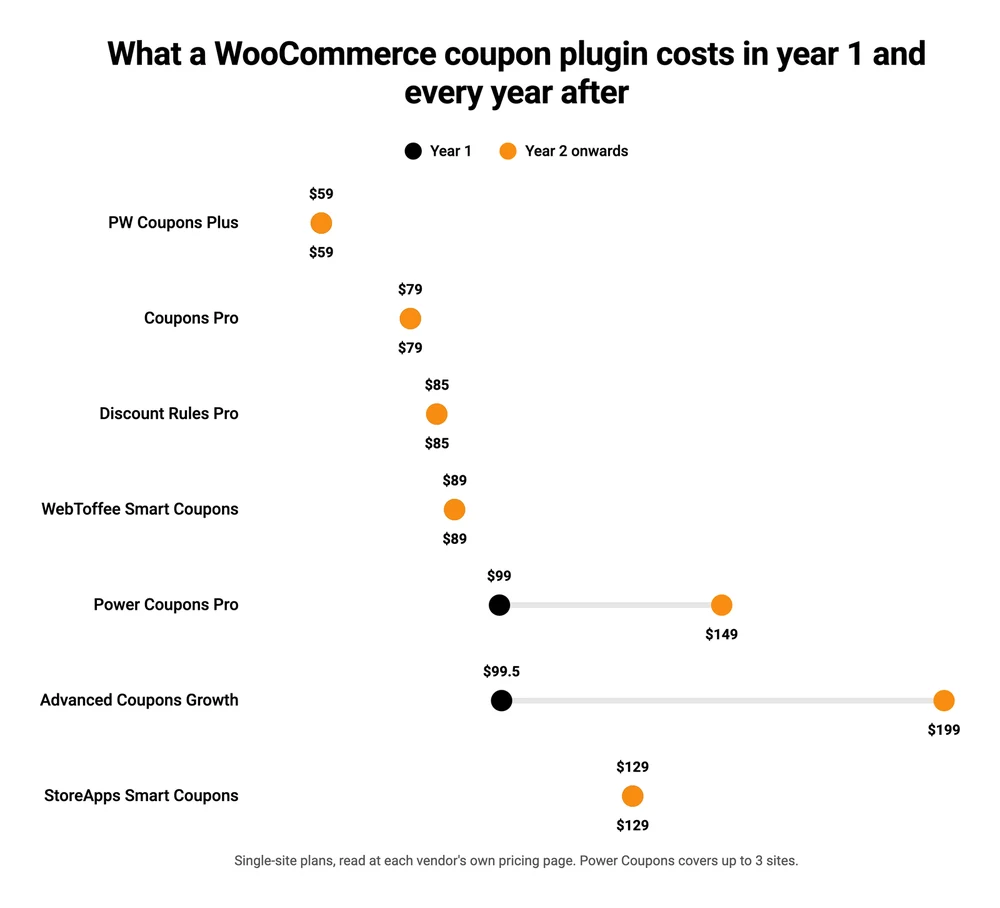
Read the 2 price columns together and the order changes at the top end. StoreApps has the highest advertised price on this table at $129, and by year 2 it is $20 cheaper than Power Coupons and $70 cheaper than Advanced Coupons. Advanced Coupons and PW Coupons Plus sit $40.50 apart on the shelf and $140 apart in year 2.
None of this is hidden. Every figure above came off the vendor’s own page.
What the buying guides do with it is the odd part. FunnelKit’s roundup never mentions renewal pricing at all. CartFlows’ roundup mentions it exactly once, in the row for its own plugin, and quotes a plain first-year figure for the other 6.
Renewal pricing is the same trap that catches people on their selling platform, not just their plugins. If you want the wider version of this, how to price digital products works through the margin side of the same question.
Advanced Coupons’ FAQ explains what happens if you let a licence lapse: “access to premium features may cease to be accessible via the backend (front end functionality will remain active)”. Your live coupons keep working. You just cannot change them.
The job every buying guide skips: surviving your own checkout
WooCommerce has 2 completely different checkouts, and a coupon plugin can work perfectly on one and misbehave on the other.
Stores started after WooCommerce 8.3, released in November 2023, default to the Cart and Checkout blocks. Older stores that simply updated kept the classic checkout. Our guide to choosing a WooCommerce checkout plugin has a 30-second way to tell which one you are on.
The plugin vendors have been publishing the evidence for 2 years, in their own changelogs.
Advanced Coupons’ free plugin publishes a public changelog covering 59 releases. 28 of its entries are about the cart and checkout blocks. The earliest 2 read “Declare incompatible with WC Cart/Checkout blocks” and “Display incompatibility notice for WC 8.3 (Cart and checkout blocks)”. The team then spent release after release building support back in, a bit at a time: the store credit form, the BOGO discount summary, the cart condition notice.
They are still at it. Version 4.7.4, the release just before the current one, fixes a missing block-checkout script dependency.
Discount Rules, at more than 100,000 installs the most installed of these plugins on WordPress.org, has a changelog line that reads simply “Fix: Block checkout item discount [Core].”
Power Coupons does not wait to be asked. Its directory listing carries the question “Does Power Coupons work with WooCommerce Cart and Checkout Blocks?” and answers: “Power Coupons is built for WooCommerce cart and checkout flows. If your store uses Blocks and you notice coupon UI differences, update WooCommerce and Power Coupons to the latest versions and contact support with details.”
That is a vendor telling you, on the download page, that differences exist.
Now count how often the buying guides raise it. CartFlows’ 3,609-word roundup uses the word block zero times. FunnelKit’s 5,054-word roundup does not mention the checkout blocks either. A reader following either one has no way to know the question exists.
None of this makes any of these plugins bad. Block checkout changed how discounts render, and each of the 3 vendors above has published something about it. What it does mean is that the roundups ranking these plugins on feature count are ranking them on the wrong thing for a store built in the last 2 years.
The practical move: install the free version, switch your test store to whichever checkout you actually run, put a real product in the cart, and watch the discount appear. Do it before the sale, not during it.
Which coupon plugin covers which job
2 of the cheapest names on page 1 are not discount engines at all. PW Coupons Plus at $59 ships 6 features: clip-to-activate coupons, a bulk editor, a no-coupons-allowed product flag, best-value selection, coupon duplication and custom cart messages. Coupons Pro at $79 ships 11 modules covering when and where a coupon reaches a customer: birthday, anniversary, first purchase, referral, re-engagement, product page, URL and bulk generation. Neither plugin does auto-apply, BOGO or tiered pricing.
WebToffee Smart Coupons is the only plugin here doing auto-apply, BOGO and tiered pricing free, then $89 a year for the rest. The 2 cheapest options, PW Coupons Plus at $59 and Coupons Pro at $79, do none of those 3.
| Plugin | Auto-apply | BOGO | Tiered / bulk | Block checkout evidence | Year 2 cost |
|---|---|---|---|---|---|
| WooCommerce core | No | No | No | Blocks are core | Free |
| PW Coupons Plus | No | No | No | None published | $59 |
| Coupons Pro | No | No | No | None published | $79 |
| Discount Rules | Paid | Paid | Free | 1 fix shipped | $85 |
| WebToffee Smart Coupons | Free | Free | Free | None published | $89 |
| StoreApps Smart Coupons | Paid | Paid | Paid | None published | $129 |
| Power Coupons | Free | Paid | Paid | Vendor warns of differences | $149 |
| Advanced Coupons | Paid | Free | Not offered | 28 fixes shipped | $199 |
The block checkout column is what the vendor has published, not a test result. “None published” means that vendor puts out no changelog or FAQ answering the question either way, which is the reader’s problem rather than a clean bill of health.
If you only want auto-apply, WebToffee Smart Coupons and Power Coupons both do it free and you can stop reading. If you want quantity breaks with a discount table on the product page, Discount Rules does that free. If you want gift cards and store credit run properly, StoreApps is the one built for it, and that plugin is paid only. StoreApps does publish 2 free single-feature plugins on WordPress.org, URL Coupons and Auto Apply Coupons, but they are separate products sitting at 20 and 10 installs.
Why page 1 disagrees with itself
That vendor-owned page 1 is worth looking at properly, because 2 of those 8 results are buying guides and both rank their own employer’s plugin.
Plugin companies often write the clearest documentation in this space, because they know the software better than anyone. The rankings inside their guides need more care than the instructions do.
CartFlows publishes a 7-plugin roundup and puts Power Coupons first. Power Coupons is made by Brainstorm Force, the company behind CartFlows.
They say so plainly, above the pick: “Full disclosure: Power Coupons is made by our team, the people behind CartFlows. We’ve ranked it on features and value, credited competitors where they win, and flagged our own tradeoffs.”
That is a straight answer, and more than most sites manage.
Their stated method is worth holding up against the pick, though. The post says it weighed “Ratings and installs. Real wordpress.org numbers, weighted by review volume.”
Power Coupons was added to the plugin directory in February 2026, is on version 1.0.7, and has 3 reviews. Discount Rules, which it outranks in that same list, has 1,369.
FunnelKit takes a quieter route.
Its 9-plugin roundup gives 3 of the 9 slots to its own products, including the top one. The only disclosure on the page is about affiliate commission: “This content includes links to products we recommend. We may earn a commission at no extra cost to you.”
The post never says that FunnelKit Cart, FunnelKit Funnel Builder and FunnelKit Automations are FunnelKit’s own. The brand name sits in the domain, so nothing is concealed. It is just never said.
The place it shows up is in the numbers.
FunnelKit’s comparison table prices Advanced Coupons at $59.50 a year. Advanced Coupons’ own page says $99.50, renewing at $199.
CartFlows quotes Power Coupons at $49 a year for a single site. Power Coupons’ own pricing page has no single-site tier at all, and starts at $99 for 3 sites.
Both of those are easy mistakes on a page that gets updated once a year. They are also the reason to read a price at the vendor rather than in a roundup, including this one.
WooCommerce coupon plugin FAQ
How do I add a coupon in WooCommerce?
Go to Marketing, then Coupons, then Add coupon. Enter a code, pick percentage discount, fixed cart discount or fixed product discount, and set the amount.
The Usage restriction tab holds minimum spend, product and category rules and email restrictions. The Usage limits tab caps how many times it can be used in total and per customer. No plugin is needed for any of this.
What is the best discount plugin for WooCommerce?
There is no single best one, because they split on which job they do free.
WebToffee Smart Coupons is the only one giving away both auto-apply and BOGO. Discount Rules puts quantity breaks and the product-page discount table in its free version. Advanced Coupons is built around cart-condition rules. StoreApps Smart Coupons is the one to buy for gift cards and store credit, and that plugin is paid only at $129.
Is there a free coupon plugin for WordPress that is not crippled?
WooCommerce core itself is the honest answer, and it is free with no upgrade prompt. Among third-party plugins, WebToffee Smart Coupons is the only free version that covers both auto-apply and BOGO. Free tiers elsewhere are thinner than the marketing suggests, which is what 10 of Discount Rules’ 34 one-star reviews are about.
Will a coupon plugin work with block checkout?
Check before you buy.
Advanced Coupons declared itself incompatible with the cart and checkout blocks and has been adding support back release by release ever since. Discount Rules has shipped block checkout fixes. Power Coupons’ own FAQ warns you may see coupon UI differences on blocks.
Install the free version and test a real discount on your own checkout first.
What happens to my coupons if I stop paying?
That varies by vendor, so read the terms before the renewal lands. Advanced Coupons states that premium features “may cease to be accessible via the backend (front end functionality will remain active)”, so existing coupons keep discounting but you lose the screens to edit them.
If the store is only there to take the money
Run back through what the last few sections asked you to do. Pick a coupon plugin, check it against your checkout type, budget for a renewal that may double, and test the free version before a sale so nothing breaks on the day.
That is a reasonable amount of work for a store with a catalogue, stock and shipping. It is a lot of work for someone selling 3 digital files, where WooCommerce is there to take the money and nothing else. If that is closer to your setup, our guide to WooCommerce alternatives sorts the options by what they replace, and choosing a WordPress ecommerce plugin covers the same ground from the plugin side.
CartMango is mine, so treat this as the founder talking rather than a neutral review. It is a hosted checkout for people selling digital products, and coupons come with every plan instead of arriving as a licence on top.
There is no separate WooCommerce coupon plugin to keep compatible with your theme, and no renewal to budget for. CartMango is free until October 2026, then $10 a year.
About the Author

👋 I’m Welly, founder of CartMango (the site you’re on), a checkout platform for digital product sellers. We’ve previously processed $179M+. I also run BirdSend (email marketing tool, 3.1B+ emails sent). On the side I show other non-techie digital sellers how I use AI workflows to automate 50%+ of my operations. Find me on LinkedIn.
Related Reading
- WooCommerce checkout plugin: the 30-second test for whether your store runs classic or block checkout
- WooCommerce digital downloads: the 3 file delivery methods and what the hosting really costs
- WordPress plugins for selling digital products: the 4 jobs a digital seller has to cover, priced on the renewal
- Cart abandonment software: for recovering the carts a discount code was meant to save