

The most-installed free WooCommerce abandoned cart plugin is Cart Abandonment Recovery by CartFlows, Abandoned Cart Pro suits stores wanting popups and SMS at $119 a year, and AutomateWoo suits stores already buying Woo extensions at $159. WooCommerce core tracks nothing, so a plugin is doing this job or nobody is.
Where they split is 2 things the roundups rarely price. Can the plugin get an email from a shopper who never reached your checkout page, and who delivers the mail once it is written. Every price below was read at the vendor’s own page this week, which is how FunnelKit costs $99.50 on its own guide and $129 on Omnisend’s, with both being correct.
You run WooCommerce, sales are coming in, and the reports show plenty of people got close and stopped. What you cannot see is who any of them were.
Every guide answers this the same way. Here are 9 plugins, here are 16, here is a feature table, pick one.
That works right up until you install the winner, watch it recover almost nothing, and cannot tell whether the plugin is the problem or your setup is.
Recovering a cart is 4 separate jobs, and a plugin only does some of them. This post walks each job in order, names which plugins cover it, and prices every one at the vendor’s own page.
Key Takeaways
- WooCommerce tracks no abandoned carts on its own. The official documentation page is setup instructions for an extension you buy separately.
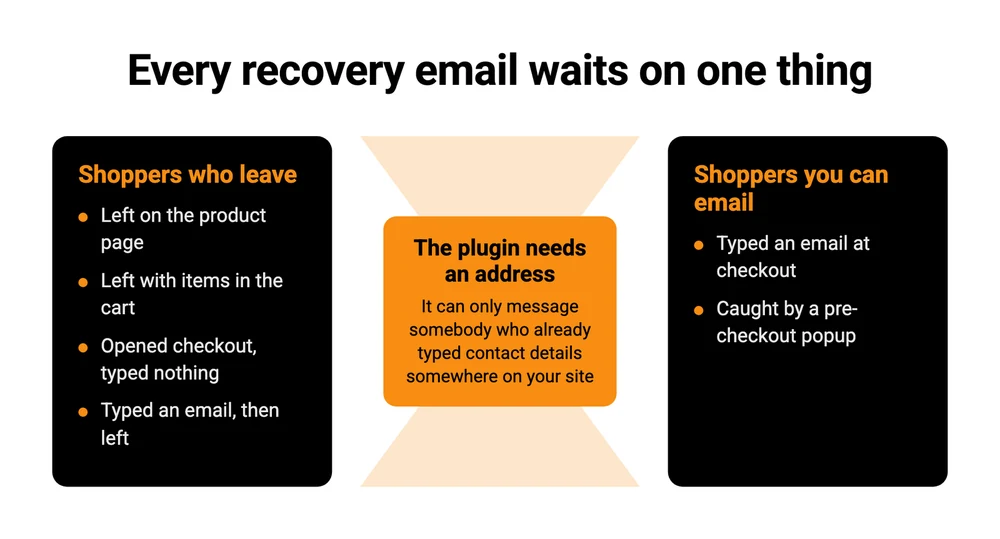
- A recovery email needs an address. Most plugins only get one when the shopper reaches checkout and types it, so earlier leavers stay invisible.
- Only 3 of the 7 plugins priced here can capture an email, on their own, from someone who never opened your checkout page.
- FunnelKit is the only one of the 7 whose own page calls its advertised price introductory. Basic goes from $99.50 to $129.
- Almost nobody costs in the sending. Across Omnisend, FunnelKit and Blocksy, spam folder and promotions tab appear zero times.
An abandoned cart is rarely the first leak in the line. Pricing, the offer and the page they arrived on all leak earlier and cost more, which is what the Online Selling Mistakes Challenge covers, 1 mistake a day by email, free. A recovery plugin only works on people who already wanted to buy.
The 7 plugins at a glance
CartFlows is free with no paid tier at all, the 2 cheapest paid options are Addify at $79 a year and FunnelKit at $99.50 rising to $129, and Retainful is the only one billed monthly.
| Plugin | Best for | What it costs |
|---|---|---|
| Cart Abandonment Recovery (CartFlows) | Most stores, as a first install | Free, no paid tier |
| Abandoned Cart Lite (Tyche) | A second free option to compare | Free |
| Abandoned Cart Recovery (Addify) | Chasing pending orders too | $79 a year |
| FunnelKit Automations | Email and SMS in one place | $99.50, then $129 |
| Abandoned Cart Pro (Tyche) | Popups, SMS and Messenger | $119 a year |
| AutomateWoo | Stores already buying Woo extensions | $159 a year |
| Retainful | Sending that does not touch your server | $14 a month at 1,000 contacts |
That table answers which one. The rest of this post answers whether any of them finishes the job, because a recovery plugin is doing 4 things and the price tells you nothing about how many it covers.
Job 1: seeing the abandoned cart at all
WooCommerce does not record abandoned carts. There is no screen for it, no report, and nothing to switch on. The page that turns up near the top of Google for this, WooCommerce’s own abandoned cart documentation, opens by telling you to download a .zip from your WooCommerce account. It is setup instructions for something you buy, not a feature you already have.
That single fact is why this whole plugin market exists. WooCommerce ships you a store and sells the recovery separately, the way it sells shipping rules and subscriptions separately. Hosted platforms tend to bundle it instead: CartMango, which is mine, carries cart abandonment on its plans, and Shopify has abandoned checkout recovery built in. That is a difference in how the products are assembled, and worth knowing before you go shopping, because it explains why you are shopping at all.
So the first job any plugin does is watch.
What “abandoned” actually means. The plugin starts a timer when somebody stops touching their cart. AutomateWoo’s documentation puts its default at 15 minutes of inactivity, and counts loading the cart or checkout page as activity. Most plugins let you change this. Shorter means you chase people who were just making a cup of tea, longer means you chase people who already bought elsewhere.
Cart abandonment and checkout abandonment are not the same thing, and the difference decides what you can see. Somebody who adds a product and closes the tab never reached checkout, so WooCommerce has no order record of them whatsoever. Somebody who started checkout and stopped often leaves a pending or failed order behind, which you can find in WooCommerce without any plugin at all. The first group is bigger and completely dark. Sorting out where your own leaks are is the same exercise as choosing a WooCommerce checkout plugin, just pointed at the exit instead of the entrance.
Every plugin in this post does this watching job. It is the part they all get right, which is why it makes such a poor basis for choosing between them.
Baymard Institute keeps a running average of documented cart abandonment rates, currently 70.22%, calculated across 50 separate studies going back to 2006. That is an industry average across all of ecommerce rather than a promise about your store, and your own figure is the only one that matters. It does mean the group you cannot see is usually much larger than the group you can.
Baymard also publishes why people leave, and a plugin fixes none of the top 3 reasons. Extra costs being too high accounts for 40%, delivery being too slow 20%, and not trusting the site with card details 19%. Baymard does not publish the sample size or the field dates for that particular breakdown, so treat the percentages as directional.
The 2 biggest of those reasons are about shipping, which means a recovery email cannot argue with either of them. If you sell downloads rather than boxes, the first 2 do not apply to you at all, and you are left with the trust one. Recovery plugins work on the people who wanted to buy and got interrupted, not on the people you priced out.
Job 2: getting an email address before they go
A recovery email needs somewhere to go, and the plugin cannot invent an address. So the question that decides whether any of this works for you is a timing question: at what moment does the tool learn who the shopper is? Most roundups file that under features, alongside template counts and dashboard screenshots.
For most of them, that moment is the checkout page. The free CartFlows plugin, which has 300,000 active installs and is by some distance the most used tool in this category, describes itself on its own WordPress.org listing as one that “captures emails when customers begin checkout”. Tyche’s Abandoned Cart Lite listing promises support for “both guest and logged-in shoppers”, and its capture still runs off the checkout fields.
A shopper who adds to cart, reads your refund policy, decides to think about it and closes the tab has given you nothing. No plugin in this post can email that person, because there is no address to email.
Omnisend’s roundup, the longest on page 1 at over 9,000 words, says both things about this on the same page. Its troubleshooting section warns that “Without an email entry, no plugin can send recovery messages.” Its FAQ, a few hundred words later, asks whether these plugins recover guest checkout carts and answers “Yes, all 16 WooCommerce abandoned cart plugins recover guest carts when customers enter email addresses during checkout.” Both sentences are true, and the qualifier at the end of the second one is carrying all the weight. Only the first reads like a warning.
What actually closes the gap is capture that happens before checkout. An add-to-cart popup, an exit-intent popup, a newsletter box that ties the subscriber to the cart. That is lead capture wearing a different hat, and if you have already built a lead capture page for your list you have done this job once already.
Now look at who charges for it. Tyche’s free Lite plugin has no popup capture. The add-to-cart and exit-intent popups sit in Abandoned Cart Pro at $119 a year, which Tyche confirmed in the r/woocommerce thread that ranks on page 1 for this search, answering a store owner who had asked for phone capture. AutomateWoo takes a different route, collecting the billing details as they are typed rather than waiting for submit: its documentation says that with pre-submit data capture enabled, “the customer’s billing information is collected before they finish the checkout process.” Useful, and still dependent on the shopper opening checkout and starting to type.
That same Reddit thread has a store owner asking a blunter version of the question: “Any plugin to get the mobile number? Nobody looks into emails anymore.” He is wrong about emails and right about the underlying problem. You are trying to turn an anonymous visitor into somebody you are allowed to contact, and the plugin is the last step of that, not the first.
Storing an address somebody typed but never submitted is data you are holding without an order behind it, so the consent checkbox most of these plugins ship is not decoration. Turn it on.
Job 3: sending a sequence people actually open
A recovery sequence is normally 2 or 3 emails, and every guide covers this part in depth, so what follows is where they agree and where they leave you on your own.
The first email goes out within a few hours, reminds them what was in the cart and links straight back to it. The second lands a day or so later. A third, if you send one, usually carries a discount. Omnisend, FunnelKit and Blocksy all land between 1 and 4 hours for that first send, which is about as close to a consensus as this category has.
The mechanical thing that matters most is the one-click restore link, which drops the shopper back into a rebuilt cart instead of on your homepage. CartFlows advertises a 1-click restore link on its own listing and Addify passes a direct cart link into its emails. Several of the others say nothing either way, which makes this the first feature to test yourself rather than take on trust, and it is also the one that breaks quietly when a theme or a caching plugin gets in the way.
The discount is the decision people get wrong. Send one every time and you teach your regulars to abandon carts on purpose, because waiting produces a coupon. Hold it for the last email, or for carts over a certain value. If you want the mechanics of the codes themselves, that is the same ground as choosing a WooCommerce coupon plugin, and the writing side is covered in our abandoned cart email templates.
No roundup leads with this one: some of these plugins tell YOU about an abandoned cart, not only the customer. The store owner who started that r/woocommerce thread asked for exactly this, wanting to follow some of them up by hand rather than leave everything to an automation, and another commenter confirmed the free CartFlows plugin does notify the admin. If you sell few, high-value items, a human email will beat a template, and that setting is the difference between being able to send one and not knowing there was anything to send.
Running 2 of these at once happens more than you would think. People install a second plugin to compare, leave the first active, and send everybody 2 copies of everything. Omnisend’s own troubleshooting section says the same thing in 1 line. Deactivate properly before you switch.
If the sequence is doing its job you will start thinking about what else rides along with it, and the natural next move is the offer inside the email rather than another email. That is order bump territory, and it is a better use of a recovered buyer than a second discount.
Job 4: getting that email into the inbox, not the promotions tab
Sending the email is a job of its own, and nobody on page 1 puts a price on it. I counted to be sure.
Omnisend, FunnelKit and Blocksy come to nearly 16,000 words between them. Across all 3, the letters SMTP appear exactly once, in a troubleshooting list near the end of Omnisend’s. The words spam folder and promotions tab appear zero times.
The people in the r/woocommerce thread treat it as the first thing you do. 1 commenter recommends the free CartFlows plugin and adds, unprompted, “Pair it with an SMTP plugin so the emails land.” A second recommends FunnelKit “with a smtp service”. 2 store owners, in separate replies, naming the same missing piece that 16,000 words of buying advice walked past.
By default WordPress hands your email to whatever your web host provides. For a password reset going to 1 person, fine. A marketing sequence is a different ask, because the receiving server is judging your domain’s sending reputation before it decides where to file the message, and on shared hosting that reputation is not yours and not under your control. Your plugin logs the email as sent. Whether a human ever saw it is a question nobody on your side of the wire is asking.
Almost every plugin in this post sits on top of that. They compose the email and hand it to WordPress. Retainful is the exception in this group, because it is an email service with a WooCommerce connector rather than a plugin that borrows your server.
Renting your checkout does not remove this job either. CartMango, which is mine, sends its abandoned cart emails through the email tool you connect to it, so you still need an account with an email service. The mail then goes out from that email service rather than from your web host, which is the same fix this section recommends for WooCommerce.
I have been on the wrong end of this one personally, which is why I keep bringing it up.
Back in February 2022 I ran a batch of experiments on my own list, trying to get my emails out of Gmail’s Promotions tab. I had read the blog posts first. They told me shoppers happily browse the Promotions tab, that there was nothing much to be done about it anyway, and that the fix was to ask subscribers to drag my email across into Primary. I believed all 3. When I actually tested it, all 3 turned out to be wrong, and I remember feeling fairly dumb for having taken them at face value for as long as I did.
What I took from it was that the work belongs on my end. Asking every subscriber to perform a small chore so that my email arrives properly means depending on other people to do something for me, one at a time, forever. Getting the sending right is 1 job I control, once.
For a WooCommerce store that is 3 things. The first and third are quick. The middle one means editing DNS records, which is fiddly the first time and then never again.
Install an SMTP plugin and point it at a real sending service rather than your web host. Set up the 2 authentication records on your domain, SPF and DKIM, which tell a receiving server the mail genuinely came from you. Then send yourself a test to a Gmail address you do not own and look at which tab it lands in.
That last step is the one people skip, and it is the only one that answers the actual question. Budget an afternoon. Skip it and you have bought a recovery plugin whose emails pile up somewhere nobody opens, while the dashboard reports every one of them as sent.
What these WooCommerce abandoned cart plugins actually cost
All 7 can watch a cart, only 3 can get an email out of somebody who never opened your checkout page, and only FunnelKit charges you more in year 2, going from $99.50 to $129. Every annual figure below is the vendor’s own published yearly price, read live this week.
| Plugin | Email before checkout | Free version | Year 1 | Year 2 |
|---|---|---|---|---|
| Cart Abandonment Recovery (CartFlows) | No, checkout field only | Yes, fully free | Free | Free |
| Abandoned Cart Lite (Tyche) | No, checkout field only | Yes | Free | Free |
| Abandoned Cart Pro (Tyche) | Yes, add-to-cart and exit popups | No | $119 | $119 |
| Abandoned Cart Recovery (Addify) | Yes, modal popup | No | $79 | $79 |
| AutomateWoo | Part way, as typed at checkout | No | $159 | $159 |
| FunnelKit Automations Basic | Only via OptinMonster | Yes, limited | $99.50 | $129 |
| Retainful | Yes, exit-intent popup | Yes, 500 emails a month | $14 a month | $14 a month |
Retainful is the only one billed monthly, and $14 is its price at 1,000 contacts on a slider that climbs with your list: 3,000 contacts is $30 a month and 4,000 is $38. YITH’s Recover Abandoned Cart, which also ranks on page 1, sits outside the table because it publishes in euros at €89,99 a year.
2 things in that table are worth more than the numbers themselves.
The $99.50 and the $129 are the same plan. FunnelKit’s own pricing page shows Basic at $99.50 with a struck-through “Normally $129” beside it, and a footnote at the bottom reading “Special introductory pricing, all renewals are at full price.” Go up the tiers and the gap widens: Plus is $149.50 then $299, Professional is $199.50 then $399, Elite is $299.50 then $599. 3 of the 4 plans exactly double in year 2.
FunnelKit’s own roundup prints $99.50. Omnisend’s prints $129. Neither uses the word renew anywhere in the article, so a reader comparing the 2 pages has no way to tell that both numbers are right and which year each applies to.
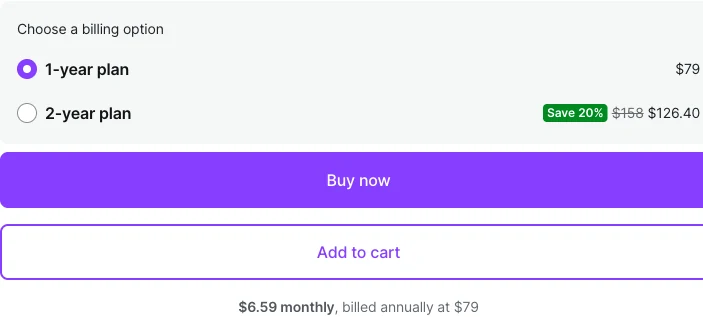
The WooCommerce marketplace leads with a number it does not bill. The official Abandoned Cart Recovery extension shows “$6.59 monthly, billed annually at $79” as its headline. AutomateWoo on the same marketplace shows “$13.25 monthly, billed annually at $159”. Neither is a monthly plan. You pay the annual figure, once, up front.
While checking these I found FunnelKit’s roundup disagreeing with itself. It prices Tyche’s plugin at $149 a year in the write-up and at about $119 in its own summary table on the same page. It does the same with Retainful, $19 a month in the write-up and $14 in the table. The vendors say $119 and $14, so the tables were right and the paragraphs were not. Read that as a fair warning about taking any of this on trust, this post included, without opening the pricing page yourself.
The table shows licence prices. On WooCommerce the licence is only part of the bill, because the sending sits outside every one of these plugins and the Job 4 setup is yours to do. CartMango is mine and has the same requirement: its cart abandonment, on the $20 a year Gold plan, sends through an email service you connect. You skip the plugin licence and the SMTP plugin, and you still need the email service. Everything is free until the beta ends in October 2026. The 2 totals differ because they bundle different things, so the comparison only means something once you have decided which kind of store you want to run.
Frequently asked questions
How can I view abandoned carts in WooCommerce?
Not without a plugin. WooCommerce has no abandoned cart screen. What you can see natively is pending and failed orders, which catch some of the people who started checkout and stopped. Anyone who left before reaching checkout leaves no record at all. Install one of the plugins above and you get a dedicated list showing cart contents, value and whether a recovery email went out.
Is there a genuinely free WooCommerce abandoned cart plugin?
Yes. Cart Abandonment Recovery for WooCommerce by Brainstorm Force has no paid tier whatsoever, and at 300,000 active installs it is the most used option in the category. Abandoned Cart Lite by Tyche is also free, with a paid Pro version at $119 a year if you later want popups or SMS. Both send through your WordPress mail, so budget for the sending either way.
How long should I wait before the first recovery email?
The 3 guides ranking for this search all land between 1 and 4 hours, and the plugin defaults sit lower than you might expect. AutomateWoo marks a cart abandoned after 15 minutes of inactivity by default. Marking it early and emailing a few hours later is a reasonable starting point, then adjust once you have enough carts to compare.
Can I run 2 abandoned cart plugins at once?
You can, and you should not. Both will track the same carts and both will email, so your shopper gets everything twice. Deactivate the old plugin fully before switching, rather than leaving it installed for comparison.
What is the difference between abandoning a cart and abandoning a checkout?
A cart abandoner added a product and left before opening the checkout page, so WooCommerce never created a record of them. A checkout abandoner opened checkout and stopped part way, which usually leaves a pending or failed order you can find without any plugin. Most recovery tools are better at the second group, because that is where the email address comes from.
Do I have to use a plugin at all?
No. You can chase carts manually if your volume is low enough to make that sane, and retargeting ads reach people who never gave you an address, which no email tool can. Both cost more attention than a plugin costs money. If you are choosing a whole setup rather than an add-on, our guide to cart abandonment software covers the options that are not WordPress plugins.
Start with the job you are missing
Most stores reading this already have a plugin installed. If that is you, the useful question is which of the 4 jobs is currently unstaffed. Run a test cart through as a stranger, leave it, and see whether an email arrives and which tab it lands in. That test costs 10 minutes and tells you more than any comparison table, including the one above.
If you are still choosing, start free. The CartFlows plugin costs nothing and covers jobs 1, 3 and 4’s composing half. Add pre-checkout capture and proper sending only once you can see how many carts you are actually losing.
And if you would rather not maintain the WordPress side of this, that is a real option too. CartMango is the one I build, for people selling digital products rather than shipping boxes. Cart abandonment is on the $20 a year Gold plan with no plugin to install or update, and the emails go out through the email tool you connect. Everything is free until the beta ends in October 2026.
About the Author

👋 I’m Welly, founder of CartMango (the site you’re on), a checkout platform for digital product sellers. We’ve previously processed $179M+. I also run BirdSend (email marketing tool, 3.1B+ emails sent). On the side I show other non-techie digital sellers how I use AI workflows to automate 50%+ of my operations. Find me on LinkedIn.
Related Reading
- WordPress plugins for selling digital products: the same jobs framing applied to the whole selling stack, which is the layer a WooCommerce abandoned cart plugin sits on top of
- WooCommerce digital downloads: what WooCommerce core already does for file delivery before you buy anything
- WordPress payment plugin: whose account actually holds your money, and how long the first payout takes
- WooCommerce alternatives: for readers who suspect the whole plugin stack is the problem, not this one plugin