

OptimizePress’s $199 Scale plan suits a WordPress owner who wants landing pages, a checkout with upsells and a course area under 1 licence, with no cut of each sale beyond Stripe or PayPal fees. The cheaper $129 Launch plan builds pages only and has no checkout of its own.
The catches: the page editor stops working if you stop paying, client use starts at the $249 Elevate plan, and OptimizePress’s own pages give 2 refund windows, 14 and 30 days. This OptimizePress review rests on the vendor’s pages and 134 ratings across Trustpilot, Capterra and G2, plus the 8 price lists on Google’s first page, none of which names today’s 3 plans.
You want to know if OptimizePress is worth a yearly licence, so you open a few reviews. Between them they quote 6 different plan lists: Essential at $99, Core at $97, Suite at $499.
OptimizePress has renamed its plans twice since mid-2024, and its own FAQ page still says plans “start from only $99/year”.
So this review starts from the live price page and OptimizePress’s own help docs, then sorts the ratings people left. You’ll see which plan fits your situation, what it costs, and what happens to your pages the year you stop paying.
Key Takeaways
- Selling starts at $199 a year. The $129 Launch plan is the page builder alone, so the checkout, upsells and courses start on Scale.
- Search results quote old plans. None of the 8 price lists on Google’s first page names Launch, Scale and Elevate, Google’s AI answer included.
- Stopping payment locks the editor. OptimizePress says your pages “should” keep working, but the editor stops and it makes “no guarantees of future functionality”.
- The checkout has no affiliate program. OptimizePress says it is “not planning to develop our own affiliate platform” for it, so affiliates need another tool.
- Scores depend on the site. Trustpilot shows 3.3 from 33 reviews, G2 3.9 from 30 and Capterra 4.6 from 71.
The 3 OptimizePress plans, and what each one can sell
OptimizePress sells 3 yearly plans: Launch ($129, 1 site), Scale ($199, 5 sites) and Elevate ($249, 25 sites). Launch is the page builder alone. Scale and Elevate add the checkout, funnels with upsells, the Mentor plugin for courses and memberships, and the ThemeBuilder for blog pages.
Comparing checkouts because sales feel slow? The Online Selling Mistakes Challenge covers 5 common selling mistakes by email over 5 days, at no cost.
Scale at $199 a year is the cheapest OptimizePress plan with a checkout of its own, and Elevate at $249 is the only plan on the price page that allows client sites.
| Plan | Price a year | Sites | Checkout and upsells | Courses (Mentor) | Client sites |
|---|---|---|---|---|---|
| Launch | $129 | 1 | No | No | No |
| Scale | $199 | 5 | Yes | Yes | No |
| Elevate | $249 | 25 | Yes | Yes | Yes, “subject to agency terms” |
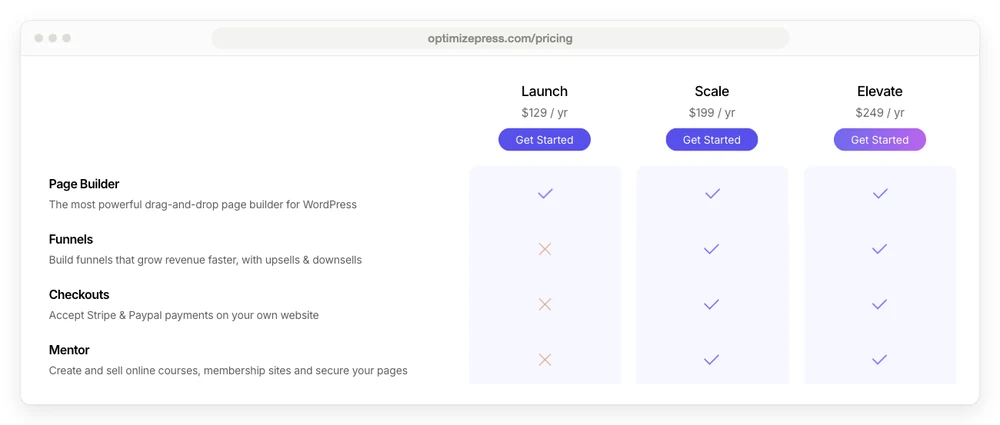
Each plan card says the renewal is charged at the same price, so year 2 costs what year 1 did. Each card also shows a crossed-out “Normally” price above the real one: $199 for Launch, $299 for Scale and $399 for Elevate. Prices exclude tax, and they leave out hosting. OptimizePress runs on a WordPress site with your own hosting, so the real yearly bill is the plan plus whatever your host charges.
OptimizePress takes nothing from each sale. Its checkout page says “No transaction fees (just your Stripe fees)”, and the money goes straight to your own Stripe or PayPal account. Stripe’s standard rate for US cards is 2.9% + 30¢, so a $49 ebook leaves you $47.28 after Stripe’s $1.72, with nothing to OptimizePress.
What other OptimizePress reviews quote, and why none of them match
None of the 8 price lists on Google’s first page for this search names Launch, Scale and Elevate. OptimizePress has changed its plan names twice since mid-2024, and some of the pages ranking today still describe OptimizePress 2.
Across those 8 sources the cheapest OptimizePress plan ranges from $97 to $149, and the only one quoting all 3 of today’s prices files them under older plan names.
| Source | Plans it names | Prices it quotes (a year) | Closest match |
|---|---|---|---|
| Google’s AI answer | Essential, Suite, Agency Standard | $99, $199, $399 | The Systeme.io review it cites |
| G2 listing | Essential, Suite | $149, $499 | No plan sold today |
| Capterra listing | None named | “Starting price $149” | No plan sold today |
| Blogging Wizard | Builder, Suite, Suite Pro | $129, $199, $249 | Today’s prices, older names |
| WPKube | Essential, Business, Agency Standard, Agency Pro | $99, $149, $399, $599 | Older plans, plus 2 still on the agency page |
| Systeme.io’s blog | Essential, Suite, Agency Standard | $99, $199, $399 | Older plans |
| Meridian Themes | Essential, Business, Suite | $99, $149, $199 | Older plans |
| AccurateReviews | Core, Publisher, Pro | $97, $197, $297 | OptimizePress 2 |
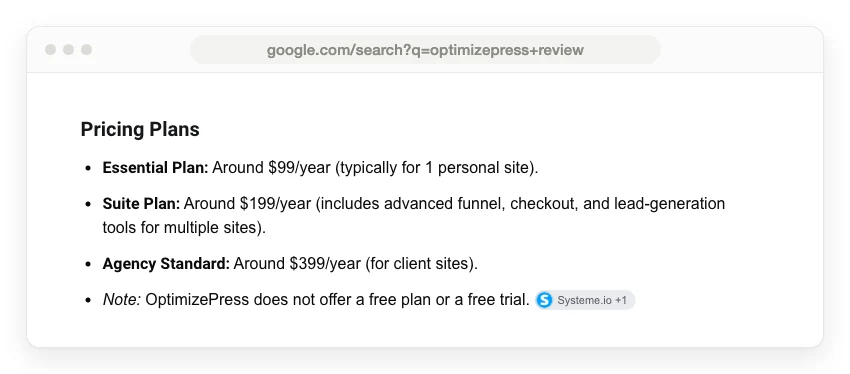
OptimizePress causes part of the confusion, because its own pages disagree with each other:
- The FAQ page says “Our plans start from only $99/year” and talks about upgrading from “lower tier plans (Essential or Business)”.
- The checkout page says the checkout is “Included with all Suite & Agency plans”, 2 plan names the price page no longer uses.
- The agency page, linked from the FAQ, still lists Agency Standard at $399 a year for 15 client sites and Agency Pro at $599 for 40.
- The homepage shows “Rated 4.8 based on 1,124+ reviews” and does not say where those reviews live.
- The price page itself says 600+ templates on the Launch card and 200 for Launch in its comparison grid.
Between them, those pages give 2 different starting prices ($99 on the FAQ, $129 on the price page) and 2 sets of retired plan names. That leaves any summary, Google’s included, with a stale list to quote.
I have a stake here too: I run CartMango, a checkout platform for digital sellers. Some of the reviewers have one as well. Blogging Wizard says it “may make a commission” from its links, Meridian Themes earns on its “referral link”, and Systeme.io’s review closes by telling readers to sign up for Systeme.io instead.
Age is the other problem. A 2012 review page, marked updated in April 2026, still calls OptimizePress “a WordPress theme” sold for $97 once.
What changes the answer for you
4 things decide whether OptimizePress fits: whether you already run a WordPress site with your own hosting, whether you need to take payments on it, whether you build for clients, and whether you will keep paying every year. You need the WordPress site. OptimizePress’s FAQ says: “All you need is your own hosting (with a company like Siteground) and a domain to use.”
Without that site, a hosted tool skips the plugin, the hosting and the updates. Systeme.io, whose blog ranks for this very search, is one of them (our Systeme.io review covers its free plan limits). CartMango is another, for a seller with a few products who needs a sales page and a checkout rather than a whole website.
The 5 situations below are for readers who do have WordPress.
If Elementor or the block editor already builds your pages
OptimizePress’s $129 Launch plan mostly repeats what your builder already does, so keep the one you have unless OptimizePress’s marketing templates are the reason you came. You are in this group if your WordPress pages already look the way you want and you are wondering whether OptimizePress would turn out better landing pages. Launch gives you its template library for opt-in, sales and webinar pages on 1 site, with no checkout. For $129 a year, that is a second page builder.
The top answer in a r/Wordpress thread asking whether OptimizePress is worth trying makes the same point. “It’s a powerful page builder, but it’s definitely overkill for most small businesses,” it says, and for a standard Home, About, Services and Contact site “you’re probably better off with ‘elementor pro’ or even the free version of ‘elementor’ or ‘wordpress’s native block editor’.” Its main con is short: “It’s expensive.”
You would also run 2 page builders, and OptimizePress’s FAQ says its blank template pages leave out the code from “external theme and plugins” by default, so a plugin you rely on stays off those pages until you switch it back on in the settings. If you want hosted landing pages instead, our Leadpages review covers that route.
If you want the checkout on your own WordPress site
OptimizePress’s Scale plan, at $199 a year for 5 sites, is the one to buy for a checkout on your own WordPress domain. It suits a seller of digital products, coaching or a service who wants order bumps and upsells after the main purchase.
Its checkout connects to Stripe and PayPal, and the checkout page lists order bumps, “Unlimited 1-Click Upsells & Downsells”, subscriptions and payment plans, coupons, secure file downloads and EU VAT calculation. Its integrations page lists direct connections to email tools including ActiveCampaign, AWeber, ConvertKit (now Kit), Drip, GetResponse, Mailchimp and MailerLite. Subscriptions sit in your own Stripe or PayPal account, which OptimizePress says lets their systems retry failed renewal payments. The cost is $199 a year, plus hosting, plus Stripe’s 2.9% + 30¢ on each US card sale, with nothing added per sale by OptimizePress.
What you give up:
- Affiliates. OptimizePress says “We’re not planning to develop our own affiliate platform for OptimizeCheckouts” and recommends a separate tool, WPSlice.
- WooCommerce. “We do not integrate with WooCommerce,” the checkout FAQ says, adding that its checkout “is not designed to be an alternative or replacement for” an online shop.
- The editor, if you stop paying. It stops working when the licence lapses, covered below.
That missing affiliate tool would weigh on me more than the $199. If you plan to let other people promote your product, budget for a separate affiliate tool.
If you already run a WooCommerce store, a funnel plugin built for it fits better, and our CartFlows review walks through that one. For the wider field of WordPress options, see our guide to plugins for selling digital products.
CartMango covers the checkout side without WordPress at all. CartMango is free right now, and paid plans start in November from $10 a year, with 0% per sale. CartMango includes order bumps on every plan, upsells on its $20 plan and affiliates on its $30 plan. CartMango’s limit runs the other way: its checkout opens on CartMango’s own page rather than inside your WordPress page, and embeddable checkouts are still on its planned list.
If you plan to sell a course or membership
OptimizePress covers courses and memberships on the same $199 Scale plan, through its Mentor plugin. OptimizePress describes it as “Create and sell online courses, membership sites and secure your pages”, and its course page lists drag-and-drop lessons, drip release, access rules down to parts of a page, and unlimited courses and members. The checkout can then “add buyers directly into your own membership site or online course”, so payment and access live in 1 system.
Mentor sitting on the $199 plan is new. In January 2025 the archived price page put Mentor only on the Ultimate plan ($179 in year 1, then $249), above Starter and Plus, so older reviews that put courses on a dearer plan were right at the time.
Quizzes are the gap. OptimizePress’s own course page lists student progress tracking, quizzes and completion certificates as “coming soon”. Unless that page is out of date too, a course that needs a test or a certificate needs another plugin. Systeme.io’s review also lists “Limited membership site features” among the cons, though Systeme.io sells a rival course tool, so weigh that as 1 view.
If courses are the main product, compare a dedicated tool first. Our MemberPress review covers the membership plugin route, and our guide to the best WordPress LMS plugin prices 7 course plugins on their year 2 renewal.
CartMango is not an option here yet, because its course hosting is not live.
Wondering whether WordPress is the right home for a course at all? Our course selling guide compares the 4 starting points for selling courses from your own website.
If you build sites for clients
Elevate, at $249 a year for 25 sites, is the only OptimizePress plan on the price page that allows client sites. The grid marks it “subject to agency terms”, and the plan card adds an asterisk the page never explains.
The trouble is a second price list. The agency page, which the FAQ still links to, sells Agency Standard at $399 a year for 15 client sites and Agency Pro at $599 for 40, with extra packs of 10 licences for $200. That page also warns that “if you cancel your Pro plan or let your plan lapse, any unused licenses will be lost”.
So you cannot tell from the site which terms you are buying. Before you pay, ask OptimizePress support in writing which plan covers client work and what the agency terms say, and keep the reply. The refund help doc also excludes “Club/Agency subscription purchases” from refunds.
If you might stop paying within 2 years
OptimizePress’s page editor stops working when your licence lapses, while your published pages “should” keep running, according to its own help doc on cancelling. You are in this group if your project is short, your budget is tight, or you doubt OptimizePress will still suit you in 2 years. If I were choosing, this rule would count for more than the price.
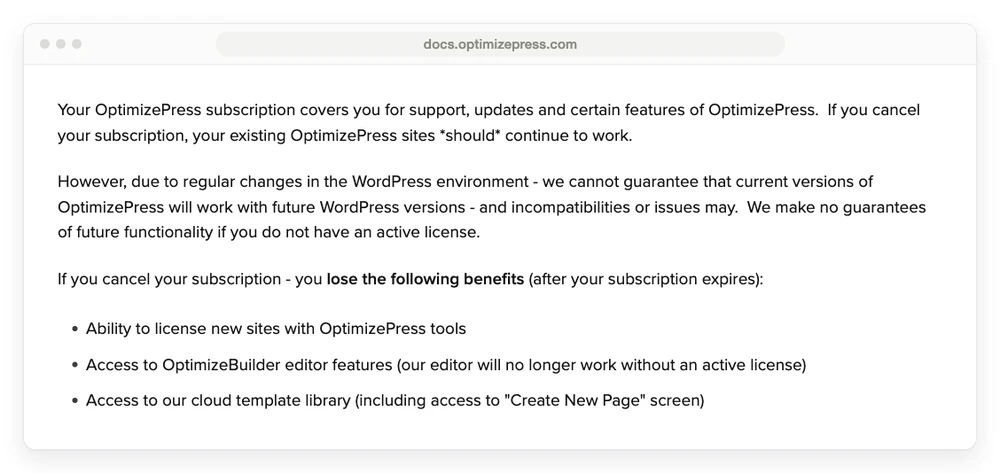
The same doc adds that updates, support, the template library and new site licences go too, and that it makes “no guarantees of future functionality if you do not have an active license”. Come back later and you pay whatever the price page says then, because OptimizePress does not honour old pricing on cancelled accounts.
The older FAQ page tells a softer version: “We will not stop your pages from working if you cancel your OptimizePress plan.” Read together, the pages stay up and you lose the ability to change them.
A version change has hurt before, according to 1 reviewer. When OptimizePress 3 replaced version 2, a 2021 Trustpilot reviewer wrote that “all our sites no longer work and force us to buy their version”. OptimizePress replied that existing customers got “at least 6 months additional free subscription time” to move over, and that it kept supporting the old version “for over 2 years after the launch”.
2 more rules to know before you buy:
- Refunds. The price page and the FAQ promise 30 days. The checkout page says 14 days, and the refund help doc says 14 days from your first purchase only, with no refunds on renewals or upgrades. Plan around the 14 days.
- No lifetime licence. A help doc explains why OptimizePress sells yearly only, and says any lifetime offer would be “a limited lifetime license as a promotional offer”.
If you sell subscriptions through it, they sit in your own Stripe or PayPal account. OptimizePress does not say what happens to member access in Mentor after its own licence lapses, so ask before you build a membership on it.
What 134 ratings say about OptimizePress and its support
OptimizePress scores 3.3 on Trustpilot from 33 reviews, 3.9 on G2 from 30 and 4.6 on Capterra from 71, while its homepage badge reads 4.8 from “1,124+ reviews” with no source named.
| Site | Score | Reviews | What stands out |
|---|---|---|---|
| Trustpilot | 3.3 | 33 | 23 at 5 stars, 8 at 1 star, both 2026 reviews at 1 star |
| G2 | 3.9 | 30 | Its price box still lists Essential $149 and Suite $499 |
| Capterra | 4.6 | 71 | 94% of review sentiment marked positive |
| OptimizePress homepage | 4.8 | “1,124+” | No source given |
On Trustpilot, the TrustScore of 3.3 sits below the plain average of the 33 star ratings, which works out to 3.88, because Trustpilot calculates its TrustScore its own way.
Trustpilot’s page data also records how each review arrived. It tags 12 of the 23 reviews at 5 stars as coming through a basic review link, a link any business can share to collect reviews, though the page itself labels them “Unprompted review”. The tag only shows how a review arrived. All 12 were posted between November 2024 and March 2025, and all 12 praise the support team, 5 of them by an agent’s name.
The 20 reviews tagged as arriving on their own split evenly: 10 at 5 stars and 10 at 1 to 3 stars. The last of the 33, a 5-star review from 2017, carries a third tag.
The low ones are mostly about support and bugs:
- Slow or no replies. A November 2024 reviewer on the old Suite plan wrote: “I submitted 2 tickets 2 weeks ago and not a single person has even acknowledged receipt.” OptimizePress replied that it was “unable to find any record of you as a customer or any support tickets from you”. Older reviews from 2017 and 2022 describe waits of 1 to 3 days.
- A plugin that would not run on 1 host. The longest review, from June 2026, describes “REST API errors”, pages that would not load and over a month of support blaming the host. The reviewer says a full refund came “after I posted this negative review” and that “The founder requested I delete this review.” It is 1 customer’s account, and OptimizePress has not replied on the page.
- Version and compatibility breaks. Reviews from 2017 to 2021 name a JVZoo connection, a Clickbank connection, WPBakery and the move from version 2 to 3.
The other reply in that r/Wordpress thread sums up the split: “Some people love how powerful and easy it is, but others have run into plugin conflicts and support issues.” Support runs by email “24/5”, and the FAQ says there is no phone support.
Each situation, the plan and the catch
Scale at $199 a year is the pick for a WordPress seller who wants pages, a checkout and a course area in 1 licence. Elevate fits client work or more than 5 of your own sites, and Launch suits someone who needs pages without a checkout.
| Your situation | Pick | Cost a year | The catch |
|---|---|---|---|
| Elementor or the block editor already builds your pages | Keep your builder, or Launch for the templates | $0 extra, or $129 for Launch | No checkout on Launch, and a 2nd page builder to keep updated |
| You want the checkout on your own WordPress site | Scale | $199 plus hosting | No built-in affiliates, no WooCommerce link |
| You want a course or membership on WordPress | Scale, with Mentor | $199 plus hosting | No quizzes or certificates yet, per its own page |
| You build client sites | Elevate | $249 | Client terms not spelled out, and a 2nd agency price list |
| You may stop paying within 2 years | Skip it, or plan to keep paying | $129 to $249 while you pay | The editor stops without a licence |
| No WordPress site, selling a few products | CartMango | Free right now, from $10 ($20 with upsells) once paid plans start in November | No course hosting yet, and the checkout opens on CartMango’s page |
CartMango, in the last row, is the checkout I run.
FAQ
Does OptimizePress have a free trial?
No, there is no free plan and no free trial. The price page promises a 30-day money-back guarantee, but the refund help doc says 14 days from your first purchase, with no refunds on renewals or upgrades. Plan around the shorter window and test everything in the first 2 weeks.
Is OptimizePress a theme or a plugin?
OptimizePress 3 is a plugin, and its FAQ says “OptimizePress 3.0 is a WordPress plugin”, so it runs beside your existing theme. Its old SmartTheme is listed in the help center as a retired legacy theme. Reviews that call OptimizePress a theme are describing version 1 or 2.
Does OptimizePress take a cut of each sale?
No, the checkout page says “No transaction fees (just your Stripe fees)”. You still pay Stripe or PayPal their normal processing fee, which for Stripe is 2.9% + 30¢ on a US card. The money lands in your own Stripe or PayPal account.
Does OptimizePress work with WooCommerce?
No. The checkout FAQ says “We do not integrate with WooCommerce” and that the 2 run separately on the same site. OptimizePress suggests its checkout for selling individual products, courses or digital products, not for a store with a cart full of items.
Is there an OptimizePress lifetime deal?
Not as a standard plan. A help doc explains that OptimizePress sells yearly licences only, and that a lifetime licence would only ever appear as “a limited lifetime license as a promotional offer” for a short time.
When a sales page and a checkout are enough
OptimizePress fits best when you already run WordPress and want pages, a checkout and a course area from 1 vendor. The problems this OptimizePress review found are mostly about paperwork and leaving: plan names that keep changing, refund pages that disagree, and an editor that stops when the licence does.
If what you need is a sales page and a checkout for a few products, CartMango covers both with nothing to install or host. CartMango is free right now, and paid plans start in November from $10 a year, with order bumps on every plan and 0% taken from each sale.
About the Author

👋 I’m Welly, founder of CartMango (the site you’re on), a checkout platform for digital product sellers. We’ve previously processed $179M+. I also run BirdSend (email marketing tool, 3.1B+ emails sent). On the side I show other non-techie digital sellers how I use AI workflows to automate 50%+ of my operations. Find me on LinkedIn.
Related Reading
- CartFlows review: the WooCommerce funnel plugin, and why its real entry plan is Pro
- Leadpages review: the hosted landing page route, plans and ratings sorted
- Systeme.io review: the all-in-one that ranks for this search, and its free plan limits
- WordPress plugins for selling digital products: the jobs a WordPress seller has to cover, priced on renewal
- ClickFunnels review: the hosted funnel builder OptimizePress pitches itself against