

To sell online courses from your own website, start from the site you have: add a course plugin to WordPress, use the course tools inside Squarespace or Wix, connect a hosted course platform to your own domain, or sell your videos and PDFs through a checkout on your own page.
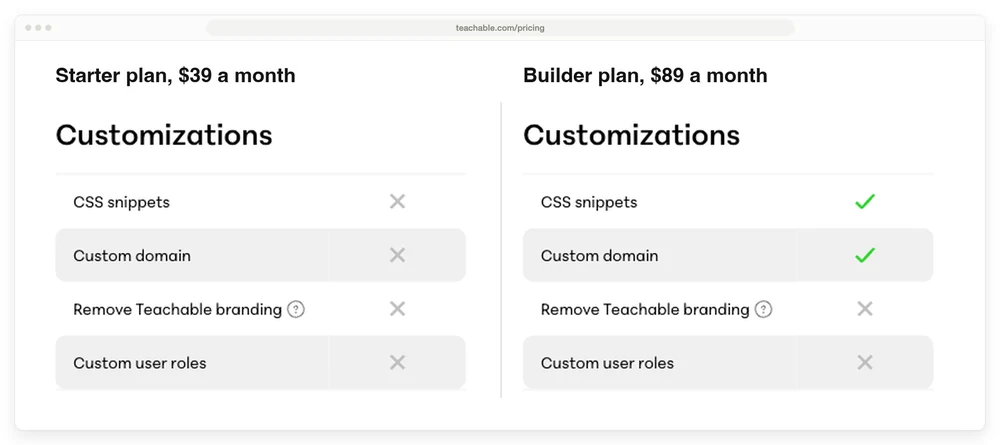
Check which plan includes your domain before you pay. Teachable’s $39 Starter plan has no custom domain, so Teachable’s entry is Builder at $89. LearnWorlds includes your domain at $29 a month plus $5 a sale. For files, Payhip’s free plan takes 5% a sale and CartMango takes 0%, free right now, from $10 a year once paid plans start in November.
You want the course on your own site, under your own name, with every student’s email landing in your own list, ready for the next course you make.
The Teachable price you will see quoted first, $39 a month, buys a plan that keeps your course on Teachable’s own web address. And a WordPress course plugin can be free, but the hosting under it sends a bill every year.
Below are the 4 starting points, what each costs on the plan that actually uses your domain, and the catch with each one. Every plan price comes from the vendors’ own pages.
Key Takeaways
- Teachable’s $39 Starter plan cannot use your own domain. Its cheapest plan that can is Builder, at $89 a month.
- Thinkific removed its $40 Basic plan in October 2026. Its cheapest plan is now Start, at $109 a month.
- WordPress trades a plugin bill of $0 to $350 a year for upkeep. Tutor LMS has a free core plugin, and LearnDash now comes in a bundle.
- Squarespace charges more on a course than a download. Courses pay 7% on the Basic plan and 0% only on Advanced.
- Videos and PDFs can skip course software. Payhip’s free plan takes 5% a sale. CartMango, the checkout I run, takes 0%, free right now, from $10 a year once paid plans start in November.
How to sell online courses from your own website, starting from the site you have
To sell online courses from your own website, first decide which kind of “own website” you mean, since each needs a different setup:
- A WordPress site. A course plugin runs on your server, next to your blog or business site.
- A Squarespace or Wix site. The builder’s own course tools keep the course inside the site.
- Your own domain on a hosted platform. Teachable, Thinkific, Podia, Kajabi or LearnWorlds hosts the course at your web address.
- Your own page with a checkout. The lessons are files, and a checkout such as Payhip or CartMango takes the payment and delivers them.
Want the mistakes that cost course sellers their first sales caught early? The Online Selling Mistakes Challenge covers 5 of them over 5 days by email.
A seller with an established WordPress blog and a seller with nothing but a Vimeo folder should not end up with the same setup. If you are still working out what goes inside the course, start with what an online course is and come back.
If your website already runs on WordPress
A WordPress course plugin fits you if you already publish a blog or business site on WordPress and can install a plugin without calling anyone. The plugin, also called an LMS (learning management system), puts the course, the students and their logins on your own server, so there is no course platform to leave later. The 2 names you will see most are Tutor LMS and LearnDash.
What it costs, from the vendors’ own pages:
- Tutor LMS gives away its core plugin, which it calls “free forever.” Its paid Individual plan is $199 a year for 1 site and adds Tutor’s pro add-ons and themes.
- LearnDash is now sold as the Nexcess Plugin Stack, which bundles it with Kadence, Give and The Events Calendar. The cart reads $350 a year for 1 site, and learndash.com/pricing now forwards to Liquid Web.
- Hosting is a separate bill from a separate company, so add it to whichever plugin price you pick.
- Card fees come on top of everything. Stripe charges 2.9% plus 30 cents per successful domestic card payment in the US.
Start on Tutor LMS’s free core if you want to build and test the course before paying anything. Move to its $199 plan or to LearnDash once the course sells, and check which payment gateways your version accepts on the plugin’s own page before you launch.
What you give up is time. Before CartMango, I ran a company that built WordPress plugins, so I will say the unglamorous part plainly: a plugin is software that someone has to keep maintaining, and when they stop, you inherit it. That has already happened to a tool recommended for this topic: 1 of the 5 tools in Salvador Briggman’s page-1 guide to selling courses from your own website is CoursePress Pro, and its maker, WPMU DEV, retired it with the words “We will no longer be supporting these plugins.”
Course sellers who run WordPress describe the same trade. In an r/instructionaldesign thread, a LearnDash user wrote: “LearnDash requires some expertise with WordPress and a willingness to tinker. I have had some problems with plugin conflicts and site performance.” If that sounds fine to you, WordPress puts the whole course on your own server for a plugin bill of $0 to $350 a year. If it sounds like a second job, read the next 2 sections first.
If your site lives on Squarespace or Wix
Squarespace and Wix sites can keep a course inside the site you already have, because both builders sell courses natively. On Squarespace that convenience has a price. It runs 2 fee schedules: a downloadable file is charged as commerce, and a course, member site or video page is charged at a higher rate, which its own fee documentation lists like this:
- Basic, $228 a year: 7% on courses, 2% on downloads
- Core, $348 a year: 5% on courses, 0% on downloads
- Plus, $588 a year: 1% on courses, 0% on downloads
- Advanced, $1,188 a year: 0% on both
Squarespace sites on an older plan with no Digital Products add-on pay 9% on courses. On Basic, a $97 course hands Squarespace $6.79 before card processing, and the same content sold as a download would cost $1.94. The full breakdown, with the 300 MB limit on a single download, is in our Squarespace digital products guide. Moving from Basic to Core costs $120 more a year and cuts the course fee from 7% to 5%, so it pays for itself at $6,000 of course sales a year. Below that, stay on Basic and accept the 7%.
Wix’s own course guide says you can build a course “without a paid plan”, and that “if you plan to also use Wix Bookings to take bookings, you’ll need a paid plan to do so.” The guide names no price for selling a course, so check the plan list in your Wix account before you build there.
The other option is to leave the builder alone and connect a hosted course platform to your domain. Thinkific’s own FAQ describes exactly that, using Thinkific as “the education portion to complement your existing website, whether it’s custom built or created on a CMS like WordPress.” The cost of staying inside Squarespace is a cut of every course sale until you reach the Advanced plan.
If you want your own domain without running a website
A hosted course platform on your own domain fits you if you have no site, or have one and never want to maintain course software inside it. Connect your domain, and the platform handles video, logins, checkout and student progress while your students see your address in the browser bar.
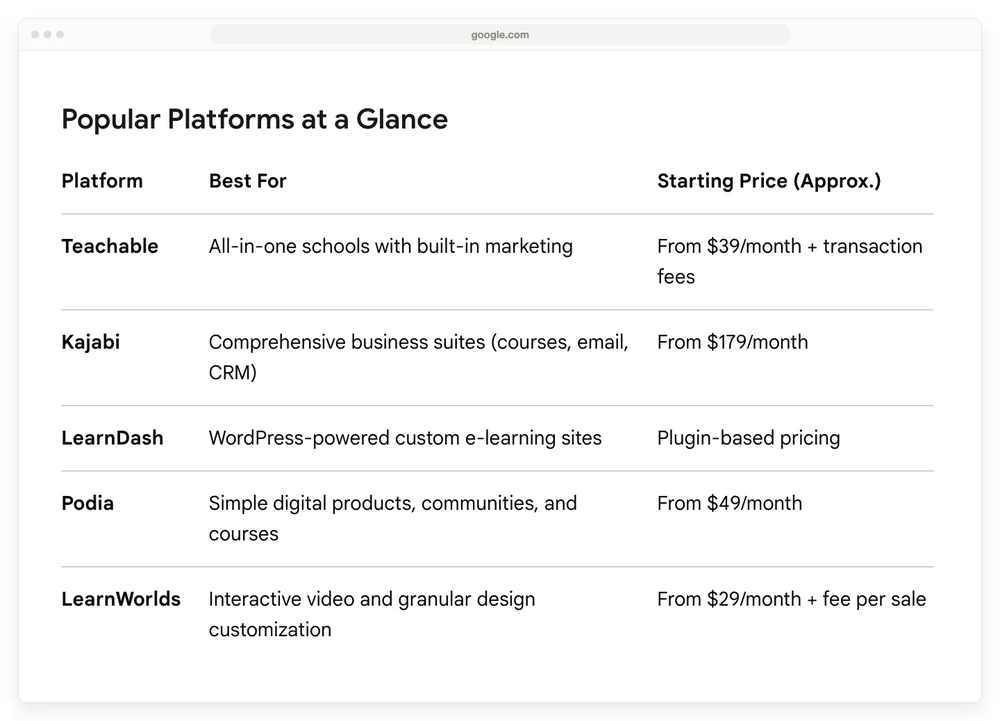
On Teachable, the plan that includes your domain is not the $39 one. Google’s AI Overview for this search lists Teachable “From $39/month + transaction fees”.
That $39 plan has an ✕ next to “Custom domain” on Teachable’s own plan comparison. Builder, the next plan up, has the tick.
Thinkific removed its cheapest plan. An archived copy of its pricing page shows a Basic plan at $40 a month billed yearly, and that plan is no longer on the live page, so the cheapest plan Thinkific lists is Start.
LearnWorlds Starter has the lowest monthly price of the 5 hosted platforms that put a course on your own domain, at $29 plus $5 a sale, and Kajabi Basic has the highest at $179.
| Platform | Plan with your domain | Month to month | Billed yearly | Cut per sale |
|---|---|---|---|---|
| LearnWorlds | Starter | $29 | $24 a month | $5 per paid enrollment |
| Podia | Mover | $48 | $42 a month | 5% |
| Teachable | Builder | $89 | $69 a month | 0% on Teachable Payments |
| Thinkific | Start | $109 | $82 a month | No extra gateway fee on Thinkific Payments, an extra fee on your own Stripe or PayPal |
| Kajabi | Basic | $179 | $143 a month | No revenue share, an extra processing fee on another processor where Kajabi Payments is offered |
The pick comes down to your course price and what else you want on the same bill. Below $100 a course, Podia’s 5% takes less than LearnWorlds’ flat $5, and above $100 the $5 is smaller. Podia’s plans include email and a community, and its Shaker plan drops the 5% for $84 a month billed yearly, which pays for itself at about $10,000 of course sales a year. Teachable Builder suits a seller who wants its built-in email and affiliate tools with 0% on Teachable Payments, and Kajabi Basic suits one who wants the website, email and courses in 1 tool at $179 a month.
The downside is the monthly bill in the months you sell nothing. The person who started that r/instructionaldesign thread put it this way: “Most of the ones I’ve looked at have monthly fees so high that they would eat into whatever revenue courses hosted on them might generate.”
If your course is a set of videos and PDFs
A checkout that delivers files fits you if the course is already recorded as videos and PDFs and you mainly need a way to take payment and hand them over. In an r/onlinecourses thread, a fitness course seller described courses of 7 to 20 pre-recorded videos of about 8 minutes each, hosted on Vimeo and sold through PayPal on their own site. Their earlier WordPress membership version, they wrote, “was a hassle with bugs,” and the setup they moved to, a customizable website plus a U-Screen plan, cost “about $250/mo.”
You can skip course software here. Put a checkout button on your own page and let the checkout deliver the files. Payhip goes a step further and hosts the course itself on every plan.
On a $97 course, Gumroad keeps $10.20 of each sale, Payhip’s free plan keeps $4.85, and CartMango takes no cut, with card processing from Stripe or PayPal added on top of every row.
| Tool | Cut of a $97 sale | Plan price | Course player with progress | Watch for |
|---|---|---|---|---|
| Gumroad | $10.20 (10% + $0.50) | None | No | The biggest cut here |
| Payhip Free | $4.85 (5%) | None | Yes | 5% on every sale, forever |
| Payhip Plus | $1.94 (2%) | $29 a month | Yes | A monthly bill plus 2% |
| CartMango | $0 | Free right now, from $10 a year once paid plans start in November | Not yet, planned for October 2026 | Delivers files, no lesson player today |
CartMango is the checkout I run. Its $10-a-year plan costs more than Payhip’s 5% until your 3rd $97 sale of the year, and less from then on. CartMango’s course hosting, with lessons and progress tracking, is planned for October 2026 on its $30-a-year Platinum plan, and until then it delivers your course as protected files.
Pick Payhip if you want a lesson player today and can live with 5% of every sale. Pick CartMango if the course works as downloads and you would rather pay no cut on each sale. Files cost you the lesson player. Students download the videos rather than ticking off lessons, and a file on someone’s laptop is easier to pass around. These ways to protect digital downloads cover what you can still do about that, and a video host for course lessons keeps big files off your checkout entirely.
Where course sellers lose money on this choice
Course sellers lose money on this choice by trusting old price lists, paying monthly too early and putting a cheap course on a flat fee.
Trusting a list that has aged. Pricing pages change faster than the guides written about them. Read the vendor’s pricing page the week you buy, including the plan comparison under the price cards, since that is where Teachable’s ✕ next to “Custom domain” sits.
Paying monthly before anything sells. Every hosted plan above runs whether you sell 0 courses or 50. Yearly billing takes roughly 12% to 25% off across the 5 platforms above, and it only saves money if you are still selling in month 12.
Putting a cheap course on a flat fee. LearnWorlds’ $5 per enrollment is 5% of a $100 course and 17% of a $29 one. Under $100, a percentage fee such as Podia’s 5% or Payhip’s free plan takes less.
Your setup for selling courses from your own website, in 1 table
WordPress adds a plugin that costs from free to $350 a year, Squarespace takes 7% of a course sale on its Basic plan, a hosted platform on your own domain starts at $29 a month plus $5 a sale, and files behind a checkout start at no monthly cost.
| Where you are | What to pick | What it costs | The catch |
|---|---|---|---|
| A WordPress site | Tutor LMS’s free core, then Tutor Pro or LearnDash | Free to $350 a year, plus hosting | You maintain it |
| A Squarespace or Wix site | The builder’s own course tools | Squarespace: 7% a course sale on Basic, 0% on Advanced. Wix: a paid plan, price not given in its course guide | Squarespace’s highest course fee sits on its cheapest plan |
| No site, want your domain | LearnWorlds or Podia, Kajabi for website, email and courses in 1 tool | From $29 a month plus $5 a sale | A monthly bill in slow months |
| Videos and PDFs | Payhip for a lesson player, CartMango for 0% a sale | Payhip free: 5% a sale. CartMango: 0%, free right now, from $10 a year once paid plans start in November | No lesson player on CartMango today |
FAQ
How do I sell my own course online?
Pick where the course lives first: a WordPress plugin, your site builder’s course tools, a hosted platform on your domain, or files behind a checkout. Upload the lessons and set the price. Connect Stripe, PayPal or the platform’s own payments. Build a sales page that says who the course is for and what they get. Run a test purchase with a 100% coupon to check that access arrives, then send people to the page, starting with your email list.
Is selling courses online profitable?
A course creator earned $2.8 million in 3 years, though that is 1 creator’s result, not a typical one. Fees decide a lot of the margin: on a $97 course, Gumroad keeps $10.20 before card fees, Payhip’s free plan keeps $4.85 and Squarespace Basic keeps $6.79. A hosted platform adds $29 to $179 a month whether you sell or not, so with only a handful of sales a year the plan price can eat most of the profit.
What is the best website to sell courses?
The one that matches the site you already have. On WordPress, a course plugin. On Squarespace or Wix, the builder’s own course tools or a hosted platform connected to your domain. With no site, a hosted platform. LearnWorlds Starter has the lowest monthly price of the 5 above at $29 plus $5 a sale.
Can I sell courses from my own website for free?
Close to free, yes. Tutor LMS has a free core plugin, though WordPress hosting still costs money. Payhip’s free plan hosts a course and takes 5% of each sale. CartMango is free right now and takes 0% of a sale, costs from $10 a year once paid plans start in November, and delivers files rather than a lesson player today. Card processing applies to all of them.
What are the most profitable online courses to sell?
Lists of the most profitable topics rarely show sales or profit numbers. What you can check yourself is whether people already pay for the same outcome through coaching, books or other courses. For topics worth testing, see these online course ideas worth pursuing.
Where your first course sale can land
If your course is still a folder of videos and a workbook, you can sell online courses from your own website before you buy any course software. CartMango puts a checkout and a Mini Pages sales page in front of those files and takes no cut of the sale, so the only deductions from a $97 course are the card fee and, from November, a plan from $10 a year.
About the Author

👋 I’m Welly, founder of CartMango (the site you’re on), a checkout platform for digital product sellers. We’ve previously processed $179M+. I also run BirdSend (email marketing tool, 3.1B+ emails sent). On the side I show other non-techie digital sellers how I use AI workflows to automate 50%+ of my operations. Find me on LinkedIn.
Related Reading
- How to sell online courses: a creator’s $2.8 million in 3 years, broken into strategy and action
- Squarespace digital products: the 2 fee schedules, and what a $30 sale leaves you on each plan
- How to sell digital products without a website: 12 places to sell when you have no site at all
- ThriveCart for courses: what ThriveCart Academy costs and who it suits
- How to add a shopping cart to a website: 4 ways to put a checkout on a site you already run