

CartFlows is a widely installed WooCommerce funnel and checkout plugin with 1 catch in its pricing: the $99 Starter plan has no order bumps or one-click upsells. Those start on Pro, at $199 in year 1 and $299 a year after, so judge it at that price.
Based on 65 Trustpilot reviews, 27 low WordPress.org ratings and CartFlows’ policies, this CartFlows review says buy it if you already run WooCommerce. Other routes: FunnelKit Plus ($149.50, then $299 a year) on WooCommerce, SureCart ($0 plus 2.9% a sale, or $199 a year) on plain WordPress, and CartMango (free right now, from $10 a year once paid plans start in November) with no WordPress.
You’re about to put a plugin in charge of your checkout and likely pay for it every year, so you want a straight read on whether CartFlows holds up.
3 of the 5 top reviews I read come from CartFlows’ own people: its owner’s CEO, a co-founder and the vendor itself. 3 of the 5 also quote plans it no longer sells.
So I read all 65 Trustpilot reviews, sorted the 27 lowest WordPress.org ratings by hand, and went through CartFlows’ terms, refund policy, support policy and changelog.
You’ll see how CartFlows handles the 5 jobs a seller needs done, what each one costs, and the job those 5 reviews mostly skip: stopping.
Key Takeaways
- Pro is the real entry plan. Starter at $99 has no order bumps or one-click upsells, so plan on $199, then $299 a year.
- It needs a store underneath. CartFlows only runs on WordPress with WooCommerce. Hosting sits on top, plus $279 a year if you sell subscriptions.
- Many top reviews have a stake. 3 of the 5 I read come from CartFlows’ own people, and 3 quote plans it no longer sells.
- Scores depend on where you look. WordPress.org shows 4.8 from 517 ratings, Trustpilot 3.7 from 65 reviews, and G2 3.9 from 7.
- A renewal looks outside the refund window. The 14 days run from your first purchase, and cancelling means contacting CartFlows before the renewal date.
- A seller with no store has shorter routes. CartMango, which I run (free right now, from $10 a year once paid plans start in November), Payhip (free plan, 5% per sale) and Gumroad (10% + $0.50 per sale) host the page and checkout.
CartFlows review verdict: buy it for a store, skip it for 1 file
CartFlows fits a seller who already runs WooCommerce and wants a better checkout, order bumps and upsells without leaving WordPress. It fits badly if you sell 1 PDF or 1 course and have no store yet, because all of that has to exist before CartFlows does anything.
Is checkout even your weak spot? The Online Selling Mistakes Challenge walks through 5 common selling mistakes by email over 5 days, at no cost.
Who wrote the CartFlows reviews on page 1
3 of the 5 top reviews I read come from CartFlows’ own people, and 1 comes from a rival. The only 2 showing today’s plans are the vendor’s own post and the rival’s.
| Site | Written by | Their stake | Plans quoted | Current? |
|---|---|---|---|---|
| wpastra.com | Sujay Pawar | CEO of Brainstorm Force, which owns CartFlows | Plus $189, Pro Bundle $299 | No |
| wpcrafter.com | Adam Preiser | Called CartFlows’ co-founder on its own blog | Plus $189, Pro $299, Woo Toolkit $449 | No |
| cartflows.com | Team CartFlows | The vendor | Starter, Pro, Suite | Yes |
| bloggingx.com | Site writer | Affiliate links | Starter $99, Plus $199, Pro $299 | No |
| storeapps.org | StoreApps writer | Sells a rival, Smart Offers | Starter, Pro, Suite | Yes |
The wpastra.com review says “We use it in our store” near the top, and its bio calls Sujay Pawar “the co-founder and CEO of Brainstorm Force”. WPCrafter’s review is signed by Adam Preiser and rates ease of use, price and support 10 out of 10 each.
CartFlows’ own blog says its editorial team is “led by Adam Preiser, the co-founder of CartFlows”, and the plugin’s WordPress.org listing names wpcrafter as a contributor. I couldn’t find that stake stated in the review itself. WPCrafter’s disclosure page says it uses referral links, and also says: “This site does not contain any content which might present a conflict of interest.”
A founder can explain a product well, so none of this makes those reviews wrong. Read WPCrafter’s 10 out of 10s as the maker’s view, though. Stale plans cost a buyer more: its review still recommends a $189 Plus plan “for most stores”, while today’s pricing page has no Plus plan and no $189 price.
My stake, so you can weigh this review the same way: I run CartMango, a rival checkout. From 2011 to 2015 I also ran Profits Theme, a WordPress plugin for building landing pages, so I’ve sold in this market too. The figures below come from public pages, and I say where each one comes from.
Job 1: having a WooCommerce store to run it on
CartFlows needs WordPress and WooCommerce on your own hosting before it does anything. Its WordPress.org FAQ says so plainly: “CartFlows requires WordPress and WooCommerce to be installed on your site.”
WooCommerce itself is free, so the bill starts with the host. Bluehost lists WordPress hosting from $3.99 a month on a 36-month term, renewing at $9.99 a month. Stripe or PayPal fees come on top.
For a digital product, WooCommerce core handles delivery: a downloadable product emails the buyer a protected link with no extra plugin. Recurring billing is a separate purchase. CartFlows’ pricing FAQ points you to the WooCommerce Subscriptions extension, which costs $279 a year.
Tax stays with you on this stack. WooCommerce’s tax docs cover how to enter rates, “not when or what to charge”, and add “We are not tax professionals”. CartFlows sits on top of that, and CartMango wouldn’t change it either, because on CartMango you stay the legal seller too.
If you already run a store, this job is done and CartFlows adds nothing to it. If you don’t, a hosted checkout skips the job. CartMango hosts the sales page (Mini Pages) and the checkout, and Payhip and Gumroad host product pages too, so none of the 3 needs a website of your own. A hosted page doesn’t bring buyers by itself, so you still need your own traffic.
Job 2: swapping the checkout without breaking it
The free CartFlows plugin replaces the WooCommerce checkout at no cost, which makes it the cheapest way to test the product. You get checkout layouts, ready-made funnel templates, a field editor, and pixels for Google, Facebook, Pinterest, Snapchat and TikTok. It works with Elementor, Divi, Bricks, Beaver Builder and the block editor.
Its listing shows 200,000 active installs, and CartFlows’ own comparison post adds a useful caveat: “a portion of that install base driven by Astra theme demo bundling”. Astra comes from the same company.
The risk sits in what the plugin touches. A checkout is where your theme, page builder, payment gateway and caching plugins all meet. Of the 27 WordPress.org ratings at 3 stars or below, 14 describe bugs, conflicts or design limits, and 4 of those name Elementor.
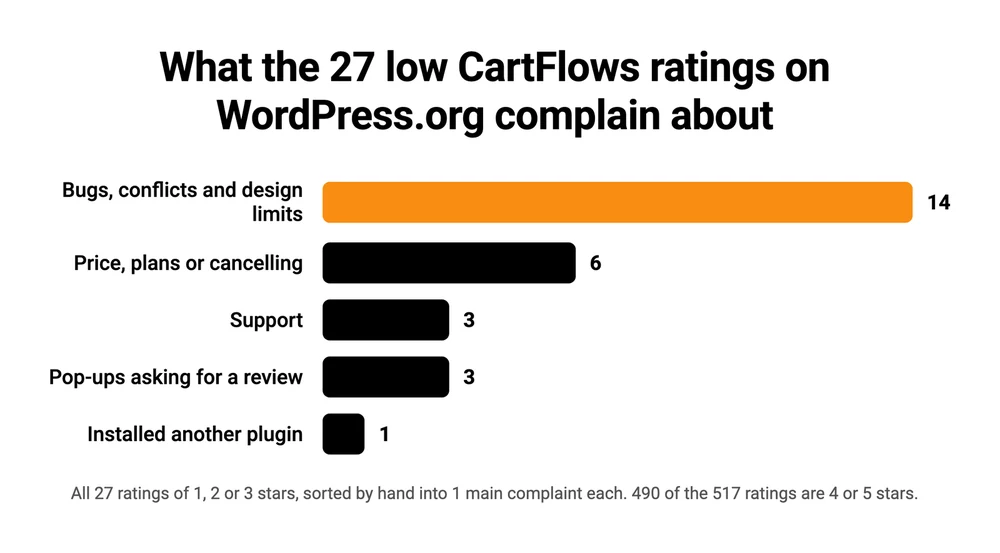
For scale, 490 of the 517 ratings are 4 or 5 stars, and only 5 of the 27 low ones date from 2025 or 2026.
In a 2023 r/woocommerce thread, a store with “someone waiting to place a $200 order” got a “Checkout ID not found” error on products outside its funnel, and traced it to a CartFlows checkout saved as a Bricks template. A 2021 WordPress.org reviewer reported that deleting the plugin left the WooCommerce checkout throwing errors.
Try it on a copy of your site first, with your real theme and gateway, and run a test purchase before you switch the live store over.
Job 3: earning more from each order
An order bump is a tick box at checkout, and a one-click upsell is an offer after payment that charges the saved card. CartFlows keeps both, plus A/B testing and funnel analytics, behind its Pro plan.
CartFlows pricing, plan by plan
CartFlows Starter costs $99 and has no order bumps or one-click upsells, so the first plan with both is Pro at $199 in year 1 and $299 a year after.
| Plan | Year 1 | Year 2 on | Lifetime | Sites | Bumps and upsells |
|---|---|---|---|---|---|
| Starter | $99 | $149 | Not sold | 1 | No |
| Pro | $199 | $299 | $699 | 3 | Yes |
| Suite | $299 | $449 | $999 | 30 | Yes |
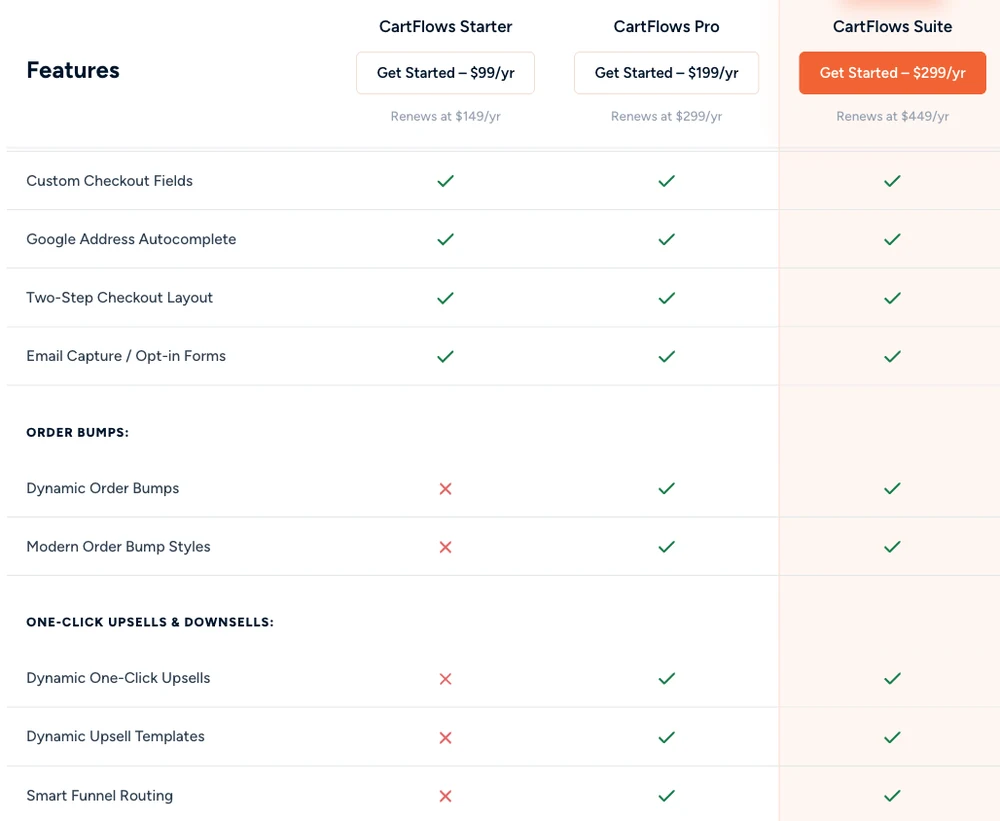
Over 3 years on yearly billing, Starter costs $397, Pro $797 and Suite $1,197. The lifetime licences, sold on Pro and Suite only and payable over 6 months, pay for themselves during year 3.
Suite fits a seller running several stores. It adds Cart Abandonment Recovery Pro, Modern Cart Pro and Power Coupons Pro, plus a year of OttoKit Pro and a one-time 2,500-contact SureContact plan. Our WooCommerce upsell plugin guide prices the same features at CartFlows’ rivals.
2 checks before you pay
Test your gateway first, because one-click upsells depend on it. CartFlows’ pricing FAQ lists Authorize.net, iDeal via Mollie, PayPal, Square, Stripe, WooCommerce Payments and Cash on Delivery. Its changelog shows an August 2026 fix for Apple Pay and Google Pay buyers skipping the upsell step, so try the exact wallet your buyers use.
Then read the plan grid on the pricing page, because CartFlows’ own pages disagree. The pricing page sells Starter, Pro and Suite. The Free vs Pro page still shows Starter, Plus and Pro, and it puts a cross beside 2-step checkout on Starter where the pricing page shows a tick.
A March 2023 reviewer on Trustpilot bought Plus for its upsells, was told they were Pro only, and ended up with a refund after 5 days of back and forth.
Winning back abandoned carts
The free Cart Abandonment Recovery plugin also comes from Brainstorm Force, and it sends timed recovery emails to shoppers who leave checkout. It has 300,000 active installs and a 4.8 from 626 ratings, and it costs nothing to test. The Pro version, which CartFlows’ pricing page says adds SMS and WhatsApp, costs $99, then $149 a year, and also comes with Suite.
On CartMango, cart abandonment sits on the $20 a year plan and the emails go out through the email tool you connect. Buyers pay on a hosted CartMango checkout, because embedded checkouts are still on its roadmap.
Job 4: getting help when the checkout breaks
CartFlows’ pages disagree on when support is open. The pricing page promises “24/7 Premium Support”. The support policy says: “Our support team operates on regular business days, and response times apply only to these working days.”
Pro users get a target of 24 hours on working days, free users 2 to 3 working days, and there’s no phone line. The same policy rules out “Theme or plugin conflicts caused by products that do not adhere to WordPress coding standards”, and I can’t tell how many of the 14 low ratings in Job 2 fall under that line.
What the review sites say
WordPress.org rates CartFlows 4.8, more than a full point above Trustpilot’s 3.7, and G2’s 3.9 rests on just 7 reviews.
| Site | Score | Reviews | Worth knowing |
|---|---|---|---|
| WordPress.org | 4.8 | 517 ratings | 477 give 5 stars, 15 give 1 star |
| Trustpilot | 3.7 TrustScore | 65 | The plain average of the stars is 4.4 |
| G2 | 3.9 | 7 | Too few to read much into |
Trustpilot needs sorting before it means much. 25 of its 52 5-star reviews arrived in January 2025, and 21 of the 52 run to 5 words or fewer. One reads “goooooooooood”. Another says “I have not really used it because i can not get my website to work right”.
Its transparency page counts 4 reviews since December 2025, none at 5 stars, and 2 of those 4 come from people hit by the fake job scam in the FAQ below.
The 9 reviews at 1 or 2 stars include 1 of those scam targets, which leaves 8 about CartFlows and its sibling plugins. 6 of the 8 complain about support, and 3 describe a refund or cancellation that went badly. A word search finds support named in 13 of the 52 5-star reviews too.
CartFlows answers some of this in public. A November 2025 reviewer couldn’t unlink CartFlows’ Stripe plugin from their Stripe account, and the reply admitted the ticket had been “tucked away in our support system”, then said the issue was fixed.
WordPress.org’s 4.8 needs a footnote too. 3 of the 27 low ratings there, and a 4th in passing, complain about prompts asking for a review, and one reads: “You keep givng the SPAM message forcing me to give you a review”. I can’t tell how many of the 477 5-star ratings those prompts produced.
Job 5: stopping without paying another year
Stopping CartFlows takes action before your renewal date, because every yearly plan renews automatically and the refund window looks closed by then. The 4 reviews in that first table that aren’t on cartflows.com say nothing about cancelling.
CartFlows’ terms say its products are “sold as automatically recurring subscriptions that renew every year on the anniversary of the purchase date”. To stop, they say: “You may cancel your subscription at any time easily by contacting us.” A December 2023 WordPress.org reviewer and an October 2024 Trustpilot reviewer both describe looking for a cancel button in the account area and finding none.
CartFlows counts its 14-day refund window from your first purchase, and its policy says so twice.
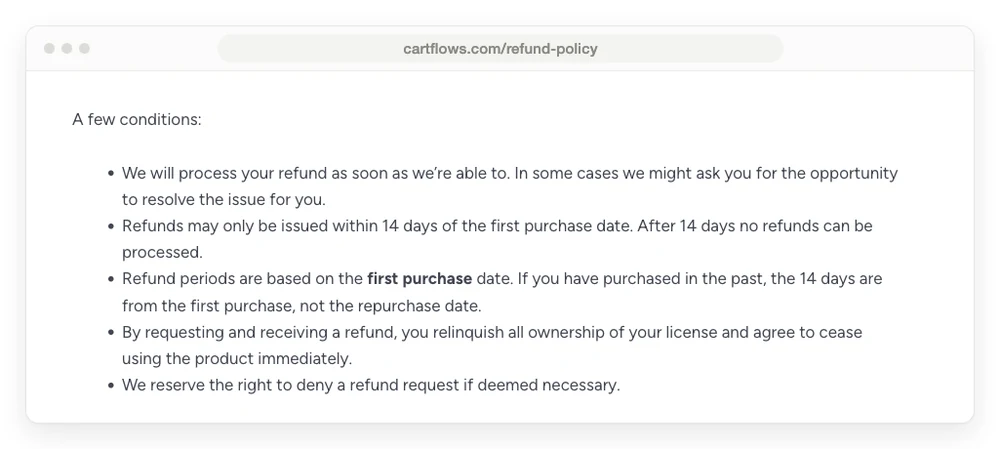
I read a renewal as a repurchase, which puts a forgotten renewal outside the window. A December 2025 reviewer on Trustpilot says they missed cancelling by 1 day and CartFlows refused to refund $500. Put the renewal date in your calendar the day you buy. Lifetime licences skip this, because the terms say they “do not require renewals”.
What happens after you stop is less clear. CartFlows’ funnel guide says “the funnels you’ve created will continue working on your WordPress site”, and that “you’ll lose access to plugin updates, premium support, new templates, and advanced features”. It doesn’t list which features count as advanced, so ask support whether order bumps and upsells keep running before you let a paid licence lapse.
The terms add that download access ends, and that coming back later costs “the current listed price”.
The 2026 changelog lists 15 releases and 4 security fixes. In September, Wordfence published a flaw rated 8.8 out of 10 in every version of the free plugin up to 3.2.0, fixed in 3.2.1. It needed a logged-in user with contributor access or higher, so a solo seller with no other logins was less exposed.
That flaw sat in the free plugin, which keeps getting updates from WordPress.org whether you pay or not. With a lapsed Pro licence, the Pro add-on stops getting fixes while WordPress and WooCommerce keep changing around it.
CartFlows pros and cons
WordPress.org users rate CartFlows 4.8 from 517 ratings, and its low reviews point at bugs, plans and leaving.
What sellers get
- A free plugin that replaces the WooCommerce checkout
- Support for the main WordPress page builders
- Funnels that stay on your own site
- No per-sale cut on its pricing page
- A lifetime option on Pro and Suite
What sellers give up
- It only runs on WordPress with WooCommerce
- Starter has no order bumps or one-click upsells
- Yearly renewals run 50% above the year 1 price
- Bugs and conflicts lead the low ratings
- Support works business days, whatever the pricing page says
- Cancelling goes through CartFlows, and the refund window counts from your first purchase
CartFlows vs FunnelKit, SureCart and CartMango
CartFlows Pro and FunnelKit Plus both cost $299 from year 2, SureCart costs 2.9% of each sale or $199 a year, and CartMango Gold costs $20 a year at launch prices. All 4 cover order bumps, upsells and cart recovery.
| Tool | Job 1: you must run | Job 3: bumps and upsells | Cart recovery | Limit |
|---|---|---|---|---|
| CartFlows Pro | WordPress and WooCommerce | $199, then $299 a year | Free plugin, or Pro at $99, then $149 | 3 sites |
| FunnelKit Plus | WordPress and WooCommerce | $149.50, then $299 a year | Included | 2 sites |
| SureCart | WordPress | $0 plus 2.9% a sale, or $199 a year | Included | 1 store on Pro |
| CartMango Gold | Nothing, it’s hosted | Free right now, then $20 a year | Included | 25 products |
The last row is mine, so weigh it with that in mind. CartMango is built for digital products, so a store shipping physical goods should stay with the first 3. CartMango’s paid plans start in November, and it says these launch prices will rise over time.
FunnelKit is the closest match. WordPress.org shows it with 30,000 active installs against CartFlows’ 200,000, and a 5.0 from 1,028 ratings against CartFlows’ 4.8 from 517. Its footnote says “all renewals are at full price”, and its Professional plan, $199.50 then $399, adds its own email and SMS automations. CartFlows leaves most of that job to OttoKit or another tool.
SureCart suits a WordPress site that wants a store without WooCommerce at all. Its pricing page says order bumps, upsells and cart recovery come on every plan, including the $0 Launch plan with its 2.9% transaction fee. If you’d rather leave WooCommerce behind, our WooCommerce alternatives guide sorts the options by type.
FAQ
How much does CartFlows Pro cost?
CartFlows Pro costs $199 in year 1 and $299 a year after that, for up to 3 sites, or $699 once as a lifetime licence. Starter is $99 then $149, with no order bumps or upsells. Suite is $299 then $449 for 30 sites.
What is the CartFlows plugin?
CartFlows is a WordPress plugin from Brainstorm Force, listed on WordPress.org since 2018. It replaces the WooCommerce checkout and adds sales funnels: landing pages, checkout pages, upsell offers and thank-you pages. The free version covers checkouts. Order bumps and one-click upsells need Pro or Suite.
Is CartFlows legit?
Yes. CartFlows is a real plugin with 200,000 active installs, sold by Brainstorm Force. A search for “CartFlows job” is a different story: scammers posing as CartFlows recruiters offer fake remote work. CartFlows has published a notice listing 23 fake domains and says it never recruits by text. 2 Trustpilot reviewers and an r/isthisascam thread describe the same pitch.
Is the free version of CartFlows enough?
For a cleaner checkout, it can be. It replaces the WooCommerce checkout with better layouts and lets you edit fields. For order bumps, one-click upsells, A/B testing and funnel analytics, it isn’t. Start there anyway, since it’s the cheapest way to see whether CartFlows works with your theme and gateway.
Does CartFlows work without WooCommerce?
No. CartFlows requires WordPress and WooCommerce, and its funnels are built around WooCommerce products. For a store on WordPress without WooCommerce, look at SureCart. For no WordPress at all, a hosted checkout is the shorter route.
Is CartFlows a good ClickFunnels alternative?
If all you need is checkout and funnels on a WordPress site, yes. CartFlows Pro works out to about $25 a month on yearly billing from year 2, on your own site. ClickFunnels runs $81 to $248 a month billed yearly on its 3 main plans and hosts everything for you. You trade that bigger bill for hosting and upkeep you handle yourself. Our ClickFunnels review covers the other side.
Selling 1 file without building a store first
The 5 jobs in this CartFlows review all assume a WooCommerce store exists. If you have no store yet, is Job 1 worth doing just to reach CartFlows?
CartMango skips that job. On CartMango, a Mini Page holds your sales page, the checkout sits behind it, order bumps come on the $10 a year plan, and upsells and cart abandonment come on the $20 plan, with no cut of your sales. CartMango is free right now, and its paid plans start in November.
About the Author

👋 I’m Welly, founder of CartMango (the site you’re on), a checkout platform for digital product sellers. We’ve previously processed $179M+. I also run BirdSend (email marketing tool, 3.1B+ emails sent). On the side I show other non-techie digital sellers how I use AI workflows to automate 50%+ of my operations. Find me on LinkedIn.
Related Reading
- WooCommerce Upsell Plugin: real renewal prices for 5 upsell plugins, CartFlows included
- WooCommerce Alternatives: 4 types of tool, for when you want off WooCommerce
- WordPress Plugins for Selling Digital Products: the 4 jobs a digital seller has to cover
- ClickFunnels Review: the hosted funnel builder CartFlows gets compared to