
Build an ebook landing page from 6 blocks: a headline naming the reader’s result, the cover, 3 to 5 bullets on what is inside, an author line, 1 piece of proof and 1 button. For a free ebook, the button opens an email form. For a paid ebook, it opens a checkout.
Strip the menu and footer links so the button is the only way forward. For a paid ebook you need no website: Payhip (free plan, 5% a sale), Gumroad (10% plus $0.50 a sale) and CartMango (free right now, from $10 a year once paid plans start in November, 0% a sale) host the page and send the file. Card fees apply on all 3.
A finished ebook still needs 1 page that gets a stranger to hand over an email address, or $19, for it.
The top 3 written guides to that page come from companies selling page tools, and they give delivery a line or 2. I checked their 23 examples too: 10 have no link, and only 2 of the other 13 still open the page described.
So the examples below are built from scratch. You get the 6 blocks, a template to copy, a free page and a paid page filled in, and what those guides rush: what happens after the click, and what hosting costs.
Key Takeaways
- 6 blocks carry the page. A result-led headline, the cover, 3 to 5 inside bullets, an author line, 1 proof and 1 button.
- Free and paid pages end differently. Free ends at an email form and a delivery email. Paid ends at a checkout and a protected download.
- Page-1 example lists mostly lead nowhere. Of 23 examples on the top 3 guides, 10 have no link and only 2 of the other 13 still open.
- I’d send a free ebook in parts. My view since 2022, not a tested number: with 1 PDF link, readers tend to open only the first email.
- A paid ebook page needs no website. Payhip (free plan) takes 5% a sale, Gumroad 10% plus $0.50, and CartMango 0%, free right now, from $10 a year once paid plans start in November.
Free ebook or paid ebook: decide this first
A landing page for a free ebook trades the book for an email address, and a landing page for a paid ebook trades it for money, so the 2 versions end in different places.
Giving an ebook away only pays off when you have something to sell those readers next. If that part still feels fuzzy, the Online Selling Mistakes Challenge walks through 5 common mistakes solo sellers make, and how to fix them, over 5 days by email, free. It is also built the way I recommend delivering a free ebook later in this post: in parts.
The free version can be short. Your reader risks nothing but a slot in their inbox, so a headline, a cover, a few bullets and a 1-box form usually do the job. In practice it is a lead capture page with a book attached. The paid version has more questions to answer before anyone pays. Is it worth $19? What if it is not for me? Who are you?
That makes it a short ebook sales page, built like any sales page, with a price, a refund line if you offer refunds, and a few objections answered under the button.
3 things change between them:
- The button. “Send me the guide” on a free page. “Buy for $19” on a paid one.
- What happens after the click. A thank-you page and a delivery email, or a checkout, a receipt and a download.
- How much proof you need. Nice to have when the book is free. Strongly preferred when you charge, but never invented.
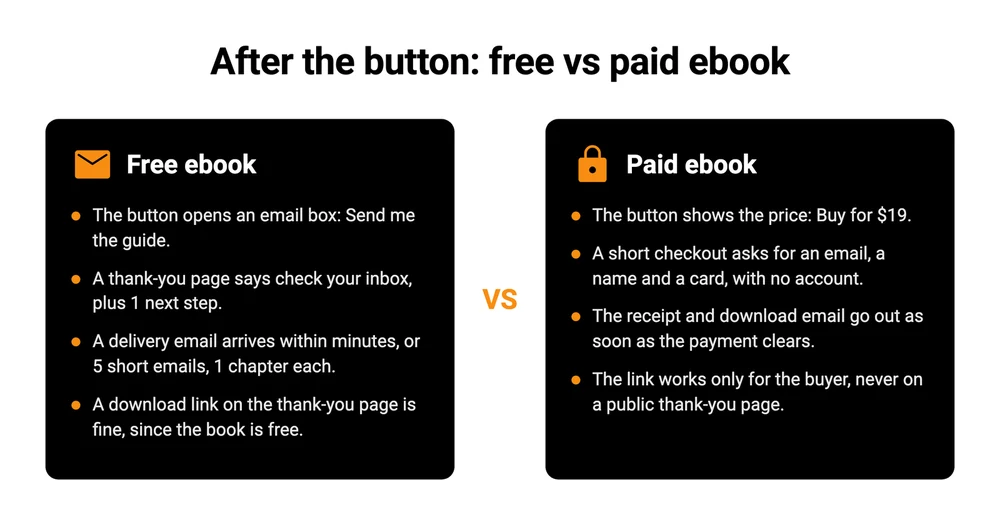
The 4 things that happen after the button, on a free ebook page and on a paid one.
You can run both, with the free ebook pulling readers toward the paid one. That is how the 2 worked examples further down are set up. If the book itself is not finished yet, start with how to make and sell an ebook and come back.
A paid ebook page does not need a website of your own. Payhip, Gumroad and CartMango, the checkout platform my team and I run, all host the page for you, and the cost table further down compares them on a single $19 sale.
The 6 blocks of an ebook landing page
An ebook landing page needs 6 blocks, in this order: headline, cover, what is inside, author line, proof and button.
Both versions use the same 6 blocks in the same order, and the paid version adds more proof, a stated price and, if you offer refunds, a refund line.
| Block | Job | Free ebook | Paid ebook |
|---|---|---|---|
| Headline | Names the reader’s result | 1 line | 1 line plus who it is for |
| Cover | Makes a PDF feel like a book | Flat or 3D image | Same |
| What is inside | Lists what the reader gets | 3 bullets | 5 bullets |
| Author line | Says why you | Optional | Needed |
| Proof | Shows readers got value | Optional | 1 to 3 real quotes, once you have them |
| Button | The only way forward | Email box | Price and buy button |
Headline: say what changes for the reader
Your title can be clever. The headline has to say what changes for the reader, in words they would use themselves. “The Low-Light Handbook” is a title. “Keep every plant in a dim apartment alive for a year” is a headline. Put the title on the cover, where it belongs.
Cover: a picture of the thing
A flat front cover made in Canva works. A 3D book cover mockup, the book shown at an angle, looks a little more finished. Either gives the reader something to picture.
What is inside: 3 to 5 results
Rewrite each chapter as something the reader can do afterwards. “Chapter 3: Watering” becomes “How often to water a plant that gets 2 hours of light.” 3 bullets are plenty on a free page, and a paid page can carry 5. Add the page count on both, so the reader knows they are getting 64 pages and not 6.
Author line and proof: only real ones
1 or 2 lines on why you are worth listening to. A number from your own life works well here, such as years doing the thing or people you have taught. Social proof is where pages go wrong, because an empty proof slot tempts people to fill it. Never write a testimonial yourself. On a paid page, launch with the author line alone, then ask your first 10 readers to reply with 1 sentence about what helped, and add the best 3 with their permission.
The button: 1 action, worded as the offer
On a free page, ask for an email address and nothing else, unless you will really use a first name in your emails. Make the button repeat the offer, “Send me the 15 plants” rather than “Submit.” On a paid page, put the price right next to the button, so nobody has to scroll to find out what it costs.
Then take the menu, sidebar and footer links off the page. Every other link is a way out. Before you share it, open the page on your phone, because a cover that looks fine on a laptop can push the button below the fold on a small screen. For more headline and bullet wording to borrow, the landing page copywriting template has fill-in lines for each section.
An ebook landing page template you can copy
Here is the whole page as a single fill-in template, with the free and paid lines marked, so you can paste the free version into an email tool’s landing page, or the paid version into a hosted sales page such as Payhip’s or CartMango‘s Mini Pages, and replace the brackets.
[HEADLINE: the result the reader gets, in their words]
[SUBHEADLINE: who it is for + page count + "free" or the price]

[COVER IMAGE]

Inside this [page count]-page ebook:
- [Result 1: what they can do after reading]
- [Result 2]
- [Result 3]
- PAID ONLY: [Result 4]
- PAID ONLY: [Result 5]

Written by [your name], [the 1 fact that makes you worth hearing].

PROOF: ["A real reader's sentence" - first name, what they do]
(No real quote yet? Delete this block. Never write one yourself.)

FREE VERSION:
[Email box]
[Button: Send me [the short title]]
[Small print: when it arrives + "unsubscribe anytime"]

PAID VERSION:
[$price, single payment, instant PDF download]
[Button: Get [the short title] for $price]
[Refund line, only if you offer refunds]

PAID ONLY, under the button:
Q: [Biggest worry 1]?  A: [Your answer]
Q: [Biggest worry 2]?  A: [Your answer]
Q: [Biggest worry 3]?  A: [Your answer]
[Button again]
On a paid page, try filling it in from the bottom up if the top feels hard. You may already know the 3 worries from reader emails, and writing the answers tells you what the headline should promise.
2 worked examples, filled in
Here are both versions of the template filled in for an invented houseplant writer, 1 free and 1 paid. Neither is a real product, and the author name and proof blocks stay as placeholders on purpose.
Free ebook landing page example
Grow something green in a north-facing room
15 plants that cope with low light, and where to put each one. A 12-page guide, free.
[Cover: “15 Houseplants for a North-Facing Window”]
Inside:
• The 15 plants that survive 2 hours of light, with a photo of each
• Where in the room each one goes, from the sill to the far corner
• The watering mistake that kills most low-light plants
Written by [your name], who has kept a north-facing apartment full of plants for [X] years.
[Email box] Send me the 15 plants
It arrives by email in a few minutes. Unsubscribe anytime.
Why it is built this way: the headline names the room, which is the reader’s problem, and the title waits on the cover. 3 bullets are enough for a free book, and the button repeats exactly what they will get.
Paid ebook landing page example
Keep every plant in a dim apartment alive for a full year
The care plan for 40 low-light plants, from watering to repotting. 64 pages, PDF.
[Cover: “The Low-Light Houseplant Handbook”]
Inside:
• A watering calendar for each of the 40 plants, by season
• How to tell low light from no light, with a 1-minute phone test
• Which 6 plants to skip, whatever the garden center label says
• Repotting, feeding and pests, with a fix for each
• A printable care checklist for the fridge
Written by [your name], author of the free “15 Houseplants” guide.
[Proof: add 1 to 3 real reader quotes here once you have them]
$19, single payment, instant PDF download
Get the handbook for $19
[Refund line, if you offer one]
Q: I have killed every plant I own. Will this help? A: [Your answer]
Q: Is this the free guide, but longer? A: [Your answer]
Q: Does it work in a basement apartment? A: [Your answer]
Why it is built this way: the paid page promises a bigger result (a full year, 40 plants) than the free one, so a reader of the free guide has a reason to pay. It shows the price before the button, and it names 3 worries a buyer is likely to have, with room for your answers.
Why the examples here are built from scratch
The top 3 written guides on Google for this search show 23 example pages between them. When I clicked through, 10 had no link to click and only 2 of the other 13 opened the page described.
Leadpages shows its 10 examples as screenshots with no links at all.
Unbounce links 10. Its 2 own ebooks still load, its Copyhackers link now redirects to a copywriting workshop, and the other 7 go to a company’s homepage rather than the ebook page. One of those homepages, Impraise, now hosts an unrelated lifestyle blog. Systeme.io’s 3 examples are a course catalog homepage, a page that returns a 404 error and a domain that no longer loads.
Sales pages get rewritten, products get retired and domains lapse, and a link can keep working while the page behind it changes completely. A template you fill in yourself cannot go stale that way.
After the click on a free ebook: thank-you page and delivery email
A free ebook needs 2 more pieces after the form: a thank-you page that says where the book is going, and an email that delivers it within minutes.
The thank-you page needs 3 lines: check your inbox, look in the promotions tab if it is not there, and 1 next step, such as a link to your best article. A download button on this page is fine for a free book, since anyone who shares that link is sharing something you give away anyway.
The delivery email is short too:
- Subject: Your copy of [title] is here
- Body: 1 line on what is inside, the download button, and “reply to this email if the link does not work.”
Then sign up with your own address and test it once, because a reader who never gets the book may never tell you.
Why I’d send a free ebook as an email series
In 2022 I told my email list to stop delivering lead magnets as a single PDF or video, and to send them as a short email series instead. My reasoning then: “If it were just a one-time pdf or video? They’ll only open the 1st email.” My argument was that a 5-part series fixes this: each email builds on the one before, subscribers get into the habit of opening yours, and you have a reason to write every day for their first 5 days. An ebook splits naturally, 1 chapter per email. You can still put the full PDF in the last email for readers who want it in a single file.
Which email tools can send the series
The catch is that free email plans limit automation. MailerLite’s free plan lists 5 automation steps, so a 5-email series with waits between emails may not fit.
Kit puts email series on paid plans only, MailerLite’s free plan allows 3 short automations, and BirdSend has no free plan but includes unlimited automation from $90 a year.
| Tool | Free plan | Hosted page | Email series | Paid from |
|---|---|---|---|---|
| Kit | Up to 10,000 subscribers | Unlimited pages | Paid plans only | $390 a year, 1,000 subscribers |
| MailerLite | Up to 250 subscribers | 1 page | 3 automations, 5 steps | $129.60 a year, 500 subscribers |
| Systeme.io | Up to 2,000 contacts | 3 funnels | 1 email campaign | $170 a year |
| Carrd | 3 sites, no forms | Forms from $19 a year | None, sends no email | $9 a year, forms need $19 |
| BirdSend | None, 7-day trial | Welcome Screen form page | Unlimited, every plan | $90 a year, 1,000 contacts |
BirdSend is the other company I run, and it has 2 limits. It has no free plan. And its landing page is a form type called the Welcome Screen, hosted at a BirdSend link, as its help page on landing pages explains. That is simpler than Kit’s page builder. What BirdSend adds is the series: unlimited forms and automated emails on every plan, from $90 a year.
After the click on a paid ebook: checkout and a download that stays yours
A paid ebook needs a checkout that asks for little more than an email and a card, and a delivery step that sends the file only to the person who paid.
Keep the checkout short. Baymard Institute’s cart abandonment research covers online shopping in general. Among shoppers who abandoned for a reason other than just browsing, 18% left because the site wanted an account, and 17% because checkout was too long or complicated. For a $19 PDF, ask for an email, a name and a card, and nothing else. The checkout page guide counts the boxes on 8 real digital checkouts if you want to compare.
Delivery is where the free-ebook habit causes trouble. Leadpages’ guide offers a download link on your thank-you page as one of its 2 delivery options, which is fine for a free book. On a paid one, anyone who gets that URL gets the book without paying. Send the file by email instead, through a link that only works for the buyer or expires. Checkouts built for digital files, such as Payhip, Gumroad and CartMango, protect their download links, so a link a buyer shares does not hand the book to everyone else.
A buyer can still forward a PDF they downloaded. Expiring links stop a link being posted in a forum, and a watermark with the buyer’s email deters casual sharing. The guide to protecting an ebook from sharing goes through what each method stops and what it does not.
An extra worth adding once the basics work is a small add-on at checkout, such as a plant-care calendar poster for $5 on top of the $19 handbook. That is an order bump, and Gumroad, Payhip and CartMango all offer one.
Where to host a paid ebook landing page, and what it costs
You can host a paid ebook landing page without a website, and the lowest-cost option depends on how many copies you sell. Carrd’s payment plan costs $49 a year, and CartMango is free right now, then $10 a year once paid plans start in November.
On a single $19 sale, Gumroad keeps $2.40 and Payhip’s free plan keeps $0.95, while Systeme.io, Carrd and CartMango take no cut, with card processing on top in every row.
| Tool | Plan, billed yearly | Cut of $19 | Sends the file | The catch |
|---|---|---|---|---|
| Gumroad | $0 | $2.40 (10% + $0.50) | Yes | 30% on sales from its Discover marketplace |
| Payhip | $0, free plan | $0.95 (5%) | Yes | Plus at $29 a month lowers it to 2% |
| Systeme.io | $0, free plan | $0 | Yes, a download page or members area you set up | 2,000 contacts and 3 funnels on free |
| Carrd, Stripe form | About $4.08 a month ($49 a year) | $0 from Carrd | No file delivery in its docs | You send every file yourself |
| CartMango | About $0.83 a month ($10 a year), free right now | $0 | Yes, protected links | 10 products and 10 Mini Pages on $10 |
CartMango is my own platform, so read its row knowing that. When we announced Mini Pages, I called it a simple hosted page for your offer, and said that since CartMango is not a page builder, Mini Pages is intentionally no-frills. Once paid plans start, CartMango’s $10 a year costs less than Payhip’s free plan from the 11th $19 sale in a year, and less than Gumroad from the 5th. Below that, the free plans cost you less.
Mini Pages also brings no audience, so every visitor is one you send, while Gumroad’s Discover marketplace finds buyers for a 30% cut. Gumroad and Payhip also collect and pay sales tax for you (Payhip covers EU and UK VAT plus US and Canadian sales tax). CartMango does not, since you stay the seller. Payhip shows no yearly price, so its Plus plan is quoted monthly.
Page builders such as Leadpages and Unbounce add A/B testing and more design control, and charge a monthly fee for it. Leadpages also shows different prices in different countries, which the Leadpages alternatives breakdown covers. If you like Carrd’s look, the Carrd review explains which of its plans can take a payment. Gumroad, Payhip and CartMango host the page for you, so you need no site of your own, while Carrd is a one-page site you build yourself. For a wider list of places to sell the book itself, see these platforms to sell ebooks, or this guide to selling without a website.
FAQ
What is a good conversion rate for an ebook landing page?
I found no independent ebook benchmark. Unbounce’s Q4 2024 study of 41,000 landing pages put the median at about 6.6% across all industries. Leadpages says ebook pages built on its tool average 24%, from its own customer data. Free pages convert higher than paid ones, which Leadpages notes too. In a r/FacebookAds thread, a seller sending ad traffic to a free PDF guide got 6 sign-ups from 37 clicks, and their sign-up rate later rose to 29%. Another advertiser wrote: “I typically shoot for >20-25% with a free lead magnet in a broad B2C niche and 12-17% in a B2B niche.” So treat about 6.6% as the all-page median, and expect a free ebook page to land well above it, and a paid page below a free one.
Is there a free ebook landing page template?
Yes. The template above works in most page tools, and Kit’s free plan (up to 10,000 subscribers) has templates too.
What is the difference between an ebook landing page and a sales page?
An ebook landing page is any single-purpose page for a single ebook. When the ebook costs money, that page is also a sales page, so it needs a price, more proof and answers to objections. When it is free, it works as an opt-in page and can be much shorter.
Can ChatGPT build an ebook landing page?
ChatGPT can draft the copy if you give it the template above and a description of your book. You still paste the result into a page tool, check every claim against the book, and delete any testimonial it makes up.
Do I need a landing page if my ebook is on Amazon?
Amazon gives your book a product page, but you never learn who bought it. A page of your own lets you collect emails or sell direct and keep the buyer list. You can run both. The KDP royalties guide shows what Amazon pays you per sale.
After the page goes live
Once your ebook landing page is live, a free ebook needs a delivery email and ideally a short series, and a paid one needs a checkout and a protected download. I run a tool for each of those jobs: BirdSend for the emails, and CartMango for the checkout.
If you are giving the ebook away, BirdSend sends the delivery email and the whole series on every plan, from $90 a year after a 7-day free trial.
If you are selling it, CartMango hosts the page in Mini Pages, takes 0% of each sale and delivers the PDF through protected download links. CartMango is free right now, from $10 a year once paid plans start in November.
About the Author

👋 I’m Welly, founder of CartMango (the site you’re on), a checkout platform for digital product sellers. We’ve previously processed $179M+. I also run BirdSend (email marketing tool, 3.1B+ emails sent). On the side I show other non-techie digital sellers how I use AI workflows to automate 50%+ of my operations. Find me on LinkedIn.
Related Reading
- Lead capture page: the 5 parts of an opt-in page and the delivery half most guides skip
- How to create a sales page: the 7-block structure behind a paid ebook page
- Protect an ebook from sharing: what each protection method stops, and what it does not
- Platforms to sell ebooks: 9 places to sell the book once the page is ready
- Leadpages alternatives: for readers weighing a page builder against a simpler setup