

Circle.so pricing is $89 a month when paying annually, for the Professional plan. Business is $199 a month on the same billing and Circle Plus is priced by sales. Every plan also keeps a cut of member payments: 2% on Professional, 1% on Business and 0.5% on Circle Plus, on top of Stripe’s fees.
Circle’s pricing page shows only those annual rates. The page’s own code stores month-to-month prices of $99 for Professional and $219 for Business, but no toggle displays them. Email marketing is a separate Email Hub charge that starts at $19 a month, and Professional charges $49 a month extra for custom profile fields.
You have a community idea, a rough member count, and 1 number from Circle’s pricing page: $89. That number is real. It assumes you pay for a full year upfront and that nobody has paid you anything yet.
Everything else takes clicking or scrolling to find. A fee row inside a panel you have to open. An add-on list further down. An email tool priced on its own slider. A monthly price that lives in the page code.
This breakdown puts all of it in one place: what each plan costs on both billing options, what Circle and Stripe take from a $100 member payment, where Business starts paying for itself, and what leaving Circle involves.
Key Takeaways
- Circle sells 3 plans. Professional is $89 a month and Business $199, both billed yearly, and Circle Plus has no published price.
- Month-to-month costs more. Circle’s page code lists $99 and $219, which adds $120 or $240 a year compared with paying annually.
- A $100 member subscription leaves you $94.10 on Professional. Circle takes $2, Stripe takes $3.20, and Stripe Billing adds 70 cents.
- Business pays for itself at $11,000 a month in member payments. If you need custom profile fields and branded emails, that drops to $2,100.
- Leaving takes work. Cancelling your Circle plan does not cancel your members’ subscriptions, so Circle tells you to cancel each one yourself.
Circle.so pricing plans and what each one includes
Circle.so pricing has 3 tiers: Professional at $89 a month, Business at $199 a month, and Circle Plus at a custom price, with the first 2 billed yearly. Unlimited members are included on all 3, so the plan price does not rise with your member count. What changes between tiers is everything around the members: admins, spaces, storage and the cut on payments.
If this is your first time charging people for access, the selling mistakes are worth catching before launch, whichever plan you pick. The Online Selling Mistakes Challenge is a free 5-day email course that walks through 5 of them.
Circle Professional costs $89 a month, takes 2% of member payments and gives you 3 admins, 20 spaces and 200GB of storage, while Business raises every one of those limits for $110 a month more:
| Plan | Price (billed yearly) | Circle’s cut | Admins | Spaces | Storage |
|---|---|---|---|---|---|
| Professional | $89 a month | 2% | 3 | 20 | 200GB |
| Business | $199 a month | 1% | 5 | 30 | 500GB |
| Circle Plus | Custom | 0.5% | Unlimited | Flexible | 1TB |
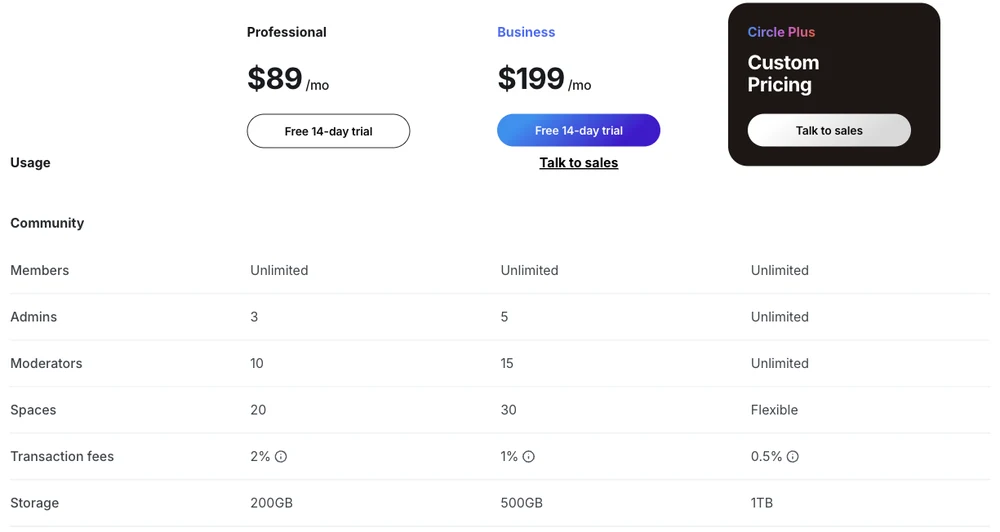
Every plan includes courses, events, live streams, paid memberships, gamification and a custom domain, so none of those decide your tier.
Business adds the things a growing team runs into. 20 automations and 20 scheduled workflows, the admin and member APIs, custom profile fields, branded email notifications, the AI content writer, automated transcriptions, activity scores, and the option to remove Circle’s branding from your community.
Circle Plus adds AI agents, AI moderation, custom single sign-on with Auth0 among the sign-in options, priority support, 10,000 Email Hub contacts at no extra charge, and the option to buy branded iOS and Android apps. Circle does not publish a price for it. You talk to sales.
The monthly price Circle keeps off the page
Circle’s pricing page stores month-to-month prices of $99 for Professional and $219 for Business in its own code, but neither number appears on screen. The page shows $89 and $199 with an asterisk, and the footnote reads: “Prices displayed in USD, based on annual billing and do not include applicable taxes.” Monthly billing does exist. Circle’s Email Hub billing help doc says Email Hub “is billed monthly, regardless of whether your community plan is monthly or annual”, which only makes sense if monthly community plans are sold.
The pricing section is built with a Monthly and Annually toggle, and the setting named frequencySwitch is set to false, so no toggle appears. Each plan card still carries 2 prices, in fields called priceMonth and priceYear. Here are the values sitting in the page source:
Professional:  "priceMonth":99,  "priceYear":89
Business:      "priceMonth":219, "priceYear":199
Toggle:        "frequencySwitch":false
That is $1,188 a year monthly against $1,068 annually for Professional, and $2,628 against $2,388 for Business.
2 of the guides ranking for this search quote a different monthly figure for Professional. SchoolMaker and AI Funnel Insider both list $129 a month, and both agree with Circle’s page data on $219 for Business.
The only $129 on Circle’s pricing page is Email Hub at 15,000 contacts. Check your billing screen before choosing monthly.
The monthly label goes wrong in 1 more place, and this one is aimed at AI assistants rather than people. Circle’s pricing page registers a small tool through WebMCP, a proposed browser standard that lets a website hand AI agents ready-made functions. The tool is called getCirclePricing. It returns “monthlyPrice: 89” for Professional and “monthlyPrice: 199” for Business, which are the annual rates, so an assistant that trusts it could tell you the monthly price is $89.
If you commit to a year and change your mind, Circle’s pricing FAQ says: “We always offer a 30-day, 100% money back guarantee.” That matters because AI Funnel Insider’s Circle pricing guide describes the annual payment as “non-refundable after the 14-day trial window.” Circle’s own wording gives you 30 days.
What Circle and Stripe take from a $100 member payment
A $100 membership payment leaves you $94.10 on Professional, $95.10 on Business and $95.60 on Circle Plus after every fee.
Circle does not process payments itself. You connect your own Stripe account, and Circle’s percentage comes out as an application fee on each charge. The info icon beside the Transaction fees row on the pricing page says it plainly: “This is in addition to the standard Stripe processing fee.”
Stripe’s side has 2 parts for a subscription. Stripe’s card rate is 2.9% plus 30 cents on a domestic card, and because Circle runs subscriptions and installment plans through Stripe Billing, Stripe Billing’s pay-as-you-go rate of 0.7% of billing volume applies too. Circle’s own paywall fees help doc spells out the stack with a Business plan example: “1% (Circle) + 2.9% (Stripe Payments) + $0.30 (Stripe Payments) + 0.7% (Stripe Billing).”
Total fees on a $100 subscription payment come to $5.90 on Circle Professional and $4.40 on Circle Plus, so moving up 2 plans saves $1.50 per $100:
| Plan | Circle’s cut | Stripe card fee | Stripe Billing | Total fees | You keep |
|---|---|---|---|---|---|
| Professional | $2.00 | $3.20 | $0.70 | $5.90 | $94.10 |
| Business | $1.00 | $3.20 | $0.70 | $4.90 | $95.10 |
| Circle Plus | $0.50 | $3.20 | $0.70 | $4.40 | $95.60 |
That is a US domestic card. Stripe adds 1.5% for an international card and another 1% when a currency conversion is needed. A member paying $100 from abroad with a card in your own currency costs you $7.40 on Professional instead of $5.90, which adds up quickly if most of your members live outside your country.
One-time paywall payments are different. Circle’s help doc says those go through Stripe Invoicing rather than Stripe Billing, and Stripe’s Billing page says its 0.7% excludes one-off invoices. Stripe Invoicing is priced separately, so check its rate before you plan around one-time payments.
Refunds have a catch. Refund a member inside Circle and Circle returns its fee. Refund from your Stripe dashboard and Circle keeps it.
That returned amount is Circle’s transaction fee only.
Kajabi vs Circle runs this same stack against Kajabi’s identical 2%, 1% and 0.5% ladder.
If you mostly use Circle to charge your members
If the community itself lives somewhere else, or you already run a free group, Circle Professional’s 2% is paying for a paywall. On $5,000 a month in member payments that is $100 a month, before the plan price and before Stripe.
Circle Professional costs $89 a month plus a $100 cut on $5,000 of member payments, while CartMango takes no cut of those payments but does not host a community yet:
| Option | Plan price | Cut of $5,000 a month | Hosts the community |
|---|---|---|---|
| Circle Professional | $89 a month, billed yearly | $100 | Yes |
| Circle Business | $199 a month, billed yearly | $50 | Yes |
| CartMango | Free until October 2026, then from $10 a year | $0 | Not yet, planned for October 2026 |
All 3 rows leave out payment processor fees, which you pay on any of them.
CartMango is the checkout I run, and it belongs on this list for 1 reason: it takes subscriptions on every plan and charges no percentage of them. It does not host discussions or courses today. Community and course hosting are planned for October 2026 on the $30 a year plan, so if your members come for the conversation right now, Circle or one of its rivals is still the right home for that part.
For a like-for-like look at those rivals, our Circle competitors guide sorts 8 of them by the kind of buyer each serves, and our Skool pricing, Mighty Networks pricing and Heartbeat pricing breakdowns go plan by plan.
When Circle Business pays for itself
Circle Business pays for itself once your members pay you $11,000 a month, on annual billing, if you compare only the plan price and Circle’s cut. Below that line Professional is cheaper, and above it Business is.
The maths is short. Business costs $110 a month more than Professional and takes 1 percentage point less, and 1% of $11,000 is $110. Stripe’s fees are identical on both plans, so they drop out of the comparison. On the monthly prices from Circle’s page data, the gap between the plans is $120 instead of $110, and the break-even moves to $12,000.
At $5,000 a month in member payments, Professional costs $60 a month less than Business, and at $20,000 Business costs $90 less:
| Member payments a month | Professional (plan + 2%) | Business (plan + 1%) | Cheaper plan |
|---|---|---|---|
| $1,000 | $109 | $209 | Professional by $100 |
| $5,000 | $189 | $249 | Professional by $60 |
| $11,000 | $309 | $309 | Same |
| $20,000 | $489 | $399 | Business by $90 |
Now add the 2 Professional add-ons that Business includes: custom profile fields at $49 a month and branded email notifications at $40.
If you would buy both, Professional really costs you $178 a month, only $21 less than Business. Business then pays for itself at $2,100 a month in member payments, which is 84 members at $25 a month.
Removing Circle’s branding pushes the same way. Professional gives you custom branding, color themes and your own domain, but the “White-labeled community” row on Circle’s comparison table carries a cross for Professional and a tick for Business. We covered why that decides a lot of Skool vs Circle choices.
Business still stops short of a few things people expect from it. AI agents, AI moderation, the knowledge engine, the AI inbox and priority email support all carry a cross on Business and a tick on Circle Plus in Circle’s comparison table. Branded mobile apps carry a cross on Business too, and on Circle Plus they are sold through sales.
The AI tool built into Circle’s pricing page says otherwise. Its highlights for Business include “Branded app” and “Priority support”. If an AI assistant tells you Business comes with a branded app, that tool is 1 place it could have read it, and the comparison table on the same page disagrees.
The add-ons that grow a Circle bill
Circle’s add-ons are priced per month on top of your plan, starting at $10 a month for each extra admin.
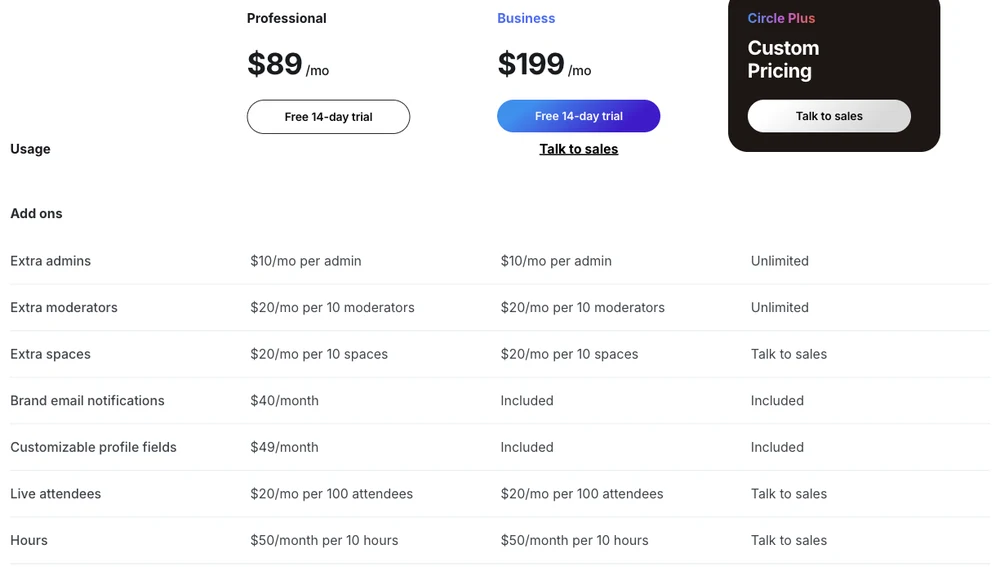
Here is the full add-on list from that table, which applies to Professional and Business alike unless noted:
- Extra admins: $10 a month each. Professional includes 3, Business 5.
- Extra moderators: $20 a month per 10. Professional includes 10, Business 15.
- Extra spaces: $20 a month per 10. Professional includes 20, Business 30.
- Live attendees: $20 a month per 100. Professional includes 100 live-stream attendees and Business 200.
- Live hours: $50 a month per 10 hours. Professional includes 10 hours and Business 15.
- Circle AI credits: 2,500 a month on both plans, then $10 per 1,000.
- Professional only: branded email notifications at $40 a month and custom profile fields at $49 a month. Business includes both.
A team of 5 admins on Professional adds $20 a month. If live calls are the heart of your community, check your expected hours against the 10 or 15 included before you pick a plan, because each extra block of 10 hours is another $50.
Email Hub is priced by contact, not by plan
Email Hub costs $19 a month for up to 1,000 contacts and $99 a month at 10,000, and it is billed monthly even when your community plan is billed yearly. Only people subscribed to your marketing emails count as contacts, so a 1,200-member community with 700 email subscribers counts as 700 contacts.
Circle’s Email Hub price climbs from free below 100 contacts to $439 a month at 100,000:
| Contacts | Email Hub a month |
|---|---|
| Fewer than 100 | $0 |
| Up to 1,000 | $19 |
| Up to 2,500 | $39 |
| Up to 5,000 | $59 |
| Up to 10,000 | $99 |
| Up to 25,000 | $199 |
| Up to 100,000 | $439 |
The ladder keeps going to $999 a month at 195,000 contacts, and beyond 200,000 you contact Circle. Circle Plus includes the first 10,000 contacts.
2 billing rules in Circle’s help doc are worth knowing before you import a list. The tier upgrades automatically the moment your contact count passes its limit, with the difference prorated. Going back down is not automatic: you contact support, who check whether you are eligible, and the lower rate starts the next billing cycle.
Circle also nudges you toward it. A Circle customer on an r/CommunityManager thread wrote in July 2025 that they “began getting a popup every single time I made a post in my own community. This popup is trying to sell me their marketing plan.” In a December 2025 update on the same thread, they said that “after awhile I decided to subscribe to the marketing service” and stayed on Circle.
What a 200-member community pays Circle each month
A community of 200 members paying $25 a month brings in $5,000, and on Circle Professional with 1,500 email contacts it costs $458 a month to run, or 9.2% of that revenue. On Business the same community costs $518.
This is a worked example, not a real customer’s bill: annual billing, US domestic cards, no extra admins.
Stripe card fees are the largest line on both plans, at $205 a month:
| Line | Professional | Business |
|---|---|---|
| Plan (billed yearly) | $89 | $199 |
| Circle’s cut | $100 | $50 |
| Stripe card fees | $205 | $205 |
| Stripe Billing | $35 | $35 |
| Email Hub, 1,500 contacts | $29 | $29 |
| Total a month | $458 | $518 |
Of that $458, Circle itself keeps $218: the plan, its 2% and Email Hub. Stripe keeps the other $240. On Business, Circle keeps $278.
The Stripe share grows with the number of payments, not only their size. 200 small charges each carry their own 30 cents, which is $60 a month before any percentage. A community charging $50 a month to 100 members brings in the same $5,000 and pays only $30 in flat fees.
We ran similar totals for Skool, Mighty Networks, Heartbeat, Patreon and Discord in what community platforms really cost, if you are still choosing a platform.
What happens to your member subscriptions if you leave Circle
Cancelling your Circle plan does not cancel your members’ subscriptions. Circle’s help doc tells you to cancel each one yourself and issue any refunds.
The rest of Circle’s cancellation guide, in plain terms:
- Your plan runs to the end of the billing cycle. The community stays live until then.
- Your Stripe account stays tied to Circle. Circle’s doc says it “will always remain connected” and recommends against using it for anything else. You can close that Stripe account once your member subscriptions are settled.
- Your data is deleted about 90 days after cancellation. Before that, support can export a CSV of members (without passwords), spaces, posts (without images) and comments. Circle notes that this export is not easy to re-import.
Coming in, Circle’s FAQ offers a free payment migration that “transfers active subscriptions and payment information from your legacy platform to Circle.” Going out, the help doc gives you a cancellation checklist. CartMango handles that step the other way round: if you leave CartMango, the subscriptions you created keep running and keep paying you. That is worth weighing if recurring member payments are most of your income.
Old Circle prices you will still find quoted
Some pages ranking for circle so pricing still quote Circle plans and terms that are not on Circle’s pricing page, which sells only Professional, Business and Circle Plus.
- A Basic plan with a 4% fee. WithHimanshu’s Circle review says “Circle’s basic plan now costs $89/mo” and describes fees “ranging from 4% on the Basic plan”. There is no Basic plan on Circle’s page, and the highest fee on it is 2%.
- An Enterprise plan at $419 a month. SchoolMaker’s Circle pricing table lists an Enterprise plan at $499 a month, or $419 a month billed yearly. Circle’s page has no Enterprise tier. Its top tier is Circle Plus, with custom pricing.
- 100GB of storage on Professional. That figure comes from the AI Overview Google shows for this search. Circle’s comparison table says 200GB.
If a number you read elsewhere does not match the 3 plans above, check it against Circle’s comparison table before you budget around it.
FAQ
Is Circle.so worth it?
Circle is worth its price when the community itself is the product and you need what Professional includes, like separate spaces, courses, events and your own domain. It is harder to justify if you mostly need a paywall, because 2% of every payment plus $89 a month adds up fast. Once you do choose it, the $11,000 break-even above tells you whether Professional or Business fits.
How does Circle.so make money?
Circle earns from 3 places: the monthly plan fee, a transaction fee of 2%, 1% or 0.5% on every member payment, and paid add-ons. Those add-ons include Email Hub, extra admins, moderators and spaces, live-stream hours, AI credits, and branded mobile apps on Circle Plus. Stripe’s processing fees go to Stripe, not Circle.
How much does it cost to use Circle?
Circle costs $89 a month on Professional or $199 a month on Business when billed yearly, plus 2% or 1% of member payments and Stripe’s fees. A 200-member community paying $25 a month costs about $458 a month to run on Professional, including Stripe, Stripe Billing and Email Hub at 1,500 contacts.
Is there a Circle.so coupon code?
Circle’s pricing page offers no coupon or discount code. The page’s only discount is paying yearly, which saves $120 a year on Professional and $240 on Business against the monthly figures in Circle’s page data. Circle also offers a 14-day free trial with no card and a 30-day money-back guarantee.
Has Circle.so raised its prices?
Circle does not publish a price history, so the date and size of any past increase cannot be confirmed from Circle itself. What you can confirm is today’s line-up: the cheapest plan is Professional at $89 a month billed yearly, and the Basic plan some guides still mention is no longer on Circle’s pricing page.
Does Circle.so have a free plan?
Circle has no free plan. You get a 14-day free trial without a credit card, and Circle deletes community data about 90 days after a trial expires. If you connect Stripe and take member subscriptions during the trial, Circle’s help doc says to cancel them before the trial ends.
Before you pick a Circle plan
Circle.so pricing makes sense once you price the whole stack instead of the plan card: the yearly rate, the cut on member payments, Stripe on top, and Email Hub if you email your members.
If the part you are really paying for is the paywall, CartMango takes one-time and recurring payments with no cut, and your subscriptions keep paying you if you ever move. It is free while in beta, so you can test its checkout alongside a community you host elsewhere before you commit to a Circle plan.
About the Author

👋 I’m Welly, founder of CartMango (the site you’re on), a checkout platform for digital product sellers. We’ve previously processed $179M+. I also run BirdSend (email marketing tool, 3.1B+ emails sent). On the side I show other non-techie digital sellers how I use AI workflows to automate 50%+ of my operations. Find me on LinkedIn.
Related Reading
- Kajabi vs Circle: the identical 2%, 1% and 0.5% fee ladder, priced side by side
- Skool vs Circle: both platforms priced at the same member volume
- Circle competitors: 8 alternatives sorted by the kind of buyer each serves
- What community platforms really cost: 6 platforms priced at the same member count
- Mighty Networks pricing: all 4 self-serve plans and the fee on each