

WELCOME50 is the WishList Member coupon code that works, and the WishList Member pricing page already builds it into every Get Started button. It takes 50% off the first year: Basic drops from $299 to $149.50, Plus from $499 to $249.50 and Pro from $699 to $349.50.
Renewals bill at the full price, so year 2 of Basic costs $299. The 9 other codes listed on 2 coupon sites all came back “Invalid Coupon Code” at checkout. For your own members, WishList Member relies on the payment tool’s coupons: a Stripe promo code on Basic, Plus and Pro, or a connected cart’s coupon box on Plus and Pro.
Coupon sites promise up to 75% off WishList Member, with codes like ENNRS and TEYYDERY. I opened every code they list and typed each one into WishList Member’s real checkout.
This search has a second crowd too. Some of you already run a WishList Member site and want to hand your own members a code. For you, the coupon box can quietly go missing, depending on where the product was set up.
Below: what each code did at checkout, what 2 years cost on each plan, and how to set up coupons for your members, including the 1 setup that hides the box.
Key Takeaways
- WELCOME50 is the code that works. It took 50% off year 1 on all 4 plans, and the pricing page’s buttons add it for you.
- Year 2 costs double year 1. Renewals bill at the regular price: $299 for Basic, up to $899 for Elite.
- The other coupon-site codes failed. All 9 returned “Invalid Coupon Code”, and so did last year’s Black Friday code, BF2025.
- Your members’ coupons come from Stripe or your cart. On Basic that means Stripe promo codes. Plus and Pro add connected carts.
- 1 setup hides the coupon box. A one-time payment created inside WishList Member’s Stripe settings shows no coupon field.
Is there a working WishList Member coupon code?
Yes. WELCOME50 is the working WishList Member coupon code, and it takes half off the first year of any plan.
You don’t need to copy it from anywhere. The WishList Member pricing page shows each regular price crossed out next to the half price. Every Get Started button then opens the checkout with ?coupon=WELCOME50 already in the web address, so the code is applied before you type a thing.
Before you commit to a plugin that renews at $299 or more a year, check how you’ll sell on it. The Online Selling Mistakes Challenge covers the top 5 online selling mistakes over 5 days, free.
Here’s what WELCOME50 did on each plan at the checkout:
- Basic: $299 a year, $149.50 due today, for 1 site
- Plus: $499 a year, $249.50 due today, for 2 sites
- Pro: $699 a year, $349.50 due today, for 5 sites
- Elite: $899 a year, $449.50 due today, for Infusionsoft by Keap and Recurly users
Elite doesn’t get its own card on the pricing page. It sits behind a separate text link under the 3 main plans.
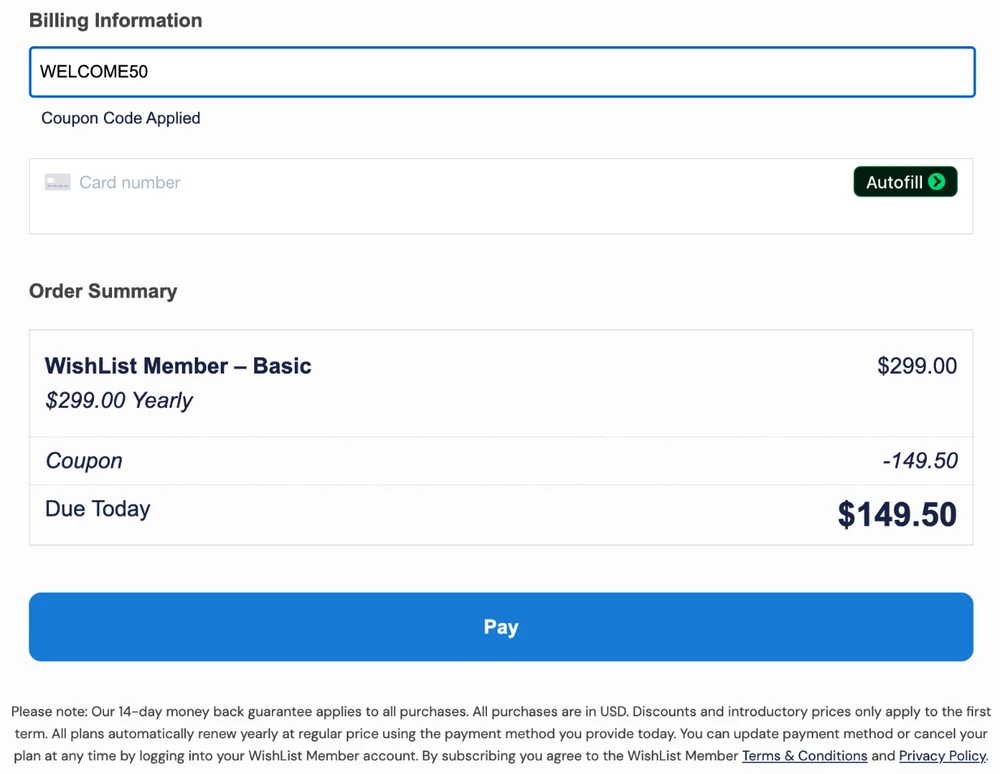
WishList Member’s own checkout with WELCOME50 applied to Basic. Read the Order Summary: $299.00 Yearly, Coupon -149.50, Due Today $149.50, and the note under the Pay button about renewals.
Capital letters don’t matter. I typed welcome50 in lower case on the Pro checkout, and it applied the same 50%.
There’s also a glitch to know about. When I opened the Pro checkout straight from its web address, the box sat on “Checking Coupon Code” and the full price stayed put. Going back to the pricing page and clicking Get Started fixed it, and that route worked on all 4 plans.
10 WishList Member promo codes from coupon sites, tested
Only WELCOME50 worked out of the 10. The other 9 returned “Invalid Coupon Code” and left the full price in place.
The first site is CouponSwift. Its Google listing says “70% Off”, while its own page now says “1 Active Code, 50% Off”. The second is Tenere Team’s WishList Member page, titled “75% OFF Wishlist Member Coupon Codes”. I opened every “Get Code” button on both, then typed each code into WishList Member’s checkout. Of the 10 codes, 1 took 50% off and 9 were rejected, including all 6 that Tenere Team lists:
| Code | Listed by | What the site claims | Tested on | Result |
|---|---|---|---|---|
| WELCOME50 | CouponSwift | 50% off year 1, “verified” | Basic, Plus, Pro, Elite | Worked, 50% off |
| BF2023PRO | CouponSwift | 65% off, marked expired | Basic, Plus, Pro | Invalid Coupon Code |
| VACAY60ELITE | CouponSwift | 60% off Elite, marked expired | Basic, Pro, Elite | Invalid Coupon Code |
| eyvrbvdx | CouponSwift | 10% off, marked expired | Basic | Invalid Coupon Code |
| DSODYD | Tenere Team | Up to 75% off, “not yet verified” | Plus | Invalid Coupon Code |
| LEUEEF | Tenere Team | Up to 10% off, “not yet verified” | Basic | Invalid Coupon Code |
| YYRWSEEOBS, ENNRS, RSTHS, TEYYDERY | Tenere Team | $34, $11, $36 and $21 off, “not yet verified” | Basic | Invalid Coupon Code |
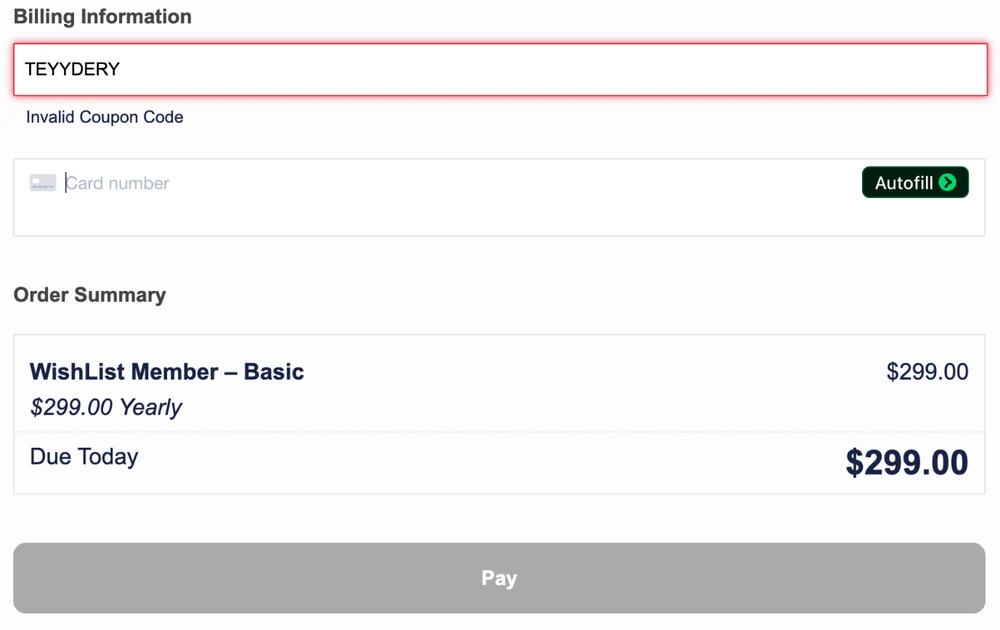
TEYYDERY, one of the codes Tenere Team lists, at WishList Member’s Basic checkout. The box turns red, says “Invalid Coupon Code”, and $299.00 stays due today.
How to spot a stale WishList Member coupon page
A few signs gave these pages away, and they’re worth checking on any software coupon page:
- The headline claims more than the page backs up. Tenere Team’s title says 75% off, and every code it lists is marked “not yet verified”. Its own chart puts the biggest discount it tracked at 48%.
- There are no codes at all. Wativ’s WishList Member page is titled “50% off” and lists 0 coupon codes. Its 2 “offers” are product features: a setup wizard and content protection.
- The deal text doesn’t fit the product. Tenere Team’s “$34 off” card reads “Top-quality products priced at just $34 and above”, for a plugin that costs $299 or more a year.
- The page contradicts itself. CouponSwift’s service box lists a “30-Day Money Back” guarantee. Its own FAQ, and WishList Member’s checkout, both say 14 days.
MemberPress, from the same parent company, did better when I tested its codes from coupon pages: 3 of 11 worked, all at 50%.
What WishList Member costs after the coupon
WishList Member costs $149.50 to $449.50 for the first year with WELCOME50. After that it costs $299 to $899 every year, because the discount covers the first term only.
Both of WishList Member’s own pages say so. The pricing page footnote reads “Special introductory pricing, all annual renewals are at full price.” The note under the checkout’s Pay button reads “Discounts and introductory prices only apply to the first term.”
Is half off still a good deal when year 2 doubles? For year 1, yes, but year 2 is the price you keep paying. Basic costs $448.50 over 2 years and Pro costs $1,048.50:
| Plan | Year 1 with WELCOME50 | Year 2 onward | 2-year total | What the plan adds |
|---|---|---|---|---|
| Basic | $149.50 | $299 | $448.50 | 1 site, Stripe, PayPal and eWay payments |
| Plus | $249.50 | $499 | $748.50 | 2 sites, connected carts, Redemption Codes |
| Pro | $349.50 | $699 | $1,048.50 | 5 sites, WooCommerce, Zapier |
| Elite | $449.50 | $899 | $1,348.50 | Infusionsoft by Keap and Recurly |
A few costs sit outside those numbers. WishList Member lists “No Transaction Fees” on all 3 main plans, so it takes nothing per sale. Stripe or PayPal still charge their normal card fees, and you pay for your own WordPress hosting. There’s also a 14-day window to get your money back. The pricing page promises that if you’re “not completely satisfied with WishList Member over the next 14 days, we’ll happily refund 100% of your money.”
WishList Member is owned by Caseproof, the company behind MemberPress. Our MemberPress alternatives guide found 4 membership plugins that discount year 1 and then renew at full price, WishList Member and MemberPress among them. For a wider view, our guide to membership site platform costs puts 8 platforms side by side.
Some sellers don’t need a membership plugin at all. If you only bill people and send them files, CartMango, the checkout I run, covers billing, delivery and coupons. CartMango’s course hosting and community features aren’t live yet, so it won’t replace WishList Member for a members-only site.
How to give your own members a coupon in WishList Member
WishList Member sends you to your payment tool for coupons: you create the discount there, and WishList Member decides who gets access once the payment goes through.
The WishList Member coupons page puts it this way: “Your chosen payment provider handles the payments and WishList Member handles all the protection and access to your site content.” It names Stripe, PayPal and WooCommerce coupons as options. MemberPress, by contrast, lists a “Flexible Coupon System” on its own pricing page, to “create unlimited custom coupon codes” inside the plugin.
Which payment tools you can connect depends on your plan, so your coupon options do too. On Basic, Stripe is the route where WishList Member’s own payment form shows a code box. PayPal Checkout is on Basic too, but the coupons page only says to create PayPal coupons “according to their coupon capabilities”, so that discount lives on PayPal’s side. Plus adds carts like ThriveCart, SamCart and SendOwl, and only Pro adds WooCommerce:
| Method | Plans | What the member does | The catch |
|---|---|---|---|
| Stripe promo code | Basic, Plus, Pro | Types a code you named, like HALFOFF | No box on one-time payments set up inside WishList Member |
| A connected cart’s coupon | Plus, Pro | Types the code in that cart’s checkout | Access depends on the cart passing the sale back |
| WooCommerce Member Pricing | Pro | Nothing, members in the level pay the special price | Needs WooCommerce on your site |
| Code Redemption | Plus, Pro | Enters a unique code that adds them to a level | Free access, with no price involved |
Set up a Stripe coupon for WishList Member
The Stripe route works on Basic, Plus and Pro, and it puts a Coupon Code box on the payment form WishList Member generates. These steps come from WishList Member’s Stripe docs and Stripe’s own help pages:
- Create the coupon in Stripe. Open Product catalog, then Coupons, and set the discount as a percentage or a fixed amount.
- Pick how long it lasts. Stripe’s coupon duration setting defaults to once, which covers the first payment only. You can also choose a set number of months, or forever.
- Add a promo code. In the coupon’s Codes section, name the code your members will type, such as HALFOFF. Stripe treats promo codes as case-insensitive.
- Check how the product was made. The coupon box shows for a recurring Stripe plan, and for a one-off payment created in Stripe itself. More on the exception below.
- Build the form in WishList Member. Click the WishList Member Shortcode Inserter and choose Stripe Registration Button. Set Enable Coupon Code to Yes, then place the shortcode on your sales or registration page.
- Test it with a real code. Open the page logged out, type the code, and check that the total drops before you send it to anyone.
Still picking a Stripe plugin for WordPress? Our WordPress Stripe plugins guide compares what each one takes per sale.
Why the coupon box doesn’t show up
A one-time payment created inside WishList Member never gets a coupon box. According to WishList Member’s Stripe coupon doc, when a one-time payment is set up in WishList Member’s own Stripe settings, “the coupon code field will not appear on the payment/registration form.” The fix is to create that product in Stripe instead, because the same doc says a one-off payment “created in the Stripe account on the Stripe site” does get the field.
You can also go the other way. Change coupon="1" to coupon="0" in the shortcode and the box disappears from that form, which is handy for a full-price page next to a discounted one.
Coupons through a connected cart
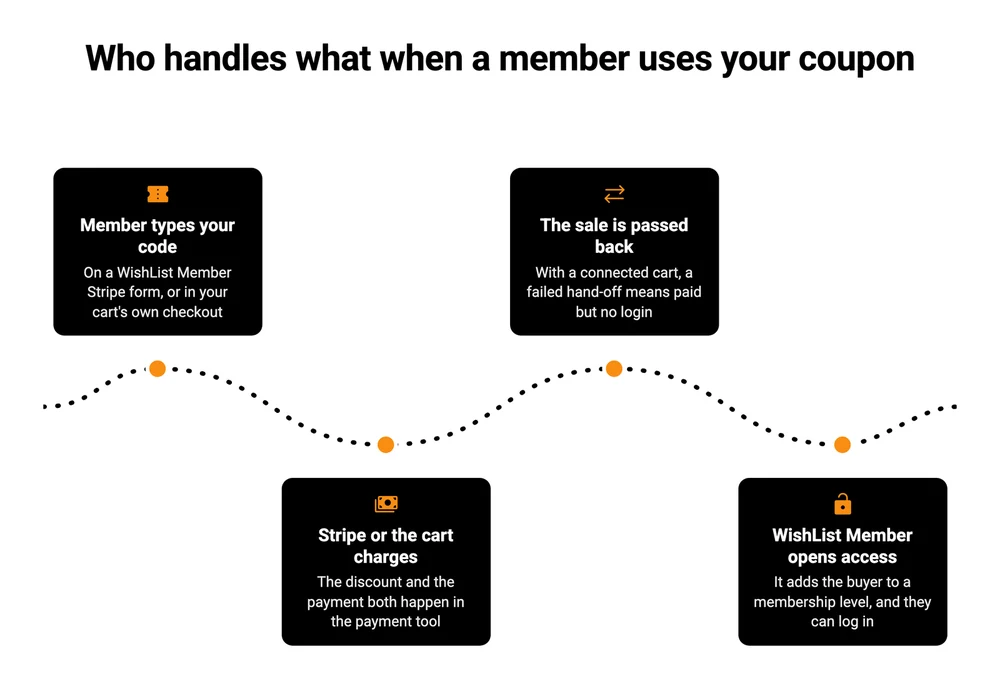
On Plus and Pro, you can take payment through a cart such as ThriveCart, SamCart, SendOwl or PayKickstart, and run the coupon there. WishList Member’s coupons page leaves the coupon to each payment tool: “you can use the coupon functionality that is built right into your favorite payment option.” So the code lives in the cart, and so does the setup. If ThriveCart is your cart, here’s how to build coupons in ThriveCart.
The cart takes the money, then has to tell WishList Member to create the member’s login. That hand-off has failed for at least 1 seller. In an April 2025 r/ProWordPress thread, a seller running 3 WishList Member sites wrote that “Customers are buying via Thrivecart, getting charged, but not getting added to the site and sent their login details.”
So when you launch a coupon, run 1 discounted purchase yourself from start to finish. Then check that the login email arrives.
WooCommerce coupons and Member Pricing
On Pro, you can also sell through WooCommerce. WooCommerce has its own coupons, and our WooCommerce coupon plugin guide covers what it does free. WishList Member adds Member Pricing on top, which sets “a special price for a WooCommerce product for membership levels”.
Free access with Code Redemption
Code Redemption, on Plus and Pro, hands out unique codes that add or move someone into a membership level when they enter it. WishList Member’s Code Redemption doc says the codes can be exported “so they can be shared with services like AppSumo.” Use it for giveaways, partner deals or a bonus level for existing buyers. It can’t take 20% off a price, because no payment happens at all.
WishList Member also lists Uncanny Codes, a separate code plugin from Uncanny Owl, which adds or changes member levels through redeemed codes in the same way. For a paid discount, go back to Stripe or your cart.
FAQ
Does WELCOME50 work on WishList Member renewals?
No, WELCOME50 covers the first year only. The checkout states that “Discounts and introductory prices only apply to the first term,” and that every plan renews yearly at the regular price. Basic renews at $299, Plus at $499, Pro at $699 and Elite at $899.
Where do I get a WishList Member discount code?
You don’t need to find one. The Get Started buttons on WishList Member’s pricing page carry WELCOME50 in the link and apply it at checkout for 50% off the first year. Every other discount code I found on coupon sites failed. If you can wait, check the pricing page again in late November, when WishList Member has run bigger sales before.
Does WishList Member run Black Friday deals?
It did last year. On Cyber Monday 2025, WishList Member’s Instagram told followers to “grab UP TO 65% OFF WishList Member” and to “Use code BF2025 before midnight.” That code now returns “Invalid Coupon Code” at checkout. Its pricing page shows only the 50% offer so far, so a 2026 repeat is possible but not announced.
Does WishList Member have a free trial?
No free trial appears on WishList Member’s pricing page. It offers a 14-day money-back guarantee on every purchase instead. You can buy a plan with WELCOME50, set up your site, and ask for a full refund within 14 days if it doesn’t fit. All WishList Member prices are listed in US dollars.
Does WishList Member take a cut of my sales?
No. WishList Member lists “No Transaction Fees” and “No Monthly Fees” on all 3 main plans, so you pay the yearly license and nothing per sale. Your payment processor still charges its normal fee on each payment, whether that’s Stripe, PayPal or a connected cart.
Are WishList Member coupon codes case-sensitive?
Not on WishList Member’s own checkout: welcome50 in lower case applied the same 50% as WELCOME50. For codes you create for your own members through Stripe, Stripe’s help pages say promo codes are case-insensitive. A member who types halfoff still gets the HALFOFF discount you set up.
If you only need billing, not a member site
A WishList Member coupon code like WELCOME50 halves year 1, and year 2 onward costs $299 to $899. That money buys locked pages, member logins and course lessons on your own WordPress site. If your members need all of that, WishList Member with WELCOME50 is a fair deal for the first year.
Plenty of sellers only need to bill people and send them a file or a monthly download. For that, CartMango bills one-time sales and subscriptions, with coupons on every plan. CartMango’s course hosting and community area are not live yet, and both are planned for October 2026 on its $30 a year plan.
CartMango is free right now, and paid plans start in November 2026 from $10 a year, with no cut of your sales. If you ever leave CartMango, the subscriptions you created keep paying you.
About the Author

👋 I’m Welly, founder of CartMango (the site you’re on), a checkout platform for digital product sellers. We’ve previously processed $179M+. I also run BirdSend (email marketing tool, 3.1B+ emails sent). On the side I show other non-techie digital sellers how I use AI workflows to automate 50%+ of my operations. Find me on LinkedIn.
Related Reading
- MemberPress Coupon Code: the same test on WishList Member’s sister plugin, and how its own coupons work
- MemberPress Alternatives: 8 membership plugins priced on the year 2 renewal, and who owns which
- What Membership Site Platforms Really Cost: 8 platforms priced at the same 100 members
- WordPress Paywall Plugin: the cut each free paywall plugin takes, and when a flat license is cheaper
- ThriveCart Coupon Code: 11 coupon-site codes tested at ThriveCart’s own checkouts