

Half off year 1 is the whole MemberPress coupon code deal. The official code is WELCOME, memberpress.com’s checkout applies it before you type anything, and it takes Launch to $199.50, Growth to $349.50 and Scale to $499.50. Every plan renews at full price, $399, $699 or $999, from year 2.
Of 10 MemberPress codes listed on a page-1 coupon site, 3 worked at checkout, and all 3 gave the same 50%. The other 7 returned “Invalid Coupon”, including PODCAST23, advertised there as 60% off. Site owners who want coupons for their own members create them under MemberPress, then Coupons, then Add New, with 3 discount modes to choose from.
You picked MemberPress, you’re 1 click from paying, and you wonder if a code could knock a bit more off. So you open a new tab and search, because nobody wants to be the person who paid full price.
That search mostly turns up codes and percentages. None of the 3 coupon pages on Google’s first page says what year 2 costs, and year 2 is where the bill doubles.
Below: what each MemberPress plan costs with the code and after it, the 11 codes I tested at the real checkout, the Black Friday history, and, if you run a MemberPress site, how to build coupons for your own members.
Key Takeaways
- WELCOME is already applied. memberpress.com’s checkout loads with it, so typing it changes nothing. Removing it raises Launch from $199.50 back to $399.
- Year 2 costs double. Every MemberPress plan renews at full price, $399, $699 or $999 a year. Launch also takes 4.9% of what members pay you.
- Most listed codes fail. 7 of 10 codes on a page-1 coupon site returned “Invalid Coupon”, and the 3 that worked gave the same 50%.
- Deeper deals are rare. MemberPress ran up to 65% off for Black Friday 2022 and up to 70% in 2025, and calls such sales rare.
- Nonprofits keep 50% for life. Approved nonprofits renew at the introductory price, the only MemberPress discount I found that lasts past year 1.
- Your own coupons live under MemberPress, then Coupons. Pick Standard, First Payment or Trial Period Override, then switch on the coupon field.
Is there a working MemberPress coupon code?
Yes. WELCOME is the official MemberPress coupon code, and it is already applied when memberpress.com’s checkout loads, on all 3 plans.
Open any plan’s checkout and the order summary shows a 50% discount before you have typed a thing. Behind it sits a hidden coupon field already holding WELCOME.
The checkout’s own page data spells out the deal for the Scale plan: “1 Year for $499.50 then $999 / Year with coupon WELCOME”.
If coupon hunting means money is tight, the Online Selling Mistakes Challenge is a free email series on the 5 biggest selling mistakes solo creators make, and how to fix them.
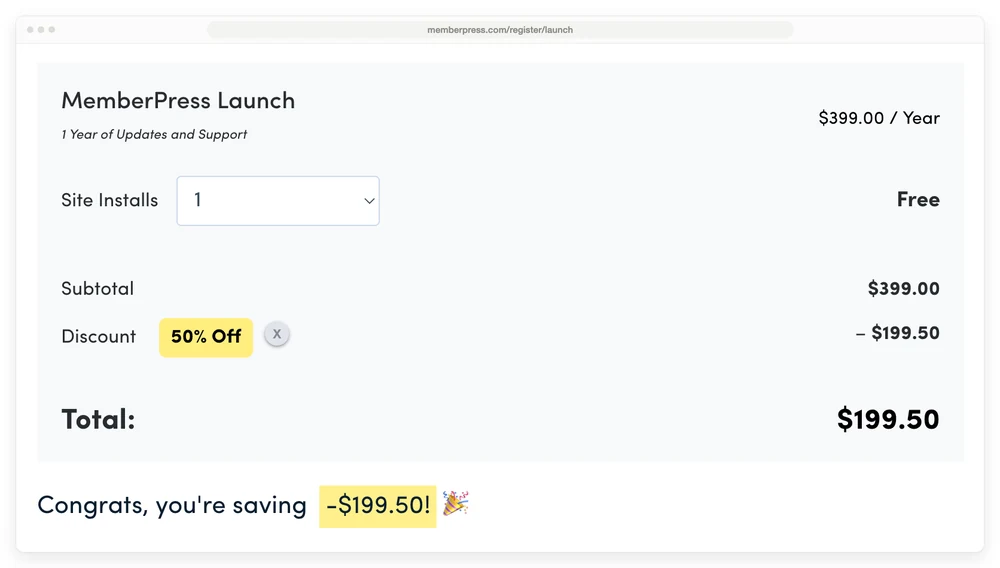
MemberPress’s Launch checkout as it first loads. Look at the Discount line: the 50% is there before any code is typed.
Click the small X beside the discount and the total jumps to $399.00, with an “Add a Promo Code” link in its place. Type WELCOME back in and you land on the identical $199.50. Lowercase “welcome” works too. The cart holds 1 code at a time, so there is nothing to stack on top of it.
memberpress.com’s own coupon page tells you to “Use the official MemberPress coupon code WELCOME”, without mentioning that checkout has already applied it.
With WELCOME applied, MemberPress costs $199.50, $349.50 or $499.50 for year 1, then $399, $699 or $999 every year after, and only Launch takes 4.9% of each payment your members make.
| Plan | Normal price | Year 1 with WELCOME | Year 2 onward | Cut of member payments |
|---|---|---|---|---|
| Launch | $399 a year | $199.50 | $399 | 4.9% |
| Growth | $699 a year | $349.50 | $699 | None |
| Scale | $999 a year | $499.50 | $999 | None |
Those figures come from MemberPress’s pricing page, and its footnote confirms the renewal: “Special introductory pricing, all annual renewals are at full price.”
Payment processor fees, like Stripe’s or PayPal’s, still apply on every plan, the pricing page notes.
I tested 11 MemberPress coupon codes from page 1
I tested 11 MemberPress coupon codes from page 1 at the real checkout, and only 3 worked, all at the same 50% that was already applied.
10 came from WorthEPenny’s MemberPress page, the coupon site ranking third for this search. Its page title promises “70% Off”, the page says “8 Coupons Verified” and was updated that same day, and its source holds 10 codes. It also claims “with the regular MemberPress code PODCAST23, military members can get 60% off.”
The 11th was the code on WPBeginner’s deal page. I typed each one into the Launch checkout, re-ran the working codes and PODCAST23 on Scale, and tried a lowercase “welcome” for good measure.
WELCOME, WPBGNR and BLOGGERSIDEAS were the 3 that worked, and each took Launch to $199.50 and Scale to $499.50, the same 50% as the default.
| Code | Where it’s listed | Launch total | What happened |
|---|---|---|---|
| WELCOME | memberpress.com, Google, WorthEPenny | $199.50 | Worked, already applied |
| welcome (lowercase check) | My own test | $199.50 | Worked, switched to WELCOME |
| WPBGNR | WorthEPenny | $199.50 | Worked, same 50% |
| BLOGGERSIDEAS | WorthEPenny | $199.50 | Worked, same 50% |
| CLICKHERE | WPBeginner | $399.00 | Invalid Coupon |
| PODCAST23, FLYIN50, REVENUE23, TENYEAR23, RESOLUTION23, BF2024, BF2024FLASH | WorthEPenny | $399.00 | Invalid Coupon |
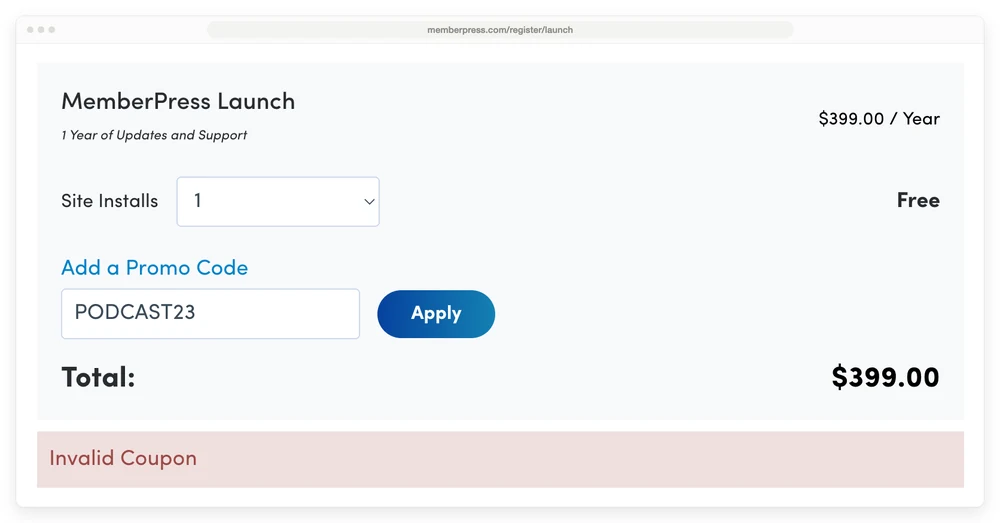
PODCAST23, listed as 60% off for military members and students, returns “Invalid Coupon” and the Launch total stays at $399.00.
MemberPress explains the failures itself. Its pricing FAQ says: “We do not share coupon codes on popular coupon directories. So, if you find a coupon there, it may not work.” Real codes, it says, turn up in its own emails, on its website, or “through partner or affiliate sites”.
WPBeginner’s deal page is the affiliate kind. It calls its offer an “exclusive MemberPress coupon code”, shows CLICKHERE in the code box, and says its referral link applies the 50% automatically. CLICKHERE came back invalid. The referral link landed me on the same WELCOME checkout, at the same $499.50 for Scale, that a direct visit gets.
Teachable and Kajabi show the same thing. Teachable publishes no public code for its plans, and Kajabi’s checkout has no code box at all, yet Google’s results for both are full of codes. Our Teachable coupon code and Kajabi coupon code guides have the details.
4 tells give a dead MemberPress code away before you try it:
- A promise above 50% outside Black Friday week. Both deeper MemberPress sales I could find were announced in Black Friday week.
- An old year in the code. MemberPress’s own 2022 Black Friday code was BF2022 and ran for 5 days. BF2024, still listed on coupon sites, returns Invalid Coupon.
- A “verified” badge. The page saying “8 Coupons Verified” held 10 codes in its source, and 7 failed.
- A code box that is really a link. If clicking the code opens memberpress.com, you’re getting the default WELCOME price through someone’s referral link.
What is the annual fee for MemberPress after the coupon?
MemberPress’s annual fee is $399 for Launch, $699 for Growth and $999 for Scale from year 2, because the WELCOME discount covers the first year only. The checkout’s fine print says it plainly: “Discounts and introductory prices only apply to the first term. All plans automatically renew yearly at regular price using the payment method you provide today.”
That jump catches people. A reviewer on Trustpilot put it mildly in March 2026: “The initial pricing is discounted, but the renewal jumps to full price, which isn’t always obvious unless you dig into the details.”
Launch has a second cost that grows with you: 4.9% of every payment your members make. At $5,000 a year in member payments, that’s $245 on top of the $399 renewal, so $644 in all. Growth renews at $699 with no cut.
So past about $6,122 a year in member payments, Growth is the cheaper plan in year 2. In year 1 the break-even point is lower, about $3,061 a year, because the plans are only $150 apart.
Each extra site costs $69 a year more, on any plan. Our MemberPress pricing breakdown goes plan by plan.
Skipping a renewal doesn’t get you out cleanly either. When a licence lapses, the front of your site keeps working but the admin screens stop. Our MemberPress alternatives guide covers it, using MemberPress’s own documentation.
Other MemberPress discounts, and cheaper routes
The nonprofit program is the only MemberPress discount I found that outlasts year 1, and a 14-day refund is the closest thing to a free trial.
- Nonprofit pricing, for life. MemberPress offers qualifying organizations “our introductory pricing for life”, so Launch stays at $199.50, Growth at $349.50 and Scale at $499.50 on every renewal. The application asks for your organization’s name, website and tax ID number. Upgrading keeps the discount, but you have to ask support for a coupon, because the system doesn’t apply it on its own.
- A 14-day refund, not a free trial. You pay first. MemberPress’s pricing FAQ calls the window “a no-risk trial period of 14 days”, and its pricing page promises: “If you don’t like MemberPress over the next 14 days, we’ll happily refund 100% of your money.”
- No lifetime licence. “Currently, MemberPress does not offer a Lifetime license,” according to its pricing FAQ, so a lifetime deal listed for it elsewhere isn’t a MemberPress offer.
- No student or military discount that I could find. The only one I saw claimed, on a coupon site, failed my test above.
If the renewal is the real problem, a different tool costs less, as long as you can live without what it leaves out. I run CartMango, so read that last row with that in mind.
In year 2, MemberPress Launch costs $399 plus 4.9% of member payments, a nonprofit’s Launch stays at $199.50, Paid Memberships Pro’s free version costs $0 plus 2% through its Stripe Connect, and CartMango costs $10 a year with no cut.
| Route | Year 1 | Year 2 | Cut per payment | The catch |
|---|---|---|---|---|
| MemberPress Launch | $199.50 | $399 | 4.9% | Full price from year 2 |
| MemberPress Launch, nonprofit | $199.50 | $199.50 | 4.9% | Registered nonprofits only |
| Paid Memberships Pro, free version | $0 | $0 | 2% on its Stripe Connect | Fee goes away with a licence or your own Stripe keys |
| CartMango | Free right now, then $10 a year from November 2026 | $10 a year | 0% | Course hosting and a community: not yet, planned for October 2026 |
CartMango bills one-time sales and subscriptions, with coupons on every plan, including the $10 a year Silver plan. CartMango doesn’t host courses or a community yet. Both are planned for October 2026, on CartMango’s $30 a year plan.
The Paid Memberships Pro pricing breakdown shows where its 2% fee stops being cheaper than its $499 licence.
Does MemberPress run Black Friday deals?
MemberPress has run Black Friday sales that beat the WELCOME price, announced on its own site: up to 65% off in 2022 and up to 70% off in 2025.
The 2022 sale ran from November 21 to November 25, according to MemberPress’s press release, and needed the code BF2022. It also cut upgrades for existing customers by up to 65%. The 2025 deal topped MemberPress’s own Black Friday roundup, posted that Black Friday week, under the heading “MemberPress Up To 70% Off”, with no code named.
MemberPress itself advises against waiting. Its pricing FAQ says deeper sales “are few and far between. We recommend against waiting for a sale.”
The wait is worth 20% of the normal price at most, the gap between 50% and 70% off. That’s $79.80 on Launch or $199.80 on Scale, and only if the top rate applies to your plan, since MemberPress says “up to”. If the same first-term rule from the checkout holds, year 2 renews at full price either way.
The Black Friday codes still floating around coupon sites, BF2024 and BF2024FLASH, both returned “Invalid Coupon” when I tried them.
How to create a coupon code in MemberPress for your own members
To create a coupon code in MemberPress, go to MemberPress, then Coupons, click Add New Coupon, set the code, discount, discount mode and memberships, then publish it. Every plan can do this, since MemberPress lists a “Flexible Coupon System” under Launch, its cheapest plan.
A naming note first. MemberPress’s coupon documentation notes that on MemberPress 1.14 and later, Memberships appear as Products in the WordPress dashboard, so the screens may say Products where these steps say memberships. Running a WooCommerce store instead? Core WooCommerce already handles basic coupons, and our WooCommerce coupon plugins guide covers what the paid add-ons do on top.
Step by step
- In your WordPress dashboard, go to MemberPress, then Coupons, and click Add New Coupon.
- Keep the random code or type your own, like SPRING20. Use letters, numbers, hyphens or the underscore symbol, with no spaces.
- Enter the discount and choose a percentage or a fixed amount in your currency.
- Pick a discount mode. The 3 options are in the table below.
- Tick at least 1 membership under Apply Coupon to the Following Memberships. With none ticked, the coupon is invalid at checkout.
- Add usage limits, a start date or an expiry date if you want them.
- Click Publish.
- Switch on the coupon field: MemberPress, then Settings, then the Account tab. Under Registration, tick “Enable Coupon Field on membership registration forms” and click Update Options.
Steps 5 and 8 are the easy ones to skip, and each one quietly breaks the coupon. A coupon with no membership ticked never works, and with the field switched off, members have nowhere to type your code.
The 3 discount modes, and which one you need
Standard takes the discount off every payment for as long as the subscription runs, First Payment adds an extra cut to payment 1 only, and Trial Period Override swaps your trial for a custom length and price.
| Mode | What it does | Example | Watch out |
|---|---|---|---|
| Standard | Same discount on every payment, for the subscription’s lifetime | 10% off every payment | A one-time payment just gets 1 discount |
| First Payment | Standard discount plus an extra First Payment Discount | $50 off payment 1, main discount set to 0 | Cancels any free trial you set |
| Trial Period Override | A custom trial length and trial price | 90 days for $1, or 3 months for $30 | Cancels your normal trial |
The docs put that last column plainly: “Free trials will be skipped, and members will be charged immediately with the reduced payment.”
Trial Period Override answers a question a site owner posted in an r/Wordpress thread back in 2022: “Let’s say they get 6 months at a lower price when they sign up and then pay the full price after that.”
The thread shows no replies. The answer is a Trial Period Override set to the length and price you want.
MemberPress’s own coupon guide does exactly this with 3 months for $30, after which the coupon “automatically switches back to the standard membership pricing.”
First Payment can’t do that job, because it changes the amount of payment 1 and not how long it covers.
Limits, dates and who can use it
- Usage Count caps how many times the coupon can be used in total. The default is unlimited.
- Usage Limit Per User caps each member, per month, per year or for life.
- Allow on Upgrade and Downgrade lets members use the code when they switch plans.
- Schedule Coupon Start and Expire Coupon turn it on at 00:00:01 AM and off at 11:59:59 PM on the dates you pick, in the timezone you pick.
- Membership Specific Discounts give each membership its own amount and mode under 1 code. The docs’ example is WELCOME10, a 10% first payment on 1 membership and a permanent 10% on another.
- Associate Affiliate appears only when the Easy Affiliate plugin is active, and pays that affiliate a commission on every sale that uses the code.
An expired coupon keeps working for people who already used it. MemberPress’s coupon examples page says members who signed up with a coupon on an automatic recurring subscription keep their discounted renewal until the subscription ends or gets cancelled.
3 ways members can use your code
The coupon field is hidden by default, behind a “Have a Coupon” link at the bottom of the registration form.
Members click it and type the code.
A link does the typing for them. Add /?coupon=your-coupon-code to the end of a registration page address, and the docs’ own example is https://www.yourcoolsite.com/register/gold/?coupon=cyber-monday. MemberPress warns that it cannot stop people sharing that link, so pair a public link with a usage limit or an expiry date.
The third route fills 1 code into every registration form automatically. It needs a short code snippet from MemberPress’s docs, which recommend adding it with the WPCode plugin: install WPCode, go to Code Snippets, then Add Snippet, paste the snippet and swap in your own coupon code.
A second snippet opens the coupon field so members don’t have to click. Test the result in a private browser window.
Are MemberPress coupon codes case-sensitive?
MemberPress’s docs disagree with each other. The coupon creation guide and the registration guide both say coupons are “not case-sensitive”. The older coupon examples page says “MemberPress Coupons are case-sensitive”, and Google’s AI summary repeats that version.
The live test sides with the newer docs. On memberpress.com’s own checkout, typing “welcome” in lowercase applied WELCOME. Share your code in capitals anyway, exactly as you created it, and it works whichever page is right.
The same examples page also says coupons expire at midnight UTC, a fixed world clock time, while the newer guide says 11:59:59 PM in the timezone you choose. Give an expiry a day of slack if the timing matters.
Show the saving the way MemberPress shows its own
In 2022 I bought a pair of Converse on sale at a big sports chain, and the label put the $50 sale price first, then the $100 original crossed out after it. The best number arrived first, so there was no “wow” left by the time I read the original.
I wrote about it to my email list at the time. “In the end the price is the same, but how you present it matters.” I credited the idea to the contrast principle in Robert Cialdini’s book Influence: show the higher price first, then the cut.
My other gripe in that email was labels that only say “40% discount” next to a price, because nobody can tell at a glance how much money that is, or whether the price shown is before or after the cut. MemberPress’s checkout gets both right. It shows the $399 subtotal, then the 50% badge with the $199.50 coming off, then a line telling you how much you’re saving. Copy that order on your own registration page.
How often to run one
Run coupons rarely, or your members learn to wait for the next one. In late 2022 I watched a brand launch a product with 50% off that it said was strictly for the 7-day launch, then run the same 50% off again for Black Friday about 6 weeks later.
I wrote to my list about it that December, said I rarely run discounts, usually once a year for Black Friday, and put the lesson in 1 line: “Never sacrifice long-term reputation for short-term profits.”
MemberPress keeps its own deeper sales rare too.
If the price itself is what keeps you reaching for a coupon, start with how you price the membership instead.
FAQ
Does the MemberPress WELCOME coupon work on renewals?
No. WELCOME takes 50% off the first year only. MemberPress’s checkout states that “Discounts and introductory prices only apply to the first term” and that every plan renews yearly at the regular price. Launch renews at $399, Growth at $699 and Scale at $999. The one exception is the nonprofit program, where approved organizations keep the introductory price on every renewal.
Can I use 2 MemberPress coupon codes at once?
No. The memberpress.com cart holds 1 code at a time. While a code is applied, the “Add a Promo Code” link disappears, and adding a new code means removing the current code first. Since WELCOME, WPBGNR and BLOGGERSIDEAS all give the same 50%, swapping between them changes nothing about the price.
Is there a MemberPress free trial?
Not in the usual sense. You pay the discounted first-year price at checkout, then have 14 days to ask for a full refund. MemberPress’s FAQ calls that window “a no-risk trial period of 14 days”.
Does MemberPress have a student or military discount?
Not that I could find on memberpress.com. The only student and military code I saw advertised, on a coupon site, returned “Invalid Coupon”. The only group discount I found is the nonprofit program, which keeps the introductory price for life after an application.
Do members keep a MemberPress coupon after it expires?
Yes, on automatic recurring subscriptions. MemberPress’s coupon examples page says members who signed up with the coupon keep the discounted renewal until the subscription expires or is cancelled. An expiry date only stops new people from using the code. So if you want a discount that ends, use First Payment or Trial Period Override rather than a Standard coupon with an end date.
When the membership plugin is the expensive part
A MemberPress coupon code gets you half off year 1, and that’s the whole deal. From year 2 you pay full price. If you need gated pages, drip content and courses inside WordPress, MemberPress does that job, and our MemberPress alternatives guide prices the other plugins that do it too.
If what you mostly do is take a monthly payment and send people a file, CartMango covers that for less. CartMango is free right now and starts at $10 a year once paid plans begin in November 2026, with no platform cut on top of payment processing. Coupons and subscriptions come on every plan, and if you ever leave, the subscriptions you created keep paying you.
About the Author

👋 I’m Welly, founder of CartMango (the site you’re on), a checkout platform for digital product sellers. We’ve previously processed $179M+. I also run BirdSend (email marketing tool, 3.1B+ emails sent). On the side I show other non-techie digital sellers how I use AI workflows to automate 50%+ of my operations. Find me on LinkedIn.
Related Reading
- MemberPress pricing: every plan, the 4.9% Launch fee, and the renewal that doubles
- MemberPress alternatives: 8 options priced on what you pay in year 2
- Paid Memberships Pro pricing: the free version’s 2% fee and when the licence wins
- Membership site platform costs: 8 platforms priced at 100 members
- Kajabi coupon code: the deals Kajabi actually offers, and the code box it doesn’t have