

Where you sell website templates decides most of your income. ThemeForest and Creative Market each keep 50% of the sale. The Webflow Marketplace keeps 5% and Framer keeps nothing. Selling through your own checkout costs less again, from 10% with Gumroad down to 0% with CartMango, but none of those routes brings you a buyer.
I ran a web design service, then closed it to start a company building WordPress plugins. Later I left that one too, to start a SaaS company. Each move took me further from selling my hours, closer to selling a product.
Selling templates is that same move. Building one is the skill you already have. Picking where to sell it is a money decision, and the pages ranking for this topic are quietly wrong about the money.
Google’s AI summary tells searchers that template marketplaces take “12% to over 50%”. I opened every marketplace it names and read their own terms. The real spread is 0% to 50%, so that range is wrong at both ends.
So this guide gives you the real figures. What each route keeps from a single $59 sale, what template sellers honestly earn, and the one question that decides whether a marketplace cut is worth paying.
Key Takeaways
- ThemeForest takes 50% of your item price and Creative Market pays you 50%, both confirmed in their own published terms this week.
- Framer keeps 0% of template sales and Webflow keeps 5%, so your cut swings 50 points on marketplace choice alone.
- Two pages ranking on page 1 publish marketplace rates that contradict the platforms’ own terms, and Google’s AI summary repeats one of them.
- On a $59 template you keep $29.50 through ThemeForest, $52.94 through Etsy, and $56.99 through your own checkout.
- One named seller’s public 2024 figures show her own website out-earning Etsy, Showit and Creative Market combined.
- Judge a commission by one test: did that platform actually find the buyer, or did you bring them yourself?
What Counts as a Website Template, and Which Ones Sell
A website template is a pre-built site design a buyer copies and fills with their own content. The buyer skips the design work and the blank page. You build it once and license it repeatedly.
Before you go further: most template businesses stall on the same handful of mistakes, and almost none of them are design mistakes. My free 5-day Online Selling Mistakes Challenge walks through the 5 we see most often after processing $179M+ in sales.
The word covers several different products, and they do not sell in the same places:
- HTML and CSS templates. Raw files, usually built on Bootstrap or Tailwind. Sold on ThemeForest and Creative Market.
- WordPress themes. Installed on a WordPress site, with their own market and their own licensing rules. I have a separate guide on selling WordPress themes because the GPL question changes the answer.
- Webflow templates. Built in Webflow, sold to Webflow users through its marketplace.
- Framer templates. The same idea inside Framer.
- Wix Studio templates. Wix runs a designer marketplace, open to Wix Partners.
- Showit templates. Popular with photographers and creative service businesses.
- Squarespace templates. No official Squarespace marketplace exists, so these are sold by designers on their own sites.
- Canva website templates. The beginner end, and the reason Etsy appears in this category at all.
Your build tool narrows the shortlist before you have chosen anything. A Framer template cannot be sold to somebody who does not use Framer. An HTML template can be sold to anyone, which is exactly why it faces the most competition.
What Website Template Sellers Actually Earn
Page 1 of Google shows you 2 completely different answers, and it does not tell you they contradict each other.
One ranking guide publishes a projection table climbing to $1,000,000 from 10 niches at $100 across 1,000 copies each. There is no source under it. That is arithmetic, not evidence.
Ranking on that same first page is a r/webdev thread asking how hard template selling really is, and the sellers answering paint a very different picture. The top reply calls it extremely hard and says most items on Envato sit at 10 to 100 sales at roughly $12 each. The same commenter warns that templates with 500,000 downloads are unicorns rather than the norm.
Run that realistic version. 50 sales at $12 is $600 of revenue on ThemeForest, and the 50% author fee leaves you $300.
Another seller in that thread, selling through their own site rather than a marketplace, describes the cost nobody advertises: maintenance, updates and bug fixes for every buyer, on a product you hoped was finished.
The one seller who published her real numbers
Melissa of Superhero Design, who sells Showit website templates, broke down her own 2024 sales by channel. Reading every result on page 1, hers were the only itemized figures I found rather than projections:
| Channel | Her 2024 sales | Type |
|---|---|---|
| Her own website (ThriveCart + WooCommerce) | $135,943.25 | Own checkout |
| Etsy | $71,023.10 | Marketplace |
| Showit Marketplace | $20,398.00 | Marketplace |
| Creative Market | $19,900.22 | Marketplace |
Her own website brought in more than all 3 marketplaces put together, by about $24,600. That is 55% of roughly $247,000 in template sales through the one channel that charges her no commission.
Two honest caveats. She had already built an audience, and those website sales run through a checkout she pays for. This is one seller, not a survey. But it is a real, itemized, public set of numbers from somebody doing exactly what you are considering, and it points the same way the fee math does.
Where to Sell Website Templates: The 7 Real Routes
| Route | Best for | Sends you buyers? | Catch |
|---|---|---|---|
| ThemeForest | HTML and WordPress templates | Yes, the largest audience | Strict review, and the biggest cut of any route |
| Creative Market | Design-led templates and UI kits | Yes | Half your revenue, same as ThemeForest |
| Webflow Marketplace | Webflow templates only | Yes | Vetted entry, and buyers must use Webflow |
| Framer Marketplace | Framer templates only | Yes | Smaller audience than the HTML marketplaces |
| Etsy | Canva and simple site templates | Some | Ad fee becomes mandatory once you pass $10,000 |
| Wix Studio or Showit | Templates built in those tools | Yes, to that tool’s own users | Partner or approval requirements |
| Your own checkout | Sellers with any audience at all | No, every visitor is yours to find | You do all the marketing |
Audience, commission and lock-in are the 3 things that vary, and no route wins all 3. The next 2 sections put real numbers under that.
What It Really Costs to Sell Website Templates on a Marketplace
Search this topic and Google leads with an AI summary. Here is what it said:
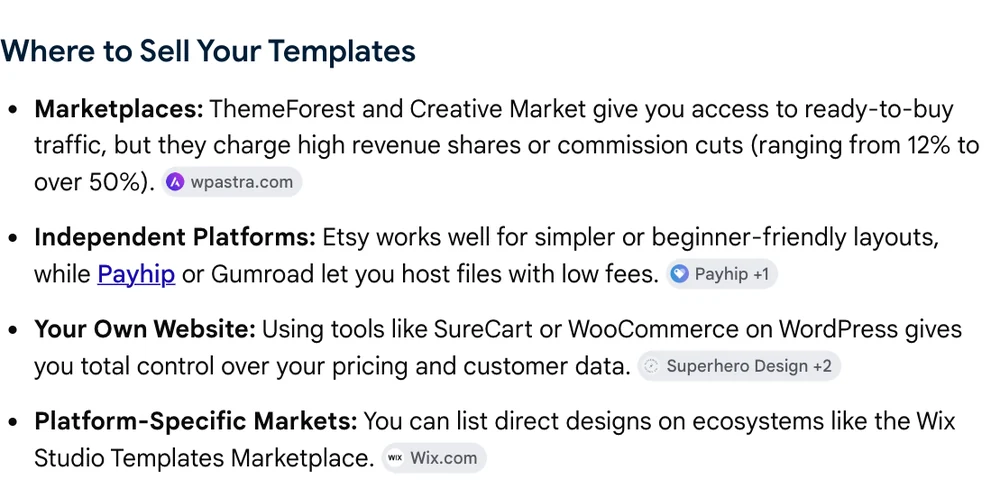
That “12% to over 50%” range is credited to a guide sitting at position 7, whose own fee table lists ThemeForest at “12.5 – 55% per sale”. That guide says it was last updated on 3 June 2026.
So I opened Envato’s own author earnings documentation. Here is their published example, unedited:
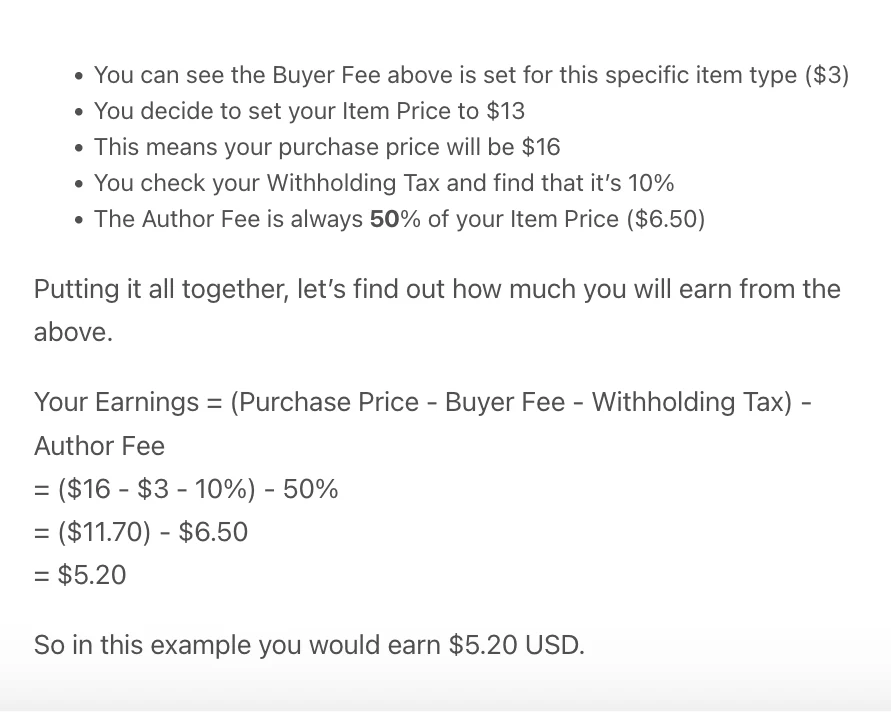
Envato’s wording is blunt. The Author Fee is always 50% of your Item Price, which is a flat half on every sale rather than a rate you improve as you grow.
Walk their example through. You set your item price at $13, Envato adds a $3 buyer fee, and your customer pays $16. The 50% author fee takes $6.50, a 10% withholding tax on your $13 item price takes another $1.30, and you receive $5.20.
Your buyer paid $16. You got $5.20, which is 32.5% of what changed hands. Envato kept $9.50 of it, or 59.4%.
That is one wrong number on page 1. There is a second. A checkout company’s guide at position 9 publishes a fee table listing Creative Market at 30% commission, then builds a worked example on it showing a seller keeping $3,290 of $4,700 a month.
Creative Market’s own Shop Terms, updated 1 July 2025, say it pays you 50% of net revenue on standard licences, and that it may make further deductions before calculating that net. At the real rate that seller keeps $2,350, not $3,290. The published figure overstates their income by $940 a month.
Now the number nobody on page 1 mentions at all. Webflow’s own announcement of 24 October 2025 raised template creator commission to 95%, keeping 5% to cover payment processing. And Framer’s help centre is blunter still: for paid templates, you keep 100% of the revenue from each sale.
Read those together. Same product category, same kind of buyer, and your share runs from 50% to 100% purely on which marketplace you picked. Not one page ranking for this keyword puts those numbers side by side, which is how a searcher ends up planning a business around a rate that no longer exists.
One more worth checking yourself before you rely on it. Wix Studio’s template submission page still promotes keeping 100% of the profits you earn through mid-2025, with a footnote saying the no-fees offer was valid until 30 June 2025.
Its own FAQ answers the fee question by saying that in 2024 Wix will not charge any fees and 100% of the sale goes to you. So one page carries 3 expired dates, mid-2025, 30 June 2025 and 2024, and never states what the rate is now. Treat Wix Studio’s cut as unknown and ask them before you submit anything.
One $59 Template, 8 Routes: What Lands in Your Bank
Percentages hide things, so here is a single sale. You price the template at $59. Every fee below was read at the platform’s own page.
| Route | Fees | You keep | Sends buyers? |
|---|---|---|---|
| ThemeForest | $29.50 | $29.50 | Yes |
| Creative Market | $29.50 | $29.50 | Yes |
| Etsy, US seller | $6.06 | $52.94 | Yes |
| Webflow Marketplace | $2.95 | $56.05 | Yes |
| Framer Marketplace | $0.00 | $59.00 | Yes |
| Gumroad direct link | $8.41 | $50.59 | No |
| Payhip free plan | $4.96 | $54.04 | No |
| CartMango | $2.01 | $56.99 | No |
The first 5 rows are marketplaces that bring you an audience. The last 3 are your own checkout, where you bring everybody yourself.
How each row is built, so you can check me:
- ThemeForest. The author fee is a flat 50% of the item price you set, so a $59 item price pays you $29.50. Note that Envato adds its category buyer fee on top of your $59, so your customer hands over more than that. Every other row here is what the customer actually pays.
- Creative Market. 50% of net revenue, with their terms allowing further deductions from “net”.
- Etsy. A 6.5% transaction fee and a $0.20 listing fee from Etsy’s fee policy, plus US payment processing of 3% + $0.25 from their per-country processing table. This row excludes Offsite Ads, which runs 12% to 15% and becomes mandatory once your shop passes $10,000 in a year.
- Webflow. 5%, and Webflow states that covers payment processing.
- Framer. Framer’s help centre says creators keep 100% of the revenue from a paid template. Their page does not break out payment processing separately, so treat $59.00 as their stated figure rather than mine.
- Gumroad. 10% + $0.50 on a direct link, plus card processing at 2.9% + $0.30. Selling through their Discover marketplace costs 30% instead.
- Payhip. 5% on the free plan, plus card processing.
- CartMango. No platform commission, so the only deduction is your own Stripe processing at 2.9% + $0.30. Free until October 2026, then from $10 a year.
I should be upfront that CartMango is mine, which is exactly why its row sits last and why its buyers column says “No”. Read both columns together or this table will mislead you.
Framer keeps more of your money than my own product does, and it still puts your template in front of an audience. On these numbers it is the strongest deal in the category for anyone building in Framer.
Webflow Changed the Rules in October 2025
The old question was marketplace or your own site. Webflow retired it.
That same October 2025 update added a fulfilment link. You generate a link for a template, sell it anywhere you like through your own site or another marketplace, and take payment through whatever checkout you already use. Webflow handles delivering the template to the buyer.
So a Webflow creator can list on the marketplace for discovery and sell the identical template through their own checkout to everyone they reach themselves. Marketplace reach on the traffic you cannot generate, full margin on the traffic you can.
No page ranking for this keyword mentions it. If you build in Webflow, it is probably the most useful thing in this guide.
The Question That Decides Where You Sell Website Templates
One test settles this, and it has nothing to do with the size of the percentage.
Did the platform bring you this buyer?
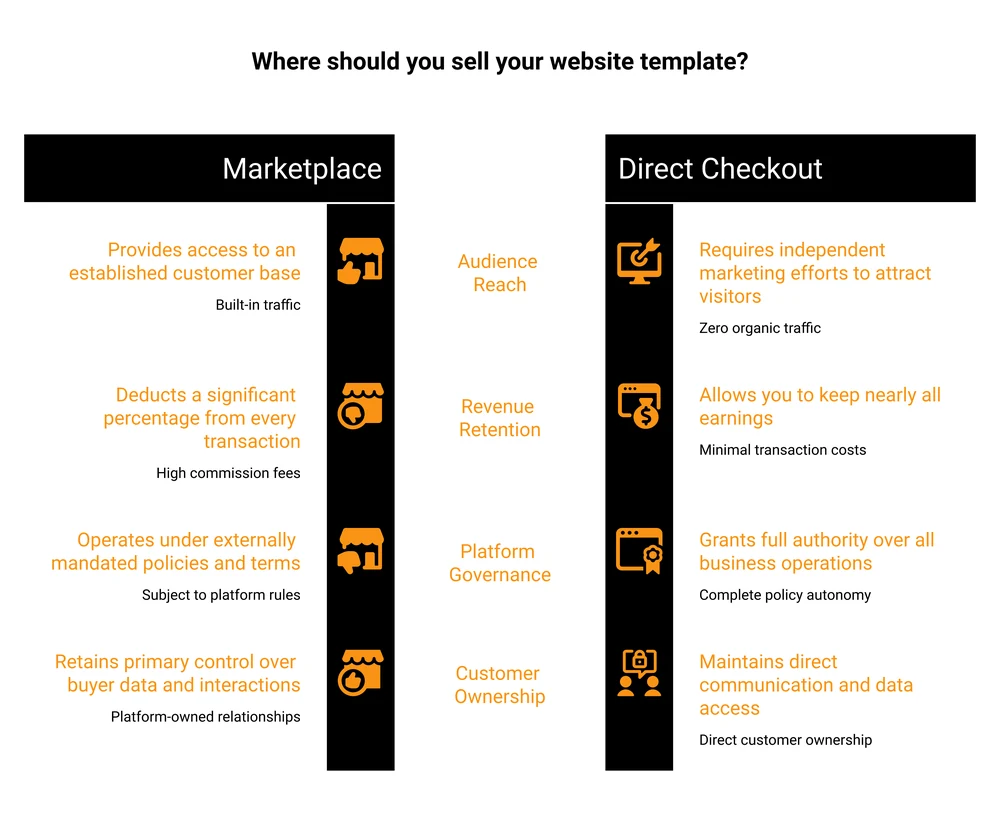
A 50% commission on a customer ThemeForest found for you is an advertising cost, and it might be a bargain. You paid nothing up front, you had no audience, and a stranger bought your template. Half of something beats all of nothing.
That same 50% on a buyer who came from your own newsletter, your own portfolio or your own social post is a tax on traffic you already owned. You did the marketing and paid the marketplace anyway.
Which is why most established sellers end up running both, and why Melissa’s numbers break the way they do. Marketplaces handle discovery. Her own checkout handles the audience she built herself, and that is where 55% of her money came from.
If you want the mechanics of the second half, I cover adding a checkout to your own site and building a sales page separately, including the version with no website at all. If you are weighing specific tools, the Gumroad alternatives and ThriveCart alternatives breakdowns compare them properly.
One warning on running both. Read your marketplace agreement before listing the same template in 2 places. Exclusivity terms vary by platform and by category, and breaking one costs you the account that was sending you customers.
What to Charge for a Website Template
Study the going rate before you pick a number.
Open your chosen marketplace, filter to your exact category, and note what the sellers at the top actually charge today. That band is set by the market you are joining, and it moves. Guessing at it from a blog post, this one included, is how you end up priced wrong.
Three things move you up that range:
- Niche depth. A generic business template competes with thousands. One built for dental practices, or for wedding photographers, competes with a handful and can charge more.
- What is included. Documentation, a demo import, placeholder content and a support window all raise perceived value, and buyers say so in reviews.
- Variations. That Reddit thread’s top reply suggests building one design across several stacks, then bundling a master pack priced like 2 or 3 of them. One design, several products.
Remember that your list price and your take-home are different numbers on a marketplace, and the gap is large. A $59 item price on ThemeForest pays you $29.50. Through your own checkout you could price the same template at $31, clear $29.80 after card processing, and your buyer would pay roughly half of what ThemeForest charges them, since Envato adds its buyer fee on top of your $59.
My broader guide to pricing a digital product goes deeper on landing on a number you can defend.
Licensing, Updates and Support: The Margin Nobody Budgets For
The listing is not the finish line, which is the part the passive income framing skips.
Licensing. Decide what one purchase buys. Marketplaces impose their own licence tiers, typically a regular licence for one end product and an extended licence for resale. Selling direct means you write the terms, so state plainly whether a buyer may use the template on 1 site or many, and whether they may resell it.
Third-party assets. Fonts, icons, images and plugins inside your template each carry their own licence, and the right to use something is not the right to redistribute it. This is the most common reason a marketplace rejects a submission.
Updates. Browsers change, WordPress and Webflow ship releases, and a template that worked last year starts breaking. Buyers expect fixes. Budget the time or say clearly in your listing that you do not provide them.
Support. Every sale can turn into a question. That Reddit seller called it the thing that quietly eats the profit, and they were selling through their own platform where the margin is best.
Delivery and file protection. Your template is a zip file, and a zip file travels. Whichever route you pick, deliver through something that gives each buyer their own link rather than a public URL. I go through the options in protecting digital downloads.
How to Actually Get Sales
Ranking inside a marketplace and selling from your own site need different work.
On a marketplace, you are competing on that marketplace’s own search results page. Pick a niche buyers actually type, study which templates already sell in it, then title and tag for the words those buyers use rather than the clever name you gave the design.
A seller in that Reddit thread who reported steady Etsy and Creative Market sales credited exactly this: picking niches already popular on the platform rather than inventing demand.
From your own site, you need a reason for anyone to arrive. What works for template sellers:
- A free light version. The top Reddit reply calls a free template a loss leader that lifts paid conversions and brings in custom work, which lands hardest if you also take client projects.
- Show the template working. A live demo beats screenshots, because buyers are checking whether it looks real.
- Sell the adjacent work. Custom edits, installation, hosted versions, copywriting and full bespoke builds all sell to the same person, often at higher prices than the template.
- Build the list. A template buyer today is a template buyer next year, but only if you can reach them. Marketplaces own that relationship. Selling direct means you keep it.
If you already sell on Etsy and are weighing the move, Etsy’s fee math for digital products and the wider set of Etsy alternatives both go further than I can here.
FAQ
Is selling website templates still profitable in 2026?
Yes, with realistic expectations. Sellers in the r/webdev thread describe most Envato items landing at 10 to 100 sales at around $12 each, which is a side income rather than a salary. One named Showit template seller published 2024 figures totalling roughly $247,000 across 4 channels, so the ceiling is real. Profitability improves when you pick a narrow niche and build variations of one design.
Which platform pays website template sellers the most?
Framer, which states creators keep 100% of the revenue from paid template sales. The Webflow Marketplace pays 95%. ThemeForest and Creative Market both keep 50%. Your own checkout charges little or no commission through tools like CartMango and Payhip, but no own-checkout route brings you buyers.
Do I need my own website to sell website templates?
No. Marketplaces host everything for you, and several checkout tools host the sales page too, so a site of your own is optional. It does become useful later, mostly as a place to demo templates and collect emails.
Can I sell the same template on more than 1 platform?
Usually, but check first. Some marketplaces offer better terms for exclusive listings, and some categories require exclusivity outright. Read the author agreement for each platform before you list twice, because the penalty is losing the account.
How much should a beginner charge for a first template?
Price inside the range your chosen platform already supports rather than undercutting it. Sort your category by best selling, note what the top listings charge, and sit in that band. Pricing far below the market signals low quality to buyers who cannot inspect your code before they purchase.
Wherever you decide to sell website templates, the checkout is where the money leaks out. CartMango takes 0% of your sale and drops every buyer straight into your email tool, so you can sell to them again. It builds the sales page for you too, if you do not have a site.
About the Author

👋 I’m Welly, founder of CartMango (the site you’re on), a checkout platform for digital product sellers. We’ve previously processed $179M+. I also run BirdSend (email marketing tool, 3.1B+ emails sent). On the side I show other non-techie digital sellers how I use AI workflows to automate 50%+ of my operations. Find me on LinkedIn.
Related Reading
- How to sell WordPress themes: the same question, with the GPL licence problem only WordPress has
- How to add a shopping cart to a website: 4 ways to take payment on a site you own
- How to create a sales page: the 7-block structure, with a fill-in template
- Digital product pricing: how to land on a number you can defend
- Selling digital products on Etsy: the honest fee math, and when the marketplace earns its cut