

This SendOwl review finds a good tool for delivering digital files that is fairly priced only for sellers near its sales limits. It stamps PDFs, limits downloads, issues license keys and takes no cut of sales, with upsells, cart recovery and affiliates on every plan. Creator plans cost $39 to $159 a month.
Each plan comes with a yearly sales limit ($10,000, $36,000 or $100,000), and SendOwl moves you up a plan when you pass it. Since January 2025, 58 of its 61 Trustpilot reviews give 1 or 2 stars, and 46 of the 58 are about the 2025 price change that moved older accounts onto these plans.
You want to sell a PDF, a course file or a software key without building a whole store, and SendOwl came up. Then you saw its Trustpilot score: 1.6 out of 5.
In 2022 and 2023, sellers praised SendOwl as simple and good at stamping PDFs. In 2025, sellers who had paid the same low price for years opened bills several times higher.
I read all 158 Trustpilot reviews, the 90 on SendOwl’s Shopify app and SendOwl’s own pricing and help pages.
Then I sorted what SendOwl does well and badly by what you need from a checkout, from protecting a file to leaving without breaking old buyers’ links.
Key Takeaways
- Delivery is still the strength. Every SendOwl plan includes PDF stamping, download limits, license keys, upsells, abandoned-cart emails and an affiliate program.
- Your sales set the price. Launch is $39 a month up to $10,000 a year in sales, then SendOwl moves you to Grow at $87.
- Recent reviews are about money. 46 of the 58 1- and 2-star reviews since January 2025 describe SendOwl’s 2025 price change.
- The pricing page disagrees with itself. Its plan cards give Launch 10 GB of download data a month. The FAQ on the same page says 20 GB.
- Leaving breaks old links. Closing a SendOwl account stops every buyer’s download link and cancels the subscriptions you sold through Stripe.
SendOwl’s creator plans: $39 to $159 a month, every feature included
SendOwl’s 3 creator plans cost $39, $87 and $159 a month, and each one includes every feature. SendOwl itself is a hosted checkout for digital products. You upload a file, connect Stripe or PayPal, and sell through a payment link, a buy button, a SendOwl storefront or a product page, and SendOwl delivers the file after each sale.
If you are comparing checkouts because your current checkout got expensive, the Online Selling Mistakes Challenge covers 5 common selling mistakes and how to fix them, over 5 days by email.
SendOwl takes no cut of your sales. You pay 3 things: the plan, your payment processor’s fee, and $1 for every GB your buyers download past the plan’s monthly allowance. On Stripe that fee is 2.9% + $0.30 a sale for US sellers, and more outside the US. There is no free plan. The 7-day free trial needs a card, and SendOwl only skips the charge if you process no orders and close the account before the trial ends.
Billed yearly, the 3 creator plans cost $32.50, $72.50 and $132.50 a month, and each covers up to $10,000, $36,000 or $100,000 in sales over 12 months. Business plans start at $299 a month.
| Plan | Monthly | Billed yearly | Sales limit | Orders a year | Monthly data |
|---|---|---|---|---|---|
| Launch | $39 | $32.50 ($390 a year) | $10,000 a year | 5,000 | 10 GB |
| Grow | $87 | $72.50 ($870 a year) | $36,000 a year | 25,000 | 20 GB |
| Scale | $159 | $132.50 ($1,590 a year) | $100,000 a year | 50,000 | 50 GB |
| Business | $299 | $249 | $200,000 a year | 100,000 | 100 GB |
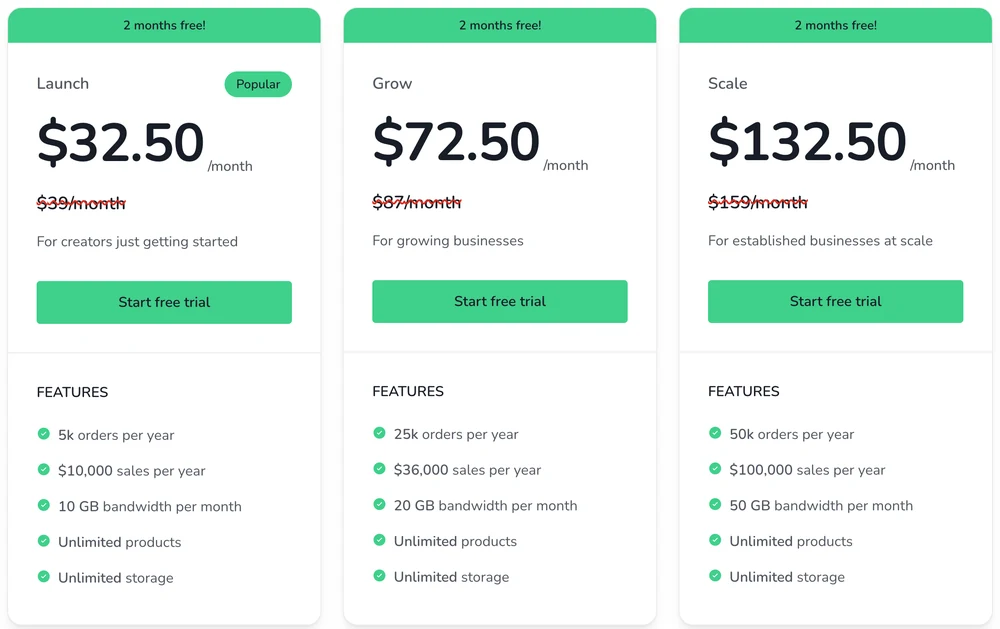
The data figures come from the plan cards. The FAQ on the same page gives different ones, covered further down. SendOwl says the plans differ only in sales and order limits, download data and support. Its support page sets the longest reply time at 2 business days on Launch and 5 business hours on Grow and Scale.
The 2 written reviews on Google’s first page for this search are both out of date. SQSP Themes’ review quotes “pricing plans ranging from $9 to $39 per month” and a free trial of 30 days. Whop’s review has today’s prices but older plan names (Starter, Standard and Pro), and says the cheapest “only offers 10GB of storage and 20 products per store”. Every plan now lists unlimited products and unlimited storage. Neither review mentions the yearly sales limits.
Omari Harebin, who wrote the SQSP Themes review, is also among the customers named on SendOwl’s own pricing page.
For the Business tiers above these plans and what happens at each limit, see our SendOwl pricing breakdown.
SendOwl’s reviews split at April 2025
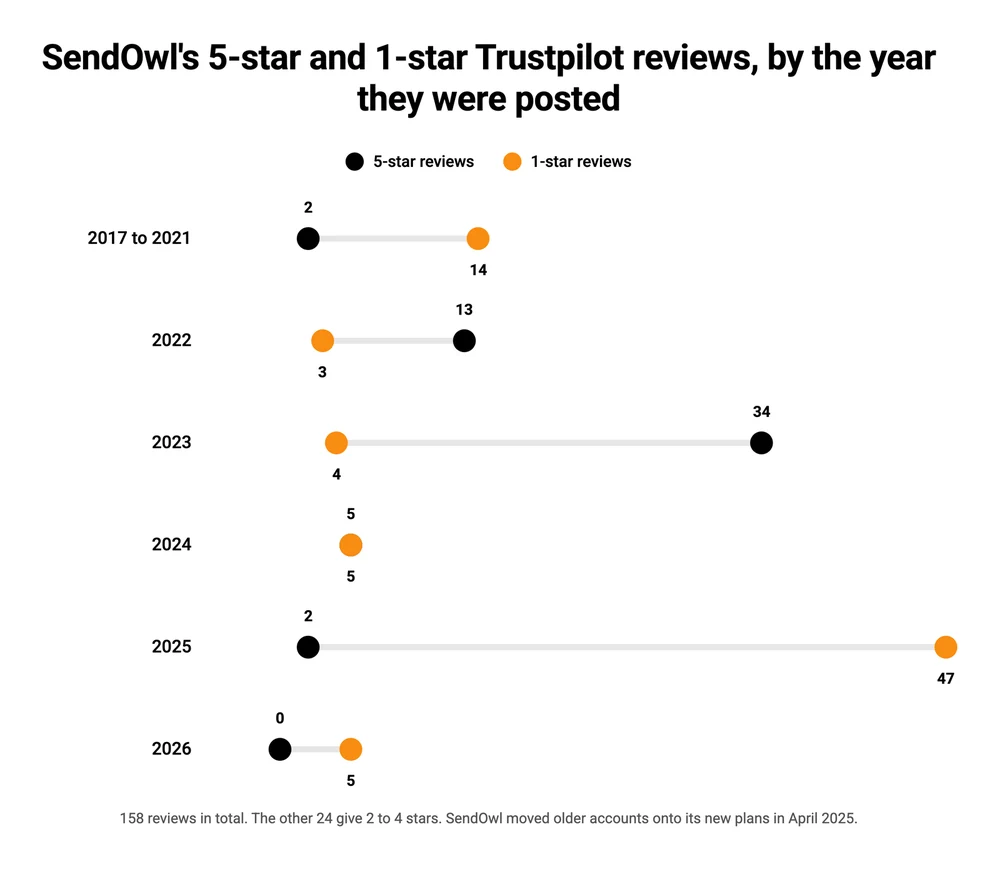
SendOwl’s 158 Trustpilot reviews divide almost exactly at its 2025 price change, announced in March and in force from April. 47 of its 56 5-star reviews were posted in 2022 and 2023, and 47 of its 78 1-star reviews were posted in 2025 alone.
What the 5-star reviews praise
The happy reviews are short and say the same few things. 26 of the 56 5-star reviews call SendOwl easy or simple, 17 praise its support, and 5 single out file security or PDF stamping.
33 of those 56 carry Trustpilot’s Verified label, which Trustpilot gives “when we can confirm a business interaction took place”. Only 2 of the 78 1-star reviews carry it.
What the 1- and 2-star reviews since 2025 say
Of the 58 1- and 2-star reviews posted since January 2025, 46 describe the price change, 10 describe a charge the writer did not expect, and 2 describe slow support.
| What the review is about | Reviews | In the reviewer’s words |
|---|---|---|
| The 2025 price change | 46 | “They just increased the monthly fee for us from $35 to $999/month.” |
| A charge the writer did not expect or agree to | 7 | “I was then automatically placed on a ‘Starter’ plan at $39 without my consent.” |
| Charges after closing or cancelling | 3 | “I used it for 1 month and then cancelled my subscription. Every month they still charge me $39 USD.” |
| Slow or unhelpful support | 2 | “Asked for a phone call to review why. Was told only email was an option.” |
Not every 1-star review is about how SendOwl treats sellers. 17 of the 78 come from shoppers who bought from a SendOwl seller: a download that failed, an order that never arrived, or a seller who turned out to be a scam. Those matter if your own buyers will use SendOwl’s download pages, but they say nothing about what SendOwl charges you.
How big the price jumps were
The jumps landed on SendOwl’s new plan prices. 22 of the 46 price-change reviews quote the new monthly price in US dollars, and 16 of those 22 are exactly $39, $87 or $159, SendOwl’s 3 creator plans. 2 more, $599 and $999, are its Business Plus and Enterprise prices.
5 sellers who named both prices paid $15 to $39 a month before the change and $87 to $999 after it.
| Reviewer | Source | Before | After |
|---|---|---|---|
| Vanessa, over 10 years on SendOwl | Trustpilot | $15 a month | $87 a month |
| Candy P., over 10 years on SendOwl | Trustpilot | $39 a month | $159 a month |
| ShirtandTieFitness | Reddit, r/ecommerce | $15 a month | $159 a month |
| Dan B. | Trustpilot | $39 a month | $599 a month |
| D. M. | Trustpilot | $35 a month | $999 a month |
SendOwl’s answer, and what other review sites show
SendOwl answered most of these reviews in public. In 15 of its replies it calls the change its first or only pricing update in 15 years, and it says it sent several emails and in-app messages beforehand. To a long-time seller it explained that the new plan was “the lowest-cost plan you were eligible for based on your use of features that require a higher tier”.
2 sellers did post 5-star reviews after the change. One “found it fair given the value we get from the platform”. The other, writing in Italian, says SendOwl quickly offered a large discount.
The same split shows up away from Trustpilot. SendOwl’s Shopify app has 3.5 stars from 90 reviews, and 18 of the 22 reviews dated 2025 there give 1 or 2 stars. On Reddit, the top result for this search is an r/ecommerce thread titled “SendOwl Debacle”, where sellers trade the same numbers. A seller wrote: “My SendOwl plan went from $15 -> $159 in under 2 years… shocking.”
Protecting a PDF that buyers could pass around
SendOwl protects a PDF by stamping each buyer’s name and other order details on every page. It can also cap how many times a link downloads, set links to expire, lock PDF and Office files, and generate license keys for software. This is what its long-time fans name. A 5-star reviewer uses it only for selling “PDF books with the buyer’s email stamped on each page to reduce piracy”, and another chose SendOwl “because they offer ID stamping on the PDF’s that I sell”.
SendOwl is honest about the limits. Its own pricing page calls this “lightweight protection”, there to make sellers comfortable without making downloads complicated for buyers. A stamped PDF also cannot take a password lock from other software afterwards, according to SendOwl’s stamping guide.
Download limits cut both ways. 7 of the 1-star reviews come from buyers whose download failed or ran out of attempts. A buyer wrote that the link “will only allow 3 attempts”, and another had large files fail partway and still count as downloads.
If you use limits, set them with room to spare. SendOwl lets you reset download attempts on a single order when a buyer gets stuck.
PDF stamping is not unique to SendOwl. Payhip stamps the buyer’s email on every page on its free plan, and Gumroad stamps the first page.
Getting more from each order without a bigger plan
SendOwl puts upsells, abandoned-cart recovery and an affiliate program on every plan, including the $39 Launch plan. Sellfy, for comparison, keeps upselling, cart abandonment and affiliates for its 2 upper plans.
Each feature has a catch:
- Only 1 upsell shows per order. If several apply, SendOwl shows the highest-ranked one.
- After-payment upsells need a card payment. PayPal and Apple Pay buyers can only see an upsell before they pay.
- An after-payment offer expires about 15 minutes after the page opens.
- Cart reminder emails only go to buyers who typed their email before leaving.
- The affiliate program only tracks sales made through SendOwl’s own checkout, so a Shopify sale is not counted.
On CartMango, the checkout I run, these sit on different plans: order bumps on all 3, and upsells and cart abandonment from the $20-a-year Gold plan once paid plans start in November.
Billing members every month
SendOwl sells subscriptions with a free or reduced-price trial, but its trial is charged once, whatever its length. A 3-month trial at $4.99 takes 1 payment of $4.99 that covers all 3 months, then the regular price starts.
Running a monthly membership through PayPal? Then limits tied to PayPal apply: at most 52 billing cycles, and a trial of up to 90 days, 52 weeks, 12 months or 1 year. SendOwl applies those to every subscription you create while PayPal is switched on, “even to buyers who pay with Stripe”.
Apple Pay is not offered on subscription products at all, and a subscription upsell can only swap a subscription for another.
A 5-star reviewer flagged an email quirk: when subscribers cancel, “it unsubscribes them from my mailing list.”
Predicting what SendOwl will cost next year
SendOwl sets your plan from your last 12 months of sales and orders, so the bill can rise without you changing anything. Cross $10,000 in sales over any 12 months and SendOwl moves you from Launch at $39 to Grow at $87 a month. When your volume drops, it only emails you the option to move back down.
Will you pass $10,000 this year? Then budget for Grow, not Launch.
Download data can raise the bill too. Every GB your buyers download past the allowance costs $1, and SendOwl’s own pricing page gives 2 different allowances. The plan cards say Launch includes 10 GB a month and Grow 20 GB. The FAQ further down the same page says this:
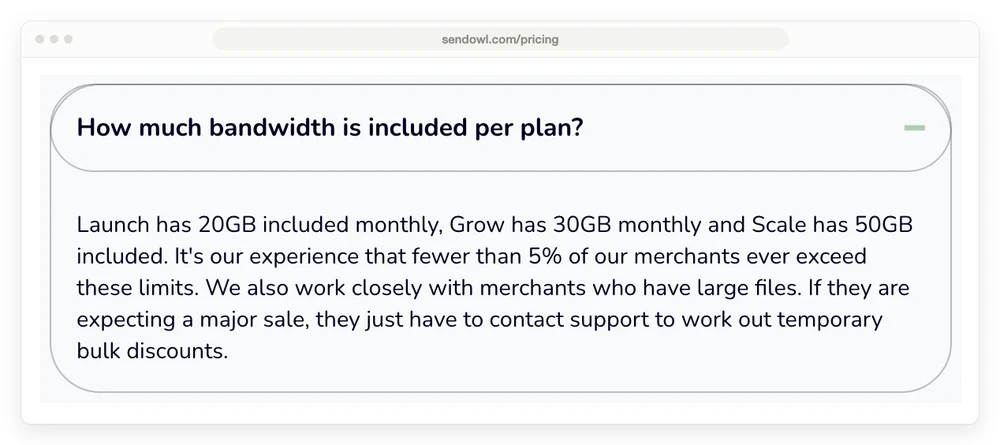
SendOwl says fewer than 5% of its sellers ever go over. If you sell video or large audio files, ask support in writing which figure applies to your plan before a big launch.
A seller in the Reddit thread above wrote: “Plan went from $19/month for several years to over $400 for the month of April 2025, and for May it went to over $600.” That seller puts the jump down to the data their customers streamed, not the plan price, and moved the videos to a separate host.
Annual billing saves 2 months, so Launch drops to $390 a year. It is also non-refundable, according to SendOwl’s billing help page, so pay yearly only once you know your sales will stay under the limit.
Closing the account without breaking your buyers’ downloads
Closing a SendOwl account ends your buyers’ access too. SendOwl’s help center says that once the closure goes through, “existing download links stop working”, and the account and its data are permanently deleted.
Subscriptions go with it. If you sold them through Stripe, closing the account cancels every one and Stripe stops collecting. If you sold them through PayPal, SendOwl does not cancel them for you, so delete the subscription products before you close or cancel them in PayPal yourself. Either way, SendOwl says your subscribers lose access to what they paid for.
The closing screen does not make this easy. SendOwl’s guide says it “may show you a special offer before you go”. A seller on Reddit posted the full warning they got: “If you close your account you will no longer be able to sell your digital goods, all your data will be wiped and your customers will no longer have access to their downloads links.”
That screen went on to offer a discount for staying and asked the seller to email support. SendOwl told another reviewer this flow is “specific to customers on higher tier plans”. On Trustpilot, 3 sellers say the charges kept coming after they closed or cancelled.
Neither written review on Google’s first page covers this. If you might leave later, plan the exit early:
- Export first. Download your order history, customer list and tax reports while the account is still open.
- Rehost the files. Give past buyers a new download link before the old ones stop.
- Move subscribers on purpose. They have to sign up again on your new checkout, so email them before the closure date.
- Skip the close-now option. By default the account stays open to the end of the billing cycle, so buyers keep their links until the last day you paid for.
- Leave a few days before renewal. If the button only shows an offer, email SendOwl support and get the closure confirmed in writing.
How 4 checkouts handle the same jobs
SendOwl’s Launch plan costs $32.50 a month billed yearly at $10,000 a year in sales. On the same sales, from 400 orders of $25, Gumroad comes to about $100 a month, Payhip’s free plan to about $42 and CartMango’s top plan to about $2.50 billed yearly. Card processing comes on top of all 4.
| Checkout | File protection | Upsells | If you leave | Cost a month | Sales limit |
|---|---|---|---|---|---|
| SendOwl | PDF stamp on every page, download limits, license keys | Every plan, 1 per order | Stripe subscriptions cancelled, download links stop | $32.50 on Launch | $10,000 a year on Launch, then the $87 plan |
| Gumroad | PDF stamp on the first page | Upsells, no conditional downsells | Subscriptions lost | About $100 (10% + $0.50 a sale) | None |
| Payhip | PDF stamp on every page, download limits | Order bumps, no upsells or downsells | Subscriptions lost | About $42 (5% a sale on the free plan) | None |
| CartMango | Protected download links, no PDF stamping listed | Order bumps on every plan, upsells from $20 a year | Subscriptions keep paying you | About $2.50 ($30 a year on Platinum) | None |
CartMango is the platform I built, so weigh its row with that in mind. CartMango’s tier table lists protected delivery but no PDF stamping, and its plans cap products (10, 25 or unlimited) and storage (2, 10 or 50 GB), never sales.
Gumroad and Payhip have no yearly plan, so their costs are their per-sale fees spread over 12 months. CartMango is free right now, and its yearly price applies once paid plans start in November.
SendOwl’s flat fee pays off only near its limit. Payhip’s 5% costs less than SendOwl’s $390 a year until you sell about $7,800 a year. Gumroad’s 10% + $0.50 costs less until about $3,250 a year at a $25 average sale, and only up to a lower figure if your products are cheaper. Our SendOwl alternatives roundup prices 7 more options, and the SendOwl vs Payhip comparison puts those 2 side by side.
Is SendOwl worth it in 2026?
SendOwl is worth it for a seller near $10,000 a year who sells through SendOwl’s own checkout and wants PDF stamping, license keys, upsells, cart recovery and affiliates on 1 flat plan. At that volume, $390 a year undercuts both Payhip’s 5% and Gumroad’s 10%.
It is a poor fit in 3 cases. Under a few thousand dollars a year, $390 is a big share of what you make. If you sell large video or audio files, the download allowance and its $1 per GB overage are hard to predict. And if you sell subscriptions you might move later, closing the account cancels them.
2 sellers in these reviews say they moved to E-junkie: a 10-year SendOwl user on Trustpilot and a commenter in the Reddit thread above. E-junkie starts at $8 a month with no cut per sale, but it sells no subscriptions. Our E-junkie review covers that trade, and the Payhip review and Gumroad review cover the 2 per-sale options.
SendOwl review FAQ
Is SendOwl legit?
Yes. SendOwl is a real, long-running checkout, and in its replies to reviews it describes 15 years in business. Its 1.6 Trustpilot score comes mostly from sellers angry about the 2025 price change and unexpected charges, plus shoppers whose downloads failed. Sellers who have used it for years still praise its delivery.
How much does SendOwl cost per month?
SendOwl costs $39 a month on Launch, $87 on Grow and $159 on Scale, or $32.50, $72.50 and $132.50 a month billed yearly. Each plan covers a set amount of yearly sales, and Business plans start at $299 a month.
Does SendOwl have a free plan?
No. You sign up with a card for a 7-day free trial, then Launch costs $39 a month. At least 4 reviewers say their old free accounts were moved onto the $39 plan in 2025. A Shopify reviewer described “a $39/month cost when it was previously $0/month but a per-transaction fee”.
Does SendOwl take a percentage of sales?
No. SendOwl’s help center says it “takes no revenue cut or per-sale commission”. You pay the plan, your processor’s fee and any download overage.
What payment methods does SendOwl support?
Stripe and PayPal, plus Apple Pay, Klarna, iDEAL, Bancontact and Alipay through Stripe. Apple Pay is not offered on subscriptions.
How do I cancel SendOwl?
Go to Settings, then Account, then Close account, and decline any offer SendOwl shows. The account stays open until the end of your billing cycle, then your buyers’ download links stop working and your data is deleted. If the button only shows an offer, email SendOwl support a few days before renewal, and export your reports first.
What are the best SendOwl alternatives?
Payhip (free plan, 5% a sale) beats SendOwl’s $390 a year below about $7,800 in yearly sales, Gumroad (10% + $0.50 a sale) adds a marketplace, E-junkie (from $8 a month, no subscriptions) suits plain one-time downloads, and CartMango (free right now, from $10 a year once paid plans start in November, 0% a sale) keeps your subscriptions if you leave.
When your subscribers should outlast your checkout
Most of the angry reviews I read for this SendOwl review are about bills that jumped or charges nobody expected. SendOwl’s own help pages add the exit rules: closing the account cancels Stripe subscriptions and kills old download links. If you sell memberships, decide on day 1 what should happen to your subscribers if you ever switch checkouts.
On CartMango, they stay yours. If you leave CartMango, the subscriptions you sold keep billing and paying you, and every plan can sell subscriptions. CartMango costs nothing right now, and its paid plans start in November from $10 a year, with no cut of your sales.
About the Author

👋 I’m Welly, founder of CartMango (the site you’re on), a checkout platform for digital product sellers. We’ve previously processed $179M+. I also run BirdSend (email marketing tool, 3.1B+ emails sent). On the side I show other non-techie digital sellers how I use AI workflows to automate 50%+ of my operations. Find me on LinkedIn.
Related Reading
- SendOwl pricing, plan by plan: every tier, its yearly sales limit and the processing fees, the companion to this SendOwl review
- 7 SendOwl alternatives: where to move if the new plans no longer fit
- SendOwl vs Gumroad: a flat monthly plan against a cut of every sale
- Gumroad review: what its sellers say about fees, payouts and suspensions