

Paid Memberships Pro costs nothing to download, $499 a year (or $49 a month) for a Standard licence, and $999 a year (or $99 a month) for Max, which adds managed hosting. The catch in Paid Memberships Pro pricing is the free version: on Stripe Connect, it takes 2% of every payment.
The free plugin is open source with no site limit. Connect Stripe through Paid Memberships Pro’s built-in Stripe Connect button without a licence, though, and a 2% application fee goes to its developer, Stranger Studios, on every payment. An active licence or your own Stripe API keys removes it. If a licence lapses, the 2% returns on active subscriptions.
You are probably pricing out a membership site on WordPress, and the reviews you open give Paid Memberships Pro different prices. $247. $347. $597.
None of those 3 is a price Paid Memberships Pro charges today, and 1 of them comes from a review last updated in June 2026.
The pricing page also never mentions the 2% fee on the free version. That fee is what site owners have spotted coming off their Stripe payouts.
You will see which plan you need, whether the 2% or the $499 licence costs you less, and how to keep the fee from coming back when a licence lapses.
Key Takeaways
- The plugin costs $0 and Standard costs $499 a year. Standard adds 1 licensed site, support and 54 premium add-ons, sold only as a bundle.
- Max adds a managed server. $999 a year buys hosting plus 25 monthly developer credits, and the bigger Max tiers are priced by order volume.
- The free version takes 2% on Stripe Connect. An active licence, or your own Stripe API keys, removes the fee completely.
- On Stripe Connect, a lapsed licence restarts the 2% on every active subscription. The pricing page never mentions the fee at all.
- Below $24,950 a year in member payments, the 2% costs less than Standard. Above that line, the $499 licence costs less than the fee.
- The 4 third-party reviews I checked all quote retired prices. $347, $597 and $247 appear in them, and none matches a plan sold today.
Paid Memberships Pro pricing, plan by plan
Paid Memberships Pro sells 4 plans on its pricing page. Free costs $0, Standard $499 a year, Max $999 a year and Max 2x $2,999 a year, and each paid plan also has a monthly price. Paying yearly saves roughly 2 months, which the page itself advertises.
If you are still working out what to charge your members, the Online Selling Mistakes Challenge covers 5 selling mistakes solo creators make, free over 5 days by email.
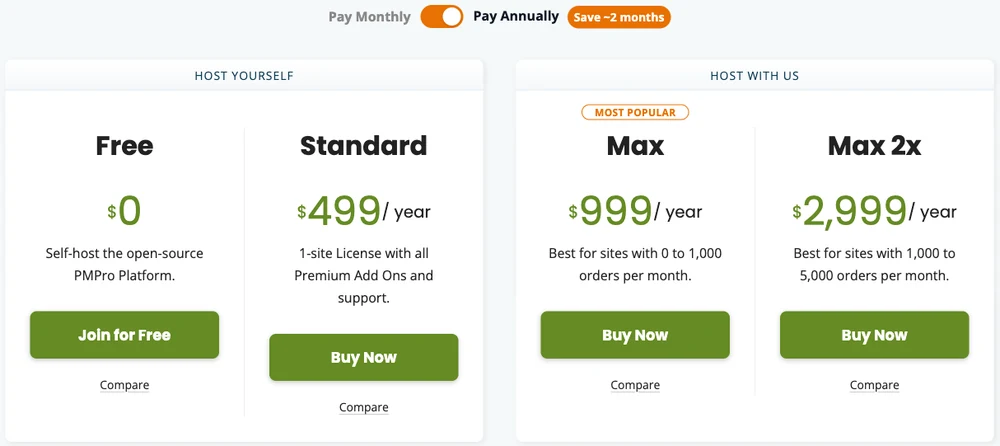
Standard at $499 a year is the cheapest paid plan, and Max, Max 2x and Max 4x run from $999 to $4,999 a year depending on how many orders your site takes each month.
| Plan | Monthly | Yearly | Sites | Best for |
|---|---|---|---|---|
| Free | $0 | $0 | Unlimited | Testing, self-hosting |
| Standard | $49 | $499 | 1 licensed site | Your own host |
| Max | $99 | $999 | Unlimited on its servers, plus 1 elsewhere | Up to 1,000 orders a month |
| Max 2x | $299 | $2,999 | Unlimited on its servers, plus 1 elsewhere | 1,000 to 5,000 orders a month |
| Max 4x | $499 | $4,999 | Not listed | Over 5,000 orders a month |
Max 4x is missing from the pricing page. It appears only in Paid Memberships Pro’s own plans guide, so ask before you plan around it. On the monthly toggle, the Max card also shows $99 next to a “normally $149” label, and nothing on the page says how long the $99 lasts.
Every paid plan carries a 100-day money-back guarantee.
The page’s wording is that it will “refund a single payment made within the last 100 days, whether you are paying annually or monthly.” I found no first-year discount: the checkout page shows Standard at $499.00 per year, the same number the pricing card shows.
What Standard adds to the free plugin
Standard adds a licence key for 1 site, technical support and 54 premium add-ons on top of the 25 free ones. You cannot buy add-ons one at a time. The pricing FAQ says so plainly: “Add Ons cannot be purchased individually.” Need a second site? Extra licence uses cost $20 a month or $200 a year each, per the plans guide, so 2 sites on Standard come to $699 a year.
What Max adds: a server and a developer allowance
Max is the Standard licence plus a managed WordPress server run by the Paid Memberships Pro team. The base Max server has 2 CPUs, 4GB of RAM and 80GB of storage, in a region you pick. Max 2x doubles the CPUs and RAM and raises storage to 200GB.
The other big line is “Do It For Me” credits, a request queue where their developers build things for you. Max includes “100 welcome credits plus 25 credits every month, about $250 of development work”, in the pricing page’s own words. Max 2x gets 50 credits a month. The rest of the list is what a good host would give you: free migration, page and object caching, a Cloudflare CDN, daily backups, SSL, malware cleanup and transactional email up to 250 messages a day.
Max is priced by order volume.
The checkout page explains that “your site activity is what drives our costs, not your revenue.” Say 2 sites each take 800 orders a month, one selling $5 memberships and the other $200 ones. Both fit Max, and both pay $999 a year.
Why reviews still quote $347, $597 or $247
Third-party reviews of Paid Memberships Pro quote prices that the live pricing page no longer shows. Here is what Google’s first page showed when I searched.

Opening each page shows the same thing in full:
- BlogVault lists “Standard plan starts at $347/year” and “Plus plan is $597/year.”
- Membership Geeks says Standard costs $174 for the first year and $347 after that, and the full add-on bundle $299 then $597 for 2 sites.
- WPKube lists Standard at $347 a year, Plus at $597 and an Enterprise tier “over $5,000 per year”. Its page says it was last updated on June 30, 2026.
- Software Advice shows “Starting at $247.00 flat rate per year.”
The $347 figure looks like an earlier price rather than a typo.
In July 2025, a commenter in an r/Wordpress thread described the premium licence going “up to $347/year after the intro year.” Today’s Standard is $499, the pricing page lists no Plus plan, and the checkout shows no intro price.
You also cannot install Paid Memberships Pro from the WordPress plugin search. Its WordPress.org listing reads “This plugin has been closed as of October 17, 2024 and is not available for download. This closure is permanent. Reason: Author Request.” The free version now comes as a zip from the developer’s own site.
Watch the name, too: Paid Member Subscriptions is a different plugin from a different company, which our guide to WordPress paywall plugins covers.
The 2% fee on the free version
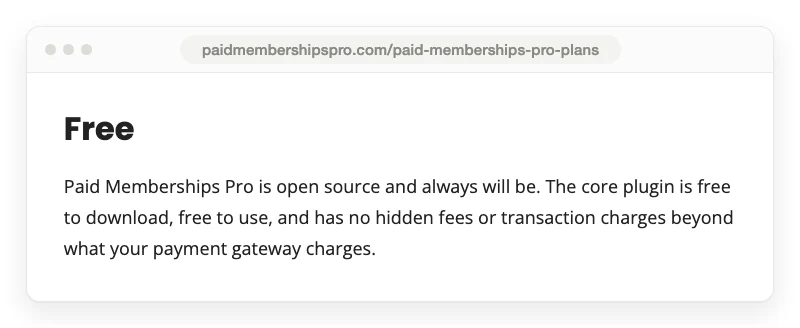
The free version of Paid Memberships Pro adds a 2% application fee to every Stripe payment when you connect Stripe through its built-in Stripe Connect button and hold no active licence. The fee is easy to miss. The pricing page does not mention it at all, and the developer’s plans guide says the free plugin has no transaction charges beyond what your payment gateway charges.
The plans guide describes the free plugin like this:
Its Stripe gateway documentation says this:
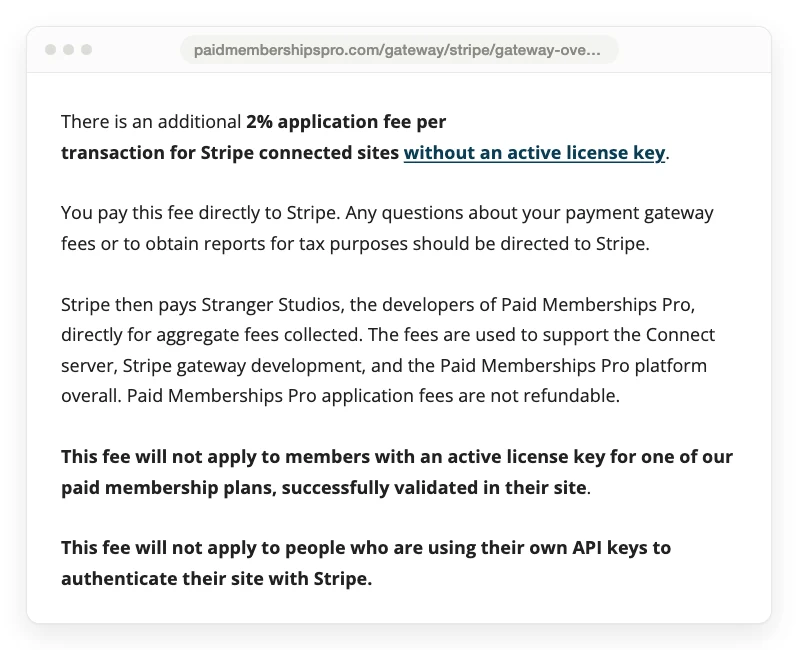
Both lines can be read as true, because the 2% reaches you as a Stripe charge. The same document then says “Stripe then pays Stranger Studios, the developers of Paid Memberships Pro, directly for aggregate fees collected,” and that the fees “are not refundable.” Whatever the wording, 2% of each Stripe payment ends up with the plugin’s developer.
How to pay no fee at all
You can avoid the 2% in 2 ways:
- Hold an active Standard or Max licence. The fee “will not apply to members with an active license key” for one of the paid plans.
- Connect your own Stripe API keys instead of using the Stripe Connect button. The fee “will not apply to people who are using their own API keys” to connect to Stripe.
The second way costs nothing.
A commenter signing as Jason Coleman, co-founder of Paid Memberships Pro, replied in the same r/Wordpress thread. Switching to your own restricted keys, the reply says, “takes a few minutes and should have no impact on how your site or subscriptions work.”
That same comment explains why some site owners never noticed the fee before: “We had bugs in our code that caused the fees to not be applied on recurring orders.” After version 3.5 fixed how the fee is charged, it started showing up on existing renewals. “Starting on July 31st, all my EXISTING SUBSCRIPTIONS have this fee,” 1 site owner wrote in that thread. Another thanked the thread for “clarifying the mystery of a few cents always missing from the Stripe payout.”
Stripe’s own charges sit on top of all this, on every plan. Stripe takes 2.9% plus 30 cents per domestic card payment in the US. The Paid Memberships Pro docs add that recurring payments run through Stripe Billing, which charges 0.7% of billing volume. On a $10 monthly membership that is about $0.66 to Stripe and $0.20 to Stranger Studios, so $0.86 of every $10 is gone before you see it.
For scale, MemberPress takes 4.9% of every payment on its cheapest plan, and CartMango, the checkout I run, takes nothing per payment on any of its plans.
When the 2% costs more than the $499 licence
The 2% fee costs more than a Standard licence once your members pay you more than $24,950 a year, which is about $2,079 a month. That is $499 divided by 2%. Below that line, paying the fee is cheaper than paying for Standard.
At $12,000 a year in member payments the 2% costs $240, about half of a Standard licence, and the fee matches the $499 licence at $24,950.
| Member payments a year | 2% to the developer | Standard licence | Cheaper option |
|---|---|---|---|
| $6,000 | $120 | $499 | The 2% |
| $12,000 | $240 | $499 | The 2% |
| $24,950 | $499 | $499 | Same |
| $36,000 | $720 | $499 | Standard |
| $60,000 | $1,200 | $499 | Standard |
Every row has a third option at $0: your own Stripe keys.
You lose support and the premium add-ons that way, but you keep the whole 2%.
We put a Coway water filter subscription in at home for a simple reason.
Where I live, I buy drinking water every month, and the subscription costs about the same as that water. The filter for our tap water, for bathing and washing dishes, comes on top. A no-brainer.
The $499 licence is easiest to judge the same way, against a cost you already pay. Once your members bring in more than $24,950 a year, it wins. The 2% you already pay is bigger than the licence, so Standard is the cheaper bill and the support and add-ons come with it. Under that line, the no-brainer is the free one: your own keys, and no fee at all.
The same arithmetic decides any tool that takes a percentage, which is why our breakdown of WordPress Stripe plugins works out a break-even for each plugin that takes a cut.
Paid Memberships Pro vs MemberPress on price
Paid Memberships Pro Standard costs $499 every year, while MemberPress Growth costs $349.50 in year 1 and $699 a year after that. MemberPress discounts the first year, and its pricing page says “all annual renewals are at full price.” Paid Memberships Pro charges the same $499 from day one.
Over 2 years, Paid Memberships Pro Standard comes to $998 and MemberPress Growth to $1,048.50, while the free Paid Memberships Pro core costs nothing on your own Stripe keys and MemberPress Launch adds 4.9% of every payment on top of its $598.50.
| Option | Year 1 | Year 2 onward | Cut per payment | Members area |
|---|---|---|---|---|
| Paid Memberships Pro, free on your own Stripe keys | $0 | $0 | 0% | Yes |
| Paid Memberships Pro Standard | $499 | $499 | 0% | Yes |
| MemberPress Launch | $199.50 | $399 | 4.9% | Yes |
| MemberPress Growth | $349.50 | $699 | 0% | Yes |
| CartMango | Free now, $10 from November | $10 | 0% | Not yet, courses and community planned for October 2026 |
CartMango is the odd row out. It bills subscriptions on every plan with no cut, but it does not host a members area. Its courses and community features are planned for October 2026, on the $30 a year plan.
If you need a members area today, Paid Memberships Pro on your own Stripe keys is the cheapest row in this table. If you want courses or community built in, MemberPress Growth bundles both, and our guide to community platforms for creators prices hosted options like Skool and Circle.
MemberPress Launch also takes Stripe only, while Growth adds PayPal and Square. Growth bundles course tools and community forums, so set it against Paid Memberships Pro Standard, which includes every premium add-on. Our MemberPress pricing breakdown has the full fee story, and the MemberPress alternatives post prices 8 options on the year 2 renewal.
What happens when you stop paying
When a Paid Memberships Pro licence ends, your site keeps working, but updates and support stop. The pricing FAQ puts it this way: “The core Paid Memberships Pro plugin and all Add Ons already installed will continue to work. Your License Key will not allow you to install new Add Ons or make updates to premium Add Ons already in your site.” The same FAQ says a membership is valid for 1 year from the purchase date.
That FAQ answer says nothing about the fee. The version 3.5 release notes say that “sites with lapsed Premium licenses will now see the 2% application fee applied to all active subscriptions.” On Stripe Connect, ending your licence restarts the 2% on every member who is already paying you.
So switch to your own Stripe keys before the licence runs out.
The co-founder’s later reply in the same Reddit thread adds a warning: “we are finding that disconnecting is not always disconnecting the fees.” The same reply says later versions of the plugin remove the fee from old subscriptions as new payments come in. Update the plugin, then check a renewal in your Stripe dashboard.
Who keeps your subscribers if you move away varies a lot by tool. Our guide to what membership platforms really cost compares 8 of them on exactly that.
FAQ
Is Paid Memberships Pro really free?
Yes, the core plugin is free and open source, with no limit on how many sites you use it on. You download it from the developer’s site, because the WordPress.org listing closed in October 2024. It includes 25 free add-ons. The catch is payments: connecting Stripe through its Stripe Connect button without a licence adds a 2% fee, which your own Stripe API keys avoid.
What is Paid Memberships Pro?
Paid Memberships Pro is a WordPress membership plugin from Stranger Studios. It restricts content to members, handles registration and charges members through gateways like Stripe and PayPal. The developer says it powers 90,000+ active sites. The plugin is free, and the paid plans sell support, premium add-ons and, on Max, hosting.
What are the 3 types of membership plans on Paid Memberships Pro?
Paid Memberships Pro groups its plans into 3: Free, Standard and Max, with Free as the open-source plugin at $0. Standard is $499 a year for a 1-site licence with support and 54 premium add-ons. Max starts at $999 a year and adds managed hosting plus monthly developer credits. Max 2x and Max 4x are larger versions of Max, priced by how many orders your site handles.
Does Paid Memberships Pro have a lifetime licence?
No lifetime option appears on the current pricing page. Every paid plan is billed monthly or yearly: Standard at $49 a month or $499 a year, Max at $99 a month or $999 a year. If a review offers you a lifetime deal, check the pricing page before you buy, since several reviews still describe plans that no longer exist.
Can I use 1 licence on more than 1 site?
A Standard licence covers 1 site. Extra site uses cost $200 a year or $20 a month each, according to the developer’s plans guide. A Max licence works on unlimited sites hosted on its servers plus 1 site elsewhere. The free plugin has no site limit at all, but premium add-on updates need a licence.
Which is better, MemberPress or Paid Memberships Pro?
On price, Paid Memberships Pro Standard beats MemberPress Growth from year 2, staying at $499 while Growth renews at $699. MemberPress Launch renews at $399 but takes 4.9% of every payment. Paid Memberships Pro is also free with your own Stripe keys, which no MemberPress plan is. MemberPress Growth bundles course and community forum tools, so the right pick depends on how much of that you need built in.
When billing is the only job left
Paid Memberships Pro pricing makes sense once you see what each dollar buys: the members area, the add-ons, the support and, on Max, the server. If your members pay for something you deliver outside WordPress, like a paid newsletter sent through an email tool such as Kit or BirdSend, the members area is the one piece you can skip.
CartMango bills recurring memberships with no cut on any plan, and if you ever leave, every subscription you set up keeps paying you.
About the Author

👋 I’m Welly, founder of CartMango (the site you’re on), a checkout platform for digital product sellers. We’ve previously processed $179M+. I also run BirdSend (email marketing tool, 3.1B+ emails sent). On the side I show other non-techie digital sellers how I use AI workflows to automate 50%+ of my operations. Find me on LinkedIn.
Related Reading
- MemberPress pricing: the 4.9% Launch fee hiding in a collapsed FAQ, every plan renewing at double, and how it sits next to Paid Memberships Pro pricing
- MemberPress alternatives: 8 options priced on the year 2 renewal, Paid Memberships Pro included
- What membership platforms really cost: 8 platforms priced at 100 members, and who keeps your subscribers if you leave
- WordPress paywall plugins: the cut each free plugin takes, and the ones you can no longer install
- MemberSpace pricing: a hosted membership add-on with a percentage on top, and where it crosses over