

To sell digital products on Instagram, set up a professional account, post content that shows your product in action, and send buyers to an external checkout through your link in bio or a DM. Instagram has no built-in checkout for digital goods, so the sale closes off-platform. The platform’s job is discovery: getting people to your link.
Search how to sell digital products on Instagram and half the guides tell you to open an Instagram Shop and tag your products. That path is closed for digital goods. Instagram removed in-app checkout for everyone in 2025, and Meta’s own rules ban digital downloads from Shopping catalogs in the first place. So a lot of the advice you keep reading is teaching a door that’s bricked up.
Here’s what’s true instead. People sell digital products through Instagram every single day. They just do it through a flow Instagram doesn’t put a button on. This guide walks you through that flow start to finish: how to set up your account, what actually sells, where the money changes hands, how to turn a Reel into a paying customer, and what to ignore because it no longer works.
Key Takeaways
- Instagram is the storefront window, not the store. It drives discovery. The actual sale closes off-platform on a link in your bio or a DM.
- Meta bans digital products from Instagram Shopping. Downloads, subscriptions, and digital accounts can’t go in a catalog or a product tag, so there’s no native checkout for them.
- You don’t need a full website. A simple hosted checkout page or a link-in-bio page is enough to take the payment and deliver the file.
- The engine is content to click. Reels and Stories pull attention, your CTA sends people to the link, the checkout handles payment, and delivery is automatic.
- Some old advice is dead. IGTV (gone in 2022), in-app Shop checkout (moved to website checkout in September 2025), and product tags for digital goods (never allowed) are dead ends.
What You Need Before You Sell
Two quick setup jobs come first. Neither takes long.
Switch to a professional account. In your Instagram settings, change your account type to Creator or Business, which is free and takes a minute. You get post insights, contact buttons, and the link tools you’ll lean on later. A personal account is fine for browsing, but it’s a weak base for selling.
Make your profile do one job. When someone lands on your profile from a Reel, you have about three seconds. Your bio should answer one question fast: what do you help people do, and what can they get?
A few things that help:
- A name field with a keyword, not just your handle. “Mara | Notion templates for students” beats “Mara.”
- One line of value in the bio. Skip the life story.
- One clear link. This is where every sale starts, so treat it as prime real estate.
A quick rule on that link. If you sell one product, point it straight at that product’s checkout, no extra clicks. If you sell a few, use a simple link-in-bio page that lists them so people can pick. Fewer taps between a curious viewer and the buy button means more sales.
That’s the whole setup. If you want the deeper version of this for sellers who don’t have a site yet, I wrote a full guide on how to sell without a website that pairs well with this one.
One more thing before tactics. If you want to spot the profit leaks most solo sellers miss before you scale anything, the free 5-day Online Selling Mistakes Challenge walks through the top five, built from patterns I’ve seen after processing $179M+ in sales.
What Digital Products Sell Best on Instagram
Instagram is a visual feed. The products that sell are the ones you can show, not just describe. If you can demo it in a 15-second Reel or a carousel, you can sell it here.
The formats that consistently move:
- Templates. Canva designs, Notion dashboards, spreadsheet trackers. Easy to demo, easy to want.
- Presets and filters. Lightroom presets sell on a single before-and-after slide.
- Ebooks and guides. A clear promise on a problem your audience already talks about.
- Printables and planners. Wall art, budget sheets, wedding planners, habit trackers.
- Mini-courses and workshops. Short, specific, outcome-driven.
- Audio. Sample packs, meditations, sound effects.
Presets have a real track record here. Tezza Barton launched her Lightroom presets to her Instagram following and turned it into the Tezza editing app, which TechCrunch reported had passed 20 million downloads. Most sellers won’t hit that, but it shows the ceiling on a simple, visual product.
Not sure what to make yet? Browse 100 digital product ideas for a starting point, or read what counts as a digital product if you’re brand new to the category.
One honest note on price. Cold traffic from Instagram converts best on low-ticket offers, roughly $9 to $49. A stranger who just watched one Reel isn’t ready for your $500 course. Start low, build trust, sell the bigger thing later to people who already bought once.
Before you spend a weekend building, test the idea. Post about the problem your product solves and watch the saves, shares, and DMs. If a Reel about the pain point lands, the product behind it usually does too. If nobody reacts, you just saved yourself the build and learned something for free.
Where the Sale Actually Happens When You Sell Digital Products on Instagram
This is the part most guides get wrong, so read it twice.
Instagram is not a checkout. For digital products, it’s not even allowed to be one. Meta’s Commerce Policies state plainly that commerce content “may not promote the buying, selling or trading of downloadable digital content, digital subscriptions or digital accounts.” That means your ebook, your template, or your preset cannot go into an Instagram Shop, a product catalog, or a shoppable tag, no matter how your account is set up.
On top of that, Instagram retired in-app checkout for everyone. As of September 2025, per Meta’s own help center, Shops on Facebook and Instagram “now use website checkout,” and customers “are now directed to your own website to complete the purchase.” So even for physical sellers, the in-app buy button is gone.
Put those two facts together and the picture is simple. Instagram drives the discovery. The sale closes somewhere else, on a link.
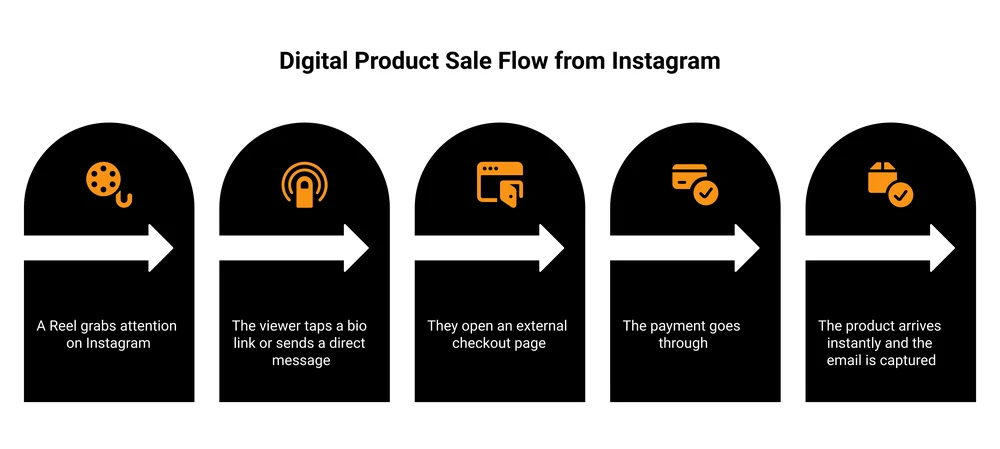
Now the good news, because one popular guide oversells this. You don’t need to build a full e-commerce website. That’s overkill for a solo creator selling a $19 template. All you need is one place that takes the payment and delivers the file. You have three honest ways to do that:
If you’d rather keep your buyer list and skip a big per-sale cut, your own checkout sends people straight from your bio to a payment page. Tools like Gumroad, Payhip, or my own platform CartMango do this. If you want built-in browse traffic and don’t mind a bigger fee, a marketplace like Etsy works. And if you just want the fastest possible setup, a link-in-bio storefront bundles the bio link and a checkout in one.
Here’s how the three stack up.
| Where you take payment | Best for | Real fee (as of 2026-06-24) | Who owns the buyer |
|---|---|---|---|
| Marketplace (Etsy) | Tapping built-in browse traffic | 6.5% per sale + $0.20 listing + processing (~3%) | The marketplace |
| Link-in-bio store (Linktree, Stan) | Fastest setup, one tap from bio | A monthly or yearly plan, plus its checkout cut | The tool (varies) |
| Self-serve checkout (Gumroad, Payhip) | Keeping more per sale, owning your list | Gumroad 10% + $0.50 (plus processing), Payhip 5% on the free plan (plus processing) | You |
| CartMango | Keeping the most of each one-time sale | Free during beta, then from $10/year, no per-sale platform fee | You |
I’ll be upfront: CartMango is the checkout I built, made for keeping more of each one-time sale instead of handing a cut to the platform on every order.
The fee gap is real on small products. Take a $30 template. Through Gumroad you’d keep about $25.33 after its 10% plus $0.50 and card processing. On Payhip’s free plan you’d keep roughly $27.30 after its 5% and card processing. On a flat-fee checkout with no per-sale platform cut, you keep closer to $28.80, just the card processing. One sale, not much. A hundred sales a month, and that’s over $200 you keep instead of hand to the platform. The “who owns the buyer” column matters even more: on a marketplace, the customer is Etsy’s, not yours. Through your own checkout, you keep the email and can sell to them again. Ready to compare dedicated checkouts head to head? See the best Gumroad alternative for the options laid out.
Here’s how to create ready-to-post Instagram carousels with AI, no Canva or designer:
How to Drive Discovery (Turn Content Into Clicks)
You’ve got the offer and the checkout. Now you need eyeballs moving toward that link. This is the actual work, and it’s all content.
Lead with Reels. Reels reach people who don’t follow you yet, which is how a brand-new account gets its first buyers. Show the product doing its job. A Notion template? Screen-record yourself using it. A preset? One tap, before and after.
A Reel that converts tends to follow a simple structure: a hook in the first second (the problem or the end result), three to five seconds of the product actually in use, then a clear call to action by voice or on-screen text. Keep your first ones under 15 seconds. You can stretch longer once you see what your audience watches to the end.
Use Stories for the warm crowd. Add the link sticker so people who already follow you can tap straight through. Polls and questions in Stories also tell you what your audience actually wants you to make next.
Make the call to action obvious. “Link in bio” still works. The higher-converting play right now is the comment-to-DM flow: you post a Reel and say “comment PLANNER and I’ll send you the link,” then a DM automation tool drops the checkout link straight into their inbox. It feels personal, and a DM link tends to convert better than a bio link buried under everything else.
Be realistic about the timeline, though. Organic reach is a grind. Most accounts post for weeks before a Reel takes off. It happens fast for some people: one creator, Lindsay Bowden, has described making her first sale within 14 days on a brand-new account with no audience. That’s the exception, not the baseline. Treat it as proof it’s possible, not as the average.
It scales, too. The photographer Oliur has written that he built a Lightroom preset business past $200,000 in revenue with a plain routine: share his photos on Instagram with one line, “presets available, link in bio.” No funnel tricks, just the offer in front of the right audience.
If you want more channels feeding the same checkout, the same playbook works on other platforms too. Here’s how to approach selling on Facebook, and a broader guide on promoting digital products without burning out.
How Buyers Get the Product (Delivery and Getting Paid)
Someone tapped your link and paid. What happens next should be automatic.
A good checkout delivers the file the second payment clears, either as an instant download or an emailed access link. The buyer shouldn’t have to wait for you to manually send anything. If you’re selling while you sleep, manual delivery defeats the point.
A few things to get right:
- Set expectations on the sales page. When they’ll get the file, your refund policy, where to ask for help. Clear terms cut down on confused DMs.
- Protect your work. Digital files get shared. You can’t stop all of it, but watermarks, clear license terms, and limited download links slow the casual leaks. Here’s a full rundown on how to protect your digital downloads.
- Pick reliable delivery. If you’re weighing tools, these digital delivery systems cover the main options.
The biggest thing Instagram doesn’t give you: the customer’s email. The platform owns that relationship. When the sale runs through your own checkout, you capture the email and you can sell to that buyer again next month. That repeat business is where the real money is, and it’s the single best reason to route sales through a checkout you control.
What Selling on Instagram Actually Looks Like
Time for the honest part the highlight reels skip. On Reddit, one seller described making about $2,000 a month from digital products off viral social traffic, and was candid that it took a year of testing and is not fully passive.
Followers are not buyers. You can have 50,000 followers and weak sales, or 800 engaged followers and a steady $1,000 a month. Cold Instagram traffic converts at a low rate, so your job isn’t a huge audience, it’s a clear offer in front of the right small one.
Expect to start small. Low-ticket products and volume come first. Consistency beats intensity: a few good Reels a week for three months will teach you more than one frantic launch. If you want a grounded look at the numbers behind this kind of income, I wrote about treating it as a digital product side hustle with realistic expectations.
The sellers who last aren’t chasing one viral moment. They post steadily, capture every buyer’s email through their own checkout, and sell the next product to people who already trust them. One Reel might bring a buyer once. An owned email list brings the same person back again and again. That repeat business, not the follower count, is the real engine.
And stop wasting time on features that no longer exist. Here’s what’s dead in 2026:
- IGTV. Instagram retired it in 2022. All video lives in Reels and the main feed now.
- In-app Shop checkout. Moved to website checkout in September 2025. There’s no buy button inside the app anymore.
- Product tags for digital goods. Never allowed, and Meta’s policies still ban them. Don’t try to force your template into a catalog.
Ignore any guide still telling you to do those three things. It was written for a version of Instagram that’s gone.
Frequently Asked Questions
Can you sell digital products on Instagram?
Yes, but not directly inside the app. Instagram doesn’t process payments for digital goods, and Meta’s policies ban them from Shops and product tags. You sell by using Instagram to get attention, then sending buyers to an external checkout through your link in bio or a DM. The discovery happens on Instagram. The transaction happens on your link.
Can you sell digital products on Instagram without a website?
Yes. You don’t need a full website at all. A hosted checkout page from a tool like Gumroad, Payhip, or CartMango, or a link-in-bio storefront, is enough to take payment and deliver the file. Many full-time digital sellers never build a traditional website.
Why can’t I tag my digital product or add it to an Instagram Shop?
Because Meta’s Commerce Policies prohibit downloadable digital content, subscriptions, and digital accounts in commerce features. Instagram Shopping was built for physical goods catalogs. So tagging and catalogs simply aren’t an option for an ebook or a template, no matter how your account is set up.
How much does it cost to sell digital products on Instagram?
Instagram itself is free. Your cost is whatever your checkout or marketplace charges. A marketplace like Etsy takes 6.5% plus a listing fee and processing. Self-serve checkouts range from a flat yearly fee with no per-sale cut up to about 10% per sale. Pick based on how much you sell and whether you want to own the customer.
What digital products sell best on Instagram?
Visual, low-ticket products. Templates, presets, printables, ebooks, and mini-courses all do well because you can demo them in a Reel or a carousel. Prices in the $9 to $49 range convert best from cold traffic, since a new viewer isn’t ready for a high-ticket purchase yet.
Do I need a lot of followers to start?
No. A small, engaged audience with a clear offer outperforms a large passive one. New accounts make sales off Reels that reach non-followers. Focus on a specific product and consistent content, not a follower count.
Ready to keep more of every sale?
You’ve now got the whole flow to sell digital products on Instagram: the right account setup, what to sell, where the money changes hands, how to drive clicks, and how to deliver. The one decision that compounds over time is where you take the payment. CartMango is the checkout I built for exactly this, made to help you make more per buyer and keep your customer list, not hand a cut to the platform on every order. It’s free while we’re in beta, then starts at $10 a year.
About the Author

👋 I’m Welly, founder of CartMango (the site you’re on), a checkout platform for digital product sellers. We’ve previously processed $179M+. I also run BirdSend (email marketing tool, 3.1B+ emails sent). On the side I show other non-techie digital sellers how I use AI workflows to automate 50%+ of my operations. Find me on LinkedIn.
Related Reading
- Sell digital products without a website the closest companion to this guide
- Selling digital products on Facebook the same flow on another channel
- Promoting digital products more ways to drive traffic to your offer
- 100 digital product ideas if you’re still deciding what to make
- The best Gumroad alternative for readers comparing dedicated checkouts