

LearnPress vs LearnDash is a choice between a free course plugin you add paid pieces to and a $259-a-year plugin with them built in. LearnPress works for a $0 start, buying Stripe, certificates or subscriptions only when needed, and LearnDash for having all 3 on 1 licence.
They differ on what costs extra and on year 2. Renewed year by year for 3 years, LearnPress with the 6 add-ons I matched to LearnDash Essentials costs $534, against $777 for Essentials, and prepaying 2 years of updates brings LearnPress to $517. Every price comes from the vendors’ own pages, because the LearnPress vs LearnDash comparisons on Google, LearnDash’s own included, print wrong prices.
If your first paid course needs a way to take cards, a certificate at the end and a monthly plan for your members, the 2 plugins handle those 3 jobs differently.
On LearnPress, each of those is a separate add-on, bought once and renewed every year if you want updates. On LearnDash, all 3 come with the entry plan, and the whole plan renews.
Then comes year 2: what you keep paying, and what happens to your course if you stop. Page 1 barely touches that question, and LearnDash’s own comparison page misprints the only renewal figure it prints.
Key Takeaways
- LearnDash costs $259 a year now. The $199 that 3 page-1 comparisons still quote was its old 1-site licence, which it no longer sells.
- LearnPress is free with PayPal built in. Stripe is a $39 add-on, and certificates, assignments, drip and subscriptions cost $39 each on top.
- Renewed year by year for 3 years, LearnPress with 6 matching add-ons costs $534, its Pro Bundle $717.60 and LearnDash Essentials $777.
- Both keep running if you stop paying, according to each vendor’s own documentation, but updates, security patches and support stop.
- Moving between them works both ways. Both vendors publish a migration tool, and LearnDash’s says it does not carry over student progress.
LearnPress vs LearnDash pricing over 3 years
Over 3 years of updates, LearnPress costs $0 to $717.60 and LearnDash Essentials costs $777.
The plugin is only one line in a launch budget. For the selling mistakes no pricing page shows, the Online Selling Mistakes Challenge is a free 5-day email course.
Renewed year by year, LearnPress costs $0 with PayPal, $93 with Stripe, $534 with 6 add-ons and $717.60 as the Pro Bundle, against $777 for LearnDash Essentials.
| Setup | Year 1 | Year 2 | 3 years | What it covers |
|---|---|---|---|---|
| LearnPress, free plugin | $0 | $0 | $0 | Courses, quizzes, PayPal |
| LearnPress + Stripe add-on | $39 | $27 | $93 | Adds card payments |
| LearnPress + 6 add-ons | $224 | $155 | $534 | Stripe, subscriptions, certificates, assignments, drip, bundles |
| LearnPress Pro Bundle | $299 | $209.30 | $717.60 | All 33 premium add-ons |
| LearnDash Essentials | $259 | $259 | $777 | Stripe, PayPal, subscriptions, certificates, assignments, drip, bundles |
| LearnDash Pro | $399 | $399 | $1,197 | Adds reporting, gradebook, student notes |
Year 2 is what you pay to keep updates and support switched on, at today’s listed prices. On LearnPress’s pricing page, every add-on is a lifetime licence for 1 site, which means you can keep using it on that site, plus 12 months of updates. After those 12 months, ThimPress, the company behind LearnPress, sells another year of updates at $27 for each add-on in the 6-add-on row ($20 for Upsell), and $209.30 for the Pro Bundle.
Prepaying is cheaper: buy 2 extra years of updates at checkout, and the Pro Bundle totals $688 and the 6 add-ons $517.
Stripe alone comes to $90 that way. LearnDash’s pricing page shows no multi-year price.
LearnDash has no free version.
You pick Essentials, Pro or Elite, and the LearnDash pricing page says the licence “Renews annually, cancel any time.”
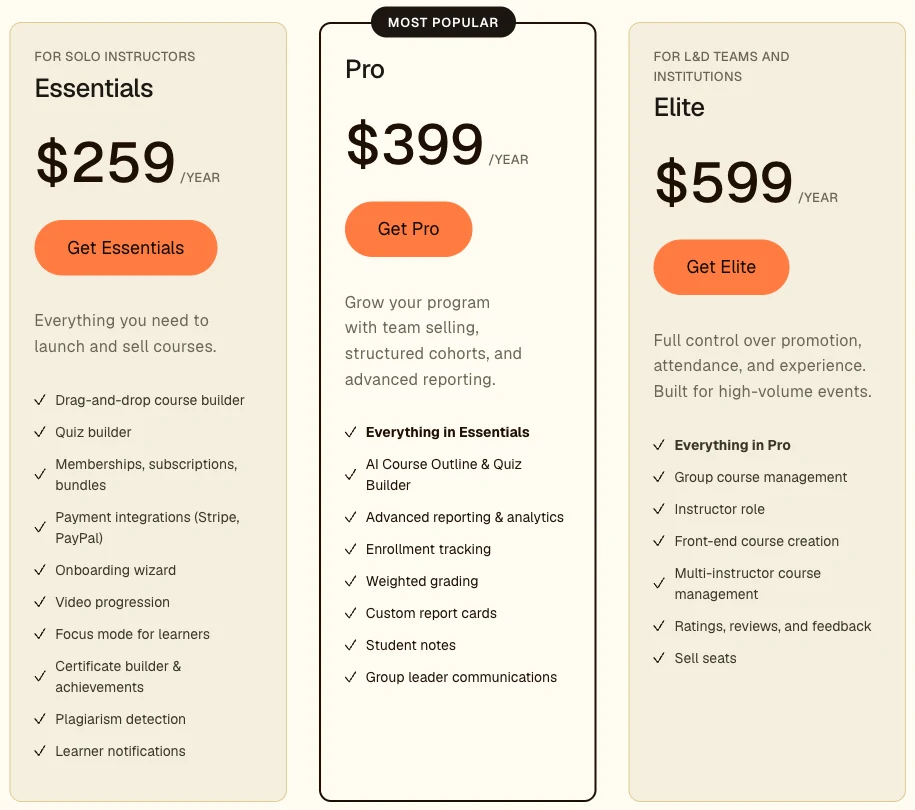
LearnDash’s current plans. Essentials lists Stripe, PayPal, memberships and certificates.
The 6-add-on row is my own pick of the LearnPress add-ons that cover what Essentials lists on its card: Stripe ($39), Memberships & Subscriptions ($39), Certificates ($39), Assignments ($39), Content Drip ($39) and Upsell ($29) for bundles and coupons. LearnPress’s own pages disagree on a few of those prices. Its pricing table shows the Memberships & Subscriptions add-on at $29, and the Pro Bundle page lists Stripe at $29 and Assignments at $49, so every price here is the one on each add-on’s own checkout page.
Hosting is left out of every row, because you need it with either plugin.
What page 1 prints instead
All 4 ranking pages that print a LearnDash entry price print a retired one, and LearnDash’s own page also puts LearnPress’s renewal at $710 when LearnPress’s card says $209.30.
| Page on page 1 | Published by | LearnDash price shown | LearnPress price shown |
|---|---|---|---|
| LearnDash vs LearnPress | Liquid Web, which owns LearnDash | $199 per year | $299, then “$710 at renewal” |
| LearnPress vs LearnDash | ThimPress, which makes LearnPress | “Starts at $199/year” | $299, renews at $209.30 |
| LearnDash vs. LearnPress | Masteriyo, a rival LMS plugin | $199, $399 and $799 | Pro Bundle “$299/year” |
| LearnDash Vs LearnPress | WPCrafter, a review blog | “$159 to $189” | “Free to $249” |
| LearnDash vs. LearnPress | AccessAlly, a rival LMS plugin | None in the text | None in the text |
Those $199, $399 and $799 figures were LearnDash’s old 1-site, 10-site and unlimited licences, before it moved to Essentials, Pro and Elite. My LearnDash pricing breakdown has the full ladder.
Liquid Web owns LearnDash, so that first row is LearnDash’s own company quoting a price its pricing page no longer shows.
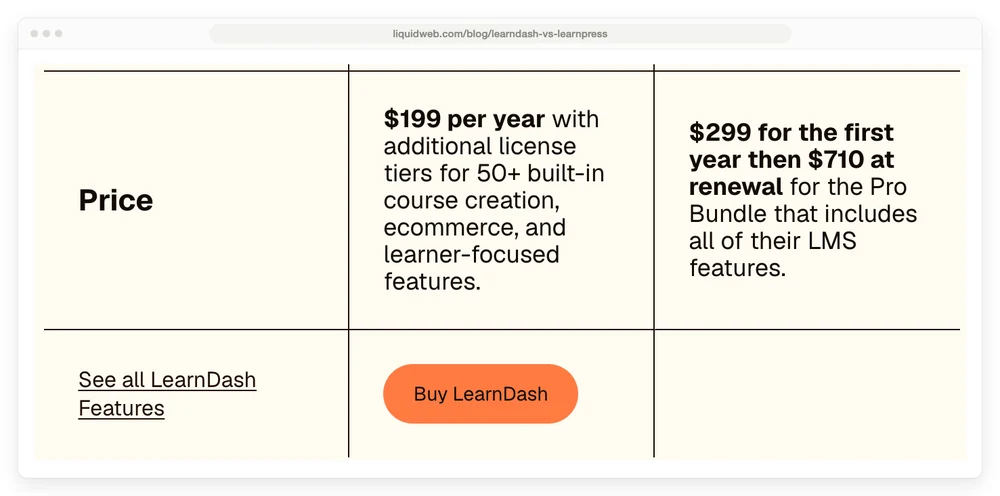
The price row on LearnDash’s own comparison page. The middle column is LearnDash, under its Buy LearnDash button, and the right column is LearnPress.
The $710 does appear on LearnPress’s own pricing card, as the struck-through “was” price of the Pro Bundle, right above the $299. The renewal line on that same card reads “Renews at $209.30.”
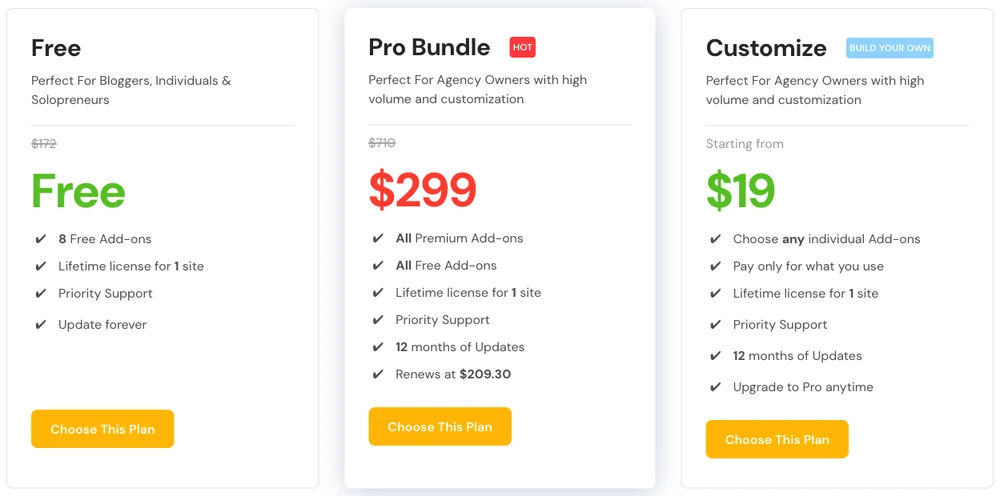
LearnPress’s own pricing cards. The $710 is crossed out, and the renewal line reads $209.30.
The WPCrafter page carries “(October 2026)” in its title, while the article itself says it was updated in February 2024. Masteriyo’s page adds that “neither of the two LMS plugins offers a lifetime license”, which LearnPress’s pricing cards contradict on every plan.
The $79 theme route, and the licence question
ThimPress also sells Eduma, a ThemeForest theme listed with “24+ Premium LearnPress Add-ons included in the Theme bundle,” for $79.
That $79 buys the Regular License, which covers “a single end product which end users are not charged for,” while the Extended License costs $3,200. Envato’s license FAQ says that “If the end users need to pay to see the end product, you need an Extended License,” and gives “A website that requires money before you can access the content” as its example. Read that way, a paid course site needs the $3,200 licence rather than the $79 one.
ThimPress reads it differently. When a buyer asked in the Eduma comments whether a Regular License works for a site where learners buy courses, ThimPress support replied: “You can use a regular license.” I am not a lawyer, and the 2 answers disagree, so get the answer from ThimPress or Envato in writing before you build a paid course site on the $79 route.
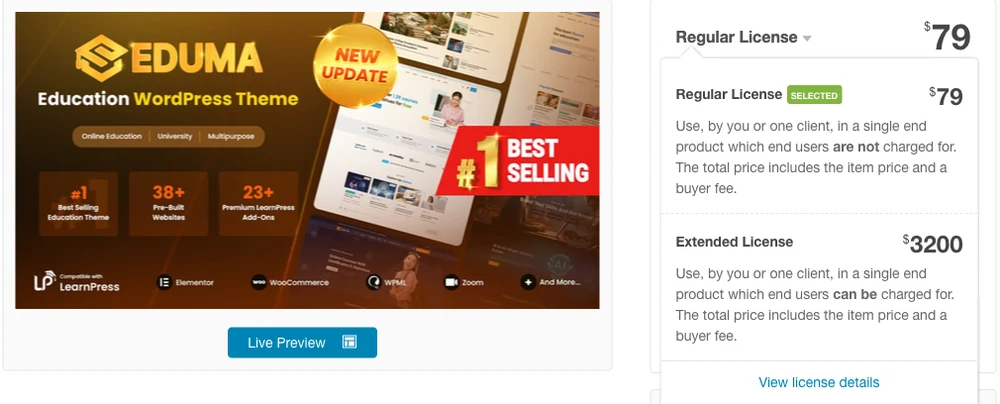
Eduma’s listing: $79 on the Regular License, $3,200 on the Extended one.
Building the lessons, quizzes and certificates
Both plugins build courses, lessons and quizzes without a paid add-on, and the difference shows up in certificates, assignments and drip, which LearnDash Essentials includes and LearnPress sells at $39 each.
What does a student need to finish your course? For a video course with a few quizzes, the free LearnPress plugin already does the job. Its pricing table marks the course builder, lessons, question banks, quiz attempts, countdown timers, course reviews, SCORM support (a standard format for course packages from other e-learning tools) and AI course generation all as $0.
That AI point is another miss on LearnDash’s comparison page, which marks AI course outlines as “Not available” for LearnPress.
Does your course need a certificate at the end?
If students are paying partly for proof they finished, it does, and on LearnPress that is the $39 Certificates add-on. Drip, meaning lessons that open on a schedule, is another $39, and so are assignments, where students hand in work for you to grade.
LearnDash Essentials puts those pieces in the plan from day 1:
- a drag-and-drop course builder with 8 quiz question types
- a certificate builder and badges
- assignment management
- video progression, which makes students finish a video before moving on
- focus mode, a distraction-free lesson view
LearnDash’s help docs add that drip-feeding lessons is built into the core plugin, while reporting, a gradebook and student notes start on Pro at $399. On ease of use, both build courses in the WordPress dashboard. LearnDash adds an onboarding wizard on every plan and front-end course creation on Elite, and LearnPress sells a $49 Frontend Editor add-on.
A course with nothing to grade or track needs none of this, and the last section covers how CartMango, the checkout I run, can sell one.
Getting paid by card, PayPal or subscription
LearnDash takes Stripe and PayPal on every plan, including subscriptions and bundles. Free LearnPress takes PayPal and offline payments, and charges $39 for Stripe.
The PayPal part of LearnPress is easy to miss, because its pricing table lists “One Time Payment” rather than PayPal.
The plugin’s source code ships a PayPal gateway, meaning a built-in payment method, in the free version, and its WordPress.org listing names PayPal among its billing methods too. Guest checkout is free as well.
On LearnPress only PayPal and offline sales are free, while Stripe, subscriptions and the WooCommerce connection cost $39, $39 and $49, and LearnDash Essentials includes all 3.
| Payment need | LearnPress | LearnDash Essentials |
|---|---|---|
| PayPal, one-time | Free | Included |
| Stripe cards | $39 add-on | Included |
| Recurring subscriptions | $39 add-on | Included |
| WooCommerce payments | $49 add-on | Included on every plan |
| ThriveCart or SamCart | Not on its pricing page | Included |
WooCommerce is WordPress’s free store plugin, and ThriveCart and SamCart are separate checkout tools. LearnPress sells its $49 WooCommerce add-on for what its pricing table calls “Global and Local Payment Gateways.” LearnPress’s subscription add-on handles lifetime or recurring plans, free trial days and a cap on how many students can join a plan, according to its product page.
Neither vendor’s pricing page lists a cut of your course sales. LearnDash’s says “No per-student fees,” and your payment processor’s own fees apply on both. If you care where the money sits between a sale and your bank, the WordPress payment plugin guide covers that part.
Selling more than 1 course
LearnDash includes memberships, subscriptions and course bundles on every plan through MemberDash, its built-in membership tool, while LearnPress sells bundles and coupons in a $29 Upsell add-on and membership plans in a $39 add-on.
Will you sell a second course, or a monthly plan? If so, the add-ons below belong in your launch budget.
MemberDash, per LearnDash’s pricing page, lets you build free, basic and premium tiers, drip content by membership level, and let members update their own payment details. LearnPress gets to roughly the same place 1 add-on at a time. The Upsell add-on creates and discounts course packages and runs coupons, and the Memberships & Subscriptions add-on sells the plans.
Selling seats to a company has no matching add-on on LearnPress’s pricing page. That page lists only a free cap on how many students a course takes and a $29 Co-Instructors add-on for teachers who share a course. LearnDash sells company seats, multi-instructor courses and an instructor role on Elite at $599 a year.
If you are still weighing more than these 2, the WordPress LMS plugin guide compares 7 of them on price and payments.
What happens when you stop paying for updates
Both plugins keep working when you stop paying for updates, according to their own documentation, and what stops is updates, security patches and support.
Of the 8 results on page 1, only AccessAlly’s article answers it in its text, and it contradicts LearnDash’s own help docs. WPCrafter answers it correctly, but only in a 2019 comment reply under its article: “It will still work, just not receive updates.”
LearnDash’s license documentation puts it plainly: “LearnDash will still function properly even with an invalid license.” A valid licence is what keeps product updates, security patches and support coming, per the same page. LearnPress’s Pro Bundle page says much the same: updates and support last 12 months, and “after that, add-ons keep working,” while the free core never expires.
AccessAlly’s comparison on page 1 says the opposite about LearnDash: “if you cancel your LearnDash license, your content isn’t usable anymore.” LearnDash’s help docs do not agree, though its terms of service read stricter, and my LearnDash vs Tutor LMS comparison quotes them. Check with LearnDash in writing before you plan around a lapsed licence.
Running without updates is still a risk, because updates carry the security fixes for a site full of student logins.
How renewals are charged
LearnDash renews automatically a year after purchase, and turning off auto-renewal stops the next charge without refunding the current year, per its billing documentation. LearnPress renews per product instead. An add-on you stop renewing keeps running, minus updates, and you can prepay up to 3 extra years of updates at checkout for less than renewing each year (the totals above use 2).
Moving from one to the other
Moving between LearnPress and LearnDash works in both directions, with gaps.
LearnPress’s free Backup & Migration Tool, with 5,000+ active installs, lists “one-click migration” from Tutor LMS and LearnDash into LearnPress. Going the other way, LearnDash’s Migration add-on imports lessons, topics, quizzes and questions from LearnPress. It does not move course progress, categories, tags or media, and LearnPress course sale prices are not carried over.
I have not run either tool myself.
Plan for a checking pass after any move, because student progress is the part LearnDash’s tool says it does not move.
Which plugin covers which job
LearnPress free covers lessons, quizzes and PayPal sales, the add-ons for the next 3 rows cost $29 to $39 each, and LearnDash Essentials includes all of it for $259 a year.
| Job | LearnPress free | LearnPress paid | LearnDash Essentials |
|---|---|---|---|
| Lessons and quizzes | Yes | Not needed | Yes |
| Certificates, assignments, drip | No | $39 each | Yes |
| Payments | PayPal only | Stripe $39 | Stripe and PayPal |
| Subscriptions and bundles | No | $39 and $29 | Yes |
| Year 2 to stay updated | $0 | $20 to $27 per add-on | $259 |
Going by those numbers, here is how I would choose:
- Selling 1 course with PayPal, no certificates: LearnPress free, at $0.
- Want cards, certificates and subscriptions, and happy to add them yourself: LearnPress with the 6 add-ons, $224 in year 1.
- Want everything on 1 licence, or plan to sell seats to companies later: LearnDash Essentials, then Elite for seats.
A seller in r/Wordpress wrote that they “picked a template that has LearnDash, and only learned after I set it all up that LearnDash plugin is $199 per year.” LearnDash’s pricing page now lists the entry plan at $259. In the same thread, another commenter said that for an 11-lesson course, “LearnPress ended up being the simplest and worked really well without needing to pay.”
CartMango is missing from this grid because it does not host courses yet. Course hosting on CartMango is planned for October 2026 on its $30-a-year plan, and until then either plugin above is the right answer for lessons and quizzes.
FAQ
How much does LearnDash cost?
LearnDash costs $259 a year for Essentials, $399 for Pro and $599 for Elite, with no free version and no lifetime licence. The licence renews every year, and LearnDash offers a 48-hour trial that needs no credit card, so you can try the course builder before paying. WordPress hosting is a separate bill on top of any plan, since LearnDash is a plugin you install on your own site.
Is LearnPress really free?
The LearnPress core plugin is free, with a lifetime licence for 1 site and PayPal built in. Stripe, certificates, assignments, drip and subscriptions are paid add-ons at $39 each, and the Pro Bundle with all 33 add-ons costs $299, then $209.30 a year if you want updates and support to continue. Hosting is extra, as with any WordPress plugin.
Is LearnDash a good LMS?
LearnDash is the more complete of these 2 on its entry plan, with Stripe, PayPal, memberships, certificates and assignments built into Essentials, so none of those needs an add-on. The trade-off is a $259 bill every year to stay updated, with reporting held back for Pro at $399 and company seat sales for Elite at $599.
What are some good alternatives to LearnDash?
Tutor LMS, LifterLMS, Sensei and Masteriyo are the other WordPress plugins worth comparing, alongside LearnPress. Hosted platforms like Thinkific and Teachable take WordPress out of it entirely. The LearnDash alternatives guide prices 8 of them on what you pay in year 2.
Which LMS is best for WordPress?
For a paid course on WordPress, pick LearnDash if you want everything on 1 licence, and LearnPress if you want to start free and add pieces as you need them. The WordPress LMS plugin guide compares 7 plugins on price and payments, and picks Tutor LMS for a first course on a budget and LearnDash for structured programs.
A course with no quizzes may not need either plugin
If your first course is a workbook plus a few recorded videos, with nothing to grade and no progress to track, it may need neither plugin. The 6 LearnPress add-ons in the cost table cover payments, subscriptions, certificates, assignments, drip and bundles, and a course like that needs only the payment part, which takes the LearnPress vs LearnDash choice off the table.
So how does a workbook course sell without an LMS? CartMango delivers the files and hosts the sales page, and the videos stay on YouTube, Vimeo or wherever you host them now. CartMango is free right now, with paid plans from $10 a year starting in November 2026.
About the Author

👋 I’m Welly, founder of CartMango (the site you’re on), a checkout platform for digital product sellers. We’ve previously processed $179M+. I also run BirdSend (email marketing tool, 3.1B+ emails sent). On the side I show other non-techie digital sellers how I use AI workflows to automate 50%+ of my operations. Find me on LinkedIn.
Related Reading
- LearnDash pricing: the full tier ladder and why $199 keeps getting quoted
- LearnDash vs Tutor LMS: both priced live, and what a lapsed licence means on each
- The best WordPress LMS plugin: 7 plugins compared on price and payments
- LifterLMS pricing: the $149 Stripe add-on the plan cards skip
- The best course platform: hosted platforms and what each keeps per sale